You ship a form. The user fills it out, hits Submit, and the API returns a 400. You open the network tab, expecting some JSON that tells you which field broke, and you find this:
{ "error": true, "message": "Validation failed" }Which field? Why? Was the email already in use, or just malformed? Is this something the user can fix, or did the validator have a bug? You have no signal. So you do what every frontend in this situation does — you show a generic red toast that says "Something went wrong," and you hope the user retries.
That is the moment frontend error handling stops being about your code and starts being about the contract you have with the backend. A frontend can only be as helpful as the error responses it receives.
The Problem Detail Standard
You do not have to invent the JSON shape. The IETF did, twice. RFC 9457 — Problem Details for HTTP APIs, published in 2023, is the current standard, replacing the older RFC 7807 (the structure is essentially the same; 9457 cleans up edge cases). The MIME type is application/problem+json.
HTTP/1.1 403 Forbidden
Content-Type: application/problem+json

{
  "type": "https://api.example.com/errors/insufficient-credit",
  "title": "Insufficient credit.",
  "status": 403,
  "detail": "Your current balance is 30, but this action costs 50.",
  "instance": "/users/12345/transactions/abc"
}
Five fields, all of them useful:
type— a URI that identifies the kind of error. Stable across releases. The frontend can switch on this. The URL can also point at a documentation page humans can read.title— a short, human-readable summary. Same string for every instance of this error type.status— the HTTP status code, included in the body so log aggregators do not have to correlate.detail— the human-readable explanation specific to this occurrence ("balance is 30, costs 50").instance— a URI for this specific failure, useful in support tickets and trace lookups.
You can extend the object with any other fields you want. The standard explicitly allows it.
Validation Errors Need More Structure
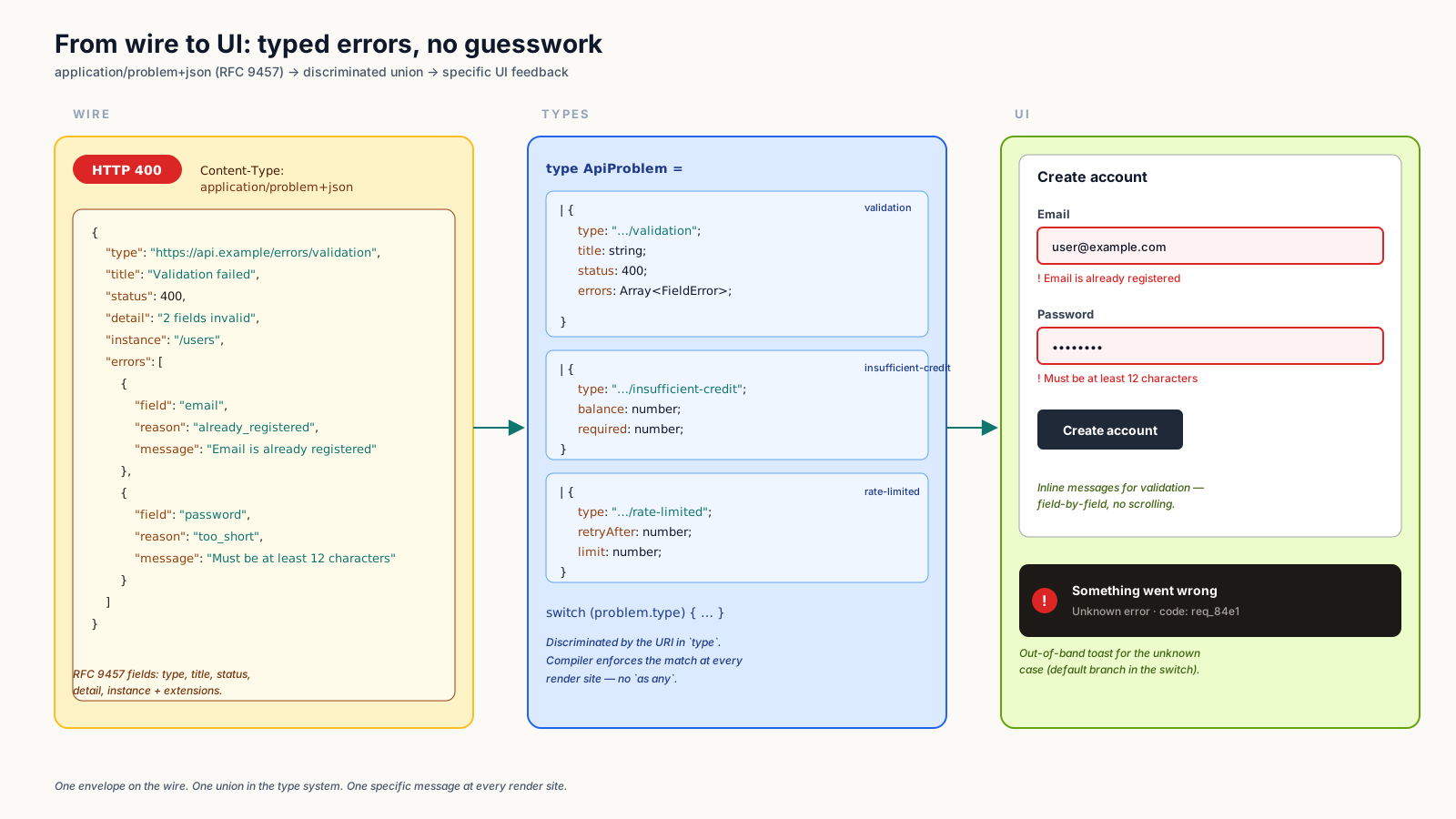
The most useful extension is for form validation. A typical signup hits multiple errors at once — invalid email, password too short, username taken — and the frontend needs to surface all of them simultaneously, each on the right input.
{
  "type": "https://api.example.com/errors/validation",
  "title": "Validation failed",
  "status": 400,
  "detail": "One or more fields failed validation.",
  "errors": [
    { "name": "email", "reason": "Email is already registered." },
    { "name": "password", "reason": "Must be at least 12 characters." }
  ]
}
The frontend's job becomes mechanical: catch the 400, loop the errors array, and assign each reason to the matching input's error state.
function onSubmit(values: SignupValues) {
  signup(values).catch((err) => {
    if (isProblem(err) && err.type.endsWith('/errors/validation')) {
      for (const e of err.errors ?? []) form.setError(e.name, { message: e.reason });
      return;
    }
    toast.error('Something went wrong. Please try again.');
  });
}
That last toast is the fallback for unknown errors. The interesting code is the path where the backend told you something specific and the UI translates it into specific feedback.
Modeling Errors As A Discriminated Union In TypeScript
If the backend sends a stable type URI, the frontend can model the entire error space as a discriminated union and let the compiler enforce that you handle each case correctly.
type ApiProblem =
  | {
      type: 'https://api.example.com/errors/validation';
      title: string;
      status: 400;
      errors: Array<{ name: string; reason: string }>;
    }
  | {
      type: 'https://api.example.com/errors/insufficient-credit';
      title: string;
      status: 403;
      detail: string;
      balance: number;
      cost: number;
    }
  | {
      type: 'https://api.example.com/errors/rate-limited';
      title: string;
      status: 429;
      retryAfterSeconds: number;
    };

function describe(err: ApiProblem): string {
  switch (err.type) {
    case 'https://api.example.com/errors/validation':
      return `${err.errors.length} field(s) need attention.`;
    case 'https://api.example.com/errors/insufficient-credit':
      return `Top up at least ${err.cost - err.balance} credits to continue.`;
    case 'https://api.example.com/errors/rate-limited':
      return `Try again in ${err.retryAfterSeconds}s.`;
  }
}
Add a new error type to the backend, and TypeScript tells you everywhere the frontend needs to handle it. Drop one, and the compiler tells you what depended on it. This is the payoff for paying the upfront tax of a stable error vocabulary.
If you generate types from an OpenAPI spec or a tRPC router, the union comes for free. If you write the types by hand, it is still cheap.
4xx And 5xx Are Different Animals
The single most important rule: 4xx is the user's situation, 5xx is your problem.
A 4xx response means the request was understandable but rejected. The user submitted an empty form, tried to access something they do not own, hit a rate limit. The frontend should expect a parseable body, surface a specific message, and let the user act on it.
A 5xx response means something is broken on your side. Database timeout, upstream API down, unhandled exception. The body might be JSON, might be HTML from a load balancer, might be empty. The frontend should not try to surface the contents — it should log the failure to an observability tool, show a friendly "we are having technical trouble" message, and offer a retry.
export class ApiError extends Error {
  constructor(public problem: ApiProblem, public response: Response) {
    super(problem.title);
  }
}

export async function apiFetch<T>(input: RequestInfo, init?: RequestInit): Promise<T> {
  const res = await fetch(input, init);

  if (res.ok) return (await res.json()) as T;

  if (res.status >= 500) {
    captureException(new Error(`Server error ${res.status}`), { res });
    throw new Error('We hit a server error. Please try again.');
  }

  const ct = res.headers.get('content-type') ?? '';
  if (ct.includes('application/problem+json') || ct.includes('application/json')) {
    const problem = (await res.json()) as ApiProblem;
    throw new ApiError(problem, res);
  }

  throw new Error(`Unexpected response (${res.status}).`);
}
The wrapper is fifty lines, lives in one place, and gives every component the same well-typed error to work with.
Mapping Errors To UI
A useful mental model: every error response has both an audience and a placement.
The audience is either the user or the engineer. Field validation errors are for the user, presented inline next to the input. A 500 is for the engineer, logged to Sentry; the user only sees a generic apology. A rate-limit error is for the user but presented at the page level, with a countdown.
The placement matters because surfacing the wrong error in the wrong place is a common, bad outcome:
- Field errors in a global toast. The user sees "Validation failed" but cannot tell which field.
- Server errors at the field level. The user gets "Email: internal server error" and reasonably wonders what is wrong with their email.
- Auth errors as field validation. The 401 should be a top-level redirect to login, not a "Password: unauthorized" message under the password input.
Decide once, in the fetch wrapper or a small mapErrorToUi helper, where each error type belongs.
Network Failures, Aborts, And Offline
The standard does not cover the case where the request never made it to the server. Browser offline, user navigated away, fetch aborted. These present as exceptions thrown from fetch, not as response objects.
try {
  const data = await apiFetch('/api/things');
} catch (err) {
  if (err instanceof DOMException && err.name === 'AbortError') return; // user navigated away
  if (!navigator.onLine) showOfflineBanner();
  else captureException(err);
}
AbortError should be silent — the user's intent was to leave the screen, not to retry. Network failures should usually surface as a banner ("you are offline"), not as a per-component error. Genuine bugs should always reach your observability tool.
A Word On Status Code Reuse
Pick canonical status codes and stick with them. A few that are commonly muddled:
- 400 vs 422. RFC 9110 broadened 400 to cover any client error, so
400 Bad Requestfor validation is fine.422 Unprocessable Contentis also valid and arguably more specific. Pick one, document it. - 401 vs 403. 401 means "we do not know who you are" — the frontend should redirect to login. 403 means "we know who you are and you are not allowed" — show a not-authorized screen, do not redirect.
- 404 vs 410. 404 is the workhorse for "not found." 410 means "this resource intentionally no longer exists." The latter is rarely needed but useful when you want crawlers to drop a URL.
- 409. Use for state conflicts (the resource was modified since you read it, or you tried to create something that already exists). The frontend can offer a "refresh and try again" path.
The status code is the coarse signal. The type URI is the fine-grained one. Both belong in your error contract.
A One-Sentence Mental Model
Treat your API errors the way you treat your API responses — as a typed contract, shaped by RFC 9457, modeled as a discriminated union, parsed in one fetch wrapper, and routed to the right placement in the UI — and the difference shows up everywhere your users meet your product's failure modes.