A queue library makes the easy part easy. Pushing a job, claiming it, calling your handler — that part of BullMQ or any other queue is two screens of code. The hard part starts the second your worker becomes a real long-running process that has to survive deploys, OOM kills, slow handlers, and a Redis connection that hiccups for 400ms.
Background workers fail differently from HTTP servers. There is no user staring at a spinner who will hit refresh. When a worker is sick, the symptom is silence — jobs piling up, dashboards looking fine, and someone discovering at 9am that nothing has run since 2am.
This is the checklist I run through when I move a Node.js worker from "works on my machine" to "I trust it on Sunday at 3am."
Run Workers In Their Own Process
The first decision is structural: workers should not share a process with your HTTP server. You will eventually want different scaling rules, different memory limits, different deploys. Co-locating them in one process means a CPU-hot job blocks request handlers and a memory leak in either kills both.
The simplest layout is two npm scripts and two entry files:
{
  "scripts": {
    "start:web": "node dist/web.js",
    "start:worker": "node dist/worker.js"
  }
}
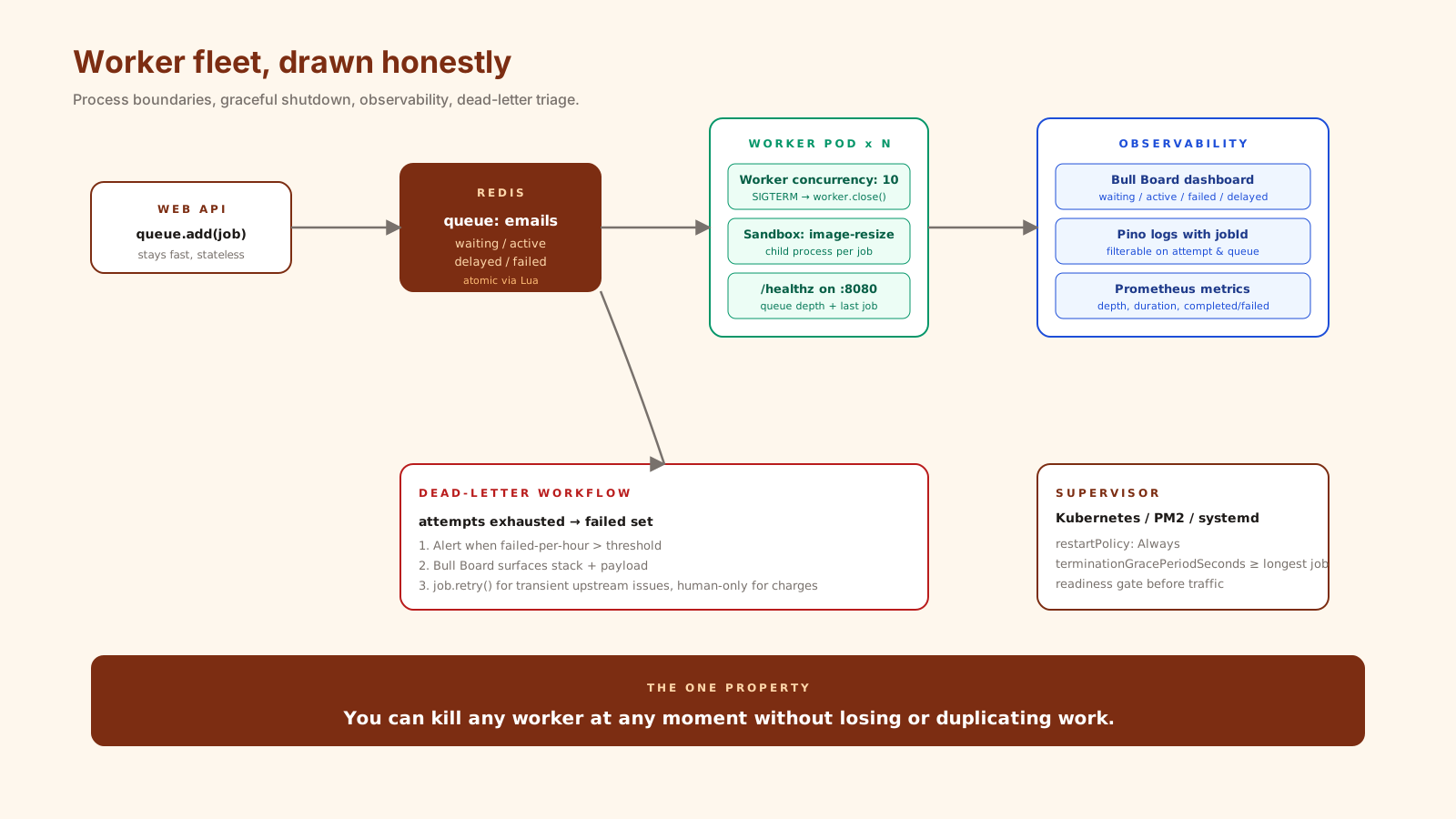
Two Docker images (or one image with two commands), two Kubernetes Deployments, two sets of replicas. The web service stays stateless and fast. The worker can be sized for the heaviest job it runs.
If you have one CPU-bound handler in a mostly I/O worker, BullMQ supports a sandboxed processor that runs each job in a child process. You point at a file path instead of a function:
import { Worker } from 'bullmq';
import path from 'node:path';

new Worker('image-resize', path.join(__dirname, 'jobs/resize.js'), {
  connection,
  concurrency: 4,
});
A crash in resize.js only kills the child, not the parent worker, and CPU work no longer blocks the event loop of other handlers.
Graceful Shutdown Is Not Optional
Every container orchestrator — Kubernetes, ECS, Nomad — sends SIGTERM and gives you a grace period (default 30s in Kubernetes) before SIGKILL. If your worker ignores SIGTERM and dies hard, in-flight jobs sit in the active set with a stale lock, and your retry policy decides whether they re-run.
The BullMQ pattern for this is small and worth memorizing:
const worker = new Worker('emails', handler, { connection, concurrency: 10 });

let shuttingDown = false;
async function shutdown(signal: string) {
  if (shuttingDown) return;
  shuttingDown = true;
  console.log({ msg: 'shutdown.start', signal });
  await worker.close(); // stops claiming new jobs, waits for in-flight to finish
  await connection.quit?.(); // close Redis
  console.log({ msg: 'shutdown.done' });
  process.exit(0);
}

process.on('SIGTERM', () => shutdown('SIGTERM'));
process.on('SIGINT', () => shutdown('SIGINT'));
worker.close() does the right thing: it stops pulling new jobs, waits for currently active jobs to finish (or hit their timeout), then resolves. Pair this with a terminationGracePeriodSeconds in your Kubernetes spec that is at least as large as your longest expected job — otherwise the orchestrator kills the worker mid-job anyway.
Choose Your Restart Strategy On Purpose
Node processes die. They die from uncaught exceptions, from memory limits, from kill -9. The question is what supervises them.
- PM2 in cluster mode is the classic single-host story.
pm2 start worker.js -i maxruns one worker per CPU, restarts on crash, has a built-in log rotator. - systemd is the boring, rock-solid choice for VMs. A unit file with
Restart=always,RestartSec=2, and resource limits viaMemoryMax=. - Kubernetes is the modern default: a
Deploymentof replicas, liveness and readiness probes,restartPolicy: Always. The orchestrator handles crashes and rolling updates.
Pick one, then make sure your worker actually exits on unrecoverable errors. The supervisor cannot help you if your unhandledRejection handler logs and continues.
process.on('unhandledRejection', (err) => {
  console.error({ msg: 'unhandledRejection', err });
  shutdown('unhandledRejection'); // let the supervisor restart us clean
});
Health Checks That Mean Something
A liveness probe that pings /healthz and gets {"ok": true} is theater if /healthz does not check whether the worker is actually consuming jobs. Two checks worth running:
- Readiness: Redis is reachable and the worker has registered with the queue. Fail this on startup until both are true. Kubernetes will not route traffic (you have none) but more importantly will not consider the pod ready, which delays the rolling update of the next replica.
- Liveness: the worker has processed a job within the last N minutes, or the queue is empty. The combination matters — if the queue has 10,000 jobs and you have processed zero in five minutes, something is wrong.
import express from 'express';
const app = express();
let lastJobAt = Date.now();
worker.on('completed', () => { lastJobAt = Date.now(); });

app.get('/healthz', async (_req, res) => {
  const waiting = await emailQueue.getWaitingCount();
  const stalled = Date.now() - lastJobAt > 5 * 60_000;
  if (waiting > 0 && stalled) return res.status(503).json({ ok: false, reason: 'stalled' });
  res.json({ ok: true });
});

app.listen(8080);
Yes, this means your "worker" also runs an HTTP server on a different port. That is fine. It is the cheapest way to give Kubernetes a real signal.
Observability: Bull Board, Logs, Metrics
You will need three things during an incident: a list of jobs in each state, structured logs you can filter by job ID, and a metric you can graph.
Bull Board (@bull-board/express or the Fastify variant) gives you a dashboard for waiting, active, completed, failed, and delayed jobs. Mount it behind auth on an internal route. Arena is the older alternative; Bull Board is the actively maintained one for BullMQ.
Structured logs with Pino, including the jobId on every log line inside a handler:
const worker = new Worker('emails', async (job) => {
  const log = logger.child({ jobId: job.id, jobName: job.name, attempt: job.attemptsMade });
  log.info('start');
  try {
    await sendEmail(job.data);
    log.info({ ms: Date.now() - job.processedOn! }, 'done');
  } catch (err) {
    log.error({ err }, 'failed');
    throw err;
  }
}, { connection });
Metrics via prom-client: a counter for completed/failed by queue, a histogram for job duration, a gauge for queue depth (sampled every 30s). Three metrics will tell you almost everything that matters.
Dead-Letter Queues Are A Workflow, Not A Folder
When attempts runs out, BullMQ leaves the job in the failed set. That is a dead-letter queue in the literal sense. The mistake is treating it as a graveyard.
Build a small workflow around it:
- Alert when the count of failed jobs in the last hour exceeds a threshold.
- Surface failed jobs in Bull Board with the failure reason and stack.
- Provide a one-click retry for the cases where the upstream is now healthy:
await job.retry()re-queues a single failed job. - For jobs that must not be retried automatically (charges, exports), require a human action and log who did it.
The point of a dead-letter queue is to convert silent failure into visible work. That only happens if someone is watching it.
A One-Sentence Mental Model
A reliable worker is a long-lived process that you can kill at any moment without losing or duplicating work — every other feature you add is in service of that property.