"How Should We Style This Thing"
Pick almost any new React or Vue codebase and the first non-trivial decision is how the styles get organized. It used to be Sass plus BEM and a folder full of partials, and the team would argue about naming for an afternoon and then move on. Now it's CSS Modules versus styled-components versus Tailwind versus Vanilla Extract versus "we just use globals," and each option pulls a different lever.
The right call depends on team size, what you ship to the client, whether you're using Server Components, and how much custom design you have. There is no universal best — but there are a few choices that have become safe defaults, and a few that come with a real cost you should know about up-front.
This is the lay of the land in late 2024.
The Job CSS Architecture Is Doing
Before tools, the actual problem. In a component-based app you want three things from your styling layer:
- Scoping. A class name written for the
Buttoncomponent should not collide with the same name in aCardcomponent three layers away. - Co-location. The styles for a component should live near the component, so deleting it doesn't leave dead CSS behind.
- Predictable specificity. When you read the markup, you want to know which rules win without doing a cascade walk in your head.
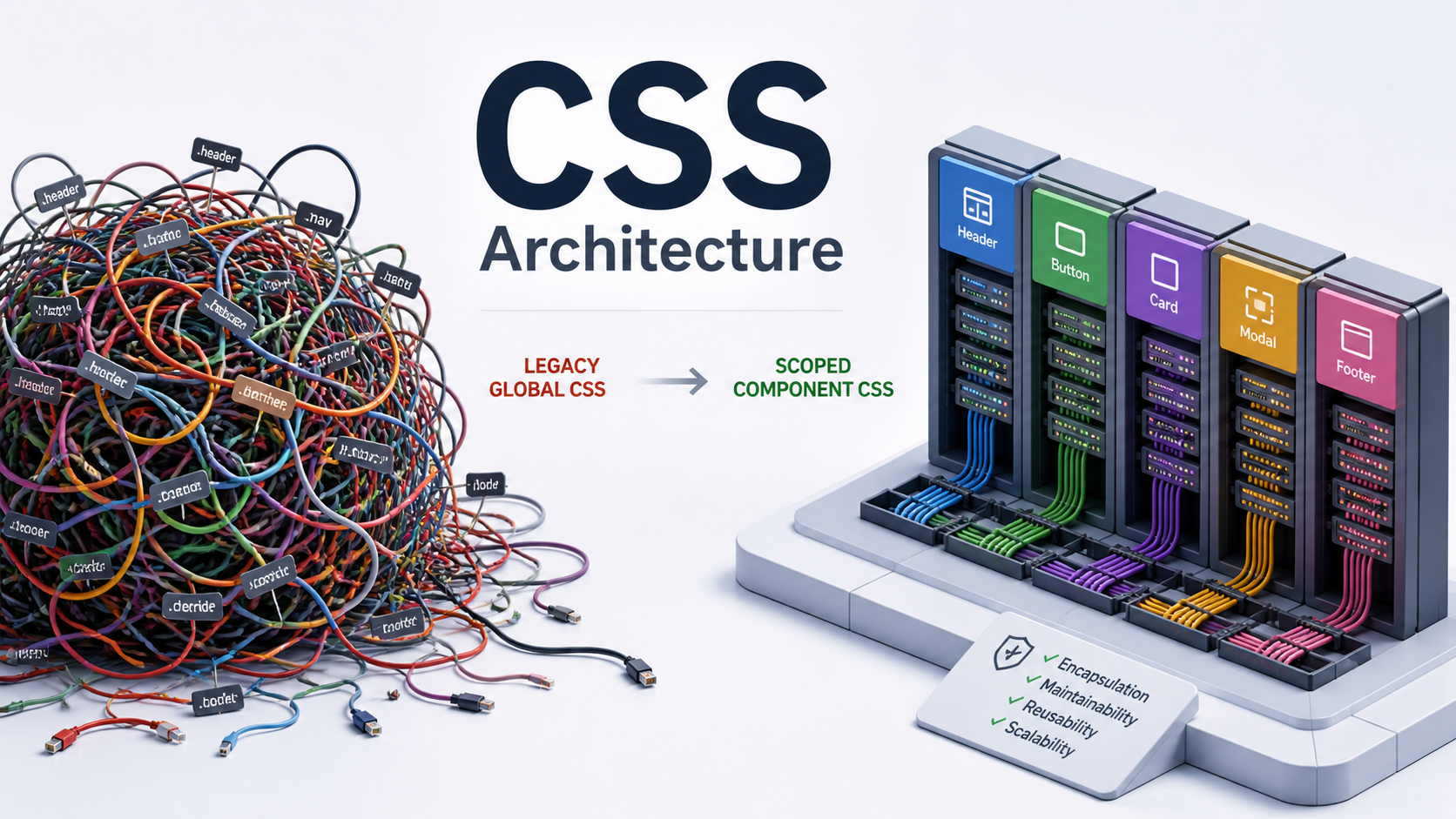
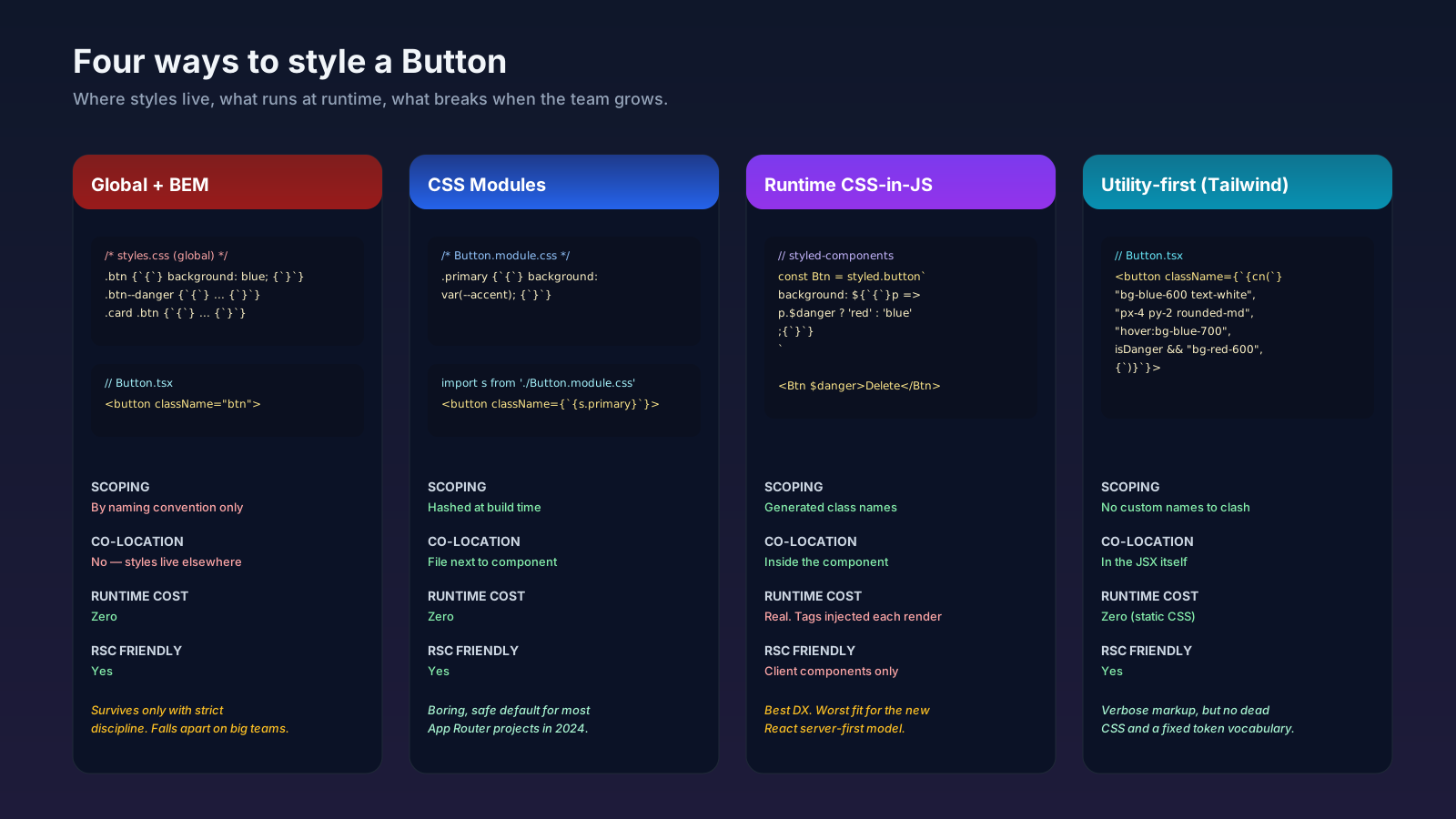
Every "CSS architecture" you've heard of is some answer to those three. BEM solves them with discipline. CSS Modules solve them with a build step. CSS-in-JS solves them with a runtime. Tailwind solves them by deleting the problem — there are no custom class names to collide.
CSS Modules: The Boring Default That Holds Up
CSS Modules are built into Next.js, Vite, Remix, Astro, and most modern toolchains. You write a .module.css (or .module.scss) file, import it from your component, and the build hashes the class names so they're unique to that file.
/* Button.module.css */
.primary { background: var(--accent); color: white; }
.primary:hover { background: var(--accent-hover); }import styles from './Button.module.css';
export function Button({ children }) {
return <button className={styles.primary}>{children}</button>;
}What you get: real CSS — every feature, every selector, container queries, :has, the lot — with zero runtime. The build step replaces .primary with Button_primary__a8f2 so collisions are impossible. Co-location is natural: the file lives next to Button.tsx. Specificity stays flat because every class is its own scope.
Where it gets awkward: deeply nested style overrides between parent and child components. You end up exporting class names or passing className props, which is fine but slightly more ceremony than the alternatives. Theme variables go in your global stylesheet as custom properties, not in the module.
For a typical product app — and especially one using React Server Components — CSS Modules are the safest default in 2024. They have no runtime, work everywhere, and never surprise you.
CSS-in-JS: Great DX, Real Costs
Emotion and styled-components made writing styles feel like writing components. You get prop-driven styling, theme context, and automatic vendor prefixing in a single import.
import styled from 'styled-components';
const PrimaryButton = styled.button<{ $danger?: boolean }>`
  background: ${p => p.$danger ? 'var(--danger)' : 'var(--accent)'};
  color: white;
  padding: 0.5rem 1rem;
`;
The DX is genuinely good. The cost shows up at runtime: the library has to evaluate template literals on every render, generate class names, inject <style> tags, and keep them in sync. That's CPU on the main thread that competes with your app code. On low-end devices it's measurable.
The other issue is React Server Components. Both Emotion and styled-components rely on React Context and runtime style injection, which are client-only concerns. They work in App Router but only inside 'use client' boundaries, which fights the point of Server Components. The official position from both libraries' maintainers in 2023-2024 has been that traditional CSS-in-JS isn't the right shape for server-rendered React anymore.
If you're starting a new RSC-heavy app, runtime CSS-in-JS is the option I'd think hardest about before adopting.
Zero-Runtime CSS-in-JS: Vanilla Extract And Panda
The newer wave keeps the developer experience of CSS-in-JS but moves the work to build time. The styles are extracted into static CSS files during the build — there's no runtime library injecting <style> tags.
// button.css.ts (Vanilla Extract)
import { style } from '@vanilla-extract/css';
export const primary = style({
  background: 'var(--accent)',
  color: 'white',
  padding: '0.5rem 1rem',
  ':hover': { background: 'var(--accent-hover)' },
});import * as styles from './button.css';
export function Button({ children }) {
return <button className={styles.primary}>{children}</button>;
}Vanilla Extract gives you typed style objects that compile to plain CSS. Panda CSS is similar in spirit, with a heavier focus on design tokens and recipes. Both work cleanly with Server Components because the result is just static CSS.
These are more interesting than runtime CSS-in-JS for a new codebase in 2024. The cost is a bigger build configuration and a smaller community, but the runtime profile matches CSS Modules and the DX is closer to styled-components.
Utility-First (Tailwind): A Different Model Entirely
Tailwind doesn't solve the scoping problem so much as side-step it. There are no custom class names in your component, only utilities.
export function Button({ children }) {
  return (
    <button className="bg-blue-600 hover:bg-blue-700 text-white px-4 py-2 rounded-md">
      {children}
    </button>
  );
}
The architecture wins are real: zero dead CSS, predictable design tokens via the config (or @theme in Tailwind v4), and the styles physically travel with the markup so deleting the component deletes the styles. The trade is verbosity in JSX and a reliance on the build to keep CSS small. Most teams pair it with clsx and tailwind-merge plus a cn helper to compose conditional classes safely.
Tailwind has its own article in this series. For architecture, the relevant point: it's a complete answer to the three concerns, just by replacing custom CSS with a fixed utility vocabulary.
The Role Of Global CSS Has Shrunk
In 2024, your global stylesheet should be small and boring. Reasonable contents:
- A modern reset (Josh Comeau's reset, Andy Bell's, or Tailwind's preflight).
- Design tokens as custom properties at
:root— colors, spacing, radius, typography scale. :focus-visibleand accessibility defaults you want everywhere.- Element-level base styles for tags you don't always wrap (
<a>,<hr>,<table>).
Everything else is component-local. If you're tempted to write .btn, .card, or .modal in globals.css, push it back to the component. That's the discipline that actually makes the architecture work — picking CSS Modules and then writing global component styles is the worst of both worlds.
How To Choose For A New Project
A short, opinionated decision tree:
- Server Components, broad team, custom design. CSS Modules. Boring, fast, no runtime, no surprises.
- Server Components, broad team, design system you want strongly typed. Vanilla Extract or Panda. You get tokens-as-types and zero runtime.
- Client-heavy SPA, you want the most velocity per developer. Tailwind, with
cnandtailwind-mergefrom day one. - Existing styled-components codebase that's working. Don't migrate just to migrate. The runtime cost is real but rewriting to escape it is rarely worth it unless you're moving to RSC or hitting concrete perf issues.
What I'd avoid as a default for a new app in 2024: pure runtime CSS-in-JS in an RSC environment, and globals-only with naming conventions for anything bigger than a marketing site. The first fights the framework, the second doesn't survive a second engineer joining the team.
The architecture choice matters less than picking one and holding the line. Most CSS pain in big codebases comes from the team mixing three approaches because nobody decided.