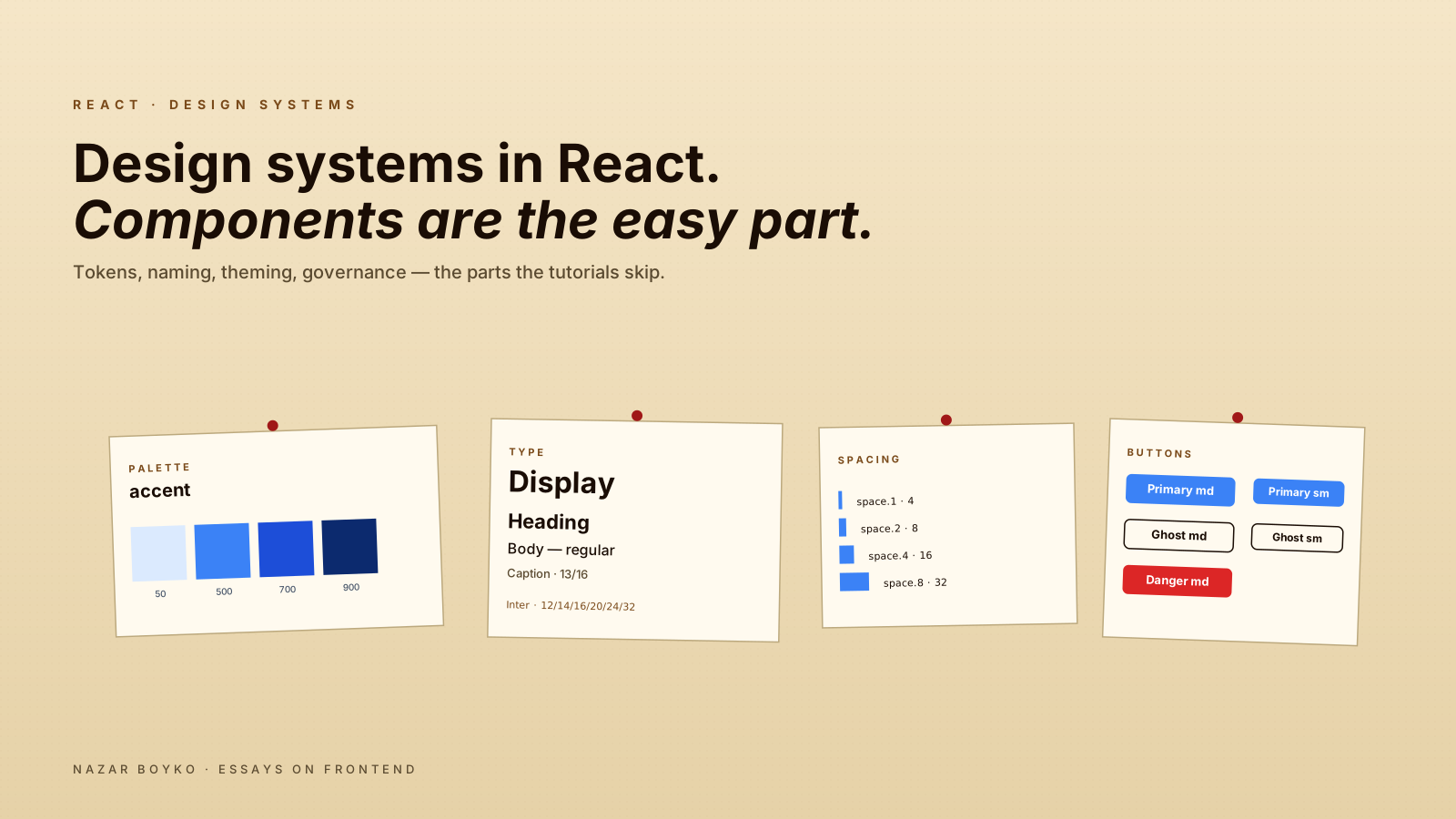
You've been asked to "build a design system". It sounds like a component library — a <Button>, a <Card>, a <Modal>, all with consistent props. Three weeks of work, maybe four with theming. Easy.
If only. The Button is the easy part. What makes a design system hard isn't the components — it's everything around them: design tokens that survive a rebrand, naming that doesn't get re-debated every quarter, deprecation paths that don't break the app, contribution rules that work when the design team grows from 3 to 12, and the day-to-day politics of "why are we using two different shades of blue".
This article is about the parts of a design system that the tutorials skip.
Tokens Are The Foundation
Before any component, you need a single source of truth for the visual primitives. Colours, spacing, font sizes, radii, shadows. These are design tokens, and they're the only layer you should be sharing between design tools (Figma) and code:
// tokens/colors.ts
export const tokens = {
  color: {
    bg: { default: '#ffffff', subtle: '#f5f7fa', muted: '#e6ebf2' },
    text: { primary: '#0f172a', secondary: '#475569', muted: '#94a3b8' },
    accent: { default: '#3b82f6', hover: '#2563eb', pressed: '#1d4ed8' },
    danger: { default: '#dc2626', subtle: '#fee2e2' },
  },
  space: { 1: '4px', 2: '8px', 3: '12px', 4: '16px', 6: '24px', 8: '32px' },
  radius: { sm: '4px', md: '8px', lg: '12px', full: '9999px' },
  font: {
    size: { xs: '12px', sm: '14px', md: '16px', lg: '20px', xl: '24px' },
    weight: { regular: 400, medium: 500, bold: 700 },
  },
};
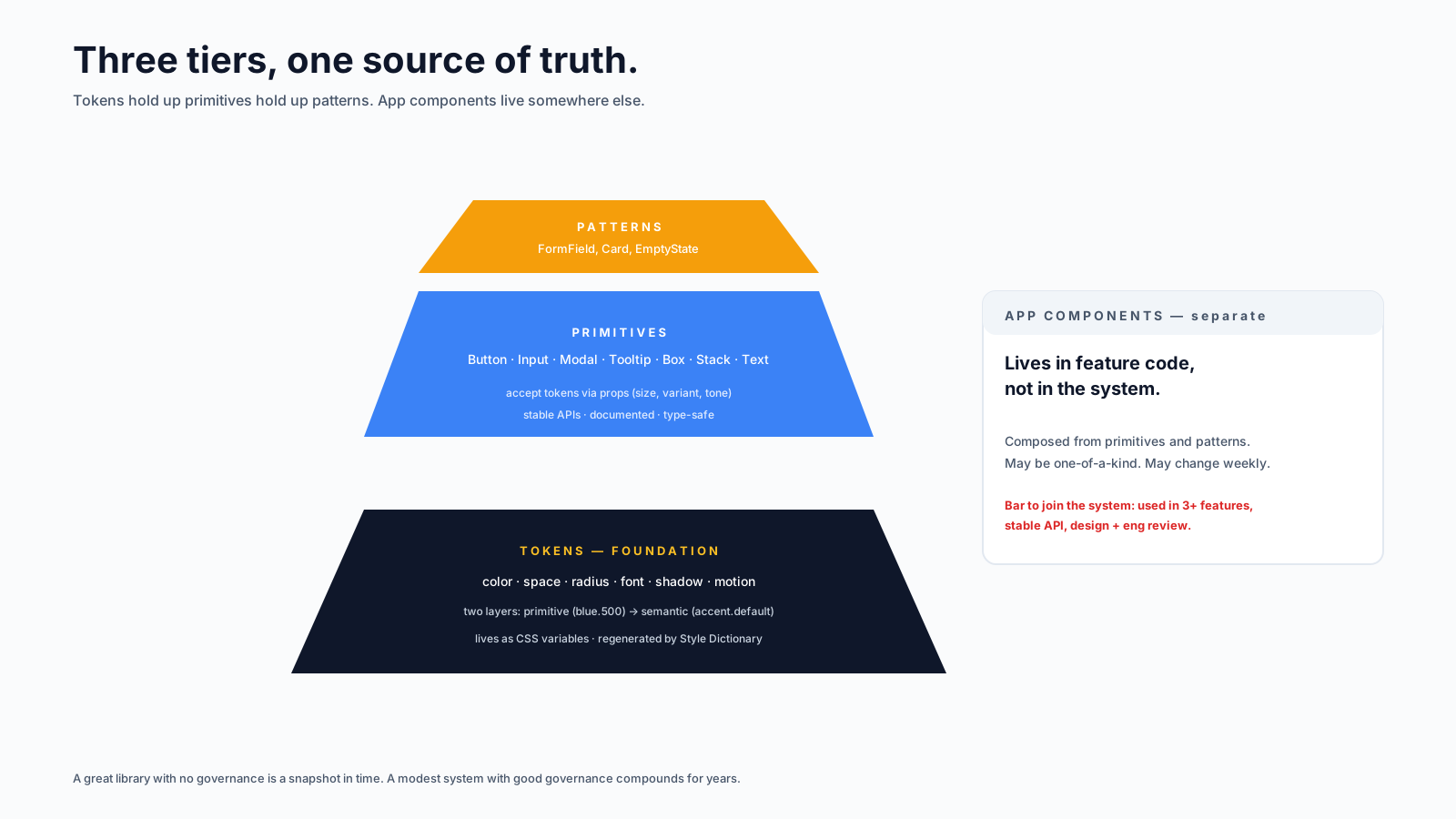
Two crucial properties: tokens are named, not value-based, and they're semantic, not visual. A token is color.text.primary, not color.gray.900. When you rebrand from gray to slate, only the value changes — every consumer keeps using color.text.primary.
Tools like Style Dictionary or Tokens Studio can generate the same tokens for CSS variables, JS objects, iOS, and Android from a single source. Even if you never need cross-platform, the discipline of "tokens are data, components are code" pays off the day someone asks for a "compact density mode" or a dark theme.
Two-Layer Naming: Primitive vs Semantic
The naming question that comes up first and never goes away: should we call it blue-500 or accent-default?
The answer is: both, in two layers.
// 1. PRIMITIVE — actual colour values
const primitive = {
  blue: { 50: '#eff6ff', 500: '#3b82f6', 700: '#1d4ed8' },
  red:  { 50: '#fef2f2', 500: '#ef4444', 700: '#b91c1c' },
};

// 2. SEMANTIC — what we use in components
const semantic = {
  accent: { default: primitive.blue[500], hover: primitive.blue[700] },
  danger: { default: primitive.red[500] },
};
Components only ever reference the semantic layer. The semantic layer references primitives. When you rebrand, you change one mapping, not every component. When you add a dark theme, you add a second semantic mapping that points at different primitives.
This split is the single most important architectural decision in a design system. Skip it, and every component ends up with hard-coded bg-blue-500 everywhere — a refactor that haunts you for years.
Theming Without Drama
The cleanest way to ship multiple themes (light/dark, brand variants, density modes) in 2026 is CSS variables, populated from your tokens, with theme switches as data attributes:
:root,
[data-theme="light"] {
  --color-bg-default: #ffffff;
  --color-text-primary: #0f172a;
  --color-accent-default: #3b82f6;
}

[data-theme="dark"] {
  --color-bg-default: #0f172a;
  --color-text-primary: #f5f7fa;
  --color-accent-default: #60a5fa;
}

.button {
  background: var(--color-accent-default);
  color: white;
}
Then in React, you just toggle the attribute:
function ThemeProvider({ theme, children }) {
  useEffect(() => {
    document.documentElement.dataset.theme = theme;
  }, [theme]);
  return children;
}
No styled-components prop drilling. No emotion theme provider. Just CSS variables that the cascade applies. Performance is excellent because the browser does the work, and you can switch themes without re-rendering React.
Components: Three Tiers
In a mature design system, components fall into three tiers, each with a different governance model.
Primitives are the building blocks: <Box>, <Stack>, <Text>, <Button>, <Input>. They're stable, well-documented, and changing them requires a major version bump. Most apps shouldn't need to override their appearance — they accept tokens as props (size, tone, variant) and render the right styles.
Patterns are well-known compositions: <FormField> (label + input + error), <Card> with header/body/footer, <EmptyState> with icon/title/description/action. They're opinionated and reduce common boilerplate.
App components live in feature code, not the design system. They might compose primitives in a non-reusable way for one specific screen. They are not the system's responsibility — but the system is responsible for making them easy to build.
The trap teams fall into is letting "app components" leak back into the system. Every "we should add this here for reuse" is one more thing to maintain forever. The bar for joining the design system has to be high — used in three or more features, with a stable API.
The Tooling That Earns Its Keep
A short list of tools that consistently pay off:
- Storybook. A visual catalogue of every component in every state. Designers can browse it. New engineers can find what exists. Reviewers can preview changes. Worth the setup cost on the first sprint.
- Style Dictionary (or Tokens Studio). Generates token output for multiple platforms from one source. Even if you only have web, the discipline matters.
- Chromatic (or visual regression in Playwright). Catches "did this PR change anyone's button shadow" before it ships. Every design system needs this; the bug class is otherwise invisible.
- TypeScript with strict prop types. A
<Button variant="primary">that gets a typo ("primry") should be a compile error. The autocompletedvariantprop from a generated type union is a daily quality-of-life win.
The "Library Or Build It Yourself" Decision
Three honest options for the underlying components:
- Build everything yourself. Maximum control, maximum cost. Right when your design language is genuinely unique and you have the team to maintain it.
- Use a headless library + your own styles. Radix, React Aria, or React Aria Components for the behaviour and accessibility; your own styles on top. This is the strongest 2026 default for most teams.
- Use a styled library. MUI, Chakra, Mantine, Ant Design. Fastest to ship, hardest to deviate from later. Right when "looks like a generic SaaS" is acceptable.
The hybrid that's currently winning is shadcn/ui: copy-paste Radix primitives styled with Tailwind into your repo. You own the code (no library version lock-in), but you didn't write the accessibility logic. For new projects, this is hard to beat.
// shadcn-style button — yours to edit
import { cva } from 'class-variance-authority';

const buttonStyles = cva('inline-flex items-center rounded-md font-medium', {
  variants: {
    variant: {
      primary: 'bg-blue-600 text-white hover:bg-blue-700',
      ghost:   'bg-transparent text-gray-900 hover:bg-gray-100',
    },
    size: {
      sm: 'h-8 px-3 text-sm',
      md: 'h-10 px-4 text-base',
    },
  },
  defaultVariants: { variant: 'primary', size: 'md' },
});

export function Button({ variant, size, className, ...props }) {
  return <button className={buttonStyles({ variant, size, className })} {...props} />;
}
Five small variants, one component, type-safe via cva. Multiply by twenty primitives, and you have a design system the team can extend without arguing about CSS conventions every week.
Versioning And Deprecation
The unglamorous part. Once people depend on your system, you can't change things casually. The discipline I've seen work:
- Semantic versioning, taken seriously. Breaking change → major bump. Even renaming a prop counts.
- Codemods for breaking changes. When
<Button intent="...">becomes<Button variant="...">, ship ajscodeshiftscript alongside the release. The cost of writing it is much lower than the cost of every team migrating manually. - A deprecation period. Mark the old API with
@deprecatedJSDoc, log a console warning in dev, keep it working for one major version. Then remove. - A changelog people actually read. Markdown files, one entry per release, with example before/after for breaking changes.
If your design system is published as an internal package, treat the team as a customer. If they have to stop their work to deal with your changes, your system isn't earning its keep.
Governance: The Quiet Half
The technical decisions are the easy ones. The hard ones:
- Who owns the system? A single team, ideally with both designers and engineers. "Owned by everyone" means owned by no one.
- How do new components get added? A short proposal, evidence of three uses, design + engineering review. Not a free-for-all.
- How are breaking changes decided? A small group with the authority to say no. "Anyone can change anything" is how you get five Button variants.
- How is feedback channelled? A specific Slack channel, a recurring office-hours session. Otherwise complaints go nowhere and resentment builds.
This is the part that turns "we have a component library" into "we have a design system that survives". A great library with no governance is a snapshot in time. A modest system with good governance compounds for years.
A Realistic Roadmap
If you're starting from scratch, the order that has worked for me:
- Week 1–2: define tokens (colours, spacing, type, radii). Set up CSS variables, dark mode plumbing, a tiny
<Box>and<Text>. - Week 3–4: ship 5–8 critical primitives (Button, Input, Modal, Tooltip, Card). Set up Storybook. Write usage docs.
- Month 2: patterns (FormField, EmptyState). Visual regression. TypeScript prop unions.
- Month 3+: governance, codemods, deprecation policies. Migrate one app fully to test the system from a consumer's perspective.
Don't try to ship 50 components in week one. Five solid primitives that 100% of your app uses are worth ten times more than fifty components used by no one.
The Button is genuinely a day's work. The Button that's still right two years later — same name, same API, three rebrands and four engineers — that's the actual design system, and it's mostly built out of decisions that have nothing to do with React.