The first time you build a real B2B SaaS, the boring assumptions of single-tenant work go out the window. Your logo is no longer the logo. Your color is no longer the brand color. Your users do not all live in one row of one table. Company A wants their wordmark in the header and a calm blue dashboard. Company B wants a custom domain, a red theme, four custom roles, and an audit log they can export every month for their compliance team. Company C is a regulated bank that does not want to share a database with anyone.
If you do not architect for that on day one you end up with a codebase full of if (tenantId === 'acme') {} and a cache layer that occasionally hands one customer's invoice to another. Both are fixable; both are a lot more work to fix later than to design for now.
Pick A Tenancy Model Before You Pick A Stack
The frontend choices follow from the data model, so settle that first. Three patterns dominate:
- Database per tenant. Each customer gets their own database. Strongest isolation, easiest compliance story, most expensive to operate. Common at the high end of B2B (banks, healthcare, government).
- Schema per tenant. One database, one schema per customer (Postgres, SQL Server). Less ops cost than per-database, still gives you per-tenant backups and clean isolation.
- Row-level (shared schema). One database, one schema, every table has a
tenant_idcolumn and a row-level security policy enforces it. Cheapest to run, fits the most customers per node, and Postgresenable row level securitypluscreate policymakes it tractable.
The frontend does not care which one you pick — but it does care that the tenant identity is unambiguous on every request. That identity has to flow from the URL through middleware into your data layer and back, so the rest of this article assumes you know how each request answers the question "which tenant is this?"
Subdomains, Paths, Or Custom Domains
Next decision: how does a user land on their tenant?
- Path-based.
app.example.com/acme/dashboard. Simplest to set up, no DNS games, but cookies are shared with every other tenant on the same domain, and the URL feels less branded. - Subdomain.
acme.example.com/dashboard. The B2B default — Slack, Notion, Linear, Stripe Dashboard. Each tenant gets a clean URL, cookies are scoped naturally, and CORS rules are easier. - Custom domain.
app.acme.com, white-labeled. Highest perceived polish, requires DNS verification flows and certificate management (Let's Encrypt or your CDN's automated certs).
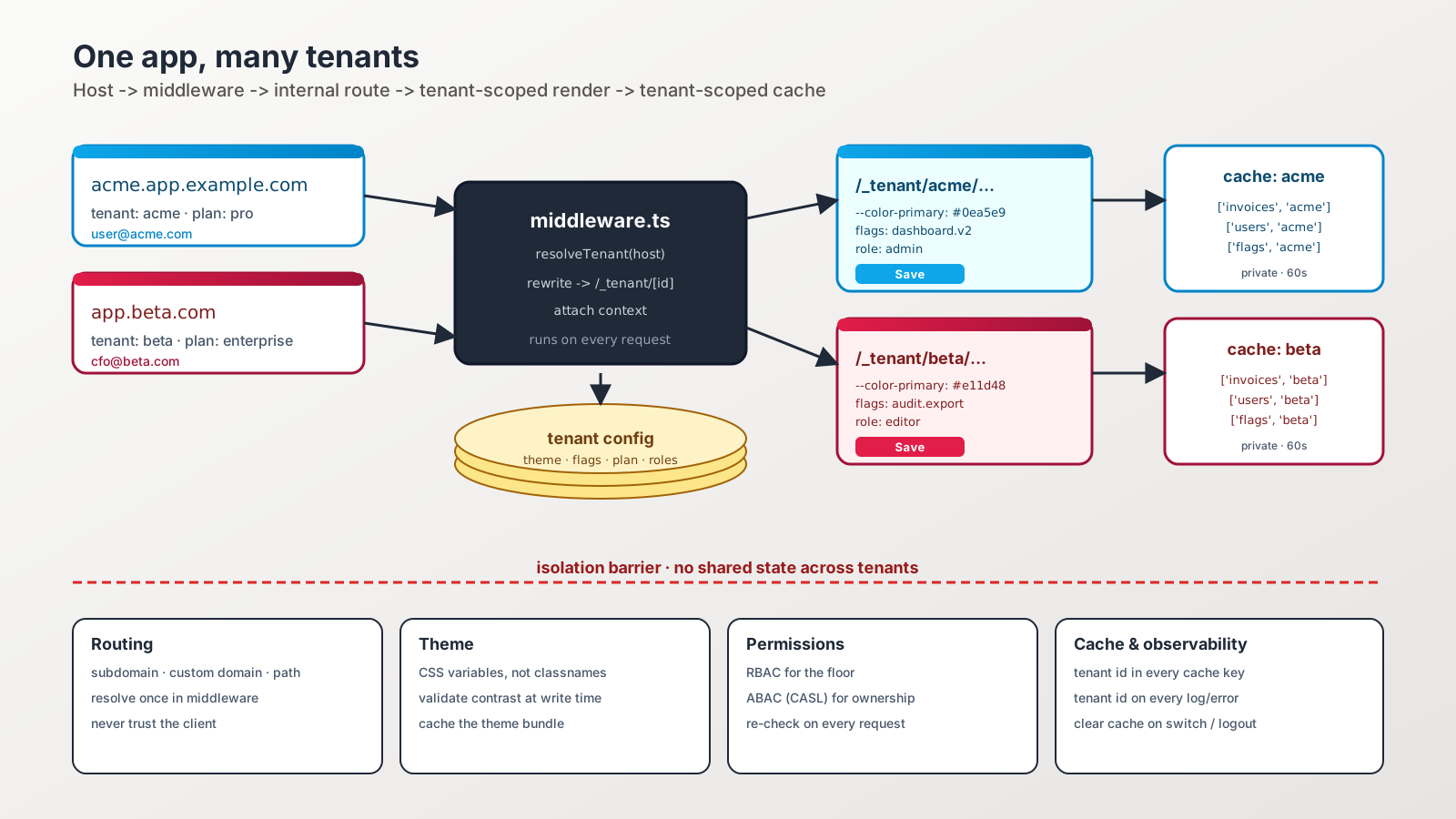
You will end up supporting at least two of these. The cleanest approach is to put tenant resolution in one place — middleware — and let the rest of the app read the resolved tenant from a typed object.
In Next.js App Router, that lives in middleware.ts:
import { NextRequest, NextResponse } from 'next/server';

const ROOT = 'app.example.com';

export async function middleware(req: NextRequest) {
  const host = req.headers.get('host') ?? '';
  const url = req.nextUrl.clone();

  // Subdomain: acme.app.example.com
  if (host.endsWith('.' + ROOT) && host !== ROOT) {
    const tenant = host.replace('.' + ROOT, '').split('.')[0];
    url.pathname = `/_tenant/${tenant}${url.pathname}`;
    return NextResponse.rewrite(url);
  }

  // Custom domain: app.acme.com (resolved against your domain table)
  if (host !== ROOT) {
    const tenant = await lookupTenantByDomain(host);
    if (tenant) {
      url.pathname = `/_tenant/${tenant}${url.pathname}`;
      return NextResponse.rewrite(url);
    }
  }

  return NextResponse.next();
}
The user keeps seeing acme.app.example.com in their address bar. Your file system uses app/_tenant/[tenantId]/... and every nested page can read the tenant from params. One place, one rule.
Dynamic Theming Without if Statements
Hardcoded colors are the enemy. The trick is to push every brand decision into CSS variables and load the values per request.
// app/_tenant/[tenantId]/layout.tsx
import { getTenant } from '@/lib/tenant';

export default async function TenantLayout({ params, children }) {
  const tenant = await getTenant(params.tenantId);

  return (
    <div
      data-tenant={tenant.slug}
      style={{
        '--color-primary': tenant.theme.primary,
        '--color-primary-fg': tenant.theme.primaryFg,
        '--color-accent': tenant.theme.accent,
      } as React.CSSProperties}
    >
      {children}
    </div>
  );
}
If you live in Tailwind, point its primary palette at the same variables in tailwind.config.js:
colors: {
  primary: 'rgb(var(--color-primary) / <alpha-value>)',
  accent:  'rgb(var(--color-accent)  / <alpha-value>)',
}
Now <button className="bg-primary text-primary-fg"> is red for one tenant and blue for the other without any conditional logic in the component. The same pattern works for fonts (--font-display), spacing scales, and even shape decisions (--radius-button). Pick the contract once, vary the values per tenant.
A few things to lock down so this stays sane:
- Validate brand inputs. Customers will paste
#fffandrgba(0,0,0,.5)andredinto your settings UI. Normalize to one format on write and validate contrast against the background color so a tenant cannot create unreadable buttons. - Cache the theme bundle. Tenant config rarely changes. Stick it in Redis, an Edge KV, or a 60-second per-tenant fetch — not in every render.
- Never inline secrets in CSS variables. Themes are public; the tenant API key is not.
The Cache Is Where Tenants Leak
The scariest bug in a multi-tenant frontend is a cross-tenant leak — Company B briefly seeing Company A's data because someone reused a cached value. It almost always happens in one of three places:
- Client query caches. TanStack Query, Apollo, RTK Query. The cache key forgot the tenant.
- Service worker caches. A Workbox runtime cache stores
/api/invoiceswithout a tenant qualifier. - CDN edge caches. A cacheable response was emitted without a
Vary: Cookieor per-tenant cache key.
The fix is mechanical. Always include the tenant in the cache key, on every layer.
// Bad — first user fills the cache, second user reads it.
useQuery({ queryKey: ['invoices'], queryFn: fetchInvoices });

// Good — the key is unforgeable for another tenant.
useQuery({
  queryKey: ['invoices', tenantId],
  queryFn: () => fetchInvoices(tenantId),
});
For data on the server: scope it with the tenant in unstable_cache tags or your equivalent, and bust those tags on tenant-config writes. For the CDN: set Cache-Control: private on anything personalized, and never put a tenant-bearing path in a public cache without including the tenant in the key.
When a user signs out or switches tenants, blow the entire client cache away. queryClient.clear() is cheap insurance.
Auth, Roles, And The Permission Model
Multi-tenant auth is two questions: which tenant am I in, and what can I do inside it? The session token has to carry both, and every request has to verify both. RBAC (roles like admin, editor, viewer) is the floor; ABAC (attribute-based — "can the user edit this invoice because they own the project") is what most B2B apps grow into.
A few JS libraries make this less painful:
- CASL. The most popular ABAC library for JavaScript. Define abilities once, check them with
ability.can('update', invoice)everywhere. Same definition can ship to the server. - AccessControl / AccessControl-RE. Classic RBAC with attribute-level grants.
- Casbin / Oso. Policy-engine style — useful when rules get complex enough that a DSL beats hand-written checks.
Whichever you pick, do not store the role in localStorage and trust it. The frontend uses it to hide buttons and avoid pointless API calls; the backend has to re-check it on every request. (That happens to be the topic of a whole separate article.)
Feature Flags Per Tenant Are Not Optional
Different customers will want different features at different times. Some are paying for a beta. Some have legacy workflows you cannot break. Some are on a plan that does not include a module.
A flag system that supports per-tenant targeting solves three problems at once: gradual rollout, paid tier gating, and contractual obligations. The big providers (LaunchDarkly, GrowthBook, PostHog, Statsig, Flagsmith, Unleash, and Vercel's Edge Config + Flags SDK) all support attribute-based targeting. The pattern is the same across all of them — pass the tenant id and plan when you initialize the SDK, and let the rules engine decide.
Where it gets dangerous: flags become permanent forks. Sunset every flag on a date. If a feature is "GA for plus plan and above" forever, that is not a flag, that is a plan permission, and it belongs in the permission model.
Observability Has To Be Tenant-Aware
When something breaks at 2am, the first question is for which tenant? Make sure that question is one tag away in every system:
- Logs. Every log line carries
tenant_id. Structured JSON, indexed in your log store. - Errors. Sentry, Highlight, Datadog — set tenant as a tag on every captured error.
- Metrics. Per-tenant request rate, error rate, p95 latency. The "noisy neighbor" problem is real and you want to see it before customers do.
- Feature usage. Per-tenant funnels in PostHog or Mixpanel so customer success can spot a tenant who has not adopted a feature.
The cheap version of all of this is a single withTenantContext() helper that wraps every request handler and tags the loggers, the error reporter, and the metric emitter. Set it once, never think about it again.
A One-Sentence Mental Model
A multi-tenant frontend is the same app rendered through a per-request lens — tenant identity from the URL, theme from a config, permissions from a model, cache keyed by tenant — and every leak you ever ship will be a place where one of those four wires crossed.