You are three weeks into a redesign and the design system you inherited has a Combobox component that almost works. The keyboard handling is fine. The accessibility tree is correct. But your designer wants the listbox to float above a translucent sidebar, with rounded selection chips and a custom empty state, and the component you have was built to look exactly one way. You start writing CSS overrides. Then !important. Then a wrapper component that swallows props and re-emits them. Then you give up and rebuild it from scratch and ship the Combobox with three subtle a11y bugs that QA finds in production.
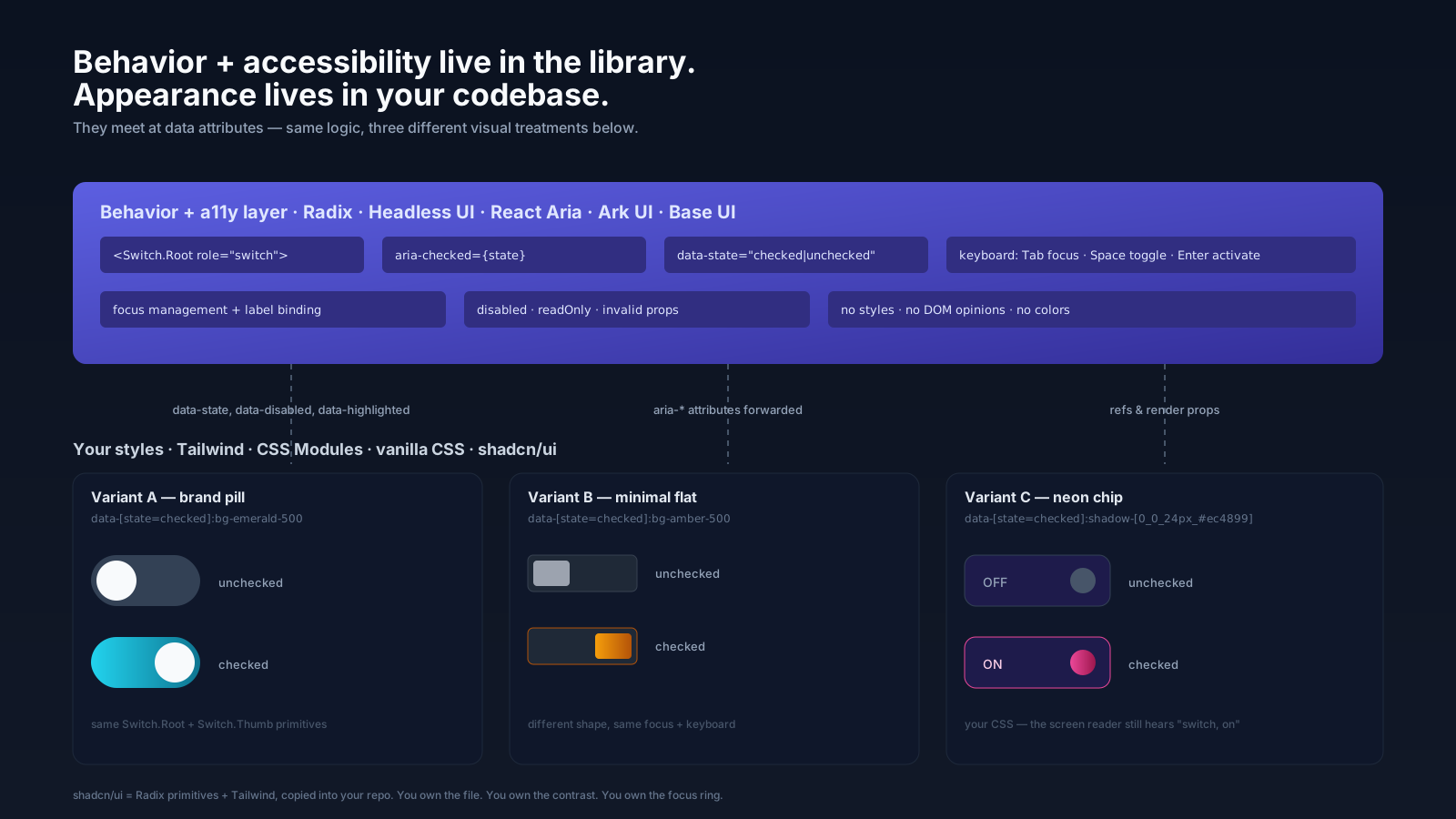
This is the problem headless UI exists to solve. The previous generation of component libraries — Bootstrap, Material UI, Ant Design — bundled three things together: the behavior (state, focus management, keyboard), the accessibility (ARIA roles and attributes), and the appearance (DOM structure, classnames, opinionated styles). Headless libraries split that bundle. You get the first two. You bring the third.
What "Headless" Actually Means
A headless component is a component that renders no opinionated styling and exposes the primitives you need to build the visible thing yourself. Radix UI gives you a Dialog.Root, Dialog.Trigger, Dialog.Portal, Dialog.Overlay, Dialog.Content, Dialog.Title, Dialog.Description, and Dialog.Close. Each is a real DOM node. Each has the right role, the right aria attributes, and the right keyboard behavior wired up. None of them ships with colors, padding, shadows, or layout.
Your job is to take those primitives and decorate them — with Tailwind classes, with CSS Modules, with vanilla CSS, with whatever you want — and arrange them into the visual component your designer drew. The library is responsible for "this is a dialog with the right semantics." You are responsible for "this is a dialog that looks like our brand."
The shorthand: behavior comes from the library, appearance comes from you, and they meet at the DOM via data attributes and forwarded refs.
Why You Want This
The reason this trade is worth making becomes clear the first time you build a custom Combobox by hand. To do it correctly you need:
- Focus on the input, not the listbox.
- Down arrow moves the active descendant, but focus stays on the input.
aria-expandedreflects open state,aria-controlspoints at the listbox id,aria-activedescendantpoints at the highlighted option id.- Typing filters the list. Escape closes. Enter selects the active item. Tab closes and moves on.
- Click outside closes. Click inside the listbox does not blur the input.
- Screen readers announce the selected option as a label, not as listbox content.
That is several days of work to get right, and a permanent maintenance burden when WCAG guidance evolves or a new browser quirk shows up. A headless library has already done it, in code that hundreds of teams test in production every day. You inherit that work. You spend your time on the part the library cannot do for you, which is making it look right.
The Players Worth Knowing
The space has converged enough that you can pick by team and constraints rather than guessing.
Radix UI is the de facto default for React. It is unstyled, well-documented, and the primitives compose cleanly. Most React component layers you see in 2024 — including shadcn/ui — sit on top of Radix.
Headless UI from Tailwind Labs is leaner, scoped to the components Tailwind users tend to need, and integrates particularly well with Tailwind's transition utilities. If your app is Tailwind-first and you want the smallest possible primitive set, this is a fine pick.
React Aria from Adobe is the most rigorous. It is built around hooks rather than components, so you wire up your own DOM and call useButton, useDialog, useComboBox to get the behavior. The ceiling is higher and the floor is higher — you write more code, but you can shape the markup however you want.
Ark UI is the framework-agnostic layer from the Zag team. The same state machines drive React, Vue, Solid, and Svelte adapters, which matters if you maintain components across frameworks.
Base UI is MUI's headless line. If your team already uses MUI for some things and wants a path to fully custom styling without leaving the ecosystem, it is the bridge.
You will not regret picking any of these. You will regret reinventing what they already shipped.
Data Attributes Are The Public API
The communication channel between a headless library and your stylesheet is data attributes. Radix sets data-state="open" on a dialog when it is open and data-state="closed" when it is not. It sets data-disabled on disabled items and data-highlighted on the active option in a menu. Your CSS targets those attributes:
import * as Switch from '@radix-ui/react-switch';

export function AirplaneMode() {
  return (
    <label className="flex items-center gap-3">
      <span>Airplane mode</span>
      <Switch.Root
        className="
          h-6 w-11 rounded-full bg-zinc-300 transition-colors
          data-[state=checked]:bg-emerald-500
          focus-visible:ring-2 focus-visible:ring-emerald-400
        "
      >
        <Switch.Thumb
          className="
            block h-5 w-5 translate-x-0.5 rounded-full bg-white transition-transform
            data-[state=checked]:translate-x-[22px]
          "
        />
      </Switch.Root>
    </label>
  );
}
The library never asked you what color "checked" is. It told you when checked is true, and you styled accordingly. That decoupling is the whole point.
What You Are Now Responsible For
The flexibility cuts both ways. The library will not stop you from making the thumb the same color as the track and rendering an invisible switch. It will not stop you from removing the focus ring. It will not stop you from setting aria-label to an empty string. The accessibility floor of a headless component is the floor of your styling discipline.
A short list of mistakes I have seen ship in real apps using Radix:
A dropdown menu styled with outline: none and no replacement focus ring, so keyboard users had no idea what was selected.
A dialog with the close button styled to be visually hidden on the design system's "minimal" variant, leaving only the Escape key as the way to dismiss.
A combobox with the active option styled identically to the hovered option, so once a screen reader user pressed down, sighted users could not tell what was about to be selected.
A switch with no associated label because someone used Switch.Root directly inside a div with text next to it, never wiring up htmlFor.
These are not library bugs. They are owner bugs. When you take the styling responsibility, you also take the contrast, the focus visibility, and the labelling.
Where shadcn/ui Fits
The natural follow-up is "fine, but Radix gives me eight unstyled primitives and I have to style every one of them every time." That is what shadcn/ui addresses. It is not a component library you install. It is a CLI that copies pre-styled, Radix-based component source code into your repo. You own the files. You can edit them. You can delete them. You are not pinning a version of someone's design opinions.
The trade: you get a fast start with sensible defaults, and you keep the right to diverge. The cost: you maintain that code, including pulling in upstream changes manually if something gets fixed. For most product teams that is the right trade.
The pattern generalizes. There is a healthy ecosystem of "styled on top of headless" libraries — Park UI on Ark, NextUI's recent versions on React Aria, Mantine moving in this direction. The world has settled on "behavior is a library, appearance is a codebase you own."
The Composition Story Is Where It Pays Off
The other thing headless libraries do well, and traditional component libraries do badly, is composition. A Radix <Dialog> is just a set of components. You can wrap them, you can extend them, you can build your own <ConfirmDialog> that internally uses Dialog.Root and adds a "destructive action" prop. Nothing about the library fights you.
import * as Dialog from '@radix-ui/react-dialog';

export function ConfirmDialog({ title, description, onConfirm, children }) {
  return (
    <Dialog.Root>
      <Dialog.Trigger asChild>{children}</Dialog.Trigger>
      <Dialog.Portal>
        <Dialog.Overlay className="fixed inset-0 bg-black/50" />
        <Dialog.Content className="fixed left-1/2 top-1/2 -translate-x-1/2 -translate-y-1/2 rounded-xl bg-white p-6">
          <Dialog.Title className="text-lg font-semibold">{title}</Dialog.Title>
          <Dialog.Description className="mt-2 text-sm text-zinc-600">{description}</Dialog.Description>
          <div className="mt-4 flex justify-end gap-2">
            <Dialog.Close className="px-3 py-1.5">Cancel</Dialog.Close>
            <Dialog.Close onClick={onConfirm} className="bg-red-600 text-white px-3 py-1.5">
              Confirm
            </Dialog.Close>
          </div>
        </Dialog.Content>
      </Dialog.Portal>
    </Dialog.Root>
  );
}
That is a useful, real component that you wrote in fifteen minutes, that has correct focus management and aria semantics for free, and that you can keep evolving without ever fighting an opinionated parent library.
What To Do On A Greenfield Project
If you are picking today, the playbook that has worked for me is short.
Start with Radix UI for primitives. The component coverage is broad — Dialog, Popover, Dropdown Menu, Select, Tabs, Accordion, Toast, Tooltip — and the primitives compose. Add React Aria for the few cases where you need a level of control Radix does not expose, like a Combobox, a complex date picker, or a virtualized listbox.
Use shadcn/ui to bootstrap the visual layer. Run the CLI, accept the defaults, then start editing. By month two you will have your own design system, written in code you control, sitting on top of behavior you did not have to build.
Lock down the visual contract early. Tokens for color, spacing, radius, shadow. A focus ring component everyone uses. A <VisuallyHidden> that the team reaches for instead of display: none on accessibility-critical text. The point is to make the right choice the easy choice when somebody is styling a new variant at 4pm on a Friday.
Audit your components against a real keyboard once a quarter. Tab through every interactive element. Trigger every dialog with Enter and dismiss with Escape. Open every menu with the keyboard. Most regressions are not architectural — they are someone removing a focus ring three sprints ago and nobody noticing.
The library gave you a foundation. Treat the rest like the work it is.
A One-Sentence Mental Model
A headless component is a contract that says "the keyboard, focus, and aria are correct, and the styling is your problem" — pick a library that takes the first half seriously, then take the second half just as seriously, because the user has no idea which side wrote which line.