It is two in the morning and a deploy is hung. The CI logs say php artisan migrate --force started six minutes ago. Half your application servers have already updated and are throwing 500s because the new code expects a column that the migration has not committed yet. The other half are stuck waiting for the old code to drain. The schema migration is sitting on ALTER TABLE orders ADD COLUMN status_v2 VARCHAR(32) NOT NULL DEFAULT 'pending' against a 200-million-row table, holding a metadata lock, and every write to orders is queued behind it.
This is the moment teams stop trusting Laravel migrations. It is not Laravel's fault. The migration ran in 80 ms on staging because staging had 200 rows. Production has more, and production has traffic, and the same schema change behaves nothing like the staging run. The patterns that keep production calm are well known and not specific to Laravel — but Laravel makes them easy to apply if you know which ones to use.
What A Migration Actually Is
In Laravel, a migration is a versioned class that knows how to apply a schema change and how to undo it. php artisan make:migration create_orders_table creates a file under database/migrations/, and since Laravel 9 these are anonymous classes by default:
return new class extends Migration {
    public function up(): void
    {
        Schema::create('orders', function (Blueprint $table) {
            $table->id();
            $table->foreignId('customer_id')->constrained();
            $table->string('status')->default('pending');
            $table->decimal('amount', 12, 2);
            $table->timestamps();

            $table->index(['customer_id', 'created_at']);
        });
    }

    public function down(): void
    {
        Schema::dropIfExists('orders');
    }
};
The migrations table tracks which files have run. In production you call php artisan migrate --force (the flag is required because Laravel refuses to run migrations in production without it). The migrations execute in batch order, and either they succeed or the down() method has to undo what up() did.
That is the happy path. The hard part is everything that happens around the migration when the database is large and the application is running.
The First Pattern: Expand, Then Contract
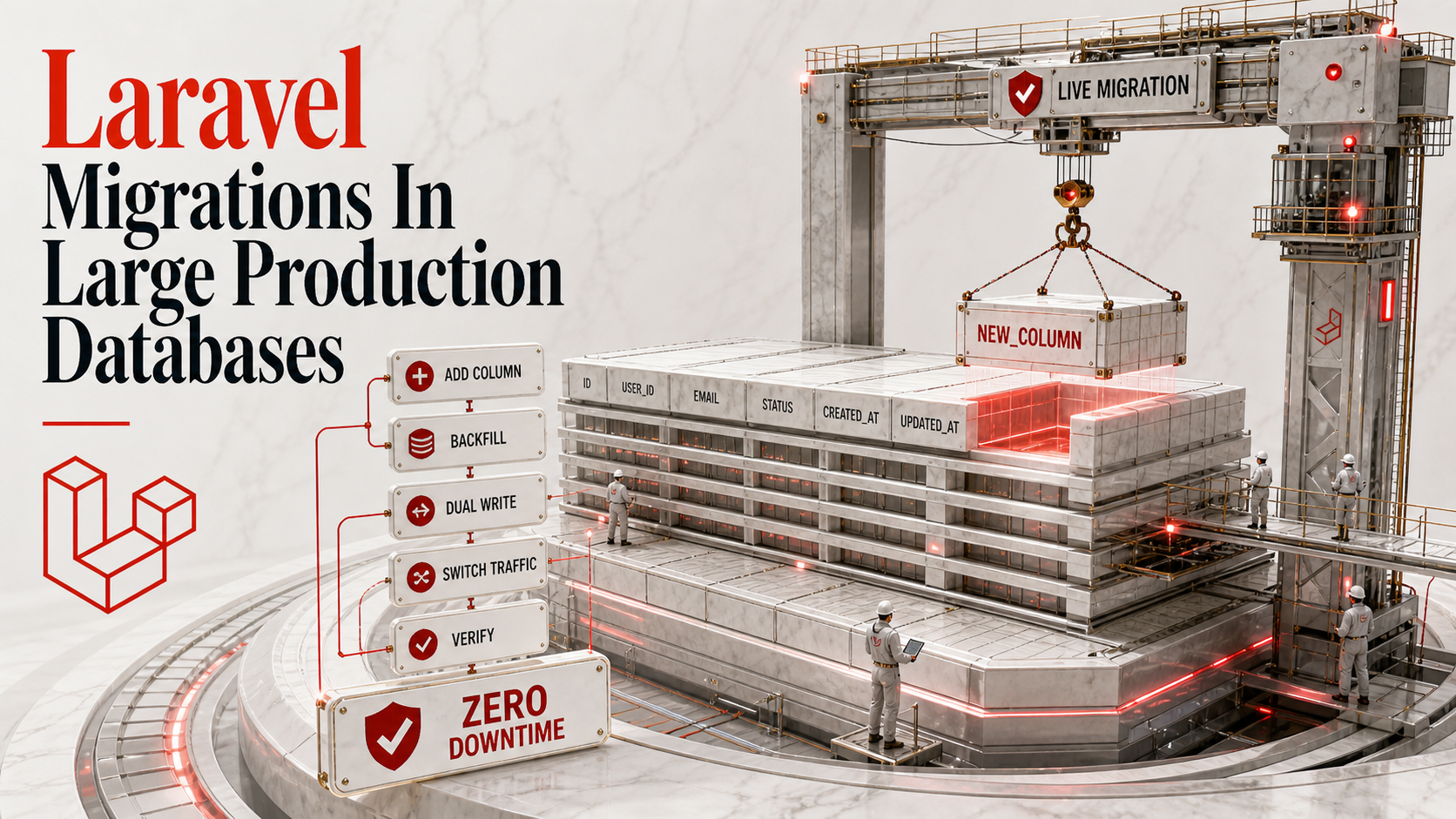
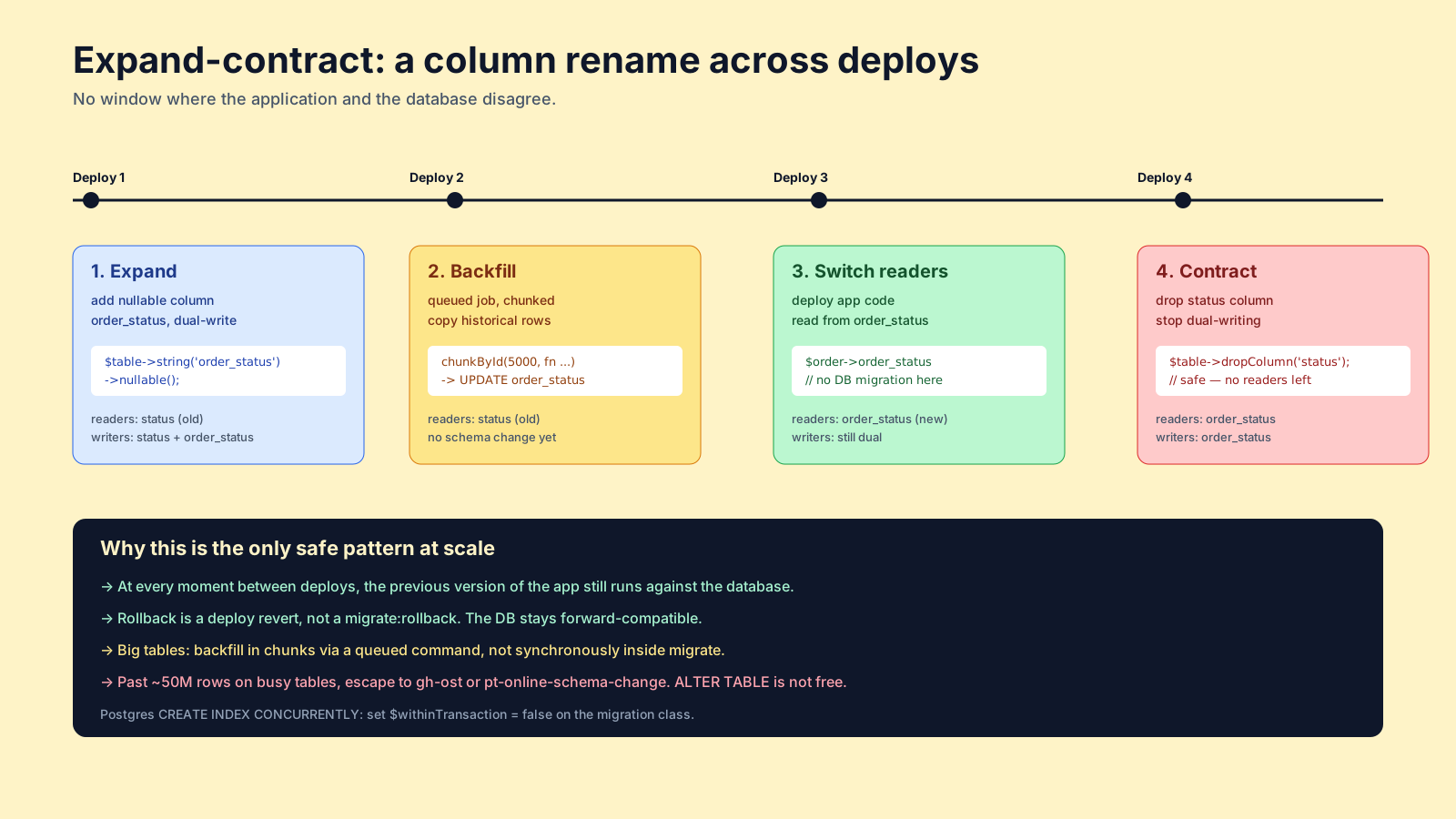
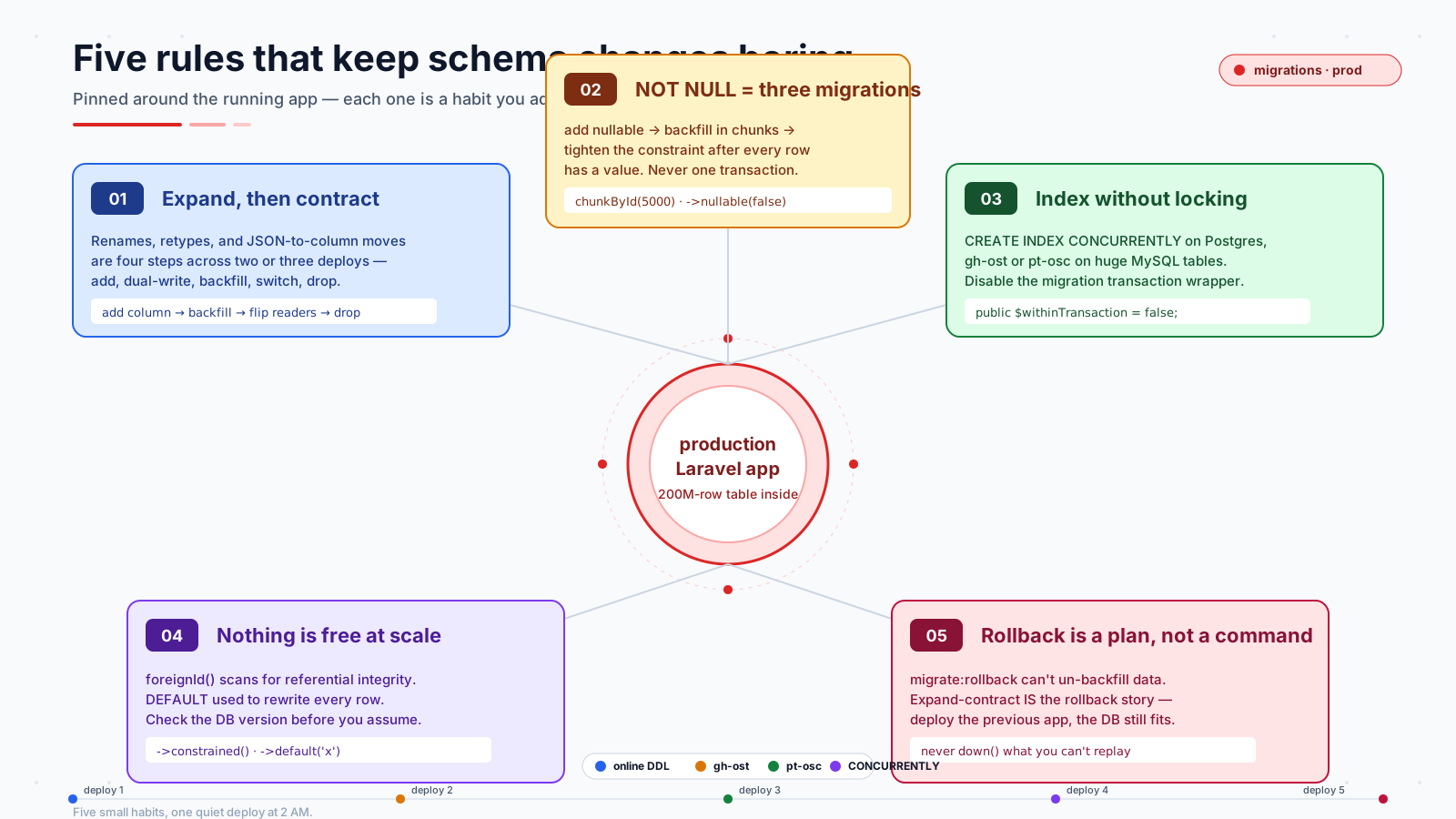
Almost every safe schema change follows the same shape. You do not "rename a column" — you add a new column, write to both, backfill, switch readers, then drop the old one. That is expand-contract.
Take a column rename. The instinct is one migration:
$table->renameColumn('status', 'order_status'); // do not do this in productionIn MySQL this is an ALTER TABLE that rebuilds the table. On a big orders table it locks writes for the duration. In Postgres a rename is metadata-only, but the application code is the bigger problem — you cannot deploy old code and new code at the same time if they disagree on the column name.
The expand-contract version is four steps spread across two or three deploys:
- Expand. Add the new column. Application reads still go to the old one. New writes go to both.
- Backfill. A separate migration or job copies historical data from the old column into the new one, in chunks.
- Switch. Deploy code that reads from the new column. Old column is now ignored.
- Contract. Remove the old column in a final migration.
Each step is its own deploy. At every point, the application and the database are compatible. There is never a window where rolling back one server takes the site down.
The same pattern applies to splitting a column into two, changing a type, replacing a varchar(20) with an enum, or moving from a JSON blob to first-class columns. The shape is always: add the new thing, dual-write, backfill, cut over readers, drop the old thing.
Adding A NOT NULL Column Is Three Migrations
The single most common production-breaker is adding a NOT NULL column with no default. The migration tries to apply the constraint immediately, the table has existing rows, the database refuses, and the deploy fails — or worse, it hangs while rewriting every row to populate a default.
The three-step pattern is non-negotiable on a big table:
// 2025_12_01_000001_add_region_to_orders.php
public function up(): void
{
    Schema::table('orders', function (Blueprint $table) {
        $table->string('region', 8)->nullable()->after('status');
    });
}
Deploy. Now write code that fills region for every new row.
// 2025_12_05_000001_backfill_region_on_orders.php
public function up(): void
{
    DB::table('orders')
        ->whereNull('region')
        ->orderBy('id')
        ->chunkById(5000, function ($rows) {
            foreach ($rows as $row) {
                DB::table('orders')->where('id', $row->id)->update([
                    'region' => $this->resolveRegion($row),
                ]);
            }
        });
}
For very large tables, this backfill belongs in a queued job, not a synchronous migration — php artisan migrate should not block on millions of UPDATEs. Run it as php artisan app:backfill-orders-region and let it take an hour. Once you have verified every row has a region:
// 2025_12_10_000001_make_orders_region_not_null.php
public function up(): void
{
    Schema::table('orders', function (Blueprint $table) {
        $table->string('region', 8)->nullable(false)->change();
    });
}
Three migrations across at least two deploys. No locks long enough to hurt. No window where new rows can violate the constraint.
Online DDL And The Real Cost Of ALTER TABLE
MySQL since 5.6 supports online DDL for many ALTER TABLE operations — adding a column, adding an index, changing a default. "Online" here means the table is not fully locked for reads and writes while the change runs. It does not mean instant. A 200 GB table will still take hours to rebuild, just without the writes-blocked behavior.
The operations that are not online — changing a column type, dropping a primary key, certain FULLTEXT operations — still rewrite the table and still lock writes. Check ALGORITHM=INPLACE, LOCK=NONE in the MySQL docs for the exact matrix on your version. Postgres has a similar matrix; many operations are metadata-only (ADD COLUMN ... NULL DEFAULT ... is fast on PG 11+), but creating an index without CONCURRENTLY will lock writes against the table for the duration.
In Laravel, you can express the Postgres-friendly form:
// Postgres: build the index without locking
DB::statement('CREATE INDEX CONCURRENTLY idx_orders_status_created_at ON orders (status, created_at);');
CONCURRENTLY cannot run inside a transaction, and Laravel migrations run in a transaction by default on Postgres. The escape is to disable the wrapping transaction for that specific migration:
return new class extends Migration {
    public $withinTransaction = false;

    public function up(): void
    {
        DB::statement('CREATE INDEX CONCURRENTLY idx_orders_status_created_at ON orders (status, created_at)');
    }

    public function down(): void
    {
        DB::statement('DROP INDEX CONCURRENTLY IF EXISTS idx_orders_status_created_at');
    }
};
The $withinTransaction = false property has been honored by Laravel since 9.x. Use it any time you reach for a DDL statement that cannot run inside a transaction.
When Online DDL Is Not Enough — gh-ost And pt-osc
There is a size of table where every option in the database itself is too slow or too risky. Pinterest, GitHub, and Shopify all run schema changes on tables in the billions of rows. The tools they reach for are Percona's pt-online-schema-change and GitHub's gh-ost.
Both work the same way at a high level. They create a shadow copy of the table with the new schema, copy rows over in small batches while the original keeps taking writes, replay the writes onto the shadow copy via triggers (pt-osc) or the binlog (gh-ost), and then atomically rename. The original table is never locked for more than the rename itself.
The Laravel side is small: you skip the Schema::table() call entirely and run gh-ost from your CI/CD pipeline, then mark the migration as run. Or you wrap the tool in a custom Artisan command that records the migration in migrations once the change completes. The point is to recognize when you have crossed the threshold where running ALTER TABLE directly is not safe — usually somewhere around tens of millions of rows on a busy table — and switch tools deliberately.
Foreign Keys, Defaults, And The Things That Look Free
Two more details that bite teams.
foreignId('customer_id')->constrained() adds a foreign key constraint, which in MySQL/InnoDB causes the database to scan and verify referential integrity at the moment the constraint is added. On a big table this can take minutes or hours. If you need the constraint, add it. If you do not, do not — and definitely do not add one as a casual afterthought in a migration that "just adjusts the schema."
->default('something') on an ADD COLUMN historically rewrote every row to populate the default. Modern MySQL 8 and Postgres 11+ store the default as metadata for new columns and do not rewrite existing rows — this is why those versions added column adds in milliseconds — but older versions and certain edge cases still rewrite. Check the version you actually run before assuming a default is free.
Rollbacks Are A Plan, Not A Command
php artisan migrate:rollback exists. In a production with a live database, it is rarely the right answer. Rolling back a Schema::dropColumn recreates the column empty. Rolling back a backfill cannot un-backfill the data. Rolling back a RENAME brings the old name back but loses any rows the application wrote against the new name.
The expand-contract pattern is its own rollback story. At every step, the previous step is still live: the old column still exists, the dual-write is still happening, the readers can be flipped back. The only "rollback" that ever makes sense in production is to deploy the previous version of the application, which works because the database was kept compatible with both.
When a migration goes wrong mid-deploy — the long lock at 2 AM — the answer is also rarely migrate:rollback. It is to figure out whether the migration is actually progressing (look at the database process list, check whether the table is being copied), kill it cleanly if it is not, and let the application run on whichever side of the schema change it is currently compatible with. That is why the expand-contract steps need to be small.
A Quick Tour Of The Migration Mistakes
Things I keep seeing in PRs that I always flag:
- A single migration that adds a column, backfills it, and adds a
NOT NULLconstraint in oneup()method. This is three deploys' worth of work crammed into one transaction. - An index added in a migration that does production work — slow, locks writes, blocks deploys. Run the
CREATE INDEX CONCURRENTLYoutside the migration framework if the table is large. - Foreign-key constraints added casually to ten-million-row tables. Add them at table creation; adding them later is a much bigger operation than it looks.
Schema::dropColumnon a column the running code still references. Always two deploys: deploy the code that no longer reads the column, then deploy the migration that drops it.- A
down()method that says// noop. That is sometimes correct (a backfill is genuinely irreversible), but it should be a deliberate decision with a comment, not a missed step.
The migrations system in Laravel is good. What makes it work in a busy production database is not Laravel features — it is the discipline of breaking schema changes into steps small enough that each one is trivially safe, and never letting a migration carry both a structural change and a data backfill in the same PR. Once a team adopts that habit, the 2 AM "the deploy is hung" calls stop. The migrations become the boring part of the deploy, which is exactly what you want them to be.