You've just bootstrapped a Lumen service. Routes work. The database is wired. You hit /orders and it returns JSON. Then someone on the team asks the question that always shows up around now: "How are we doing auth?"
And there's a pause. Because Lumen doesn't really come with auth the way Laravel does. There's no install:api, no Sanctum out of the box, no Breeze, no Jetstream. There's a commented-out line in bootstrap/app.php that mentions AuthServiceProvider, a stub Authenticate middleware, and a config file you have to create yourself. The rest is up to you.
That's not a bug. It's the whole point of Lumen. It hands you the wiring and steps back. But it also means every Lumen team ends up rolling their own auth setup, and a fair number of those setups have the same five problems. Let's walk through how it's actually supposed to work, in detail, with the patterns that hold up in production.
Why Lumen Auth Is Its Own Thing
Laravel and Lumen share most of the Illuminate components, but auth is one of the places where they diverge hard.
Laravel ships with a session-backed user provider, Sanctum (since Laravel 7), Passport (as an installable package with a Lumen-shaped hole in its compatibility matrix), auth:api and auth:web guards pre-configured, password resets, email verification, the whole package. You install one Composer dep and you have working auth in ten minutes.
Lumen ships none of that. It gives you:
- An
Authenticatemiddleware stub atapp/Http/Middleware/Authenticate.php. - A commented-out
AuthServiceProvider::classregistration inbootstrap/app.php. - A commented-out
$app->routeMiddleware(['auth' => Authenticate::class])line. - A note in the docs that says, in effect, "go write your own."
There's a real reason for this. Lumen was built for stateless API services: no sessions, no cookies, no view layer. Most of what Laravel's auth system depends on (the session driver, the cookie middleware, the CSRF token middleware) isn't loaded by default in Lumen, and bolting it back on defeats the point. Sanctum's SPA cookie mode depends on Laravel's session stack, and it does not work in stock Lumen. Passport depends on Laravel's full container, encryption, and several service providers Lumen doesn't load; the community dusterio/lumen-passport package exists but trails upstream and is best avoided for new projects.
So what you actually have in a Lumen API is two practical paths:
- Opaque bearer tokens: random strings issued at login, stored hashed in a
personal_access_tokens-style table, validated on each request. - JWTs: signed, self-contained tokens, usually via
tymon/jwt-auth, validated by signature without a database lookup.
Both are token-based, both go in Authorization: Bearer ... headers, both work fine in Lumen. They have different operational profiles, and the choice is the first real decision you make.
Pick A Token Strategy First
Before you write a line of code, pick one. The two patterns optimise for different things and the rest of your setup follows from this choice.
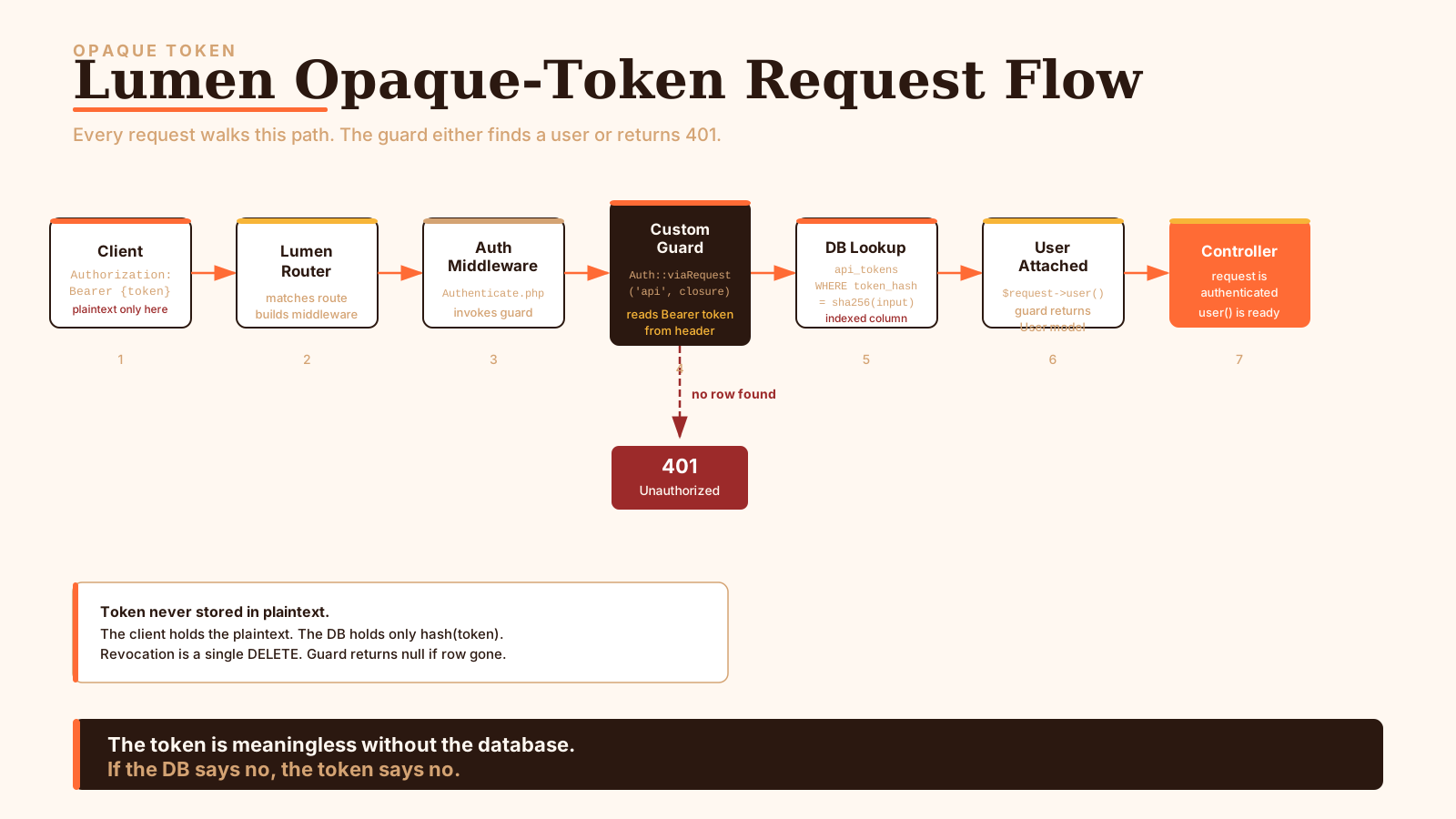
Opaque tokens are random strings. The server hands you tok_2P9..., stores the SHA-256 of it in personal_access_tokens, and on every request looks the row up by hash. Revocation is a single DELETE. The token is meaningless without the database: if the DB says no, the token says no.
JWTs are signed payloads. The server hands you eyJhbG...header.payload.signature, and on every request it verifies the signature with a secret (HS256) or a public key (RS256). There's no database lookup in the hot path. Revoking before expiry means either keeping a blacklist (which puts the database back in the hot path) or rotating the signing key (which kills every token, not just one).
Trade-offs that actually matter in a Lumen service:
| Opaque tokens | JWT | |
|---|---|---|
| Per-request DB hit | Yes | No (unless you blacklist) |
| Revocation cost | One row delete | Blacklist row, or key rotation |
| Token size | ~40 bytes | ~500-1500 bytes |
| Inter-service trust | Shared DB | Shared key |
| Leak window | Until you delete the row | Until the token expires |
| Library lift | None (Lumen + DB) | tymon/jwt-auth or firebase/php-jwt |
The pattern that works for most single-service Lumen APIs is opaque tokens with short-ish lifetimes. You already have a database, the per-request lookup is microseconds with a hash index, and you get clean revocation for free.
The pattern that works for fleet-of-services is JWTs with short access tokens and a refresh endpoint. The shared key lets every service verify without phoning home; the short lifetime keeps the leak window narrow; the refresh endpoint is where you put the database back in the loop for revocation.
If you're stuck choosing, start with opaque tokens. You can always add JWT later for service-to-service hops; the inverse is harder.
The Opaque-Token Path
Let's wire this one end-to-end. You'll need: a tokens table, a custom guard, the auth middleware, and a login route that issues tokens.
The table
<?php

use Illuminate\Database\Migrations\Migration;
use Illuminate\Database\Schema\Blueprint;
use Illuminate\Support\Facades\Schema;

return new class extends Migration {
    public function up(): void
    {
        Schema::create('api_tokens', function (Blueprint $table) {
            $table->id();
            $table->foreignId('user_id')->constrained()->cascadeOnDelete();
            $table->string('name');                    // device/app label
            $table->char('token_hash', 64)->unique();  // sha256 hex
            $table->json('abilities')->nullable();     // scopes, e.g. ["orders:read"]
            $table->timestamp('last_used_at')->nullable();
            $table->timestamp('expires_at')->nullable();
            $table->timestamps();

            $table->index(['user_id', 'expires_at']);
        });
    }

    public function down(): void
    {
        Schema::dropIfExists('api_tokens');
    }
};
Three things to notice. The token_hash column stores SHA-256 of the plaintext token, never the plaintext itself. The abilities column is JSON so you can express scopes per token without joining a separate table. The expires_at index lets your cleanup job sweep stale tokens cheaply.
Bootstrap wiring
This is the part Lumen tutorials gloss over. You have to uncomment and add lines in bootstrap/app.php to make any of this work.
$app->withFacades();
$app->withEloquent();

$app->routeMiddleware([
    'auth'    => App\Http\Middleware\Authenticate::class,
    'ability' => App\Http\Middleware\CheckAbility::class,
    'throttle' => App\Http\Middleware\ThrottleRequests::class,
]);

$app->register(App\Providers\AuthServiceProvider::class);

// Force config/auth.php to load — Lumen doesn't auto-load config files.
$app->configure('auth');
$app->configure('auth') is the line everyone forgets. Lumen lazy-loads config files; if you don't tell it to load config/auth.php, your guard config silently won't apply and Auth::viaRequest will hit a default that doesn't exist.
The config
<?php

return [
    'defaults' => [
        'guard' => 'api',
    ],

    'guards' => [
        'api' => [
            'driver' => 'api', // matches Auth::viaRequest('api', ...)
        ],
    ],
];
Tiny on purpose. The driver name api is the string you'll match in AuthServiceProvider.
The guard
<?php

namespace App\Providers;

use App\Models\ApiToken;
use Illuminate\Support\Facades\Auth;
use Illuminate\Support\ServiceProvider;

class AuthServiceProvider extends ServiceProvider
{
    public function boot(): void
    {
        Auth::viaRequest('api', function ($request) {
            $token = $request->bearerToken();
            if (!$token) {
                return null;
            }

            $record = ApiToken::with('user')
                ->where('token_hash', hash('sha256', $token))
                ->where(function ($q) {
                    $q->whereNull('expires_at')
                      ->orWhere('expires_at', '>', now());
                })
                ->first();

            if (!$record) {
                return null;
            }

            // Best-effort last_used update, never block the request on it.
            $record->forceFill(['last_used_at' => now()])->saveQuietly();

            // Attach abilities so middleware can read them off the user.
            $user = $record->user;
            $user->setAttribute('current_token_abilities', $record->abilities ?? []);

            return $user;
        });
    }
}
Auth::viaRequest($driver, $closure) is the whole hook. The closure returns the authenticated user or null. Once it returns a user, auth()->user(), auth()->id(), and the auth middleware all work the way they would in Laravel, because under the hood they go through the same Illuminate\Auth\GuardHelpers trait.
A few details worth calling out:
$request->bearerToken()parsesAuthorization: Bearer xxxfor you. It also returnsnullif the header is missing or malformed, so you don't need defensivestr_starts_withchecks.hash('sha256', $token)is fast and constant-time enough for this lookup. You're comparing a 64-char hex string against an indexed column with no timing side channel that matters here, because the database does the comparison and the result is a row-or-not-row.saveQuietly()skips events. If you don't, every authenticated request fires a model event, which usually isn't what you want for a metadata touch.- The
current_token_abilitiesattribute is a no-DB way to ferry scope info from the guard to whatever ability-check middleware you write next.
Issuing tokens
<?php

namespace App\Http\Controllers\Auth;

use App\Http\Controllers\Controller;
use App\Models\ApiToken;
use App\Models\User;
use Illuminate\Http\Request;
use Illuminate\Support\Facades\Hash;
use Illuminate\Support\Str;

class LoginController extends Controller
{
    public function login(Request $request)
    {
        $this->validate($request, [
            'email'       => 'required|email',
            'password'    => 'required|string',
            'device_name' => 'required|string|max:255',
        ]);

        $user = User::where('email', $request->input('email'))->first();

        if (!$user || !Hash::check($request->input('password'), $user->password)) {
            return response()->json(['message' => 'Invalid credentials'], 401);
        }

        $plain = Str::random(64);

        ApiToken::create([
            'user_id'    => $user->id,
            'name'       => $request->input('device_name'),
            'token_hash' => hash('sha256', $plain),
            'abilities'  => $request->input('abilities', ['*']),
            'expires_at' => now()->addDays(30),
        ]);

        return response()->json([
            'token'      => $plain,
            'expires_at' => now()->addDays(30)->toIso8601String(),
        ], 201);
    }
}
The plaintext token is generated, sent back to the client exactly once, and only its hash is stored. If a user loses the token, they don't recover it. They get a new one. That's the same model GitHub PATs and Sanctum tokens use.
Str::random(64) uses random_bytes under the hood, which is cryptographically secure on every supported PHP version. You don't need a UUID, and you definitely don't need md5(microtime()). Both still show up in the wild and both are wrong.
Revoking tokens
<?php

namespace App\Http\Controllers\Auth;

use App\Http\Controllers\Controller;
use App\Models\ApiToken;
use Illuminate\Http\Request;

class LogoutController extends Controller
{
    public function logout(Request $request)
    {
        $token = $request->bearerToken();
        if (!$token) {
            return response()->json(['message' => 'No token provided'], 400);
        }

        ApiToken::where('token_hash', hash('sha256', $token))->delete();

        return response()->json(['message' => 'Logged out'], 200);
    }

    public function logoutAll(Request $request)
    {
        ApiToken::where('user_id', $request->user()->id)->delete();

        return response()->json(['message' => 'All sessions logged out'], 200);
    }
}
This is the move JWT can't make cheaply. One row delete and the token is dead everywhere. logoutAll is the "I lost my phone" button: same idea, every token for that user.
Wiring routes
$router->post('/auth/login',  'Auth\LoginController@login');

$router->group(['middleware' => 'auth'], function () use ($router) {
    $router->post('/auth/logout',     'Auth\LogoutController@logout');
    $router->post('/auth/logout-all', 'Auth\LogoutController@logoutAll');
    $router->get('/me', function () {
        return response()->json(auth()->user());
    });
});
That's the entire opaque-token setup. Around 200 lines of code across five files. Zero dependencies beyond what Lumen ships. The database does the heavy lifting, which is the right shape for a single-service API.
The JWT Path With tymon/jwt-auth
If you decided JWT instead, this is the package. tymon/jwt-auth has been the de facto JWT library for Laravel and Lumen since 2014; version 2.x supports Lumen 9+ and PHP 8.0+. There are alternatives: firebase/php-jwt is the lower-level option if you want to assemble the pieces yourself, but tymon/jwt-auth is what most Lumen teams reach for because it ships a Lumen-specific service provider and a working set of middleware.
Install
composer require tymon/jwt-authThen in bootstrap/app.php:
$app->register(Tymon\JWTAuth\Providers\LumenServiceProvider::class);

$app->routeMiddleware([
    'auth'      => App\Http\Middleware\Authenticate::class,
    'jwt.auth'  => Tymon\JWTAuth\Http\Middleware\Authenticate::class,
    'jwt.check' => Tymon\JWTAuth\Http\Middleware\Check::class,
    'jwt.refresh' => Tymon\JWTAuth\Http\Middleware\RefreshToken::class,
]);

$app->configure('auth');
$app->configure('jwt');
Then publish the JWT config and generate the secret:
php artisan jwt:secretThat writes a JWT_SECRET=... line to .env. If you want to use RS256 instead of HS256, the package supports it, and you'll set JWT_ALGO=RS256 and provide JWT_PUBLIC_KEY and JWT_PRIVATE_KEY paths in config/jwt.php.
The User model
JWT needs the user model to implement Tymon\JWTAuth\Contracts\JWTSubject:
<?php

namespace App\Models;

use Illuminate\Auth\Authenticatable;
use Illuminate\Database\Eloquent\Model;
use Tymon\JWTAuth\Contracts\JWTSubject;

class User extends Model implements
    \Illuminate\Contracts\Auth\Authenticatable,
    JWTSubject
{
    use Authenticatable;

    protected $hidden = ['password'];

    public function getJWTIdentifier()
    {
        return $this->getKey();
    }

    public function getJWTCustomClaims()
    {
        return [
            'role' => $this->role,
            'tid'  => 'session-' . bin2hex(random_bytes(8)),
        ];
    }
}
getJWTIdentifier returns the sub claim, which is almost always the primary key. getJWTCustomClaims is where you stuff anything the API will want to read off the token without a DB hit. Keep this list short. Every claim adds bytes to every request, and every claim that isn't sub/iat/exp is one you have to remember to invalidate when the underlying fact changes.
The tid claim is a per-session ID. You'll use it for selective revocation in a minute.
The guard
<?php

return [
    'defaults' => [
        'guard' => 'api',
    ],

    'guards' => [
        'api' => [
            'driver'   => 'jwt',
            'provider' => 'users',
        ],
    ],

    'providers' => [
        'users' => [
            'driver' => 'eloquent',
            'model'  => App\Models\User::class,
        ],
    ],
];
The jwt driver is registered by LumenServiceProvider. You don't write your own Auth::viaRequest closure. The package handles it.
Login
<?php

namespace App\Http\Controllers\Auth;

use App\Http\Controllers\Controller;
use Illuminate\Http\Request;

class JwtLoginController extends Controller
{
    public function login(Request $request)
    {
        $this->validate($request, [
            'email'    => 'required|email',
            'password' => 'required|string',
        ]);

        $credentials = $request->only('email', 'password');

        if (!$token = auth('api')->attempt($credentials)) {
            return response()->json(['message' => 'Invalid credentials'], 401);
        }

        return $this->respondWithToken($token);
    }

    public function refresh()
    {
        return $this->respondWithToken(auth('api')->refresh());
    }

    public function logout()
    {
        auth('api')->logout(); // adds the current token to the blacklist
        return response()->json(['message' => 'Logged out']);
    }

    protected function respondWithToken(string $token)
    {
        return response()->json([
            'access_token' => $token,
            'token_type'   => 'bearer',
            'expires_in'   => auth('api')->factory()->getTTL() * 60,
        ]);
    }
}
auth('api')->attempt() is the JWT-aware version of Auth::attempt. It verifies the password, mints a token, and returns the JWT string. auth('api')->refresh() exchanges the current token for a fresh one (within the refresh TTL window). auth('api')->logout() adds the token's jti to the blacklist so it's rejected even before expiry.
The TTL is set in config/jwt.php:
'ttl'         => env('JWT_TTL', 15),         // minutes — keep short
'refresh_ttl' => env('JWT_REFRESH_TTL', 20160), // 2 weeks
'blacklist_enabled' => env('JWT_BLACKLIST_ENABLED', true),
Short access TTL is the single biggest decision that makes JWTs safe in practice. 15 minutes is a reasonable default. An hour is acceptable. A day is asking for trouble. The threat model is "a token leaked five minutes ago": at 15 minutes you have a 15-minute exposure window; at 24 hours you have a 24-hour exposure window.
Routes
$router->post('/auth/login',   'Auth\JwtLoginController@login');
$router->post('/auth/refresh', 'Auth\JwtLoginController@refresh');

$router->group(['middleware' => 'jwt.auth'], function () use ($router) {
    $router->post('/auth/logout', 'Auth\JwtLoginController@logout');
    $router->get('/me', fn () => response()->json(auth('api')->user()));

    $router->get('/orders',        'OrderController@index');
    $router->post('/orders',       'OrderController@store');
});
jwt.auth is the middleware that parses the token, verifies the signature, checks the blacklist, and attaches the user to the request. If any step fails, the middleware throws and the response is 401.
Middleware: Where Auth Actually Lives
The middleware layer is where the rubber meets the road in Lumen auth. Get this wrong and the rest doesn't matter.
How Lumen middleware is registered
There are two registration spots in bootstrap/app.php, and the difference matters:
// Global — runs on every request, including health checks.
$app->middleware([
    App\Http\Middleware\RequestId::class,
    App\Http\Middleware\SecurityHeaders::class,
]);

// Route-scoped — only runs when applied via group/route.
$app->routeMiddleware([
    'auth'       => App\Http\Middleware\Authenticate::class,
    'throttle'   => App\Http\Middleware\ThrottleRequests::class,
    'ability'    => App\Http\Middleware\CheckAbility::class,
    'admin-only' => App\Http\Middleware\AdminOnly::class,
]);
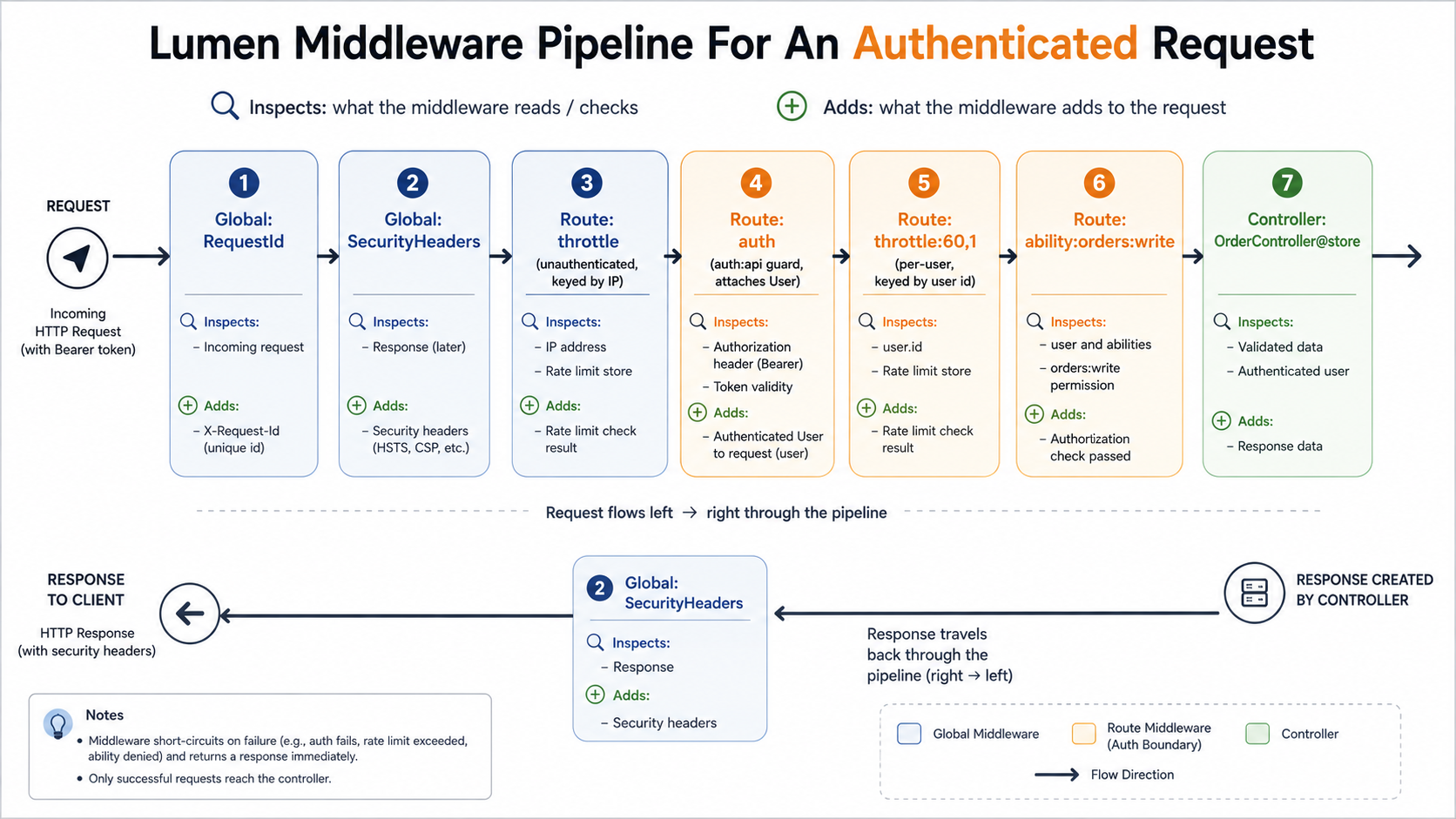
Global middleware runs before the router has resolved which route is being hit. That means it can't read route parameters, can't access the matched controller, and must be cheap: anything you put here runs on /healthz too.
Route middleware runs inside the routing context, has access to the route object, and only runs when applied. This is where every auth-shaped concern belongs.
The middleware contract
<?php

namespace App\Http\Middleware;

use Closure;
use Illuminate\Contracts\Auth\Factory as Auth;

class Authenticate
{
    public function __construct(protected Auth $auth) {}

    public function handle($request, Closure $next, $guard = null)
    {
        if ($this->auth->guard($guard)->guest()) {
            return response()->json(['message' => 'Unauthorized'], 401);
        }

        return $next($request);
    }
}
That's it. Lumen middleware is a class with a handle($request, $next, ...$params) method that either returns a response or calls $next($request). The $guard parameter is what lets you write 'middleware' => 'auth:api'. Lumen splits on the colon and passes the rest as middleware arguments.
Custom middleware patterns
Ability check: token scopes, the same way Sanctum does it:
<?php

namespace App\Http\Middleware;

use Closure;

class CheckAbility
{
    public function handle($request, Closure $next, string $required)
    {
        $user = $request->user();
        if (!$user) {
            return response()->json(['message' => 'Unauthorized'], 401);
        }

        $abilities = $user->current_token_abilities ?? [];

        if (in_array('*', $abilities, true) || in_array($required, $abilities, true)) {
            return $next($request);
        }

        return response()->json([
            'message' => 'This token does not have the required ability',
            'ability' => $required,
        ], 403);
    }
}
Used as:
$router->group(['middleware' => ['auth', 'ability:orders:read']], function () use ($router) {
    $router->get('/orders', 'OrderController@index');
});
Login throttling: the single most-skipped middleware in production Lumen APIs:
<?php

namespace App\Http\Middleware;

use Closure;
use Illuminate\Cache\RateLimiter;
use Illuminate\Http\Request;

class ThrottleLogin
{
    public function __construct(protected RateLimiter $limiter) {}

    public function handle(Request $request, Closure $next, int $maxAttempts = 5, int $decayMinutes = 1)
    {
        $key = sha1($request->input('email', '') . '|' . $request->ip());

        if ($this->limiter->tooManyAttempts($key, $maxAttempts)) {
            $seconds = $this->limiter->availableIn($key);
            return response()->json([
                'message'     => 'Too many login attempts',
                'retry_after' => $seconds,
            ], 429)->header('Retry-After', $seconds);
        }

        $this->limiter->hit($key, $decayMinutes * 60);

        $response = $next($request);

        // Clear the counter on success so legitimate users aren't penalised.
        if ($response->getStatusCode() === 201 || $response->getStatusCode() === 200) {
            $this->limiter->clear($key);
        }

        return $response;
    }
}
Apply it to /auth/login specifically. The bulk-routes block isn't where brute force happens.
Middleware ordering pitfalls
Lumen runs middleware in the order they're declared on the route, outer-first. That means:
$router->group(['middleware' => ['throttle:60,1', 'auth', 'ability:orders:write']], ...);...throttles before auth before ability check. Usually correct. But:
$router->group(['middleware' => ['auth', 'throttle:60,1']], ...);...authenticates before throttling. Now your throttle key can be $request->user()->id instead of $request->ip(), which is what you want for per-user rate limits. But it means every request, including unauthenticated ones that are about to be 401'd, paid the cost of the auth lookup. If you're getting hit by a credential-stuffing attack, that's exactly the wrong order.
Put unauthenticated throttling before auth, and per-user throttling after it. Two different middleware applications for two different threats.
A note on Closure middleware
Lumen accepts inline closure middleware:
$router->group(['middleware' => function ($request, $next) { /* ... */ }], ...);Don't. The class-based form is testable, type-hinted, and reusable. Closure middleware is for one-off prototypes, and prototypes have a way of shipping.
Refresh Tokens And Revocation In The JWT World
If you went with JWT, refresh is where most of the hard thinking actually lives. The naive approach of issuing a 24-hour token and letting the client re-login when it expires fails the first time you need to log a user out before that window closes.
There are three patterns that actually work, in increasing order of complexity.
Pattern 1: Blacklist-on-logout, short TTL
tymon/jwt-auth ships this. When auth('api')->logout() runs, the package adds the token's jti to the blacklist (Redis or cache by default), and the jwt.auth middleware checks the blacklist on every request. Combined with a 15-minute TTL, your exposure window for a leaked token is min(time-to-blacklist, 15 minutes).
The trade-off you've just made is that JWT verification is no longer stateless: every request hits the cache. But it's still cheaper than a database lookup, and the cache hit is the same shape regardless of how many tokens you've issued.
Pattern 2: Sliding refresh window
The client holds two tokens: a short-lived access token (15 min) and a long-lived refresh token (2 weeks). When the access token expires, the client trades the refresh token for a new pair. Both tokens are JWTs, but the refresh token's jti is also stored in a refresh_tokens database table.
Revocation is a row delete on refresh_tokens. The next time the access token expires (≤ 15 min away), the client tries to refresh and gets a 401. You've put the database back in the loop, but only on the refresh path, which runs once every fifteen minutes instead of on every request.
<?php

namespace App\Http\Controllers\Auth;

use App\Http\Controllers\Controller;
use App\Models\RefreshToken;
use Illuminate\Http\Request;
use Tymon\JWTAuth\Facades\JWTAuth;

class RefreshController extends Controller
{
    public function refresh(Request $request)
    {
        $this->validate($request, ['refresh_token' => 'required|string']);

        $stored = RefreshToken::where('token_hash', hash('sha256', $request->input('refresh_token')))
            ->where('expires_at', '>', now())
            ->first();

        if (!$stored) {
            return response()->json(['message' => 'Invalid refresh token'], 401);
        }

        $user = $stored->user;
        $access = JWTAuth::fromUser($user);

        // Rotate: invalidate the used refresh token, issue a new one.
        $stored->delete();
        $plainNew = bin2hex(random_bytes(32));
        RefreshToken::create([
            'user_id'    => $user->id,
            'token_hash' => hash('sha256', $plainNew),
            'expires_at' => now()->addDays(14),
        ]);

        return response()->json([
            'access_token'  => $access,
            'refresh_token' => $plainNew,
            'expires_in'    => 15 * 60,
        ]);
    }
}
The bin2hex(random_bytes(32)) gives you a 64-char refresh token that's not a JWT. There's no point making it a JWT, because you're going to look it up in the database anyway. Treat it as an opaque token that happens to live alongside a JWT access token.
Pattern 3: Reuse detection
Once you've got rotation, the next step is reuse detection. If a refresh token is presented after it's already been used (which means the previous holder rotated and got a new one), you know something's wrong: either the legitimate user lost their session and an attacker has the old token, or the legitimate user has it and an attacker also got it from somewhere.
Either way, the safe move is to invalidate every refresh token for that user and force re-login.
$used = UsedRefreshToken::where('token_hash', $hash)->first();
if ($used) {
    // Someone is presenting an already-rotated token. Burn it all down.
    RefreshToken::where('user_id', $used->user_id)->delete();
    return response()->json(['message' => 'Session compromised, please log in again'], 401);
}
This is the OAuth2 refresh token rotation with reuse detection pattern. It's overkill for a small internal API. It's the right default for anything customer-facing.
Security: The Five Things Lumen APIs Get Wrong
Let's walk through the five issues that show up most often in real Lumen APIs, in roughly the order of how bad they are.
1. Storing tokens in plaintext
Half the auth tables out there look like this:
CREATE TABLE api_tokens (
    id BIGINT PRIMARY KEY,
    user_id BIGINT,
    token VARCHAR(255),   -- plaintext
    created_at TIMESTAMP
);
A DB dump now leaks every active token. Anyone with read access to the table can impersonate every user. The fix is what we did above: store hash('sha256', $token) and forget the plaintext as soon as you've returned it to the client.
If you're inheriting a table like this, the migration path is: add a token_hash column, write a one-off backfill that hashes every existing token, switch the auth guard to look up by hash, drop the plaintext column. Don't try to do it in a single deploy; the order matters.
2. Long-lived tokens with no revocation path
A 90-day JWT with no blacklist and no refresh flow is the worst of both worlds. You have all the operational downsides of stateless tokens (can't revoke) and none of the security benefits of short-lived ones (small leak window). Either:
- Use opaque tokens with a TTL, and revoke by row delete.
- Use short-lived JWTs with a refresh flow, and revoke at refresh time.
But not "long-lived JWTs and hope nobody loses one." That's not a strategy, that's deferred panic.
3. Leaking JWT_SECRET (or losing track of who has it)
The HS256 secret is a symmetric key. Anyone who has it can mint valid tokens for any user. In a real org this means:
- It belongs in your secrets manager (AWS Secrets Manager, Vault, Doppler, or GCP Secret Manager).
- It is never committed to git, including in
.env.example. - It is rotated when an engineer with access leaves the team.
- It is different per environment: staging and production share nothing.
If you're running multiple services that verify the same tokens, switch to RS256. The private key stays on the issuer; every other service holds only the public key, which can't mint tokens. A leak of the public key is a non-event.
'algo' => env('JWT_ALGO', 'RS256'),
'keys' => [
    'public'   => env('JWT_PUBLIC_KEY'),
    'private'  => env('JWT_PRIVATE_KEY'),
    'passphrase' => env('JWT_PASSPHRASE'),
],
4. Skipping rate limiting on /auth/login
The single most attacked endpoint in your service. If /auth/login will accept 1000 requests per second from one IP, an attacker with a list of leaked passwords from another site will use that throughput to find every user who reused one.
Two layers, both required:
- Per-IP limit: say, 60 attempts/minute. Stops the dumb scripts.
- Per-(email + IP) limit: say, 5 attempts/minute. Stops the smart ones.
The middleware example above does this. The mistake is leaving it off because "we have a captcha on the frontend." The frontend isn't the only thing that calls /auth/login. Anyone can curl it.
5. Returning auth errors that leak structure
Compare:
{ "message": "User with this email does not exist" }{ "message": "Invalid credentials" }The first one lets an attacker enumerate which emails have accounts on your platform by trying them one at a time and looking at the error. The second one tells them nothing. Same response, same status code, regardless of whether the email exists or the password is wrong.
This extends to timing. If User::where('email', ...) returns fast (no user) and Hash::check($password, $user->password) is slow (real user, real bcrypt), an attacker can time the response and infer user existence anyway. The fix is to run Hash::check against a dummy hash when the user doesn't exist:
$user = User::where('email', $request->input('email'))->first();

$dummy = '$2y$10$' . str_repeat('a', 53);
$valid = $user
    ? Hash::check($request->input('password'), $user->password)
    : Hash::check($request->input('password'), $dummy);

if (!$user || !$valid) {
    return response()->json(['message' => 'Invalid credentials'], 401);
}
This is the kind of detail that doesn't matter in a side project and absolutely matters in anything customer-facing. It's also the kind of detail libraries handle for you when you stop rolling your own, which is a fine reason to lean on tymon/jwt-auth for the JWT case and stick to its auth('api')->attempt() flow.
A Note On Where Lumen Ends And Your Architecture Begins
Lumen gives you the wiring and gets out of the way. The auth setup you end up with is mostly your design: what tokens look like, where they live, how they're revoked, who can read what. That's freedom and it's also rope. The patterns above hold up because they're conservative: short tokens, hashed at rest, scoped where it matters, throttled at the front door, with a refresh path that puts the database in the loop only when something's changing.
If you're starting a Lumen API today, my honest recommendation is: opaque tokens until you have a second service that needs to verify auth without a shared database, then JWT for the inter-service hop while the user-facing API stays opaque. The two-token approach is harder to explain but it's the shape that actually scales without leaving security holes you'll have to come back and patch under pressure.
Auth isn't where you want to discover that you optimised for the wrong thing.