You've probably lived through this situation.
There's a frontend repo and a backend repo. Both need the same User type. Someone copies it. A week later, the backend adds a phone field, but the frontend doesn't notice because it has its own copy. Three weeks later, a designer asks for a small change to a button, the button lives in the frontend repo, except a marketing site in another repo wants the same button, so it gets copied too. Now there are two buttons with slightly different shadows. Then someone writes a tiny utility for formatting dates. Three repos copy it. One repo's version has a leap-year bug fixed. The other two don't.
This is the slow drift problem, and it's what monorepos are trying to fix. Put all the code in one place, share types and components and utilities directly, and you stop copy-pasting around the organisation. The cost is that you trade one kind of pain (drift) for another (build orchestration, dependency hygiene, CI minutes that grow with the repo). The tools you'll see most often in the JavaScript world, pnpm, Turborepo, and Nx, exist to make that second kind of pain manageable.
This piece is about how the three fit together, what each one is actually doing, and the parts you'll wish you'd thought about before the repo grew to thirty packages. We'll focus on shared packages, caching, and dependency boundaries, the three things that decide whether a monorepo feels like a superpower or a slow tax on every PR.
The three tools, in plain terms
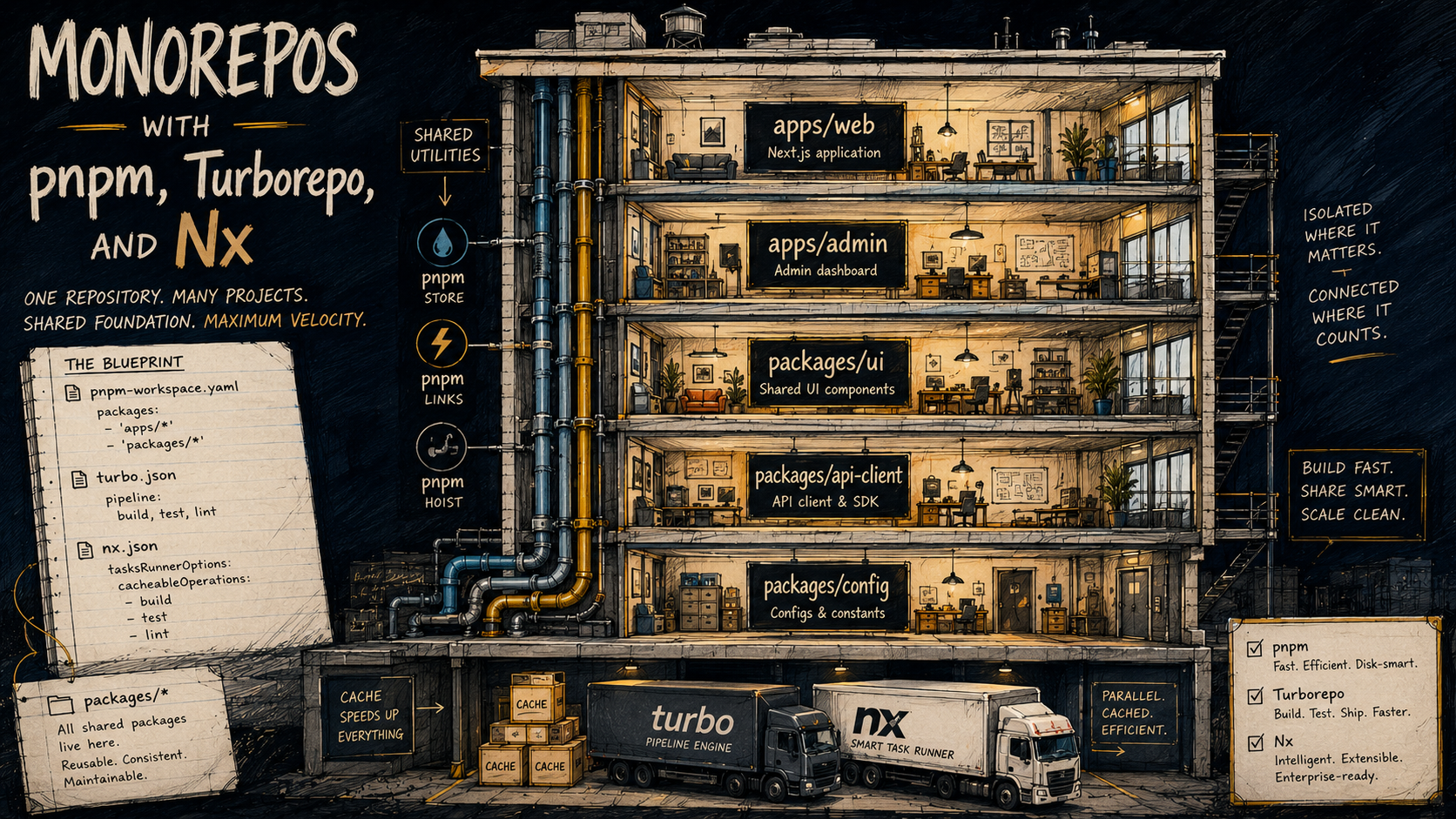
These three tools get talked about as if they're competitors. They're not, really. They sit at different layers.
pnpm is a package manager. It installs your dependencies, manages your lockfile, and, relevant here, has a first-class concept of workspaces: multiple packages in one repo, hoisted into a shared node_modules, with symlinks between them so import { Button } from "@acme/ui" in apps/web resolves to your local packages/ui source. It's not a build system. It doesn't know what "build" or "test" means. It just makes the packages addressable to each other.
Turborepo is a task runner with a cache. You tell it "to build apps/web, you first need to build packages/ui and packages/api-client", and it figures out the dependency graph, runs the tasks in the right order (in parallel where it can), and caches the outputs keyed by the inputs that produced them. If nothing changed for a package, it skips the work and replays the cached output. That's most of what Turborepo does, it's deliberately small.
Nx does what Turborepo does, plus more. It's a full monorepo platform, task runner with caching, yes, but also project generators (nx g react-app web), a richer dependency graph viewer, automatic affected-only commands, plugins for nearly every framework, and an opinionated way to organise your code into libraries with enforced boundaries. It's heavier to adopt and harder to remove, but it does more for you on day one.
The combinations you see in the wild:
- pnpm + Turborepo, the lightest setup, very common in modern Next.js and Remix shops. You write everything yourself; the tools mostly stay out of the way.
- pnpm + Nx, Nx replaces Turborepo's role as the task runner, and Nx's plugins do a lot of the scaffolding you'd otherwise hand-roll.
- Just Nx, Nx ships its own workspace logic if you don't want pnpm-specific behaviour, though most teams pair it with pnpm anyway.
- Just pnpm workspaces, no task runner. Fine for small repos with two or three packages. Falls apart around five.
There's no "right" one. What you actually need depends on how big the repo is going to get, how much custom tooling you want to maintain, and whether your team is happy to learn an Nx-shaped way of working.
What pnpm workspaces actually give you
Strip away the marketing words and pnpm workspaces is doing two things.
First, it lets multiple package.json files live in one repo under names like @acme/ui, @acme/api-client, apps/web. You declare them in a root file:
packages:
  - "apps/*"
  - "packages/*"
Second, when apps/web/package.json lists "@acme/ui": "workspace:*" as a dependency, pnpm sets up apps/web/node_modules/@acme/ui as a symlink straight back to packages/ui in the same repo. Imports resolve to local source. No publishing, no tarball juggling, no npm link rituals.
That's the whole trick. You can run pnpm install once at the root and every package in the repo is correctly wired to every other one.
What pnpm doesn't do is decide what order to build things in, or whether to build them at all. If you change packages/ui and want to retest apps/web and apps/admin and the docs site, you have to run those commands yourself, in the right order, or hope your pnpm -r run test flag works the way you want it to. That's the gap Turborepo and Nx step into.
A few pnpm-specific habits worth picking up early:
- Use
workspace:*instead of version numbers for internal dependencies. It's pnpm's way of saying "always use whatever version is local". When you publish a package, pnpm rewrites it to a real version automatically. - Set
shared-workspace-lockfile=truein.npmrc. This is the default, but worth confirming. One lockfile at the root, not one per package. - Turn on
strict-peer-dependenciesif you can stomach it. It catches the case where two packages disagree about what version of React they want before that mismatch hits production.
Sharing packages without breaking everything
The point of a monorepo is shared packages, that single User type, that single Button component, that single formatCurrency helper. So how you structure shared packages is the most consequential decision you'll make.
Some patterns that work:
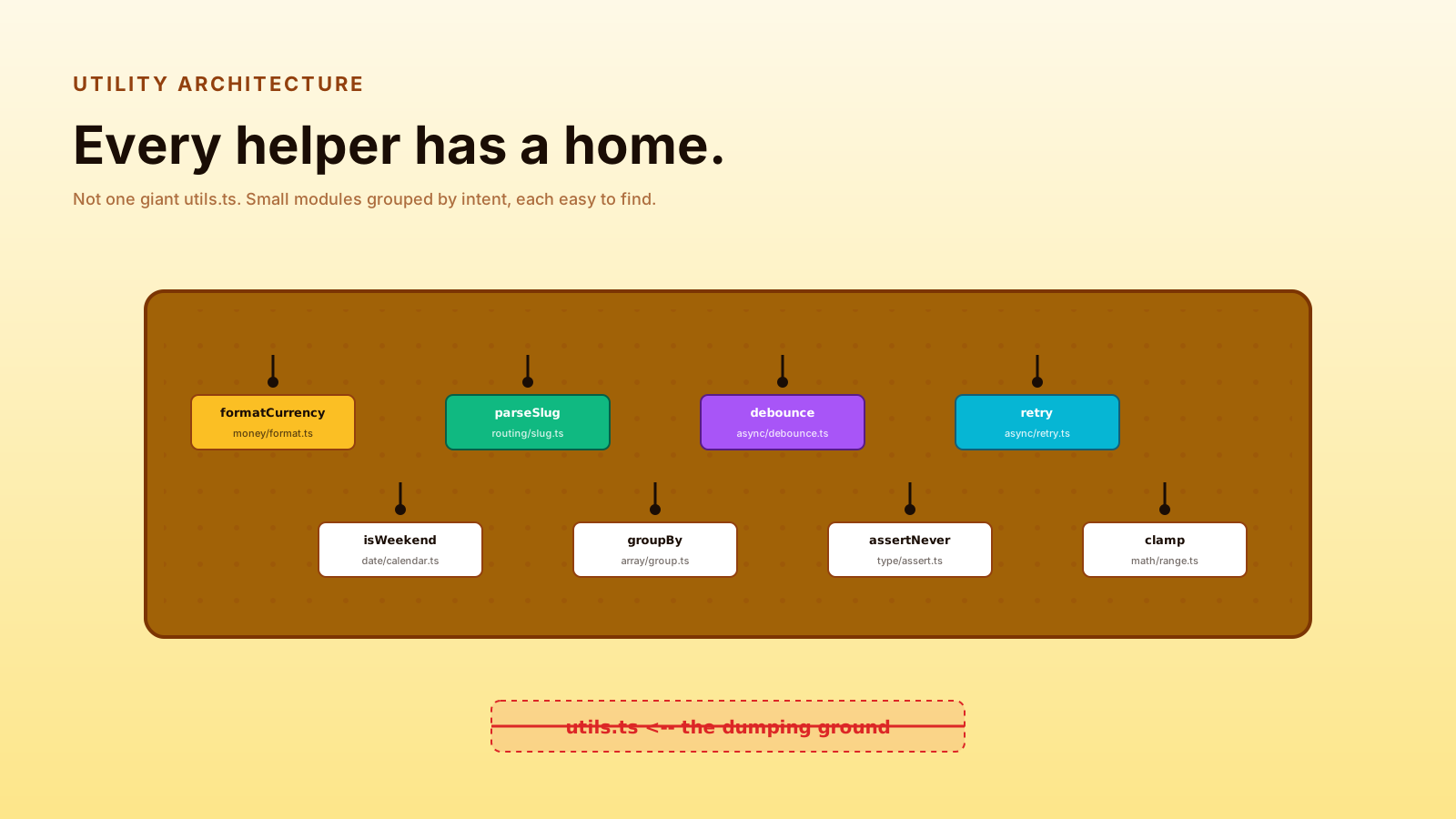
Tiny, focused packages. A package called @acme/utils that holds twenty unrelated helpers is the same anti-pattern as a giant helpers.js file, just spread across imports. Better to have @acme/dates, @acme/currency, @acme/log, each small, each with one clear job. The cost of "too many packages" is low; the cost of "one mega-package that everything depends on" is that touching any line in it invalidates the cache for the entire repo.
Apps consume packages, not the other way around. apps/* import from packages/*, never the reverse. Packages should be reusable; the moment a package imports from apps/web, it's an app-with-extra-steps and the boundary is gone.
Resist the urge to share too early. The first time two apps need a button, copy it. The second time, copy it. The third time, extract it. Premature sharing locks two consumers into a shape that fits neither.
Versioning is internal until it isn't. Inside the repo, everything is workspace:*. If you start publishing some packages externally (to npm or a private registry), introduce semver discipline only for the ones that leave the building.
The actual structure looks unremarkable:
apps/
  web/                  Next.js app, depends on ui + api-client + analytics
  admin/                Internal admin, depends on ui + api-client + auth
  marketing/            Astro site, depends on ui only
packages/
  ui/                   React component library (Button, Card, Modal)
  api-client/           Typed fetch wrappers around the backend
  config/               Shared TS configs, eslint configs, prettier
  log/                  Tiny logging wrapper with a unified API
  types/                Cross-cutting domain types (User, Workspace, Plan)
pnpm-workspace.yaml
turbo.json
package.json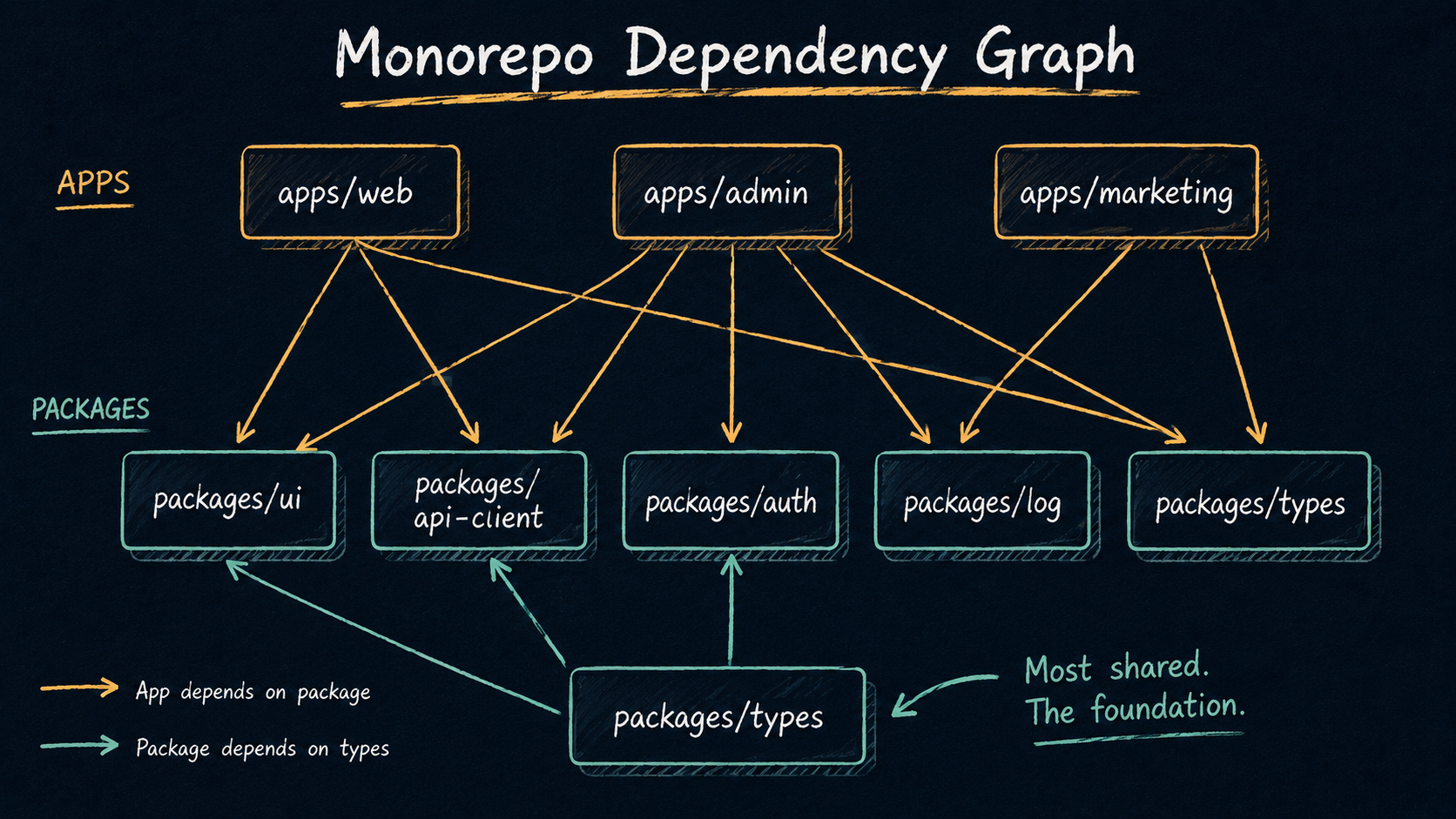
A package's package.json is doing most of the wiring:
{
  "name": "@acme/ui",
  "version": "0.0.0",
  "private": true,
  "main": "./src/index.ts",
  "types": "./src/index.ts",
  "exports": {
    ".": "./src/index.ts",
    "./button": "./src/button.tsx"
  },
  "scripts": {
    "build": "tsc -b",
    "lint": "eslint ."
  },
  "dependencies": {
    "react": "^18.2.0"
  },
  "devDependencies": {
    "@acme/config": "workspace:*",
    "typescript": "^5.4.0"
  }
}
A few decisions in there worth saying out loud.
main and types point to source, not built output. For an internal-only package consumed by other packages in the same repo, this means consumers compile your TypeScript as part of their own build. No separate dist/, no prepublish step, no "did you remember to build the library before testing the app" foot-gun. The downside is that consumers need to handle your TypeScript syntax, fine for Next.js, Vite, esbuild, tsx, Vitest; not fine if you're publishing externally. If you're publishing, you'll need a real build that emits dist/, and main/types should point there instead.
exports lets you control the public API. Anything not listed isn't importable. This is the cheapest way to enforce "don't import our internal helpers from outside the package".
private: true is the dead-man's switch that stops anyone accidentally publishing your internal package to npm. Always set it on packages that aren't meant to leave the repo.
Caching: what Turborepo and Nx actually do
The cache is the thing that turns a slow monorepo into a fast one. Without it, CI for a 30-package repo gets slower with every package you add. With it, CI takes about as long as the slice of work you actually changed, because everything else just replays from cache.
Both Turborepo and Nx work the same way at a high level. For each task (build, test, lint), they:
- Hash the inputs: source files, environment variables, dependency versions, the task config itself, and the outputs of upstream tasks this one depends on.
- Look that hash up in the cache (local first, remote if configured).
- If it's there, restore the outputs and skip the work. Print "cache hit, replaying logs" and move on.
- If not, run the task. On success, write the outputs to the cache under that hash.
The contract is "if the inputs are identical, the outputs are identical, so we don't need to run the task again". Everything interesting about caching is in defining the inputs correctly.
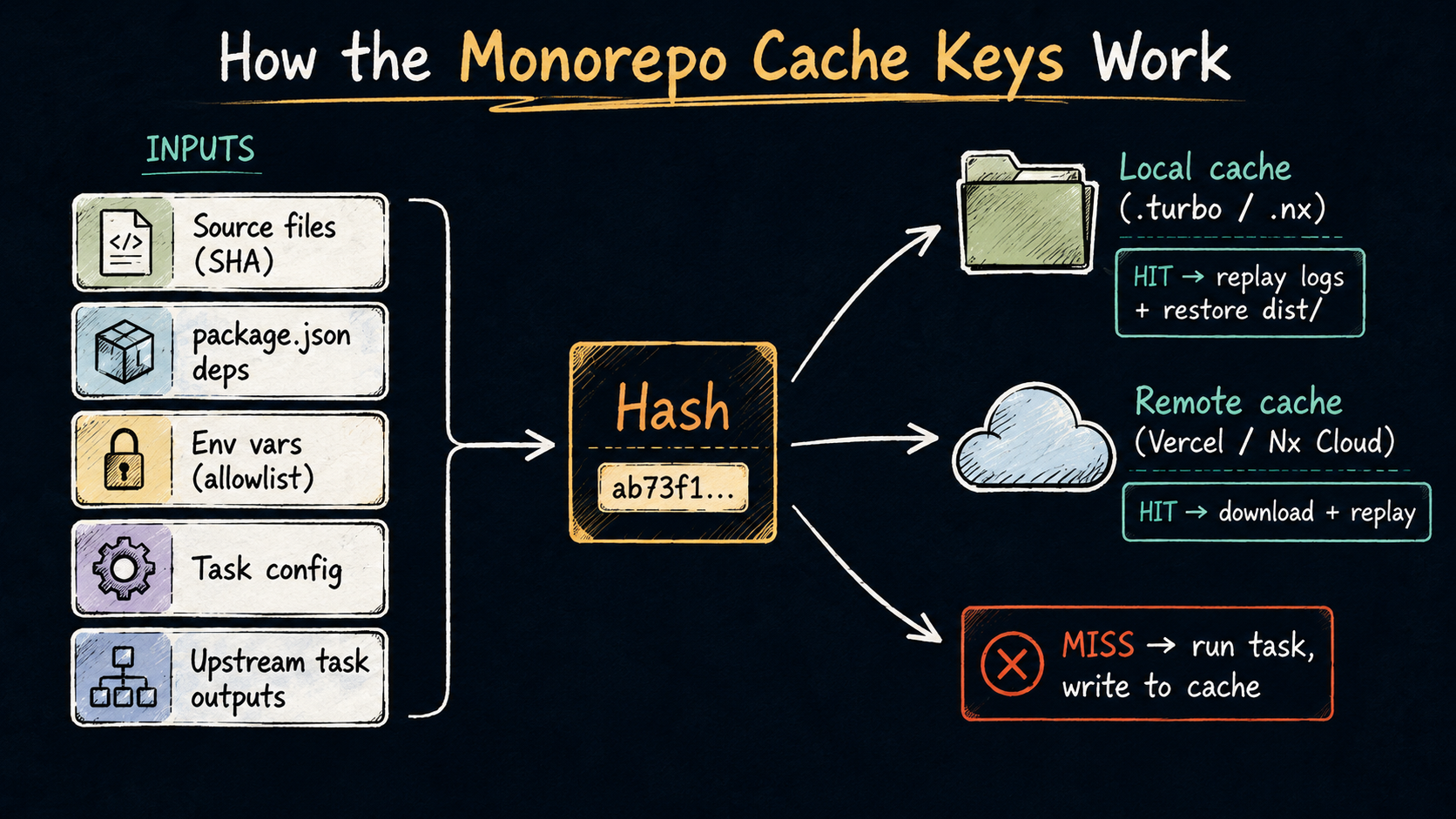
A Turborepo config is mostly a description of how tasks depend on each other and what their inputs and outputs are:
{
  "$schema": "https://turbo.build/schema.json",
  "tasks": {
    "build": {
      "dependsOn": ["^build"],
      "outputs": [".next/**", "!.next/cache/**", "dist/**"]
    },
    "test": {
      "dependsOn": ["^build"],
      "inputs": ["src/**", "test/**", "vitest.config.ts"],
      "outputs": ["coverage/**"]
    },
    "lint": {
      "dependsOn": [],
      "inputs": ["src/**", ".eslintrc.*"]
    },
    "dev": {
      "cache": false,
      "persistent": true
    }
  }
}
The pieces that matter:
dependsOn: ["^build"]means "before running build for this package, run build for all its dependencies". The caret prefix means "in upstream packages". So buildingapps/webwill triggerbuildinpackages/ui,packages/api-client, etc., first.outputstells Turbo what to save as the cached result. If your build emits to.next/anddist/, both need to be listed. Anything not listed won't be restored on a cache hit, which is the most common source of "why does my build look weird after a cached restore?" bugs.inputsrestricts what files Turbo considers when hashing. By default it considers everything in the package directory. Restricting tosrc/**for a test task means a README change won't bust the test cache.cache: falseandpersistent: trueare fordev-style commands that should never be cached and should keep running.
Nx does the same thing in a different shape, task config in nx.json and per-project project.json, with the concept of named inputs for reusable input groups. The mental model is identical.
A few patterns that pay off:
Be explicit about environment variables. Build outputs can depend on NODE_ENV, NEXT_PUBLIC_*, build-time API URLs. Both Turborepo and Nx let you declare which env vars are part of the hash; declare them explicitly. The footgun is "the cached build was for staging, but the env says production now and we just deployed staging assets".
Don't cache things that should always run. A format:check that takes 200ms is cheaper to re-run than to cache. A dev server can't be cached at all. Reserve the cache for the slow tasks: build, test, lint on large packages.
Use a remote cache. The local cache helps the same developer on the same machine. The remote cache (Vercel for Turborepo, Nx Cloud or self-hosted for Nx) is what makes CI fast and what lets developers benefit from each other's work. The first PR that touches packages/ui pays the build cost. Every other PR after that gets a cache hit until something in packages/ui changes again.
Watch for non-deterministic builds. If your build embeds a timestamp or a git SHA into a file, the output hash will change every run and you'll get cache hits on identical inputs but cache misses on identical outputs going into the next layer. Strip timestamps from build artifacts, or accept that the affected task will always rebuild.
What "affected" means and why it matters
A monorepo's CI gets slow when every PR runs every test. The fix is affected-only commands.
Turborepo offers turbo run test --filter=...[HEAD^1], which expands to "run test for every package changed since HEAD^1 and every package that depends on those, transitively". Nx has nx affected --target=test --base=origin/main, which does the same.
The plumbing is the dependency graph plus the git diff:
- Git diff tells you which files changed.
- The graph tells you which packages own those files.
- The graph also tells you which packages depend on those packages, transitively.
- The CI runs the requested target (
test,lint,build) only on that affected set.
A PR that touches a typo in apps/marketing runs marketing's tests and that's it. A PR that touches packages/types runs everything that imports types, because in a typed codebase, types touch everything.
This is the single biggest CI speedup a monorepo gives you. A common starter CI looks like:
name: CI
on: [pull_request]
jobs:
  build:
    runs-on: ubuntu-latest
    steps:
      - uses: actions/checkout@v4
        with: { fetch-depth: 0 }     # need history for the diff
      - uses: pnpm/action-setup@v4
      - uses: actions/setup-node@v4
        with: { node-version: 20, cache: pnpm }
      - run: pnpm install --frozen-lockfile
      - run: pnpm turbo run lint test build --filter=...[origin/main]
        env:
          TURBO_TOKEN: ${{ secrets.TURBO_TOKEN }}
          TURBO_TEAM: ${{ vars.TURBO_TEAM }}
fetch-depth: 0 is the easy thing to forget. Without it, the runner has a shallow clone and the diff against origin/main is wrong, usually too broad, sometimes empty. You'll know it's misconfigured because every PR builds the entire repo even when it should be a 30-second job.
Dependency boundaries
This is the part most teams skip until it bites them.
A monorepo gives you the ability to import any file from any package. Without rules, that ability becomes "the marketing site now imports from the admin app's internal helpers because someone needed a function once". A few months in, you can't refactor anything without breaking three unrelated apps.
Boundaries are how you stop that. There are three layers, from cheapest to strongest.
Layer 1: package exports. Already covered above. If a package's package.json only exports ./ and ./button, you physically cannot import @acme/ui/internal/colors from outside the package, TypeScript and the bundler will both fail. This is the easiest enforcement and it's free; just set it up at the start.
Layer 2: depcheck and dependency-cruiser. Tools that read your code and yell about disallowed imports. dependency-cruiser lets you write rules like "apps may import packages; packages may not import apps; apps may not import other apps; ui may not import api-client". It runs in CI and fails the build on violations. The rules look like this:
{
  "forbidden": [
    {
      "name": "no-app-to-app",
      "severity": "error",
      "from": { "path": "^apps/([^/]+)" },
      "to":   { "path": "^apps/(?!\\1)" }
    },
    {
      "name": "no-package-to-app",
      "severity": "error",
      "from": { "path": "^packages/" },
      "to":   { "path": "^apps/" }
    }
  ]
}
Layer 3: Nx tags and @nx/enforce-module-boundaries. Nx's preferred answer. Every project gets tags (scope:web, type:feature, type:ui). An ESLint rule reads those tags and enforces "feature projects may depend on ui projects; ui projects may not depend on feature projects; nothing tagged scope:web may import from anything tagged scope:admin". It's the most expressive and the most opinionated. If you're already on Nx, use it. If you're on Turborepo, dependency-cruiser plus exports plus a code-review rule is the rough equivalent.
Whichever layer you pick, the rules need to be enforced in CI, not just documented in a README. "We don't import apps from packages" in a doc nobody reads is the same as no rule.
A small list of boundary rules that work for almost every repo:
- Packages don't import from apps.
- Apps don't import from other apps.
- A "leaf" package (
@acme/log,@acme/types) doesn't import from a "feature" package (@acme/api-client,@acme/auth). The arrows point one way: leaves → features → apps. - Anything tagged "experimental" or "deprecated" can only be imported from places explicitly opted in.
Get those four right and the repo can grow for years without the dependency graph turning into spaghetti.
TypeScript in a monorepo
TypeScript has its own opinions about how packages relate. Two configs you'll meet:
Composite project references. A tsconfig.json with "composite": true lets other packages reference it as a "project reference". The compiler then builds packages in dependency order, emits .d.ts files into dist/, and re-uses them across consumers. It's the official TypeScript-blessed way to do multi-package builds.
{
  "extends": "@acme/config/tsconfig.base.json",
  "compilerOptions": {
    "composite": true,
    "outDir": "dist",
    "rootDir": "src"
  },
  "include": ["src/**/*"]
}{
"references": [
{ "path": "../../packages/ui" },
{ "path": "../../packages/api-client" }
]
}Path aliases and paths. Many monorepos skip composite and instead use tsconfig path aliases to point @acme/ui at the package's source directly. It's simpler, works with most bundlers out of the box, and means there's no separate "build packages first" step in dev. The trade-off: every consumer compiles every package's source from scratch on type-check, which scales worse for very large repos.
For most JavaScript-shaped monorepos (Next.js apps, Remix apps, Vite apps), the path-aliases approach is enough. The compositions-and-references dance is more relevant when you're publishing packages externally or when the type-check time on a single app exceeds a minute.
The one rule that catches everyone: shared tsconfig as a package. Put a packages/config/tsconfig.base.json in the repo and have every other package extend it. The first time you need to change one option across thirty packages you'll be glad you did. Same applies to ESLint configs, Prettier configs, and Vitest configs.
When the cache lies
The cache will eventually lie to you. Two common shapes:
Cache hit, but the artifact is broken. Usually means an input was missed from the hash. You changed a file, the cache said "I've seen this before", and replayed an old build that didn't include the change. Audit the inputs and outputs for the affected task. The fix is almost always "add the missing input to the task config".
Cache miss every run, even when nothing changed. Usually means an input is non-deterministic. The lockfile got reformatted by a tool, an env var includes a timestamp, the task config has a date in it, or one of the source files has a line ending that flips between LF and CRLF on different machines. Run turbo run build --dry-run (or nx show project ...) and look at the inputs Turbo/Nx is hashing. The offender is usually obvious.
A small habit that helps: invalidate the cache by changing the task config, not by deleting .turbo/. Bumping a version string in turbo.json invalidates that task across the entire team, including remote cache. Deleting .turbo/ only invalidates your own machine, which means everyone else still gets the broken artifact.
CI minutes are not free, but they're cheaper than you think
A common worry about monorepos is that the CI bill will explode. In practice, it doesn't, and the reason is the cache.
A PR that touches one file in one package:
- Without cache: every test in every package re-runs. 25 minutes on a big repo. Multiplied by every PR.
- With cache: tests run for that package plus its dependents. 90 seconds.
The expensive runs are the ones that update a leaf package everything depends on. Even those benefit, because the first PR that touches it pays the full cost, and every other PR opened against the same baseline gets a remote cache hit for everything except the changed slice.
The thing that does get expensive is the storage and network for the remote cache. Vercel's free tier is generous; Nx Cloud's is too. Self-hosting (S3-backed) is a one-time setup that often costs less than the CI minutes it saves on a team of more than five engineers.
When the answer is "not a monorepo"
Worth saying out loud: monorepos are not free, and a lot of repos work better as separate repos.
A monorepo earns its keep when you have:
- More than two apps that share real code (components, types, API clients).
- A single team or a few closely-collaborating teams that own all of it.
- The build tooling discipline to set up Turborepo or Nx correctly the first time.
A monorepo is not a good fit when:
- One repo is owned by frontend and the other by backend, and they release on different cadences and have no shared code beyond an OpenAPI spec.
- You have one app and "we might add more some day", premature.
- You're scared of build tooling. Monorepos amplify whatever discipline you have; if you can't keep one
tsconfig.jsonhealthy, three of them in a row will not save you.
The honest signal is "we keep copying the same code between repos and it keeps drifting". If that's not happening, you're probably fine with a polyrepo and a good shared-library publishing flow.
Picking the combination
If you're starting fresh today, the defaults that work for most teams:
- Small repo, two or three packages. Just pnpm workspaces. No task runner. Run scripts manually with
pnpm -r. Add Turborepo when build times pass the "this is annoying" line. - Medium repo, modern stack (Next.js, Vite, Remix). pnpm workspaces + Turborepo. Cheap to set up, generous cache, mostly stays out of your way.
- Large repo or organisation-wide platform. pnpm + Nx. The plugin ecosystem and the tags-based boundary enforcement pay off when more than one team is working in the same repo. You'll write less custom tooling.
- You're already on Nx. Stay on Nx. Migrating off it is more work than the difference is worth, unless you have a specific reason.
The shape that doesn't work well: spreading task config across both Turborepo and Nx in the same repo, hoping to pick the best of each. Pick one. The cache and the dependency graph are the value, and you only get to use one of them at a time.
A small checklist before you commit to a monorepo
If you're about to migrate three repos into one, walk through these first:
- Do you have a story for the deploy of each app? Vercel, Cloudflare Pages, Netlify, and Fly all support monorepos but each has its own way of saying "only deploy when this subdirectory changes".
- Do you have a story for CODEOWNERS so the right team gets pinged on PRs touching their packages?
- Have you decided on the rules for who can import from where, and how those rules will be enforced?
- Will your remote cache be Vercel (Turborepo), Nx Cloud, or self-hosted? Have you measured the actual cache-hit rate after a week?
- Are your env vars declared as cache inputs, or are you about to deploy a staging build to production?
- Does your CI fetch enough git history to compute the affected set correctly?
- Do you have at least one shared
tsconfigand ESLint config that every package extends?
None of these are deal-breakers, but you'll feel each one of them the first month if you skip it.
Monorepos aren't a magic productivity unlock, they're a way of moving certain kinds of pain (drift, duplication, copy-paste rot) into different kinds of pain (build orchestration, dependency hygiene, CI cost). The trade-off is usually worth it once you cross a certain size, and the tools, pnpm for the wiring, Turborepo or Nx for the orchestration and cache, are what make the new pain manageable. Set up the boundaries early, declare your cache inputs honestly, and the repo will keep being a pleasure to work in long after the third app and the fifteenth shared package show up.