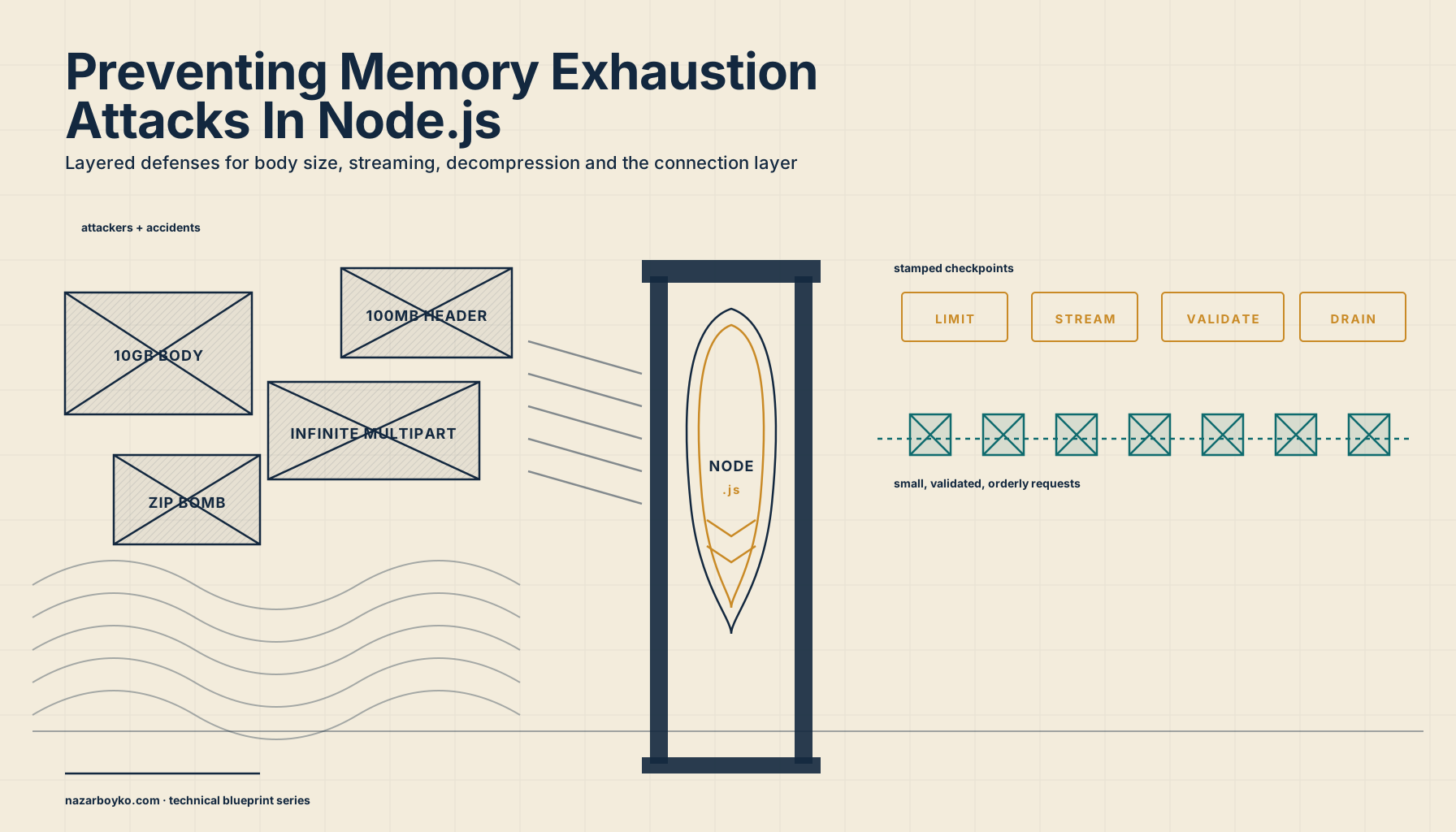
You ship a Node service. It accepts JSON, it accepts file uploads, it accepts the occasional gzipped payload from a partner integration. Every endpoint is wrapped in input validation, every controller is covered by tests, and the staging environment has been beaten on for a month. You're proud of it.
Then someone sends you a single POST request with a 10 GB body. The pod's memory chart goes vertical. The OOM killer steps in. The container restarts. The next request lands while the service is half-up, the same thing happens, and now you're stuck in a crash loop while the dashboard turns red.
You didn't ship a memory leak. You shipped a service that trusts the client's word about how big the body is. And that one decision is enough to let any anonymous user on the internet take you offline by holding down a key.
This piece is about that whole class of failure, what attackers (and accidents) can do to make a Node process run out of memory, why Node in particular is exposed to it, and the layered defenses that actually work. There's no clever trick at the end. The fix is a stack of small, boring, well-documented checks, applied at the right layer, before the data lands somewhere it can no longer be controlled. Most of the defenses already exist in the libraries you're already using. You just have to turn them on.
Why Node Is A Soft Target For Memory Attacks
Before we get into specific attacks, it's worth being honest about why this lands so hard in Node compared to, say, a thread-per-request Java service.
A Node process is a single OS process with a single V8 heap, and every request is sharing it. There's no per-request memory accounting, no per-request memory limit, no kernel-enforced cgroup that says "this one HTTP transaction gets 32 MB and no more." Whatever the request handler allocates lives in the same heap as every other handler, every cached object, every timer closure, every promise the runtime is still tracking. When the heap fills up, the process dies, not the request. The blast radius of one oversized payload is the entire service.
That's the structural part. There's also a cultural part. Node makes producers easy. A few lines and you've got an HTTP server, a JSON body parser, a file-upload handler. The defaults of those things are tuned for getting started fast, not for holding the line under hostile input. Express's express.json() middleware ships with a default body limit, but a generous one (100kb is the documented default, and many teams crank it up to 10mb the first time a customer complains about a payload getting rejected). The multer package, the most common file-upload middleware, has no upload size limit by default, you have to opt in to limits. Node's built-in HTTP server caps request header size but not request body size. The system is built to let you grow into the limits as you understand them, which means the limits don't exist until you put them there.
Add to that the asynchronous nature of every read. When a request arrives, the body streams in over the network. The runtime starts buffering bytes immediately. Your handler hasn't run yet, there's nothing in user code to inspect the body, because the body isn't there yet. By the time your handler gets called, the body has been fully buffered, which means a 10 GB body has occupied 10 GB of heap before any of your code got a say. The decision point you wanted, "is this body too big?", has already been overtaken by the bytes.
So: shared heap, generous defaults, buffering that runs ahead of your code. Those three together are why this category of bug shows up so often, and why the fixes have to live in specific places.
The Shape Of The Attack
The label "memory exhaustion attack" covers more ground than it sounds like. It's not just "send a huge body and watch it OOM." Here are the patterns that actually show up:
Oversized body, single request. The plain case. A client posts gigabytes to an endpoint that expects kilobytes. If your body parser has no limit, or a limit that's higher than your process can hold, that one request takes you down.
Many medium requests, in parallel. Less obvious. Each individual request is under your limit, say, 5 MB JSON when the cap is 10 MB. But the attacker opens 200 connections in parallel, holds them open while the bodies drip in slowly, and now you're buffering a gigabyte across the process. The per-request limit is fine; the missing limit is concurrent in-flight bytes.
Decompression bomb. A small compressed body that expands into something enormous. A 10 KB gzip can decompress to 10 GB if it's all zeros. If your endpoint accepts Content-Encoding: gzip and your library decompresses to memory without a cap on the output size, the request body limit gives you no protection, the limit applies to the compressed bytes.
Multipart upload with too many parts. A multipart form upload has fields, file parts, headers per part, filenames per part. An attacker can send a multipart body with a million tiny fields, each one allocating a string in your parser, even if the total body size is moderate. Or they can send file parts that never finish, holding open buffers indefinitely.
Deeply nested or pathological JSON. A JSON document where every value is a nested array, twenty thousand levels deep. The parsing itself allocates, the resulting object graph allocates, and even after parsing the GC has to walk an object tree of awful shape. Even moderate-size JSON can blow up if its shape is hostile.
Headers and metadata. Less common but real. A request with 50,000 header lines, each one allocating a key and value. If your stack doesn't reject this early, the headers eat memory before the body even starts.
Slow-loris style connection floods. The attacker opens many connections, sends a partial request each, and never finishes. Each open connection holds a socket buffer, parser state, and any headers received so far. If your server has no connection-level cap and no idle timeout, the memory grows by the connection count, not by any single payload size.
What ties these together is that none of them are exotic. They're all the same shape, trust + no limit at the entry point, applied to different fields. So the defenses are also the same shape, applied at the right layer.
Defense 1: Set Limits Before The Request Reaches Your Handler
The first rule is that your application is the last line of defense, not the first. Anything you can reject before it hits your Node process is bytes that never had to allocate.
If you're behind nginx, set client_max_body_size and client_body_buffer_size:
http {
  client_max_body_size 10m;
  client_body_buffer_size 16k;
  large_client_header_buffers 4 8k;
  client_body_timeout 10s;
  client_header_timeout 10s;
  send_timeout 10s;
}
Nginx will reject anything larger than client_max_body_size with a 413 before it ever touches your Node process. The two timeouts cap how long a slow client can hold the connection open without sending data. These four directives by themselves stop the simplest oversized-body and slow-loris attacks at the perimeter.
If you're on AWS, the Application Load Balancer enforces its own request size cap (1 MB request body for HTTP/HTTPS, more for the network load balancer). If you need higher than that, you raise it deliberately. CloudFront has its own per-request limit. The point is: every layer in front of Node should have a body size cap that's smaller than the limit you set in Node, not larger. The outer layers fail fast and cheap; the inner layers exist to catch what slipped past.
For the Node layer itself, set the limits on the body parser explicitly. Don't trust defaults, defaults change between major versions, and the value that ships with the library is rarely tuned to your endpoint's needs.
import express from 'express';

const app = express();

// JSON endpoints, most APIs need 100kb or less. Be specific.
app.use('/api/events', express.json({ limit: '100kb' }));

// A few endpoints might genuinely need more, e.g. bulk import.
app.use('/api/imports', express.json({ limit: '5mb' }));

// urlencoded forms have their own parameter limit too.
app.use('/api/forms', express.urlencoded({
  extended: true,
  limit: '100kb',
  parameterLimit: 1000,    // cap the number of parameters
}));

// Disable automatic decompression on the parser, then handle it explicitly.
app.use(express.json({ limit: '100kb', inflate: false }));
The important pieces:
limitis enforced while reading the body, not after. As soon asbody-parserhas bufferedlimitbytes, it stops reading and emits a 413. The body never gets fully allocated.parameterLimiton urlencoded matters because the attacker doesn't need a large total body, they need a million tiny parameters, each one creating a key and a value in memory. The default in Express is 1,000 but check your stack.- Disabling automatic decompression on the parser is a defensive move worth understanding, we'll come back to it in the decompression section.
For Fastify, the equivalents are bodyLimit on the server and per-route:
import Fastify from 'fastify';

const app = Fastify({
  bodyLimit: 100 * 1024, // 100 KB global default
});

app.post('/api/events', {
  bodyLimit: 100 * 1024,
}, async (req, reply) => {
  // handler
});

app.post('/api/imports', {
  bodyLimit: 5 * 1024 * 1024, // 5 MB only here
}, async (req, reply) => {
  // bulk import handler
});
The pattern is the same across frameworks: pick a per-endpoint limit based on what that endpoint actually needs, set it explicitly, and let the framework reject oversized requests before any handler code runs.
Defense 2: Stream Uploads, Don't Buffer Them
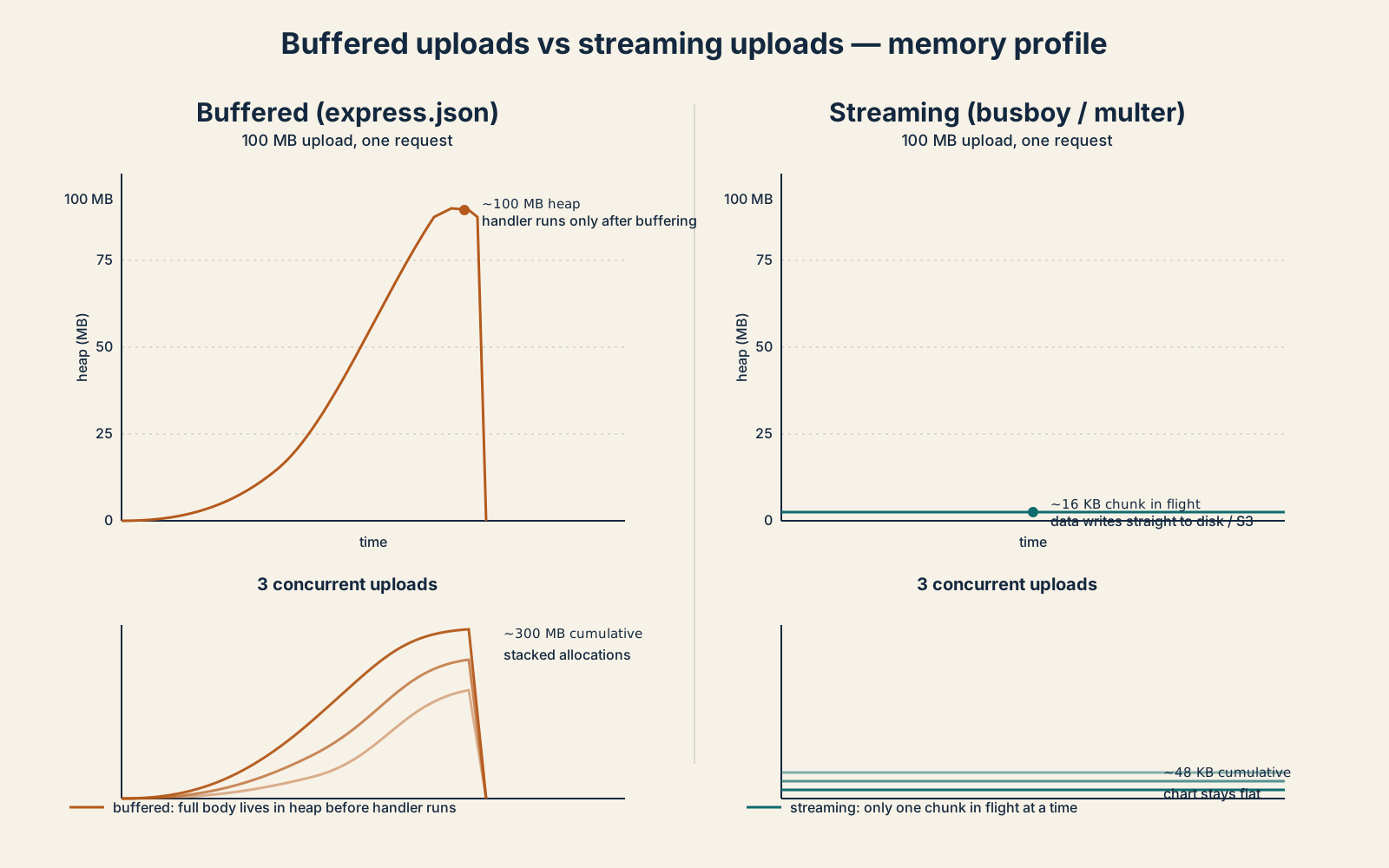
Body parsers are fine for small JSON. They are absolutely the wrong tool for file uploads, because they fully buffer the body in memory before handing it to your code. A 100 MB upload through express.json (or any whole-body parser) is 100 MB of heap before your handler runs.
For uploads, you want a streaming parser. The Node ecosystem has two well-maintained choices: busboy, which is a low-level streaming multipart parser, and multer, which is a higher-level wrapper around busboy that's easier to plug into Express but exposes the underlying limits.
The streaming pattern means: the parser hands you each file as a readable stream, and you pipe it directly to wherever it's going, disk, S3, a temporary file, a transformation pipeline, without ever holding the full file in memory.
import Busboy from 'busboy';
import { createWriteStream } from 'node:fs';
import { pipeline } from 'node:stream/promises';

app.post('/upload', (req, res) => {
  const bb = Busboy({
    headers: req.headers,
    limits: {
      fileSize: 10 * 1024 * 1024,  // 10 MB per file
      files: 3,                     // at most 3 files
      fields: 20,                   // at most 20 non-file fields
      fieldNameSize: 100,
      fieldSize: 1024,
      headerPairs: 100,
    },
  });

  bb.on('file', async (name, file, info) => {
    const out = createWriteStream(`/tmp/${info.filename}`);
    try {
      await pipeline(file, out);
    } catch (err) {
      res.status(413).end('upload too large');
      return;
    }
    if (file.truncated) {
      // busboy sets `truncated` when fileSize limit was hit
      res.status(413).end('upload too large');
      return;
    }
  });

  bb.on('filesLimit', () => res.status(413).end('too many files'));
  bb.on('fieldsLimit', () => res.status(413).end('too many fields'));

  req.pipe(bb);
});
The limits object is where every protection lives. fileSize caps each individual file. files caps the count of files in one request. fields caps non-file form fields. fieldNameSize and fieldSize cap the per-field allocations. headerPairs caps the number of part-headers. Every one of these limits matters, leaving any of them at the default lets an attacker target whichever field doesn't have a ceiling.
For multer the equivalents live in the constructor:
import multer from 'multer';

const upload = multer({
  storage: multer.diskStorage({
    destination: '/tmp/uploads',
    // Always give files a safe name, never trust `originalname`.
    filename: (req, file, cb) => cb(null, crypto.randomUUID()),
  }),
  limits: {
    fileSize: 10 * 1024 * 1024, // 10 MB per file
    files: 3,
    fields: 20,
    fieldNameSize: 100,
    fieldSize: 1024,
    headerPairs: 100,
  },
});

app.post('/upload', upload.array('files', 3), (req, res) => {
  res.json({ uploaded: req.files.map((f) => f.filename) });
});
The same logic applies: pick limits based on the endpoint, not the framework default.
What changes is where the bytes live. With streaming, the highest memory cost of an upload is roughly one chunk in flight per concurrent upload, plus whatever the OS buffers behind the socket. That's measured in kilobytes per request, not megabytes. The chart goes flat.
Defense 3: Validate While Reading, Not After
The instinct, when you're not sure what's in a body, is to parse it first and validate after. Read the JSON, then check whether the structure is OK. That works fine when the input is trustworthy. It is dangerous when the input is hostile, because parse-then-validate means fully allocate the parsed object before deciding it's invalid.
For raw byte streams, the pattern is to validate while reading, meter the bytes as they arrive, and reject the request the moment they exceed the limit. The body parser does this for total size, but if your handler reads the body manually (for example, to verify a webhook signature before deserialising), you have to do it yourself.
import { Readable } from 'node:stream';

async function readBody(req: Readable, max: number): Promise<Buffer> {
  const chunks: Buffer[] = [];
  let total = 0;
  for await (const chunk of req) {
    total += chunk.length;
    if (total > max) {
      // Abort the stream so the rest of the body is discarded.
      req.destroy();
      throw new Error('payload too large');
    }
    chunks.push(chunk);
  }
  return Buffer.concat(chunks, total);
}
The key line is total += chunk.length before chunks.push. You check the budget before you commit memory to it. The moment you exceed the limit, you destroy the stream, which tells Node to stop reading the body from the socket, and bail. The TCP connection might still be open for a moment as the FIN propagates, but no more bytes get buffered in user space.
For schema validation of structured data, the equivalent technique is streaming validation. Instead of JSON.parse followed by zod.parse, you use a streaming JSON parser that emits events as it reads, and you assert on the shape as you go. Libraries like stream-json make this possible, but for most APIs the cheaper move is: enforce a tight body size limit (Defense 1), then JSON.parse is fine. The body parser already capped the input. The risk only re-emerges when the parser is generous and the schema validator does the heavy lifting after.
What you don't want is a validation step that allocates more than the input itself. A schema like Zod's z.record(z.string()) will happily accept an object with a million keys; the validation passes, the resulting JS object holds a million entries, and you've doubled the memory of the request. Bound the number of fields at the parser layer (Defense 1's parameterLimit) so the validator never sees an unbounded shape.
Defense 4: Decompression Needs Its Own Limits
A gzipped body that's 1 MB on the wire can decompress to 1 GB in memory. The HTTP body size limit doesn't help you here, it caps the compressed size, which is exactly what the attacker wants. Decompression bombs are the cleanest example of "your defenses look fine, but they're measuring the wrong thing."
The defense is to cap the output of decompression, not the input. Either you decompress in a streaming way and abort if the output exceeds your budget, or you don't auto-decompress at all.
For Node's built-in zlib, the pattern is to pipe the request through zlib.createGunzip() and through a counting transform that aborts when it exceeds the cap:
import { createGunzip } from 'node:zlib';
import { Transform } from 'node:stream';
import { pipeline } from 'node:stream/promises';

function capStream(max: number) {
  let total = 0;
  return new Transform({
    transform(chunk, _enc, cb) {
      total += chunk.length;
      if (total > max) {
        return cb(new Error('decompressed body too large'));
      }
      cb(null, chunk);
    },
  });
}

app.post('/api/ingest', async (req, res) => {
  if (req.headers['content-encoding'] !== 'gzip') {
    return res.status(415).end('expected gzip');
  }

  const gunzip = createGunzip();
  const cap = capStream(5 * 1024 * 1024); // 5 MB decompressed cap

  const chunks: Buffer[] = [];
  const sink = new Transform({
    transform(chunk, _enc, cb) {
      chunks.push(chunk);
      cb();
    },
  });

  try {
    await pipeline(req, gunzip, cap, sink);
  } catch (err) {
    return res.status(413).end((err as Error).message);
  }

  const body = Buffer.concat(chunks);
  // ... parse and handle
});
The cap is enforced inside the pipeline, so the moment the decompressed total exceeds 5 MB, the entire pipeline errors and the request is aborted. The compressed body might have been only 50 KB, that's irrelevant. The defense is measured at the layer the attacker is attacking.
If you don't need compressed bodies at all, the safest move is to reject them outright at the perimeter, nginx can refuse Content-Encoding: gzip requests with a one-liner. The fewer places where decompression runs, the fewer places this attack has surface.
The same logic applies to any other expanding format your service consumes, zip archives, brotli, even base64 (which expands by 33% in the other direction and can hide a lot inside a "small" looking payload). Each one needs its own metered output cap, separate from the wire-size limit.
Defense 5: JSON Has Edges Too
Even with a strict body size cap, JSON can blow up in two specific ways: deep nesting and very wide objects.
Deep nesting ([[[[[[...]]]]]] repeated tens of thousands of times) doesn't take up much space on the wire, but the parsed value is a chain of references and the structures around it allocate state per level. In current Node, V8's JSON parser uses a non-recursive algorithm, so you no longer trip the C stack at moderate depths, but the resulting JS object is still a tree that's awkward to walk, and any code that traverses it (yours, your validator's, your serializer's on the way out) will do so recursively. A naive JSON.stringify of a 20,000-deep nested structure can throw "Maximum call stack size exceeded."
Wide objects, { "a": 1, "b": 2, ... } with hundreds of thousands of keys, are a different shape of the same problem. They fit comfortably under a body size limit (each key/value pair is small) but the resulting JS object is enormous and slow to iterate.
For both cases, the defense is twofold. First, set a tight body size limit. A 100 KB JSON body has a hard upper bound on how deep and how wide it can possibly be, even pathologically. Second, if your service genuinely takes user-shaped JSON (a public-facing API, a webhook receiver, a config endpoint), use a parser that lets you set explicit limits on depth and key count.
The secure-json-parse package from the Fastify ecosystem is the canonical choice for hardening JSON.parse against prototype pollution and over-deep input. It's a drop-in replacement for JSON.parse with extra checks turned on:
import sjson from 'secure-json-parse';

const body = await readBody(req, 100 * 1024); // from Defense 3

let parsed: unknown;
try {
  parsed = sjson.parse(body.toString('utf8'), {
    protoAction: 'remove',         // strip __proto__ keys
    constructorAction: 'remove',   // strip constructor keys
  });
} catch (err) {
  return res.status(400).end('invalid json');
}
secure-json-parse doesn't expose a depth cap directly, for that you'd reach for a true streaming parser like stream-json, which fires events token-by-token and lets you bail when the depth counter hits a ceiling. But for the majority of services, tight body limits + prototype-key stripping covers the realistic threat surface. The exotic depth attacks mostly matter for services that accept arbitrary client-defined JSON and process it offline.
Defense 6: Slow-Loris And The Connection Layer
The last category isn't about big payloads at all. It's about many small payloads, sent slowly, holding sockets open. The attacker opens ten thousand connections and sends one byte every ten seconds. Each connection is tiny, but each one is buffered request-parsing state in Node, plus a TCP socket, plus the bookkeeping V8 needs to keep around. Multiply by 10,000 and you've exhausted the heap with nothing that looks like a "request" at all.
The defenses live on http.Server and at the reverse proxy. Node's HTTP server has three timeouts that exist exactly for this:
import http from 'node:http';

const server = http.createServer(app);

// Drop connections that take too long to send headers.
server.headersTimeout = 10_000; // 10 seconds

// Drop connections that take too long to send the full request.
server.requestTimeout = 30_000; // 30 seconds

// Drop idle sockets that aren't part of an active request.
server.keepAliveTimeout = 5_000;

// Cap the number of concurrent connections.
server.maxConnections = 5_000;

server.listen(3000);
Every one of those defaults to infinite in older Node versions and to permissive values even in current ones. requestTimeout is the one that closes the slow-loris case directly, it puts a wall-clock cap on how long a single request can take to fully arrive, no matter how slowly the client is feeding it.
maxConnections is the per-process cap. It's a coarse instrument, once you're past it, the kernel will start refusing accepts, but it's the only hard ceiling on "how many sockets can this process be juggling." If your service runs behind a load balancer that can fan out, this cap is fine; if it's a single-process service exposed directly, set it conservatively.
The header size cap is configured at process start with a CLI flag:
node --max-http-header-size=8192 server.jsThe default in current Node is 16 KB. If you have no reason to allow 16 KB of headers, and most APIs don't, drop it to 8 KB or 4 KB. Oversized header attacks are rare, but the cost of tightening this is zero, and it kills an entire class of attempts.
If you're behind nginx, most of this lives there instead. Nginx will close slow connections and reject oversized headers long before Node sees them, and the Node-side settings are a defense-in-depth layer for the case where someone bypasses the proxy or you're running without one.
A Layered Mental Model
The six defenses are not alternatives. They're layers. Each one catches a different class of attack and they only work together. Here's how they stack up, outside-in:
Layer 1: Network edge. Reverse proxy or load balancer caps body size, header size, idle timeouts, and slow-client timeouts. Bytes that don't pass here never reach Node.
Layer 2: Process bootstrap. Node CLI flags and http.Server options. --max-http-header-size, server.headersTimeout, server.requestTimeout, server.maxConnections. These bound what a single process can be juggling at once.
Layer 3: Body parser. express.json({ limit }), urlencoded({ parameterLimit }), fastify.bodyLimit. Per-endpoint caps on total body size and on the parameter explosion vector. The 413 response is generated here.
Layer 4: Stream-aware upload handlers. busboy or multer with explicit limits.fileSize, limits.files, limits.fields. File data flows through a stream and never lives in heap longer than the chunk in flight.
Layer 5: Decompression. Any code that calls zlib.createGunzip(), unzipper, or any inflate routine must measure the output size and abort when it exceeds the cap. Defense at the wire size doesn't apply here.
Layer 6: Parser hardening. secure-json-parse for prototype protection, streaming JSON for depth caps when the data is truly user-defined. Tight body size caps make most of this unnecessary, but the parser is the final inner ring.
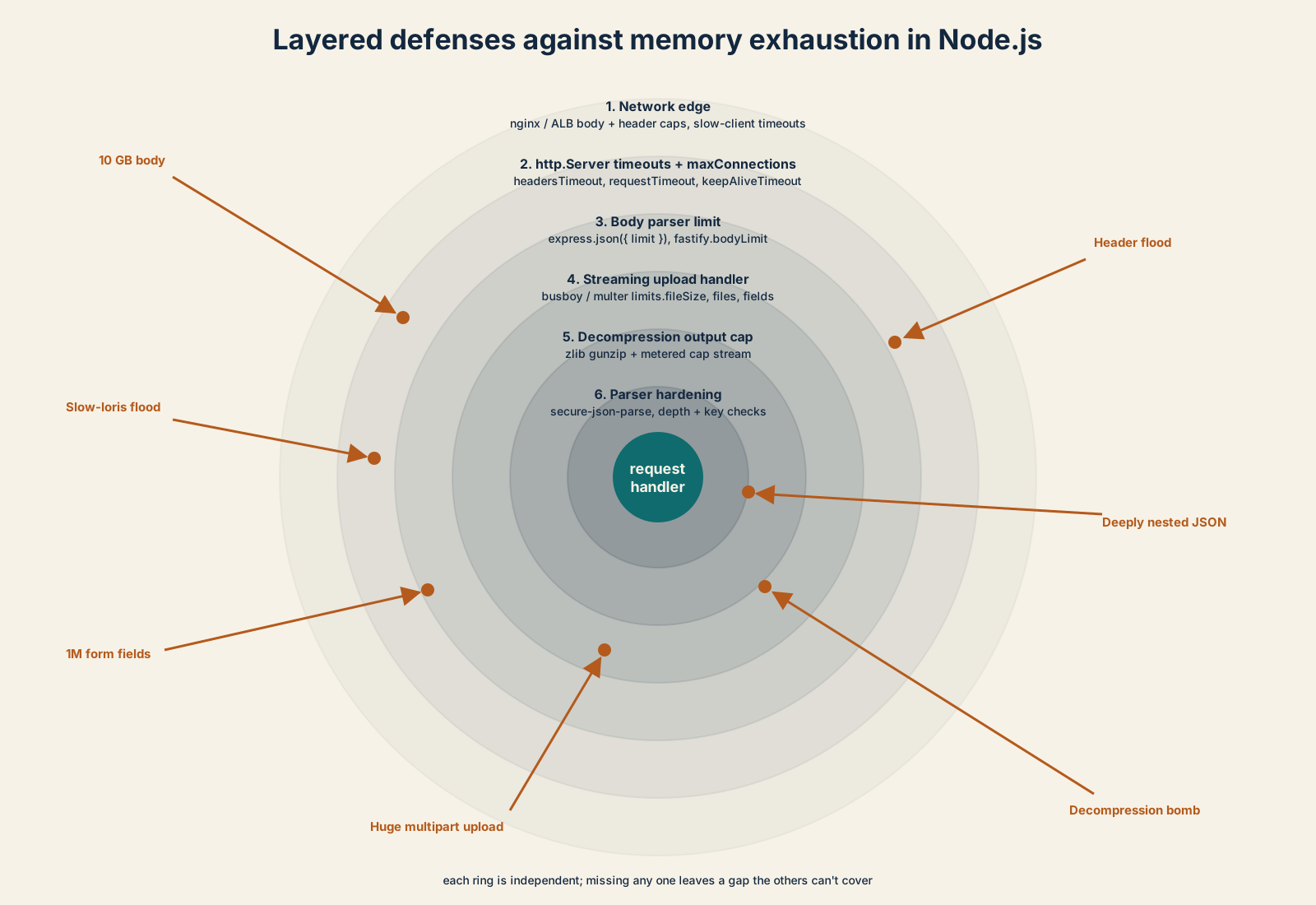
The reason this layering matters is that each layer is cheap to add, and missing any one of them creates a hole the others can't cover. A perfect body size cap doesn't help if the body is a decompression bomb. A perfect decompression cap doesn't help if the parser allocates an object graph the validator can't bound. A perfect parser doesn't help if a slow-loris attacker is holding ten thousand idle sockets. They all need to be on.
The good news is that none of this is custom work. Every defense I described is either a config flag, a constructor option, or a five-line wrapper around an existing library. The expensive part isn't the implementation, it's deciding to care before the OOM-killer screenshot lands in the postmortem channel. Once you've sat through that meeting once, the defenses become as automatic as adding auth to a route.
Pick one endpoint today. Add explicit body limits. Look at how it handles uploads, and switch any whole-body parsing to streaming. Set the timeouts on the HTTP server. Push it through a load test that includes a few hostile payloads, curl -X POST -d "$(head -c 100M /dev/urandom)" ... against an endpoint that expects 1 KB JSON is enough to see whether your stack actually fails fast or fails slow. The fix is rarely glamorous, but it's the difference between a service that absorbs the bad request and one that goes down.