A component API is a promise. Every prop you ship is a contract you'll either keep, deprecate carefully, or break someone's day. Most React component APIs I've seen in production codebases drift the same way over time — a useful little component slowly accumulating boolean flags, edge-case props, and "oh just one more variant" until the type signature is two screens tall and nobody can tell what does what.
This article is about avoiding that. The patterns that make components flexible enough to grow, focused enough to stay understandable, and durable enough to not break consumers every quarter.
Start Small. Stay Small.
The first version of a component should accept the fewest possible props. If you can't predict whether something will be configurable, leave it out. Adding a prop later is easy; removing one is a breaking change.
// First pass — three props, all earned
<Card title="Account">
  <p>Some content</p>
</Card>
A Card doesn't need padding, bordered, shadow, headerVariant, accentColor on day one. Those props arrive when a real second use case shows up, not because you imagined one might.
The implicit cost of a prop isn't just the line of code. Every prop is one more thing to document, one more thing in autocomplete, one more thing the next person has to read before they understand the component. Twenty props on a single component is almost always a sign that the component is doing two jobs and should be split.
The Boolean Prop Trap
The fastest way to ruin a component API is to add boolean props for every variant:
// ❌ The boolean trap
<Button primary />
<Button primary large />
<Button primary large outlined />
<Button primary large outlined disabled />
<Button danger />
<Button danger large outlined />
What does <Button primary danger> do? <Button primary outlined ghost>? Booleans don't compose — you've created an exponential matrix of states, and most of them aren't meaningful.
The replacement is enums via string props:
// ✅ Single string for variant, single string for size
<Button variant="primary" size="md">Save</Button>
<Button variant="ghost" size="sm">Cancel</Button>
<Button variant="danger">Delete</Button>
Mutually exclusive options become mutually exclusive types. The type system can enforce it. The matrix of states collapses to a clear product.
For TypeScript, this is where discriminated unions earn their keep:
type ButtonProps =
  | { variant: 'primary' | 'secondary' | 'danger'; href?: never }
  | { variant: 'link'; href: string };
Pass variant="link" and the compiler now requires href. Pass variant="primary" and href is forbidden. The component's invariants are enforced before runtime.
Composition Beats Options
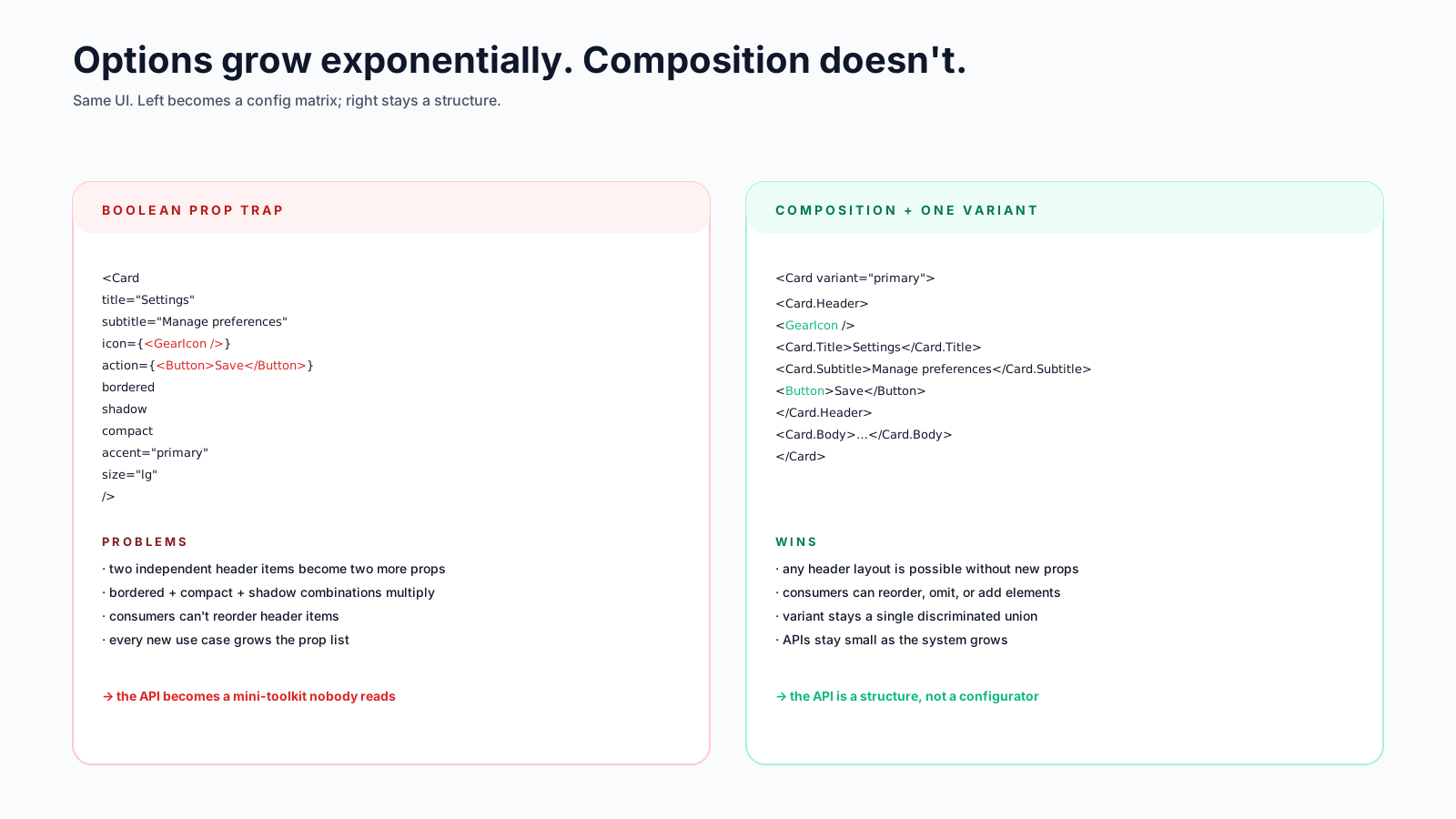
When a component starts growing prop-shaped tentacles for "header text", "header icon", "header action", "header subtitle" — that's the universe asking you to use children:
// ❌ Options that imitate composition
<Card
  title="Settings"
  subtitle="Manage your preferences"
  icon={<GearIcon />}
  action={<Button>Save</Button>}
>
  …
</Card>

// ✅ Composition — let the consumer arrange it
<Card>
  <Card.Header>
    <GearIcon />
    <Card.Title>Settings</Card.Title>
    <Card.Subtitle>Manage your preferences</Card.Subtitle>
    <Button>Save</Button>
  </Card.Header>
  …
</Card>
The composition version doesn't grow when someone needs a "second action" or a "header badge" — they just put it inside Card.Header. The component becomes a structure, not a configurator. (This is the compound components pattern; we'll cover it in detail in another article.)
The Slot Pattern
When you want users to swap a single internal element — say, the trigger of a tooltip or the icon of a button — the slot pattern works well. Two common shapes:
Render-as-prop:
function Tooltip({ trigger, content }) {
  return (
    <Popover>
      <Popover.Trigger>{trigger}</Popover.Trigger>
      <Popover.Content>{content}</Popover.Content>
    </Popover>
  );
}

<Tooltip
  trigger={<Button>Hover me</Button>}
  content="This is a tooltip"
/>
asChild (popularised by Radix):
<Tooltip>
  <Tooltip.Trigger asChild>
    <Link href="/help">Need help?</Link>     {/* the link is the trigger */}
  </Tooltip.Trigger>
  <Tooltip.Content>Click for docs</Tooltip.Content>
</Tooltip>
asChild clones the child element and merges in the props (event handlers, ARIA attributes) the parent needs. The consumer keeps full control over what tag and what styles get rendered. It's slightly magical, but once you're used to it, it solves the "I want my button to be a link" problem cleanly.
Escape Hatches
Even the cleanest API can't anticipate every consumer's need. The escape hatches that consistently age well:
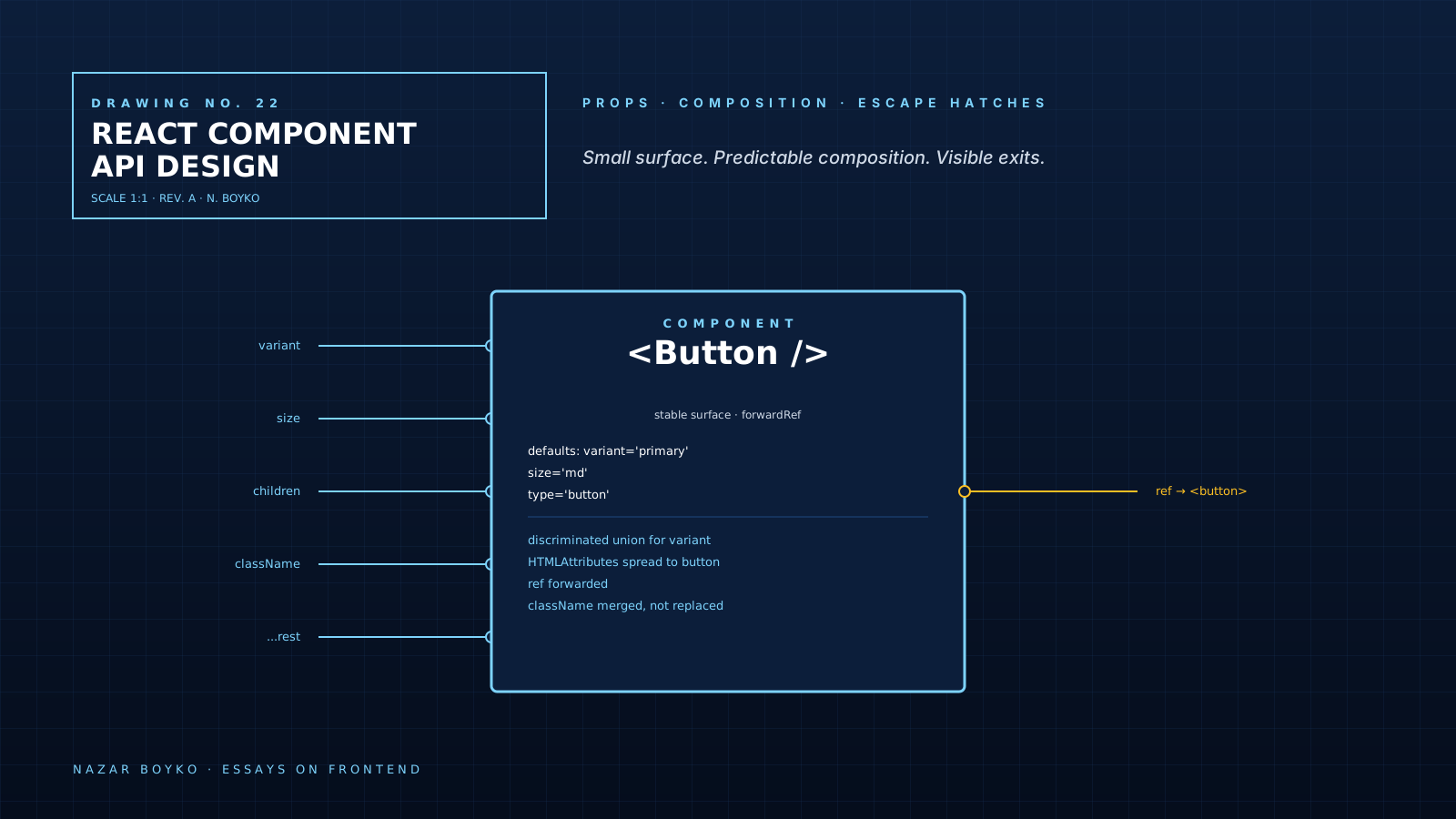
className — accept it, merge it with your internal classes:
import { cn } from '@/lib/utils';

function Button({ className, variant = 'primary', ...props }) {
  return (
    <button
      className={cn(buttonStyles({ variant }), className)}
      {...props}
    />
  );
}
The consumer can override or extend any styles. className is the single most important escape hatch in any component library.
...rest to the underlying element — pass through HTML attributes you don't explicitly handle:
<Button onClick={...} aria-label="Save" data-testid="save" disabled>None of those are props you defined; all of them work because they're spread to the <button>. Resist the urge to "filter" them. The HTML attribute set is huge, and your component shouldn't need to know about every one.
Forwarded refs — components that wrap an interactive element should forward refs:
const Button = React.forwardRef(function Button({ children, ...props }, ref) {
  return <button ref={ref} {...props}>{children}</button>;
});
Without forwardRef, a consumer who needs a ref to your button (for focus, for measurement, for a third-party library) can't get one. In React 19, ref is just a regular prop on function components, so this gets simpler:
function Button({ ref, children, ...props }) {
  return <button ref={ref} {...props}>{children}</button>;
}
Either way, the principle is the same: don't trap consumers inside your wrapper.
Controlled, Uncontrolled, Or Both?
A component that holds state should usually let the consumer take it back. The standard pattern: support a value (controlled) but fall back to internal state if not provided.
function Tabs({ value, defaultValue, onValueChange, children }) {
  const [internal, setInternal] = useState(defaultValue);
  const isControlled = value !== undefined;
  const current = isControlled ? value : internal;

  const handleChange = (next) => {
    if (!isControlled) setInternal(next);
    onValueChange?.(next);
  };

  return (
    <TabsContext.Provider value={{ value: current, onChange: handleChange }}>
      {children}
    </TabsContext.Provider>
  );
}// Uncontrolled — Tabs manages its own state
<Tabs defaultValue="general">…</Tabs>
// Controlled — consumer manages it (e.g. URL-driven)
<Tabs value={tab} onValueChange={setTab}>…</Tabs>Same component, both modes supported. Most consumers use uncontrolled; the few who need controlled (URL sync, form integration) get it without a different component.
TypeScript Patterns That Pay Off
Three patterns that quietly improve component APIs:
Discriminated unions for mutually exclusive variants (already covered above).
HTMLAttributes<T> for forwarding — extend the props of the underlying element:
type ButtonProps = React.ButtonHTMLAttributes<HTMLButtonElement> & {
  variant?: 'primary' | 'ghost' | 'danger';
  size?: 'sm' | 'md' | 'lg';
};
Consumers get autocomplete for onClick, disabled, type, aria-*, etc., without you re-declaring them.
Polymorphic as typing — when a component can render as multiple HTML elements:
type AsProp<C extends React.ElementType> = { as?: C };
type Props<C extends React.ElementType> = AsProp<C> &
  Omit<React.ComponentPropsWithoutRef<C>, keyof AsProp<C>>;

function Box<C extends React.ElementType = 'div'>(
  { as, ...props }: Props<C>
) {
  const Component = as || 'div';
  return <Component {...props} />;
}<Box as="section" aria-label="Hero">…</Box>
<Box as="a" href="/foo">…</Box>This is fiddly to write the first time. Most teams reach for libraries (@radix-ui/react-slot, the as prop in MUI/Chakra) rather than rolling their own. But the pattern itself is what makes a single component flex without becoming five.
Default Behaviour That Doesn't Surprise
Some habits that prevent footguns:
type="button"on every internal<button>unless it's literally a submit button. Otherwise your in-form button accidentally submits the form.- Stop event propagation only when needed. Calling
e.stopPropagation()by default breaks composition; consumers who wanted the event to bubble can't get it back. - Don't
e.preventDefault()in event handlers users pass in. That's their decision, not yours. - Don't auto-focus aggressively. Auto-focusing the first input on every modal open is a common a11y annoyance.
- Be honest about loading and disabled. A button that "looks disabled" but isn't — or one that's disabled but doesn't say why — is the worst kind of invisible UX.
Versioning A Component API
Once consumers depend on you, breaking changes get expensive. Two habits that have saved me:
- Mark deprecations early.
@deprecatedJSDoc, console warnings in dev, keep the old API working for one major version. - Ship codemods for renames.
jscodeshiftis your friend whentonebecomesvariant.
In a monorepo, you can often migrate consumers in lockstep. In a published package, you can't — assume someone is on the version you released last year.
A One-Sentence Mental Model
A good component API has a small surface, predictable composition, sensible defaults, and visible escape hatches. Each of those four pulls in a different direction; balancing them is the actual skill.
If you find yourself adding a fifth boolean to a component that already has six, stop. The right move is usually to compose smaller pieces, expose a slot, or split into two components — not to keep growing the surface. Boring APIs age the best. The most-used component in your library should be the one with the fewest exciting props.