So, you've built a file upload feature.
The form takes a file, hits POST /api/upload, your server reads the multipart body into memory, runs a couple of if checks on the size and the extension, then calls s3.putObject and sends back a 200. It works. The PM is happy. Then somebody uploads a 1.8 GB MOV and your Node.js process OOMs in the middle of a checkout request. Then somebody uploads a PHP shell renamed to .png and the moderation team finds it three weeks later, by which point it's been served behind a CDN for half a million pageviews. Then somebody uploads a perfectly valid PDF that crashes your thumbnail worker for reasons no one understands.
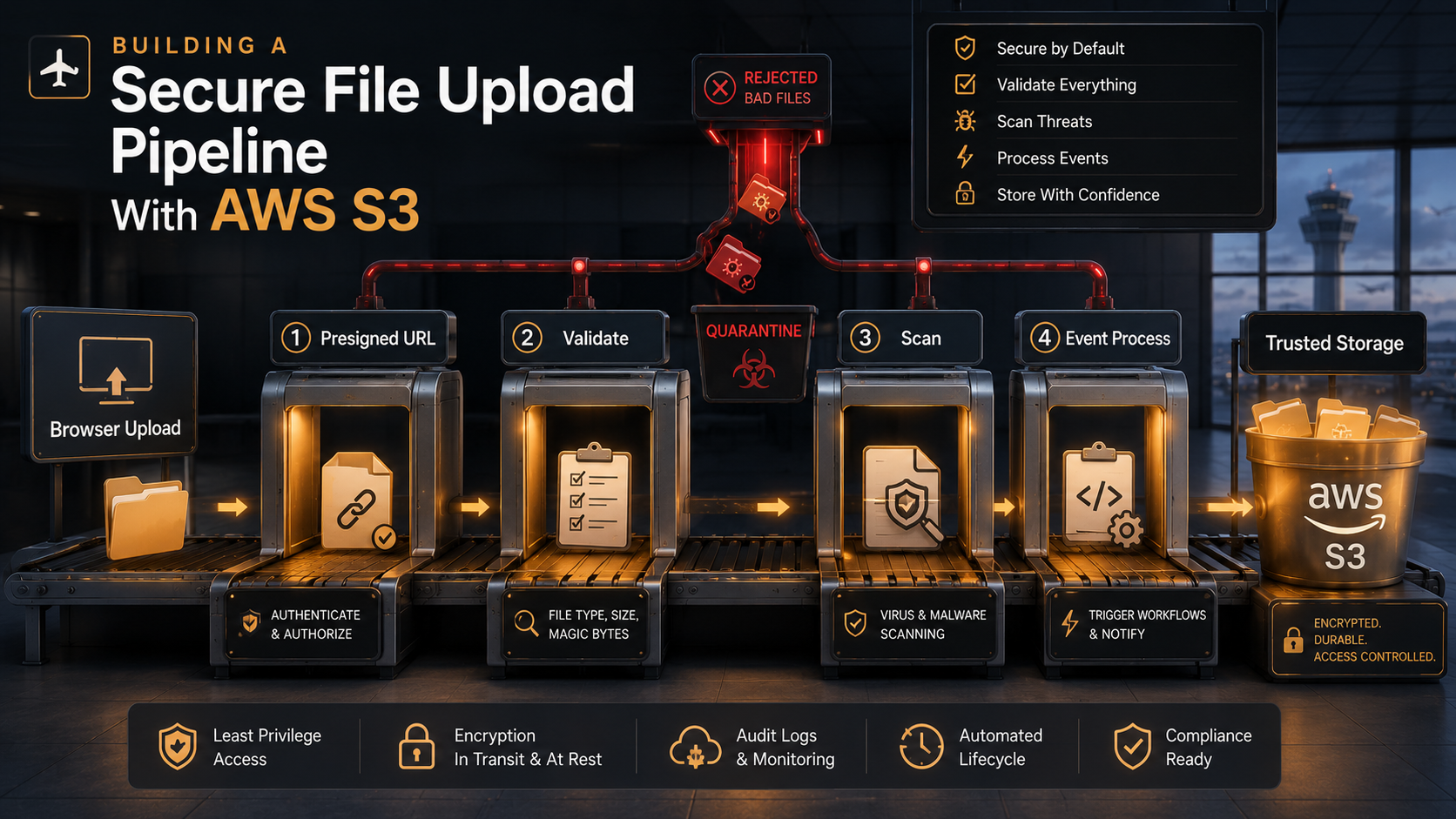
S3 didn't fail. Your pipeline failed. "Upload a file" sounds like one verb, but in production it's at least four: how the bytes get to S3, how you decide if they belong there, how you check they're not weaponised, and how you tell the rest of your system that something arrived. Skip any one of those and the other three become very expensive.
Let's go through the whole thing - the pattern, the SDK calls, the IAM policies, the scanning step everyone forgets, and the event chain that turns a quiet PutObject into a real workflow.
The Bytes Should Never Touch Your Server
The first rule of file uploads in 2026 is the most counter-intuitive one: your API server shouldn't see the file.
The traditional shape - client → your API → S3 - feels safer because the file passes "through you." In practice it's the opposite. You pay egress and ingress for every byte twice (client to your EC2, then EC2 to S3). You burn process memory or disk on a temporary copy. You hold connections open for the entire upload duration, which on mobile networks can be minutes. You become the bottleneck for retries, and you have to write your own multipart logic if files exceed your runtime's request body limit. None of this makes the file safer - your server is just expensively in the middle.
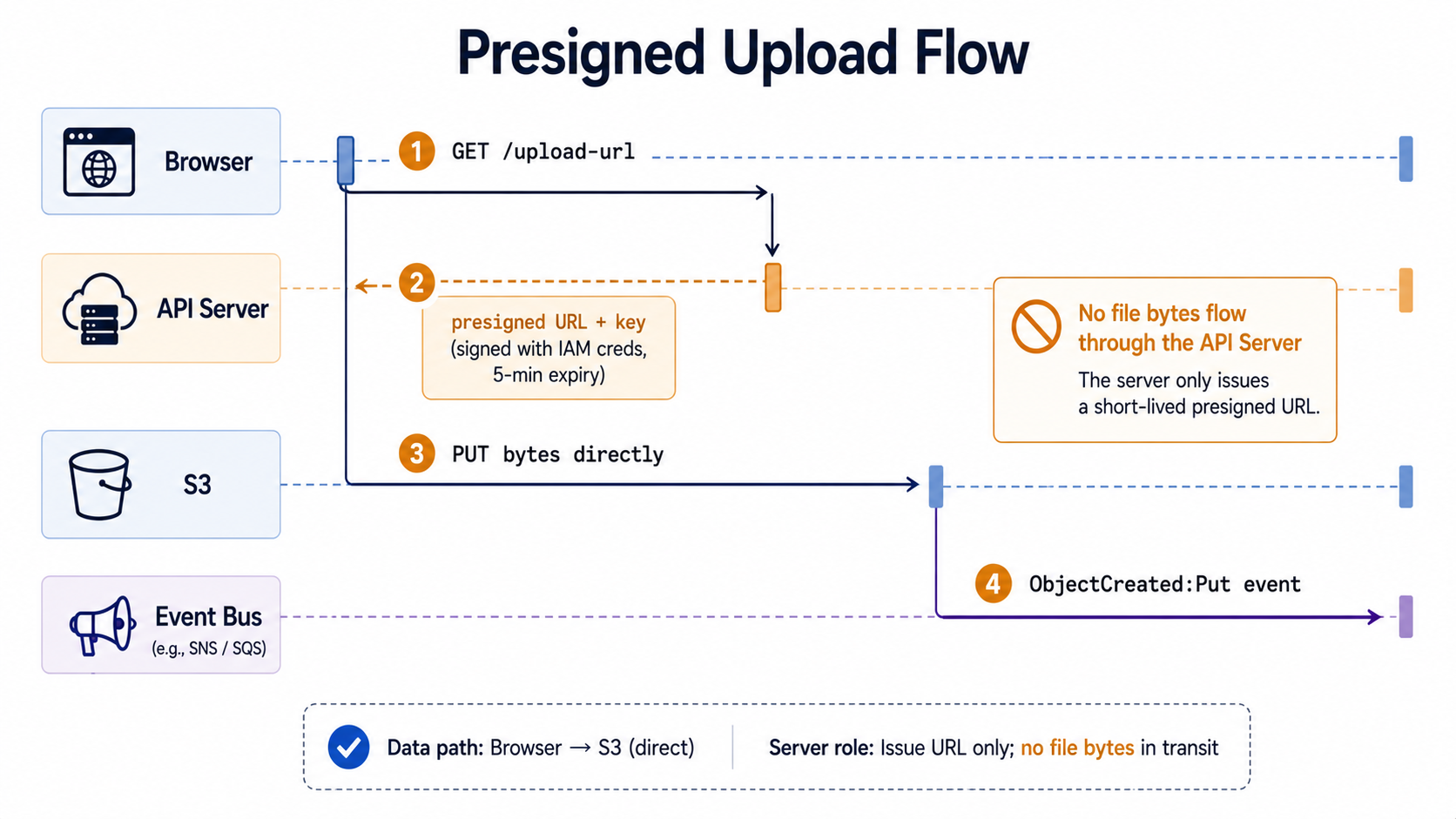
The pattern almost everyone has settled on is presigned uploads: your API hands the client a short-lived URL signed with your AWS credentials, and the client uploads directly to S3. Your code never sees the bytes. Your bandwidth bill drops. Your timeouts disappear. The file lands in S3 with whatever name and metadata you signed for, and that's the moment your pipeline actually starts.
There are two flavours of presigned upload, and the choice matters more than it looks:
- Presigned PUT. One URL, one object key, one method. The client
PUTs the bytes to that URL with the headers you signed. Simple, fast, but the client controls the body - you can constrain the key and a few headers (Content-Type, etc.) but you can't enforce a size range on the request. - Presigned POST. A URL plus a policy document you sign. The browser submits a multipart form, and S3 enforces every condition you specified - exact key prefix, content type prefix, byte-range limits, required metadata fields. It's slightly more involved on both ends, but it's the only option if you need S3 to reject oversized files before they finish uploading.
For a CRM uploading a 200 KB avatar, presigned PUT is fine. For a forum that lets anyone upload up to 10 MB, presigned POST with a content-length-range condition is the only sane choice. The most common production mistake is using presigned PUT and then "validating size on Lambda after upload" - by then S3 already charged you for the 4 GB someone yeeted at you.
Issuing The URL
Here's the minimal Node.js version using the AWS SDK v3 - the only pieces you actually need are S3Client, PutObjectCommand (or createPresignedPost for POST), and @aws-sdk/s3-request-presigner.
import { S3Client, PutObjectCommand } from "@aws-sdk/client-s3";
import { getSignedUrl } from "@aws-sdk/s3-request-presigner";
import { randomUUID } from "node:crypto";

const s3 = new S3Client({ region: process.env.AWS_REGION });

export async function issueUploadUrl(userId: string, contentType: string) {
  // Constrain the namespace: every key is scoped to the user.
  const key = `uploads/${userId}/${randomUUID()}`;

  const cmd = new PutObjectCommand({
    Bucket: process.env.UPLOAD_BUCKET,
    Key: key,
    ContentType: contentType,                  // signed in — client can't change it
    ServerSideEncryption: "AES256",            // forced encryption at rest
    Metadata: { "uploaded-by": userId },       // travels with the object
  });

  const url = await getSignedUrl(s3, cmd, { expiresIn: 60 * 5 }); // 5 minutes

  return { url, key };
}
A few things to notice that look small but aren't:
The key is scoped under uploads/{userId}/ and a UUID. That's not aesthetic - it's the only thing stopping User A from overwriting User B's avatar by guessing the key. Your bucket policy can lean on this prefix later.
The ContentType is signed into the URL. If the client uploads with a different Content-Type header, S3 rejects it. Combine that with a client-side MIME check, and you've made two of the cheapest attacks impossible.
The URL expires in five minutes. You want this short. A leaked link from an hour-old log file should not be a usable upload slot.
ServerSideEncryption is set on the signed command. If your bucket policy requires SSE (and it should - see below), this saves you from "well it worked yesterday" failures when someone forgets to add the header.
When you need size enforcement, swap to createPresignedPost:
import { S3 } from "@aws-sdk/client-s3";
import { createPresignedPost } from "@aws-sdk/s3-presigned-post";
import { randomUUID } from "node:crypto";

const s3 = new S3({ region: process.env.AWS_REGION });

export async function issueUploadPost(userId: string) {
  const key = `uploads/${userId}/${randomUUID()}`;

  return createPresignedPost(s3, {
    Bucket: process.env.UPLOAD_BUCKET!,
    Key: key,
    Conditions: [
      ["content-length-range", 0, 10 * 1024 * 1024],   // 0 – 10 MB
      ["starts-with", "$Content-Type", "image/"],      // any image/*
      { "x-amz-server-side-encryption": "AES256" },
    ],
    Fields: { "x-amz-server-side-encryption": "AES256" },
    Expires: 300,
  });
}
The browser then submits a normal HTML form to the returned url with the returned fields as hidden inputs and the file last. If the body exceeds 10 MB, S3 closes the connection mid-upload. You did not pay for the rest.
Validation Happens Twice - Once Before You Sign, Once After Bytes Land
The most important sentence in this whole post: the presigned URL is a delegated permission, not a vetted transaction. Whatever conditions you didn't sign in are conditions S3 won't enforce. Everything else has to happen in code, in two places.
Before you sign the URL - the cheap, fast checks. Is this user even allowed to upload right now? Have they hit a rate limit (e.g. 20 uploads per minute, 100 per day)? Is their account in a state that allows uploads - verified email, active subscription, not banned? Is the declared Content-Type in your allowlist? Is the declared size (if the client sent one) under your max? If any of these fail, you never issue the URL in the first place. This is your last chance to reject a request for free - every later check costs you S3 storage or Lambda invocations.
After bytes land - the deep checks. Now you have a real file, and you can look at it. There are exactly two things you should do here, in this order:
First, content-type sniffing. The Content-Type the client claimed is a string they typed; the actual bytes are reality. Read the first kilobyte and check the magic number. In Node, file-type does this in one call:
import { S3Client, GetObjectCommand } from "@aws-sdk/client-s3";
import { fileTypeFromBuffer } from "file-type";

const s3 = new S3Client({});

const ALLOWED = new Set(["image/jpeg", "image/png", "image/webp", "image/gif"]);

export async function sniffContentType(bucket: string, key: string) {
  const head = await s3.send(new GetObjectCommand({
    Bucket: bucket,
    Key: key,
    Range: "bytes=0-4095",      // first 4 KB is plenty for magic numbers
  }));

  const chunks: Buffer[] = [];
  for await (const c of head.Body as AsyncIterable<Buffer>) chunks.push(c);

  const sniffed = await fileTypeFromBuffer(Buffer.concat(chunks));
  if (!sniffed || !ALLOWED.has(sniffed.mime)) {
    throw new Error(`rejected: actual type ${sniffed?.mime ?? "unknown"}`);
  }
  return sniffed.mime;
}
This catches the "PHP shell renamed to .png" class of attack and most of its cousins. It costs you one S3 GET with a Range header - fractions of a cent - and it should happen on the very first event S3 sends you when the object is created, before anything else touches the file.
Second, structural validation. A real PNG can still be a malicious PNG. Decompression bombs (a 1 KB compressed file that expands to 4 GB), polyglot files (valid as both an image and a Java archive), corrupted headers crafted to crash a parser. The defense here isn't a one-liner - it's running the file through the actual parser you'd use downstream and confirming it doesn't blow up. For images: use sharp to read metadata and re-encode to a canonical form (this also strips EXIF you didn't want). For PDFs: parse with a hardened library in a sandboxed Lambda with a memory cap. For videos: probe with ffprobe and check the duration is sane before kicking off a transcode.
If validation fails, don't delete the object immediately. Move it to a quarantine/ prefix in the same bucket (or a separate quarantine bucket) and write the rejection reason to a metadata field. You'll thank yourself the first time you have to debug "why does my user keep failing uploads" - the object will still be there, with the parser's complaint stamped on it.
Scanning: The Step Everyone Skips Until They Can't
Validation tells you the file is what it claims to be. Scanning tells you it isn't actively malicious. They are not the same step, and you need both.
The good news: as of 2024, AWS has a managed service for this. GuardDuty Malware Protection for S3 scans new objects on upload, marks them with a GuardDutyMalwareScanStatus tag, and emits an EventBridge event you can react to. You enable it on the bucket, point it at an IAM role, and it just runs. The cost is per-GB scanned, not per-object - much cheaper than running your own Lambda-ClamAV pipeline at scale, and you don't maintain virus definitions.
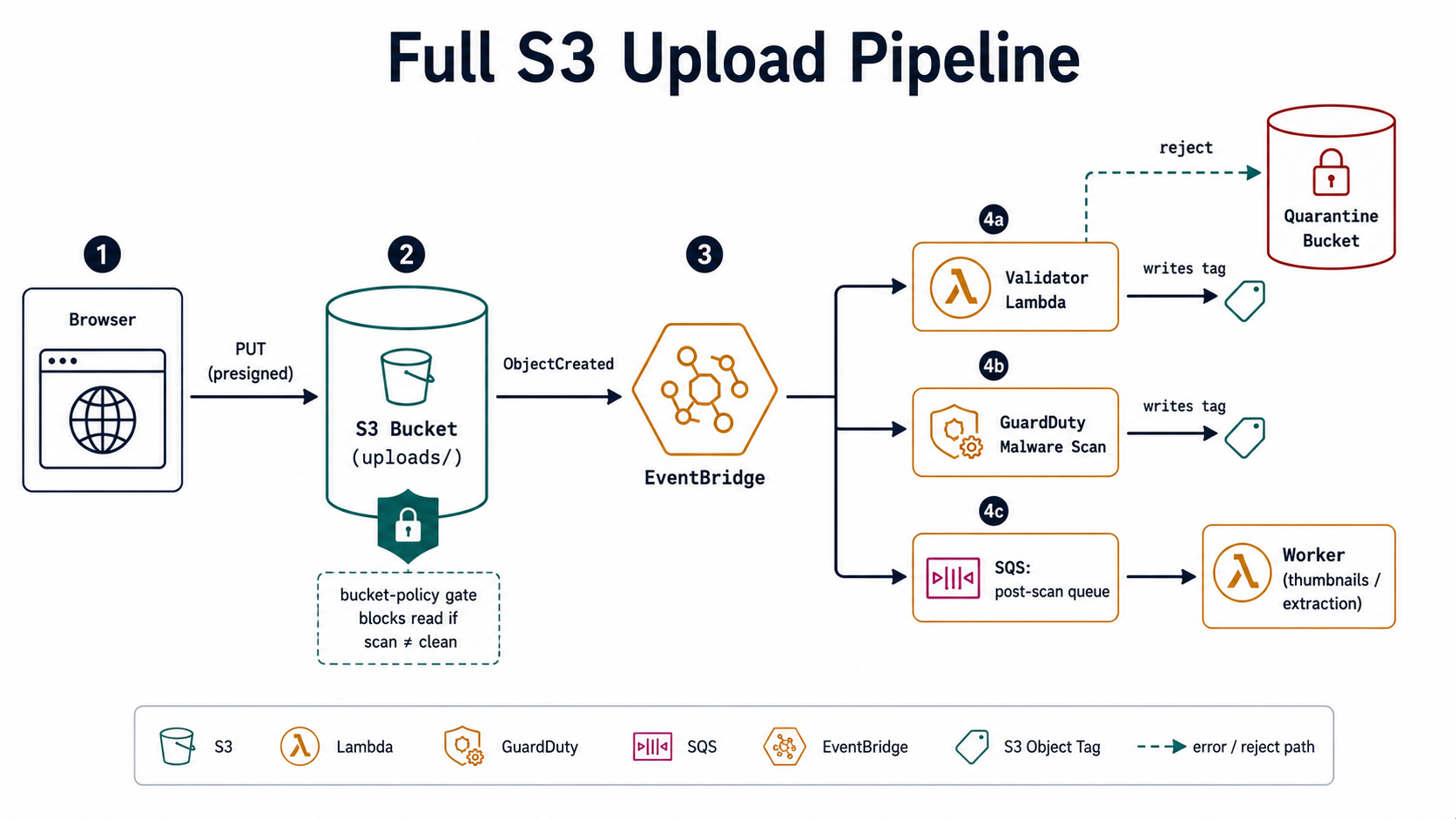
The flow is straightforward: object lands → GuardDuty scans → tag is written → EventBridge fires Object scan result. Your downstream consumers wait for the NO_THREATS_FOUND tag before promoting the object to a "public" prefix or kicking off processing. Anything tagged THREATS_FOUND goes to quarantine and triggers a security alert.
If GuardDuty isn't an option - cost, region availability, or you have a compliance requirement that says "we must run our own engine" - the self-hosted path is ClamAV in a Lambda function, triggered by S3 ObjectCreated:* events. The skeleton:
import os, urllib.parse, boto3, clamd

s3 = boto3.client("s3")
cd = clamd.ClamdNetworkSocket(host=os.environ["CLAMD_HOST"], port=3310)

QUARANTINE = os.environ["QUARANTINE_BUCKET"]

def handler(event, _ctx):
    for rec in event["Records"]:
        bucket = rec["s3"]["bucket"]["name"]
        key = urllib.parse.unquote_plus(rec["s3"]["object"]["key"])

        obj = s3.get_object(Bucket=bucket, Key=key)
        result = cd.instream(obj["Body"])  # returns {"stream": ("OK"|"FOUND", sig)}
        verdict, signature = result["stream"]

        if verdict == "FOUND":
            s3.copy_object(
                Bucket=QUARANTINE,
                Key=key,
                CopySource={"Bucket": bucket, "Key": key},
                Metadata={"signature": signature},
                MetadataDirective="REPLACE",
            )
            s3.delete_object(Bucket=bucket, Key=key)
        else:
            s3.put_object_tagging(
                Bucket=bucket, Key=key,
                Tagging={"TagSet": [{"Key": "scan", "Value": "clean"}]},
            )
Three things go wrong in practice with ClamAV-on-Lambda, and they're worth mentioning so you don't rediscover them at 2am:
ClamAV needs its virus database, and that database is hundreds of megabytes. You don't bake it into the Lambda image (it changes daily); you sidecar it on EFS or in a separate "definitions" bucket, and you refresh it on a schedule. The first time someone runs this without thinking about definition freshness, they get a glorified MD5 check.
Lambda has a 15-minute timeout and a 10 GB memory ceiling. ClamAV is happy to take 30 seconds to scan a 500 MB archive. Set your size limits at the presigned-URL layer so you never hand a 9 GB file to a Lambda that can't finish in time.
ClamAV detects known signatures. It catches the kind of low-effort attacks that drift into a public upload form, not a targeted zero-day. For higher-risk uploads (financial documents, healthcare records), pair it with a sandboxed re-encode step or a commercial multi-engine service.
Whichever path you take, the contract for the rest of the pipeline is the same: don't let unscanned objects be served, processed, or moved. Make "scanned & clean" a precondition encoded as an object tag, and put it in your bucket policies and your application logic.
The Bucket Policy Doing The Quiet Work
Behind all of this, the bucket itself needs to be locked down so that a slip-up in your code doesn't become a slip-up in your data. Three rules cover most of the surface area:
{
  "Version": "2012-10-17",
  "Statement": [
    {
      "Sid": "RequireTLS",
      "Effect": "Deny",
      "Principal": "*",
      "Action": "s3:*",
      "Resource": [
        "arn:aws:s3:::uploads-acme-prod",
        "arn:aws:s3:::uploads-acme-prod/*"
      ],
      "Condition": { "Bool": { "aws:SecureTransport": "false" } }
    },
    {
      "Sid": "RequireEncryptionOnPut",
      "Effect": "Deny",
      "Principal": "*",
      "Action": "s3:PutObject",
      "Resource": "arn:aws:s3:::uploads-acme-prod/*",
      "Condition": {
        "StringNotEquals": {
          "s3:x-amz-server-side-encryption": "AES256"
        }
      }
    },
    {
      "Sid": "BlockPublicReadOnUnscanned",
      "Effect": "Deny",
      "Principal": "*",
      "Action": "s3:GetObject",
      "Resource": "arn:aws:s3:::uploads-acme-prod/*",
      "Condition": {
        "StringNotEqualsIfExists": {
          "s3:ExistingObjectTag/scan": "clean"
        }
      }
    }
  ]
}
RequireTLS rejects any request that didn't come over HTTPS. RequireEncryptionOnPut ensures every object lands encrypted at rest, regardless of which client put it there. BlockPublicReadOnUnscanned is the load-bearing one - it makes "this object hasn't been scanned and tagged clean yet" mean "this object literally cannot be served." Even if a bug in your CDN config exposes the bucket, the object stays inaccessible until your scanner tags it.
Pair these with the Public Access Block settings on the bucket (BlockPublicAcls, IgnorePublicAcls, BlockPublicPolicy, RestrictPublicBuckets - all four on). The bucket-level Public Access Block is independent of the policy and is the thing that actually stops "I accidentally made the bucket public" disasters. It's a free button click. Click it.
Events: Where The Pipeline Becomes A Pipeline
A presigned URL plus a scanner plus a validator is, at best, a single-shot uploader. What turns it into a pipeline is the event chain that fires when objects move through it.
S3 gives you three event-delivery options, and they have different shapes:
- S3 → Lambda direct. Simplest. Good for one-fire-and-forget consumer. You lose buffering, batching, and easy fan-out. If the Lambda fails after retries, the event is gone unless you wire a DLQ.
- S3 → SQS. A queue between S3 and your worker. You get retries, dead-letter queues, and natural backpressure. The right default for "I want to process this file and care if processing fails."
- S3 → EventBridge. A bus, not a queue. Multiple consumers can subscribe to the same event with filter patterns. The right choice once you have more than one team or service that cares about uploads.
For anything beyond a side project, the pattern I'd reach for first is S3 → EventBridge → (SQS queue per consumer). EventBridge filters keep the fan-out clean, and per-consumer SQS queues mean a slow downstream doesn't starve a fast one. An EventBridge rule looks like this:
{
  "source": ["aws.s3"],
  "detail-type": ["Object Created"],
  "detail": {
    "bucket": { "name": ["uploads-acme-prod"] },
    "object": { "key": [{ "prefix": "uploads/" }] }
  }
}
Combine that with a second rule that listens for Object Tags Added and filters on scan=clean, and you've split your pipeline into two cleanly separable phases: file landed and file is safe to use. The thumbnail worker subscribes to "safe"; the antivirus dashboard subscribes to "landed."
One thing that bites teams the first time they wire this up: S3 event delivery is at-least-once. Your consumers must be idempotent. If your thumbnail Lambda runs twice for the same object, the result should be the same as if it ran once. The cheapest way to enforce this is to make the output key deterministic - thumbnails/{key}.webp - so the second run is a harmless overwrite of a byte-identical file.
The Boring Pieces That Make It Survive Production
A few last things that aren't glamorous but cause more outages than the architecture choices:
Lifecycle rules. Every upload bucket needs a lifecycle policy. Incomplete multipart uploads abandoned by a flaky mobile client will sit in your bucket and bill you forever unless you tell S3 to delete them after, say, 7 days. The rule is one line of config and it has paid for itself in every account I've seen it run on.
CORS. Browser uploads need a CORSConfiguration on the bucket. Allow only your real origins, only the methods you actually use (PUT for presigned PUT, POST for presigned POST), and only the headers you sign (Content-Type, x-amz-*). The default "open" CORS config on S3 examples is a footgun - tighten it before you ship.
Observability. Three CloudWatch metrics will tell you when your pipeline is breaking: 4xxErrors on the bucket (presigned URLs expiring or clients sending wrong headers), the age of the oldest message in your post-scan SQS queue (consumer is falling behind), and the Invocations count on your validator Lambda with a Throttles overlay (cold-start floods during traffic spikes). Wire alarms on those three before you wire the dashboards. Dashboards are for explaining incidents; alarms are for catching them.
Cost. Most of your bill on a busy upload bucket won't come from storage - it'll come from PUT requests, GET requests from your scanner reading objects, and Lambda invocations. Storage Lens is free for the basic dashboard and will tell you which prefix is generating the request volume; check it before you tune anything.
The reason this pipeline is worth building, even if your first version is "just s3.putObject from the API," is that it's the only honest answer to a question every product eventually asks: "can we let users upload things without that being the worst part of our system?"
Presigned URLs keep the bytes off your server. Validation keeps the lies off your disk. Scanning keeps the malice off your users. Events keep the pipeline composable as you add the next feature. Skip any one of them and the other three become a much less interesting story - usually the kind told in a post-mortem.
Build it once. Let the bucket policy do the quiet work. And the next time someone asks if file uploads are hard, you can answer truthfully: only the first time.