

Background jobs look easy until you ship them.
A queue accepts a message. A worker pulls it. The worker does some work. Job done. What could go wrong?
The honest answer is: almost everything. The worker dies mid-job. The same message gets delivered twice. A poison message takes down every worker that touches it. A traffic spike empties your queue in a way that hammers the downstream database the queue was supposed to protect. The downstream API rate-limits you, the worker times out, the message comes back, the API rate-limits you again, and you have built a perpetual motion machine that burns money.
SQS, like every other queue, doesn't solve these problems for you. It gives you a small set of well-defined primitives, visibility timeout, redrive policy, batching, message deduplication, that let you build a reliable consumer if you understand what each one actually does. Most production incidents in SQS-backed systems are not bugs in SQS. They're misunderstandings about what guarantees you actually got.
This is the tour I wish I'd read before my first production SQS deployment. We'll go through the mental model, then visibility timeout in detail, then dead-letter queues, then why idempotency is non-optional, then batching for throughput, and finally Standard vs FIFO so the choice stops feeling arbitrary.
The mental model in one paragraph
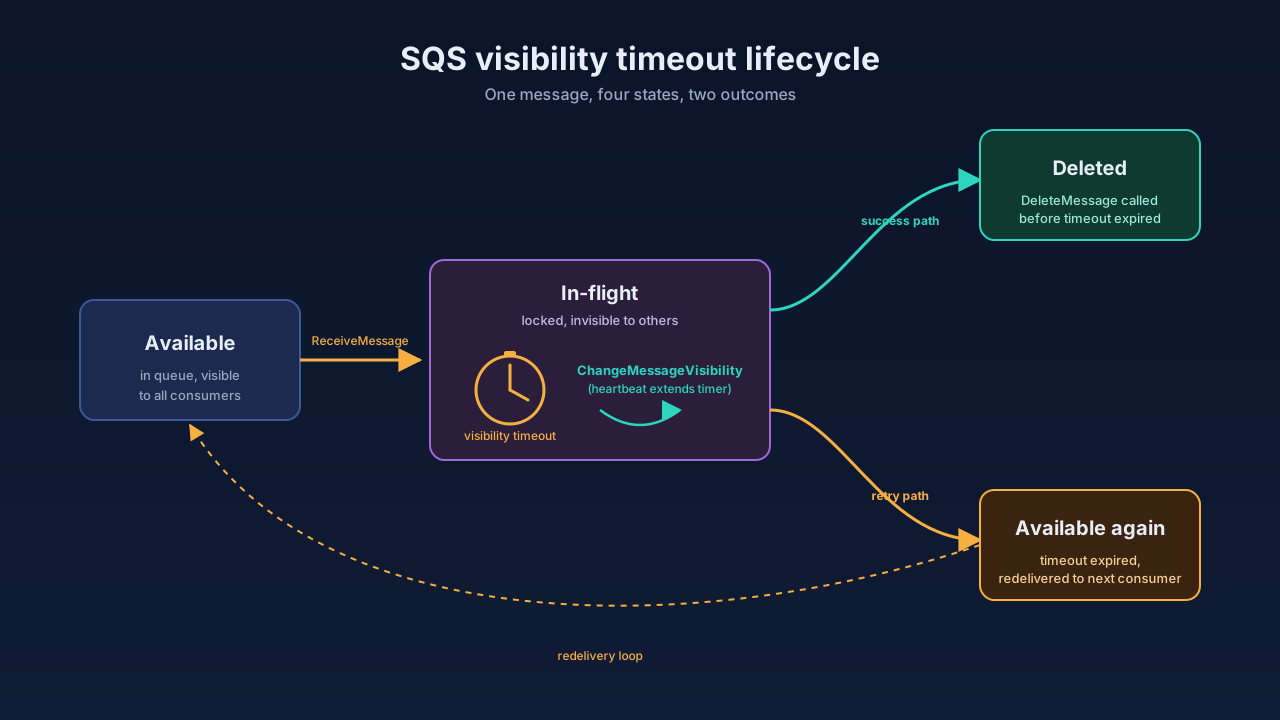
You produce a message. SQS stores it. A consumer calls ReceiveMessage and gets it back along with a receipt handle. While the consumer is processing, the message is in flight, it still exists in the queue, but other consumers can't see it. If the consumer calls DeleteMessage with that receipt handle, the message is gone for good. If the consumer crashes, times out, or simply never calls delete, the message becomes visible again after the visibility timeout expires, and another consumer picks it up.
That single paragraph contains the entire reason this article needs to exist. Notice what's not in it: there is no "the worker tells SQS it's done by returning." There is no automatic ack-on-success. Deletion is an explicit, separate API call, and forgetting to make that call is one of the most common production bugs in SQS-backed systems. It quietly turns every successful job into a duplicate that runs again twenty seconds later.
Visibility timeout: the most misunderstood knob
Visibility timeout is a per-message lock with a stopwatch. The default is 30 seconds. Maximum is 12 hours. You can set it at the queue level, override it per message at receive time with VisibilityTimeout, or extend an already-in-flight message with ChangeMessageVisibility.
The mental shortcut: visibility timeout should be slightly longer than the slowest reasonable processing time for one message. Not the average. Not the median. The slowest reasonable case.
Two failure modes bracket the right answer.
Set it too short and a slow job gets redelivered while the original worker is still happily processing it. Both workers now think they own the message. Both call the downstream service. Both write to the database. The user gets two emails, the card gets charged twice, the file gets uploaded twice. If your processing isn't idempotent, this is a corruption event, not a "weird log line."
Set it too long and a crashed worker takes forever to release the message. If your function dies after one second of work but your visibility timeout is two hours, that message sits in flight for two hours before anyone else can retry it. Your queue depth grows. Your latency budget evaporates. The "queue" effectively became "a place messages go to wait for a worker to die."
The right answer is rarely a single number. Production-grade consumers use a small pattern called visibility extension: pick a conservative starting timeout, then have a background heartbeat that calls ChangeMessageVisibility while the worker is still processing. The AWS Lambda Powertools libraries do this for you on Lambda. On a custom worker, it looks roughly like this:
const HEARTBEAT_MS = 20_000;
const EXTEND_BY_SECS = 60;

async function process(message: SQSMessage) {
  const heartbeat = setInterval(() => {
    sqs.changeMessageVisibility({
      QueueUrl: QUEUE_URL,
      ReceiptHandle: message.ReceiptHandle,
      VisibilityTimeout: EXTEND_BY_SECS,
    }).catch((err) => console.error("visibility extend failed", err));
  }, HEARTBEAT_MS);

  try {
    await doTheActualWork(message);
    await sqs.deleteMessage({
      QueueUrl: QUEUE_URL,
      ReceiptHandle: message.ReceiptHandle,
    });
  } finally {
    clearInterval(heartbeat);
  }
}
Two details matter in that snippet. First, the heartbeat fires before the timeout would have expired, never wait until the last second. Second, the delete only happens on success; the finally is for stopping the heartbeat, not for swallowing errors. If doTheActualWork throws, the message is not deleted, the heartbeat stops, the visibility window naturally expires, and the message gets redelivered for another attempt. That's exactly the behaviour you want.
Dead-letter queues: where poison messages go to die
A dead-letter queue (DLQ) is a regular SQS queue you attach to your main queue as a redrive target. You configure a number called maxReceiveCount. When a message has been received that many times without being deleted, SQS automatically moves it from the main queue to the DLQ.
The point of the DLQ is to give poison messages, messages that will never succeed no matter how many times you retry them, somewhere to go so they stop occupying your workers' attention.
Examples of poison messages: a payload that references a customer ID that was deleted from the database. A message produced by an old version of your service in a schema your new consumer can't parse. A perfectly valid message whose downstream API permanently returns a 400 because the request shape is wrong. None of these will succeed on retry attempt 17. Retrying them forever just consumes worker capacity and inflates your queue depth metrics until alerts go off for the wrong reason.
Picking maxReceiveCount is mostly about giving transient errors enough room to recover without letting permanent failures hide too long. A reasonable starting point for most workloads is 5. That's enough to ride out a 30-second downstream blip with a normal visibility timeout, but small enough that genuinely broken messages land in the DLQ within minutes, not hours.
A redrive policy via the AWS CLI looks like this:
aws sqs set-queue-attributes \
  --queue-url https://sqs.us-east-1.amazonaws.com/123456789012/orders \
  --attributes '{
    "RedrivePolicy": "{\"deadLetterTargetArn\":\"arn:aws:sqs:us-east-1:123456789012:orders-dlq\",\"maxReceiveCount\":\"5\"}"
  }'
The same thing in Terraform, because that's where it should live in real life:
resource "aws_sqs_queue" "orders_dlq" {
  name                      = "orders-dlq"
  message_retention_seconds = 1209600 # 14 days, the maximum
}

resource "aws_sqs_queue" "orders" {
  name                       = "orders"
  visibility_timeout_seconds = 60

  redrive_policy = jsonencode({
    deadLetterTargetArn = aws_sqs_queue.orders_dlq.arn
    maxReceiveCount     = 5
  })
}

resource "aws_sqs_queue_redrive_allow_policy" "orders_dlq" {
  queue_url = aws_sqs_queue.orders_dlq.id

  redrive_allow_policy = jsonencode({
    redrivePermission = "byQueue"
    sourceQueueArns   = [aws_sqs_queue.orders.arn]
  })
}
Notice the DLQ has its own message_retention_seconds set to the maximum of 14 days. That number matters a lot. SQS's default retention is 4 days for any queue, including a DLQ. A DLQ with 4-day retention silently deletes failing messages before anyone has a chance to investigate. Always bump DLQ retention to 14 days.
A DLQ on its own is half the answer. The other half is what you do with the messages that land in it. The two patterns that actually work in production:
The first is alarm on DLQ depth. Set a CloudWatch alarm on ApproximateNumberOfMessagesVisible for the DLQ at any non-zero value (or a small threshold like 5 for noisy systems). A DLQ should be empty most of the time. A message arriving there is a signal that something is wrong, either a bad deploy, a broken downstream, or a schema drift between producer and consumer. You want to know about it within minutes, not when a customer notices.
The second is redrive back to the main queue after a fix. SQS has a built-in redrive feature: once you've fixed the consumer, you can use StartMessageMoveTask (or the console's "Start DLQ redrive" button) to move messages back into the source queue. This is much safer than writing a one-off script that re-publishes them, because it preserves the original message IDs and lets SQS handle throttling.
Idempotency: the consumer guarantee SQS does not give you
Here is the line in the SQS docs that surprises new users: "On rare occasions, your consumer might receive a duplicate of a message that you sent only once."
SQS Standard queues are at-least-once delivery. That means duplicates can and do happen, even when nothing is broken. The visibility timeout dance described above is one source. AWS's own internal redundancy across servers is another, a message can be successfully delivered to two consumers if the storage layer briefly disagrees about whether the first delivery happened. FIFO queues offer exactly-once processing within a deduplication window (5 minutes), but if you need true exactly-once for hours or days, that's on you to build.
The practical consequence: every consumer must be idempotent. Processing the same message twice should produce the same end state as processing it once. If your handler sends an email, charges a card, calls a third-party API that triggers a real-world side effect, this is non-optional.
There are three common idempotency patterns, in roughly increasing strength.
The first is natural idempotency, when the operation is mathematically idempotent and you don't need to do anything special. Setting a user's email address to a specific value. Marking an order as shipped. Upserting a row with a known primary key. Writing a file to S3 at a deterministic path. If your handler only does operations like these, you're already safe and you didn't have to think about it.
The second is the idempotency key pattern, when the operation has side effects but you can attach a unique key to each message at the producer. The consumer checks the key against a store (DynamoDB is the standard choice in AWS) before doing the work. If the key already exists, it skips the work and just deletes the message. If not, it writes the key with a TTL longer than the message retention, then does the work.
async function handle(message: SQSMessage) {
  const idempotencyKey = JSON.parse(message.Body).idempotencyKey;

  // Conditional put: succeeds only if the key doesn't exist yet.
  try {
    await ddb.putItem({
      TableName: "idempotency",
      Item: {
        key:        { S: idempotencyKey },
        status:     { S: "in_progress" },
        expires_at: { N: String(Math.floor(Date.now() / 1000) + 86_400 * 15) },
      },
      ConditionExpression: "attribute_not_exists(#k)",
      ExpressionAttributeNames: { "#k": "key" },
    });
  } catch (err: any) {
    if (err.name === "ConditionalCheckFailedException") {
      // Duplicate: the work has already started or finished. Safe to drop.
      return;
    }
    throw err;
  }

  await doTheActualWork(message);

  await ddb.updateItem({
    TableName: "idempotency",
    Key: { key: { S: idempotencyKey } },
    UpdateExpression: "SET #s = :done",
    ExpressionAttributeNames: { "#s": "status" },
    ExpressionAttributeValues: { ":done": { S: "completed" } },
  });
}
The TTL deserves a comment. It needs to be longer than the longest path a message could take to be redelivered. That includes the main queue's MessageRetentionPeriod, plus the DLQ's MessageRetentionPeriod if you might redrive from the DLQ later. The conservative choice is 14 days plus a small buffer.
The third is the AWS Lambda Powertools idempotency utility, which implements that pattern (and a more sophisticated one for in-progress detection) as a decorator. If you're on Lambda, this is the lowest-effort way to get a correct implementation. Other languages: equivalent libraries exist for Python (aws-lambda-powertools), Java, and .NET.
The mistake to avoid: do not rely on the SQS message ID for idempotency. SQS may generate a new message ID for a redelivered message in some edge cases, and you cannot rely on producer code resending a message after a producer-side retry to use the same ID. The idempotency key must be set by the producer based on the meaning of the work (order ID, request ID, command ID), not by the queue.
Batching: the throughput multiplier you almost always want
Every SQS API call costs money, currently $0.40 per million requests for Standard, $0.50 for FIFO. That sounds cheap. It is cheap, until you write a consumer that calls ReceiveMessage once per message, then DeleteMessage once per message, then sees a small traffic spike, and your monthly bill arrives looking very different from your forecast.
SQS batches up to 10 messages per request on receive, send, and delete. That's three orders of magnitude of cost reduction sitting in one configuration parameter.
const { Messages = [] } = await sqs.receiveMessage({
  QueueUrl: QUEUE_URL,
  MaxNumberOfMessages: 10,         // <-- the magic number
  WaitTimeSeconds: 20,             // <-- long polling, see below
  VisibilityTimeout: 60,
});

// Process all 10 in parallel (or in sequence, depends on your downstream).
const results = await Promise.allSettled(Messages.map(processOne));

// Batch the deletes: only delete the ones that succeeded.
const toDelete = results
  .map((r, i) => r.status === "fulfilled" ? Messages[i] : null)
  .filter((m): m is SQSMessage => m !== null);

if (toDelete.length > 0) {
  await sqs.deleteMessageBatch({
    QueueUrl: QUEUE_URL,
    Entries: toDelete.map((m, i) => ({
      Id: String(i),
      ReceiptHandle: m.ReceiptHandle,
    })),
  });
}
That snippet also shows the second piece: long polling. WaitTimeSeconds: 20 tells SQS to hold the request open for up to 20 seconds waiting for messages instead of returning an empty response immediately. This eliminates the busy-loop of short polling, which not only costs you money but also slightly hides messages because Standard SQS's distributed storage means a short poll might not see a message that's actually there. Long polling is essentially always the right choice, the only reason short polling exists is backward compatibility.
If you're on Lambda with an SQS event source, batching is handled by the event source mapping configuration: BatchSize (up to 10 for Standard with default settings, up to 10000 if you also set MaximumBatchingWindowInSeconds) and MaximumBatchingWindowInSeconds (up to 300). Tune these together. A higher batch size means better throughput per invocation but worse latency for individual messages, since the event source waits to fill the batch.
The critical Lambda detail is the partial batch response. If your function processes a batch of 10 and 3 of them fail, you don't want Lambda to retry all 10, that re-runs the 7 that already succeeded. The fix is to return a batchItemFailures array containing only the messages that failed:
export async function handler(event: SQSEvent): Promise<SQSBatchResponse> {
  const batchItemFailures: SQSBatchItemFailure[] = [];

  for (const record of event.Records) {
    try {
      await processOne(record);
    } catch (err) {
      console.error("processing failed", { messageId: record.messageId, err });
      batchItemFailures.push({ itemIdentifier: record.messageId });
    }
  }

  return { batchItemFailures };
}
For this to work, you also have to enable ReportBatchItemFailures on the event source mapping. The function configuration on its own is not enough, Lambda needs to know you're using the partial-failure protocol or it will treat any thrown exception as a full-batch failure.
Standard vs FIFO: pick before you write the consumer
The Standard vs FIFO choice is one of the few SQS decisions that's expensive to reverse. It affects message ordering, deduplication, throughput, and per-million-request pricing, and you cannot convert a queue from one type to the other after creation.
Standard queues give you at-least-once delivery, best-effort ordering (messages mostly come out in order, but not guaranteed), and effectively unlimited throughput. This is what you want for any workload where you can tolerate occasional duplicates and don't strictly need messages processed in the order they were sent.
FIFO queues give you exactly-once processing (within the 5-minute deduplication window), strict ordering within a message group, and a hard throughput ceiling of 300 transactions per second per API action, or 3,000 messages per second when batched. FIFO is for workloads where ordering is correctness, not preference: per-user event streams, per-order state transitions, financial ledger entries.
FIFO is more constrained in two ways that catch people off guard. First, every message must have a MessageGroupId, and ordering is only guaranteed within a group. Different groups can be processed in parallel; that's how FIFO scales at all. So a per-user event stream with MessageGroupId = userId can process thousands of users concurrently but always in-order per user. Second, the deduplication window is 5 minutes, period. Messages with the same MessageDeduplicationId (or content hash, if you enable content-based deduplication) within 5 minutes are deduplicated; outside that window, you're back to the same "build it yourself" idempotency problem you had with Standard.
A few small things that bite
Some last items that don't deserve a whole section but cost teams real time when they show up.
Message size limit is 256 KB. If your payload is larger than that, you either chunk it or use the Extended Client Library, which stores the body in S3 and puts a pointer in the SQS message. The Extended Client is the cleaner option for occasional large messages; chunking is the cleaner option when "large" is the common case and you want to keep the consumer simple.
Message retention defaults to 4 days, max 14 days. If you have a consumer that's been down longer than the retention period, messages are gone. They're not in the DLQ. They're not anywhere. Set retention deliberately based on your worst-case recovery time, not the default.
ApproximateNumberOfMessagesNotVisible is the in-flight count. When you're debugging "messages are stuck," check this metric. A high value means workers are receiving messages but never deleting them, usually a sign of crashed workers, a visibility timeout that's way too long, or a bug where the delete call was forgotten.
Empty receives still cost a request. Long polling helps because a 20-second long poll that returns empty is still one billed request, but a tight short-poll loop is one billed request per iteration. Cost-wise, long polling is the right default for almost every consumer.
Server-side encryption is one checkbox. SQS supports SSE-SQS (AWS-managed keys) and SSE-KMS (customer-managed keys). For most workloads, SSE-SQS is free and good enough. Enable it on every new queue by default; the principle of "encryption at rest by default" is worth more than the zero dollars it costs.
What "reliable" actually means here
If you take one thing from all of this, take this: SQS does not make your background processing reliable. SQS gives you a small, well-defined set of primitives, and you make your background processing reliable by composing them correctly.
The minimum bar for a production SQS consumer is:
A visibility timeout that comfortably covers your slowest reasonable processing time, with a heartbeat extender if processing time is variable. A DLQ with a maxReceiveCount somewhere around 5, 14-day retention, and a CloudWatch alarm on its depth. An idempotency strategy, natural idempotency where possible, an idempotency-key table where not. Batched receive and delete with long polling enabled. The correct queue type chosen before the consumer was written, based on whether ordering is a correctness requirement or a preference.
If any of those is missing, the queue is going to surprise you sooner or later. Probably sooner. Probably during a launch. Probably on a Friday.
Get them all right and SQS is one of the most reliable pieces of plumbing AWS makes. Decades of production traffic ride on it for a reason, the primitives are correct, the failure modes are predictable, and the pricing is honest. It just expects you to do the work of understanding what each primitive guarantees and what it explicitly doesn't.



