"Why Are There Forty Classes On This Button"
Every team that adopts Tailwind hits the same moment around the six-month mark. Someone opens a PR with a button that has thirty-five class names on it, the new hire on the team mutters something about HTML readability, and a quiet rebellion starts. By the end of the week there's either a wrapper component called <Btn> or a Slack channel arguing whether to rip Tailwind out.
Both reactions are real. Tailwind is genuinely productive for shipping new UI fast, and the markup genuinely gets noisy as the app grows. The interesting question isn't "Tailwind: yes or no" — it's how to keep it usable past the demo phase, where most of the engineering pain shows up.
This is what the patterns look like when they're working in a real product, and where they fall apart when they're not.
The Failure Mode: Inline Tailwind Without A Composition Story
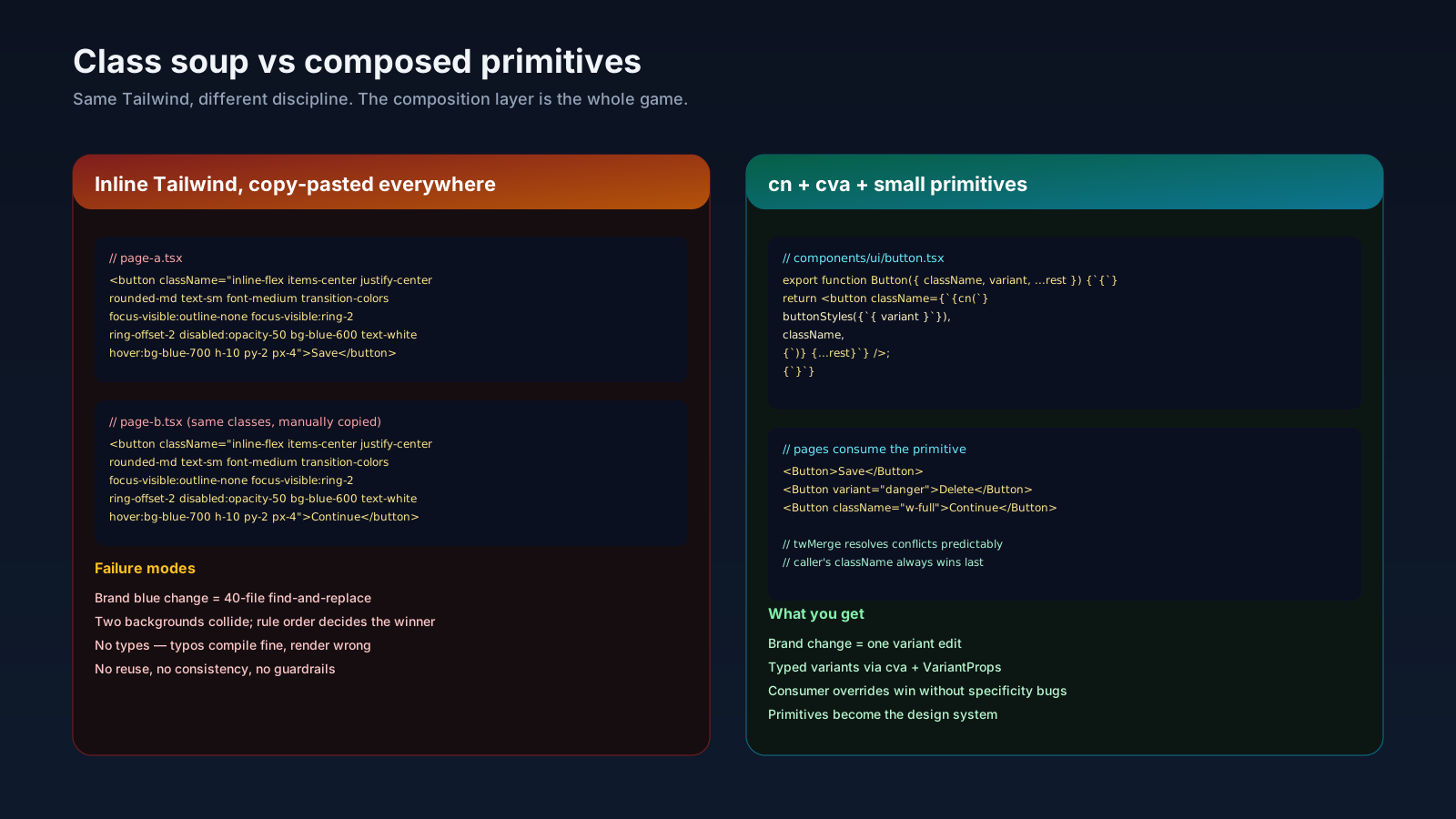
The default way teams use Tailwind for the first three months is to write the classes inline, copy-paste similar JSX between pages, and never extract anything. It works until two things happen.
First, the design system has to evolve and you have forty places where bg-blue-600 hover:bg-blue-700 text-white px-4 py-2 rounded-md appears verbatim. Changing the brand blue is now a forty-file find-and-replace. Second, someone tries to make a component reusable and writes className={"bg-blue-600 " + props.className}, the consumer passes bg-red-500, and you get a button with both classes on it. Which one wins is decided by the order of the rules in the generated stylesheet, not by the order in the markup. That's a real bug and it ships.
Both problems have the same root cause: Tailwind makes it cheap to start and expensive to compose unless you set up the composition layer early.
clsx And tailwind-merge: The cn Helper
The pattern almost every serious Tailwind codebase converges on is a cn helper that combines clsx (for conditional joining) and tailwind-merge (for resolving Tailwind-class conflicts).
// lib/utils.ts
import { clsx, type ClassValue } from 'clsx';
import { twMerge } from 'tailwind-merge';

export function cn(...inputs: ClassValue[]) {
  return twMerge(clsx(inputs));
}
clsx flattens arrays and filters out falsy values. twMerge looks at the resulting string, sees bg-blue-600 bg-red-500, knows those are both background utilities, and drops the earlier one. The right side wins, every time, predictably.
import { cn } from '@/lib/utils';

interface ButtonProps extends React.ButtonHTMLAttributes<HTMLButtonElement> {
  variant?: 'primary' | 'danger';
}

export function Button({ className, variant = 'primary', ...props }: ButtonProps) {
  return (
    <button
      className={cn(
        'inline-flex items-center justify-center rounded-md font-medium px-4 py-2 transition-colors',
        variant === 'primary' && 'bg-blue-600 text-white hover:bg-blue-700',
        variant === 'danger' && 'bg-red-600 text-white hover:bg-red-700',
        className,
      )}
      {...props}
    />
  );
}
Three things matter in the order: base classes first, variant classes second, consumer className last. Because twMerge resolves conflicts left-to-right, callers can override anything they need by passing className="bg-emerald-600" and the button does the right thing. This is the foundational pattern. If you don't have it, every shared Tailwind component you write will have specificity bugs.
class-variance-authority For The Variant Explosion
Once you have buttons with size, variant, intent, and disabled states, the conditional cn calls get long. cva (class-variance-authority) gives you a typed way to declare variants and their compounds:
import { cva, type VariantProps } from 'class-variance-authority';

export const buttonStyles = cva(
  'inline-flex items-center justify-center rounded-md font-medium transition-colors',
  {
    variants: {
      variant: {
        primary: 'bg-blue-600 text-white hover:bg-blue-700',
        danger: 'bg-red-600 text-white hover:bg-red-700',
        ghost: 'bg-transparent hover:bg-slate-100',
      },
      size: {
        sm: 'h-8 px-3 text-sm',
        md: 'h-10 px-4',
        lg: 'h-12 px-6 text-lg',
      },
    },
    defaultVariants: { variant: 'primary', size: 'md' },
  },
);

export type ButtonVariants = VariantProps<typeof buttonStyles>;
Pair with cn, plug into the component, and your prop API becomes the variant API. shadcn/ui's components ship with this exact pattern; if you're building a design system on top of Tailwind, this is what scales.
@apply Is Mostly A Trap, With One Real Use
The @apply directive lets you bake utilities into a custom CSS class:
.btn-primary { @apply bg-blue-600 text-white px-4 py-2 rounded-md hover:bg-blue-700; }It looks like the answer to long classNames. It mostly isn't. The class becomes invisible to tailwind-merge (which only resolves conflicts inside utility class strings, not custom classes), variants get harder to override, and the bundle grows because you've duplicated utilities into named rules. Tailwind's own docs explicitly recommend extracting a component over @apply for this reason.
The legitimate use: third-party content you don't render yourself — markdown HTML, a CMS body, a rich-text editor's output — where you can't put Tailwind classes on the elements directly. Use @apply inside .prose rules, or use the @tailwindcss/typography plugin, and treat it as the exception.
For everything you control, extract a React component instead.
Tailwind v4 Changed The Config Story
If you're starting fresh in 2025, Tailwind v4 (released January 2025) is worth knowing about. The big shift is CSS-first config: there's no tailwind.config.js by default, you import Tailwind with @import "tailwindcss";, and you declare your design tokens in CSS via @theme:
@import "tailwindcss";

@theme {
  --color-brand: oklch(0.7 0.18 250);
  --color-brand-fg: oklch(0.98 0 0);
  --font-display: "Inter Tight", system-ui, sans-serif;
  --radius-card: 0.75rem;
}
Those tokens become utilities — bg-brand, text-brand-fg, font-display, rounded-card — automatically. The new Oxide engine is faster on incremental builds and the per-page CSS bundles are smaller. v3 is still everywhere and still fine; v4 is the direction.
The architectural point: with @theme, your design tokens live in CSS instead of a JS config object. That matches how the rest of the platform now thinks about tokens (custom properties), and it means non-Tailwind code can read the same variables.
Where Tailwind Doesn't Pay Off
I'm largely positive on Tailwind in big apps but I've also seen it fail. The patterns where it doesn't earn its place:
- Designer-led products with bespoke per-page art direction. When every page is hand-tuned and shares almost no system, Tailwind's utility vocabulary becomes friction.
- Teams without buy-in. Half the codebase in Tailwind, half in CSS Modules, no agreement on which goes where, is worse than picking one.
- Markdown-heavy content sites. Without
proseand the typography plugin, every<p>and<a>needs explicit utilities, which fights what HTML wants to do for free.
If you're shipping a product app with a real design system, a developer team larger than three, and components that get reused across many surfaces, Tailwind plus cn plus cva plus a small set of base components is genuinely productive. If you don't have those, the productivity story doesn't materialize and the noise complaints will land harder.
How To Tell It's Working
A short list of signals that the Tailwind layer is healthy:
- New components are written by composing existing primitives, not by copying classes from another file.
Button,Card,Input,Badge,Dialogexist as your own components. The rest of the app consumes them, not raw utilities.- Brand color changes are a one-line change in the theme file or
@themeblock. - Pull requests rarely contain new uses of
@apply. - New engineers can ship their first component in a day without a senior fixing their classes.
If you've been on Tailwind for a year and those things aren't true, the framework isn't the problem. The composition layer was never built. Build it.