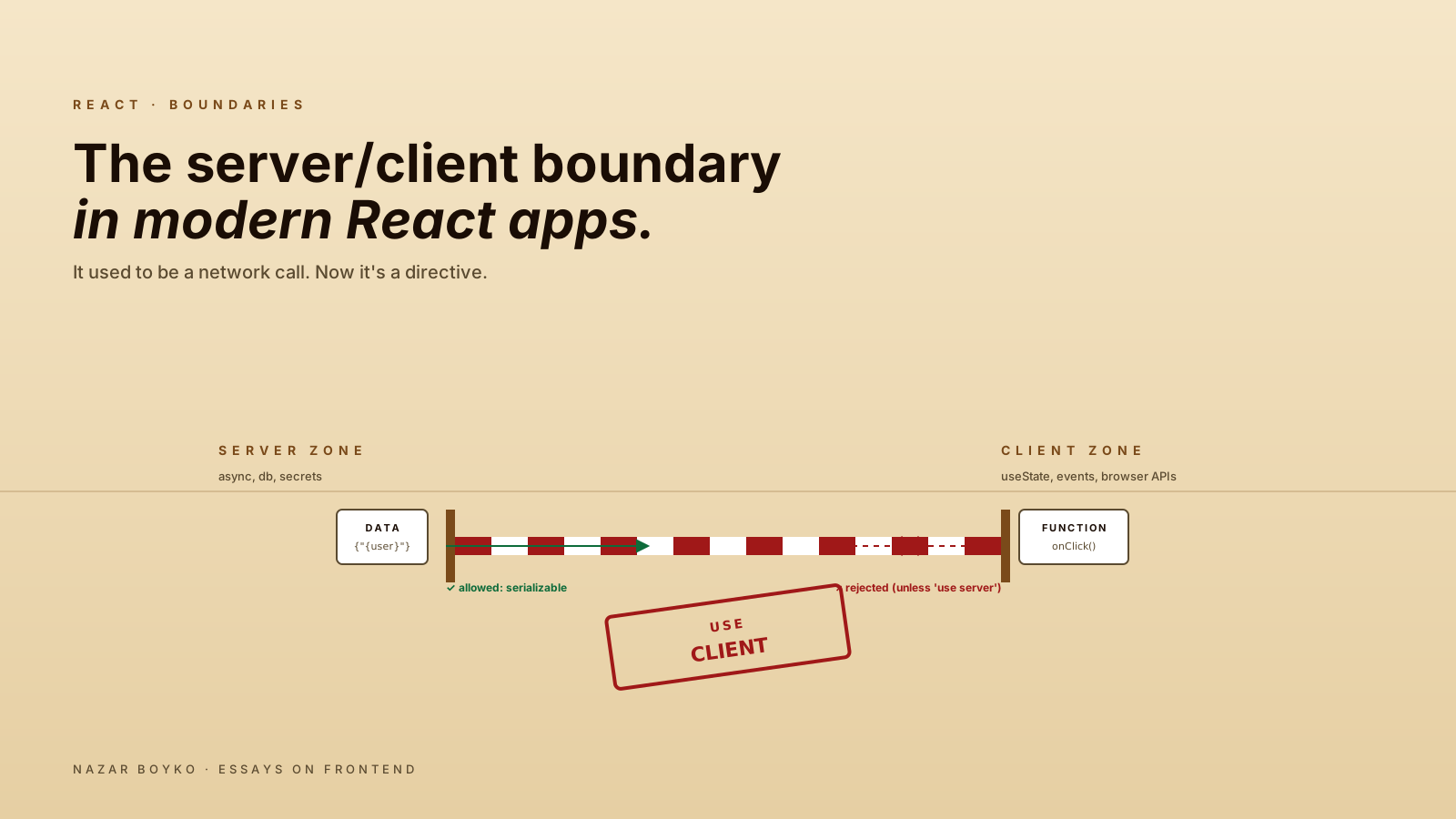
In classic React, "client" and "server" were two different worlds connected by HTTP. You wrote frontend code; your backend lived behind an API; the boundary was obvious because it was a network call.
In modern React (App Router, Remix, anything RSC-aware), the boundary is now a directive. 'use client' at the top of a file says "everything from here down is client code". Without it, the file is server code. The same React, the same JSX, but the line between the two is no longer obvious — and getting it right is the most important skill the new architecture asks of you.
This article is about that line. What crosses it, where to draw it, and the patterns that keep your bundle small without making your code awkward.
The Two Defaults Have Flipped
In Next.js Pages Router, every component ran in both environments — first server-rendered to HTML (via getServerSideProps / getStaticProps for data) and then hydrated on the client. There was no concept of a "server-only" component; the same code ran in both places.
In App Router, every component is a server component by default — meaning it runs only on the server and ships zero JS for that part of the tree. You opt into client behaviour with 'use client'. This is the most consequential single change in the framework, and it's the source of most "why doesn't this work" confusion when migrating.
// app/dashboard/page.tsx — server by default
export default async function DashboardPage() {
  const orders = await db.orders.recent(10);
  return <OrderList orders={orders} />;
}

// components/SearchBox.tsx — opted into client
'use client';
import { useState } from 'react';

export function SearchBox() {
  const [q, setQ] = useState('');
  return <input value={q} onChange={e => setQ(e.target.value)} />;
}
SearchBox works because of 'use client'. Without it, useState would throw — server components can't call hooks.
What "use client" Actually Means
'use client' is not "this component runs only in the browser". It's "this component, and everything imported by it, gets bundled for the client and hydrated in the browser". The component still renders on the server initially (for SSR), but its interactive lifecycle runs client-side.
The directive marks a boundary. Once you cross into a client component, every component imported from there is also client. The cascade goes downward, not upward.
// 'use client' at the top means everything below this becomes client too
'use client';
import { Tabs } from './Tabs';        // also client (no need to mark)
import { Modal } from './Modal';      // also client
This is why people sometimes complain that "everything turns into a client component". If you put 'use client' near the root, you've just opted the whole tree out of server rendering. The skill is putting the boundary as deep in the tree as possible.
What Crosses The Boundary
When a server component renders a client component, props are serialized across the boundary. That puts a real constraint on what you can pass:
Allowed across the boundary (the React Flight wire format serialises these):
- Primitives: strings, numbers, booleans, null, undefined.
- Plain objects, arrays,
Date,BigInt, typed arrays. Map,Set, regularPromise(the latter via React 19'suse()hook).- Registered Symbols (
Symbol.for(...)). - Other server-rendered React elements (
children,slots).
Not allowed across the boundary:
- Functions (with one big exception: server actions, marked
'use server'). - Class instances of your own types — a custom
Userclass doesn't survive serialisation, only its plain-object shape does. - Unique Symbols (the kind from
Symbol('foo')rather thanSymbol.for('foo')). - React refs, event handlers, hooks.
// Server component
export default function Page() {
  return (
    <Modal
      title="Welcome"             // ✅ string
      open={true}                 // ✅ boolean
      onClose={() => ...}         // ❌ functions can't cross — except server actions
      user={new User({...})}      // ❌ custom class instances arrive as plain objects on the other side
    >
      <p>Some content</p>          {/* ✅ children — the magic prop */}
    </Modal>
  );
}
The "no functions" rule is the one that bites people most often. If you have a button that needs an onClick, the whole button has to be a client component — the function lives there.
The Children-As-Props Pattern
The most important pattern for keeping the boundary small is passing server components as children to client components:
// 'use client'
export function Card({ children, isOpen, setOpen }) {
  return (
    <div className={isOpen ? 'open' : 'closed'}>
      <button onClick={() => setOpen(!isOpen)}>Toggle</button>
      <div>{children}</div>
    </div>
  );
}

// server component
import { Card } from './Card';

export default async function Page() {
  const data = await db.fetchHeavyData();
  return (
    <Card>
      <RenderedFromServer data={data} />     {/* still a server component! */}
    </Card>
  );
}
Card is a client component. RenderedFromServer stays a server component. The trick is that React doesn't re-render children when Card re-renders — it just re-positions the already-rendered output. So you can drop expensive server-rendered content inside an interactive client wrapper without paying for re-renders or shipping that content's code to the browser.
This pattern is the difference between "everything became a client component" and "the boundary is exactly where it should be".
Pushing The Boundary Down
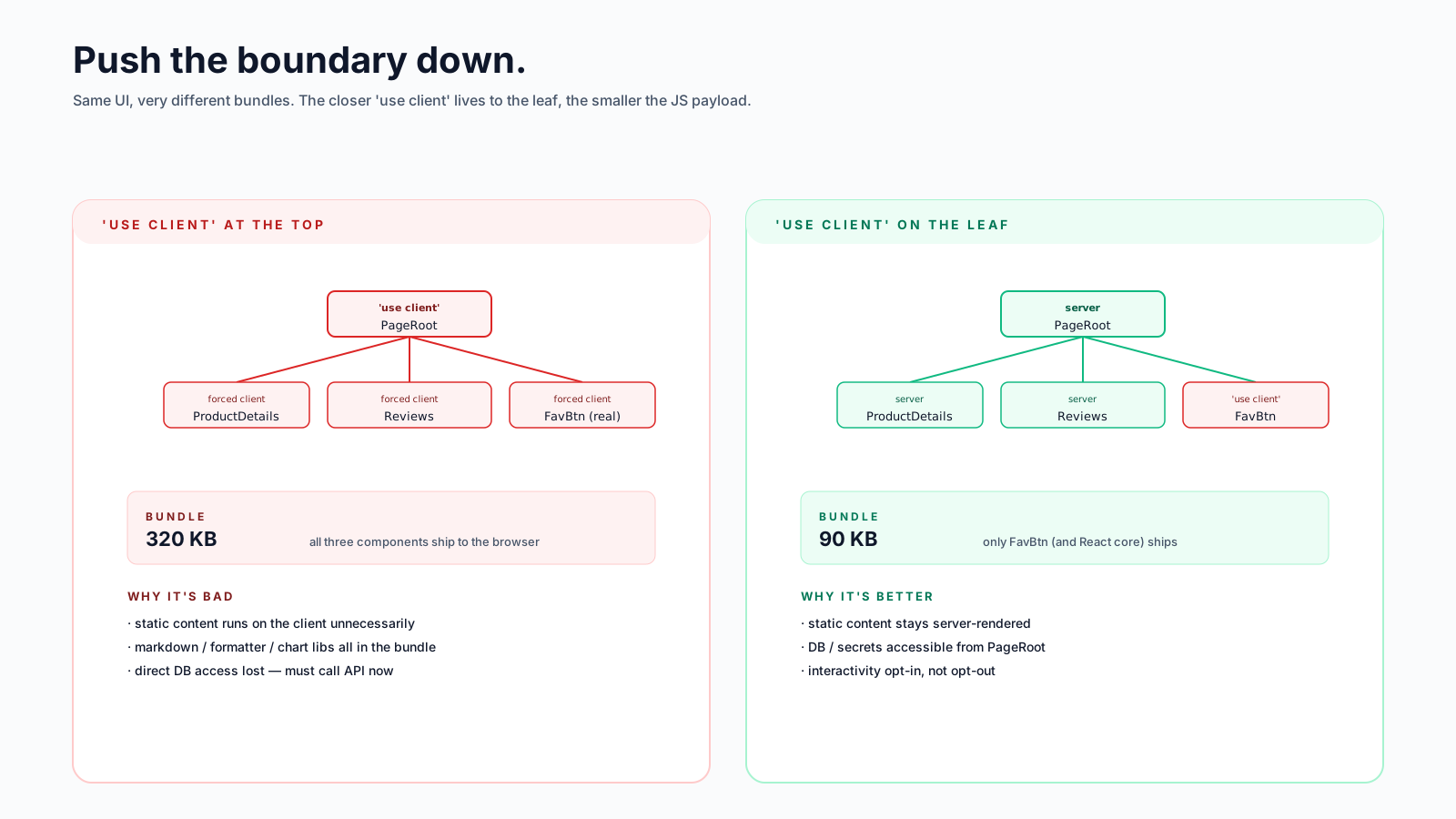
The most common mistake is putting 'use client' too high. A page that has one interactive button doesn't need the whole page to be a client component. Push the boundary to the smallest unit that needs it:
// ❌ pushes the entire page client-side
'use client';
export default function ProductPage() {
  return (
    <main>
      <ProductDetails />
      <Reviews />
      <FavouriteButton />     {/* the only interactive bit */}
    </main>
  );
}

// ✅ only the button is a client component
export default function ProductPage() {
  return (
    <main>
      <ProductDetails />
      <Reviews />
      <FavouriteButton />     {/* this file has 'use client' */}
    </main>
  );
}
Same UI. In the second version, ProductDetails and Reviews render on the server, ship no JavaScript, and the bundle is dramatically smaller. Only FavouriteButton (and its small dependency tree) reaches the browser.
Server Actions: The Function That Crosses
Functions can't cross the boundary — except for server actions, which are functions marked with 'use server' that run on the server but can be called from a client component:
// app/actions.ts
'use server';

export async function deletePost(id: string) {
  await db.posts.delete(id);
  revalidatePath('/posts');
}

// components/DeleteButton.tsx
'use client';
import { deletePost } from '@/app/actions';

export function DeleteButton({ id }) {
  return (
    <button onClick={async () => {
      await deletePost(id);
    }}>
      Delete
    </button>
  );
}
What's actually happening: the framework wraps deletePost in an HTTP call (a POST to a special endpoint). The client component calls the wrapper; the framework runs the real function on the server; the result comes back as a regular promise resolution. From the developer's perspective, you're calling a function. From the runtime's perspective, you're making a network call.
Server actions are how mutations work in the new model — no more /api/posts/delete endpoint, no more fetch('/api/...') plumbing. The function is the endpoint.
When You Need The Whole Subtree Client-Side
Sometimes you genuinely have a large interactive subtree — a chart with controls, a code editor, a drawing tool. In those cases, biting the bullet and marking the root as 'use client' is fine. Don't fight it.
The thing to avoid is marking unrelated parts of the page client too. If your dashboard has one big interactive widget and a bunch of static panels, only the widget needs the directive. Layouts and parent pages should stay server unless they have a reason not to.
A useful question: "If this component were rendered as static HTML with no interactivity, would the user notice?" If no, it can be a server component. If yes, it's client.
The Boundary And Third-Party Libraries
Most older React libraries are written assuming client-side rendering. Things that go wrong:
- Anything using context (theme providers, query providers). Has to live inside a client component, usually as a top-level "Providers" client component that wraps
children. - Anything that calls hooks. Class-component libraries are fine; hook-based ones need a client wrapper.
- Anything that imports
window/documentat module load time. Wrap with dynamic import +ssr: falseif SSR is breaking it.
The pattern that's emerged: a small Providers.tsx client component at the layout level, holding all the providers (Theme, Query, Auth):
// app/providers.tsx
'use client';

import { QueryClient, QueryClientProvider } from '@tanstack/react-query';
import { ThemeProvider } from 'next-themes';

const queryClient = new QueryClient();

export function Providers({ children }) {
  return (
    <QueryClientProvider client={queryClient}>
      <ThemeProvider>{children}</ThemeProvider>
    </QueryClientProvider>
  );
}

// app/layout.tsx — server component
import { Providers } from './providers';

export default function RootLayout({ children }) {
  return (
    <html>
      <body>
        <Providers>{children}</Providers>
      </body>
    </html>
  );
}
The layout itself stays server. Only the providers boot client-side. children (the actual pages) can still be server components, because they're passed into the client wrapper, not imported by it.
Mental Cheat Sheet
When you're not sure where to put a component:
- Does it need
useState,useEffect, refs, or event handlers? → Client. - Does it call a browser API (
window,localStorage)? → Client. - Does it use a context? → Client (or its consumer is).
- Does it
awaitdata, hit the database, or use environment secrets? → Server. - Is it pure rendering of props? → Server (the default; default is good).
- Is it interactive but most of its content is static? → Wrap a client component around server-rendered children.
The boundary isn't a thing to be avoided; it's a thing to be placed deliberately. Once you internalise where it should go, the new model stops feeling weird and starts feeling like a bigger, sharper version of "data near the database, interactivity near the user".
The shortest correct rule: server by default, client by exception, push the exception as deep as you can.