

So you've got a Node.js codebase that's outgrown a single package.json. Maybe it's an API plus a couple of workers plus a shared @acme/types package. Maybe it's a SaaS with a Next.js frontend, a Fastify backend, a CLI, and three internal libraries. Either way, you're now in monorepo territory, and the same two names keep showing up in every "what should we use" thread: Turborepo and Nx.
They sound like alternatives. They mostly are. But they're built on very different bets about what a monorepo tool should do for you, and picking the wrong one means months of either fighting the tool or being underserved by it.
Let's break it down.
The Mental Model Difference
The biggest thing nobody mentions up front: Turborepo and Nx start from opposite ends of the same problem.
Turborepo is a task runner with a cache. That's it. You already have a workspace (pnpm, yarn, npm, bun -- Turbo doesn't care). You already have package.json scripts in each app and library. Turbo's job is to look at the dependency graph between your packages, run the right scripts in the right order, skip anything that didn't change, and stay out of your way. It does that one thing very well, and almost nothing else.
Nx is a workspace platform. It still does the task running and caching, but it also has opinions about how you organize libraries, generates code for you, enforces module boundaries, visualizes the project graph, and ships plugins that wrap whole ecosystems (Next.js, NestJS, Vite, Jest, Cypress, Playwright, and so on). When you adopt Nx, you're not adopting a build accelerator -- you're adopting a way of running a multi-package codebase.
Neither approach is wrong. They serve different teams. The trouble is teams pick based on a benchmark blog post and end up in the wrong shape entirely.
How Each One Thinks About Tasks
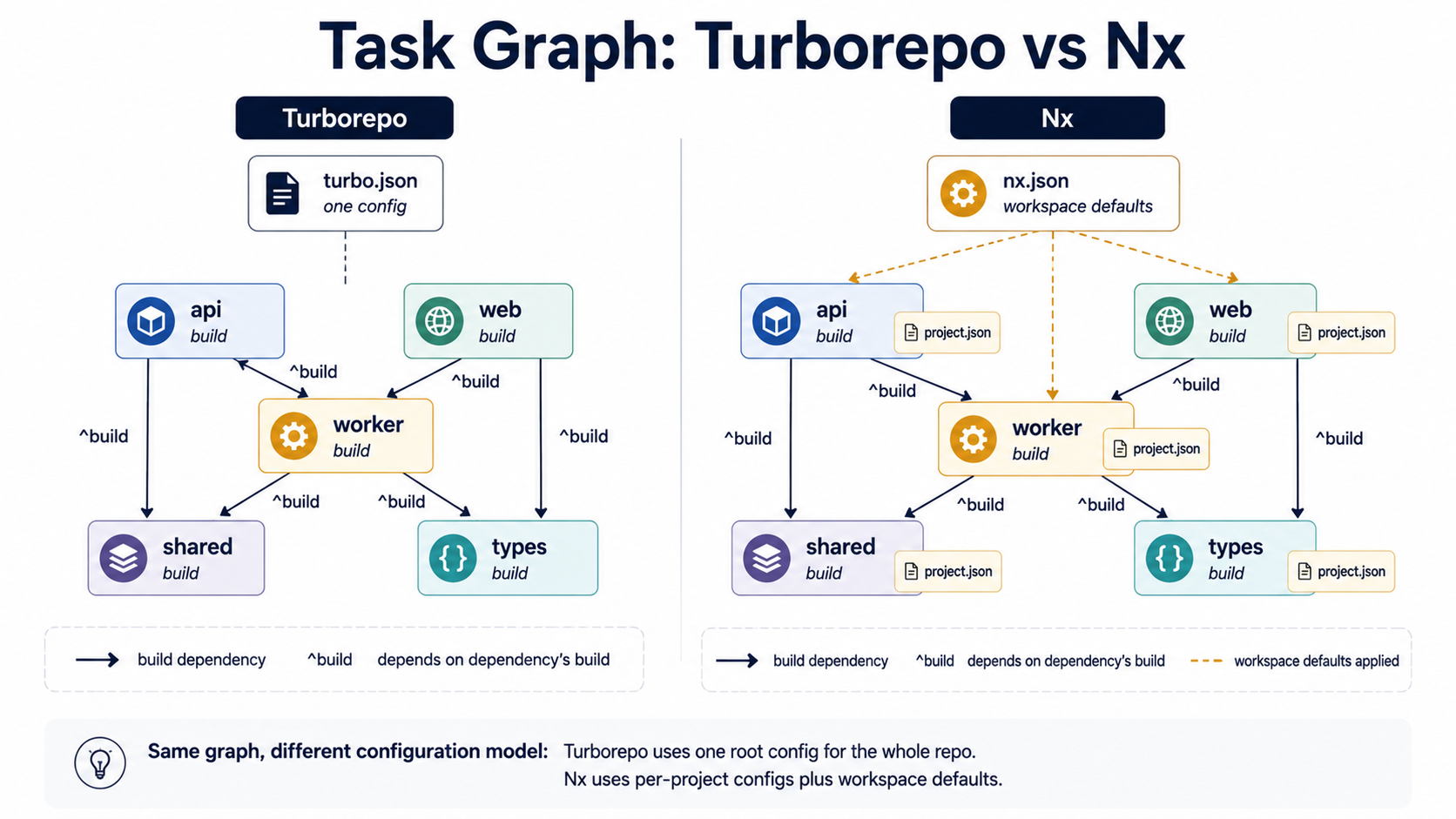
Both tools think in terms of tasks: "build the api," "test the shared library," "lint the web app." Both build a graph of those tasks, figure out what depends on what, and execute them with maximum parallelism. The configuration is where they diverge.
In Turborepo, the whole graph lives in one turbo.json at the repo root:
{
  "$schema": "https://turbo.build/schema.json",
  "tasks": {
    "build": {
      "dependsOn": ["^build"],
      "outputs": ["dist/**", ".next/**"]
    },
    "test": {
      "dependsOn": ["build"],
      "outputs": ["coverage/**"]
    },
    "lint": {},
    "dev": {
      "cache": false,
      "persistent": true
    }
  }
}
The ^build means "before running build in this package, run build in every package this one depends on." The outputs tell Turbo what to snapshot for the cache. Tasks themselves are just whatever you put in each package's package.json scripts section -- Turbo doesn't replace them, it orchestrates them.
In Nx, the same idea is split across nx.json (workspace defaults), project.json files per project (or package.json with an nx field), and the targets defined there:
{
  "targetDefaults": {
    "build": {
      "dependsOn": ["^build"],
      "cache": true,
      "inputs": ["production", "^production"],
      "outputs": ["{projectRoot}/dist"]
    },
    "test": {
      "dependsOn": ["^build"],
      "cache": true
    }
  },
  "namedInputs": {
    "default": ["{projectRoot}/**/*", "sharedGlobals"],
    "production": ["default", "!{projectRoot}/**/*.spec.ts"]
  }
}
Nx leans on namedInputs to describe exactly which files affect a given task's cache key. You can say "the production build doesn't depend on test files," and changing a .spec.ts won't invalidate the build cache. Turbo has inputs too, but the named-inputs concept makes Nx's setup more reusable across projects in a large repo.
The trade-off: Turbo's config fits on one screen, even for a real project. Nx's config is more powerful but more places to look when something doesn't behave the way you expect.
Caching: The Reason You're Reading This
Caching is what monorepo tools really sell. Both tools do the same thing in principle: hash the inputs (source files, dependencies, config, env vars, the task command), check if that hash has ever been seen before, and if so, replay the outputs from cache instead of running the task.
For a clean rebuild of a single package, that's not interesting. For CI, where the same commit gets built dozens of times across branches and PRs, it's the difference between a 90-second pipeline and a 12-minute one.
The local cache story is similar for both -- files on disk under node_modules/.cache/turbo or node_modules/.cache/nx, keyed by content hash. Where it gets interesting is remote cache, the thing that turns "Bob's laptop cached this build at 9am" into "every CI runner and every other developer also gets the cache hit at noon."
Turborepo's remote cache is part of the official offering. The hosted version is Vercel's Remote Cache, and it works out of the box if you log in:
turbo login
turbo link
turbo run build
You can also self-host the remote cache -- there are open-source servers like turbo-remote-cache that implement the same protocol and store artifacts in S3, R2, or GCS. The protocol is small enough that running your own is realistic for a team that doesn't want builds touching Vercel.
Nx's remote cache lives behind Nx Cloud. There's a free tier with limits on cached computation, and paid plans for serious usage. Self-hosting Nx Cloud is possible too -- the team ships a self-hosted version. But the big extra Nx Cloud offers isn't just remote cache; it's distributed task execution (DTE): Nx Cloud can split your test suite across multiple CI agents, watching for flakes and rebalancing on the fly. For a large repo where nx affected --test would normally take 25 minutes on a single agent, DTE can shrink it to 5 by running across five agents with automatic coordination.
Turbo doesn't ship a built-in equivalent of DTE. You can shard tests yourself in CI with --filter and parallel matrix jobs, but the coordination -- knowing which agent finished early, redistributing slow tests -- is on you.
So the rough mental model:
- Local cache: parity. Both work, both are fast, both invalidate correctly when configured.
- Remote cache: parity for the basic case. Hosted SaaS for both, self-hosting options for both, comparable hit rates.
- Distributed task execution: Nx wins by a wide margin. If your CI test suite is large enough that a single agent can't finish in time, this is the feature that pays for Nx Cloud.
Affected Commands And Why They Matter
Both tools have a concept of "what changed in this PR." Turbo calls it filtering by Git ref:
turbo run test --filter=...[origin/main]That runs test only on packages that changed since origin/main, plus any packages that depend on those (... is the "include downstream dependents" operator).
Nx calls it affected:
nx affected --target=test --base=origin/mainFunctionally the same: only test what changed. The implementations differ a little -- Nx's project graph is richer because Nx knows about more than just package.json dependencies (it can pick up implicit dependencies from tsconfig.json paths, custom rules, or explicit implicitDependencies lists). Turbo's graph is whatever your workspace's package manager already knows.
In small repos, the difference doesn't matter. In a repo with 80 libraries where half the dependencies aren't expressed in package.json (because they're shared TypeScript types resolved via path aliases), Nx's deeper graph catches changes Turbo's filter misses. That's a real win for correctness -- and a real source of "why is this package in the affected set?" bafflement when the implicit graph disagrees with your intuition.
DX: What It Feels Like Day To Day
This is the part that doesn't show up in benchmarks but decides whether the team likes the tool a year in.
Turborepo's daily commands are short and obvious:
turbo run build
turbo run test --filter=@acme/api
turbo run lint --filter=...{packages/shared}
The error messages are usually direct. The turbo.json is one file. New developers get it in an afternoon. The downside is that "the cache didn't hit and I don't know why" is a real category of pain -- when Turbo decides your inputs changed and you can't see why, the --dry-run=json and --summarize flags are how you debug, but it takes a few rounds before you're fluent.
Nx's daily commands are more verbose and more capable:
nx build api
nx test api
nx run-many --target=lint --projects=api,web,worker
nx affected --target=test
nx graph
nx graph is genuinely useful -- it opens a browser visualizer of your project dependencies, which is the kind of thing you don't know you want until you have it. The generator system means you scaffold new libraries with nx g @nx/node:lib billing instead of copying an existing folder and renaming things. The plugin ecosystem means a fresh Nx workspace already knows how to build a Next.js app, run Jest, configure ESLint with sensible defaults.
The cost is that Nx is opinionated. Its plugins assume you're using their executors (@nx/webpack:webpack, @nx/jest:jest, and so on), and stepping outside that assumption -- for example, wanting to run a custom esbuild config -- works, but it's more friction than just typing node esbuild.config.js into package.json. Some teams love this; others find it constraining.
A useful gut check: if you find yourself fighting Nx's executors to do something a plain package.json script would do trivially, you might be on the wrong tool. If you find yourself wishing Turbo had a generator or a project graph or a plugin for X, you might be on the wrong tool the other direction.
What Happens When The Repo Gets Big
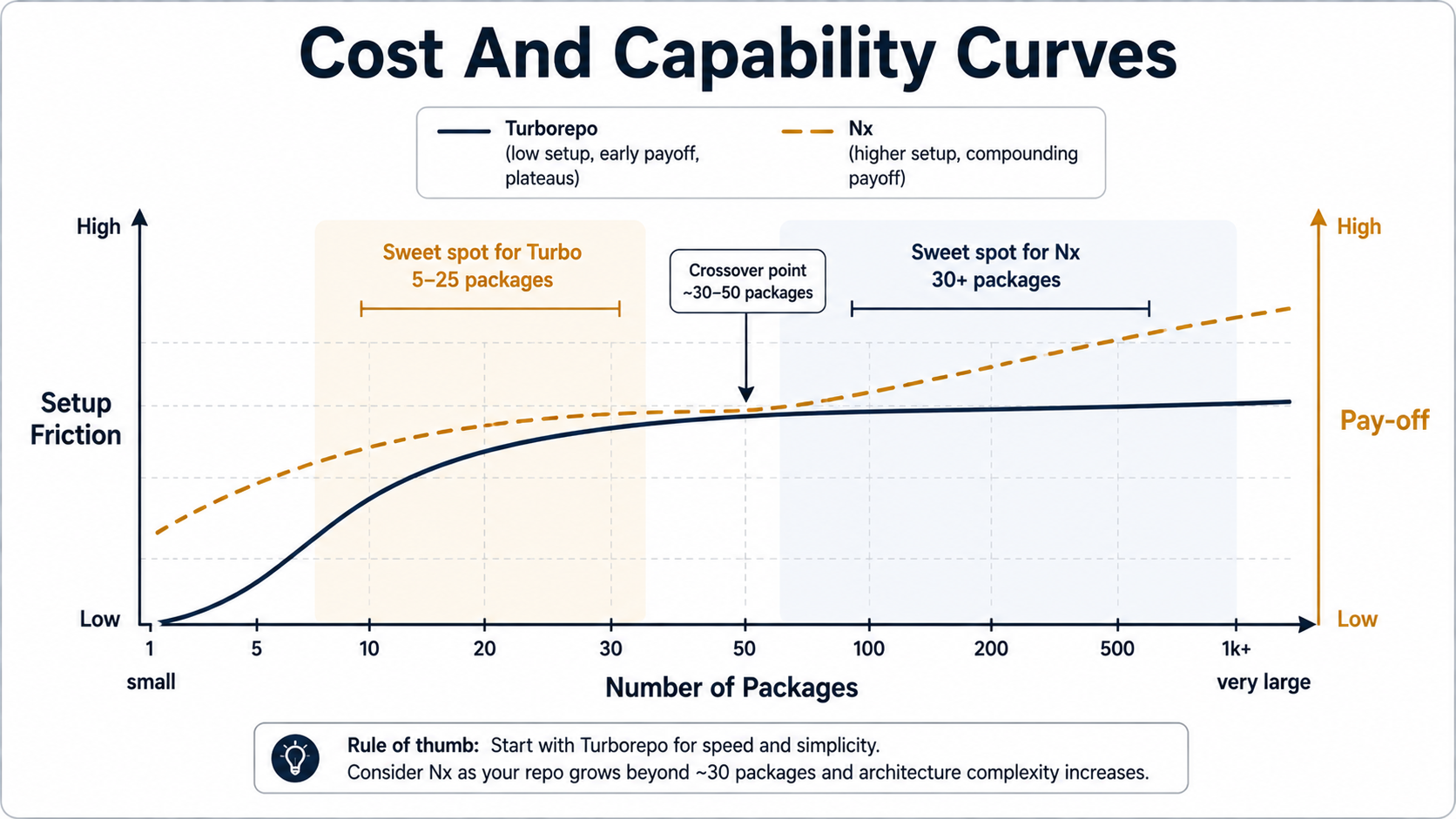
"Big" in monorepo terms isn't lines of code; it's number of packages and frequency of changes. Both tools scale, but the failure modes are different.
Turborepo at scale tends to fail quietly through cache misses. A repo with 60 packages and a few thousand cross-package imports will have some task that's defined inconsistently -- different outputs patterns, an env var that wasn't declared in globalEnv, an upstream task that wasn't listed in dependsOn. The cache hit rate slowly drops from 90% to 60%, CI gets slower, nobody can point to the day it happened. Fixing it is doable, but it requires going through turbo.json carefully with --dry-run=json and being honest about what each task actually reads.
Nx at scale tends to fail loudly through complexity. The nx.json, the per-project project.json files, the plugin executors, the targetDefaults, the namedInputs, the implicit dependencies -- there are more places to put configuration, and a misconfigured cache or a wrong tag becomes a small archaeological dig. The flip side is that when it's set up well, the project graph is precise enough that affected is trustworthy in a way Turbo's filter often isn't.
For a Node.js shop with 5--15 packages, neither tool's scaling concerns are going to bite. For 50+ packages with a real CI pipeline, Nx's deeper graph and DTE start to matter, and the configuration tax pays for itself. For 200+ packages, Nx isn't really optional -- that's the size where having nx graph and module boundary rules (@nx/enforce-module-boundaries) goes from nice-to-have to "how would you survive without this."
Migration Cost In Both Directions
A real-world consideration nobody likes: what does it cost to leave the tool you picked?
Going from no tool to Turborepo is the cheapest move in the space. You already have package.json scripts and a workspace. You add turbo as a dev dependency, write a small turbo.json, and start running turbo run build. Nothing else changes. Your scripts still work standalone -- you can run pnpm --filter=@acme/api build and bypass Turbo entirely if you want.
Going from no tool to Nx is heavier. The default Nx setup wants you to use its generators, its plugins, and its executors. You can run Nx in "package-based" mode where it only orchestrates your package.json scripts (similar to Turbo's model), but most teams that adopt Nx go all-in on the integrated mode, which means migrating each package to use Nx-provided executors. The payoff is bigger; the cost is bigger.
Going from Turborepo to Nx is doable but real work -- you're adding nx.json, optionally per-project config, and deciding whether to keep running plain scripts or move to executors.
Going from Nx to Turborepo is harder in the "integrated" case because you have to unwind the executors back to plain package.json scripts. In "package-based" Nx, the migration is much lighter.
The implication for a team that genuinely isn't sure: starting with Turborepo is the lower-regret default. You're not locked in, the config is small, and if you outgrow it, you can move. Starting with Nx is a stronger commitment -- which is fine when you know you need what it offers, but expensive when you picked it because it sounded "more professional."
When To Pick Which
Turborepo is the right call when:
- You have a small-to-medium Node.js workspace (under 30 packages is a soft line).
- Your packages each have their own opinions about tooling -- different build tools, different test runners, different bundlers -- and you don't want a wrapper around all of them.
- Your team values configuration that fits on one screen.
- You don't need distributed test execution. Either your test suite is fast enough on one CI agent, or you're happy to shard it manually.
- You're not sure yet, and you want the lower-regret starting point.
Nx is the right call when:
- The repo is large or trending large fast -- many packages, many teams, lots of cross-package work.
- You want enforced module boundaries (
@nx/enforce-module-boundaries) -- domain layers that aren't allowed to import from each other except through declared public APIs. - You want code generators for new libraries, new apps, new components. Especially valuable when onboarding people who shouldn't have to learn the "create a new lib" tribal knowledge.
- You want the project graph visualization as a first-class tool, not a thing you cobble together with scripts.
- CI test time is the bottleneck and DTE would save you real money in CI minutes.
- You're already deep in an Nx-supported framework (Next.js, NestJS, Angular) and want the plugin to set up sensible defaults.
A few things that don't matter as much as people think:
- Raw cache speed. Both are fast enough that you won't notice the difference for any reasonable repo.
- Which tool is "more modern." Turbo is older as a brand, but the current Turborepo internals are a recent Rust rewrite. Nx has been evolving for years and is currently very active. Neither is the legacy option.
- GitHub stars. Stars track marketing, not fit.
A Note On Mixing Them
It is technically possible to run both in the same repo -- Nx for the project graph and module boundaries, Turbo for the task orchestration -- and a few teams do this in the wild. It's almost always a sign that the team hasn't decided what they actually want from a monorepo tool. The configuration overhead doubles, and most of the value of each tool is in the integration the other one is now providing differently. Pick one and commit, or you're paying for both and getting the maintenance burden of neither.
The Honest Summary
Turborepo is a sharp, focused task runner with great caching and a small surface area. It's the right tool for most Node.js teams most of the time, especially when you're still figuring out what you need. The day you outgrow it, you'll know.
Nx is a workspace platform that takes a stronger position on how a monorepo should be organized. It costs more to set up and learn, and it gives you a lot more when the repo gets serious -- generators, plugins, a real project graph, module boundary enforcement, and (with Nx Cloud) the only mainstream Node.js DTE story.
If you're picking today and you can't articulate why you need the heavier tool, pick the lighter one. You can grow into Nx. You can't easily grow back out of it.



