This code looks fine. It will also break your service in production:
import { exec } from "node:child_process";

export function transcode(input: string, output: string) {
  return new Promise((resolve, reject) => {
    exec(`ffmpeg -i ${input} ${output}`, (err, stdout, stderr) => {
      if (err) return reject(err);
      resolve(stdout);
    });
  });
}
There are at least four things wrong with it, and you can't see any of them from the function signature. We'll get to all four. But the bigger question this snippet hides is the one this article is really about: when does a Node.js program actually need a child process, and which of the four flavors should you reach for?
Node lives in one thread. The moment you need to do anything CPU-heavy, talk to a binary that isn't Node, run a script written in another language, or isolate work that might crash or misbehave, you're staring at node:child_process. It's one of the oldest modules in the runtime, older than Buffer rewrites, older than Promise, older than async/await. And almost everyone misuses it the first few times.
Let's walk through it properly.
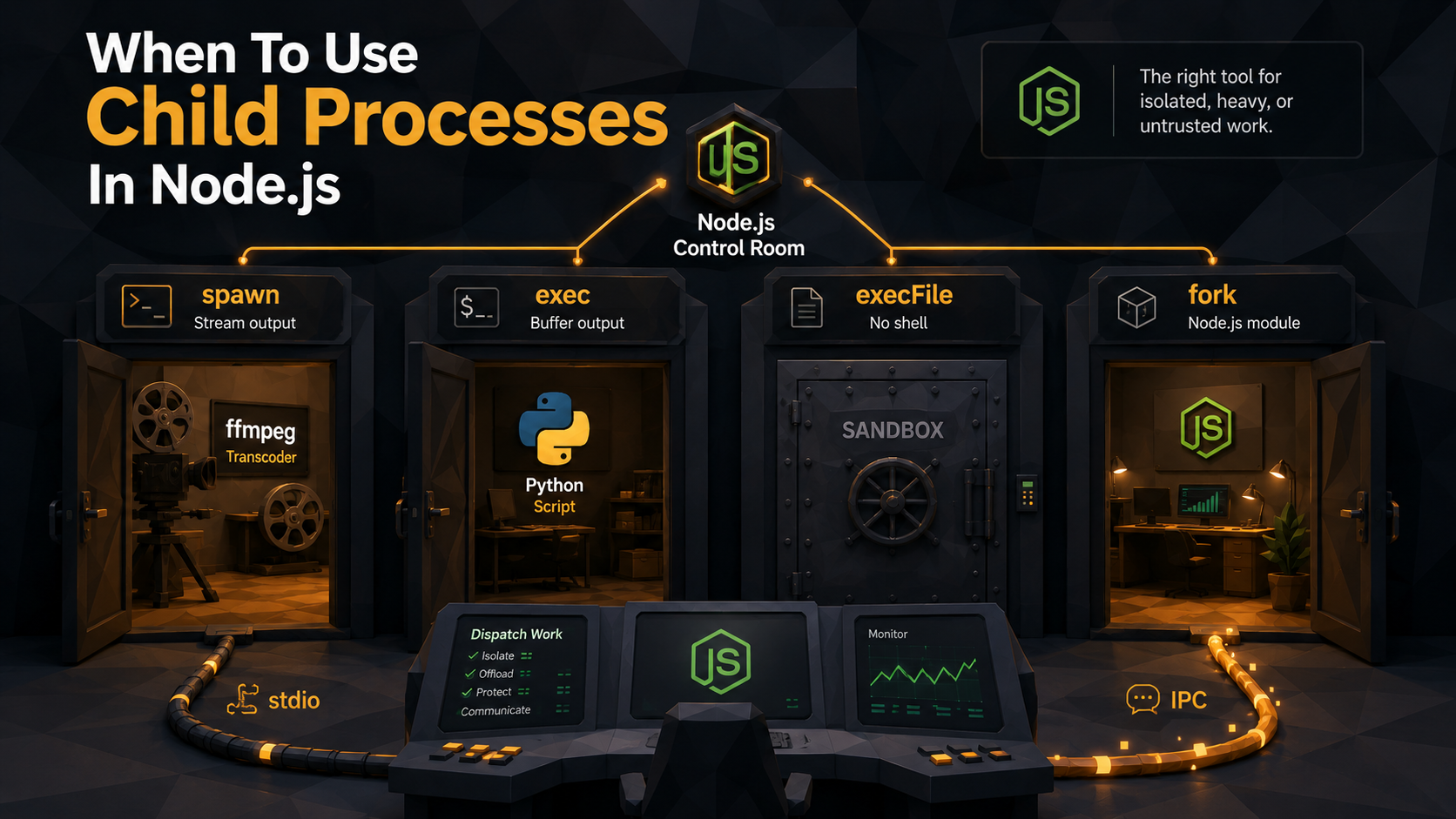
The four doors into another process
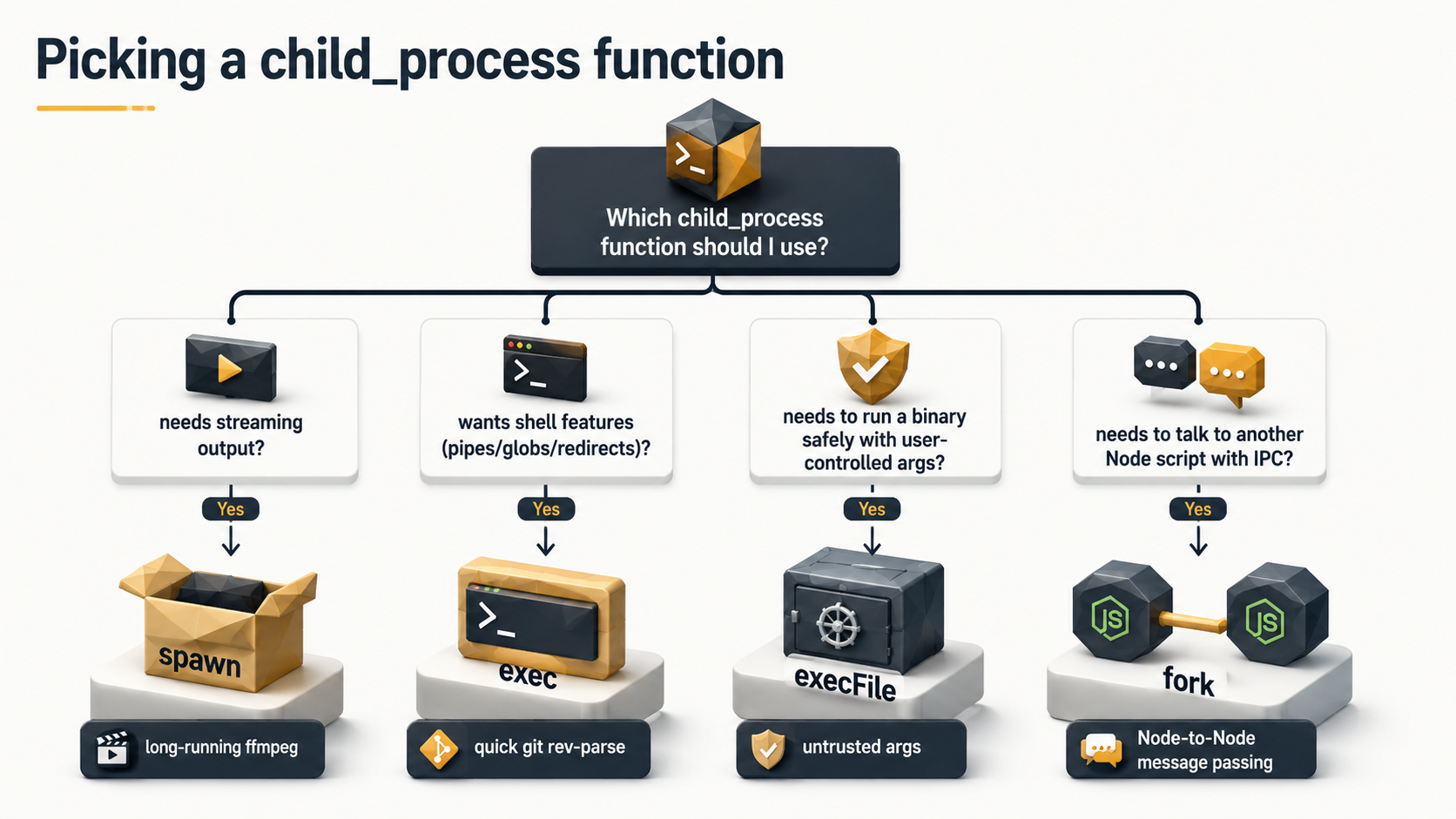
node:child_process gives you four ways to start a process, and they are not interchangeable. Picking the wrong one is the source of about 80% of the bugs people hit with this module.
spawn
spawn(command, args, options) starts a process and gives you back streams: stdout, stderr, stdin. No output is buffered. You read what you want, when you want. The child can produce gigabytes and your memory stays flat as long as you drain the streams.
import { spawn } from "node:child_process";

const child = spawn("ffmpeg", ["-i", "input.mp4", "output.webm"]);
child.stderr.on("data", (chunk) => process.stderr.write(chunk));
child.on("close", (code) => console.log(`ffmpeg exited with ${code}`));
This is the one you reach for by default. Long-running work, anything that streams, anything that produces non-trivial output: that's spawn.
exec
exec(command, options, callback) runs a command through a shell and buffers all of stdout and stderr in memory until the process exits, then hands them to your callback.
That sounds convenient. It also has a hard limit, and it runs through /bin/sh (or cmd.exe on Windows), which means string interpolation is now a security problem. The default maxBuffer is 1 MB. If the child produces more, exec kills it with an error. Before Node 12 the default was 200 KB, which broke even more people.
Use exec only when:
- You want shell features (pipes, redirects, globs, env-var expansion) on purpose.
- The output is small and bounded: a one-line
git rev-parse HEAD, a quickuname -a. - You control the entire command string (no user input concatenated in).
If any of those aren't true, you don't want exec. You want execFile or spawn.
execFile
execFile(file, args, options, callback) is exec without the shell. It buffers output like exec, but it does not invoke /bin/sh, and arguments are passed as an array. No quoting, no globbing, no $VAR expansion, no command-injection surface.
import { execFile } from "node:child_process";

execFile("git", ["rev-parse", "HEAD"], (err, stdout) => {
  if (err) throw err;
  console.log(stdout.trim());
});
If you find yourself thinking "I want exec but the input might be from a user", you want execFile. Always. The cost of the shell is zero readability gain and a permanent injection risk.
fork
fork(modulePath, args, options) is a specialized form of spawn that only starts another Node.js process and automatically wires up an IPC channel between the two. You send messages with child.send(obj) and receive them with process.on("message", ...) on the other side.
// parent.ts
import { fork } from "node:child_process";
const child = fork("./worker.js");
child.send({ task: "render", payload: { /* ... */ } });
child.on("message", (msg) => console.log("got:", msg));process.on("message", (msg) => {
// do work
process.send({ ok: true, result: 42 });
});fork is the right tool when you specifically want another Node program with a clean message-passing interface. It is not the right tool for "I want a thread inside Node". That's worker_threads, which we'll come back to.
Child process or worker thread?
Before you reach for any of the four, ask one question: am I trying to escape another Node process, or am I trying to escape this Node process's main thread?
- "Escape the main thread": you have CPU-bound JavaScript that's blocking the event loop. Hashing a big file, parsing a giant XML, image processing in pure JS. You want
worker_threads. Workers share memory throughSharedArrayBufferandMessageChannel, start in low milliseconds, and live inside the same Node process. - "Escape Node entirely": you need to run something that isn't Node code. A binary like ffmpeg or ImageMagick. A Python script. A shell command. Something written in a language Node can't execute in-process. You want
child_process. - "Isolate something that might crash or hang": you want
child_process. A worker thread that segfaults takes the whole process down with it. A child process can die and you just notice the exit code and respawn. - "Isolate something that might be malicious": neither, on its own. We'll get to that.
The mistake people make is forking a Node child to run JavaScript that should have been a worker thread, paying the full process-startup cost and the IPC serialization cost for no reason. Or, going the other way, trying to run ffmpeg "in a worker". Workers run JavaScript, not binaries.
Running external binaries: the ffmpeg case study
ffmpeg is the canonical reason people first touch child_process. It's a binary. It can run for seconds or hours. It can produce huge amounts of output. It can consume huge amounts of input. And it likes to talk to you through stderr, even when it's working correctly.
Go back to the broken exec snippet at the top. Here's everything wrong with it:
execbuffers output. ffmpeg writes progress lines to stderr continuously. A two-hour transcode generates many megabytes. You'll hit the 1 MBmaxBufferandexecwill kill ffmpeg mid-job with aERR_CHILD_PROCESS_STDIO_MAXBUFFERerror.execruns through a shell. Ifinputever comes from user input (an upload filename, an API param, a database row), you have a shell-injection vulnerability.input = "video.mp4; rm -rf /"becomes a different conversation.- No timeout. A wedged ffmpeg sits there forever, holding a worker slot and an open file handle. Production discovers this at the worst possible moment.
- No signal handling. If your Node process is killed, ffmpeg keeps running. It's now an orphan eating CPU you're paying for.
Here's the version that doesn't break:
import { spawn } from "node:child_process";

export function transcode(input: string, output: string, timeoutMs = 30 * 60_000) {
  return new Promise<void>((resolve, reject) => {
    const ffmpeg = spawn("ffmpeg", ["-i", input, "-y", output], {
      stdio: ["ignore", "ignore", "pipe"],
    });

    const killer = setTimeout(() => {
      ffmpeg.kill("SIGTERM");
      setTimeout(() => ffmpeg.kill("SIGKILL"), 5_000).unref();
    }, timeoutMs);

    let stderrTail = "";
    ffmpeg.stderr.on("data", (chunk) => {
      // keep only the last ~8KB so we have context for errors
      stderrTail = (stderrTail + chunk.toString()).slice(-8192);
    });

    ffmpeg.on("error", (err) => {
      clearTimeout(killer);
      reject(err);
    });

    ffmpeg.on("close", (code, signal) => {
      clearTimeout(killer);
      if (code === 0) resolve();
      else reject(new Error(`ffmpeg exited ${code}/${signal}\n${stderrTail}`));
    });
  });
}
A few things worth pointing out:
stdio: ["ignore", "ignore", "pipe"]. We don't care about stdout, we only keep stderr so we can grab error context if it crashes. ffmpeg writes very little to stdout in this mode anyway.- Tail buffer. We don't store all of stderr. We keep the last 8 KB so an error message survives. This is the pattern for any binary that's chatty over a long time.
- Two-stage kill.
SIGTERMfirst (lets ffmpeg flush and close files cleanly),SIGKILL5 seconds later if it didn't go. The trailing timer is.unref()'d so it doesn't keep the event loop alive on its own. - Args as array.
["-i", input, ...]. No shell, no injection. ffmpeg gets exactly the strings you handed it.
Piping data into and out of ffmpeg
The trickier case is when you don't want to read from a file on disk. You want to pipe an in-memory stream into ffmpeg's stdin and pipe its output to an upload or another consumer.
const ffmpeg = spawn("ffmpeg", [
  "-i", "pipe:0",         // read from stdin
  "-f", "webm",
  "pipe:1",                // write to stdout
]);

readableInputStream.pipe(ffmpeg.stdin);
ffmpeg.stdout.pipe(uploadStream);
This works, but watch the failure modes:
- Pipe buffers are small. The OS pipe buffer on Linux defaults to 16 pages, typically 64 KB. If you stop draining
ffmpeg.stdout, ffmpeg blocks on write. If you stop feedingffmpeg.stdin, ffmpeg sits waiting. Stalled streams in either direction will hang the whole thing. Node'sstream.pipe()handles backpressure correctly; manualon("data")handlers often don't. - stdin EOF matters. ffmpeg won't know your input is over until you actually end the stream. If your readable source forgets to emit
"end", ffmpeg hangs forever. - Errors on either pipe can throw EPIPE. Attach
errorhandlers toffmpeg.stdinandffmpeg.stdout. The default unhandled-error behavior on a stream is to crash the process.
The general rule for any binary you drive via spawn: assume the streams will misbehave, attach handlers everywhere, and never trust that "it works in local testing" means it works under load.
Talking to Python (or anything else)
The pattern for Python is essentially the same as ffmpeg, with two extra wrinkles: data exchange and Python's own startup cost.
import { spawn } from "node:child_process";

export function runPython<T>(script: string, input: unknown): Promise<T> {
  return new Promise((resolve, reject) => {
    const py = spawn("python3", [script], {
      stdio: ["pipe", "pipe", "pipe"],
    });

    let out = "", err = "";
    py.stdout.on("data", (c) => (out += c));
    py.stderr.on("data", (c) => (err += c));

    py.on("close", (code) => {
      if (code !== 0) return reject(new Error(`python exited ${code}: ${err}`));
      try { resolve(JSON.parse(out)); }
      catch (e) { reject(new Error(`bad JSON from python: ${out.slice(0, 500)}`)); }
    });

    py.stdin.end(JSON.stringify(input));
  });
}import json, sys
data = json.loads(sys.stdin.read())
result = {"squared": data["n"] ** 2}
print(json.dumps(result))The conventions worth keeping consistent across every script:
- JSON in over stdin, JSON out over stdout. Don't pass complicated data through command-line args. Args have OS length limits (on Linux a single argument is capped around 128 KB; macOS caps the whole argument list at 256 KB), they appear in
ps, and they need careful escaping. Stdin doesn't. - All logging to stderr. Then stdout stays pure JSON and your parser doesn't need to play "find the line that looks like JSON".
- Treat exit code as the truth. If your script catches an exception and prints a stack trace but exits 0, the parent will try to
JSON.parsethe stack trace and fail in a confusing way. Usesys.exit(1)on errors.
The startup-cost problem
A cold python3 interpreter on a modern Linux machine usually starts in around 30-80ms, and that's before it imports anything. Import a couple of heavy libraries (numpy, pandas, torch), and you can easily push past 1-2 seconds just to get to your first line of code. If you're spawning Python per request, that overhead dominates everything you actually do.
The fixes, in increasing order of effort:
- Pool of long-lived workers. Start a few Python processes once, give each a stdin loop that reads requests and writes responses, and round-robin work across them. Now startup happens once per worker.
- A real RPC. gRPC or a small HTTP server on a Unix socket. More moving parts, but you decouple the language boundary from the IPC boundary, and you get backpressure, timeouts, and metrics for free.
- Skip Python. If the work is small enough to rewrite, sometimes the answer is "use a Node library that already does this". A native addon, a Wasm build, or just a pure-JS implementation.
The pool approach is overwhelmingly the most common in practice. If you reach for child_process per HTTP request and the binary or interpreter takes 200ms to start, you've just built a service whose floor latency is 200ms.
The sandboxing question
Now the harder topic: people often reach for child_process to "sandbox" untrusted code. "It's a separate process, so it's isolated, right?"
Not really. A child process is isolated from your Node process in the sense that they're separate OS processes: they don't share a heap, a crash in one doesn't take the other down, and you can kill one without killing the other. But by default they share everything else:
- The same user account and file system permissions. The child can read any file your Node process could.
- The same network access. The child can open sockets, exfiltrate data, hit internal services.
- The same environment variables, including any secrets you've loaded.
- The same
/tmp. The same.env.local. The same SSH keys if you're running on a dev machine. - No CPU, memory, or wall-clock limits unless you set them.
If the code you're running is your own code, that's fine. If the code is untrusted (a user-submitted script, a third-party plugin, anything that could be hostile), child_process is the first layer, not the whole solution.
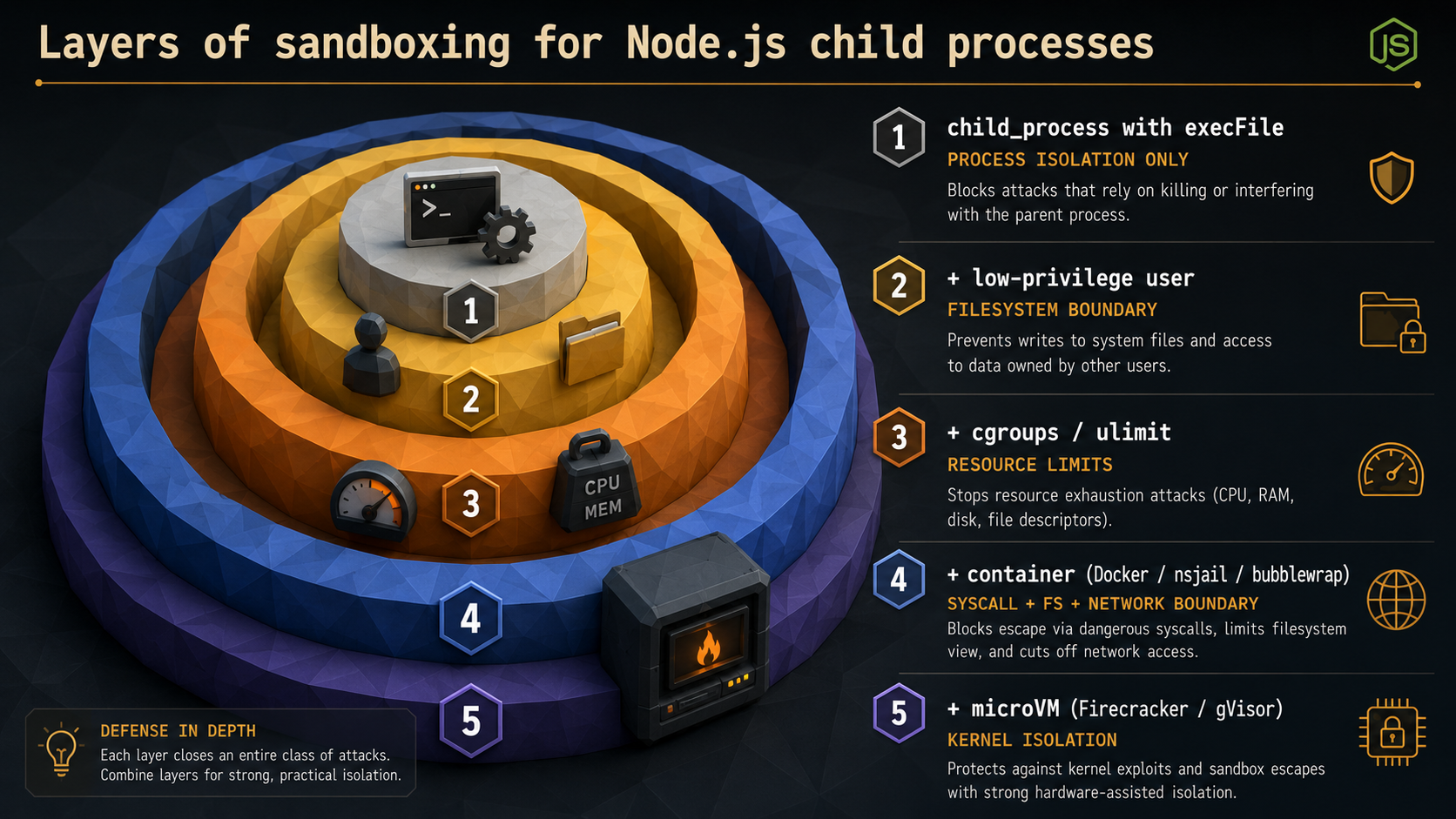
What you actually need, layered:
execFilewith array args. Closes the shell-injection door.- A dedicated low-privilege user. Run the child as a user that owns nothing important.
setuidvia the OS, oruid/gidoptions onspawnif Node is running as root (it shouldn't be, but if it is). - A read-only filesystem view. Containers,
chroot, or just file permissions that don't grant write to anything sensitive. - Resource limits.
ulimiton Linux, cgroups, or container CPU/memory caps. Without these a malicious script can:(){ :|:& };:you off the planet. - Real isolation for hostile code. Containers (Docker, Podman), microVMs (Firecracker), or syscall-filtering sandboxes (gVisor, nsjail, bubblewrap). These are what serverless platforms actually use to run customer code safely.
There is no flag on child_process.spawn that gives you any of layers 3-5. The Node docs are clear about this. The vm module is even clearer: it is not a security boundary. Code running inside vm.runInNewContext can still reach back into the host. If you've ever seen "use vm to run user code safely" on a blog post, that blog post is wrong.
The honest answer to "how do I sandbox JavaScript in Node" is usually one of:
- Run it elsewhere. Send it to a worker service running each job in a one-shot container. AWS Lambda, Fly Machines, Cloudflare Workers Isolates, or a Firecracker pool you manage yourself.
- Use
isolated-vm. A native addon that gives you actual V8 isolates with hard memory and CPU limits, used in production by Discord, Algolia, and a few others. Still not bulletproof (V8 escape bugs exist), but vastly better thanvm. - Don't run user code at all. Restrict input to a small DSL you evaluate yourself.
Survival rules for any child process
Pulling the loose threads together, the rules that save you from production grief:
- Always pass args as an array.
spawn("ffmpeg", ["-i", input]), notspawn("ffmpeg -i " + input). Even if "the input is safe" today, that assumption rots fast. - Always have a timeout. Either the built-in
timeoutoption (which sendsSIGTERMafter the duration) or your ownsetTimeout+ two-stage kill. A child that doesn't have a timeout is a future incident. - Always handle
erroron the child and on every stream you attach to. Unhandled stream errors crash the parent. - Always check the exit code. A child that exits non-zero is usually a problem, even if it printed something that looked like success.
- Drain the streams or use
stdio: "ignore". Half-drained pipes fill OS buffers and hang the child. - Don't pass secrets through command-line args. They show up in
ps. Use env vars or stdin. - Reap your children. Detached processes with
detached: trueneed explicitunref()and explicit cleanup, or you build a zombie farm. - For repeated work, pool. Don't pay startup cost per request.
None of these rules are exotic. They're just easy to forget when you're three weeks into a feature and the snippet you started with was a four-line exec call.
So when should you reach for it?
A short version, to keep in your head:
- Run a binary that isn't Node: yes,
spawnorexecFile. - Run a script in another language: yes,
spawn, ideally pooled. - Heavy CPU work in JavaScript: no. Use
worker_threads. - Isolate code that might crash: yes,
forkorspawn, and supervise it. - Isolate code that might be hostile:
child_processis a layer, not the whole answer. Pair it with containers or a microVM. - Daemonize / background work: yes,
spawnwithdetached: trueandunref(), but cleanup is on you. - Shell pipelines with redirects and globs:
execwith a fully-controlled command string, or skip the shell and do the wiring in Node.
The four functions look almost identical in the docs page. They are not. Pick the one that matches what you're actually doing, set a timeout, pass args as an array, and don't confuse process boundaries with security boundaries. That's most of it.