Intent
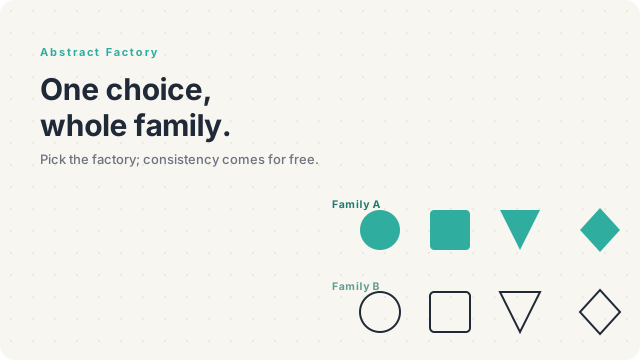
Provide an interface for creating families of related or dependent objects without specifying their concrete classes. The defining property: when you ask one factory for an object, every other object you ask the same factory for is guaranteed to be from the same family.
The Problem
You're building a cross-platform UI toolkit. The same app should run on macOS and Windows, with native-looking widgets on each. You have widgets — Button, Checkbox, Modal — and each one comes in a Mac* flavor and a Windows* flavor. The whole UI must use one family consistently — a Mac button paired with a Windows modal would look broken to the eye.
The naive approach is if (platform === 'mac') everywhere a widget is created:
$button   = $platform === 'mac' ? new MacButton()   : new WindowsButton();
$checkbox = $platform === 'mac' ? new MacCheckbox() : new WindowsCheckbox();
$modal    = $platform === 'mac' ? new MacModal()    : new WindowsModal();
That if repeats every place a widget gets constructed — controllers, screens, dialogs, tests. Add Linux support and you're editing every one of those sites. Ship a tenth widget type and you have a fresh round of branches in every screen. And nothing in the code stops a Linux developer from accidentally instantiating a MacButton next to a WindowsModal — the consistency of the family is by convention, not by type.
The Solution
Abstract Factory says: pull all the creation behind a single factory interface that exposes one method per product type. Each concrete factory produces a complete family of products that belong together. The application picks one factory at startup; everywhere it needs a widget it asks that factory.
interface WidgetFactory
{
    public function createButton():   Button;
    public function createCheckbox(): Checkbox;
    public function createModal():    Modal;
}

final class MacWidgetFactory implements WidgetFactory
{
    public function createButton():   Button   { return new MacButton(); }
    public function createCheckbox(): Checkbox { return new MacCheckbox(); }
    public function createModal():    Modal    { return new MacModal(); }
}

final class WindowsWidgetFactory implements WidgetFactory
{
    public function createButton():   Button   { return new WindowsButton(); }
    public function createCheckbox(): Checkbox { return new WindowsCheckbox(); }
    public function createModal():    Modal    { return new WindowsModal(); }
}
The application takes a WidgetFactory in its constructor, picks the right one once at startup, and the rest of the codebase asks for widgets by family-agnostic methods. Mixing a Mac button with a Windows modal becomes impossible by construction — the factory only hands out one family at a time.
Real-World Analogy
Furniture style. You're decorating a living room. You can pick "mid-century modern" or "Scandinavian minimalist" or "industrial loft" — each is a family of design choices: chairs, sofas, coffee tables, lamps, rugs, all designed to go together. You wouldn't mix a Victorian armchair with a brushed-aluminum coffee table by accident; they live in different families.
When you walk into a furniture showroom, "the mid-century modern collection" is a single thing — every piece in it shares materials, lines, colour palette. Pick the collection; the consistency is automatic. That's exactly what Abstract Factory enforces in code: the family is the unit of choice, not the individual piece.
Structure
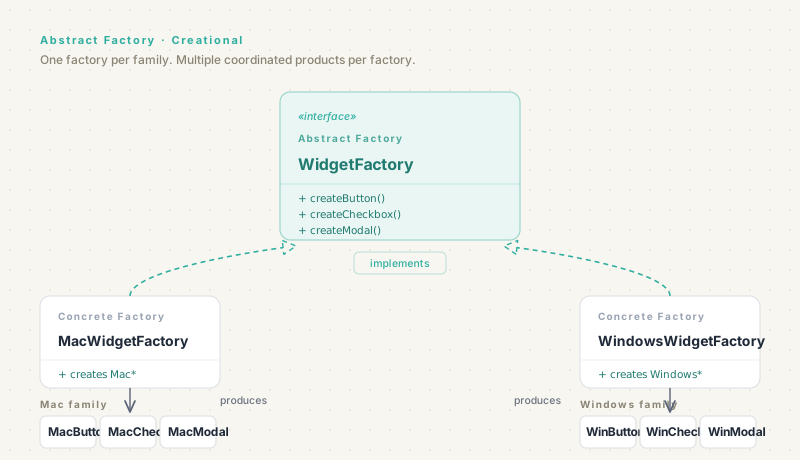
Four roles you'll see in every Abstract Factory implementation:
- Abstract Factory — the interface declaring one method per product type. Here:
WidgetFactorywithcreateButton,createCheckbox,createModal. - Concrete Factory — one implementation per family. Each implementation creates concrete products that belong to its family. Here:
MacWidgetFactory,WindowsWidgetFactory. - Abstract Product — one interface per kind of product the factory creates. Here:
Button,Checkbox,Modal. - Concrete Product — one class per combination of family × product type. Here:
MacButton,MacCheckbox,WindowsButton, etc. (5 widgets × 2 platforms = 10 classes.)
The defining property: clients depend only on the abstract types. They never instantiate a concrete product directly — they always go through the factory. That's what guarantees the family stays internally consistent.
Code Examples
Here's a small cross-platform widget factory in five languages. Watch how the application code never names a concrete widget — only the factory's createX() methods.
interface Button   { render(): string; }
interface Checkbox { render(): string; }
interface Modal    { render(): string; }

interface WidgetFactory {
  createButton():   Button;
  createCheckbox(): Checkbox;
  createModal():    Modal;
}

class MacButton   implements Button   { render() { return "🍎 button"; } }
class MacCheckbox implements Checkbox { render() { return "🍎 checkbox"; } }
class MacModal    implements Modal    { render() { return "🍎 modal"; } }

class WindowsButton   implements Button   { render() { return "▢ button"; } }
class WindowsCheckbox implements Checkbox { render() { return "▢ checkbox"; } }
class WindowsModal    implements Modal    { render() { return "▢ modal"; } }

class MacWidgetFactory implements WidgetFactory {
  createButton()   { return new MacButton(); }
  createCheckbox() { return new MacCheckbox(); }
  createModal()    { return new MacModal(); }
}

class WindowsWidgetFactory implements WidgetFactory {
  createButton()   { return new WindowsButton(); }
  createCheckbox() { return new WindowsCheckbox(); }
  createModal()    { return new WindowsModal(); }
}

// Application:
function renderForm(f: WidgetFactory): string {
  return [f.createButton().render(), f.createCheckbox().render()].join(" ");
}
from abc import ABC, abstractmethod
class Button(ABC):
@abstractmethod
def render(self): ...
class Checkbox(ABC):
@abstractmethod
def render(self): ...
class Modal(ABC):
@abstractmethod
def render(self): ...
class WidgetFactory(ABC):
@abstractmethod
def create_button(self): ...
@abstractmethod
def create_checkbox(self): ...
@abstractmethod
def create_modal(self): ...
class MacButton(Button):
def render(self): return "🍎 button"
class MacCheckbox(Checkbox):
def render(self): return "🍎 checkbox"
class MacModal(Modal):
def render(self): return "🍎 modal"
class WindowsButton(Button):
def render(self): return "▢ button"
class WindowsCheckbox(Checkbox):
def render(self): return "▢ checkbox"
class WindowsModal(Modal):
def render(self): return "▢ modal"
class MacWidgetFactory(WidgetFactory):
def create_button(self): return MacButton()
def create_checkbox(self): return MacCheckbox()
def create_modal(self): return MacModal()
class WindowsWidgetFactory(WidgetFactory):
def create_button(self): return WindowsButton()
def create_checkbox(self): return WindowsCheckbox()
def create_modal(self): return WindowsModal()
def render_form(factory):
return f"{factory.create_button().render()} {factory.create_checkbox().render()}"public interface Button { String render(); }
public interface Checkbox { String render(); }
public interface Modal { String render(); }
public interface WidgetFactory {
Button createButton();
Checkbox createCheckbox();
Modal createModal();
}
public final class MacButton implements Button { public String render() { return "🍎 button"; } }
public final class MacCheckbox implements Checkbox { public String render() { return "🍎 checkbox"; } }
public final class MacModal implements Modal { public String render() { return "🍎 modal"; } }
public final class WindowsButton implements Button { public String render() { return "▢ button"; } }
public final class WindowsCheckbox implements Checkbox { public String render() { return "▢ checkbox"; } }
public final class WindowsModal implements Modal { public String render() { return "▢ modal"; } }
public final class MacWidgetFactory implements WidgetFactory {
public Button createButton() { return new MacButton(); }
public Checkbox createCheckbox() { return new MacCheckbox(); }
public Modal createModal() { return new MacModal(); }
}
public final class WindowsWidgetFactory implements WidgetFactory {
public Button createButton() { return new WindowsButton(); }
public Checkbox createCheckbox() { return new WindowsCheckbox(); }
public Modal createModal() { return new WindowsModal(); }
}<?php
namespace App\UI;
interface Button { public function render(): string; }
interface Checkbox { public function render(): string; }
interface Modal { public function render(): string; }
interface WidgetFactory
{
public function createButton(): Button;
public function createCheckbox(): Checkbox;
public function createModal(): Modal;
}
final class MacButton implements Button { public function render(): string { return "🍎 button"; } }
final class MacCheckbox implements Checkbox { public function render(): string { return "🍎 checkbox"; } }
final class MacModal implements Modal { public function render(): string { return "🍎 modal"; } }
final class WindowsButton implements Button { public function render(): string { return "▢ button"; } }
final class WindowsCheckbox implements Checkbox { public function render(): string { return "▢ checkbox"; } }
final class WindowsModal implements Modal { public function render(): string { return "▢ modal"; } }
final class MacWidgetFactory implements WidgetFactory
{
public function createButton(): Button { return new MacButton(); }
public function createCheckbox(): Checkbox { return new MacCheckbox(); }
public function createModal(): Modal { return new MacModal(); }
}
final class WindowsWidgetFactory implements WidgetFactory
{
public function createButton(): Button { return new WindowsButton(); }
public function createCheckbox(): Checkbox { return new WindowsCheckbox(); }
public function createModal(): Modal { return new WindowsModal(); }
}package ui
type Button interface{ Render() string }
type Checkbox interface{ Render() string }
type Modal interface{ Render() string }
type WidgetFactory interface {
CreateButton() Button
CreateCheckbox() Checkbox
CreateModal() Modal
}
type MacButton struct{}
type MacCheckbox struct{}
type MacModal struct{}
func (MacButton) Render() string { return "🍎 button" }
func (MacCheckbox) Render() string { return "🍎 checkbox" }
func (MacModal) Render() string { return "🍎 modal" }
type WindowsButton struct{}
type WindowsCheckbox struct{}
type WindowsModal struct{}
func (WindowsButton) Render() string { return "▢ button" }
func (WindowsCheckbox) Render() string { return "▢ checkbox" }
func (WindowsModal) Render() string { return "▢ modal" }
type MacWidgetFactory struct{}
type WindowsWidgetFactory struct{}
func (MacWidgetFactory) CreateButton() Button { return MacButton{} }
func (MacWidgetFactory) CreateCheckbox() Checkbox { return MacCheckbox{} }
func (MacWidgetFactory) CreateModal() Modal { return MacModal{} }
func (WindowsWidgetFactory) CreateButton() Button { return WindowsButton{} }
func (WindowsWidgetFactory) CreateCheckbox() Checkbox { return WindowsCheckbox{} }
func (WindowsWidgetFactory) CreateModal() Modal { return WindowsModal{} }The application code holds a WidgetFactory and asks for widgets by name. It never imports MacButton or WindowsButton — it imports the abstract Button interface only. Switch the factory at startup; every widget in the app comes from the new family, instantly and consistently.
When to Use It
Reach for Abstract Factory when you can answer "yes" to all of these:
- You have multiple families of related objects. UI toolkits, database drivers (driver + query builder + migration runner), themed components, environment-specific service bundles (
ProdServicesvs.TestServices). - The whole family must stay internally consistent. Mixing a member of one family with a member of another would be a bug.
- Clients should depend on abstract types, not concrete ones. That's the point — the rest of your code shouldn't know which family it's working with.
- The set of product types is reasonably stable. Adding a new family is clean (one new factory class). Adding a new product type is hard (every existing factory needs a new method). If you'll add product types often, consider a different shape.
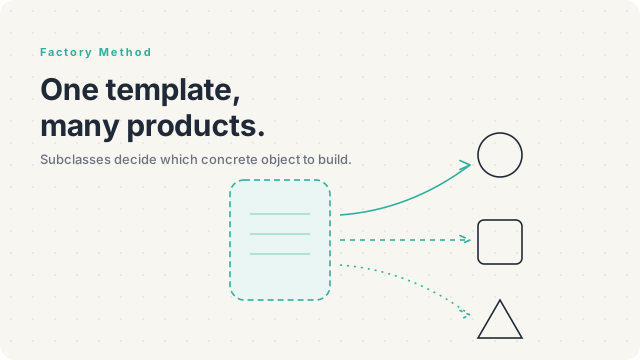
If you're producing only one kind of object, you want Factory Method instead — it's the one-product version. Abstract Factory shines specifically when the family has multiple coordinated products.
Pros and Cons
Pros
- The whole family swaps as a unit — no risk of mismatched products.
- Adding a new family is a clean addition (one new concrete factory).
- Client code depends only on abstract types, which makes it portable across families.
- Tests can substitute a
FakeWidgetFactoryto inject test-only widgets. - Often pairs with Singleton — the application typically has one factory in use, lifetime-managed by the DI container.
Cons
- Adding a new product type is painful. Every existing factory needs a new method; every existing concrete factory needs a new implementation. The interface is open for new families but closed for new products.
- More files than a flat hierarchy. N families × M product types = N × M concrete classes, plus M abstract products and N+1 factory classes. The structure scales by multiplication, not addition.
- Feels heavy for small problems. If you have two product types in two families, four classes plus two factories plus one interface is a lot of code for what you might write inline in twenty lines.
- Can become an over-engineered way to write
if (platform === 'mac'). If you only have one family in production and the second is hypothetical, you're paying the cost without the benefit.
Pro Tips
- Compose Abstract Factory from Factory Methods. Each
createX()in the abstract factory is, internally, a Factory Method on the concrete factory. Same pattern, scaled up. - Keep the family small. Three to seven product types per factory is a sweet spot. Beyond that, the "open for families, closed for products" trade-off starts hurting badly.
- Don't reach for Abstract Factory when one Factory Method suffices. If you only need to make Buttons, write a
ButtonFactoryinterface with one method. Abstract Factory is for when several related types must be made consistently. - The application picks the factory once. At startup, in the bootstrap, in the DI container — pick the family. Then never name a concrete factory again. If you find yourself instantiating
MacWidgetFactorydeep in a controller, the choice point has leaked. - Watch for "Abstract Factory + DI container." In modern frameworks, the DI container often is your Abstract Factory: bind interfaces to implementations as a group, swap the bindings to swap the family. You may not need to write the literal pattern.
Relations with Other Patterns
- Factory Method is the single-product version. Abstract Factory composes several Factory Methods into one interface; if you only have one product type to make, drop down to Factory Method.
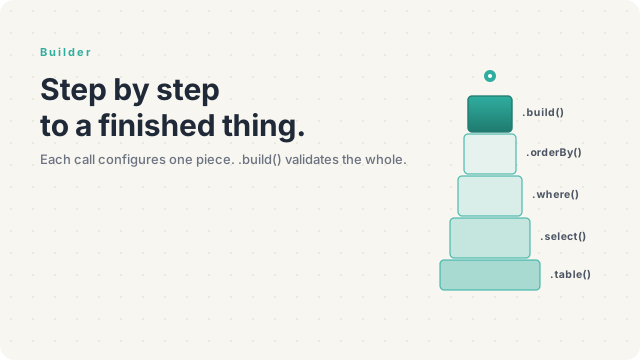
- Builder also creates objects, but for one complex object built step-by-step. Abstract Factory creates several related objects each in one step. Different problems.
- Prototype is the alternative when families are characterized by configuration rather than by class. You clone a prototype instance instead of constructing fresh.
- Singleton is the typical lifetime for a concrete factory — the application has one
MacWidgetFactoryand reuses it. In modern frameworks this is the DI container's job, not a literal Singleton. - Facade can wrap an Abstract Factory when callers want one method ("create my whole UI for this platform") rather than discrete create-X calls.
Final Tips
The cleanest Abstract Factory I've ever shipped wasn't for a UI toolkit — it was for a payment-processing module that supported three regions. Each region had a family of related services: a PaymentGateway, a TaxCalculator, an InvoiceFormatter. They all had to be consistent — calling a US tax calculator with an EU invoice formatter would have produced legal nonsense. An EuRegionFactory, a UsRegionFactory, and a JpRegionFactory made the consistency unrepresentable — the rest of the codebase asked the region factory for what it needed and never named a concrete service.
That's the deep promise of this pattern: not the production of objects, but the coordination of them. Reach for Abstract Factory when consistency across a small set of related objects is the thing you can't afford to get wrong — and skip it when you really only need to produce one of something.