So you've shipped a Nuxt app. Pages render fast on first load, navigation feels instant after that, and the team is happy with how the SSR story turned out. And then somebody opens a ticket: "add login."
That's where it gets interesting. Auth in a single-page React app is one mental model. Auth in a classic server-rendered PHP app is another. Nuxt sits on top of both worlds at once: it renders on the server, it hydrates on the client, and the same component code runs in both places. So the moment a user logs in, you have at least three places to keep track of who they are: the browser (so the next request carries credentials), the server (so SSR can render the right thing on first load), and your client-side state (so the navbar doesn't flicker between "Login" and "Hi, Alex" during hydration).
Most auth bugs in Nuxt apps come from one of those three drifting out of sync. Let's walk through the moving parts in the order you actually wire them up, and try to keep the hydration ghosts away.
The Mental Model: Where Auth Actually Lives
Before any code, a quick map. In a Nuxt 3 app, you usually have these layers:
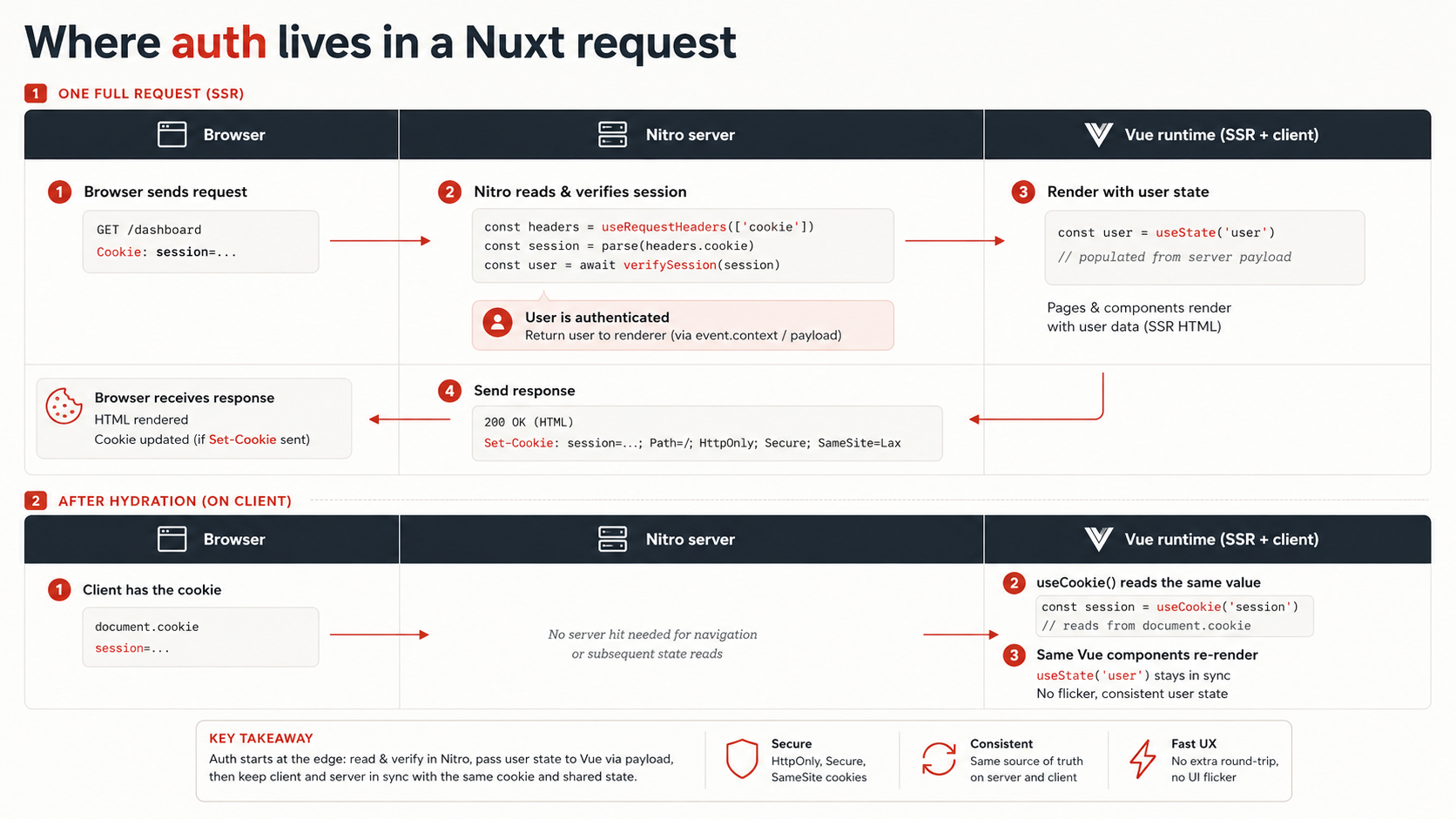
The browser holds a cookie. That cookie is the source of truth that survives reloads. Everything else is derived from it.
The server (Nitro, under server/) owns the routes that read and write that cookie. Login, logout, refresh: those handlers set Set-Cookie headers. Protected API routes read the cookie back, verify it, and either return data or 401.
The Vue side has two phases: the first render happens on the server, where Nuxt has full access to the request's Cookie header, so SSR can know who you are immediately. The second phase is the client, after hydration, where the browser is back in charge and useCookie() reads the value off document.cookie.
Route middleware (middleware/auth.ts) is the gate that decides whether a route is even allowed to render, both during SSR and during client-side navigation.
If you keep that picture in your head, the rest is mechanical. Most of the confusion comes from treating one of those layers as the source of truth and forgetting the others exist.
Cookies, The Right Way
The cookie is the part to get right first, because every other layer reads from it. Two rules cover most of the ground.
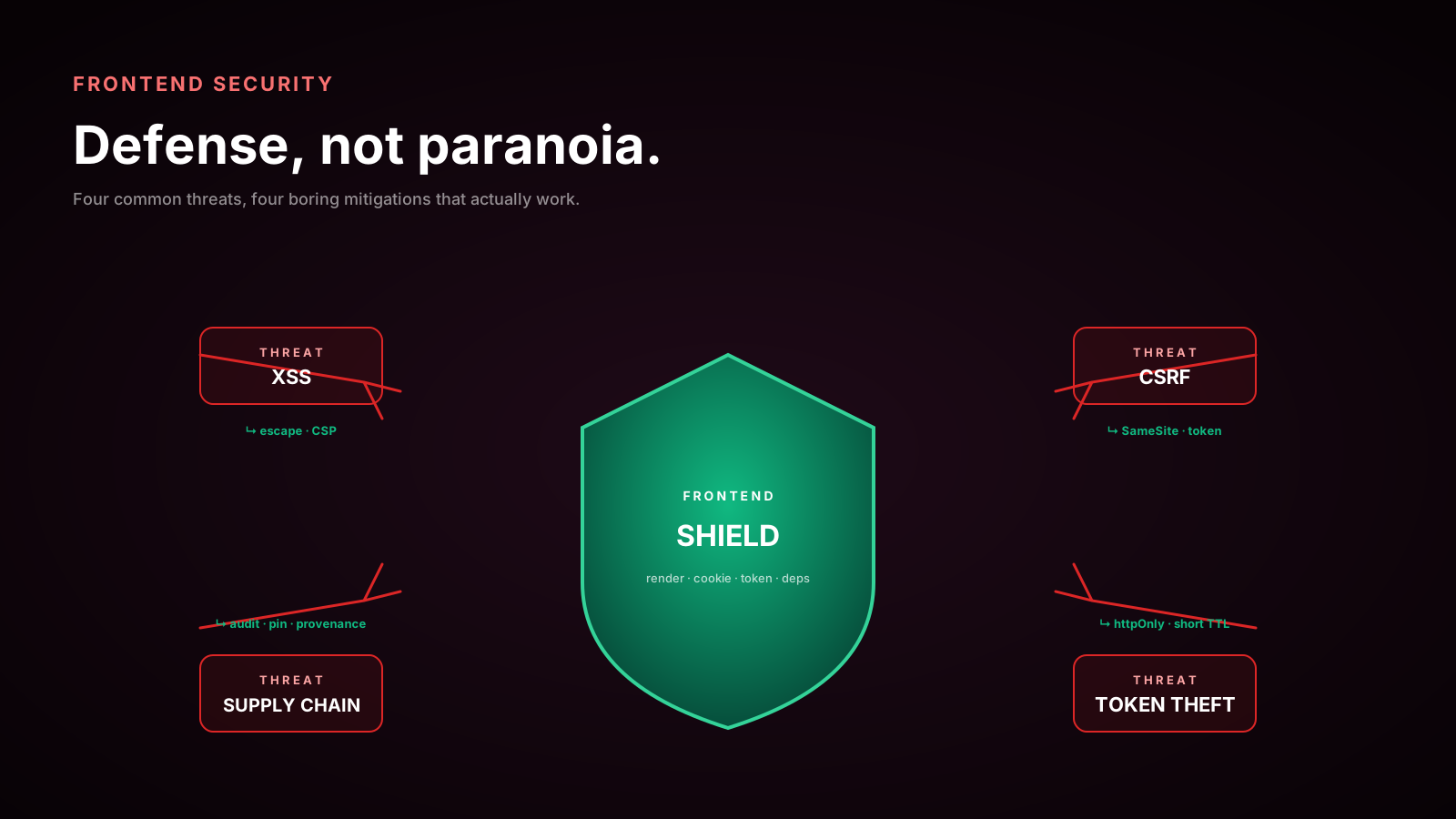
Rule one: the session cookie is HttpOnly. That means JavaScript on the page cannot read it. No document.cookie, no localStorage. The browser stores it, the browser attaches it to every request, and your server is the only thing that can decrypt or verify it. This is what makes XSS less catastrophic. Even if an attacker injects a script, they can't lift the session.
Rule two: anything you want to read in the Vue layer is a separate cookie (or no cookie at all). UI hints like "is the user logged in?" or "what's their display name?" either come from a server-rendered prop, or live in a non-HttpOnly cookie that you've explicitly decided is OK to expose.
Setting the session cookie happens on the server. From a Nitro event handler you reach for setCookie (re-exported from h3):
import { setCookie } from 'h3'

export default defineEventHandler(async (event) => {
  const { email, password } = await readBody(event)

  const user = await verifyCredentials(email, password)
  if (!user) {
    throw createError({ statusCode: 401, message: 'Invalid credentials' })
  }

  const token = await signSession({ sub: user.id, email: user.email })

  setCookie(event, 'session', token, {
    httpOnly: true,
    secure: true,
    sameSite: 'lax',
    path: '/',
    maxAge: 60 * 60 * 24 * 7, // 7 days
  })

  return { ok: true }
})
A few things worth flagging in that snippet. secure: true means the cookie will only be sent over HTTPS, which is what you want in production, and you'll want to drop it (or branch on process.env.NODE_ENV) for local development on http://localhost. sameSite: 'lax' is the sane default for a first-party app: cookies go along on top-level navigations, but cross-site POSTs don't smuggle them. If you're doing OAuth redirects and the cookie needs to survive a redirect back from a third-party identity provider, lax is still fine. The redirect is a top-level GET, which lax allows.
The path: '/' matters more than it looks. If you set the cookie at /api/auth by accident, the browser won't send it on requests for /api/orders, and you'll spend an afternoon wondering why the session "disappears."
For client-readable hints, say a small is_logged_in flag, useCookie is the composable you want. It returns a reactive ref that's SSR-safe by default:
const isLoggedIn = useCookie<boolean>('is_logged_in', {
  default: () => false,
  watch: true,
})
That ref will be populated correctly on the server during SSR (so the navbar renders the right state on first paint) and will track changes on the client after that. Do not use this cookie for authorization decisions. It's a UI hint. The real check is always done on the server, against the HttpOnly session.
Server Routes Are Where Login Happens
Nuxt 3 ships with Nitro, and server/api/*.ts files automatically become endpoints under /api/. That's where login, logout, signup, password reset, and the "who am I" endpoint live.
A minimal trio looks like this:
import { setCookie } from 'h3'

export default defineEventHandler(async (event) => {
  const body = await readValidatedBody(event, validateLogin)
  const user = await verifyCredentials(body.email, body.password)

  if (!user) throw createError({ statusCode: 401, message: 'Invalid credentials' })

  setCookie(event, 'session', await signSession(user), sessionCookieOptions)
  return { user: publicUserShape(user) }
})import { deleteCookie } from 'h3'
export default defineEventHandler((event) => {
deleteCookie(event, 'session', { path: '/' })
return { ok: true }
})export default defineEventHandler(async (event) => {
const user = await event.context.user
if (!user) throw createError({ statusCode: 401 })
return publicUserShape(user)
})That last one assumes a piece of plumbing we haven't built yet: event.context.user. The clean way to populate it is a server middleware that runs on every request, reads the session cookie, and attaches the resolved user to the event:
import { getCookie } from 'h3'

export default defineEventHandler(async (event) => {
  const token = getCookie(event, 'session')
  if (!token) return

  try {
    const payload = await verifySession(token)
    event.context.user = await loadUser(payload.sub)
  } catch {
    // bad/expired cookie — leave context.user undefined
  }
})
Files under server/middleware/ run on every Nitro request before the matched route handler. That's the right place for authn (resolving identity). Authz (deciding whether this user is allowed this action) belongs in the route handler itself, because it depends on what's being requested.
Route Middleware Is The Gate, Not The Lock
A common mistake is to treat client-side route middleware as security. It isn't. The lock is your server checking the cookie on every protected API call. Route middleware is just the user-experience layer that says "this page needs auth, so redirect to /login if there isn't any."
That said, it's a useful layer. Nuxt route middleware runs both on the server during SSR and on the client during navigation, so you only write it once.
export default defineNuxtRouteMiddleware((to) => {
  const user = useState<User | null>('user')

  if (!user.value) {
    return navigateTo({
      path: '/login',
      query: { redirect: to.fullPath },
    })
  }
})
Two things to notice. First, the middleware reads from useState('user'), not from a cookie directly. We'll wire up that user state in a minute. The point is, the middleware doesn't care how the user state was populated, only that it exists. Second, the redirect query param lets the login form bounce the user back to where they were trying to go after a successful login.
You apply this middleware in a couple of ways. Per-page:
<script setup lang="ts">
definePageMeta({ middleware: ['auth'] })
</script>
Or globally, by dropping a file in middleware/ with a .global.ts suffix, and every navigation runs it:
export default defineNuxtRouteMiddleware((to) => {
  const publicRoutes = ['/login', '/signup', '/']
  if (publicRoutes.includes(to.path)) return

  const user = useState<User | null>('user')
  if (!user.value) {
    return navigateTo({ path: '/login', query: { redirect: to.fullPath } })
  }
})
A global middleware is great for apps where most pages are private and only a handful are public. The opposite, explicit middleware: ['auth'] on each protected page, is better when most of the site is public and auth-gated pages are the exception.
SSR-Safe Auth: The Hydration Trap
Here is where most teams get stung. You wire up everything above, log in, hit a protected page, and the navbar flashes "Login" for a frame before re-rendering as "Hi, Alex." Or worse: the page renders empty on the server because it didn't know who you were, then re-renders with content on the client. That's a hydration mismatch, and Vue will scream about it in the console.
The reason is simple. During SSR, your Vue code runs inside Nitro, and there's no document.cookie to read from. You have to pull the session out of the incoming request's headers and seed your state from that. The composable for that is useRequestHeaders.
The cleanest pattern is a single useUser() composable that handles both phases:
export const useUser = () => {
  const user = useState<User | null>('user', () => null)
  return user
}
...paired with a plugin that runs once per request to populate it:
export default defineNuxtPlugin(async () => {
  const user = useUser()
  if (user.value) return // already populated (e.g., client-side after login)

  // On the server, useRequestHeaders gives us the incoming Cookie header.
  // On the client, useFetch will automatically send document.cookie.
  const headers = import.meta.server
    ? useRequestHeaders(['cookie'])
    : undefined

  try {
    const data = await $fetch<User>('/api/auth/me', { headers })
    user.value = data
  } catch {
    user.value = null
  }
})
The interesting line is useRequestHeaders(['cookie']). On the server, that returns { cookie: 'session=...' } from the incoming HTTP request, which we then pass straight through to the internal $fetch. Without that, the server-side $fetch to /api/auth/me would go out without any cookie, the me endpoint would return 401, and SSR would render the unauthenticated state, exactly the hydration mismatch we're trying to avoid.
On the client, you don't pass headers; the browser handles cookies automatically.
useState('user') is the SSR-safe shared state primitive. It's serialized into the HTML payload on the server and revived on the client, so the user object you set during SSR is available immediately during hydration. That's what stops the flash.
What About useFetch And Protected API Calls?
A common follow-up: how do protected API calls work from inside components?
On the client, easy: the browser already attaches the session cookie automatically. useFetch('/api/orders') just works.
On the server (during SSR), useFetch to your own internal API needs the cookie header forwarded, same as the me endpoint above. The useFetch composable has a built-in escape hatch:
const { data } = await useFetch('/api/orders', {
  headers: useRequestHeaders(['cookie']),
})
In practice you'll write a thin wrapper so every page doesn't have to remember:
export const useAuthedFetch: typeof useFetch = (request, opts) => {
  const headers = import.meta.server ? useRequestHeaders(['cookie']) : {}
  return useFetch(request, { ...opts, headers: { ...headers, ...opts?.headers } })
}
Now useAuthedFetch('/api/orders') is the only call style you write in pages, and it does the right thing on both sides.
CSRF: When You Actually Need It
If your only authenticated endpoints are JSON-accepting POSTs that require a custom header (like Content-Type: application/json), and your cookies are SameSite=Lax or Strict, you have very little CSRF surface. Browsers won't let an attacker's site submit a JSON POST with a custom content type without the user's involvement.
The shape that genuinely needs CSRF tokens is the old-school application/x-www-form-urlencoded POST, the kind a hidden <form> on attacker.com could auto-submit. If you have any of those, generate a per-session token, render it into the form, and verify on submit.
Nuxt doesn't ship a CSRF module in core, but there are community ones (nuxt-csurf is the usual pick). If you go that route, install it before any session-modifying endpoints exist, since retrofitting CSRF is unpleasant.
What About Auth Modules?
You don't always have to build this from scratch. Two modules are worth knowing about:
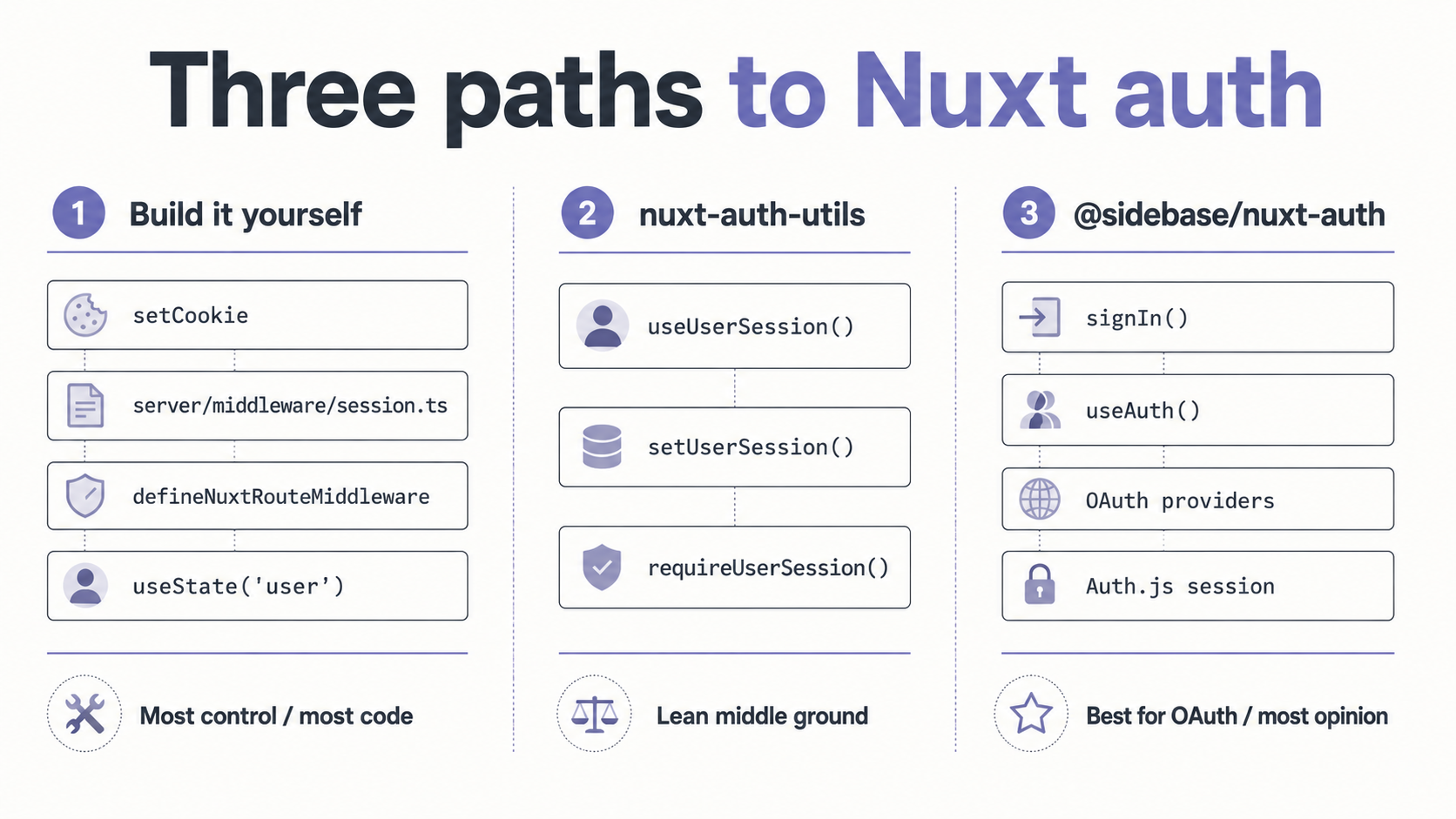
nuxt-auth-utils (from the Nuxt team) is a small, opinionated module that gives you sealed (signed) session cookies and a useUserSession() composable. It's a thin layer, about a hundred lines of behavior, but it removes most of the cookie wiring above. Good fit if you want to roll your own login flow (e.g., email + password against your own database) but don't want to manage cookie sealing and the SSR plumbing yourself.
@sidebase/nuxt-auth is a larger module that wraps next-auth (now Auth.js) for Nuxt. It's the right choice if you want OAuth providers (Google, GitHub, Discord, etc.) and you'd rather not implement the OAuth dance by hand. The trade-off is that you adopt Auth.js's mental model: providers, callbacks, JWT or database sessions. And if you don't like how it does things, you'll be working against the grain.
Both are fine. The decision is mostly about how much of the auth surface you want to own. If your app is "email + password, one role, no third-party login", raw cookies + server routes will get you there in less code than the modules will. If you need three OAuth providers and account linking, a module pays for itself the first afternoon.
Putting The Pieces Together
If you stitch all of the above into a small app, the flow looks like this. The user hits /account. Nuxt's route middleware runs during SSR, sees that useState('user') is null, and we'd redirect them to /login, except our auth plugin ran first, called /api/auth/me with the forwarded cookie header, and populated useState('user') with the real user record. So the middleware lets the request through. The page renders with user data on the server. The HTML, including the serialized useState, ships to the browser. Hydration runs, picks up the user state without a re-fetch, and the navbar shows "Hi, Alex" on the first frame without a flicker.
When the user clicks logout, you call /api/auth/logout, which clears the cookie. You also set useUser().value = null on the client so reactive components update immediately. Next navigation, the global middleware notices no user and redirects to /login.
When the user logs in, the form POSTs to /api/auth/login, which sets the session cookie. The response includes the user record, which you push into useUser(). Reactive components update. If there's a ?redirect= query param, you call navigateTo(redirect) to send them where they were heading.
Every protected server endpoint (/api/orders, /api/profile/update, anything that touches user data) reads event.context.user and either returns data or throws a 401. The server middleware that populates that context is the only place that actually decodes the cookie; every handler downstream just trusts what's already on the event.
That's it. There's no magic, no global auth state outside of useState, no special-cased SSR hack. The whole thing is just: cookies live in the browser, server routes read and write them, route middleware enforces UX-level redirects, and useRequestHeaders is the bridge that makes SSR aware of who the request is for.
The one thing worth re-emphasising before you ship: do not let yourself slip into trusting client state for authorization. Every protected route on the server must re-check the cookie. The Vue side is for showing and hiding UI; the security is at the server boundary. Once you internalise that, the rest is just plumbing, and Nuxt actually makes the plumbing pretty pleasant.