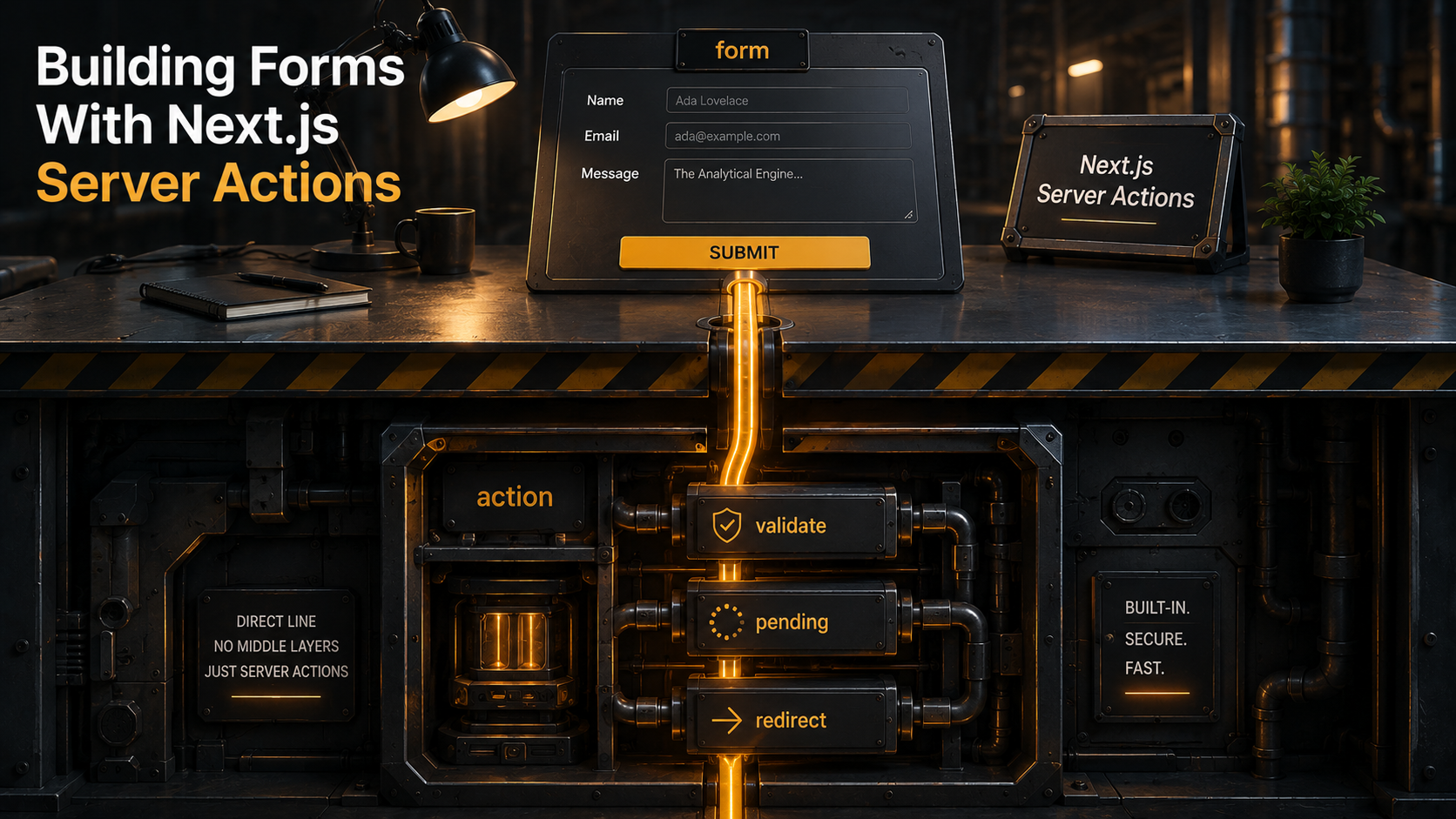
So you've started a Next.js project, opened the App Router docs, and at some point bumped into Server Actions. The pitch sounds great. Write a function, slap "use server" on it, pass it to <form action={...}>, and the form just works. No fetch, no API route, no JSON marshalling. The reader who's been wiring up REST endpoints for a decade either lights up or gets suspicious. Both reactions are fair.
This article is the version of the topic you'd want before shipping a real form. Not the "hello, world" form with one input and a console.log. The form that has a Zod schema, server-side validation, errors that need to render next to the right field, a submit button that shows a spinner, a list above the form that updates optimistically, a redirect on success, and a quiet voice in your head reminding you that the function you just wrote runs on the server and can be called by anyone on the internet who can guess its name.
Let's walk through it from the bottom up.
What A Server Action Actually Is
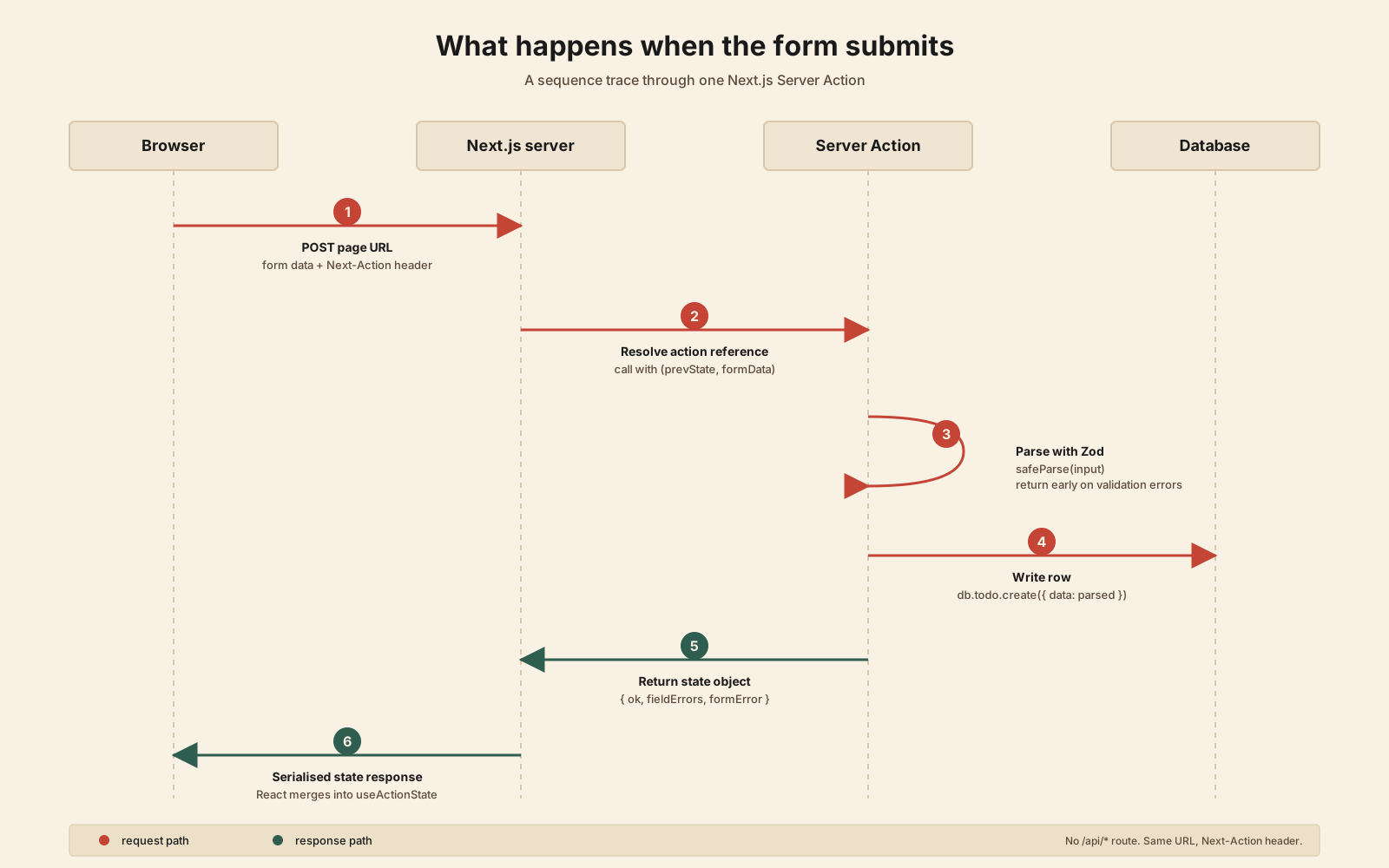
A Server Action is a function with "use server" at the top, either as a file-level directive (the whole file becomes server-only) or as the first line inside a function (just that function). When you reference such a function from a client component, Next.js doesn't ship its code to the browser. Instead, it ships a reference, a small string that points to the action. When the form submits, the browser POSTs the form data plus that reference back to the same Next.js server, which resolves the reference and runs the real function.
You can see the seams if you watch the Network tab. There's no /api/... endpoint visible to you. The request goes to the page's own URL with a Next-Action header. The response is a small piece of serialised state. Not HTML, not JSON in the shape you wrote, but a Next-internal payload that React on the client knows how to merge back into the form's state.
That's the whole trick. The "no API" feeling comes from the framework hiding the wire from you, not from the wire disappearing.
Two things to internalise before writing any real code:
- The function runs on the server. Always. There's no client fallback, no isomorphic mode. If you
import { db } from "@/lib/db"inside an action, thedbimport is fine. It'll never leak to the browser. But if you accidentally call a server-only helper from a client component outside of an action, the build will yell at you. - The action is a public endpoint. Anyone can POST to it. The form on your page is a UI, not a gate. Treat every action as you'd treat a route handler: validate input, check auth, and decide what the unauthenticated, malicious caller would be allowed to do. This part trips up almost everyone the first time.
With that out of the way, the first form.
The Smallest Real Form
A "create a new todo" form. Plain HTML, no client component, no hooks.
import { db } from "@/lib/db";
import { revalidatePath } from "next/cache";

async function createTodo(formData: FormData) {
  "use server";

  const title = String(formData.get("title") ?? "").trim();
  if (!title) return;

  await db.todo.create({ data: { title } });
  revalidatePath("/todos");
}

export default async function TodosPage() {
  const todos = await db.todo.findMany({ orderBy: { createdAt: "desc" } });

  return (
    <main>
      <ul>
        {todos.map((t) => (
          <li key={t.id}>{t.title}</li>
        ))}
      </ul>

      <form action={createTodo}>
        <input name="title" placeholder="What needs doing?" />
        <button type="submit">Add</button>
      </form>
    </main>
  );
}
That's the whole thing. The page is a Server Component. The action is defined inline. The form posts to the action. The action writes to the database and calls revalidatePath("/todos"), which tells Next.js to throw away its cached render of this route. The page re-renders on the server, the new todo appears, the user sees it in the list.
No client JavaScript runs for this to work. Disable JS in the browser and the form still submits. That's the part Conform fans have been quietly enjoying for a year. Progressive enhancement comes for free.
The seams are clean and the code is short, which means it's tempting to think you're done. You're not. Try giving the title field a minLength, or showing an error message when it's blank, or disabling the button while the request is in flight, and you'll discover the real shape of this API.
Adding Real Validation
The if (!title) return above is the world's worst validator. It silently drops bad input and tells the user nothing. Real forms need a schema, real error messages, and a way to send those errors back to the form.
Zod is the standard pick here. The trick is that the same schema validates on the server (inside the action) and on the client (if you want to). Define it once, in a file that both sides can import.
import { z } from "zod";

export const newTodoSchema = z.object({
  title: z
    .string()
    .trim()
    .min(2, "Title needs at least 2 characters")
    .max(140, "Title is too long"),
  dueDate: z
    .string()
    .optional()
    .refine((v) => !v || !Number.isNaN(Date.parse(v)), {
      message: "Due date is not a real date",
    }),
});

export type NewTodoInput = z.infer<typeof newTodoSchema>;
Now the action. Two changes worth noticing: we accept a prevState argument (we'll wire that up next), and we return a shape the form can render.
"use server";

import { z } from "zod";
import { revalidatePath } from "next/cache";
import { db } from "@/lib/db";
import { newTodoSchema } from "@/lib/schemas/todo";

export type CreateTodoState = {
  fieldErrors?: Partial<Record<keyof z.infer<typeof newTodoSchema>, string[]>>;
  formError?: string;
  ok?: boolean;
};

export async function createTodo(
  _prev: CreateTodoState,
  formData: FormData
): Promise<CreateTodoState> {
  const parsed = newTodoSchema.safeParse({
    title: formData.get("title"),
    dueDate: formData.get("dueDate") || undefined,
  });

  if (!parsed.success) {
    return { fieldErrors: parsed.error.flatten().fieldErrors };
  }

  try {
    await db.todo.create({ data: parsed.data });
  } catch (e) {
    return { formError: "Could not save. Try again." };
  }

  revalidatePath("/todos");
  return { ok: true };
}
A few things to note. The action no longer throws on bad input. It returns. Throwing from a Server Action ends up at the closest error.tsx boundary, which is too much UI for a single bad field. The shape we return (fieldErrors, formError, ok) is just a convention. Make it whatever the form needs. Some teams pack a values field in there too so they can keep what the user typed when revalidating. That's optional and depends on whether the form lives long enough on the server for it to matter.
Also: z.flatten().fieldErrors gives you Record<string, string[] | undefined>. The "undefined" half matters because once a field is valid, you want its error to disappear. The render code below uses optional chaining for exactly this reason.
Wiring Up useActionState
To get those errors back into the form, the form itself needs to become a Client Component. That sounds heavier than it is. Only the form fragment goes client, not the whole page.
"use client";

import { useActionState } from "react";
import { createTodo, type CreateTodoState } from "./actions";

const initialState: CreateTodoState = {};

export function NewTodoForm() {
  const [state, formAction] = useActionState(createTodo, initialState);

  return (
    <form action={formAction} noValidate>
      <label>
        Title
        <input name="title" aria-invalid={!!state.fieldErrors?.title} />
        {state.fieldErrors?.title?.map((msg) => (
          <p key={msg} role="alert">{msg}</p>
        ))}
      </label>

      <label>
        Due date
        <input type="date" name="dueDate" aria-invalid={!!state.fieldErrors?.dueDate} />
        {state.fieldErrors?.dueDate?.map((msg) => (
          <p key={msg} role="alert">{msg}</p>
        ))}
      </label>

      {state.formError && <p role="alert">{state.formError}</p>}
      {state.ok && <p role="status">Saved.</p>}

      <button type="submit">Add</button>
    </form>
  );
}
useActionState does two things. It takes your action and a starting state, and gives you back a wrapped action plus the latest state. When the form submits, React calls the action with (currentState, formData), suspends until it resolves, and then re-renders with the new state. The form value is preserved on submit-with-errors automatically: the inputs are uncontrolled and the page didn't navigate, so what the user typed stays put.
The noValidate is a small but important touch. Without it, the browser's built-in validation runs first and fights with your Zod errors. Pick one source of truth.
The Pending State (And Why useFormStatus Exists)
Users want to see something happen the moment they click Submit. The lazy version is to track a useState boolean. The right version is useFormStatus, a tiny hook from react-dom that reads the pending state of the enclosing form.
"use client";

import { useFormStatus } from "react-dom";

export function SubmitButton({ children }: { children: React.ReactNode }) {
  const { pending } = useFormStatus();
  return (
    <button type="submit" disabled={pending} aria-busy={pending}>
      {pending ? "Saving…" : children}
    </button>
  );
}
The catch, and it catches everyone the first time, is that useFormStatus only works in a component rendered inside the <form>. It reads the form context. Put it in the same component that defines the form and it'll always return pending: false. Extract it into a child like above and it works.
Why isn't this just a field on useActionState? Because useActionState also exposes a pending boolean as its third return value, and it works at the form-state level. The difference: useActionState's pending is for the parent that owns the state; useFormStatus's pending is for any descendant that just needs to know "is this form busy right now". Use the one that fits where you are in the tree.
const [state, formAction, isPending] = useActionState(createTodo, initialState);Pick one and stick with it for a given form. Two pending sources tracking the same thing is how you end up debugging a button that shows "Saving..." forever.
Optimistic UI With useOptimistic
So far the user has to wait for the round trip to see the new todo. That's fine for a 30ms request and infuriating for a 600ms one. useOptimistic is React's primitive for "show the new state immediately, fall back gracefully if the action fails."
"use client";

import { useOptimistic } from "react";

type Todo = { id: string; title: string; pending?: boolean };

export function TodoList({
  todos,
  addAction,
}: {
  todos: Todo[];
  addAction: (formData: FormData) => Promise<void>;
}) {
  const [optimisticTodos, addOptimistic] = useOptimistic(
    todos,
    (state, newTitle: string) => [
      { id: `optimistic-${crypto.randomUUID()}`, title: newTitle, pending: true },
      ...state,
    ]
  );

  async function action(formData: FormData) {
    const title = String(formData.get("title") ?? "").trim();
    if (title) addOptimistic(title);
    await addAction(formData);
  }

  return (
    <>
      <ul>
        {optimisticTodos.map((t) => (
          <li key={t.id} style={{ opacity: t.pending ? 0.5 : 1 }}>
            {t.title}
          </li>
        ))}
      </ul>

      <form action={action}>
        <input name="title" />
        <button type="submit">Add</button>
      </form>
    </>
  );
}
useOptimistic returns a tuple of [optimisticState, addOptimistic]. You call addOptimistic from inside an action and React paints the optimistic state until the action settles. The optimistic value is derived from the real state you pass in, so once the action finishes and the real state has not been updated, the next render just shows the real state again. That is how a failed action reverts. No explicit rollback hook to call.
Two practical notes. First: the optimistic state lives in this component only. The server-truth todos come from props, which the parent (a Server Component) re-fetches when the action revalidates. The optimistic state evaporates as soon as the server returns and the new prop list arrives. Second: the visual style for pending items matters more than people think. A faint opacity, a spinner pip, even just italic text. Anything that distinguishes "your action is in flight" from "this is real." Skipping that cue is how you get users clicking Submit three times because they assumed nothing happened.
Redirect On Success
Two patterns here, both useful, and the choice depends on where the form lives.
Pattern A: redirect inside the action, when the next page is fixed:
"use server";

import { redirect } from "next/navigation";

export async function createOrder(_prev: State, formData: FormData) {
  // validate, save, etc.
  const order = await db.order.create({ data: ... });
  redirect(`/orders/${order.id}`);
}
redirect works by throwing a special error that Next.js catches at the framework boundary. That has two consequences worth knowing. One, you can't wrap the redirect call in a try / catch that catches Error broadly. You'll swallow the redirect and the user will sit on the form forever. Two, redirect doesn't return a value, so nothing after it executes; put cleanup before it.
Pattern B: return a path, let the client navigate, when the form might want to do something else first (toast, analytics event, focus a confirmation panel):
return { ok: true, redirectTo: `/orders/${order.id}` };useEffect(() => {
if (state.ok && state.redirectTo) router.push(state.redirectTo);
}, [state]);Pattern A is cleaner when the redirect is the only post-success action. Pattern B is honest about the fact that the form lives on the client and may want to do client things first. Pick per form, not per project.
Where Things Get Tricky
The first form you write with this API is going to feel like magic. The fifth is going to feel like work. The hundredth is going to teach you the seams. Here are the ones worth knowing now, before you trip over them.
Closures Are Encrypted, .bind Is Not
You can write an inline Server Action that closes over outer variables:
function OrderPage({ orderId }: { orderId: string }) {
  async function ship() {
    "use server";
    await db.order.update({ where: { id: orderId }, data: { shipped: true } });
  }
  return <form action={ship}><button>Mark shipped</button></form>;
}
That orderId from the outer scope gets shipped to the client (so the client knows what to send back) and then back to the server. Next.js encrypts those closed-over values per-build, so a curious user opening the Network tab sees gibberish rather than your variable. Good.
The catch is .bind. Same intent, different mechanism:
const ship = unboundShip.bind(null, orderId);
<form action={ship}>...</form>
Bound arguments are not encrypted. They travel as plain values. That's documented behaviour, not a bug, and it's a deliberate opt-out for cases where you want the speed and consistency with client-side .bind. But it means if you .bind(null, internalUserPricingTier), that tier is visible to the user. Don't .bind anything you wouldn't put in a URL.
Every Action Is A Public Endpoint
This is the one that bites senior engineers hardest, because they already know it for REST routes and assume Server Actions are somehow exempt. They are not. The <form action={createTodo}> UI looks like a private function call, but the wire underneath is an HTTP POST that anyone can replay. Anyone with the page's URL can craft a request to the same action with different form data.
The implications:
- Authorisation lives inside the action, not in whether the form is rendered. If only admins can delete projects, the
deleteProjectaction must checksession.user.role === "admin"inside the function. Don't rely on hiding the button. - Resource ownership lives inside the action. If
updateTodo(id, title)is a Server Action, the action has to confirm the todo belongs to the current user before writing. Theidcame from the form; it might be anyone's. - Rate limiting lives inside the action. Comment forms, signup forms, password resets: the rate limiter has to be in the action, not the page that renders the form. The page renders once; the action can be hit a hundred times a second from a script.
The good news is that the same await getSession() / await assertOwns(...) / await rateLimit(ip) helpers you'd write for an API route work identically inside an action. The bad news is that nobody is going to remind you to use them.
CSRF Is Mostly Handled, But Read The Caveat
Next.js compares the request's Origin header to the Host (or X-Forwarded-Host) before invoking a Server Action. If they don't match, the request is rejected. That covers the classic CSRF case where a malicious site tries to POST to your action from someone else's browser.
For larger setups behind a proxy or with multiple legitimate hosts, the serverActions.allowedOrigins option in next.config.js lets you spell out the safe list. Read the Next.js security guide on Server Actions once. Not twice, but once is non-negotiable, before you put one in front of users.
Don't Return Sensitive Data In The State Object
The state returned from an action is serialised and sent to the browser, where React stores it in the form. If you return { ok: true, user: fullUserRecord } and that user record includes passwordHash, that hash just hit the browser. Treat the return value as a public payload. Return the fields the form needs to render, nothing more.
File Uploads Work, With A Size Wall
FormData carries File instances, and formData.get("avatar") as File does what you'd expect. By default Next.js caps Server Action request bodies at 1MB. Bigger uploads need either serverActions.bodySizeLimit raised in next.config.js (still bounded, and don't put a 1GB cap on this), or a direct-to-storage flow where the form action returns a pre-signed URL and the actual bytes go straight to S3 / R2 / GCS. For anything resembling a real upload (photos, PDFs, video), use the pre-signed URL pattern. Pushing big bodies through the Next.js process is the wrong shape for the job.
Don't Call An Action From useEffect
You can technically call a Server Action like a regular async function from anywhere on the client. That doesn't mean you should from useEffect. The whole point of the action is that it's tied to the form lifecycle: the pending state, the optimistic state, the rollback, the request deduplication when the user hammers submit. Calling it from useEffect gives you none of that and a lot of "why is this running twice in Strict Mode" headaches. If you want to call from a click handler outside a form, fine. Wrap it in useTransition:
const [pending, startTransition] = useTransition();

<button
  onClick={() => startTransition(() => archiveTodo(id))}
  disabled={pending}
>
  Archive
</button>
That gives you back the pending state and keeps the action firmly in the "user-initiated mutation" lane it was designed for.
The Mental Model That Actually Helps
After you've written a few of these forms, a useful frame settles in: a Server Action is a single endpoint that happens to have a form attached. The form is the UI, the action is the handler, and Next.js generates the wire between them. Everything you'd think about for an API route still applies: validation, auth, ownership, errors, rate limits, redirect semantics, body size. The framework hides the route table, not the route.
Which means the question to ask of any Server Action is the question you'd ask of any endpoint: if someone hits this directly with a curl command, what happens? If the answer is "they get exactly what they're authorised to do, nothing more, with a clean error if they sent garbage," you're done. If the answer is "well, the form wouldn't let them send that," you're not done. You're one hostile request away from finding out.
When To Use Them, When To Reach For Something Else
Server Actions are the right default for mutations from a page in the same Next.js app. Create-update-delete forms, settings panels, admin actions, anything where the user is logged in to your site and pressing buttons that change your data. The progressive enhancement, the auto-revalidation, the type-safe call from the form: all of it earns its keep.
They are not the right tool for external API consumers. If a mobile app, a webhook, a third-party integration, or another service needs to call your backend, that's a route handler, not a Server Action. Server Actions are scoped to the page that hosts them and they're not a public, documented API surface.
They are not the right tool for pure reads. The whole API is for mutations: POST with revalidation. For reads, a Server Component that calls your data layer directly is the cleaner shape.
And they are not a free pass on the rest of the form architecture. Schema lives in one place, errors come back in a typed shape, auth and ownership live in the action, optimistic UI is opt-in and labelled. Server Actions remove the API-route boilerplate. They don't remove the thinking. Spend the time you save on the parts that were always the hard parts, and the forms you ship will feel as quiet to use as the API feels easy to write.

![World map dissolving into folder tabs for en, de, uk, ja, fr feeding a /[locale] route, with Accept-Language, NEXT_LOCALE cookie, and URL prefix chips routed into a best-fit matcher.](/_next/image?url=%2Fassets%2Fimgs%2Farticles%2Finternationalization-in-nextjs-apps%2Fcover.png&w=2048&q=75)