![World map dissolving into folder tabs for en, de, uk, ja, fr feeding a /[locale] route, with Accept-Language, NEXT_LOCALE cookie, and URL prefix chips routed into a best-fit matcher.](/assets/imgs/articles/internationalization-in-nextjs-apps/cover.png)
When the App Router shipped in Next.js 13, a feature quietly vanished from the docs. The Pages Router had a tidy little i18n block in next.config.js, you'd list your locales, pick a default, and Next.js would handle the rest. Routing, detection, redirects. All built in. All gone.
The official guidance now is: here's how you can build it yourself with a dynamic segment, some middleware, and a couple of npm packages. Which is fine, except that the dozen things i18n used to do for free are now your problem. And some of them, like keeping the page statically rendered when you read the locale at request time, are subtle enough that most apps ship with them broken and never notice until the bill from Vercel arrives.
This piece walks through the whole stack: how the URL becomes a locale, how the locale becomes a translation, how the translation makes it into your metadata, and how to do all of that without accidentally turning every page on your site into an SSR request. We'll lean on the canonical patterns from the Next.js docs first, and bring in the popular libraries (next-intl, next-i18next, lingui) only where they earn their keep.
The Config That Disappeared
It's worth understanding what's no longer there, because the missing feature shapes everything else.
In the Pages Router, you'd write this in next.config.js:
module.exports = {
  i18n: {
    locales: ["en-US", "nl-NL", "nl"],
    defaultLocale: "en-US",
    localeDetection: true,
  },
};
Next.js handled the rest: it parsed Accept-Language, redirected / to /en-US, populated useRouter().locale for you, and the per-page getStaticProps got the right locale handed in. The localeDetection: true flag flipped on automatic Accept-Language matching.
The App Router doesn't read that config. The official internationalization guide for App Router opens by telling you to use middleware (or as of Next.js 16, the new proxy.ts convention) and a [lang] dynamic segment, and points you at a list of community libraries. The implementation is in your hands.
There are reasons for this. The Pages Router built-in didn't compose well with Server Components, with the new caching model, or with edge runtimes. It made decisions about cookies, headers, and redirects that were hard to override. The App Router took the opposite stance, give you the primitives, get out of your way, and that means you build it.
Which is fine. The primitives are good. But the defaults are now your defaults.
Routing: One Folder, Many Locales
The standard pattern is to wrap your entire app in a [locale] (or [lang]) dynamic segment. The official docs call it [lang]; community libraries tend to call it [locale]. Pick one and be consistent.
Your file tree goes from this:
app/
├── layout.tsx
├── page.tsx
└── about/
    └── page.tsx
To this:
app/
└── [locale]/
    ├── layout.tsx
    ├── page.tsx
    └── about/
        └── page.tsx
The dynamic segment captures whatever's in the first URL slot. A request to /de/about gets you params.locale === "de". A request to /about (no locale prefix) doesn't match this route at all, and that's where middleware steps in.
Here's what your page now looks like:
export default async function HomePage({
  params,
}: {
  params: Promise<{ locale: string }>;
}) {
  const { locale } = await params;
  return <h1>Welcome to the {locale} version</h1>;
}
Notice params is a Promise. That changed in Next.js 15, dynamic params (and searchParams) became async, which means you await them. Old tutorials from the Next.js 13/14 era will show synchronous params.locale access; that still type-checks in some setups, but the modern API is await params.
In your root layout you'll set the HTML lang attribute from the same param:
export async function generateStaticParams() {
  return [{ locale: "en" }, { locale: "de" }, { locale: "uk" }];
}

export default async function RootLayout({
  children,
  params,
}: {
  children: React.ReactNode;
  params: Promise<{ locale: string }>;
}) {
  const { locale } = await params;
  return (
    <html lang={locale}>
      <body>{children}</body>
    </html>
  );
}
generateStaticParams is what lets every locale variant get pre-rendered at build time. Drop a new locale into that array and you get a new static build of every page underneath. Forget to include generateStaticParams and your pages become dynamic, every request renders fresh on the server.
The flip side: a request to /about (no locale) doesn't match app/[locale]/about/page.tsx. You need to either redirect those requests in middleware or add a separate root app/page.tsx that does the redirect itself. The middleware option is what everyone reaches for, because it covers redirects, locale detection, and cookie persistence in one place. Let's look at it next.
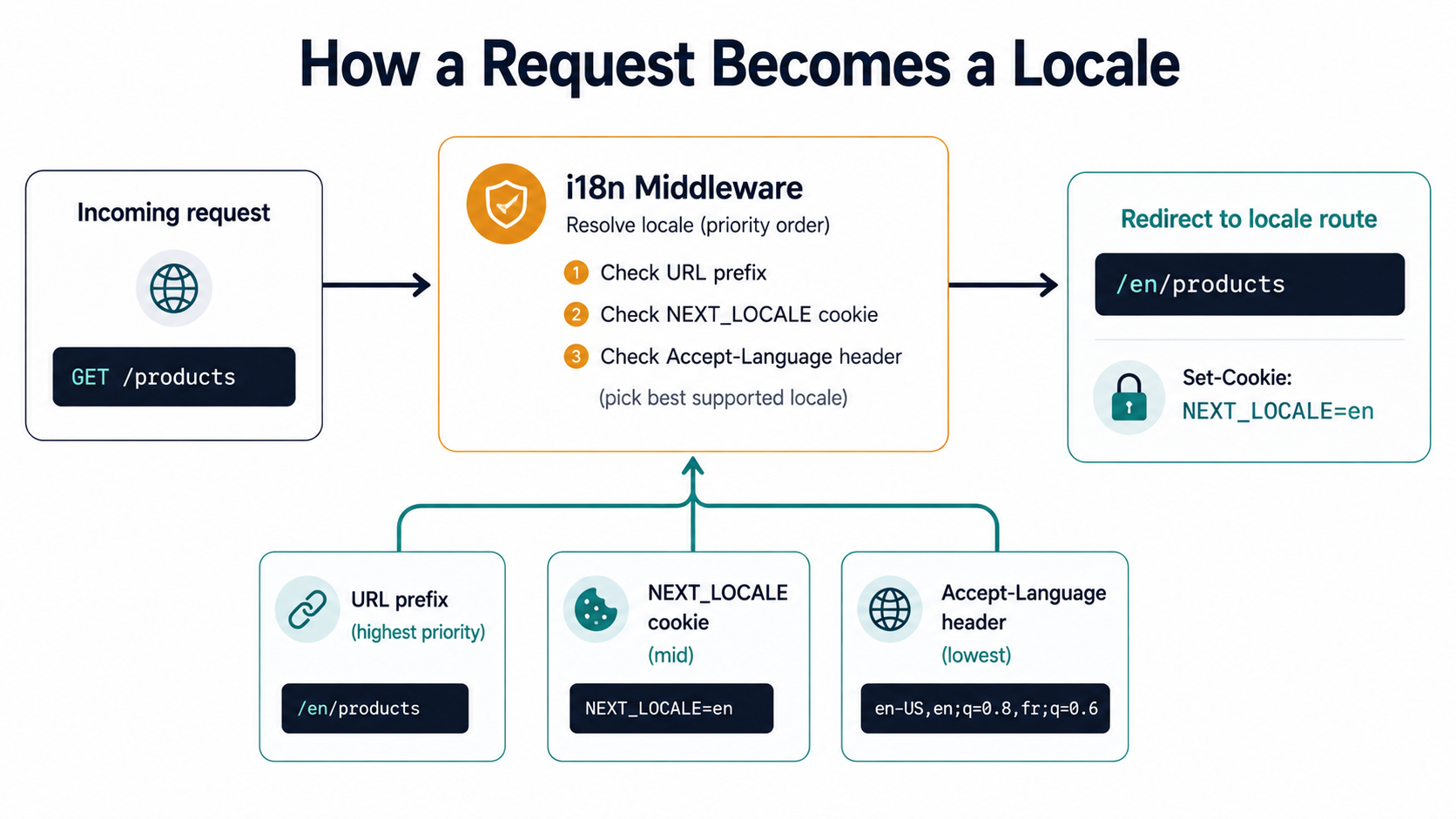
Picking The Locale: Middleware, Accept-Language, And The Algorithm Nobody Talks About
The middleware (or in Next.js 16, the equivalent proxy.ts, same concept, new name) runs before any route. Its job for i18n is straightforward: if the URL already has a locale prefix, let it through; if not, figure out the best locale for this user and redirect.
The Next.js docs show this pattern using two libraries: Negotiator (which parses Accept-Language) and @formatjs/intl-localematcher (which picks the best match against your supported locales).
import { NextRequest, NextResponse } from "next/server";
import { match } from "@formatjs/intl-localematcher";
import Negotiator from "negotiator";

const locales = ["en", "de", "uk"];
const defaultLocale = "en";

function getLocale(request: NextRequest): string {
  // Negotiator wants a plain object of headers.
  const headers: Record<string, string> = {};
  request.headers.forEach((value, key) => {
    headers[key] = value;
  });

  const languages = new Negotiator({ headers }).languages();
  return match(languages, locales, defaultLocale);
}

export function middleware(request: NextRequest) {
  const { pathname } = request.nextUrl;

  const pathnameHasLocale = locales.some(
    (locale) =>
      pathname.startsWith(`/${locale}/`) || pathname === `/${locale}`,
  );
  if (pathnameHasLocale) return;

  const locale = getLocale(request);
  request.nextUrl.pathname = `/${locale}${pathname}`;
  return NextResponse.redirect(request.nextUrl);
}

export const config = {
  matcher: ["/((?!_next|api|favicon.ico).*)"],
};
The matcher pattern is critical. You want middleware running on real page requests, but not on Next.js internals (/_next/*), API routes, or static assets. Forget to exclude _next and every CSS chunk gets a redirect attempt, which both wastes compute and creates redirect loops on some assets.
What intl-localematcher actually does
Accept-Language: en-US,en;q=0.9,de;q=0.7,*;q=0.5 is a prioritized list. The user prefers en-US, then en, then de, then anything. You have ["en", "de", "uk"]. Which one wins?
The naive answer is "find the first match". The slightly less naive answer is the RFC 4647 lookup algorithm, walk the prioritized list, strip subtags one at a time, look for an exact match in your supported locales.
@formatjs/intl-localematcher uses best fit instead. The same algorithm that browsers use internally for Intl APIs. It looks at the full request, language, region, script, and picks the closest match by similarity score, not strict lookup. The difference shows up in edge cases: a user who sends Accept-Language: pt-BR against your ["en", "pt"] will get pt under best fit, which is correct. Lookup might return your default depending on how the implementation walks subtags.
Best fit is also what the next-intl middleware uses under the hood, for the same reason: it produces fewer surprising mismatches in production.
Priority order
Once you start storing the user's choice in a cookie, the priority order matters. The conventional order, which both the Next.js example and next-intl follow:
- URL prefix, if the path starts with
/de/..., the locale isde. End of story. This is the highest priority because it's the explicit, shareable, copy-paste-the-URL choice. - Cookie,
NEXT_LOCALEby convention. Set when the user picks from a language switcher. Survives across sessions. Accept-Languageheader, only consulted on first visit, before there's a cookie.- Default locale, what you fall back to when nothing else matches.
The reason this order matters: a user who clicked your language switcher to choose German should not get redirected to English just because they opened a new tab where the browser added an English Accept-Language. The cookie wins. A user who's pasted a /de/... URL into the address bar wants German, no matter what their cookie says. The URL wins.
Translations: From JSON Dictionaries To ICU Plurals
The official pattern from the Next.js docs is the dictionary approach. You keep a JSON file per locale, load it dynamically on the server, and hand the strings to your components.
import "server-only";

const dictionaries = {
  en: () => import("./dictionaries/en.json").then((m) => m.default),
  de: () => import("./dictionaries/de.json").then((m) => m.default),
  uk: () => import("./dictionaries/uk.json").then((m) => m.default),
};

export type Locale = keyof typeof dictionaries;

export const hasLocale = (locale: string): locale is Locale =>
  locale in dictionaries;

export const getDictionary = (locale: Locale) => dictionaries[locale]();
A few things worth flagging in that 12-line file:
The import "server-only" directive at the top is doing real work. Without it, nothing stops you from importing dictionaries.ts into a Client Component, which would silently bundle every translation JSON into the browser. With it, the build fails loudly the moment anyone tries.
The dynamic import() (not a top-level import) is what makes locale loading tree-shakeable. Only the locale you actually request gets pulled in for that request. A German user never downloads the Japanese dictionary, even if your server is rendering for both at the same time on different requests.
hasLocale is the type guard you'll thread everywhere. The params.locale you get from the URL is just string, anyone could request /zz/about. hasLocale narrows it to the actual supported set, and you pair it with notFound() to 404 anything else:
import { notFound } from "next/navigation";
import { getDictionary, hasLocale } from "./dictionaries";

export default async function HomePage({
  params,
}: {
  params: Promise<{ locale: string }>;
}) {
  const { locale } = await params;
  if (!hasLocale(locale)) notFound();

  const dict = await getDictionary(locale);
  return <button>{dict.products.cart}</button>;
}
This is the bare-bones approach. It works. It has zero runtime overhead beyond the import. For a small site with a handful of strings, you don't need anything else.
When raw dictionaries stop scaling
The cracks start showing when you need any of:
- Plurals. "1 item" vs "2 items" vs "0 items", and that's just English. Polish has three plural forms. Arabic has six. You're not going to handle that with
count === 1 ? "item" : "items". - Interpolation. "Hello, {name}", easy to hack with string replace, harder once you need to pluralize inside the interpolation.
- Gender / select. "He sent you a message" vs "She sent you a message" vs "They sent you a message", you need a syntax that picks branches based on a value.
- Locale-aware formatting for numbers, dates, currencies, relative times.
Intldoes this for you, but only if you wire it up.
This is what ICU MessageFormat solves. It's a syntax, not a library, for expressing all these grammatical structures in a single string. A message like:
{count, plural,
  =0 {No new messages}
  one {You have one new message}
  other {You have # new messages}
}
…is one string, parsed at runtime against the user's locale, that handles English correctly and handles Polish's three forms (one, few, many) and Arabic's six (zero, one, two, few, many, other) without you writing branches per language. The translator fills in the right forms for each locale; the library picks the right branch using the Unicode CLDR plural rules.
ICU also has select for non-numeric branches:
{gender, select,
  male {He liked your photo}
  female {She liked your photo}
  other {They liked your photo}
}
And the two compose. You can nest a select inside a plural, which is how you get correct grammar for "He sent 1 message" / "She sent 2 messages" / "They sent 0 messages" in languages where the verb form depends on both the count and the subject's gender.
You'll see this format in react-intl (FormatJS), next-intl, and (with the macro setup) Lingui. i18next doesn't speak it natively but has an ICU plugin. If you're building anything non-trivial across multiple locales, picking a library that handles ICU is the difference between a translation file that scales and one that grows a custom plural-handler per page.
Server Components love translations
The single best thing about doing i18n in the App Router is that the translation lookup happens on the server by default. Translations don't bloat your bundle. The JSON files don't ship to the browser. The component function evaluates the right string and only the resulting HTML, <h1>Привіт</h1>, crosses the wire.
That's the part of the model that just works. The part that doesn't just work is what happens when your translations need to be read from request-specific state (the cookie, the URL, the header). That's where caching gets weird, and that's the next section.
Metadata, hreflang, And The Punctuation Bug That Costs You SEO
Google needs to know which URL serves which language for which audience. The mechanism is <link rel="alternate" hreflang="..."> in the <head>, with one entry per locale variant of the page, plus an x-default that points to a fallback for users whose browser language matches none of them.
Next.js wires this up through the alternates.languages field on the Metadata API. You return it from generateMetadata:
import type { Metadata } from "next";

type Params = { locale: string };

export async function generateMetadata({
  params,
}: {
  params: Promise<Params>;
}): Promise<Metadata> {
  const { locale } = await params;
  const dict = await getDictionary(locale);

  return {
    metadataBase: new URL("https://www.example.com"),
    title: dict.home.title,
    description: dict.home.description,
    alternates: {
      canonical: `/${locale}`,
      languages: {
        "en-US": "/en",
        "de-DE": "/de",
        "uk-UA": "/uk",
        "x-default": "/en",
      },
    },
    openGraph: {
      locale: locale.replace("-", "_"),
      alternateLocale: ["en_US", "de_DE", "uk_UA"].filter(
        (l) => !l.startsWith(locale.split("-")[0]),
      ),
    },
  };
}
The output in the rendered HTML looks like this:
<link rel="canonical" href="https://www.example.com/de" />
<link rel="alternate" hreflang="en-US" href="https://www.example.com/en" />
<link rel="alternate" hreflang="de-DE" href="https://www.example.com/de" />
<link rel="alternate" hreflang="uk-UA" href="https://www.example.com/uk" />
<link rel="alternate" hreflang="x-default" href="https://www.example.com/en" />
<meta property="og:locale" content="de_DE" />
<meta property="og:locale:alternate" content="en_US" />
<meta property="og:locale:alternate" content="uk_UA" />
Now look at the two locale formats in that HTML. hreflang="de-DE". og:locale=de_DE. Same locale. Different punctuation.
This isn't a bug in Next.js. It's the spec. BCP 47 (used for hreflang, the HTML lang attribute, and the Accept-Language header) uses hyphens: de-DE. The Open Graph protocol uses underscores: de_DE. The Facebook Open Graph parser was built before BCP 47 was standardized for the web, and the convention stuck.
The practical consequence: any code that touches both formats needs to convert. You see the .replace("-", "_") pattern in roughly every Next.js i18n tutorial because of this. Forget the conversion and you'll either ship invalid hreflang (rejected by Google Search Console) or invalid og:locale (silently ignored by social platforms).
What x-default actually means
It's tempting to skip x-default because the docs make it sound optional. It isn't, if you care about SEO. x-default tells Google: this is the URL we serve to users whose browser language matches none of our supported locales. Without it, Google has to guess, and the guess is usually "the page with the highest authority", which may or may not match what you actually serve.
The convention is to point x-default at the same URL as your default locale (/en in the example above). If you have a true locale selector page at /, that's the canonical x-default instead. Either way, set it.
The canonical-per-locale gotcha
Notice alternates.canonical in the metadata above is set to /${locale}, not to a single hardcoded URL. Each locale variant gets its own canonical pointing to itself. That's correct.
A common mistake is to set canonical: "/" or canonical: "/en" on every page, including the German and Ukrainian versions. That tells Google all three URLs are duplicates of the English one, which de-indexes the localized variants. You'll see traffic drop on the non-default locales, blame the translations, and eventually trace it to a four-character mistake in your metadata setup. Each locale points its canonical at itself; hreflang is what tells Google they're related.
The Caching Trap: Why headers() Makes Your Site Slow
This is the part most tutorials skip, and it's the part that quietly costs you the most.
The simple version of "how do I read the locale in any component" usually looks like this with a library like next-intl:
import { getTranslations } from "next-intl/server";

export default async function Greeting() {
  const t = await getTranslations("Greeting");
  return <p>{t("hello")}</p>;
}
Beautiful. No prop drilling. getTranslations figures out the locale from the request context, loads the right dictionary, returns a translator. You sprinkle it through your tree and everything works.
Here's the problem. To know which locale this request is for, getTranslations reads from headers(). Specifically, the middleware sets an internal header (x-next-intl-locale) and getTranslations reads it back.
headers() is a dynamic API in the Next.js caching model. The moment any component in the render tree touches it, Next.js gives up on static rendering for that route. Every request now hits the server. Every request runs the full render. Your generateStaticParams does nothing, there are no static pages to generate, because the request can't be resolved at build time.
If you came from the Pages Router, this is a major regression in caching behavior, and it's easy to miss because there's no warning. The page still works. It just stops being cacheable. You'll see it in your Vercel bill, in your TTFB, in the difference between "build outputs 200 pre-rendered pages" and "build outputs 0 pre-rendered pages plus a function".
Why setRequestLocale fixes it
next-intl ships a workaround called setRequestLocale. The idea is to write the locale into a request-scoped store early in the render, typically in your top-level [locale]/layout.tsx, and have all the translation hooks read from that store instead of from headers().
import { setRequestLocale } from "next-intl/server";

export default async function LocaleLayout({
  children,
  params,
}: {
  children: React.ReactNode;
  params: Promise<{ locale: string }>;
}) {
  const { locale } = await params;
  setRequestLocale(locale);

  return (
    <html lang={locale}>
      <body>{children}</body>
    </html>
  );
}
The store is implemented with React's cache(), the same primitive that backs unstable_cache and friends. It's request-scoped, lives only on the server, and doesn't count as a "dynamic API" for Next.js's static analysis. So getTranslations reads from a per-request cache (static-friendly) instead of from headers() (dynamic-only).
The result: with setRequestLocale called in your layout, every getTranslations call deep in the tree resolves at build time when generateStaticParams runs, and your pages become statically rendered again.
This is library-specific to next-intl, but the pattern is general: anywhere request-scoped state needs to feed deep into your render tree without forcing dynamic rendering, route it through cache() instead of headers().
Static rendering and the params access
There's a related, smaller trap. await params is itself a dynamic API. Touching params.locale opts into dynamic rendering, unless generateStaticParams is providing the values at build time.
// Required to pre-render this page for every locale at build time.
export async function generateStaticParams() {
  return [{ locale: "en" }, { locale: "de" }, { locale: "uk" }];
}

export default async function AboutPage({
  params,
}: {
  params: Promise<{ locale: string }>;
}) {
  const { locale } = await params;
  // ... renders statically because params.locale matches a value
  //     returned by generateStaticParams above.
}
If generateStaticParams is on your root [locale]/layout.tsx, every page underneath inherits it, you don't need to repeat it on every page. But if you skip it on the layout and forget to add it on a page, that page becomes dynamic.
Picking A Library (Or Not)
You can ship a multi-locale Next.js app with zero libraries. The dictionary pattern from the official docs is genuinely production-ready for sites with simple needs, handfuls of strings, no plurals, a couple of locales. If that's you, just ship the official pattern and skip this section.
For everything else, there are three serious choices. The picture in 2026 looks roughly like this:
next-intl is the de facto pick for new App Router projects. Around 2KB gzipped, native Server Component support, ICU MessageFormat built in, middleware-based routing, TypeScript autocomplete on message keys, and setRequestLocale to keep static rendering. Its design assumes the App Router from the ground up. The tradeoff: it's a single-vendor library, if you have a strong "framework-agnostic" preference, you might balk.
react-i18next (via next-i18next) is the framework-agnostic veteran. Bundle is larger (~6KB+), the API is older and shows it, but the plugin ecosystem dwarfs anything else, backends for every TMS platform, language detection plugins, caching layers, you name it. If your translations live in Lokalise or Phrase and your team already speaks i18next, the inertia is worth respecting. next-i18next 16 added App Router support including the new proxy.ts convention; it works, but it feels like an adapter, not a native fit.
Lingui is the compile-time approach. Tiny runtime (~2KB), tree-shakeable, catches missing translations at build time via a Babel/SWC plugin. The macro-based API is unusual and takes a minute to get used to (<Trans>Hello {name}</Trans> instead of t("hello", { name })), and the extraction/compile cycle adds CI complexity. The upside is the smallest production bundle and compile-time guarantees that the others can only fake.
| Library | Bundle (~) | App Router fit | ICU plurals | TypeScript keys | Compile-time check |
|---|---|---|---|---|---|
next-intl |
2KB | native | yes | yes | runtime |
react-i18next |
6KB+ | adapter | via plugin | partial | runtime |
Lingui |
2KB runtime | native | yes | yes | yes (build) |
The honest pick for a new project: next-intl. It will give you the smoothest path through every section of this article, routing, locale detection, translations, metadata, and caching, without you needing to glue four packages together.
The "I'm migrating an existing i18next codebase" answer: stay on next-i18next v16+ until the migration cost actually beats the integration tax.
The "I care about every byte and every build-time guarantee" answer: Lingui, and budget a day for the macro setup.
A Last Word On Defaults
The thing nobody warns you about when you start an i18n project is how much of it is negotiation between systems. The browser has opinions (Accept-Language). The user has opinions (the language switcher you built). Google has opinions (hreflang, canonical). Facebook has opinions (og:locale with underscores, please). The framework has opinions (don't read headers() in cached components). Your CMS has opinions about how messages are exported. Your translator has opinions about whether to send you JSON or XLIFF.
The whole job is making those opinions agree on the right answer for each request, fast enough to stay statically rendered, with metadata correct enough to stay indexed, in a way that survives the next time someone adds a locale by editing a single array.
Get the routing right and the locale detection priority right and the setRequestLocale placement right, and the rest is mostly typing translations. Get any of those three wrong, and you'll spend more time debugging cache invalidation than you'll spend on the actual translations. Pick the boring options early. Your future self will thank you.
![Two app/[locale]/page.tsx route trees side by side: a green static tree using setRequestLocale and cache() pre-rendering 47 pages, and an amber dynamic tree reading headers() with zero pre-rendered pages.](/assets/imgs/articles/internationalization-in-nextjs-apps/static-vs-dynamic-trees.png)