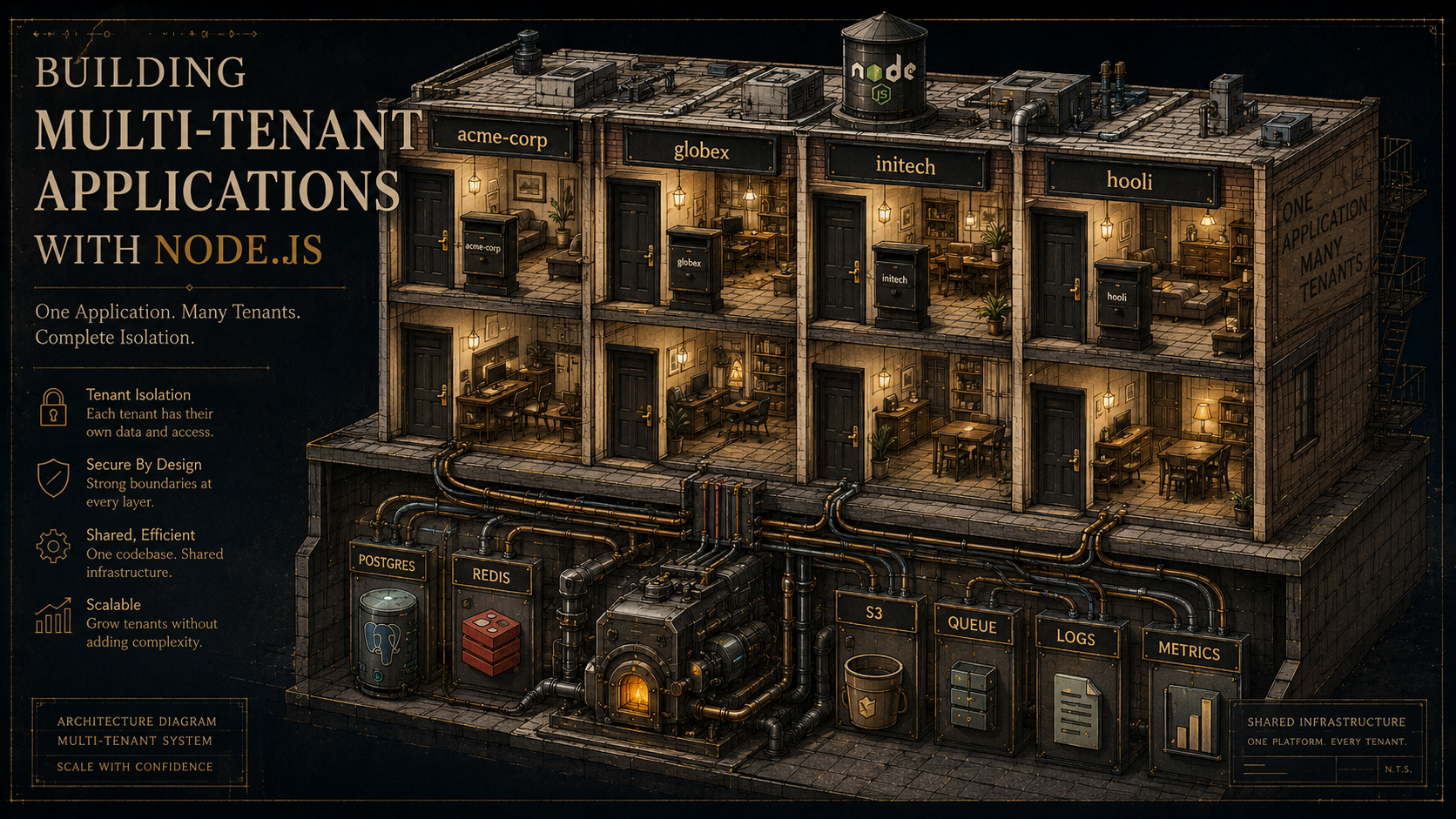
So, you shipped a SaaS. One customer. Their data sits in users, orders, invoices -- nice clean tables, no tenant_id columns, no namespacing in S3 keys, no per-tenant log labels. The dashboard works. Sales closes another customer. Then a third. Then the fourth one is an enterprise that wants their own database "for compliance reasons", and now you're holding three different problems at once: a schema that didn't plan for tenants, a logging pipeline that doesn't know who anything belongs to, and a queue that processes jobs in the order they arrived rather than the order that's fair.
Multi-tenancy isn't really a database decision. It's a thing that needs to live in every layer of your application at once -- the request boundary, the data layer, the cache, the file store, the queues, the cron jobs, the logs, the metrics, the support tools, and the deploy pipeline. Pick the wrong shape early and you'll be migrating tables on a Saturday two years later.
This piece is about what all of that looks like in Node. The data isolation models are the well-trodden part. The rest -- propagating tenant context across the async boundaries Node loves to scatter work across, keeping caches and file storage tenant-safe, handling lifecycle events without leaving ghosts behind -- is where most of the real bugs live.
The Three Isolation Models, Briefly
Every multi-tenant database conversation lands on one of three layouts. They're worth a fast recap because the rest of the article assumes you've picked one.
Shared database, shared schema. Every tenant lives in the same tables; rows are scoped by a tenant_id column. Cheapest to operate, easiest to query across tenants for internal analytics, easiest to leak data from. This is where almost every B2C SaaS lives forever.
Shared database, separate schema (Postgres flavour). Each tenant gets its own schema in one Postgres instance. Stronger isolation than a tenant_id column, you can SET search_path per connection, migrations have to run against every schema. Good middle ground for mid-market B2B.
Database per tenant. Each tenant gets a separate database, sometimes on a separate server. Strongest isolation, easiest to delete a tenant cleanly, hardest to do cross-tenant analytics, and the cost curve only makes sense above a certain ARPU. Often a contractual requirement in healthcare, finance, and EU public sector deals.
You can mix them. Most mature SaaS products run a tiered approach -- free and basic tiers in shared schema, enterprise tier in database-per-tenant -- and have a migration path that moves a customer from one tier to another without downtime. That migration path is a whole engineering project; we'll come back to it near the end.
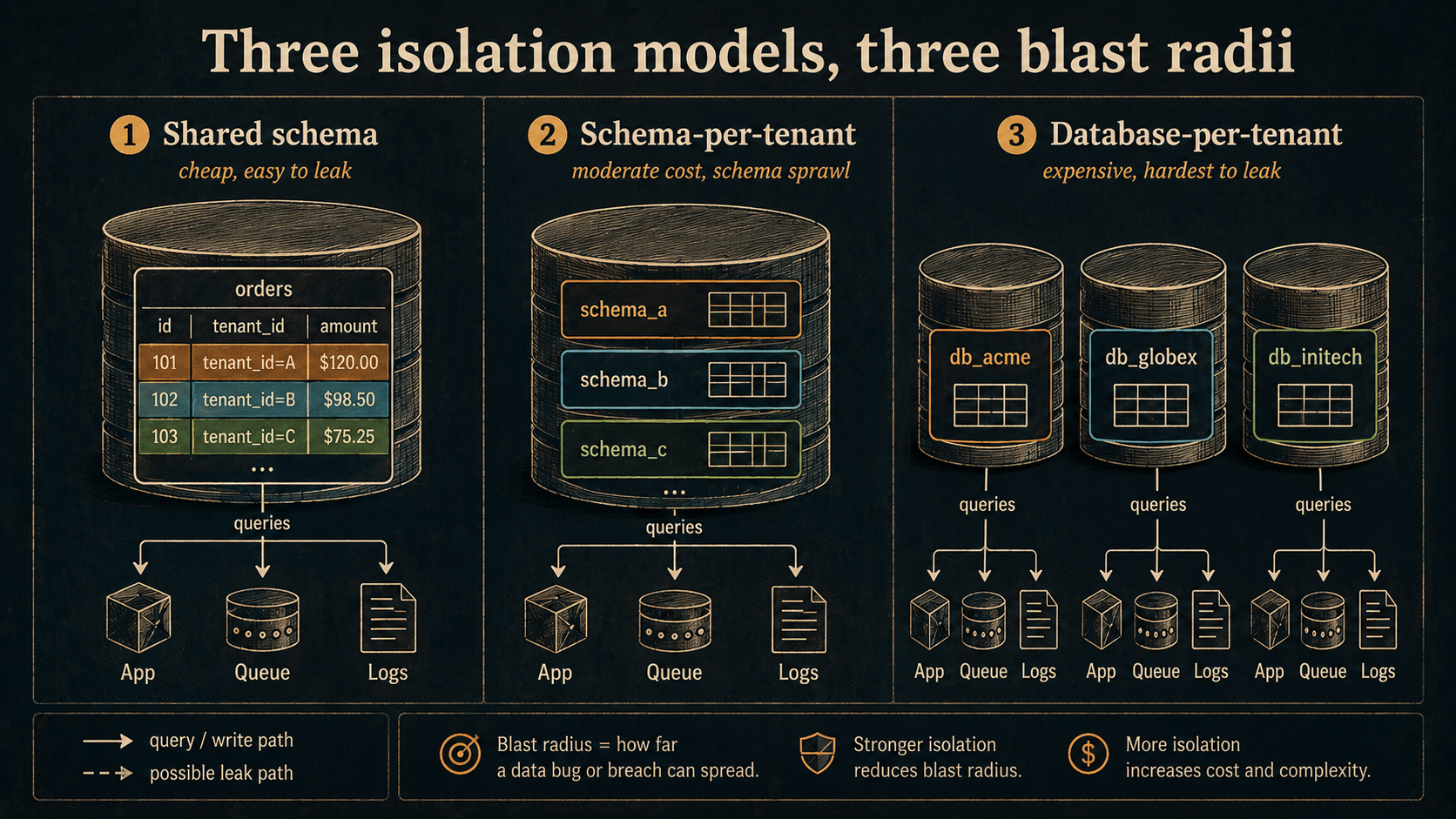
The rest of this article is mostly model-agnostic -- the tenant context, the cache keys, the file storage, the log labels all work the same way regardless of which isolation tier the request lands on. The only thing that changes per tier is which connection pool you talk to once you've decided who the tenant is.
Tenant Resolution Belongs At The Edge
The first job of every request is to figure out who's asking. Get this wrong and every defense downstream is moot.
You usually have three options for where the tenant identifier lives on the wire:
- Subdomain.
acme.app.example.com-- clean URLs, plays nicely with per-tenant cookies and OAuth callback domains, requires a wildcard DNS record plus a wildcard TLS cert. You parse it once fromreq.hostname. - Path prefix.
app.example.com/t/acme/orders-- easiest to ship, ugly URLs, easy to forget the prefix in a client SDK, fine for internal tools. - Header.
X-Tenant-Id: acme-- perfect for service-to-service calls, useless for browsers because they can't keep one set per tab, and developers forget to set it on at least once a quarter.
Whichever you pick, you do not trust the wire value alone. The tenant identifier from the subdomain or header tells you who the request claims to be for; the authenticated user's tenant claim tells you who the user actually belongs to. They must match, or the request is rejected. That single check at the middleware layer prevents most cross-tenant access bugs before they have a chance to exist.
import type { Request, Response, NextFunction } from 'express';

export function resolveTenant(req: Request, res: Response, next: NextFunction) {
  // From the subdomain — acme.app.example.com → "acme"
  const claimedSlug = req.hostname.split('.')[0];

  // From the verified JWT (set earlier by your auth middleware)
  const userTenantSlug = req.user?.tenantSlug;

  if (!claimedSlug || !userTenantSlug) {
    return res.status(400).json({ error: 'missing tenant' });
  }
  if (claimedSlug !== userTenantSlug) {
    return res.status(403).json({ error: 'tenant mismatch' });
  }

  req.tenantSlug = claimedSlug;
  next();
}
The next thing you'll want is a Tenant record -- the canonical row that says "acme exists, here's its isolation tier, here's the database it lives in, here's its plan". Looking that up on every request from the primary database is wasteful. Cache it in memory or in Redis with a short TTL, and invalidate the cache when an admin changes the tenant's tier or status. A 60-second TTL is enough that most admin actions feel instant and your database doesn't melt under traffic.
Keep tenant resolution boring and synchronous. The moment it gets complicated -- chained lookups, conditional rules per route -- you'll start writing endpoints that bypass it.
Tenant Context That Survives Every Async Hop
Once you know the tenant on the request, you need to carry that knowledge through every line of code the request touches. Passing tenantId as a function argument through ten layers is exhausting and a single missed parameter becomes a leak.
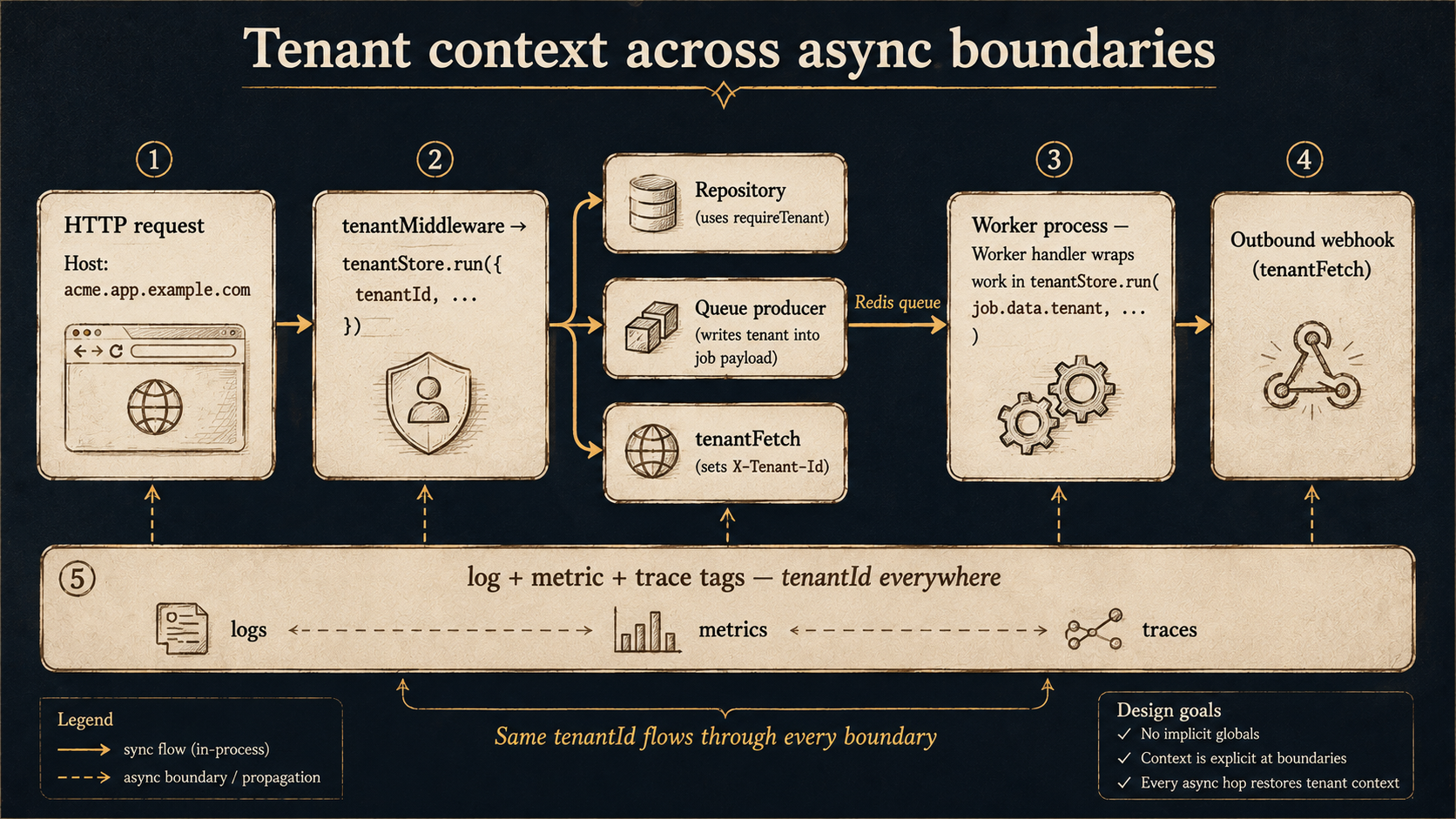
Node's built-in AsyncLocalStorage is the right tool. You stash request-scoped context once in middleware, and any code in the same async chain can read it with no plumbing.
import { AsyncLocalStorage } from 'node:async_hooks';

export type TenantContext = {
  tenantId: string;
  tenantSlug: string;
  userId: string;
  requestId: string;
  isolationTier: 'shared' | 'schema' | 'database';
};

export const tenantStore = new AsyncLocalStorage<TenantContext>();

export function requireTenant(): TenantContext {
  const ctx = tenantStore.getStore();
  if (!ctx) throw new Error('tenant context required');
  return ctx;
}
Wrap the rest of the request in tenantStore.run(...) once, near the top of your middleware chain, and every repository, logger, queue producer, and outgoing HTTP client downstream can call requireTenant() without you wiring it in.
The interesting part is the boundaries where the async chain ends -- Node has more of these than you'd think. Each one needs you to serialize the tenant context out, and then re-establish it on the other side.
Background Jobs
A queue job is an async chain that starts in a worker process; the AsyncLocalStorage from the HTTP request didn't survive the trip through Redis. Stuff the tenant context into the job payload and re-run the worker handler inside tenantStore.run.
import { Worker } from 'bullmq';
import { tenantStore } from '../context/tenant-store';
import { sendInvoiceEmail } from '../services/email';

new Worker('emails', async (job) => {
  const { tenant, payload } = job.data;
  await tenantStore.run(tenant, () => sendInvoiceEmail(payload));
}, { connection });
Make this a hard convention: every job payload starts with a tenant field. Reject jobs without one in the worker. If you have an internal/system tenant for genuinely cross-tenant work (data warehouse exports, billing reconciliation), give it a real ID like 00000000-0000-0000-0000-000000000000 and pass it explicitly. Silent global jobs in a multi-tenant system are how data leaks across customers.
Scheduled Tasks
A cron job has no incoming request to inherit a tenant from. Pick one of two patterns:
- Fan out per tenant. The cron iterates the list of active tenants and enqueues one job per tenant. The job carries the tenant payload; the worker establishes context. Use this when each tenant's work is independent.
- Single system-tenant job. The cron runs once with the system tenant. Use this only when the work is genuinely cross-cutting -- global metrics rollups, garbage collection of orphaned records.
If you can't decide which pattern fits, you're probably looking at fan-out.
Outbound HTTP And Webhooks
Outgoing requests need the tenant on them too -- both for your own internal services (so the receiving service can establish context without re-resolving) and for outbound webhooks to customers' systems (so logging and rate limiting on the receiving end work).
A small HTTP client wrapper does the trick:
import { requireTenant } from '../context/tenant-store';

export async function tenantFetch(url: string, init: RequestInit = {}) {
  const { tenantId, requestId } = requireTenant();
  const headers = new Headers(init.headers);
  headers.set('X-Tenant-Id', tenantId);
  headers.set('X-Request-Id', requestId);
  return fetch(url, { ...init, headers });
}
Now anywhere in your app that calls another service goes through tenantFetch instead of bare fetch, and the tenant travels with the request.
File Storage Without The Bucket Of Shame
Most Node SaaS apps put user uploads in S3 (or a compatible store -- R2, MinIO, GCS). The question is how the bucket is laid out, and the answer is almost never "everything in one bucket with a generated UUID per file."
Three workable patterns:
Prefix per tenant in a shared bucket. Keys look like acme/invoices/2026/04/inv-001.pdf. Cheapest to operate, single bucket policy, simplest cross-region replication. Isolation depends entirely on your application code generating the right prefix every time. One bug in key generation and you leak.
Bucket per tenant. Each tenant gets a bucket. Strongest isolation -- IAM policies can be tenant-specific, cross-region replication can be opt-in per customer, you can hand a tenant their own bucket if they ever leave you. Limited by your cloud's per-account bucket quota (AWS lets you raise it, but you'll feel the limit eventually) and bucket creation is an async operation that has to fit into your tenant onboarding flow.
Per-tier mix. Free and basic tiers in shared bucket with prefixes; enterprise tier in their own bucket. Same tiered logic as the database -- and you handle the migration the same way (background copy, dual-write window, cutover).
The non-negotiable part is generating signed URLs through a helper that always takes the tenant from context:
import { S3Client, GetObjectCommand } from '@aws-sdk/client-s3';
import { getSignedUrl } from '@aws-sdk/s3-request-presigner';
import { requireTenant } from '../context/tenant-store';
import { lookupBucket } from './bucket-registry';

const s3 = new S3Client({});

export async function signedDownloadUrl(objectPath: string) {
  const { tenantId } = requireTenant();
  const { bucket, prefix } = lookupBucket(tenantId);
  const Key = `${prefix}${objectPath}`;
  const cmd = new GetObjectCommand({ Bucket: bucket, Key });
  return getSignedUrl(s3, cmd, { expiresIn: 300 });
}
Notice the helper never takes a tenant argument. The only place that can change which tenant's bucket gets touched is requireTenant() -- and that's set by middleware, far away from the call site. The pattern repeats itself: every per-tenant resource is accessed through a helper that pulls the tenant from context, never from a parameter.
Caches, Namespaced By Tenant Or Not At All
Caches are the most-forgotten leak surface. The bug shape is always the same: a developer cached a result by userId or orderId, forgot that those keys are unique only within a tenant, and a request for tenant A returned tenant B's cached value.
Two rules, no exceptions:
- Every cache key starts with the tenant. Not as a suffix, not as a hash component -- as a prefix.
t:acme:user:123:profile, neveruser:123:profile. This makes namespace conflicts impossible by construction and makes per-tenant cache invalidation a wildcard delete. - Cache helpers take no tenant argument. The helper pulls it from context, the same way the storage helper does.
import { redis } from './redis';
import { requireTenant } from '../context/tenant-store';

export async function cacheGet<T>(key: string): Promise<T | null> {
  const { tenantSlug } = requireTenant();
  const raw = await redis.get(`t:${tenantSlug}:${key}`);
  return raw ? (JSON.parse(raw) as T) : null;
}

export async function cacheSet(key: string, value: unknown, ttlSec: number) {
  const { tenantSlug } = requireTenant();
  await redis.set(`t:${tenantSlug}:${key}`, JSON.stringify(value), 'EX', ttlSec);
}

export async function cacheInvalidateTenant() {
  const { tenantSlug } = requireTenant();
  const stream = redis.scanStream({ match: `t:${tenantSlug}:*`, count: 500 });
  for await (const keys of stream) {
    if (keys.length) await redis.del(...keys);
  }
}
The cacheInvalidateTenant() helper is the one you reach for when an admin downgrades a plan, when a tenant gets restored from backup, or when you ship a schema change that affects shape of cached objects. It's also worth wiring into your tenant-deletion flow so you don't leak data in the cache after the database row is gone.
Observability That Knows Whose Bad Day It Is
A multi-tenant outage is not "the system is down." It's "tenant X is degraded for the last 7 minutes." If your logs, metrics, and traces don't carry tenant labels, you can't see that difference, and your on-call will spend the first ten minutes of every incident reading per-customer support tickets instead of dashboards.
Logs
Every log line, no exceptions, gets the tenant. With pino and a context middleware, that looks like:
import pino from 'pino';
import { tenantStore } from '../context/tenant-store';

const base = pino({ level: process.env.LOG_LEVEL ?? 'info' });

export function log() {
  const ctx = tenantStore.getStore();
  return ctx
    ? base.child({
        tenantId: ctx.tenantId,
        tenantSlug: ctx.tenantSlug,
        requestId: ctx.requestId,
      })
    : base;
}
Anywhere in code, log().info({ ... }, 'message') produces a log line with tenant fields populated. In your log shipper (Loki, Datadog, anything), you query by tenantSlug and the search is instantly useful.
Metrics
Be careful here. A metric label is a Prometheus dimension; every unique value of tenantId you add becomes a separate time series. With 10,000 tenants and one counter, you've created 10,000 series. That's manageable for a small SaaS, painful for a big one.
A good middle ground: tag with tenantId for low-cardinality counters and histograms that you genuinely want to slice by tenant (HTTP errors, queue lag, p99 latency). Tag with tenantTier (free, pro, enterprise) for everything else. You can still drill into a specific tenant via logs and traces when you need to.
import { Histogram } from 'prom-client';

export const httpDuration = new Histogram({
  name: 'http_request_duration_seconds',
  help: 'HTTP request duration in seconds',
  labelNames: ['method', 'route', 'status', 'tenantTier'],
});
Traces
OpenTelemetry's baggage mechanism is the right home for tenant identifiers in traces. Set it once on the request span and every downstream span -- across services, across the queue, across outgoing HTTP -- picks it up automatically. The receiving service reads baggage and re-establishes its own tenantStore from it.
The payoff is that a trace for a slow request shows you the tenant on every span, including the queue wait and the downstream service calls. You can answer "which tenants did this regression hit?" by querying traces for a high-p99 endpoint and grouping by tenantId. Without baggage, that question requires correlating five logs against three traces by hand at 3am.
The Noisy Neighbor Problem
One tenant doing something unreasonable can ruin every other tenant's day. The traditional answer is "rate limit per tenant" and that's necessary but not sufficient -- you also have to think about the slow resources sitting behind the API.
A few patterns worth knowing:
Per-tenant connection pool quotas. A database pool of 50 connections shared across all tenants means one tenant running 50 long queries blocks everyone. Either split the pool (one sub-pool per tier, sized to its share of traffic), or set per-tenant connection limits in your pool layer. Most pool libraries don't ship this -- you usually wrap it yourself with a tenant-aware semaphore.
Per-tenant queue concurrency. A worker that pulls jobs in FIFO order will let one tenant's backlog of 10,000 jobs starve another tenant's two urgent jobs. BullMQ supports priority queues and concurrent worker pools -- a common pattern is one queue per tier, with worker concurrency split proportional to plan size. For finer control, dedicate a worker pool to "interactive" jobs (user-triggered) and another to "batch" (cron-triggered), so a heavy batch job from any tenant doesn't slow down user-facing work for everyone.
Per-tenant timeouts. A handler that talks to a slow tenant's webhook can hold a worker thread for 30 seconds. Per-tenant timeouts, not just per-handler timeouts, protect you from "this one customer's slow internal API is everyone's problem."
Per-tenant request budgets. Different from a rate limit -- this is "tenant X is allowed N concurrent requests at a time." Implemented with a semaphore keyed by tenant, it stops one tenant from filling your event loop with simultaneous slow operations.
The deeper rule is the one most teams learn the hard way: a multi-tenant system has to budget every shared resource by tenant, not just CPU and bandwidth. Connections, queue slots, event-loop time, file descriptors, and any external API quota all need to be carved up the same way.
Per-Tenant Configuration And Feature Flags
Every tenant ends up with at least a little custom configuration -- a custom email-from address, a different default currency, a webhook URL, an SSO provider, a feature flag for a beta they signed up for. The shape that works:
A tenant_settings table (or a JSON column on the tenant row) for the static configuration. A feature flag tool (LaunchDarkly, Unleash, ConfigCat, Statsig -- pick anything you'll actually maintain) for boolean and percentage rollouts. Both keyed by tenantId. Both read through a context-aware helper that pulls the tenant from requireTenant().
import { requireTenant } from '../context/tenant-store';
import { db } from '../db';

const cache = new Map<string, Promise<TenantSettings>>();

export function getTenantSettings(): Promise<TenantSettings> {
  const { tenantId } = requireTenant();
  if (!cache.has(tenantId)) {
    cache.set(tenantId, db.tenantSettings.findUniqueOrThrow({ where: { tenantId } }));
  }
  return cache.get(tenantId)!;
}

export function invalidateTenantSettings() {
  const { tenantId } = requireTenant();
  cache.delete(tenantId);
}
The trick is making sure that a settings change in your admin tool propagates to every Node process that might have cached it. The cheap version is a short TTL plus a "settings changed" event on a Redis pub/sub channel that all workers subscribe to and use to invalidate their local cache. The expensive version is a config service. Pick the cheap version until you outgrow it; most teams never do.
Don't put per-tenant secrets in the same place as per-tenant config. API keys for outbound webhooks, OAuth client secrets for a tenant's SSO setup -- those live in a secret manager (AWS Secrets Manager, Doppler, Vault, whatever you're already using), referenced by tenantId. They're rotated separately, they're audited separately, and they should never appear in your config table.
Schema Migrations Across Tenants
This is where shared-schema and per-schema setups diverge sharply.
Shared schema. A migration is a single DDL statement against one database. The risk is the size of the data being altered -- adding a column to a 50M-row events table is a long lock without the right tooling. Use online schema change patterns (pt-online-schema-change, gh-ost, or your platform's equivalent), and never run a migration during peak hours for your biggest tenants.
Schema per tenant. A migration is a DDL statement run once per schema. With 1,000 tenants that's 1,000 statements. A migration tool that supports per-schema execution (umzug, knex with custom plumbing, or a small homemade loop over pg_namespace) is non-negotiable. The harder problem is partial failure -- a migration that succeeds on 900 schemas and fails on 100 leaves you in a hybrid state where some application code expects the new column and some queries hit schemas that don't have it. The shape that survives this: deploy code that works against both old and new schemas first, run the migration, then deploy code that requires the new schema. Boring. Slow. Reliable.
Database per tenant. Migration becomes a deploy. Each tenant database has its own state and history. You run the migrations as part of the deploy pipeline, in parallel where you can, with a per-tenant rollback plan. Many teams maintain an "edge tenant" -- a single low-traffic tenant database that gets every migration first, sometimes an hour before the rest, so a bad migration is contained to one customer.
The common thread across all three: every migration is fundamentally a fleet operation. Tooling has to know about every tenant database/schema, the deploy pipeline has to be able to roll forward and back per tenant, and your application code has to assume there will be a window where some tenants are on the new schema and some aren't.
Tenant Lifecycle: Onboard, Migrate, Offboard
The lifecycle of a tenant is often the most-shipped, least-thought-through part of a multi-tenant system. There are three moments that matter.
Onboarding
When a tenant signs up, your system needs to atomically (or near-atomically) provision all their per-tenant resources: a database row in the tenants table, a schema or database if the tier requires one, the initial settings row, optionally a dedicated S3 bucket, optionally a feature flag context, an admin user, maybe a webhook subscription. Several of those steps talk to external systems and can fail.
The model that works: an onboarding state machine. The tenant row gets created in provisioning state. Each subsequent step (schema create, bucket create, settings populate) advances the state and is idempotent. If a step fails, a worker retries it. The tenant becomes active only when every step has succeeded. Until then, the login endpoint refuses to let users in with a clear "provisioning, try again in 30 seconds" message.
The cheap version of this is a sequence of awaited calls in a try/catch, and that works fine for the first hundred customers. The grown-up version is a saga, with explicit compensations for steps that have side effects, because the day a half-provisioned tenant locks you out of your admin tool is the day you wish you'd built the saga.
Migrating Between Tiers
Sales closes an enterprise deal. The customer is currently in shared-schema; they want database-per-tenant for compliance. The migration looks something like:
- Provision the new database for that tenant.
- Copy their existing data from the shared schema into the new database (online -- they're still using the app).
- Switch to dual-write mode: every write goes to both old and new.
- Run a consistency check to confirm the new database matches.
- Cut over reads to the new database. Keep writing to both.
- Stop writing to the old. Delete the old rows after a retention window.
The work is mostly application-level -- your repository layer needs a "where do reads/writes go for this tenant right now?" routing decision, driven by a per-tenant flag. The migration code reads that flag and the application reads that flag, so the cutover is a flag flip, not a deploy.
This isn't a quick feature. Plan for a week of engineering even for a small data set. Plan for a month if there's any cross-tenant data your application code joins.
Offboarding
A customer leaves. Their data must be deleted -- both because contracts say so and because retention regulations (GDPR, CCPA, regional equivalents) require it. Delete doesn't mean what you think it means in a SaaS app:
- Rows in the primary database -- delete or anonymize.
- S3 objects -- delete, or set a deletion marker if you're versioned.
- Cache entries -- purge with the per-tenant invalidation helper from earlier.
- Search indices (Elasticsearch, Meilisearch, OpenSearch) -- delete every doc with the tenant key.
- Log entries -- most teams set a retention period and let them age out, but a GDPR request can require active deletion. Check what your log vendor supports before you sign the contract.
- Backups -- usually outside the deletion guarantee, governed by the retention window in your DPA. Document the window clearly.
Wire offboarding through the same state-machine pattern as onboarding. The tenant moves to deleting, each step is idempotent, the tenant moves to deleted (or is removed) once everything finishes. Build a periodic "are there any tenants stuck in deleting?" alert -- orphaned tenant cleanup is a problem you'll have at least once, usually in an audit.
Cross-Tenant Operations You Can't Avoid
Some operations are legitimately cross-tenant. They need their own pattern, because they shouldn't go through requireTenant().
Internal analytics. Your data warehouse needs to see every tenant. The pattern is a separate read-only path that explicitly bypasses tenant scoping, used only from analytics ETL jobs. Lock it behind a separate service account, log every access, and never let it answer an HTTP request from a normal user.
Admin and support tools. Your support engineers need to view a customer's data to help them. The pattern is "tenant impersonation": an admin user calls an /admin/impersonate?tenantId=... endpoint that establishes a tenant context with an impersonatedBy field set to the admin's ID. Every action under that context is logged with both fields, so the audit trail is complete. Make impersonation time-bounded (15 minutes), require justification text, and notify the tenant by email when it happens -- your enterprise customers will demand all three eventually.
Cross-tenant background jobs. Garbage collection, billing reconciliation, churned-tenant cleanup. Use the system tenant pattern: a real tenant ID reserved for internal work, with its own log labels and its own resource quotas. Treat it like any other tenant in your dashboards.
The unifying rule is that every operation needs a tenant context -- even cross-tenant ones get a synthetic "system" or "admin" tenant. There is no such thing as a request without one, anywhere in your codebase. The moment you allow null, you've broken every guarantee the rest of the system was built on.
The One Test That Catches The Most Bugs
If you write one integration test for your multi-tenant code, write this one:
- Seed two tenants, A and B, with overlapping data shapes.
- Authenticate as tenant A.
- Enumerate every endpoint that takes a resource ID in the URL or body.
- For each one, send a request with an ID that belongs to tenant B.
- Assert that every single response is a 404 (or 403, pick a convention and stick to it).
The first time you run this test on a real codebase, it fails on at least three endpoints. That's normal. Those endpoints are the cross-tenant leaks you would have shipped, and now you've found them in CI instead of in a customer's bug report. Re-run on every PR. Add new resources to the enumeration as you add them. It is the cheapest piece of insurance a multi-tenant codebase can carry.
One Mental Model To Take Away
A multi-tenant Node application is one shared runtime with a tenant identifier threading through every async hop, every cache key, every storage path, every log line, every job payload, and every outbound HTTP call. The isolation model you pick for the database is one decision out of dozens -- the harder, less-glamorous work is the architecture that keeps the tenant context coherent across the boundaries where async chains break and re-form.
Get that part right and the data layer almost takes care of itself. Get it wrong and no amount of where tenant_id = ? on the database side will save you.