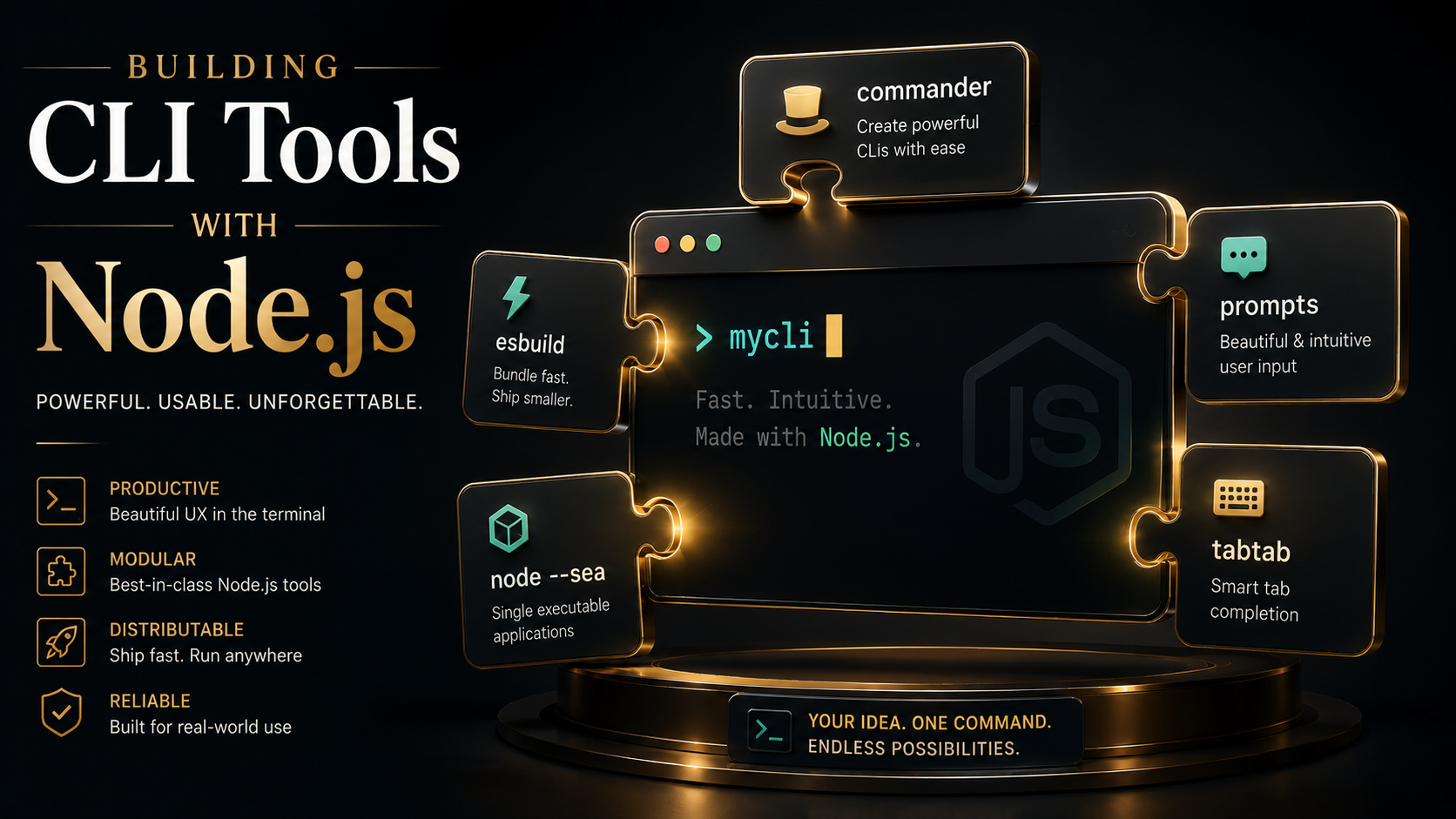
There's a moment in every Node project where someone says "we should just turn this into a CLI", and the room nods like that's a small task. It isn't. A real CLI has to parse flags the same way git does, prompt for missing answers without locking up CI, complete commands when you hit Tab, install cleanly on Windows where shebangs don't exist, and ideally run on a machine that doesn't even have Node installed. Each of those is a tiny rabbit hole. Together they're a weekend.
This article walks the whole stack, from process.argv up to a self-contained binary you can drop on a server with no runtime. It's opinionated. You'll see why I reach for Commander 99% of the time, when interactive prompts are a feature versus a UX trap, how shell completion actually works (it's not magic, it's a shell script the user sources), and what changed in Node 20 that makes the old pkg/nexe advice mostly obsolete.
Why process.argv isn't enough
Every CLI tutorial starts the same way: "Node gives you process.argv, you can just parse it yourself." You can. You shouldn't. Here's the moment that proves it.
const args = process.argv.slice(2);
const dryRun = args.includes("--dry-run");
const verbose = args.includes("-v") || args.includes("--verbose");
const inputIndex = args.indexOf("--input");
const input = inputIndex >= 0 ? args[inputIndex + 1] : null;
This works until the first user types --input=foo.json instead of --input foo.json. Then it breaks silently. inputIndex finds --input=foo.json at no position, so input becomes null and your script processes nothing. No error. They file a bug a week later.
The standard the user expects isn't "my flag parser". It's git. Long flags, short flags, =-attached values, repeatable flags (-vvv), boolean negation (--no-color), subcommands, -- to terminate option parsing. Implementing all of that yourself is how you end up with a 400-line args.js file you don't trust.
So pick a library on day one. Treat hand-rolled parsing the way you treat hand-rolled SQL escaping: a smell, not a flex.
The framework choice: Commander, Yargs, or oclif
Three serious options. They're not interchangeable, and the wrong choice will haunt you.
Commander pulls north of 400M weekly downloads, has zero runtime dependencies, and uses a fluent builder API. It does exactly what a CLI library should and nothing more. If your tool is "a binary with 1-20 commands", this is the answer.
Yargs is the more declarative cousin. It bakes in type coercion, choice validation, and a richer help generator. It carries roughly seven transitive deps. People who like config-as-data over chained method calls reach for it. Both Commander and Yargs land in roughly the same place; pick the API you prefer reading.
oclif is a different beast. Salesforce built it to run their own multi-thousand-command CLI, and it shows: it's a framework, not a library. You get a project scaffold, a plugin system, autogenerated docs, a testing harness, and an opinion about how every command should be a class in its own file. It pulls in ~30 dependencies and assumes TypeScript even when it technically supports JS. Cold-start cost is higher too. Published benchmarks put oclif around 135ms vs Commander's 25ms for trivial command dispatch on Node 20. For most CLIs, that's invisible. For something you'll invoke from a tight shell loop, it isn't.
Rough rule:
- One binary, a handful of subcommands, you want it small and fast → Commander.
- Same shape, but you want declarative validation and you like config objects → Yargs.
- A plugin ecosystem, dozens of commands, a team that will work on it for years → oclif.
I'll use Commander for the rest of the article because it stays out of the way and the patterns translate cleanly.
A Commander skeleton that scales
Here's the shape I keep coming back to. One entry file, one command per file, shared options factored into a helper.
#!/usr/bin/env node
import { Command } from "commander";
import { readFileSync } from "node:fs";
import { fileURLToPath } from "node:url";

const pkg = JSON.parse(
  readFileSync(new URL("../package.json", import.meta.url))
);

const program = new Command();

program
  .name("mytool")
  .description(pkg.description)
  .version(pkg.version, "-V, --version");

program
  .command("build")
  .description("Build the project")
  .option("-w, --watch", "rebuild on change")
  .option("--out <dir>", "output directory", "dist")
  .action(async (opts) => {
    const { run } = await import("../src/commands/build.js");
    await run(opts);
  });

program
  .command("deploy <env>")
  .description("Deploy to an environment")
  .option("--dry-run", "print what would happen, do nothing")
  .action(async (env, opts) => {
    const { run } = await import("../src/commands/deploy.js");
    await run(env, opts);
  });

program.parseAsync(process.argv);
Three small things in there matter more than they look.
Dynamic import() inside .action() is the cheapest speedup you'll ever get. If the user runs mytool --help, Commander never loads src/commands/build.js. On a CLI with twenty subcommands, that turns a 400ms cold start into 40ms. Static imports at the top of bin/cli.js would parse every command file on every invocation.
parseAsync vs parse: always the async one. The moment you await anything in an action handler (a fetch, a file write, a child process), the sync parse() will return before your work finishes, and the process will exit clean while your promise is still pending.
#!/usr/bin/env node at the top. Without that line, on Linux and macOS the shell tries to execute the JS file as a shell script and you get "syntax error near unexpected token". Windows ignores the line but npm still needs it present at install time to generate the right .cmd shim. Forget it, ship to npm, watch the bug reports roll in from Windows users.
Wire it up so npm install -g actually works
Three fields in package.json. Get them wrong and the symlink either points at the wrong file or doesn't get created at all.
{
  "name": "mytool",
  "version": "1.0.0",
  "type": "module",
  "bin": {
    "mytool": "./bin/cli.js"
  },
  "files": ["bin", "src", "README.md"],
  "engines": {
    "node": ">=20"
  }
}
bin is the magic field. On npm install -g mytool, npm walks each entry, makes the file executable (chmod +x), and symlinks it into the global prefix/bin directory: /usr/local/bin on macOS, ~/.npm-global/bin if you've set up npm sensibly, or %APPDATA%\npm\ on Windows. On Windows there's no symlink; npm writes a .cmd shim that re-invokes node against your script. That's why the shebang line still has to exist there even though Windows ignores it, npm reads it to decide how to write the shim.
files is the field everyone forgets, and the result is a 200MB published package with your node_modules, .git, and screenshots folder. Either set files explicitly or maintain .npmignore. I prefer files; allow-lists fail loudly when you add a new directory, deny-lists fail silently.
engines.node is enforced softly. npm warns by default, errors only with "engine-strict": true in .npmrc. Still set it. It's the difference between "weird crash" and "please upgrade Node" when someone tries to run your tool on the LTS they pinned in 2021.
Interactive prompts: a feature, not a default
There's a temptation, the first time you discover inquirer or prompts, to make your CLI talk to people. Resist it for anything that runs in CI.
The right rule: prompts are a fallback for missing flags, not the primary input path. Every interactive question should have a flag equivalent, and the prompt should only fire when the flag is missing and process.stdin.isTTY is true. Otherwise you've built a tool that hangs forever in GitHub Actions waiting for a human to type into a void.
Here's the pattern with prompts (lighter than inquirer, no global state, plays well with async):
import prompts from "prompts";

export async function run(opts) {
  const isInteractive = process.stdin.isTTY && !process.env.CI;

  let { name, template } = opts;

  if (!name || !template) {
    if (!isInteractive) {
      console.error("Missing --name or --template (non-interactive shell).");
      process.exit(2);
    }

    const answers = await prompts(
      [
        {
          type: name ? null : "text",
          name: "name",
          message: "Project name?",
          validate: (v) => v.length > 0 || "Required",
        },
        {
          type: template ? null : "select",
          name: "template",
          message: "Pick a template",
          choices: [
            { title: "React", value: "react" },
            { title: "Vue", value: "vue" },
            { title: "Plain", value: "plain" },
          ],
        },
      ],
      {
        onCancel: () => {
          console.log("Cancelled.");
          process.exit(130);
        },
      }
    );

    name = name ?? answers.name;
    template = template ?? answers.template;
  }

  // ...do the thing
}
Four details worth pointing out:
type: name ? null : "text":promptsskips any question whosetypeisnull. That's how you pass-through flags that the user already provided. Don't ask twice.onCancel: without it, hittingCtrl+Cduring a prompt returns an empty object and your code happily proceeds withundefinedvalues. Exit code130is the POSIX convention for "terminated by SIGINT".- The
CIenv var check: every major CI provider setsCI=true(GitHub Actions, GitLab, CircleCI, Buildkite, Vercel). Treating that as "definitely non-interactive" is more reliable thanisTTYalone, because some Docker setups attach a fake TTY. - Exit code
2is the de-facto standard for "misuse of shell command": wrong flags, missing required args. Reserve1for "command ran but the thing it tried to do failed".
Pretty output without the dependency tax
Every CLI eventually needs colour, spinners, and tables. The 2026 answer is mostly "use the small focused libraries":
picocolorsfor colour: ~7KB, zero deps, the same API aschalkminus a hundred extra features nobody uses.orafor spinners. It handles the redraw, hides the cursor, restores it onCtrl+C, and detects when stdout isn't a TTY (in which case it doesn't print spinner frames at all, important for CI logs).cli-table3when you genuinely need a table; otherwise plain padded strings.
Two principles to keep your CLI from getting that "npm-typical bloat" feel:
Detect non-TTY and switch modes. If process.stdout.isTTY is false, your output is being piped to a file or read by a script. Strip the colour codes, replace spinners with single-line status logs, and emit JSON if you have a --json flag. Nothing makes a CLI feel amateur faster than rainbow ANSI escapes showing up in someone's log file as \x1b[31m.
Respect NO_COLOR. No-color.org is a tiny standard: if the env var NO_COLOR is set to any value, the program should not emit ANSI colour. picocolors honours it automatically. Honour it manually too in your own helpers.
Autocompletion: how it actually works
This is the part people think is hard. It isn't. There's no magic. Your CLI just ships a tiny shell script that the user sources from their .bashrc / .zshrc / config.fish. When they hit Tab, the shell calls back into your binary with a special set of env vars, your binary prints the candidate completions to stdout, the shell shows them.
That's the entire dance. Two libraries handle the boilerplate:
tabtab: inspired bynpm completion, supports Bash, Zsh, Fish. The pnpm fork is more actively maintained.omelette: template-based, slightly simpler API, same shell coverage.
Here's the shape with omelette:
import omelette from "omelette";

const completion = omelette("mytool <command> <arg>");

completion.on("command", ({ reply }) => {
  reply(["build", "deploy", "init"]);
});

completion.on("arg", ({ before, reply }) => {
  if (before === "deploy") {
    reply(["staging", "production"]);
  }
});

completion.init();

// Hidden setup command users run once.
if (process.argv.includes("--setup-completion")) {
  completion.setupShellInitFile();
  process.exit(0);
}

// ... rest of your Commander setup
The user installs your CLI, runs mytool --setup-completion once, restarts their shell, and from then on mytool dep<Tab> expands to deploy, mytool deploy <Tab> offers staging and production. The setup command appends one source line to the appropriate dotfile.
The catch worth knowing: completion handlers run on every Tab press. If your handler does anything slow (reads a config file, hits the network, spawns a child process), the shell feels broken. Cache aggressively, or precompute the static list of commands at build time.
Packaging: from npm install -g to a real binary
You have three rungs of distribution, in increasing order of "the user doesn't need to know Node exists".
Rung 1: Publish to npm
The default. npm publish, users run npm install -g mytool. Works on any machine with Node. The downsides: users need a Node runtime, and you don't control the version (someone on Node 16 will hit syntax errors from your top-level await). Set engines.node and move on.
Rung 2: npx for zero-install
npx mytool init downloads-and-runs in one shot. No global install, no version drift, perfect for project scaffolders (create-react-app, create-next-app, create-vite all live here). Two things to know: the first run is slow (full download + extract), and subsequent runs use npm's cache so they're fast. If your CLI is something users will run dozens of times a day, prefer global install. If it's run once per project, prefer npx and don't even document -g.
Rung 3: Single executable, no Node required
This is where the story changed in Node 20. The old answer was pkg (deprecated in early 2024, with 5.8.1 as its last release) or nexe. Both worked by patching a Node binary at the bytecode level and stuffing your code into a virtual filesystem. Clever, fragile, broke on every Node release.
Node 19.7 added Single Executable Applications (SEA) as a built-in feature, backported to 18.16, and Node 20 was the first release line most teams actually had it in. The mechanism is cleaner: you take the official Node binary, inject a blob containing your bundled code, and the resulting binary boots straight into your script. No virtual filesystem hacks, no patched bytecode. It's still an experimental feature, though. Node marks it Stability 1.1, "active development", so the exact flags and config shift between releases. Pin your Node version when you build.
The dance is three steps:
# 1. Bundle your CLI into one file (esbuild handles imports, JSON, etc).
esbuild bin/cli.js --bundle --platform=node --outfile=build/cli.cjs

# 2. Generate the blob using a config Node ships with.
node --experimental-sea-config sea-config.json

# 3. Copy the Node binary and inject the blob.
cp $(command -v node) build/mytool
npx postject build/mytool NODE_SEA_BLOB build/sea-prep.blob \
--sentinel-fuse NODE_SEA_FUSE_fce680ab2cc467b6e072b8b5df1996b2{
"main": "build/cli.cjs",
"output": "build/sea-prep.blob",
"disableExperimentalSEAWarning": true
}You end up with a single build/mytool binary that's roughly the size of Node itself (60-90MB depending on platform), heavy by Go standards, featherlight by container standards. The deployment savings can be real. Picture a one-shot migration job that ships today as a 600MB Node + Alpine image: swap it for a ~70MB SEA binary and both the image pull and the cold start drop to a fraction of what they were. Whether that's worth it depends entirely on whether the rest of your stack already pays the container-image price for something else.
The catches:
- Native modules don't ship for free. Anything with a
.nodebinary (better-sqlite3,bcrypt,node-gypdeps) needs to be either dynamically loaded from a sidecar file or built as a Node addon you bundle separately. SEA bundles JS, not native code. - Cross-compilation is manual. You have to build on each target platform, or pull down the matching Node binary for each one. There's no magic
--target=linux-x64flag like Go has. CI matrices solve this; doing it from your laptop, you'll only get one platform per build. - Code-signing. On macOS, after
postjectpatches the binary, the original Apple signature is invalid. You have to re-sign withcodesign --remove-signaturefollowed bycodesign --sign -, otherwise Gatekeeper refuses to launch it. On Windows, the same story withsigntool. Plan for this in your release pipeline, not at 11pm before launch.
For most CLIs you can ignore rung 3 entirely. npm + npx covers the developer-facing use cases. Reach for SEA when your audience is not developers: internal tooling for a non-engineering team, a security tool that has to run on locked-down servers, a binary you ship to customers who don't have Node and don't want it.
Testing a CLI without losing your mind
CLIs are awkward to test because the output is the API. Two patterns keep tests sane:
Separate the parser from the work. Your Commander setup should be a thin wrapper around plain functions. build.js exports a run(opts) function that takes parsed options and returns a result. Your tests call run(...) directly with fake options; you don't go through program.parse(["node", "cli.js", "build", "--watch"]) for every test. The Commander layer gets one or two integration tests; everything else is plain unit tests on the functions.
For the integration tests, use execa. Spawn your CLI as a real subprocess, assert on stdout/stderr/exit code:
import { execa } from "execa";
import { test, expect } from "vitest";

test("build --help prints usage", async () => {
  const { stdout, exitCode } = await execa("node", ["bin/cli.js", "build", "--help"]);
  expect(exitCode).toBe(0);
  expect(stdout).toContain("--watch");
});

test("deploy with bad env exits 2", async () => {
  const { exitCode, stderr } = await execa(
    "node",
    ["bin/cli.js", "deploy", "nonsense"],
    { reject: false }
  );
  expect(exitCode).toBe(2);
  expect(stderr).toMatch(/unknown environment/i);
});
reject: false is essential. By default execa throws when the subprocess exits non-zero, which makes asserting "the CLI correctly exited 2" read backward.
A short release checklist
Before you tag v1.0.0 and tell people to install it, walk this list. I've shipped CLIs without each of these items and regretted each one specifically.
bin/cli.jsstarts with#!/usr/bin/env nodeand ischmod +x.package.jsonhasbin,files,engines.node, and a realdescription.npm pack --dry-runshows you exactly what'll be published. Verify nothing weird (test fixtures,.env, screenshots) snuck in.- Test the install path:
npm pack && npm install -g ./mytool-1.0.0.tgz && which mytool && mytool --version. Do this on macOS and on Windows (at least under WSL) before publishing. --helpactually describes every command. Commander generates it for you, but only if you've called.description()on each.--versionprints the version frompackage.json, not a hardcoded string. Future-you will thank present-you for this.- Exit codes follow convention:
0success,1runtime error,2usage error,130cancelled. - Errors go to
stderr, notstdout.mytool list-things | grep fooshould not pollute the pipe with error text.
None of these are exciting. They're the difference between "feels like a real tool" and "feels like a weekend project that escaped into production".
The shape of a good Node CLI
If there's one thread through all of this, it's that a CLI is mostly interface design with a Node program behind it. The Node part is the easy half. The hard parts are everything that touches the user: how the flags read, how errors land, what happens when stdin isn't a TTY, whether Tab does what muscle memory expects, whether installing it ruins their PATH. Those decisions outlive your code; if you swap Commander for Yargs three years from now, nobody notices, but if you change the flag names, every README on the internet that mentions your tool goes stale.
Pick Commander unless you have a reason not to. Make every interactive prompt skippable with a flag. Wire up shell completion early. It costs an afternoon and feels like a superpower forever. Treat exit codes and stderr as part of the contract. Ship to npm first; only reach for SEA when your users genuinely can't be asked to install Node. And test the install, not just the code.
Do that and you end up with the kind of CLI that, three years later, somebody on your team is still typing without thinking about it. Which is the whole point.