So, you've checked a .env file into git once. Or watched a coworker do it and pretended not to see. Or shipped a pipeline that logged the value of $STRIPE_SECRET_KEY in a verbose debug step. Or rotated an AWS access key only to discover three forks of the repo still had the old one baked into their CI config.
None of this makes you bad at your job. CI/CD systems are weirdly hostile to careful secret handling. They want every job to be reproducible. They want every step to be cacheable. They want everything to print to stdout so the maintainer can debug it at 11pm. And then you, the engineer responsible for not leaking the production database password, have to wedge your secrets into that machine without leaving fingerprints.
Let's actually walk through what that looks like. Not at the "use environment variables, kids" level: that's the floor. We're going to look at what env vars give you, where they quietly fail, what masking actually does (and what it pretends to do), how vaults change the model, and how to scope all of this so a compromised pipeline doesn't hand someone the entire production keyring.
What You're Actually Defending Against
It's worth being concrete about the threat model before talking about tools, because every CI/CD secrets feature is designed against a specific failure mode, and if you don't know which one, you can't tell whether you've actually fixed anything.
The leaks you're trying to prevent fall into roughly four buckets.
The first is committing secrets to the repo. Someone pastes a token into a config file. The pre-commit hook is missing. The PR lands. Now the secret is in git history forever, and if the repo is public, it's already been scraped by a bot before the engineer has finished their coffee. GitHub's secret scanning catches some of these now, but it's a backstop, not a defense.
The second is leaking secrets through CI logs. A debug echo, a curl with -v, a stack trace that includes the request body, a tool that prints its config on startup. The secret is never on disk, but it's now in the build log, which is often more accessible than the repo (especially for forks of public projects).
The third is leaking secrets through build artifacts. Bundling .env into a Docker image. Shipping a tarball with node_modules that contains a .npmrc with an auth token. Pushing a built binary that has the secret string-embedded because someone called process.env.X at compile time instead of runtime.
The fourth is abuse of legitimately-stored secrets. The secret is correctly stored, never logged, never bundled. But the CI job that reads it does more than it should. A deploy job that has the prod database password also runs untrusted PR code. A test job that has the staging Stripe key gets used to mint live charges by a malicious fork.
The first three are about containment: keeping the secret inside the box it lives in. The fourth is about blast radius: making sure that even when something inside the box has the secret, it can only do the narrow thing it's supposed to. Most secret management features map cleanly onto one of these. Knowing which one helps you stop reaching for a tool that doesn't actually defend what you're worried about.
CI Variables: The Floor, Not The Ceiling
The cheapest, lowest-friction option every CI gives you is "set this value in our UI; we'll inject it as an environment variable at job runtime." GitHub Actions calls them secrets. GitLab CI calls them CI/CD variables. CircleCI calls them environment variables (or contexts). Jenkins calls them credentials. They all do the same fundamental thing: store an opaque blob in the platform, expose it to the job, never display it in the UI after it's saved.
This is the right starting point. It solves the first leak class (the secret is not in the repo) and it's nearly free. Every CI system supports it, and most engineers will reach for it first.
Here's what that looks like in a few systems for the same scenario: a build that needs to push a Docker image to a private registry.
GitHub Actions:
name: build
on: [push]
jobs:
  build:
    runs-on: ubuntu-latest
    steps:
      - uses: actions/checkout@v4
      - name: Log in to registry
        run: echo "$REGISTRY_PASSWORD" | docker login ghcr.io -u "$REGISTRY_USER" --password-stdin
        env:
          REGISTRY_USER: ${{ secrets.REGISTRY_USER }}
          REGISTRY_PASSWORD: ${{ secrets.REGISTRY_PASSWORD }}
      - run: docker build -t ghcr.io/acme/api:${{ github.sha }} .
      - run: docker push ghcr.io/acme/api:${{ github.sha }}
GitLab CI:
build:
  image: docker:24
  services:
    - docker:24-dind
  script:
    - echo "$CI_REGISTRY_PASSWORD" | docker login -u "$CI_REGISTRY_USER" --password-stdin "$CI_REGISTRY"
    - docker build -t "$CI_REGISTRY_IMAGE:$CI_COMMIT_SHA" .
    - docker push "$CI_REGISTRY_IMAGE:$CI_COMMIT_SHA"
CircleCI:
version: 2.1
jobs:
  build:
    docker:
      - image: cimg/base:current
    steps:
      - checkout
      - setup_remote_docker
      - run:
          name: Build and push
          command: |
            echo "$REGISTRY_PASSWORD" | docker login ghcr.io -u "$REGISTRY_USER" --password-stdin
            docker build -t ghcr.io/acme/api:$CIRCLE_SHA1 .
            docker push ghcr.io/acme/api:$CIRCLE_SHA1
workflows:
  build:
    jobs:
      - build:
          context: registry-credentials
Jenkins, using the Credentials plugin:
pipeline {
  agent any
  stages {
    stage('Build') {
      steps {
        withCredentials([usernamePassword(
            credentialsId: 'ghcr-registry',
            usernameVariable: 'REGISTRY_USER',
            passwordVariable: 'REGISTRY_PASSWORD')]) {
          sh '''
            echo "$REGISTRY_PASSWORD" | docker login ghcr.io -u "$REGISTRY_USER" --password-stdin
            docker build -t ghcr.io/acme/api:$GIT_COMMIT .
            docker push ghcr.io/acme/api:$GIT_COMMIT
          '''
        }
      }
    }
  }
}
Three notes about all four of these examples that matter more than the syntax.
Always pipe the secret into the tool's stdin, never pass it as an argument. docker login -p "$REGISTRY_PASSWORD" puts the secret in the process argument list, which is visible to anyone with shell access on the runner (via ps, or by inspecting /proc/*/cmdline). The --password-stdin pattern keeps it out of the argv. The same applies to curl -u user:pass (use --config or -K with a file), and to mysql -p$DB_PASSWORD (use the ~/.my.cnf pattern or MYSQL_PWD).
Never echo a secret to debug it. This is the single most common cause of pipeline-log leaks. If a step is broken because a variable is empty, log its length with something like echo "REGISTRY_PASSWORD length: ${#REGISTRY_PASSWORD}", never its value. If you need to know whether two values match, hash them and compare hashes.
Scope the secret to the smallest possible context. GitHub Actions secrets can be set at the repo, environment, or org level. GitLab variables can be scoped to specific environments and protected branches. CircleCI uses contexts that can be restricted by security group. Jenkins credentials can be folder-scoped. The default in most systems is "available to every job in this repo," and that default is wrong for anything beyond a single-team project.
That last point is what separates a serious CI secrets setup from a hobby one. The questions aren't "is the secret encrypted at rest?" (it is, in every modern CI) or "is it hidden in the UI?" (it is). The questions are which jobs can read it, under what conditions, and what happens when those conditions are violated.
The Pull Request From A Fork Problem
Speaking of conditions being violated, every CI system has, or has had, a version of the same bug class: a contributor opens a PR from a fork of your repository, your pull_request workflow runs against their code, and you have to decide whether to expose your secrets to that run.
The answer, almost always, is no. A fork can put anything in the workflow file, including a step that exfiltrates every secret to an external server. If your CI hands them the production deploy key because the workflow says it needs it, you've handed it to the attacker.
Each system has a different default, and the defaults are worth knowing.
GitHub Actions on pull_request: by default, secrets are not exposed for workflows triggered by PRs from forks, and the GITHUB_TOKEN is read-only. The pull_request_target event runs the workflow from the target branch's perspective with secrets available, and the classic footgun is pairing it with actions/checkout configured to check out the PR's head ref. Without that, the workflow harmlessly runs against the base branch; with it, you've handed full secret access to whatever code the fork submitted.
GitLab CI: pipelines for external merge requests don't run by default. When you enable them, you have to explicitly opt into running CI on fork branches, and protected variables (the right setting for production secrets) are still not exposed to those pipelines.
CircleCI: builds from forked PRs don't pass secrets unless you flip "Pass secrets to builds from forked pull requests" to on, which is off by default for a reason.
Jenkins with the GitHub Branch Source plugin: you can configure which contributors' PRs trigger builds (everyone / collaborators / explicit allow-list), and the safe default is trusted contributors only.
The pattern across all of them is: trust the default, and if you need to override it, override it deliberately and document why. If a contributor's PR genuinely needs to run against production credentials (and that should be rare), there's almost always a better design (a maintainer re-tags the PR after review, or a separate post-merge job runs with secrets).
Masking: Useful Tripwire, Bad Defense
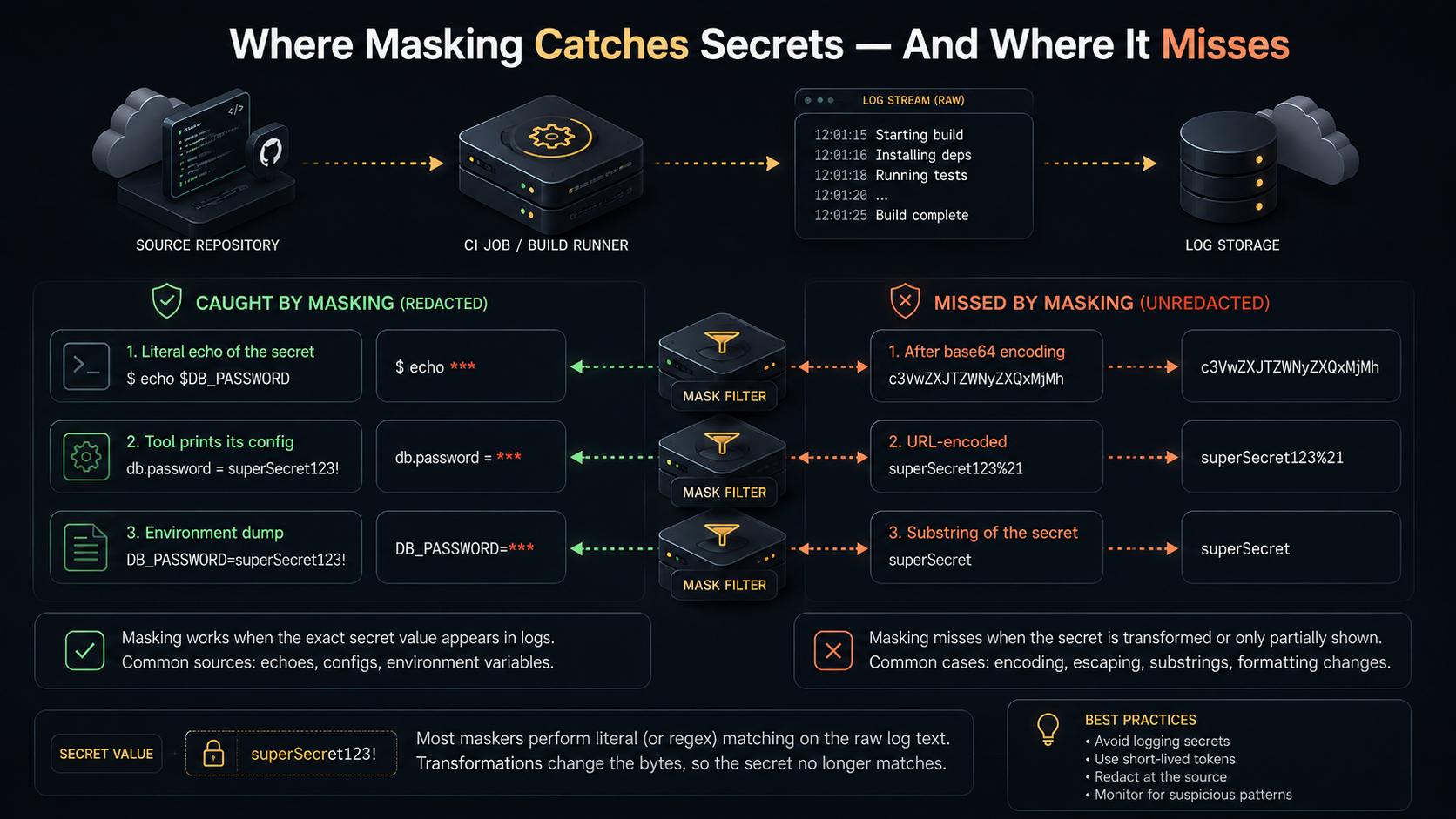
Most CI systems will mask secrets in their log output. If your STRIPE_SECRET_KEY is sk_live_abcd1234, and a step echoes that string, the log shows *** instead.
This is useful. It catches accidental leaks where someone added a debug echo and forgot to remove it, or where a tool prints its config on startup. As a tripwire (the "we caught you trying to log this thing" signal), masking does its job.
As a defense, it's leaky in ways that are worth understanding so you don't put weight on it that it can't carry.
The masking is a string search. GitLab masks the exact value of the variable in the log stream. GitHub Actions does the same, plus it masks values you've registered with ::add-mask::. If the secret appears in the log byte-for-byte, it gets ***. If it doesn't, because it's been transformed in any way, masking has nothing to find.
Examples of transformations that defeat masking:
A base64 encoding: echo "$SECRET" | base64 produces a string that doesn't appear anywhere in the secret list, so it's logged in full.
A URL encoding: a secret containing + or / gets %2B-encoded in a URL, and the encoded form doesn't match the registered mask.
A line break inside the secret: GitHub Actions, in particular, masks the value as a single string. If your secret is multi-line (a PEM key, say), and a log line shows just one line of it, the partial line may not match.
Substring extraction: echo "${SECRET:0:10}" prints the first ten characters. The mask sees a string that's not the full secret, and the substring goes through.
Logging the variable through a tool that adds whitespace, color codes, or quoting: if the tool wraps the value in "..." or prepends =, the masking sometimes still works (GitHub is reasonably aggressive about this); sometimes it doesn't.
The defensive posture this drives toward is: don't rely on masking to keep secrets out of logs. Rely on never logging the secret. Masking is the seatbelt; not having the secret in the part of the code that talks to stdout is the brakes. Treat masking the way you treat the type system: useful for catching mistakes, not a substitute for thinking.
A practical rule that follows from this: every step that handles secrets should be small, named, and exit with no output unless something failed. The echo "$X" | docker login --password-stdin pattern earlier is good because the tool itself does the I/O. Your script never names the variable in a context where stdout could capture it.
Why Static Variables Aren't Enough
Stored-in-the-UI variables are great for the simple case: one secret, one job, one platform, infrequent rotation. They start to crack in several specific situations, and these are the situations that make people reach for vaults.
The first crack is rotation cost. Every secret has an expected lifetime, and most static-variable setups treat rotation as a manual operation. To rotate STRIPE_SECRET_KEY you log into the CI UI, paste the new value, save, and pray nothing was caching the old one. If twelve repos use that secret and you've copied it into all twelve, you're now doing twelve manual operations. People skip rotations because they're tedious, and the keys live forever, and forever is a long time for a credential.
The second crack is secret duplication across pipelines. Take a database password. Your CI uses it for migrations. Your staging deploy uses it for smoke tests. Your security scanner uses it. Your data pipeline uses it. Five different systems, five copies of the same secret. Rotate the source, and now you have five places that might silently break. The single-source-of-truth principle that applies to data also applies to credentials, and the CI UI is rarely a good single source of truth across multiple CI systems.
The third crack is lack of audit. CI variables tell you who created them, sometimes when they were last updated, and that's it. They don't tell you who read them, when, from which job, on which runner. A compromised pipeline that exfiltrates every secret leaves a trail that's almost invisible in the CI's own logs.
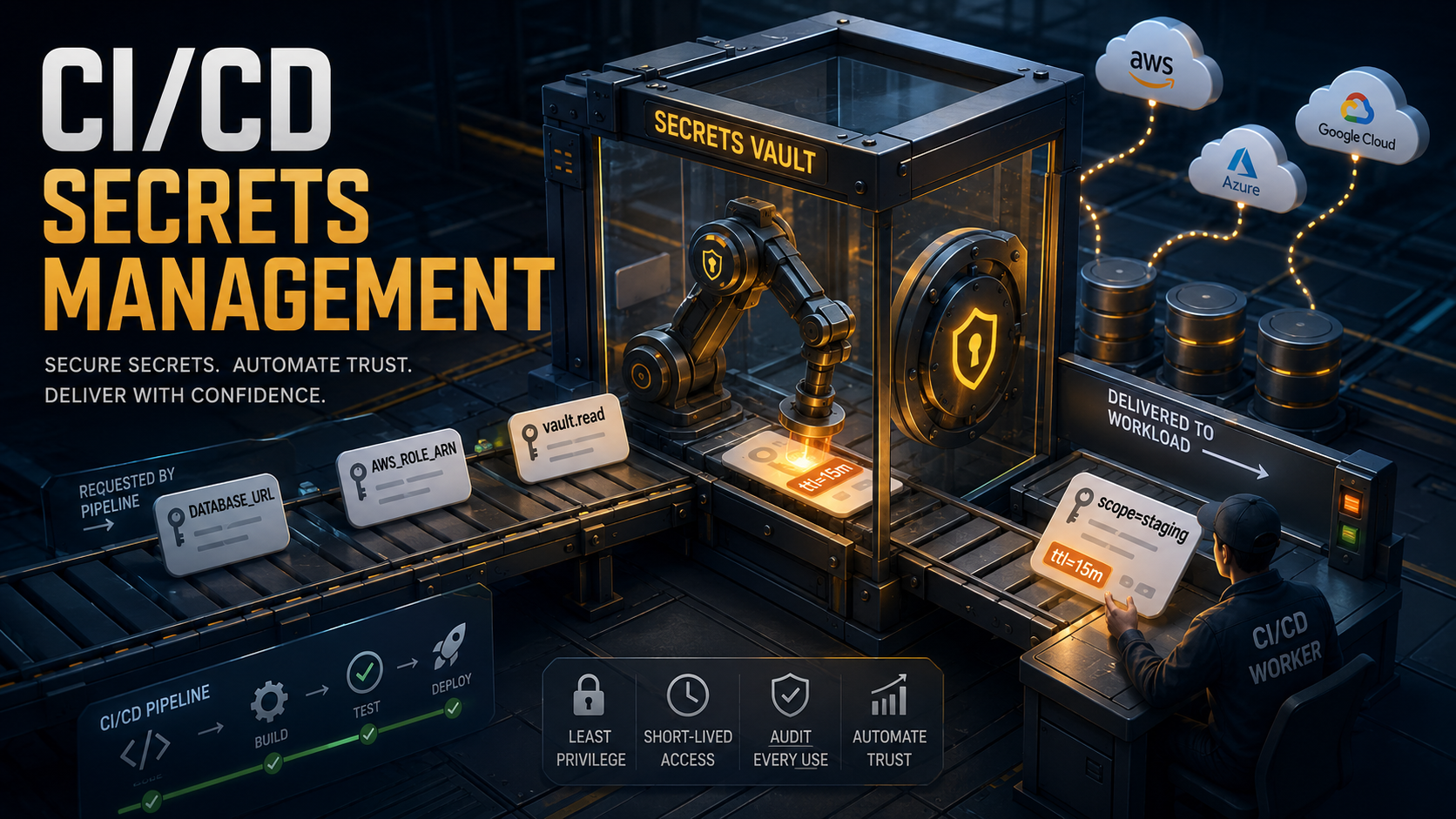
The fourth crack is temporary credentials. Some credentials shouldn't be long-lived strings at all. An AWS access key with AdministratorAccess sitting in a CI variable is the kind of thing you read about in post-mortems. The right credential here is a short-lived token, generated on demand, scoped to exactly what this job needs, expiring fifteen minutes after the job ends. You can't get that out of a static-variable setup.
When any of these cracks start showing, you're looking at a vault.
Vaults: Where Secrets Actually Live
A secret vault is a separate system whose entire job is to store, control, and audit access to credentials. CI variables become a thin layer of authentication (the CI proves to the vault who it is), and the actual secrets live in the vault, fetched at job runtime.
The concrete options are HashiCorp Vault (self-hosted or HCP), AWS Secrets Manager, Google Secret Manager, Azure Key Vault, and a handful of SaaS products like Doppler, Infisical, and 1Password Secrets Automation. The model is the same across all of them: secrets are stored centrally, access is policy-controlled, and clients fetch what they need at the moment they need it.
The pattern for using a vault from CI follows a consistent shape regardless of which vault you pick:
name: deploy
on:
  push:
    branches: [main]

permissions:
  id-token: write
  contents: read

jobs:
  deploy:
    runs-on: ubuntu-latest
    environment: production
    steps:
      - uses: actions/checkout@v4

      - name: Configure AWS credentials via OIDC
        uses: aws-actions/configure-aws-credentials@v4
        with:
          role-to-assume: arn:aws:iam::123456789012:role/ci-deploy-prod
          aws-region: us-east-1

      - name: Fetch secrets from Secrets Manager
        id: secrets
        run: |
          aws secretsmanager get-secret-value \
            --secret-id prod/api/database \
            --query SecretString --output text \
            > /tmp/db-secret.json

      - name: Run migrations
        run: |
          export DATABASE_URL=$(jq -r .url /tmp/db-secret.json)
          ./scripts/migrate.sh

      - name: Clean up
        if: always()
        run: rm -f /tmp/db-secret.json
A few things are happening in that 30-line block that are worth pulling apart.
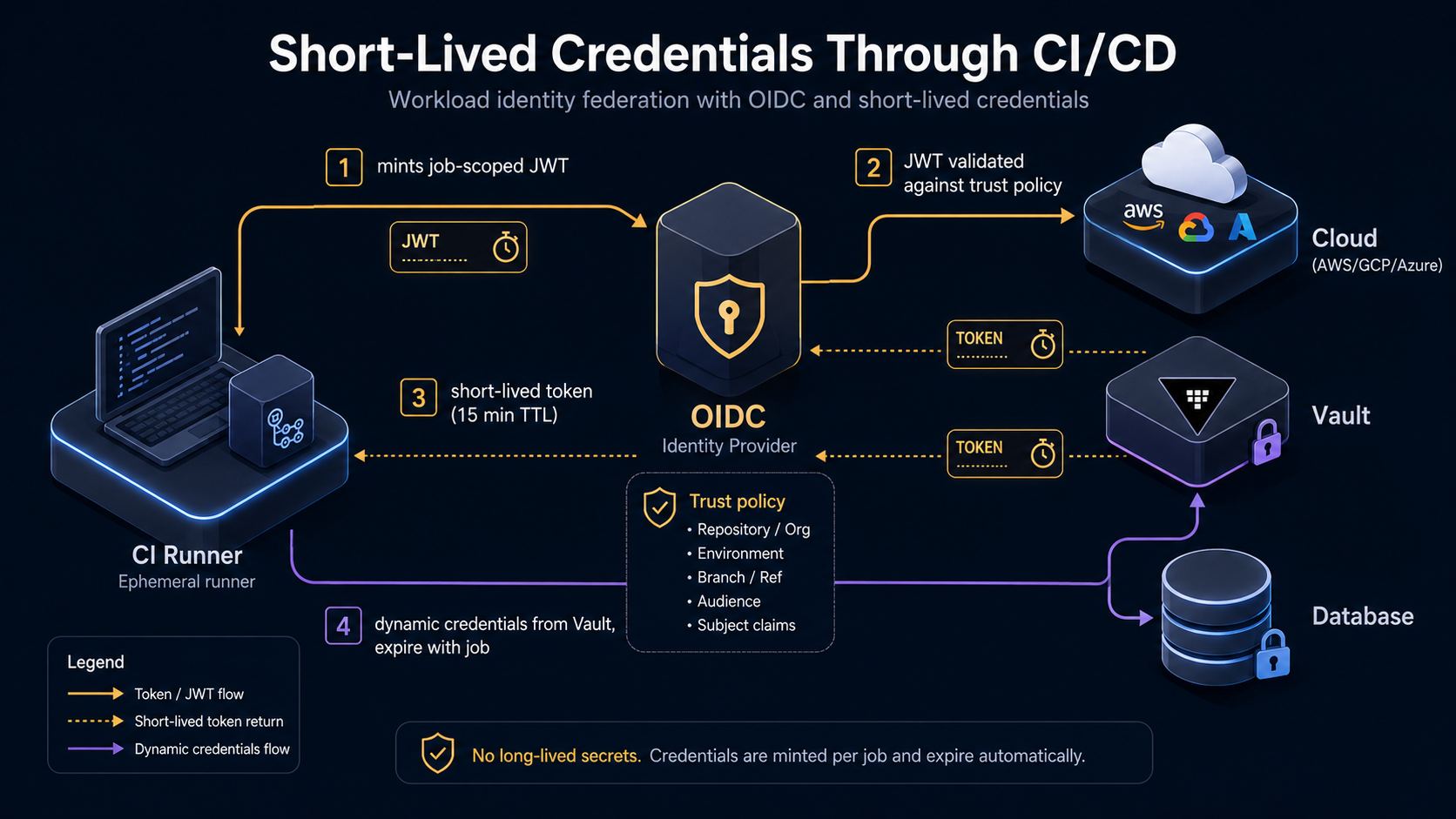
The CI job has no long-lived AWS credentials anywhere. The id-token: write permission lets GitHub Actions mint an OIDC token at job runtime. That token is presented to AWS, which checks it against an IAM role's trust policy ("trust tokens issued by this GitHub repo, on this branch, with this environment"). AWS hands back temporary credentials. The CI job uses those credentials to call Secrets Manager. The job ends, the credentials expire. There is no static AWS access key in the CI UI to leak.
This pattern (OIDC federation between CI and cloud) is the single biggest leverage point in CI/CD secrets management today. GitHub Actions, GitLab CI, CircleCI, and Bitbucket Pipelines all support OIDC tokens. AWS, GCP, Azure, and HashiCorp Vault all support consuming them. Set this up once, and you delete an entire category of secret (the cloud provider access key) from your CI configuration forever.
The same idea applies to HashiCorp Vault. Vault has an auth/jwt backend; the CI job presents its OIDC token, Vault validates it against a role policy, hands back a short-lived Vault token, the job uses that token to read whatever the policy allows.
deploy:
  stage: deploy
  id_tokens:
    VAULT_ID_TOKEN:
      aud: https://vault.example.com
  script:
    - export VAULT_TOKEN=$(vault write -field=token auth/jwt/login role=gitlab-deploy jwt=$VAULT_ID_TOKEN)
    - export DATABASE_URL=$(vault kv get -field=url secret/prod/api/database)
    - ./scripts/migrate.sh
  environment:
    name: production
  only:
    - main
The Jenkins version, using the HashiCorp Vault plugin:
pipeline {
  agent any
  stages {
    stage('Deploy') {
      steps {
        withVault(configuration: [
                    vaultUrl: 'https://vault.example.com',
                    vaultCredentialId: 'vault-approle'],
                  vaultSecrets: [[
                    path: 'secret/prod/api/database',
                    secretValues: [[envVar: 'DATABASE_URL', vaultKey: 'url']]]]) {
          sh './scripts/migrate.sh'
        }
      }
    }
  }
}
The shape repeats: a short authentication step trades the CI's identity for a vault token, then secrets are pulled directly into environment variables for the steps that need them, scoped to the duration of the job.
Short-Lived Credentials Are The Real Win
The OIDC and vault patterns above are valuable not because they store secrets more securely than CI variables (CI variables are also encrypted at rest), but because they let you stop storing certain kinds of secrets at all.
A long-lived AWS access key is a string that's valuable for as long as the IAM user exists and the key is active. If it leaks Tuesday and you discover the leak Friday, that's three days of unauthorized access. The mitigations are detection (CloudTrail, GuardDuty) and rotation (which is slow when humans do it).
A federated, short-lived credential is valuable for fifteen minutes. If it leaks Tuesday, it's worthless by Wednesday morning. The mitigation is built into the credential's existence. You don't need to detect the leak quickly; the credential expires faster than you'd discover the leak anyway.
The same principle applies to vault tokens, dynamic database credentials (Vault's database/creds endpoints generate a new database user per request with a short TTL), and cloud-native temporary credentials. Wherever you can replace "a string that works forever" with "a string that works for fifteen minutes," you've moved a problem from security operations (detect, alert, rotate) to engineering (set the TTL).
Not everything can be made short-lived. A signing key for a code-signing certificate, a long-lived API key for a third-party SaaS that doesn't support OIDC, a hardware token's PIN: these stay long-lived and need the full vault-policy-and-audit treatment. But for the common case of "this CI job needs to talk to AWS / GCP / Azure / Vault," short-lived credentials should be the default in 2026.
Least Privilege: Scope Every Secret Down
Once you have a place where secrets live and a way to fetch them, the next question is which jobs can fetch which secrets. The principle is the same one that applies everywhere in security: a job should be able to read the minimum set of secrets it needs, no more.
This is where teams that have a vault often still get hurt. A vault doesn't automatically scope anything; it's a tool for enforcing scopes you've defined. If your ci-default role has read access to every secret under secret/, you've replaced "every CI variable visible to every job" with "every vault secret readable through one token," which is the same problem with extra steps.
The shape of good scoping is:
One role per job category. Not one role per repo, certainly not one role for "CI." A migration job has a role that reads secret/prod/database/url. A deploy job has a role that reads secret/prod/api/registry-credentials and that's it. A frontend build job has a role that reads secret/prod/frontend/sentry-dsn. Each role's policy lists only what the job needs.
Environment scoping at the policy level. The staging-migration role and the prod-migration role are separate principals with separate policies. They don't read from a shared path. Even an attacker who fully compromises the staging migration job cannot read prod credentials, because the staging role's policy explicitly does not include the prod path.
Branch and event conditions in the trust policy. When using OIDC, the cloud-side trust policy can pin the role to specific repos, branches, and event types. AWS IAM trust policies for GitHub OIDC look like:
{
  "Version": "2012-10-17",
  "Statement": [
    {
      "Effect": "Allow",
      "Principal": {
        "Federated": "arn:aws:iam::123456789012:oidc-provider/token.actions.githubusercontent.com"
      },
      "Action": "sts:AssumeRoleWithWebIdentity",
      "Condition": {
        "StringEquals": {
          "token.actions.githubusercontent.com:aud": "sts.amazonaws.com",
          "token.actions.githubusercontent.com:sub": "repo:acme/api:environment:production"
        }
      }
    }
  ]
}
The sub claim restricts this role to workflows running in the acme/api repository targeting the production environment. A workflow on a different branch, in a different repo, or in a different environment cannot assume this role, even if it has id-token: write permission and tries.
Environment gates for sensitive secrets. GitHub Actions environments support required reviewers. A deploy to production won't even start until a named approver clicks Approve. Combine that with environment-scoped secrets, and you get "the prod deploy credentials are only fetchable by a workflow that a human has explicitly approved this run of." GitLab's protected environments do the same thing.
Audit what each role can do, regularly. Every secret access path drifts over time. Someone adds a new path to the migration role's policy because a one-off backfill needed it, and the path stays on the policy a year later. A periodic review, even a quarterly grep over policies, catches a lot of this.
Rotation: The Boring Part That Saves You
Every secret has a rotation cadence, and most teams either rotate on a schedule they made up once or rotate when something breaks. Both are wrong-sized.
The right cadence depends on three things: how the secret was issued, what it grants, and what happens if it leaks.
Short-lived credentials (OIDC-federated cloud roles, dynamic database credentials, Vault-issued tokens) handle this automatically. The credential lives for the duration of the job. Rotation isn't a quarterly task; it's an implementation detail.
Long-lived shared secrets need a real schedule. A third-party API key with billing implications (Stripe, Twilio, SendGrid, OpenAI) should rotate at least quarterly, sooner if anyone with access leaves the team. The rotation should be a runbook: generate the new key in the provider's console, store it in the vault under a new version, deploy the change (which is now a config change, not a secrets change, because the path didn't move), revoke the old version after a grace period. The grace period exists because there's always one long-running job somewhere that still has the old key cached.
Bootstrapping credentials, the master keys that grant access to the vault itself, need the most careful handling. These are the credentials that, if compromised, give an attacker everything else. Most vaults support unseal / initialization flows where the master key is split into multiple shares using Shamir's Secret Sharing, and the shares are held by different people. No single person can unseal the vault alone. Rotation of these is a planned operation, not a casual task.
The thing nobody mentions about rotation: you only know it works if you've practiced it. A rotation procedure that's never been run is a procedure that breaks the first time you need it. Schedule a rotation drill once a quarter on a non-critical secret. Walk the team through it. Fix the things that didn't work. Then when you have to rotate a production credential under pressure (a laptop was stolen, a contractor left, a bot scraped a private repo), the process is muscle memory, not improvisation.
Audit: You Can Only Defend What You Can See
The last piece, which most teams add last and wish they'd added first, is logging who reads which secrets and when. CI variables don't give you this. Most vaults do, by default.
What you want, at minimum, in the audit log:
The identity that read the secret (which CI role, which job ID, which workflow run).
The secret path (specific, not just "a secret was read").
The time and source IP (the CI runner's IP, ideally tagged with which CI provider).
The result (success, denied by policy, expired token).
A retention period long enough to investigate an incident discovered weeks after it happened.
This log is what lets you answer the question "if a credential leaked, what else might have been read by the same compromised job?" Without it, the answer is "everything that role could have read," and you're rotating every secret in that scope as a precaution. With it, the answer is "these three specific secrets, in this fifteen-minute window," and the rotation work shrinks by an order of magnitude.
The other use of the audit log is much more mundane: catching policy drift. A role that nobody reads from anymore can be removed. A path that's accessed from an unexpected job can be investigated. A spike in permission denied errors from a job that worked yesterday tells you something changed.
Pipe these logs into whatever your team already uses for security observability. Splunk, Datadog, Elastic, an S3 bucket queried with Athena. The exact destination matters less than the fact that they exist and somebody is responsible for noticing when something's wrong.
Putting It Together: A Practical Maturity Path
Most teams don't get to "OIDC federation + central vault + scoped policies + audit logs into SIEM + quarterly rotation drills" on day one. You shouldn't. The cost of secrets infrastructure has to match what you're protecting, and an early-stage team with one production database and three engineers is not the same as a fintech with twenty services and a compliance team.
A rough path that scales:
Start with CI variables, scoped to environments, with strict pre-commit hooks for secret detection and gitleaks or truffleHog in CI to catch what slipped through. Rotate the high-value ones quarterly. Mask everything. This is a real, defensible setup for a small team. Don't apologise for it.
When you reach the point of multiple repos sharing credentials, or "I had to update this API key in nine places" becomes a routine annoyance, add a central secrets store. AWS Secrets Manager / Doppler / Vault. Whichever fits your stack. Move the most-shared secrets first. Leave the rest in CI variables until they hurt.
When cloud-provider access keys start to feel uncomfortable, usually around the time you have a prod-deploy job that can do anything, switch to OIDC federation. This is the highest-impact single change you can make. Delete every long-lived cloud access key from your CI. It's a project, but it ends a category of problem.
When you have multiple sensitive environments (staging vs production vs PII vs PCI), add per-role scoping with explicit policies. The goal is that a compromised job can't read secrets from a more sensitive environment than its own.
When you start needing to prove things, to auditors, to customers, to yourselves after an incident, wire the audit logs into your observability stack and set alerts for unusual access patterns (a role reading from a path it never reads, a sudden spike of permission denied, a job reading more secrets than its baseline).
When you have the bandwidth, run rotation drills. A quarter is a fine cadence. Pick a low-risk secret, walk through rotating it, find what's broken, fix it. The drill is the deliverable; the rotated key is a bonus.
Each step buys you a real reduction in either blast radius or detection time, and each step is more expensive than the last. The mistake is jumping straight to step five because that's what a vendor's blog post recommended, then running it half-configured because nobody had time to finish. At which point you have all the operational complexity of a vault with none of the benefit, and your secrets are no better off than when they were in CI variables.
The honest version of CI/CD secrets management is that there is no finish line. There's a system you keep tightening, a budget for tightening it, and a willingness to do the unglamorous parts, the rotation drills, the audit log reviews, the policy audits, that aren't anyone's favorite Friday afternoon. The teams that do those parts don't make the news.