So, you've opened the AWS console for the first time, and your brain immediately tried to leave the chat.
There are over two hundred services in there. They're grouped under categories that sound like they were named by a committee that wasn't allowed to talk to each other. The search bar is your only friend. You typed "database" and it gave you nine results.
Welcome.
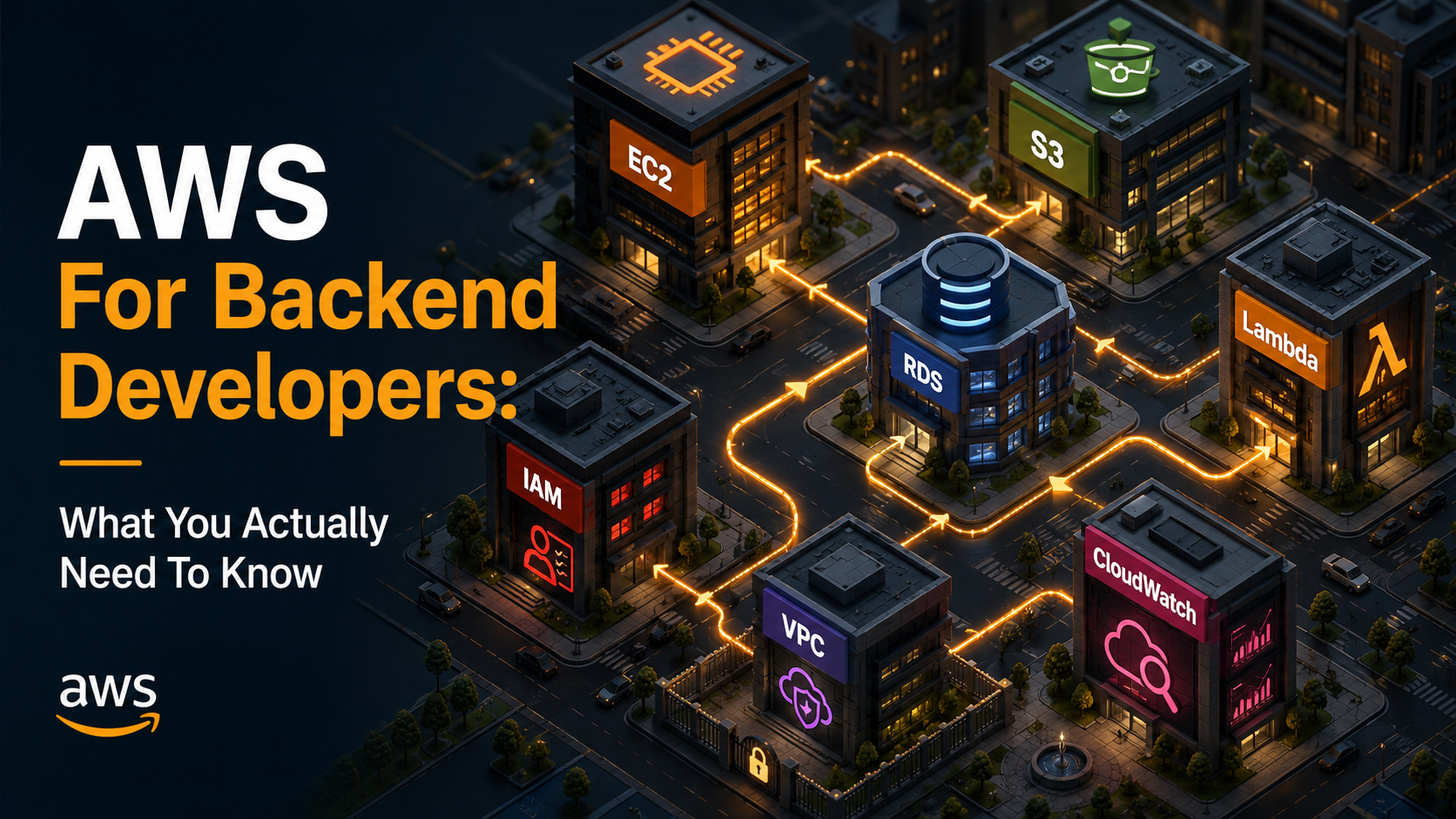
The good news is that backend developers don't need most of it. You need maybe seven services to build, ship, and keep a real production app alive. Everything else is either a specialised tool you'll meet when you actually need it, or a marketing-driven rebrand of something you already understand.
This article is the tour I wish someone had given me before my first on-call rotation. It's not exhaustive. It's not going to make you a Solutions Architect. It's going to make sure that when somebody on your team says "can you deploy this to a t3.medium and put it behind an ALB in the private subnet", you know exactly what they mean and exactly where to click.
The mental model: AWS is a Lego set, not a platform
Before any service, get this part right.
AWS isn't one product. It's a giant collection of separately-billed primitives that you wire together to build whatever shape your app needs. There's no "AWS app" you deploy. You rent a server (EC2). You rent a disk (EBS). You rent a database (RDS). You rent some object storage (S3). You give them permission to talk to each other (IAM). You stick them inside a virtual network (VPC). You watch them with CloudWatch.
That's the whole game.
Most of the confusion around AWS comes from treating it like Heroku or Vercel, a platform that runs your code if you hand it a git push. It isn't. It's closer to a cloud hardware store. You assemble what you want, and the things you don't assemble simply don't exist.
Once you internalise that, the docs stop feeling overwhelming. You're not learning AWS. You're learning a handful of pieces, one at a time.
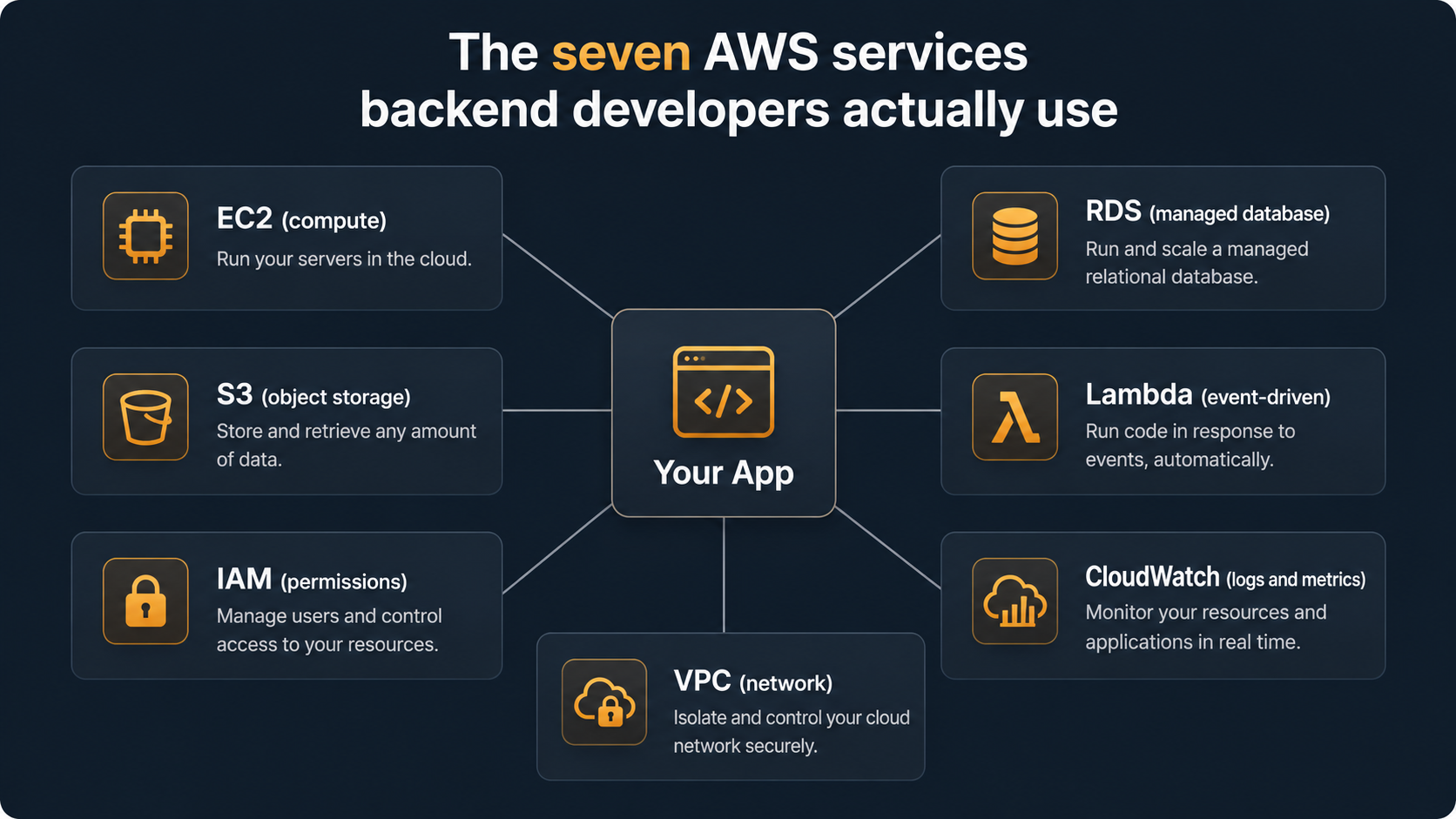
Let's go through the seven.
EC2: the rented Linux box
EC2 is the oldest, most boring, and most important service in AWS. It rents you a virtual machine. That's it. You pick a size, you pick an OS image, you SSH in, you install your stuff, you run it.
The names sound scary until you decode them.
An instance is a VM. An instance type like t3.medium or m5.xlarge is a family plus size. The family (t, m, c, r, g) tells you the workload it's tuned for (general burst, general balanced, compute, memory, GPU), and the suffix (micro, small, medium, large, xlarge) is just bigger or smaller. An AMI (Amazon Machine Image) is a snapshot of a disk image you boot from: Ubuntu 22.04, Amazon Linux 2023, a custom one your team baked.
The smallest piece of EC2 you usually touch:
# Launch a t3.micro running Amazon Linux 2023
aws ec2 run-instances \
  --image-id ami-0abcdef1234567890 \
  --instance-type t3.micro \
  --key-name my-key \
  --security-group-ids sg-0123456789abcdef0 \
  --subnet-id subnet-0abc123 \
  --tag-specifications 'ResourceType=instance,Tags=[{Key=Name,Value=api-prod}]'
In real life nobody types this by hand. You'll use Terraform, CloudFormation, or the console. But it's worth reading once because every parameter in there is a concept you'll see again. The AMI is the disk. The security group is the firewall. The subnet is the slice of the VPC you're putting it in. The tag is what you'll use to find it later when you've launched twelve of them and they all look the same.
What to actually understand about EC2
Three things, and you can defer the rest.
Storage is separate. When you launch an instance, you also attach an EBS volume. That's the disk. EBS lives independently of the instance. You can stop the instance, change its type, and start it again, and the disk persists. But if your AMI was built with "delete on termination" set to true, terminating the instance will wipe the disk. Check that. People have lost data to that default exactly once before they learn.
Stopped is not terminated. A stopped instance is still yours, still has its disk, and you stop paying for compute but keep paying for storage. A terminated instance is gone forever. The console buttons are right next to each other. Read carefully.
Security groups are stateful firewalls. A security group is a list of "allow" rules. There's no concept of deny, just absence of an allow. They're stateful, meaning if you allow inbound traffic on port 443, the response goes back out automatically without needing an outbound rule. The default deny-all-inbound is your friend; resist the urge to open 0.0.0.0/0 on port 22 just because SSH isn't working.
That's most of EC2. Everything else (autoscaling groups, launch templates, instance refresh, spot pricing) is something you'll learn the day you need it.
S3: the bucket of bytes
S3 is the easiest AWS service to like. You give it bytes, it stores them, you give it a key, it gives them back. There are no servers, no patching, no scaling, no tuning.
You think of an S3 bucket as a giant key-value store where the key is a string (often shaped like a path: users/42/avatar.png) and the value is up to 5 TB of bytes plus a small bag of metadata. There are no folders. Folders are an illusion the console paints by treating / in the key specially. Internally it's flat.
import boto3

s3 = boto3.client("s3")

# Upload
s3.upload_file("local-photo.jpg", "my-bucket", "users/42/avatar.jpg")

# Download
s3.download_file("my-bucket", "users/42/avatar.jpg", "fetched.jpg")

# Generate a temporary URL the browser can use directly
url = s3.generate_presigned_url(
    "get_object",
    Params={"Bucket": "my-bucket", "Key": "users/42/avatar.jpg"},
    ExpiresIn=3600,
)
That last call is the one most backend devs underuse. Pre-signed URLs let you take S3 out of your request path entirely. Instead of your API streaming a 50 MB file from S3 to the user, you generate a URL signed with your IAM credentials, hand it to the client, and the client downloads (or uploads) directly from S3. Your server stays free; bandwidth costs drop; you stop being a proxy.
What to actually understand about S3
Bucket names are globally unique. Across all of AWS, all customers, every account, ever. my-app-uploads is taken. Use a prefix that includes your company or environment, like acme-prod-uploads or acme-stage-user-photos.
Eventual vs. strong consistency used to be the gotcha. As of December 2020, S3 became strongly consistent for reads after writes, including overwrites and deletes. So this works the way you'd expect it to:
s3.put_object(Bucket="b", Key="k", Body=b"v1")
assert s3.get_object(Bucket="b", Key="k")["Body"].read() == b"v1"  # always true
If a tutorial tells you "watch out for S3 eventual consistency," check the date. That hasn't been true for years.
Access is denied by default. New buckets are private. The console will warn you loudly if you try to make one public. Most of the famous "company exposed millions of records on S3" headlines are bucket policies someone wrote that started with "Effect": "Allow" and "Principal": "*". Don't be that team. If you need public-ish access, prefer pre-signed URLs or put CloudFront in front.
Storage classes are how you save money. The default is S3 Standard. There's also Standard-IA (infrequent access: cheaper to store, more expensive to read), Glacier Instant Retrieval, Glacier Flexible Retrieval, and Deep Archive (cheap to store, slow to read). For most apps, set up an S3 Lifecycle rule that moves objects older than 30 days to Standard-IA and you've cut your bill without touching your code.
RDS: managed Postgres, MySQL, and friends
RDS is the answer to "I don't want to be the DBA." You give Amazon a database engine choice (Postgres, MySQL, MariaDB, SQL Server, Oracle, or Aurora, Amazon's homegrown Postgres-and-MySQL-compatible engine), an instance size, and some networking. They run the database, take backups, patch the OS, and let you fail over to a standby if the primary dies.
Your code talks to it like any other database, via the standard driver, on the standard port. There's no AWS SDK involved at runtime. From your app's perspective, RDS is Postgres.
// Node.js with pg, talking to an RDS Postgres
import { Pool } from "pg";

const pool = new Pool({
  host: "api-db.cluster-abc123.us-east-1.rds.amazonaws.com",
  port: 5432,
  user: "api_user",
  password: process.env.DB_PASSWORD,
  database: "api",
  ssl: { rejectUnauthorized: true },
});

const { rows } = await pool.query("SELECT id, email FROM users WHERE id = $1", [42]);
That hostname, the long thing ending in .rds.amazonaws.com, is the endpoint. It's the only AWS-shaped piece of this story. Everything else is your normal database life.
What to actually understand about RDS
Multi-AZ is a switch you flip and almost forget. Multi-AZ means RDS keeps a synchronous standby in another availability zone. If the primary dies, RDS fails over automatically. You get a brief period of dropped connections, and your app reconnects to the same endpoint, which now points to what used to be the standby. Production databases run Multi-AZ. The cost is roughly double, but so is your sleep quality.
Read replicas are different from Multi-AZ. Read replicas are asynchronous copies you read from to take load off the primary. They have their own endpoint. They can be in a different region. You can promote one to a standalone primary. They are not failover targets in the same automatic sense. That's Multi-AZ's job.
Backups are automatic, restoring is your problem. RDS takes daily snapshots and continuous WAL backups, so you can do point-in-time restore to any second within your retention window (default 7 days when you create from the console, max 35). But "restore" means create a new database instance. There's no "restore in place." You spin up a new instance from the backup, then either repoint your app or rename DNS. Practice this once before you need it for real.
The database is in your VPC. Probably. When you create an RDS instance you pick a VPC and a subnet group. By default it's not publicly reachable. You talk to it from EC2 or Lambda inside the same VPC. If you need to connect from your laptop, you either use a bastion host, a Session Manager tunnel, or a VPN. Don't make the database publicly reachable so you can run a one-off psql. There's a better way and it takes ten minutes to set up.
Aurora is RDS but smarter. If you're starting fresh and the engine choice is up to you, Aurora is usually the right call: same Postgres or MySQL wire protocol, but storage scales automatically, replicas are cheap and fast, and failover is faster. It costs more per hour. It often costs less in total because you provision less headroom.
Lambda: code that runs on demand
Lambda is the service most senior developers either love or have been burned by. It's a runtime that takes a function, written in Python, Node, Go, Java, Ruby, or .NET, and runs it in response to an event. There are no servers you can SSH into. You upload code, you wire it up to a trigger, it runs.
A trigger can be almost anything: an HTTP request via API Gateway, a message in an SQS queue, an S3 object being uploaded, a CloudWatch scheduled event ("run this every five minutes"), a row landing in DynamoDB, a Step Functions state machine, an EventBridge event, a Cognito user signup. Lambda is the connective tissue between AWS services.
The smallest possible Lambda:
def lambda_handler(event, context):
    name = event.get("name", "world")
    return {
        "statusCode": 200,
        "body": f"Hello, {name}!",
    }
The signature is the same in every runtime: an event object (whatever the trigger sent) and a context object (request id, time remaining, function metadata). The shape of event depends on what triggered the function. An API Gateway request looks different from an S3 PutObject event, and you'll spend more time decoding event shapes than writing the actual logic.
What to actually understand about Lambda
Cold starts are real. When a Lambda hasn't run for a while, the first invocation has to spin up a fresh container and load your code. That's the cold start, usually 100ms to 1s for Python or Node, several seconds for Java with a heavy framework. For background jobs, who cares. For user-facing APIs, this is the single thing you'll be debugging at 2am when latency spikes. Provisioned concurrency keeps a pool warm at extra cost. Lighter runtimes and smaller bundles help more.
You don't pay for idle. This is the killer feature. A Lambda that runs ten times a day costs roughly nothing. A Lambda that runs ten thousand times a second costs a lot. You're billed by GB-seconds (memory times duration) plus per-invocation. Modelling this against EC2 is worth doing before you commit either way.
Memory is also CPU. When you size a Lambda, you choose memory, but memory and CPU are linked. A 128 MB function gets a sliver of CPU; a 1769 MB function gets a full vCPU; a 10 GB function gets six vCPUs. Sometimes the cheapest function is the biggest one because it finishes faster. Always benchmark.
Lambda has limits and they will bite you. Max execution time: 15 minutes. Max payload (synchronous): 6 MB. Max deployment package (zipped): 50 MB direct, 250 MB unzipped, 10 GB if you use container images. Max /tmp storage: 512 MB by default, configurable up to 10 GB. If your job doesn't fit, it doesn't fit. Push it to a container service like ECS or Fargate.
Concurrent executions have a regional limit. By default, your account can run 1000 concurrent Lambdas across all functions in a region. If one runaway function eats all 1000, every other function in the account gets throttled. Set reserved concurrency on the loud ones to protect the quiet ones.
IAM: the most important service nobody wants to learn
IAM is permissions. Who can do what, to which resource, under what conditions. It is the single most consequential service in AWS, and also the one most developers desperately try to skip past until something breaks.
Don't skip it. The mental model is small.
Everything is a request. Every API call to AWS, like s3:GetObject, ec2:RunInstances, or rds:DescribeDBInstances, is evaluated against IAM. Three things matter for the answer: the principal (who's making the call: a user, a role, a service), the action (what they're trying to do: s3:GetObject), and the resource (which thing: arn:aws:s3:::my-bucket/users/42/avatar.jpg).
Policies are JSON. A policy is a list of statements, each saying "allow or deny these actions on these resources, optionally under these conditions." This is a real, complete IAM policy:
{
  "Version": "2012-10-17",
  "Statement": [
    {
      "Effect": "Allow",
      "Action": ["s3:GetObject", "s3:PutObject"],
      "Resource": "arn:aws:s3:::acme-prod-uploads/users/${aws:username}/*"
    },
    {
      "Effect": "Deny",
      "Action": "s3:DeleteObject",
      "Resource": "*"
    }
  ]
}
That policy lets the principal read and write objects under users/<their-username>/ in one bucket, and explicitly forbids deletes anywhere. The ${aws:username} variable is interpolated at request time. The explicit Deny always wins. That's a hard rule of IAM evaluation.
Roles, not users, for code. Long-lived IAM users with access keys are a footgun. They get committed to git, leaked in logs, found by a scanner that creates a Bitcoin-mining cluster on your account at 3am. Use roles instead. A role is a set of permissions that a service or compute resource can assume temporarily. Your EC2 instance has an instance profile (a role attached to the VM); your Lambda has an execution role; your CI pipeline assumes a role via OIDC. None of those need access keys living anywhere.
# Inside an EC2 or Lambda with the right role attached, no credentials needed
import boto3

s3 = boto3.client("s3")  # boto3 finds the role's temporary credentials automatically
s3.list_objects_v2(Bucket="acme-prod-uploads")
That's the whole magic. The SDK fetches short-lived credentials from the instance metadata service or the Lambda environment, refreshes them before they expire, and you never see them. No .env file. No leaked keys.
What to actually understand about IAM
Least privilege is a discipline, not a feature. AWS will happily let you attach AdministratorAccess to everything. It's tempting on a Friday afternoon. It's also the thing your future self will spend three days unwinding when the security team finds it. Start narrow. Give the principal the actions and resources they need today, and add more when something legitimately breaks.
Use managed policies for common cases. AWS publishes managed policies like AmazonS3ReadOnlyAccess and AWSLambdaBasicExecutionRole. They're usually the right starting point for boilerplate. Custom policies are for when you need something specific, not for re-doing what AWS already maintains.
Policy simulator is your friend. When you're not sure why a permission is or isn't being granted, the IAM Policy Simulator lets you replay an action against a principal and see exactly which statement allowed or denied it. It's the single best debugging tool in IAM and almost nobody uses it.
STS is how short-lived credentials happen. When a role is assumed, the Security Token Service hands out temporary access keys that expire in 15 minutes to 12 hours. If you've ever used aws sts assume-role to switch into another account or environment, that's STS. Knowing it exists makes the rest of IAM make more sense.
VPC: the network you didn't know you signed up for
A VPC (Virtual Private Cloud) is your own private slice of network inside AWS. Every region you operate in has at least one. By default AWS gives you a "default VPC" so things just work; in production you'll usually have your own.
The pieces fit together like this.
A VPC owns an IP range, a CIDR block like 10.0.0.0/16 (about 65,000 addresses). Inside the VPC you carve out subnets, each in a specific Availability Zone, each with its own smaller CIDR block (10.0.1.0/24, 10.0.2.0/24, and so on). Subnets are either public (have a route to an Internet Gateway) or private (don't). EC2 instances, RDS databases, and Lambdas-with-VPC-config all live inside subnets.
Internet traffic in and out goes through the Internet Gateway (for public subnets) or a NAT Gateway (for private subnets that need to call out to the internet but shouldn't be reachable from it). Traffic between subnets is governed by route tables.
Then on top of all that, you've got two more layers of access control: security groups (stateful, attached to instances) and network ACLs (stateless, attached to subnets). Most teams use security groups and ignore NACLs unless they have a specific need.
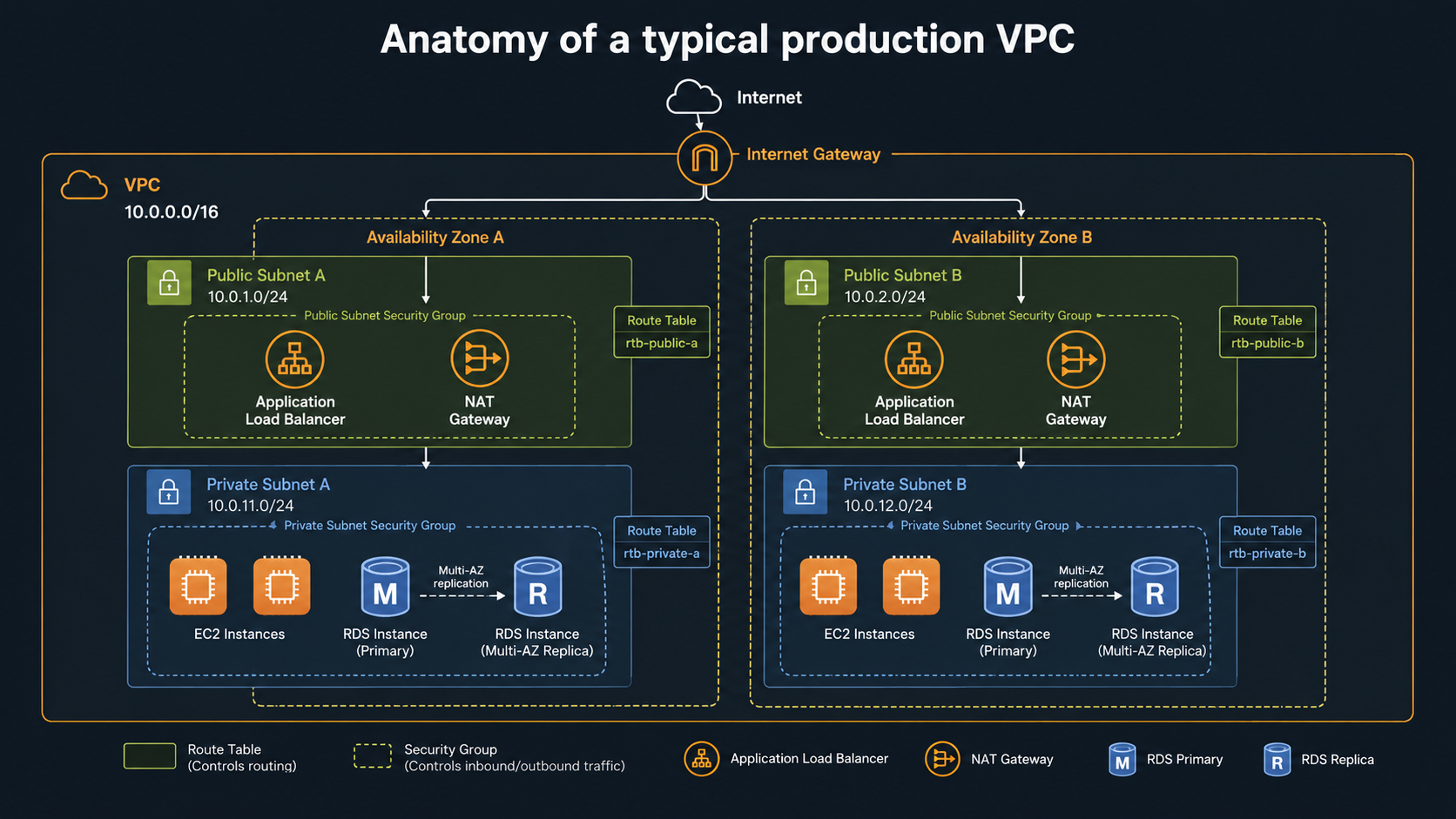
The standard production layout is simple once you've seen it: two or three Availability Zones, each with one public and one private subnet. Load balancers and NAT Gateways live in the public subnets. App servers and databases live in the private subnets. Internet to Load Balancer to App to Database, with the database never reachable from the internet.
What to actually understand about VPC
Public vs. private is about routing, not magic. A "public" subnet is just a subnet whose route table sends 0.0.0.0/0 to an Internet Gateway. A "private" subnet sends 0.0.0.0/0 to a NAT Gateway (so outbound calls work, like apt update or calling third-party APIs) or has no internet route at all. There's no flag called "public." It's the routes.
NAT Gateways cost real money. They're charged per hour and per GB processed. If you have a private subnet that talks to S3 a lot, route that traffic through an S3 Gateway Endpoint (free) instead of through the NAT. Same for DynamoDB. For other AWS services, VPC Interface Endpoints (powered by AWS PrivateLink) cost less than NAT for high-traffic flows.
Lambda in a VPC has tradeoffs. By default Lambdas run outside any VPC and can hit the internet freely. If you put a Lambda inside a VPC (because it needs to talk to RDS, say), it loses that direct internet path. Outbound calls now need a NAT Gateway in the VPC. Cold starts also got better in 2019 with Hyperplane ENIs, but they're still not free. Only put a Lambda in a VPC when you actually need VPC-only resources.
Don't reuse the default VPC for production. It's fine for tinkering. For real workloads, create your own VPC with your own CIDR plan, your own subnets, and your own naming convention. Future-you will thank present-you.
CloudWatch: your eyes and ears
CloudWatch is logging plus metrics plus alarms plus a few other things AWS bolted on over the years. It's not glamorous, but it's the difference between debugging in the dark and debugging with a flashlight.
There are three main pieces.
CloudWatch Logs collects log streams from EC2 (via the CloudWatch Agent), from Lambda (automatically, every print() or console.log ends up here), from ECS, and from anywhere else you push them. Logs go into log groups, which contain log streams, which contain log events with a timestamp and a message. You can search them with Logs Insights, a SQL-flavoured query language that's surprisingly pleasant once you get past the initial weirdness.
fields @timestamp, @message
| filter @message like /ERROR/
| filter requestId = "abc-123"
| sort @timestamp desc
| limit 100
CloudWatch Metrics is a time-series store for numbers. Every AWS service publishes metrics automatically: EC2 CPU, RDS connections, Lambda duration, ALB request count. You can also publish your own from your app via the SDK or the embedded metric format inside a log line. Metrics live for 15 months, with resolution dropping over time (1-minute for the recent 15 days, 5-minute for 63 days, 1-hour for the full 15 months).
CloudWatch Alarms watches a metric and fires an action when it crosses a threshold. The action can be an SNS topic (which can fan out to email, Slack via a webhook Lambda, PagerDuty, etc.), an Auto Scaling action, or an EC2 reboot. The classic alarm is "if RDS CPU is above 80% for 5 minutes, page oncall."
What to actually understand about CloudWatch
Log retention defaults to "never expire." New log groups keep your logs forever. Storage adds up. Set a retention policy on every log group you create (30 days, 90 days, a year, whatever your compliance requires) and watch your bill drop.
Structured logs unlock everything. A line that says User 42 placed order 7 for $19.99 is fine for a human. A line that says {"user_id": 42, "order_id": 7, "amount": 19.99, "event": "order_placed"} is a query waiting to happen. Logs Insights treats JSON fields as native columns. Once you're logging structured data, you can answer questions like "how many orders over $100 happened in the last hour, broken down by region" without standing up a separate analytics pipeline.
X-Ray is the missing piece for distributed tracing. CloudWatch shows you what happened in one service. X-Ray (or its newer cousin, CloudWatch Application Signals) shows you the trace across services: which downstream call took 3 seconds, which DB query was slow, which Lambda timed out. If you're running anything beyond a single monolith, set this up early. Retrofitting tracing into a system you don't understand is much harder than instrumenting from day one.
Alarms are only as good as the metric. "CPU above 80%" sounds like a useful alarm and is mostly a noise generator. You want alarms on symptoms users feel like error rate, p99 latency, and queue depth, not on resource utilisation. A burst of 100% CPU that lasts 30 seconds and serves every request fine is not an incident. A 0.5% error rate that lasts an hour absolutely is.
Tying it all together: what a real app looks like
Let's stitch the seven pieces into one realistic story. You're building an API for an e-commerce app.
The user hits api.example.com. That points to a CloudFront distribution (let's not worry about that yet) that sends the request to an Application Load Balancer sitting in two public subnets across two Availability Zones in your VPC. The load balancer forwards to your application, say a small ECS Fargate task or an EC2 Auto Scaling group, running in two private subnets. Your app needs to read user data, so it queries an RDS Postgres Multi-AZ database also in the private subnets. When the user uploads an avatar, your API generates an S3 pre-signed URL and the browser uploads directly to a bucket. When that upload completes, S3 fires an event to a Lambda that resizes the image and stores the thumbnails back in S3.
Every component talks to every other component because of IAM. The EC2 instance profile lets your app talk to RDS and S3, the Lambda's execution role lets it read from S3 and write to S3, the load balancer's security group only allows inbound 443 from the internet, and the database security group only allows inbound 5432 from the app's security group.
Everything is logged to CloudWatch Logs. Latency, error rate, and queue depth metrics flow into CloudWatch Metrics. An alarm pages oncall when the API's p99 latency goes above 500ms for 5 minutes.
That's a real, production-shaped, two-AZ, fault-tolerant, scalable backend. Seven services. None of them mysterious.
You can build a startup on that exact diagram and not need to learn a single new AWS service for a year.
What to learn next, in roughly the right order
Once the seven feel comfortable, the next services to add (when you genuinely hit the use case, not before) usually go in this order.
SQS for message queues, SNS for fanout topics, EventBridge for event-driven choreography. These are the glue between Lambdas and other services when you outgrow direct invocation.
ECS or Fargate for running containerised services without managing the underlying servers. Most teams that started on EC2 end up here within a year or two.
Secrets Manager for storing database passwords and API keys, instead of stuffing them in environment variables. Parameter Store for cheaper, less-featureful config storage.
CloudFront for CDN. Sit it in front of S3 for static assets, in front of your API for caching and DDoS protection.
Route 53 for DNS. You'll meet it when you point your domain at AWS.
Auto Scaling Groups for keeping a fleet of EC2 instances at the right size based on load.
VPC Peering or Transit Gateway when one VPC isn't enough.
Each of those is its own day or two of reading. None of them are required to ship a useful product on AWS.
The seven services in this article are.
Pick a real project, even a toy one, and build something that uses every one of them. You'll learn more in a weekend than in a month of tutorials. The console feels less hostile every time you open it. Eventually the search bar stops being your only friend, and AWS just becomes the toolbox you reach for.