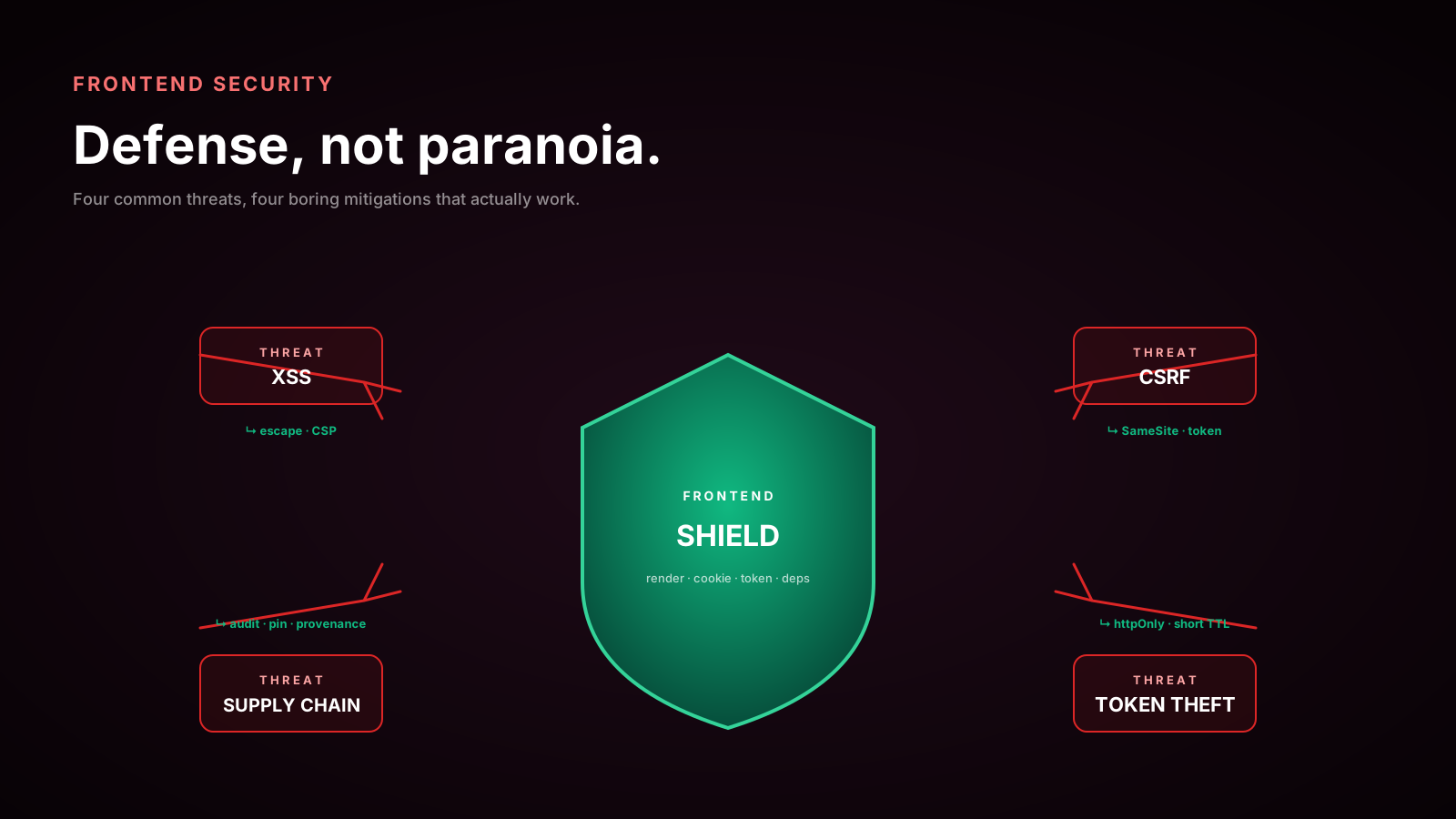
The first time I watched a frontend security incident play out in real time, I was sitting in an incident channel on a Tuesday morning. A library buried four levels deep in a package.json had pushed a malicious version overnight. By the time the team noticed, the build had already shipped to production for several hours. No backend was breached. No database was leaked. The attacker did not need any of that — the browser was already executing their code on every page view, and that was enough.
Frontend developers like to think of security as the backend's problem. It is a comforting frame because it means tokens, hashing, and TLS are someone else's department. The frame is also wrong. Your frontend is what the user actually interacts with. It is the layer that holds their session, paints their data, and makes the network calls. If the browser tab is compromised, no amount of server-side hardening helps.
This article is the version of "frontend security" I wish someone had handed me earlier in my career — not a checklist, but a way of thinking about what you are actually protecting and where the real holes are.
Stop Storing Tokens In localStorage
The single most common security mistake I still see in 2025 is auth tokens sitting in localStorage. Almost every introductory tutorial reaches for it because it is easy to demo, and almost every senior team has at one point inherited that decision and had to fix it.
The problem is straightforward. localStorage is readable by any JavaScript that runs on the page. Any third-party analytics script, any compromised dependency, any reflected XSS in a single component can read the token and exfiltrate it with a single fetch. That is not a theoretical attack — it has happened repeatedly to real products with real users.
The right answer almost always is an HttpOnly, Secure, SameSite=Lax cookie set by the server. JavaScript cannot read it. The browser still attaches it to requests. It survives reloads. It is the boring, correct default for browser-side session state.
Set-Cookie: session=eyJhbGciOi...; HttpOnly; Secure; SameSite=Lax; Path=/; Max-Age=3600If you absolutely cannot use cookies — say, because the API is on a different domain you do not control — then you are in BFF (backend-for-frontend) territory, where your own server holds the long-lived secrets and gives the browser a short-lived, scoped session cookie of its own.
XSS Is Still The Number One Web Vulnerability
Cross-site scripting did not go away when frameworks started escaping output by default. It just moved.
React, Vue, Svelte, and Solid all escape interpolated text. <div>{userInput}</div> is safe out of the box. The vulnerabilities live in the corners where you opt out:
dangerouslySetInnerHTMLin React (andv-html,@html, etc. in other frameworks).- Direct DOM manipulation through
innerHTMLorouterHTMLin custom hooks or imperative code. - URLs from user input passed to
href,src,action, orformactionwithout protocol validation —javascript:alert(1)still works. - Markdown rendered server-side that was never sanitized.
- SVG content uploaded by users and rendered inline.
Anywhere you accept HTML from a user or a third party and want to render it, run it through DOMPurify first. It is small, well-maintained, and handles the long list of edge cases you will not think of (mutation XSS, mXSS via parser quirks, namespace confusion in SVG).
import DOMPurify from 'dompurify';

const clean = DOMPurify.sanitize(richText, {
  ALLOWED_TAGS: ['p', 'a', 'strong', 'em', 'ul', 'ol', 'li', 'code'],
  ALLOWED_ATTR: ['href', 'title'],
});

ref.current.innerHTML = clean;
Modern Chromium also ships the Trusted Types API, which lets you tell the browser: any time my code assigns a string to a sink like innerHTML, refuse unless the string came through a registered policy. It is a defense-in-depth mechanism that catches the bugs sanitizer reviewers miss. Worth turning on once your CSP is in place.
CSRF Did Not Disappear, It Just Got Quieter
Once you move tokens into cookies, you trade XSS exfiltration for cross-site request forgery. The browser attaches cookies to any request to your origin, including ones initiated by other sites you did not write.
SameSite=Lax (the modern default in Chrome and Firefox) blocks cookies on cross-site POSTs and most subresource requests, which neutralizes the classic image-tag CSRF. That is most of the win. But there are still cases that slip through — top-level GET-based state changes, same-site subdomains you do not fully trust, and request types that are still considered "safe" by the browser.
The defense in depth is still an anti-CSRF token: a server-issued value the frontend reads (often via a cookie or an injected meta tag) and echoes back in a header on every state-changing request. Frameworks like Rails, Django, and Laravel ship this by default. In bespoke React + custom-API stacks, it is the piece that quietly goes missing.
The Supply Chain Is Bigger Than Your Codebase
A typical React app has somewhere between 800 and 2,000 packages in its transitive dependency tree. You wrote almost none of them. Every one of them runs at build time or at runtime with full access to whatever the build process or browser tab can do.
A few specific risks worth naming:
- Typosquatting.
react-domm,loadsh,axioss— packages with names a single keystroke off from a popular one. Always check what npm actually installed. - Dependency confusion. If your private package has the same name as a public one and your registry config is wrong, npm may pull the public version. Lock down scopes.
- Compromised maintainers. A maintainer's npm account gets phished, a malicious version is published, hundreds of downstream apps pull it during the next CI run.
- Postinstall scripts. Anything in your tree can run arbitrary code during
npm install. Use--ignore-scriptsin CI for as much as you can, audit when you cannot.
The boring defenses are the ones that work: pin versions with a lockfile, run npm audit on a schedule, use npm ci rather than npm install in CI so the lockfile is enforced, prefer well-maintained packages over the convenient new ones, and read the diff when a small utility suddenly grows from 4 KB to 40 KB.
For dependencies you load directly from a CDN (rare these days, but it happens for analytics or fonts), use Subresource Integrity:
<script
  src="https://example.com/widget.js"
  integrity="sha384-oqVuAfXRKap7fdgcCY5uykM6+R9GqQ8K/uxy9rx7HNQlGYl1kPzQho1wx4JwY8wC"
  crossorigin="anonymous"
></script>
If the file changes, the browser refuses to execute it. Cheap insurance.
Prototype Pollution Is The Bug You Will Forget About
JavaScript's prototype chain means that if an attacker can convince your code to set __proto__ on an arbitrary object, they may end up modifying Object.prototype for the entire runtime. That can turn a benign-looking property into a trigger for a downstream gadget — affecting libraries you did not write and code paths you did not anticipate.
You usually do not write obj['__proto__'] = ... directly. The bug comes through generic helpers — JSON merge functions, query-string parsers, deep-clone utilities — that copy keys without filtering. Several popular utility libraries shipped CVEs for exactly this in the last few years.
The defenses:
- Use
Object.create(null)orMapfor dictionaries that hold user-controlled keys. - Reach for
structuredClone,Object.assign, or modern utilities that explicitly skip__proto__/constructor/prototype. - When you receive a JSON payload, validate it against a schema (Zod, Valibot, ArkType) rather than letting unknown keys flow into your domain objects.
The point is not paranoia about every helper. It is knowing the failure mode exists so when a security advisory mentions it, you understand the headline.
Build Frontend Defenses As Layers
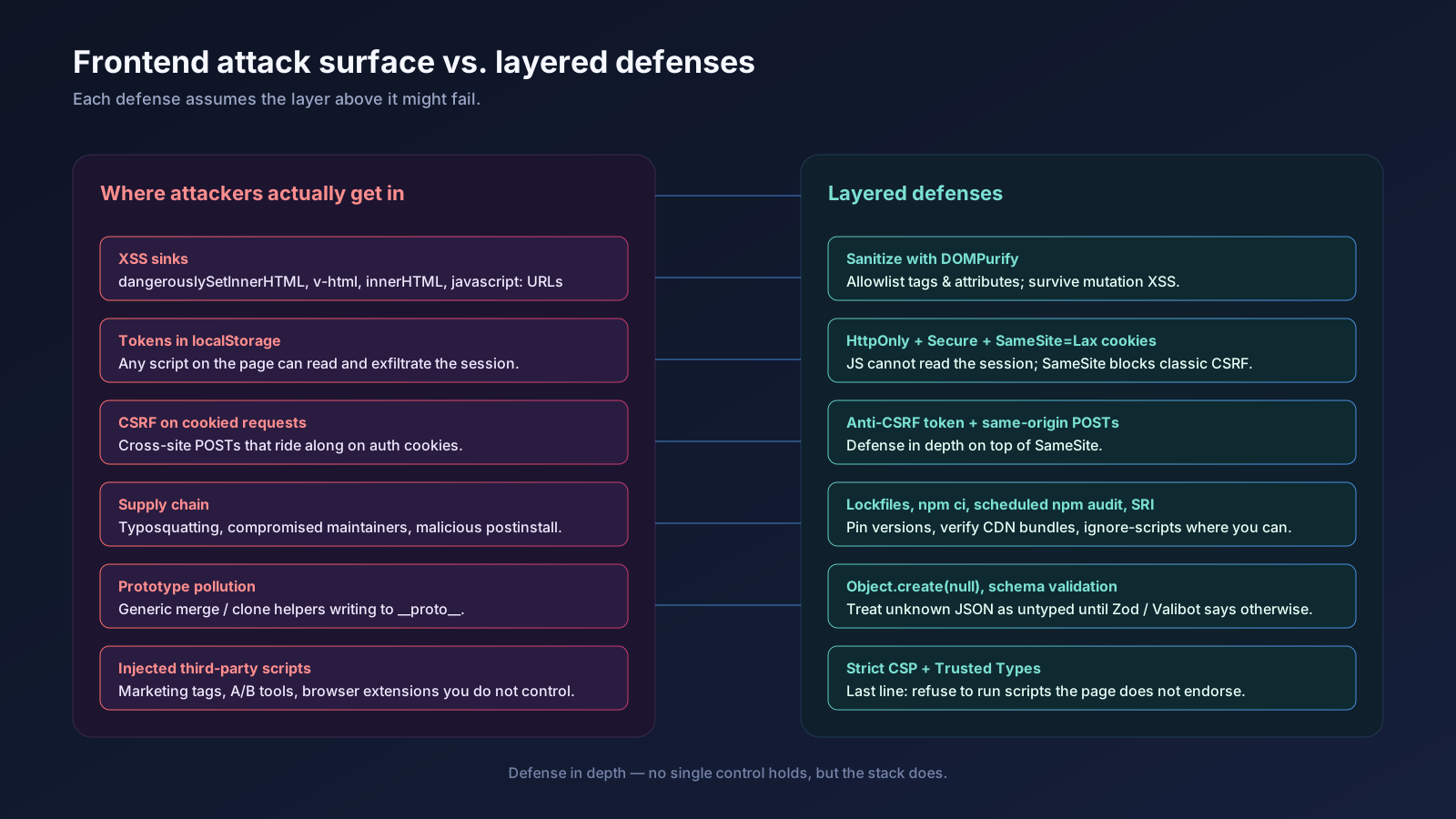
The mental model that has held up for me: every layer assumes the one below it might fail.
The browser sandbox might fail to isolate a tab — so you set CSP. CSP might miss a sink — so you sanitize input with DOMPurify. Sanitization might miss a mutation — so you turn on Trusted Types. Trusted Types might be bypassed — so your tokens are in HttpOnly cookies that the script cannot read anyway. The cookie might be stolen via CSRF — so your server validates an anti-CSRF token. The dependency you trusted might be compromised — so you have SRI on the CDN ones, lockfiles on the npm ones, and npm audit running on a schedule.
No single defense holds. The combination does.
A One-Sentence Mental Model
Frontend security is not about being clever — it is about putting boring, well-understood layers between the user's browser and everyone who would happily run code in it, starting with cookies that JavaScript cannot read and ending with a dependency tree you actually look at.