"Should We Build A PWA?"
Five years ago this question had a confident answer in either direction depending on the room. The PWA crowd promised the death of the App Store, the native crowd promised PWAs were toys. Both were wrong. In 2026 the question is no longer ideological — it's a planning question with a boring, situational answer.
I get pulled into it about once a quarter. A team is shipping an internal admin tool, a logistics dashboard, a restaurant ordering kiosk, or a B2B SaaS, and someone at the meeting asks whether it should be a PWA. Most of the time, the answer is yes. Occasionally, it's no. Worth being honest about which is which.
PWAs did not displace native apps the way the early hype suggested, partly because Apple spent years dragging its feet on key APIs, partly because the App Store has a discoverability moat the open web cannot match, and partly because users are conditioned to install software from a store. But the underlying tech matured. Web App Manifest is stable. Service Workers are universal. Web Push works on iOS 16.4+. The install button on Chrome is reliable. PWAs landed somewhere between "killer app" and "irrelevant" — they're useful, narrowly.
What A PWA Actually Is In 2026
A PWA is three things: a Web App Manifest, a Service Worker, and a site served over HTTPS. That's the spec. Everything else — push notifications, offline mode, install prompts — is a layer on top.
The manifest is a JSON file the browser reads to decide whether your site is "installable":
{
  "name": "Acme Ops",
  "short_name": "Acme",
  "start_url": "/dashboard",
  "scope": "/",
  "display": "standalone",
  "background_color": "#0b1220",
  "theme_color": "#3b82f6",
  "icons": [
    { "src": "/icons/192.png", "sizes": "192x192", "type": "image/png" },
    { "src": "/icons/512.png", "sizes": "512x512", "type": "image/png" }
  ]
}
The two fields that matter most: display: standalone strips the browser chrome (no URL bar, no tabs, no back button) when the app is launched from the home screen, and start_url is where launches land. Get those right and your PWA feels like an app the moment a user installs it.
Frameworks help you wire this up — Next-PWA, the Vite PWA plugin, and Workbox 7 all generate the Service Worker, register it, and hash your assets for cache versioning. Use them. Hand-rolled Service Workers in production are how you ship "stale forever" bugs.
Where PWAs Genuinely Win
The strongest case for a PWA in 2026 is not consumer mobile. It's the workhorse software people use every day inside a browser tab — and which, frankly, deserves a window of its own.
Three categories where I'd reach for a PWA without hesitation:
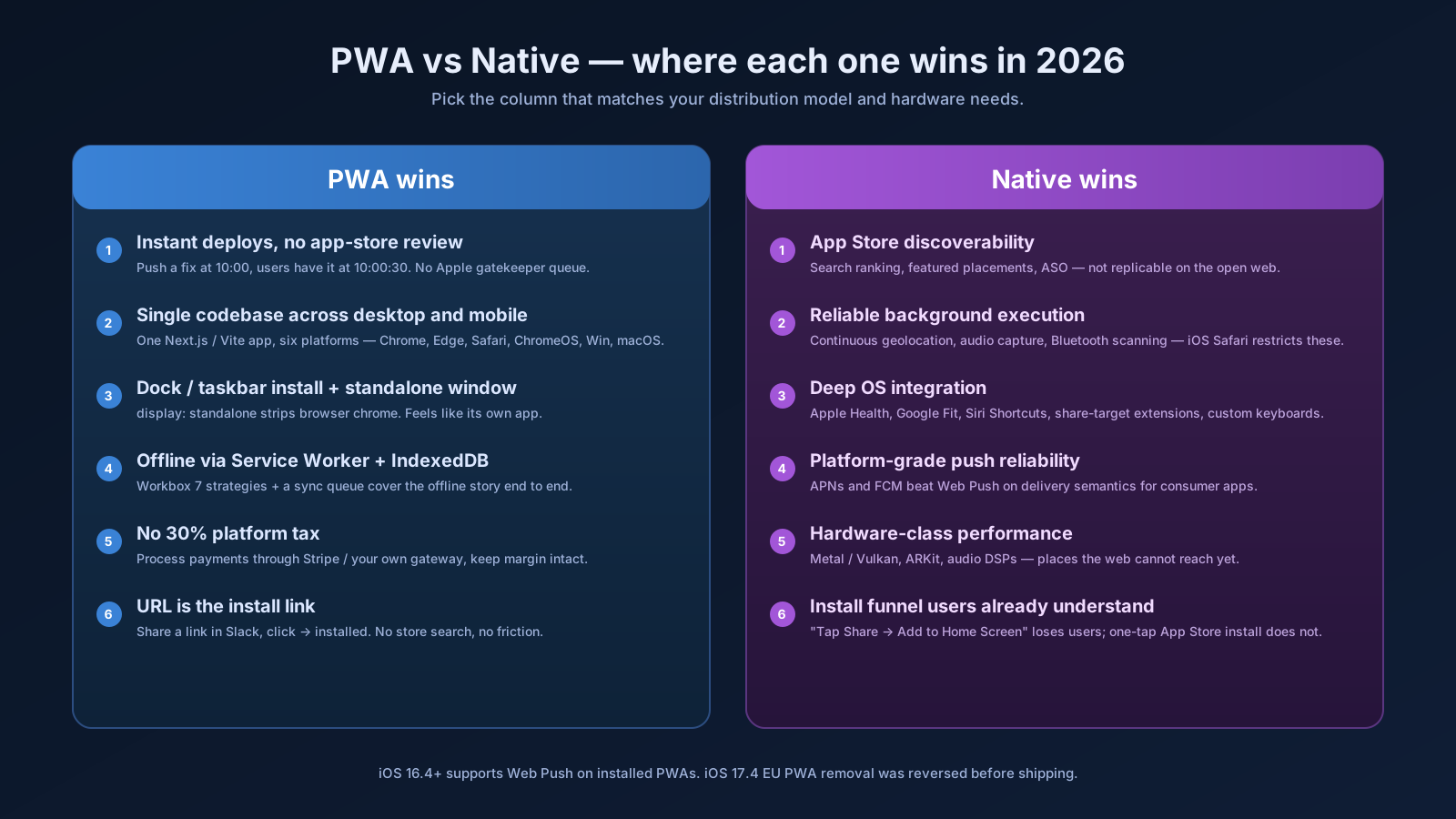
- B2B dashboards and admin panels. A user keeping eight tabs open all day in your billing console will install your PWA the moment you offer it, because it gives them a dock icon, a dedicated window, and an Alt-Tab target. You ship instant updates with no app-store review. They never lose work to a tab being closed accidentally.
- Internal tools. Your support team, ops dashboards, logistics consoles. Every Chromebook fleet on Earth runs PWAs. Every Windows install can pin one to the taskbar. You skip MDM packaging entirely.
- Productivity apps with offline mode. Notes, drafts, reading apps, calendars. The Service Worker plus IndexedDB plus a sync queue is a complete offline story. Once your data flow already reads from a local cache, the PWA wrapper is almost free.
The common thread: these are use cases where users genuinely want the app to feel like its own thing, but where the install barrier of an App Store would lose more users than it gains.
Where PWAs Still Lose
The honest negative list is short but real:
- Consumer apps that depend on store discoverability. If your business model is "rank in App Store search and convert installs," a PWA cannot replace that. The install funnel of a website with a "tap Share, then Add to Home Screen" prompt is brutal compared to a one-tap App Store install.
- Background-heavy apps on iOS. Continuous geolocation, audio capture in the background, Bluetooth scanning — Safari's PWA model puts heavy limits on background execution. If your app needs to do real work while the user has the screen off, build native or wrap in Capacitor.
- Anything that needs deep OS integration. Apple Health, Google Fit, share-target extensions on iOS, system-level keyboards, Siri shortcuts. You'll hit walls that native does not have.
- Push notifications with absolute reliability. Web Push works on iOS 16.4+ and on every other major platform — but iOS still gates it behind "must be installed to home screen first," and delivery semantics are not as guaranteed as APNs in a native app. For most B2B notifications it's fine. For a consumer notification-driven product, native is still the safer bet.
If your roadmap touches more than one of these, ship native or hybrid.
The iOS Story Is Better Than It Was
The biggest practical change since the early PWA era is iOS Safari catching up. A short, accurate timeline:
- iOS 16.4 (2023) — Web Push lands on iOS for installed PWAs, badging API, third-party manifest improvements. The first version where a PWA on iPhone was meaningfully comparable to one on Android.
- iOS 17.4 (early 2024) — the EU saga. Apple announced it would remove home-screen web apps in the EU under Digital Markets Act rules, faced immediate regulatory pushback, and reversed the decision before the release shipped. PWAs survived. The episode is a reminder that the platform is at the mercy of a single vendor's roadmap, but for now the train is on the tracks.
- 2025-2026 — incremental work on push reliability, manifest fields, and storage isolation. Nothing dramatic, but the gap to Chrome continues to narrow.
The practical takeaway: in 2026 you can ship a PWA and reasonably expect it to work on iOS, Android, ChromeOS, macOS, Windows, and Linux without per-platform builds. That was not true in 2022.
The Install Prompt Is Still Awkward
The single biggest UX wart of PWAs is the install flow. On Chromium-based browsers (Chrome, Edge, Brave, Arc) you can listen for beforeinstallprompt, defer it, and trigger it from a button:
let deferredPrompt;
window.addEventListener('beforeinstallprompt', (e) => {
  e.preventDefault();
  deferredPrompt = e;
  document.querySelector('#install-btn')?.removeAttribute('hidden');
});

document.querySelector('#install-btn')?.addEventListener('click', async () => {
  deferredPrompt?.prompt();
  const { outcome } = await deferredPrompt.userChoice;
  deferredPrompt = null;
});
That's clean. On iOS Safari there is no programmatic install — the user has to tap Share, scroll, and tap "Add to Home Screen." You can render a hint pointing at the Share icon, but the conversion rate is genuinely low. Plan for it. If installs are core to your product, do not assume iOS users will follow that flow on the first visit. Use the browser experience as the primary surface and promote install gently after the user has gotten value.
How To Decide In Five Minutes
Skip the long debate. Run a quick checklist on your project:
- Is the user going to spend serious time in the app every day? If yes, PWA earns its keep through install + standalone window.
- Do you need persistent background execution, hardware APIs, or App Store discoverability? If yes, native or hybrid.
- Is your team a web team? If yes, the PWA path lets you ship without a second skill set.
- Are you publishing to a consumer audience that searches in app stores? If yes, you need a store presence regardless — a PWA is not a replacement.
Most B2B and internal projects say yes-yes-no-no, which is why the answer there is almost always "ship a PWA." Most consumer apps with a hardware story say no-yes-no-yes, which is why native or React Native still wins there.
A One-Sentence Mental Model
A PWA in 2026 is the right answer when your distribution is the URL and your users want a window of their own — and the wrong answer when your distribution is the App Store and your users live on hardware APIs. The hype cycle ended; the technology grew up and found its real lane.