"Why Is My App Freezing On Reload?"
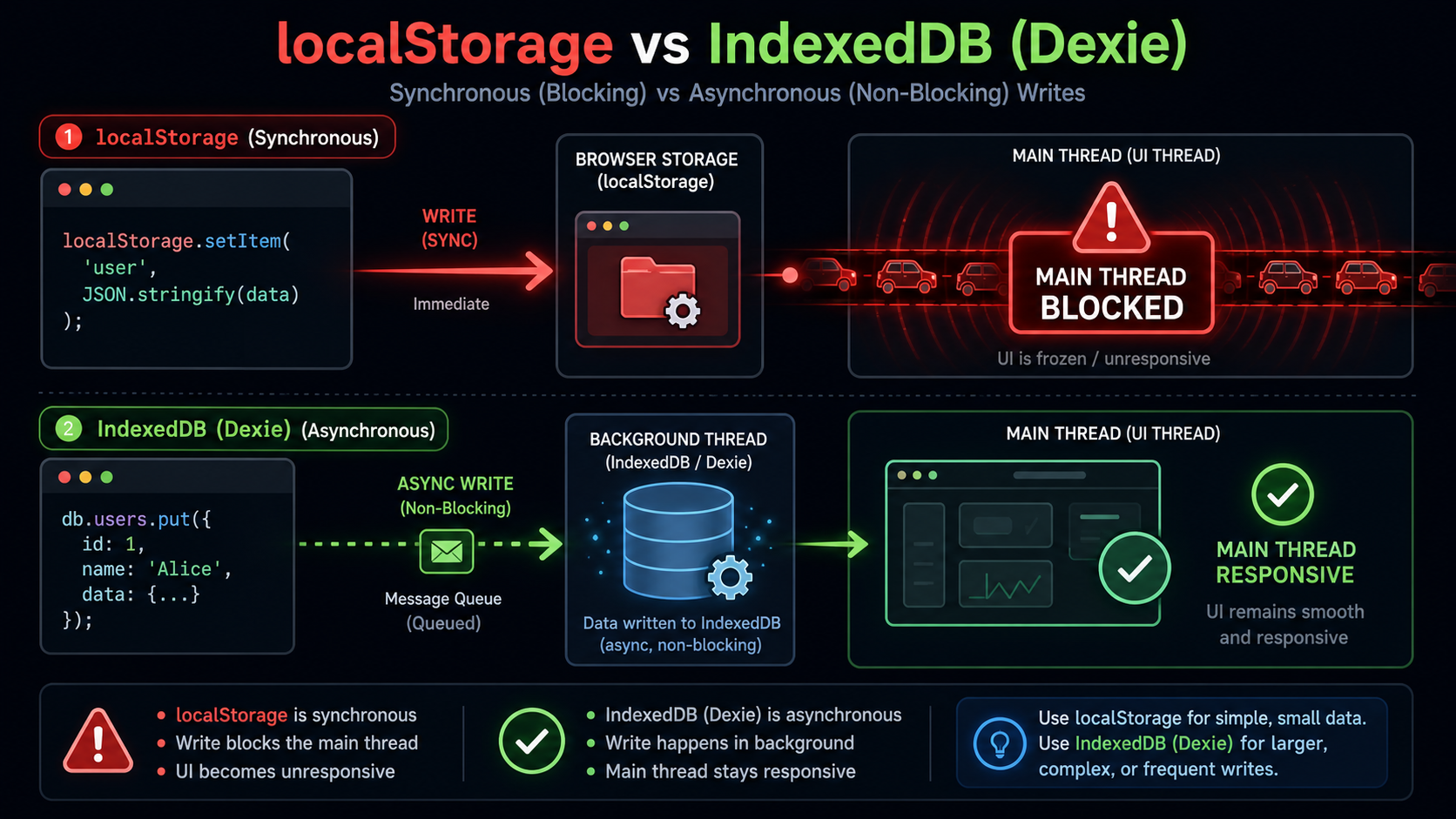
A teammate once spent two days hunting a frame drop on app load. The culprit was a 4 MB JSON string they were JSON.parse-ing out of localStorage on every boot. The browser loaded it, blocked the main thread for 80 ms while parsing, and shipped a janky first paint. Switching to IndexedDB cut that to under a millisecond on the main thread, because the parse happened on a separate thread and the UI got control back instantly.
localStorage is fine for a theme flag or a single feature toggle. It is not fine for the data your app actually runs on. The mismatch hurts in four specific ways and you tend to feel them all at once.
Why localStorage Is A Trap For Real Data
Four hard limits, each of which is enough on its own to push you off:
- Synchronous. Every
getItemandsetItemblocks the main thread. The browser must finish the read or write before it can paint or respond to input. At small sizes you don't notice. At a few hundred KB on a low-end Android phone, you do. - Strings only. Want to store a
Blob, anArrayBuffer, or a typed array? You first have to base64 it — which inflates the size by ~33% and burns CPU on every read and write. - A 5 MB-ish ceiling. The exact number varies by browser, but you absolutely do not get hundreds of megabytes. Once you're past a few thousand records, you're out.
- No querying. It's a flat key-value bag. No indexes, no
where, no range scans. You read the whole blob and filter in JavaScript.
If any of those bite, you've outgrown it. The right next step is IndexedDB — which is genuinely a database living inside the browser.
What IndexedDB Actually Is
IndexedDB is an asynchronous, transactional, indexed object store. Each origin can have many databases, each database has many object stores (think tables), and each store can have indexes for fast lookup on fields. It supports hundreds of megabytes of structured data, native Blob and File storage without encoding, and it never blocks the main thread because every operation is asynchronous.
The catch is that the native API was designed in the era of XHR and event handlers, before Promises were a language feature. Working with raw IndexedDB looks like this:
const open = indexedDB.open('app', 1);
open.onupgradeneeded = (e) => {
  const db = e.target.result;
  db.createObjectStore('notes', { keyPath: 'id', autoIncrement: true });
};
open.onsuccess = (e) => {
  const db = e.target.result;
  const tx = db.transaction('notes', 'readwrite');
  const store = tx.objectStore('notes');
  const req = store.add({ title: 'hello', body: 'world' });
  req.onsuccess = () => console.log('added');
};
Functional, but ugly the moment you have more than one operation. Use a wrapper. The native API is the assembly language; you reach for it only if you need every byte of bundle size.
Two Wrappers That Cover Almost Everything
Pick one of these in 2026 and stop hand-rolling:
idbby Jake Archibald — a tiny (~1 KB gzipped) Promise-based wrapper. Same shape as the native API, justawaitable. Use it when you want to stay close to the metal or when bundle size really matters.- Dexie.js v4 — a higher-level, ORM-style API with versioned schemas, live queries, transactions, and a friendly query builder. Use it for app-sized data layers; it's worth the ~30 KB.
Higher up the stack you have PouchDB (CouchDB-compatible, sync-first) and RxDB (reactive, schema-validated, cloud-sync addons). They're great when sync is the central problem of your app. For most apps, Dexie is the sweet spot.
A complete Dexie setup for a notes app fits on one screen:
import Dexie, { Table } from 'dexie';

export interface Note {
  id?: number;
  title: string;
  body: string;
  authorId: number;
  updatedAt: number;
  attachments?: Blob[];
}

class AppDB extends Dexie {
  notes!: Table<Note, number>;
  constructor() {
    super('app');
    this.version(1).stores({
      // ++id = auto primary key. authorId, updatedAt are indexed.
      notes: '++id, authorId, updatedAt',
    });
  }
}

export const db = new AppDB();
Querying is the part where the gap between Dexie and raw IndexedDB really shows:
// All notes by author 42, newest first.
const recent = await db.notes
  .where('authorId').equals(42)
  .reverse()
  .sortBy('updatedAt');

// Range queries work too — last week's notes.
const weekAgo = Date.now() - 7 * 24 * 3600 * 1000;
const fresh = await db.notes
  .where('updatedAt').above(weekAgo)
  .toArray();
The where(...) calls compile down to indexed range scans. If you didn't index the field, Dexie falls back to a full scan and warns you in dev mode.
Schema Versioning Is The Part People Skip
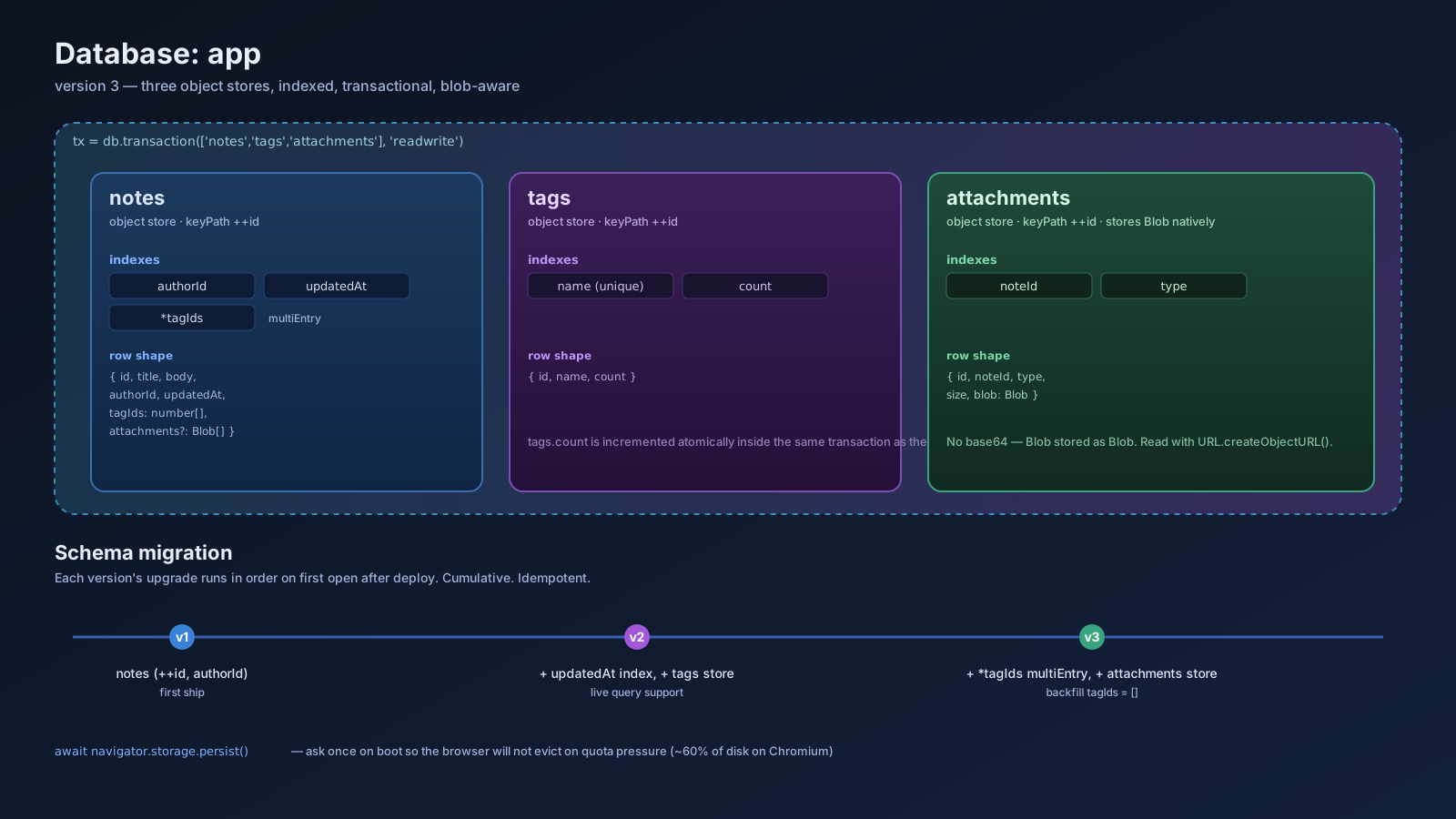
Every IndexedDB database has a version number. When you change the schema — add a store, add an index, change a key path — you bump the version and provide an upgrade function. This is the part that bites people who treat IndexedDB as "just a fancy localStorage."
this.version(1).stores({ notes: '++id, authorId' });

this.version(2).stores({
  notes: '++id, authorId, updatedAt',  // added updatedAt index
  tags:  '++id, name',                 // new store
});

this.version(3).stores({
  notes: '++id, authorId, updatedAt, *tagIds', // multiEntry index
}).upgrade(async (tx) => {
  // Migrate existing rows: assign empty tagIds.
  await tx.table('notes').toCollection().modify((n) => {
    n.tagIds = [];
  });
});
Two rules that save you grief: never reuse a version number after deploy, and never delete a store unless you've migrated the data out first. Browsers cache schemas; a user opening the app for the first time after a migration will run all upgrade functions in order, so they have to be cumulative and idempotent.
Transactions Are The Quiet Superpower
Multi-store updates that need to be atomic — write a note, write its attachments, update a tag count — wrap in a transaction and either all of them land or none of them do.
await db.transaction('rw', db.notes, db.tags, async () => {
  const id = await db.notes.add(note);
  for (const tag of tags) {
    await db.tags.where('name').equals(tag).modify((t) => { t.count += 1; });
  }
});
If anything inside throws, Dexie rolls the whole transaction back. This is the same atomicity guarantee SQL gives you, and it's the reason IndexedDB is a real database — localStorage and the Cache API simply do not have it.
Storing Blobs Is The Quiet Win
For media-heavy apps, the killer feature of IndexedDB is native Blob support. You don't base64 anything. You drop the Blob straight into a row, and on read you URL.createObjectURL it back into the page.
async function saveAttachment(noteId: number, file: File) {
  await db.notes.where('id').equals(noteId).modify((n) => {
    n.attachments = [...(n.attachments ?? []), file];
  });
}

async function showAttachment(noteId: number, index: number) {
  const note = await db.notes.get(noteId);
  const url = URL.createObjectURL(note!.attachments![index]);
  document.querySelector('img')!.src = url;
}
Storing files this way means a chat app can keep audio messages locally, a document app can stash exports until upload, and a reading app can keep cached covers without ever touching the network on subsequent loads.
Quota, Eviction, And Persistence
Browsers cap origin storage. Chromium gives an origin up to ~60% of the disk; Firefox is in the same neighborhood; Safari is stricter and varies. When the OS gets low, browsers can evict origins they don't consider important.
Two APIs save you here. First, ask for persistence so eviction policy is more conservative:
if (await navigator.storage.persist()) {
  // Browser will not evict your data without user action.
}
Second, monitor usage so you can warn the user (or trim caches) before the OS does it for you:
const { usage, quota } = await navigator.storage.estimate();
if (usage / quota > 0.8) {
  // Time to evict old caches yourself.
}
For a media-heavy PWA, both calls belong in your boot path. For a smaller app you can probably get away with just persist().
Live Queries Make Reactive UIs Trivial
Dexie 3.2 added liveQuery, which is basically a database-backed Observable: the query re-runs whenever a write touches a relevant store, and your UI re-renders without you wiring an event bus.
import { liveQuery } from 'dexie';
import { useEffect, useState } from 'react';

function useNotes(authorId: number) {
  const [notes, setNotes] = useState<Note[]>([]);
  useEffect(() => {
    const sub = liveQuery(() =>
      db.notes.where('authorId').equals(authorId).toArray()
    ).subscribe(setNotes);
    return () => sub.unsubscribe();
  }, [authorId]);
  return notes;
}
Now any other part of the app — your sync worker, a different tab, a Service Worker — can write to db.notes and the React component updates automatically. This is the offline-first data flow expressed in three lines of glue.
A One-Sentence Mental Model
IndexedDB is the SQLite of the browser — asynchronous, indexed, transactional, blob-friendly, versioned — and once you treat it as a real database with a wrapper like Dexie or idb, the question stops being "can I store this in the browser" and becomes "what's my schema."