The CommonJS-vs-ESM situation in JavaScript is genuinely the messiest thing about the ecosystem. Both module systems are everywhere, neither is fully replacing the other, and the interop edge cases produce some of the most frustrating bugs you'll hit in a Node project.
This is the honest version of what's different and why migration is harder than the docs suggest.
CommonJS Loads Differently From ESM
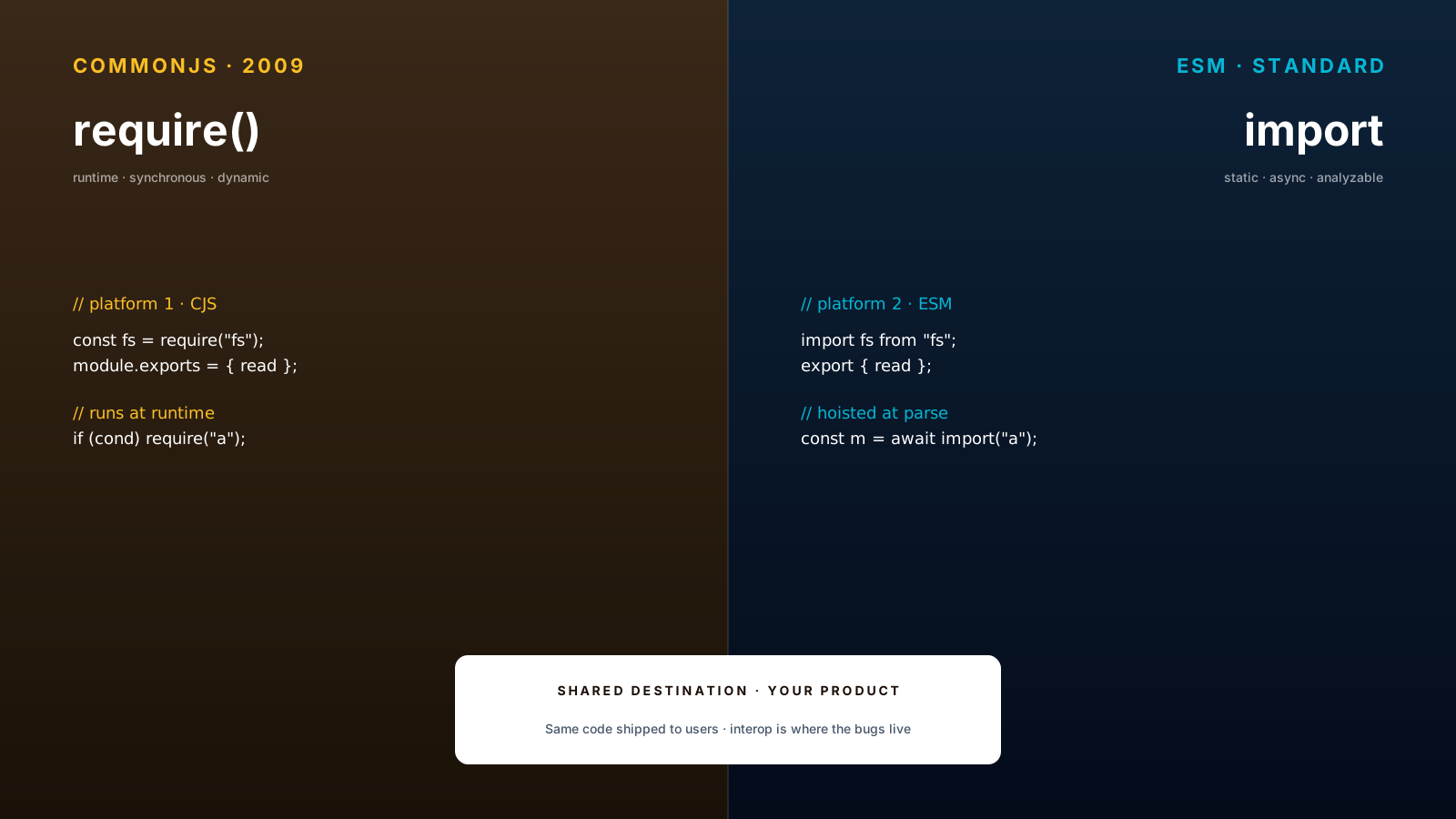
CommonJS (require/module.exports) is the original Node module system. It's synchronous and dynamic — require is a runtime function call that loads a module immediately when reached.
const fs = require('fs');
const helper = require('./helper');

if (process.env.DEBUG) {
  const debugger = require('./debugger'); // conditional load — works
}

module.exports = { run };
ESM (import/export) is the standard. It's asynchronous and static — imports are hoisted to the top of the file and resolved at parse time, before any code runs.
import fs from 'fs';
import helper from './helper.js';

// can't conditionally `import` at top level
// const debugger = condition ? import('./debugger.js') : null; // this is dynamic import → returns Promise

export { run };
That difference — sync vs async, dynamic vs static — is the root of every interop pain. CommonJS can require an ESM module only if Node supports it (and the rules vary by version). ESM can import a CommonJS module, but only the default export, not named exports synthesized from it.
ESM Is The Standard Direction
Browsers, Deno, Bun, and modern Node all default to ESM. Most new packages publish ESM-first. The tooling ecosystem (Vite, esbuild, Rollup) is ESM-native.
The reasons matter:
- Static analysis — bundlers can tree-shake unused exports because imports are known at parse time
- Async loading — modules can load over the network without blocking
- Top-level await — works in ESM modules, doesn't work in CommonJS
- Standard — it's the spec, not a Node convention
If you're starting a new project today, choose ESM. The friction is real but it's the friction of joining the standard, not of fighting it.
Interop Is Where The Pain Lives
The actual production pain points happen at the boundary:
// 🐛 ESM importing a CJS package — named export doesn't exist
import { something } from 'cjs-only-package';
// → SyntaxError: The requested module 'cjs-only-package' does not provide an export named 'something'

// ✅ default import works
import pkg from 'cjs-only-package';
const { something } = pkg;

// ✅ or use createRequire from node:module for true CJS
import { createRequire } from 'node:module';
const require = createRequire(import.meta.url);
const cjs = require('cjs-only-package');
Node has been improving CJS-from-ESM detection — modern versions can synthesize named exports for many CJS packages — but the rules are subtle and version-dependent. When in doubt, use the default-import-then-destructure pattern.
The other classic: __dirname and __filename don't exist in ESM. Use:
import { fileURLToPath } from 'node:url';
import { dirname } from 'node:path';

const __filename = fileURLToPath(import.meta.url);
const __dirname = dirname(__filename);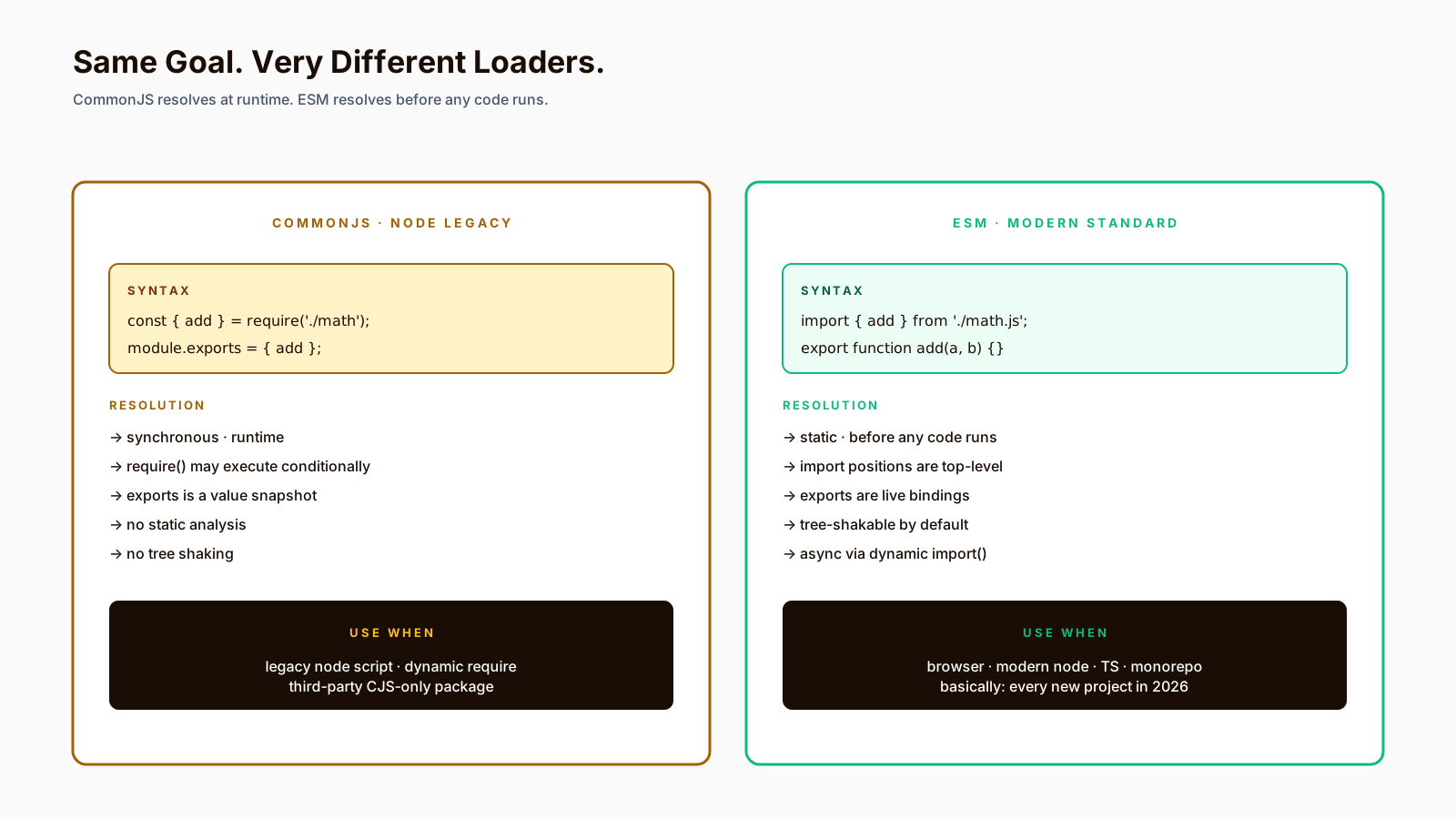
Bundlers Hide And Create Problems
Vite, esbuild, Rollup, and Webpack let you write import everywhere and ship the result to browsers, Node, or both. They're enormously useful. They also hide the underlying module system from you, which means problems show up at the wrong time:
- In dev: bundler resolves imports its own way, code works
- In prod build: tree-shaking changes which exports are actually included
- In Node runtime (SSR): the bundler's resolution doesn't apply, real CJS/ESM rules kick in
The fix is usually a build configuration tweak (format, target, platform), but the symptom — "works on my machine, breaks in production" — is exactly the kind of bug that makes module debugging painful.
Dual Packages Are A Compromise
Many libraries ship both CJS and ESM builds in the same package, with package.json exports field routing the right one based on how it's imported:
{
  "name": "my-lib",
  "exports": {
    ".": {
      "import": "./dist/esm/index.js",
      "require": "./dist/cjs/index.cjs",
      "types": "./dist/index.d.ts"
    }
  }
}
This is the best you can do today as a library author. The cost is doubled bundle size on disk, and a real risk of "dual package hazard" — two copies of your code at runtime if both formats are loaded. It works in practice; it's not pretty.
Pro Tips
- Choose ESM for new projects. The friction is the friction of the standard.
- Set
"type": "module"in package.json. Otherwise you're shipping CJS by default. - Use
.cjsand.mjsextensions when you need to be explicit per file. - Read
node --print-warningsduring dev — it warns about resolution issues. - Test the actual built output, not just the dev build.
Final Tips
The CJS/ESM situation is a snapshot of an ecosystem mid-migration. It will keep being this way for years. The good news is that the worst friction is at the library boundary; once you're inside an ESM-only or CJS-only codebase, the pain goes away.
Choose ESM, treat interop as a planned cost, and don't trust the bundler to hide reality from you forever.
Good luck — and may your imports always resolve 👊