You change a value in a ConfigMap. You run kubectl apply -f configmap.yaml. The command succeeds. You curl the service and... it's still serving the old value. Five minutes later, still the old value. You SSH into the pod, cat /etc/config/feature-flag. There's your new value, sitting in the file, while the running process happily ignores it.
Or this. Someone on the team commits a Secret to git, gets nervous, deletes it, and force-pushes. Two weeks later, an auditor asks how you store database passwords. You point at the Secret object and feel professional. They point out that base64 is not encryption.
Or this one. You update a Secret with a rotated API key. You don't restart anything. A week later, half your pods are using the old key and half the new one, because some pods got rescheduled and pulled the fresh value while others kept the env var they were born with.
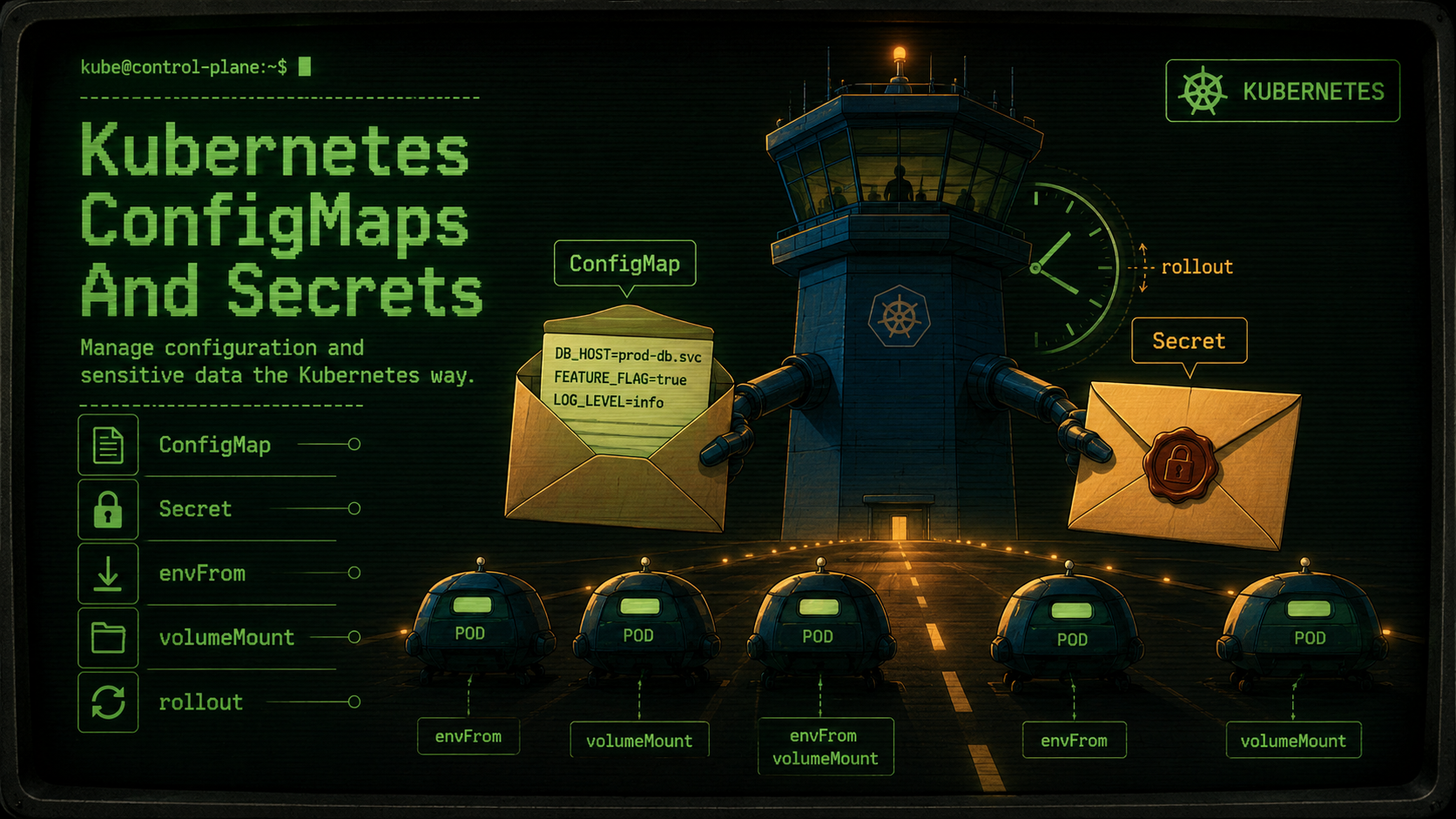
ConfigMaps and Secrets are the most-used Kubernetes primitives most teams never quite finish learning. They look simple (a YAML map of strings), and most of the time they behave the way you'd expect. It's the edges that bite you: how they roll out (or don't), how they're surfaced into your container, and how much "secret" you're actually getting out of a Secret.
This piece is a working tour of all three. We'll keep YAML and kubectl in the foreground, with brief sketches of how the values land in a Node.js or Go program where it matters.
What A ConfigMap Actually Is
A ConfigMap is a key/value blob stored in etcd, namespaced, and surfaced to pods in one of three ways: environment variables, command-line args, or files on a mounted volume. That's it. There is no smart syncing, no schema, no validation against your application. It's just a map of strings (and optionally binary data via binaryData) that the kubelet hands to your pod when it starts.
apiVersion: v1
kind: ConfigMap
metadata:
  name: app-config
  namespace: payments
data:
  LOG_LEVEL: "info"
  FEATURE_NEW_CHECKOUT: "true"
  DB_HOST: "postgres.payments.svc.cluster.local"
  config.yaml: |
    server:
      port: 8080
      timeout: 30s
    cache:
      ttl: 60s
Two shapes live in the same data: map. Short string values like LOG_LEVEL are the "set me as an env var" pattern. Longer keys whose values are entire files (like config.yaml here) are meant to be mounted into a volume so your app can read them as a regular file. There's no enforced distinction; the difference is purely in how you consume them.
A ConfigMap has a soft size limit of about 1 MiB because of etcd's per-object limit. If you're packing more than that, you've probably outgrown ConfigMaps. That data wants to be a real object store, a database, or a sidecar.
What A Secret Actually Is
A Secret is a ConfigMap with two extra properties: the value field is base64-encoded on the wire, and Kubernetes treats the resource with different RBAC defaults (tighter access to get/list, no logging of the contents in describe output by default, optional encryption at rest in etcd).
apiVersion: v1
kind: Secret
metadata:
  name: db-credentials
  namespace: payments
type: Opaque
stringData:
  DB_USER: "payments_app"
  DB_PASSWORD: "do-not-commit-this"
stringData lets you write the values in plain text; the API server base64-encodes them before storing. If you kubectl get secret db-credentials -o yaml, you'll see them under data: already encoded. That encoding is not encryption. It is purely a transport convenience so binary values fit cleanly into YAML. Anyone with read access to the Secret can decode it with base64 -d and a coffee break.
The "encryption" part of Secrets, when it exists, is something you configure at the cluster level: EncryptionConfiguration on the API server, which encrypts Secret resources at rest in etcd. Most managed clusters (EKS, GKE, AKS) either offer this as a checkbox or do it by default with a KMS-backed key. Always check. If your cluster wasn't set up that way, your Secrets are sitting in etcd in clear text, base64-wrapped, and "Secret" is doing a lot of work in the name.
For credentials that should never sit in etcd even encrypted (production DB passwords, third-party API keys with real money behind them), most serious clusters reach for an external Secret manager (AWS Secrets Manager, HashiCorp Vault, GCP Secret Manager) with a controller like External Secrets Operator pulling values into the cluster on a schedule. The Secret object becomes a cache; the source of truth lives somewhere with audit logging and rotation.
There are also typed Secrets. kubernetes.io/tls for cert pairs, kubernetes.io/dockerconfigjson for image pull credentials, kubernetes.io/service-account-token (largely replaced by projected tokens since 1.24). The shape is the same; the type just tells controllers what to expect.
Two Ways To Consume Them, And Why The Difference Matters
A pod can pick up ConfigMap or Secret values as environment variables, or as files in a mounted volume. The choice has real consequences, especially for rollouts.
Env vars from envFrom
apiVersion: apps/v1
kind: Deployment
metadata:
  name: payments-api
spec:
  replicas: 3
  selector:
    matchLabels: { app: payments-api }
  template:
    metadata:
      labels: { app: payments-api }
    spec:
      containers:
        - name: api
          image: payments-api:1.4.2
          envFrom:
            - configMapRef:
                name: app-config
            - secretRef:
                name: db-credentials
          ports:
            - containerPort: 8080
This pulls every key in app-config and db-credentials into the container as environment variables: LOG_LEVEL, FEATURE_NEW_CHECKOUT, DB_HOST, DB_USER, DB_PASSWORD. From the application's point of view, it's just process.env or os.Getenv:
const dbHost = process.env.DB_HOST;
const dbUser = process.env.DB_USER;
const dbPassword = process.env.DB_PASSWORD;
const logLevel = process.env.LOG_LEVEL ?? "info";
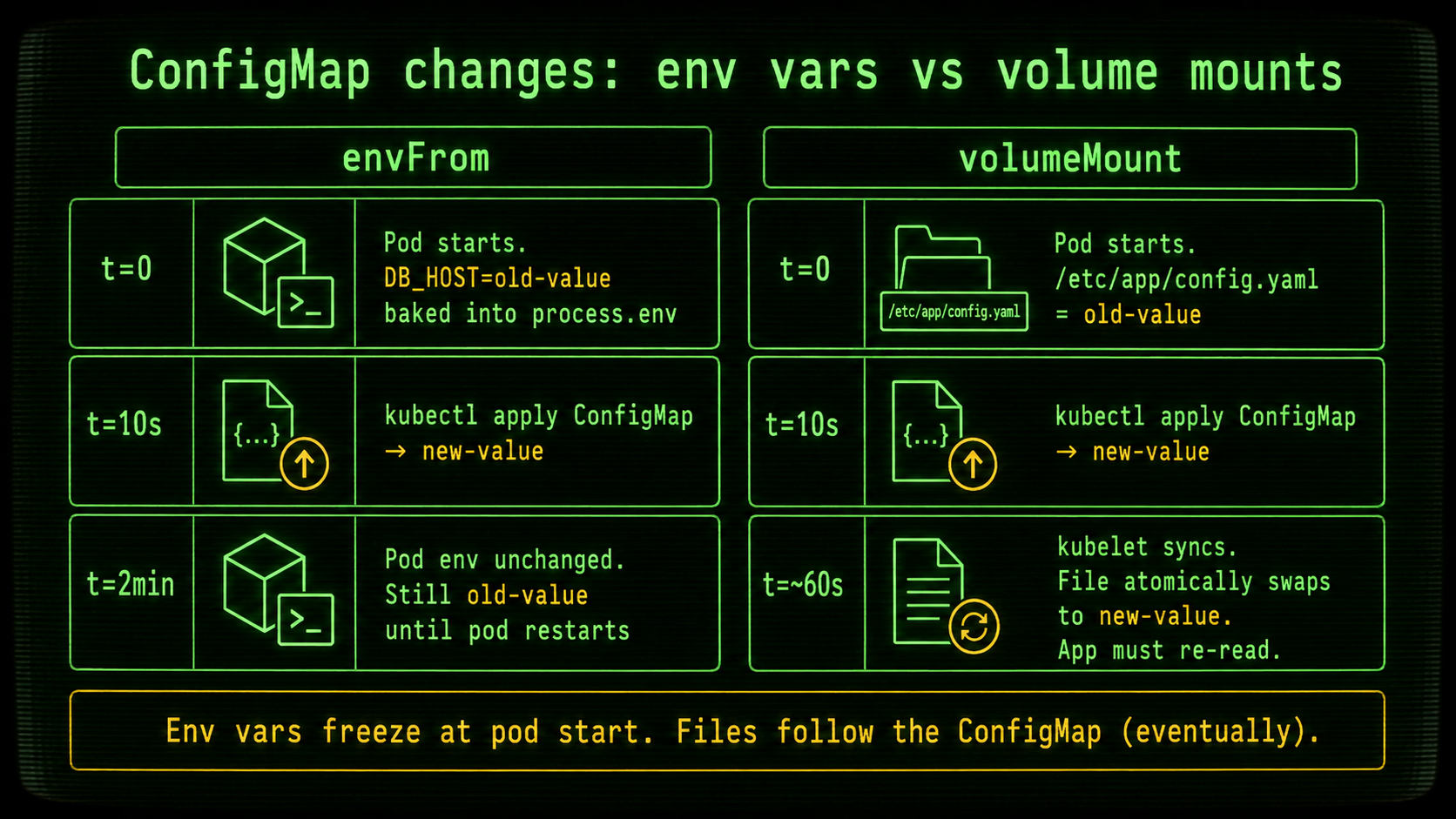
The crucial thing about env vars: they are baked into the container at start time. The kubelet reads the ConfigMap and Secret when the pod is created, sets the env vars, and from that point on, those values are frozen for the life of that pod. If you kubectl apply an updated ConfigMap, every existing pod keeps its old values. New pods (scaled-up replicas, rescheduled pods, the next rollout) will get the fresh ones. That's it.
This is the source of the "I updated the value and nothing changed" surprise. The ConfigMap did update. Your pod's env vars didn't.
Files via volumeMounts
spec:
  containers:
    - name: api
      image: payments-api:1.4.2
      volumeMounts:
        - name: config
          mountPath: /etc/app
          readOnly: true
  volumes:
    - name: config
      configMap:
        name: app-config
        items:
          - key: config.yaml
            path: config.yaml
Now your app reads /etc/app/config.yaml like any other file. The shape on disk matches the keys in the ConfigMap: one key per file by default, or only the ones you select via items. If your app supports config reloading (SIGHUP, file watcher, periodic re-read), you can pick up changes without a pod restart.
Files mounted from a ConfigMap or Secret do refresh when the underlying object changes. The kubelet runs a periodic sync (default cadence is on the order of a minute, tunable per node), and updates the projected files atomically using a symlink swap on a tmpfs underneath. Your file watcher will see one atomic rename, not a half-written file. That's the part the design got right.
The catches are subtle but real:
- The refresh is not instant. Plan for the sync interval (typically up to ~60s) before the file changes are visible inside the pod.
- If you mount with
subPath: config.yaml, you get a one-time copy. Updates to the ConfigMap will not propagate through asubPathmount. This is documented but easy to miss. If you need live updates, mount the whole directory and reference the file atmountPath/key. - Your app still needs to actually re-read the file. Mounting a fresh file doesn't help if your process loaded the config into memory at boot and never looks again.
Why the env-vs-file choice is actually a rollout question
Pick env vars when the values rarely change and a pod restart is the right way to apply them anyway: connection strings, image versions for sidecars, feature flags that need a clean re-init. Pick files when you want runtime refresh or when the value is naturally a file (a TLS cert, a long structured config, a JSON service-account key).
The honest answer for most services is "env vars for everything, and we restart the deployment when the values change." That's fine. Just be deliberate about it instead of expecting magic.
The Rollout Problem Nobody Warns You About
Here is the part that catches every team eventually. You update a ConfigMap or Secret that your Deployment references. You run kubectl apply. The command succeeds.
Nothing rolls.
Kubernetes does not, by default, restart your pods when a referenced ConfigMap or Secret changes. The Deployment's pod template is unchanged from its perspective (the same configMapRef: app-config is still there), so there's nothing for the Deployment controller to react to. The kubelet will refresh file-mounted values in existing pods as described above, but env-var-based consumers will keep their old values until something causes a pod restart.
There are four common ways teams deal with this. Pick the one that fits your operational style; mixing them on the same Deployment is how subtle bugs happen.
1. kubectl rollout restart
The dumb-and-honest approach. After updating the ConfigMap or Secret, you trigger a rolling restart of the Deployment that consumes it:
kubectl apply -f configmap.yaml
kubectl rollout restart deployment/payments-api -n payments
kubectl rollout status deployment/payments-api -n payments
kubectl rollout restart works by adding an annotation to the pod template (kubectl.kubernetes.io/restartedAt) which counts as a template change, which triggers a rolling update. New pods come up with the new ConfigMap values, old ones drain.
This is the right default. It's explicit, it's auditable in the rollout history, and it doesn't add new moving parts to your cluster.
2. Checksum-the-config annotation (the GitOps favorite)
If you generate your manifests with Helm, Kustomize, or any other templating tool, you can include a hash of the ConfigMap in the pod template:
spec:
  template:
    metadata:
      annotations:
        checksum/config: "{{ include (print $.Template.BasePath \"/configmap.yaml\") . | sha256sum }}"
Now any change to the ConfigMap changes the annotation, which changes the pod template, which the Deployment controller treats as a real update and rolls naturally. This is the canonical Helm pattern and it works beautifully, as long as the tool generating the manifest is the same tool applying it. If someone hand-edits the ConfigMap with kubectl edit, the annotation won't update and the rollout won't fire.
3. The Reloader operator
Stakater's Reloader is a small controller that watches ConfigMaps and Secrets and triggers a rolling restart on any Deployment annotated to track them:
metadata:
  annotations:
    configmap.reloader.stakater.com/reload: "app-config"
    secret.reloader.stakater.com/reload: "db-credentials"
You get the convenience of "edit the ConfigMap, pods restart on their own" without baking checksums into your templating. The cost is an extra cluster-wide controller to operate. For teams that aren't already in deep with Helm checksums, Reloader is a low-friction default.
4. Immutable ConfigMaps and Secrets
Since Kubernetes 1.21 (GA), ConfigMaps and Secrets can be marked immutable:
apiVersion: v1
kind: ConfigMap
metadata:
  name: app-config-v17
immutable: true
data:
  LOG_LEVEL: "info"
You can no longer edit it; the only way to change values is to create a new object and switch the Deployment to point at it. That turns "configuration changes" into the same shape as code changes: versioned, immutable, rolled out by changing a reference. Combined with a Kustomize generator that suffixes the ConfigMap name with a content hash (configMapGenerator), this is the pattern that gives you both auditable history and reliable rollouts. It's also kinder to the kubelet: the API server stops watching for changes on immutable objects, which matters at scale.
The downside is operational ceremony. "Change a flag" now means "create app-config-v18, update the Deployment ref, apply both." Worth it for production-critical config; overkill for a tiny side project.
What I'd reach for first
For a small team running a handful of services, the checksum annotation in Helm or kubectl rollout restart is plenty. Add Reloader when you've got dozens of services and you're tired of remembering. Reach for immutable ConfigMaps when config drift between revisions has actually burned you, or when you need a clean rollback path (revert the Deployment to point at the old ConfigMap version, done).
Secrets That Are Actually Secret
Repeat after me: a Kubernetes Secret is not secret. It is categorized as sensitive by the API server and may or may not be encrypted at rest depending on cluster configuration. Treating it as a vault will eventually cost you something.
A short checklist for taking Secrets seriously.
1. Verify encryption at rest. If your cluster is managed (EKS, GKE, AKS), check the docs for whether Secrets are encrypted by default and with what key. EKS, for example, supports KMS-backed envelope encryption via the EncryptionConfig setting on the cluster, but only if you turned it on. Self-managed clusters need an EncryptionConfiguration resource on the API server. Without it, etcd snapshots include your Secrets in base64. Anyone with the snapshot has the values.
2. RBAC the bare minimum. A common mistake is giving get/list on Secrets cluster-wide to too many service accounts. A service account that reads its own Secret needs get on that specific Secret name, not list across the namespace, definitely not across the cluster. The principle is the same as any IAM policy: principle of least privilege, scoped down to the resource name when you can.
3. Don't commit Secrets to git, even encrypted. Tools like SealedSecrets and SOPS let you commit encrypted Secret manifests, which is a defensible pattern when paired with a controller that decrypts them in-cluster. But the simpler answer is to keep the Secret outside git entirely: in AWS Secrets Manager or Vault, pulled in by External Secrets Operator on a schedule. The git repo describes which Secret to fetch, not the value.
4. Rotate by replacement, not by edit. If you update the value in a Secret in-place and your pods consume it as env vars, you've now got a fleet where some pods have the old value (until restart) and some have the new one. For credentials, that often means failed auth on half your requests during the transition. The clean pattern: create a new Secret with the new value (versioned name), roll the Deployment to use it, retire the old one once the rollout is done. With External Secrets Operator, you can let the controller handle the dance, but only if your Deployment is configured to actually restart on the change (Reloader, checksum, or a restart policy on the ExternalSecret itself).
5. Don't log the values. This sounds obvious until you've seen a Kubernetes-aware logging library helpfully include process.env in its boot banner. Audit your logs. Audit your error reporter. Sentry, Bugsnag, Datadog: all of them have config knobs for filtering env vars; turn them on for anything named *_PASSWORD, *_KEY, *_TOKEN, *_SECRET.
Practical Patterns That Survive Production
A few patterns worth standardising on, if you don't already.
One ConfigMap per logical scope. Don't pack one giant app-config with values for every microservice in the namespace. Make the ownership obvious: payments-api-config, payments-worker-config. When something needs to roll, you're rolling the right thing.
Separate stable from volatile. Connection strings, feature flags, and rate limits all live in the same ConfigMap by accident. They have different change cadences and different blast radii. A reasonable split: one ConfigMap for "infrastructure facts" (DB hosts, queue URLs, region) that almost never changes, another for "app behavior" (flags, thresholds, timeouts) that changes weekly. Different rollout strategies become natural. The infrastructure ConfigMap can be immutable + versioned, the behavior ConfigMap can be live-mounted as files.
Templating belongs in the cluster boundary, not inside the pod. If your app starts up by reading a ConfigMap and then templating values into another file, you're reinventing what Helm or Kustomize already did. Render the final value before the ConfigMap is applied. The pod should consume strings, not partials.
Validate on the way in. A ConfigMap that says LOG_LEVEL: "infoo" will start every pod successfully and then crash on the first log call. An admission controller (Kyverno, OPA Gatekeeper, or a simple ValidatingAdmissionPolicy in 1.30+) that enforces "LOG_LEVEL is one of {debug, info, warn, error}" catches that at kubectl apply time, not at 3am. Your YAML doesn't have a schema by default; you can give it one.
Pin the order in env precedence. Inside a container, env vars can come from env:, from envFrom: configMapRef, from envFrom: secretRef, and from the image's ENV directive. Kubernetes resolves these in a documented order, but it's better not to test that. Pick one source per variable. If you need a default with an override, use ${VAR:-default} in your app config layer, not in Kubernetes' merge logic.
When ConfigMaps Aren't The Right Tool
A short list of "you've outgrown this" signals.
Your ConfigMap is approaching 1 MiB. That data wants to be in an object store, a database, or a Helm-chart-rendered file baked into the container image. ConfigMaps are not a filesystem.
You're storing per-tenant overrides. A 5,000-tenant SaaS does not put tenant config in 5,000 ConfigMaps. That's a database row away from being correct. ConfigMaps are for cluster-wide and namespace-wide settings, not per-user runtime data.
You're trying to do dynamic configuration. ConfigMaps work for "update this and roll the fleet." They don't work for "feature flag this to 5% of traffic for the next two hours." That's what LaunchDarkly, Unleash, or a homegrown flag service is for. Kubernetes will let you do it badly, but you don't want to.
You're holding service-to-service credentials. If service A talks to service B inside the cluster, give them mTLS via cert-manager and a service mesh, or use Kubernetes ServiceAccount tokens with proper RBAC. Don't keep a long-lived password in a Secret for an internal lateral hop. Short-lived tokens with automatic rotation exist for exactly this case.
The Shortest Version Of All This
ConfigMaps and Secrets are dumber than they look. They're a map of strings the kubelet hands your pod at start time, plus a slow file-sync if you mounted them as a volume. They are not a reactive config service. They are not a vault.
Treat env-var consumption as "frozen at boot" and design your rollouts accordingly: kubectl rollout restart, a checksum annotation, Reloader, or immutable ConfigMaps with versioned names. Treat Secrets as "sensitive but not encrypted unless you proved otherwise," and pull real credentials from an external manager when the stakes warrant it. Split your ConfigMaps by ownership and change cadence so a flag tweak doesn't roll your database connection string.
Get those four habits right and ConfigMaps and Secrets stop being the source of weird half-deployed states. Get any of them wrong and your team will spend more 3am hours debugging configuration than the configuration was ever worth.