You add a comment, and four other people on the same page see it appear. You start typing, the avatars at the bottom show the typing dots. A long-running export finishes and the button on someone else's screen flips from "Generating..." to "Download." For most of Laravel's history, getting any of that working meant signing up for Pusher, paying per connection, or running Soketi yourself and praying the Node service didn't crash overnight.
Reverb changed that. It's Laravel's own WebSocket server, shipped with Laravel 11 in March 2024, and it's the kind of feature where the right reaction is "wait, this just runs?" Yes. It just runs.
What Reverb Actually Is
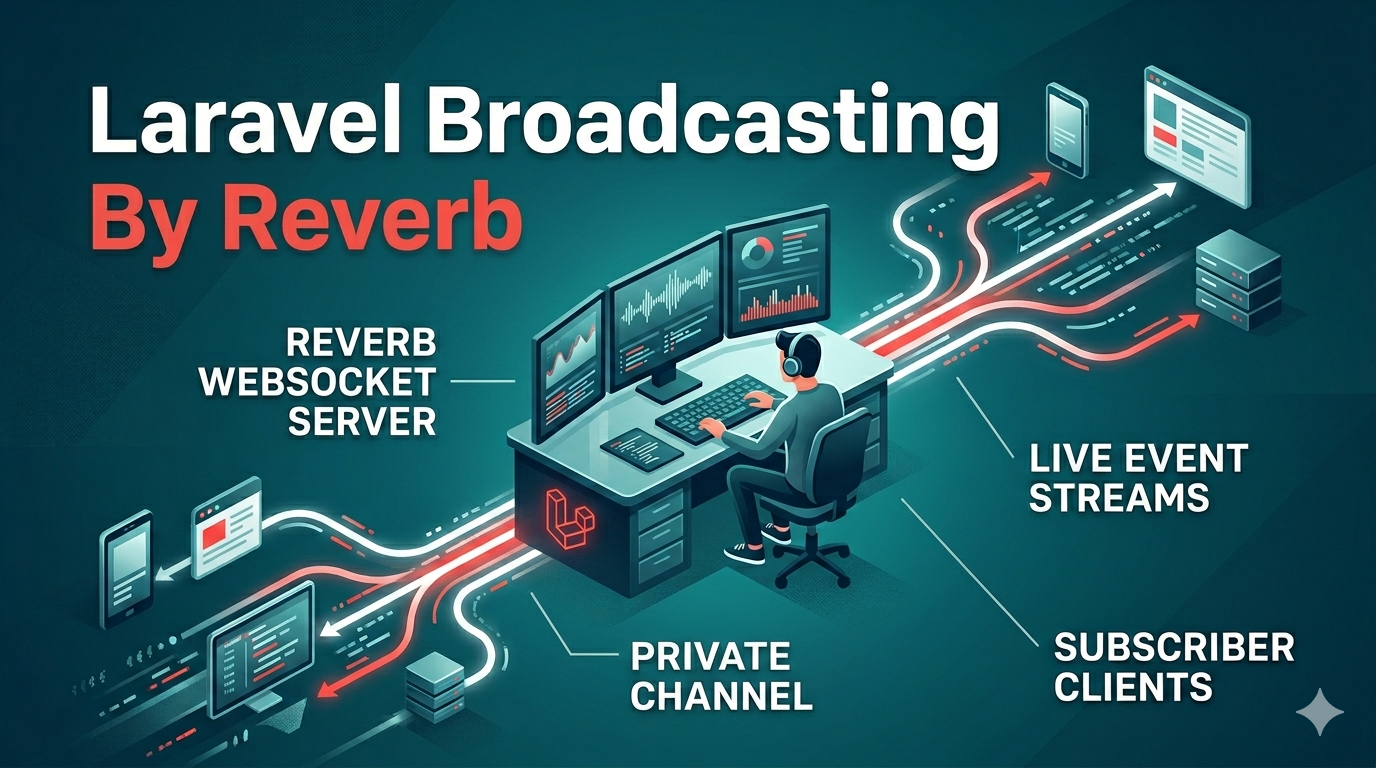
Reverb is a PHP WebSocket server built on top of ReactPHP, distributed as a first-party Laravel package. It speaks the Pusher wire protocol — meaning the JavaScript client (pusher-js) and laravel-echo work against it unchanged. If you already had a Laravel app talking to Pusher or Soketi, switching to Reverb is mostly a config change.
Install with the dedicated artisan command, which also wires up config/broadcasting.php, env keys, the JS bootstrap, and a default channel auth route:
php artisan install:broadcastingIt will ask whether you want Reverb or Pusher. Pick Reverb. You now have a working broadcasting setup. Run the server:
php artisan reverb:startBy default it binds to 0.0.0.0:8080 and uses the app key/secret you generated. Configuration lives in config/reverb.php (apps, allowed origins, scaling). In production you'll put it behind Nginx with a TLS terminator and use a process supervisor — same shape as any persistent daemon.
How Broadcasting Wires The App To The Browser
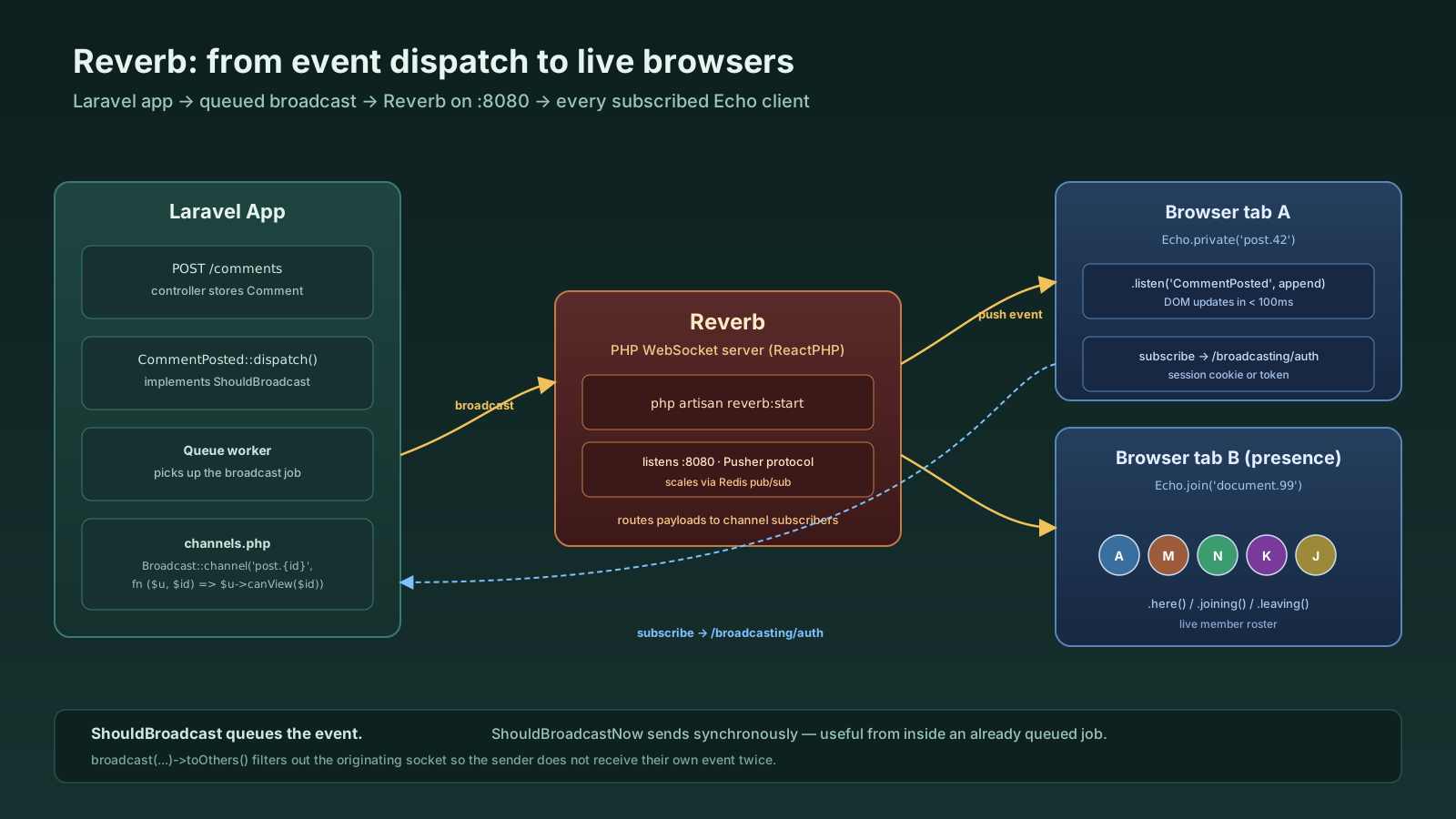
Broadcasting is event-driven. You raise an event in PHP, mark it as broadcastable, and Laravel pushes the payload to a channel. The browser is subscribed to that channel and reacts.
namespace App\Events;

use App\Models\Comment;
use Illuminate\Broadcasting\Channel;
use Illuminate\Broadcasting\InteractsWithSockets;
use Illuminate\Broadcasting\PrivateChannel;
use Illuminate\Contracts\Broadcasting\ShouldBroadcast;
use Illuminate\Foundation\Events\Dispatchable;
use Illuminate\Queue\SerializesModels;

class CommentPosted implements ShouldBroadcast
{
    use Dispatchable, InteractsWithSockets, SerializesModels;

    public function __construct(public Comment $comment) {}

    public function broadcastOn(): array
    {
        return [new PrivateChannel('post.'.$this->comment->post_id)];
    }

    public function broadcastWith(): array
    {
        return [
            'id'      => $this->comment->id,
            'body'    => $this->comment->body,
            'author'  => $this->comment->author->name,
            'postedAt'=> $this->comment->created_at->toIso8601String(),
        ];
    }
}
The ShouldBroadcast interface queues the broadcast. If you want it sent synchronously from the request, implement ShouldBroadcastNow instead — useful for events fired from within an already-queued job, but generally you want the queued version.
On the JavaScript side, you import Echo and Pusher and point them at Reverb:
import Echo from 'laravel-echo';
import Pusher from 'pusher-js';

window.Pusher = Pusher;
window.Echo = new Echo({
    broadcaster: 'reverb',
    key: import.meta.env.VITE_REVERB_APP_KEY,
    wsHost: import.meta.env.VITE_REVERB_HOST,
    wsPort: import.meta.env.VITE_REVERB_PORT,
    wssPort: import.meta.env.VITE_REVERB_PORT,
    forceTLS: (import.meta.env.VITE_REVERB_SCHEME ?? 'https') === 'https',
    enabledTransports: ['ws', 'wss'],
});

window.Echo.private(`post.${postId}`)
    .listen('CommentPosted', (e) => {
        appendComment(e);
    });
Three pieces — event class, channel, listener — and a comment posted from one tab appears in another tab in milliseconds.
Public, Private, And Presence Channels
Channels come in three flavors, each with different auth semantics.
- Public channels require no auth.
new Channel('news'). Useful for marketing-style fan-out where it doesn't matter who hears. - Private channels require auth.
new PrivateChannel('post.42'). The browser subscribes via Echo, Echo POSTs to your/broadcasting/authendpoint, and a callback inroutes/channels.phpreturns true/false based on the authenticated user. - Presence channels are private channels with member awareness. Subscribers receive a list of who else is in the channel and live join/leave events.
new PresenceChannel('post.42')and the auth callback returns user data (an array) instead of a boolean.
// routes/channels.php
use Illuminate\Support\Facades\Broadcast;

Broadcast::channel('post.{postId}', function ($user, $postId) {
    return $user->canViewPost($postId);
});

Broadcast::channel('document.{documentId}', function ($user, $documentId) {
    if (! $user->canEditDocument($documentId)) {
        return false;
    }
    return ['id' => $user->id, 'name' => $user->name, 'avatar' => $user->avatar_url];
});
The presence channel pattern is what you reach for when you want avatars-of-everyone-currently-viewing — Google Docs style. Echo gives you here(), joining(), leaving() on the subscription so the UI can update as people come and go.
Broadcasting To The Sender Or Not
A frequent confusion: when User A posts the comment, do they receive the broadcast they just triggered? By default, yes. Echo will hear its own event, you'll insert the comment into the DOM via the WebSocket reply, and you'll have a brief race with whatever optimistic UI you wrote.
The toOthers() helper handles it. It tells the broadcaster to skip the connection that originated the request:
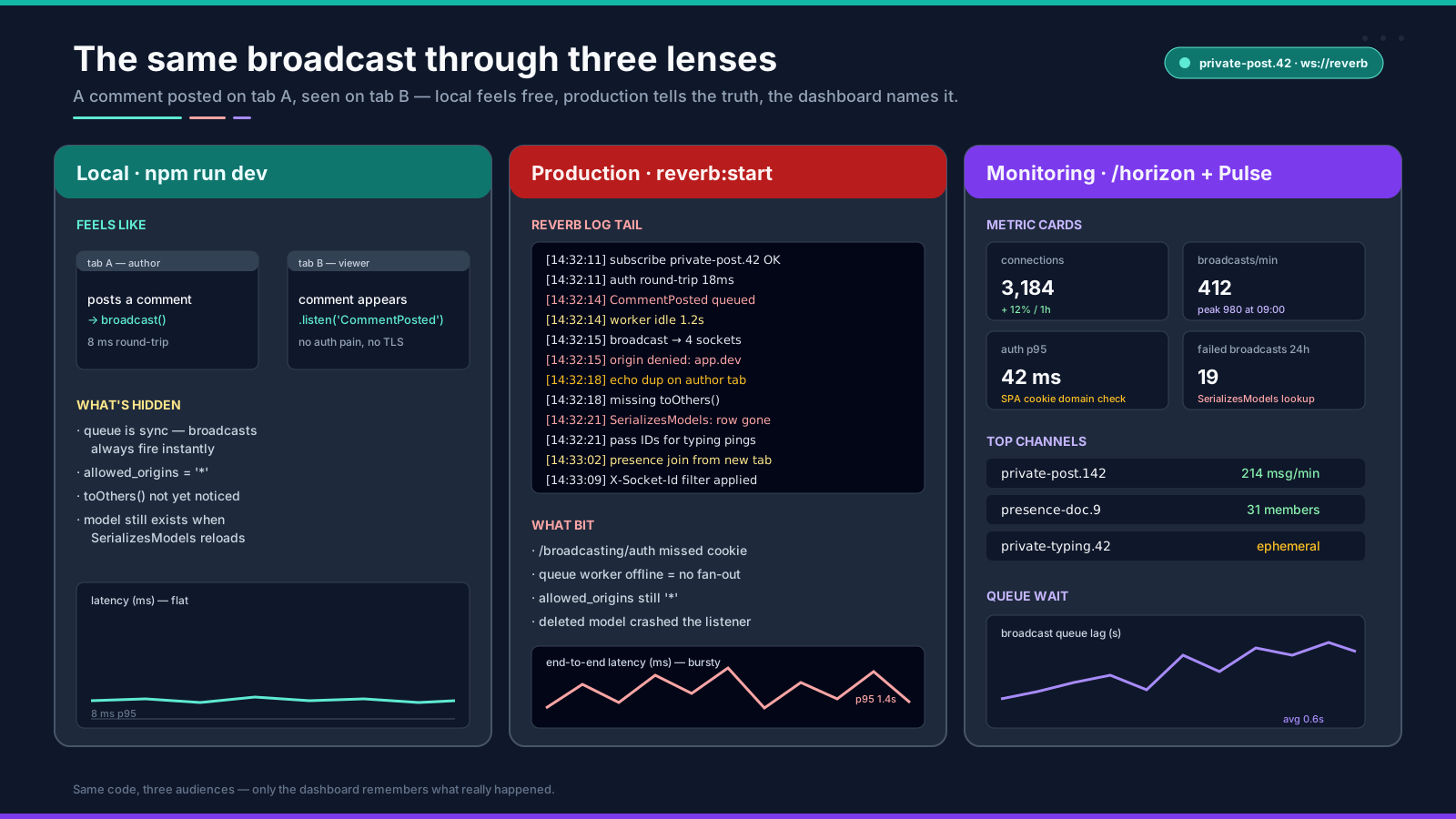
broadcast(new CommentPosted($comment))->toOthers();This works because Echo sends a X-Socket-Id header when subscribed, and Laravel uses it to filter on the broadcast. If you forget, your own UI shows duplicates. It's the most common Reverb bug.
Where Reverb Slots In Production
Reverb is one process. You start it, you keep it alive, and your Echo clients connect to it. The deployment shape that holds up:
- Process supervisor. systemd or supervisord, the same way you'd keep a queue worker running. There's a
reverb:restartcommand that signals running daemons to stop after the current connections drain. - Nginx in front. TLS termination, a
proxy_passupgrade to the WebSocket on port 8080. Reverb does not need to handle TLS itself. - Scaling. Single Reverb instance handles a lot — the docs benchmark thousands of concurrent connections per process. When you outgrow one, Reverb has a Redis-backed pub/sub mode so multiple Reverb processes share state. Configure
reverb.scaling.enabledand you can run several behind a load balancer with sticky sessions. - Same machine as the app. No reason it needs its own server. It's a daemon next to PHP-FPM and Horizon.
For most apps the right answer is one Reverb process per node, fronted by Nginx, started by supervisor, monitored by Pulse. That's it.
Common Gotchas Worth Knowing About
A few things bite teams new to Reverb:
- The auth endpoint.
/broadcasting/authneeds to be reachable from the browser with the user's session cookie or API token. SPA setups behind a separate domain occasionally forget the CORS config, and the symptom is silent — Echo just never subscribes. - Queue connection for broadcasts. Broadcasts implementing
ShouldBroadcastare queued. If your queue worker is down, your broadcast doesn't fire. UseShouldBroadcastNowfor events triggered from inside a job to avoid an extra hop. - Allowed origins.
config/reverb.phpdefaults to*in development. In production lock it down to your actual domains, otherwise any browser anywhere can connect. - Model serialization.
SerializesModelsre-fetches the model when the queued broadcast runs. If the row was deleted between the dispatch and the broadcast, the broadcast crashes. For ephemeral events (UserStartedTyping), don't pass full Eloquent models — pass IDs and handle the lookup in the listener. - Heroku and other ephemeral platforms. A WebSocket server needs a long-lived process. Heroku's request timeout will kill it. Reverb is a fit for VPS, Forge, Vapor (with caveats), or your own Kubernetes — not for "12-factor PaaS where every dyno reboots in 24 hours" without thought.
When You Don't Need Broadcasting At All
The trap with real-time is that it sounds cooler than what the product actually needs. Two questions to ask before you reach for Reverb:
- Does the user expect updates within seconds, or within a refresh? If they tab away and come back, polling every 30 seconds is fine. Real-time matters when latency between users is the feature.
- Is this driven by another user, or by a server-side process? If it's a long-running job and the user is staring at the screen waiting, a simple SSE endpoint (or polling with exponential backoff) ships in a fraction of the time.
Reverb is great. So is not needing it. Treat the WebSocket as a tool, not a default.
A One-Sentence Mental Model
Reverb is a Pusher-compatible WebSocket server that runs next to your Laravel app — broadcastable events queue up, push through Reverb, and arrive in Echo clients on private or presence channels with auth handled by routes/channels.php, which is everything you actually need to build live UI without paying anyone per connection.