A Laravel codebase that has been in production for two years almost always has the same three problems with async work. First, nobody can quite tell whether a piece of logic runs synchronously inside the request or somewhere else later. Second, when a queued job fails at 3am, the trail of "what was supposed to happen here" goes cold after the first listener. Third, the same dispatch(new SendEmail) line appears in seven controllers with slightly different arguments.
The fix is not "use more events" or "queue everything." It is knowing which of the three tools — events, listeners, jobs — is the right one for the situation, and being disciplined about the boundary between them.
Three Tools, Three Different Jobs
The vocabulary is easy to confuse because all three end up "doing something later." Sharpen the definitions:
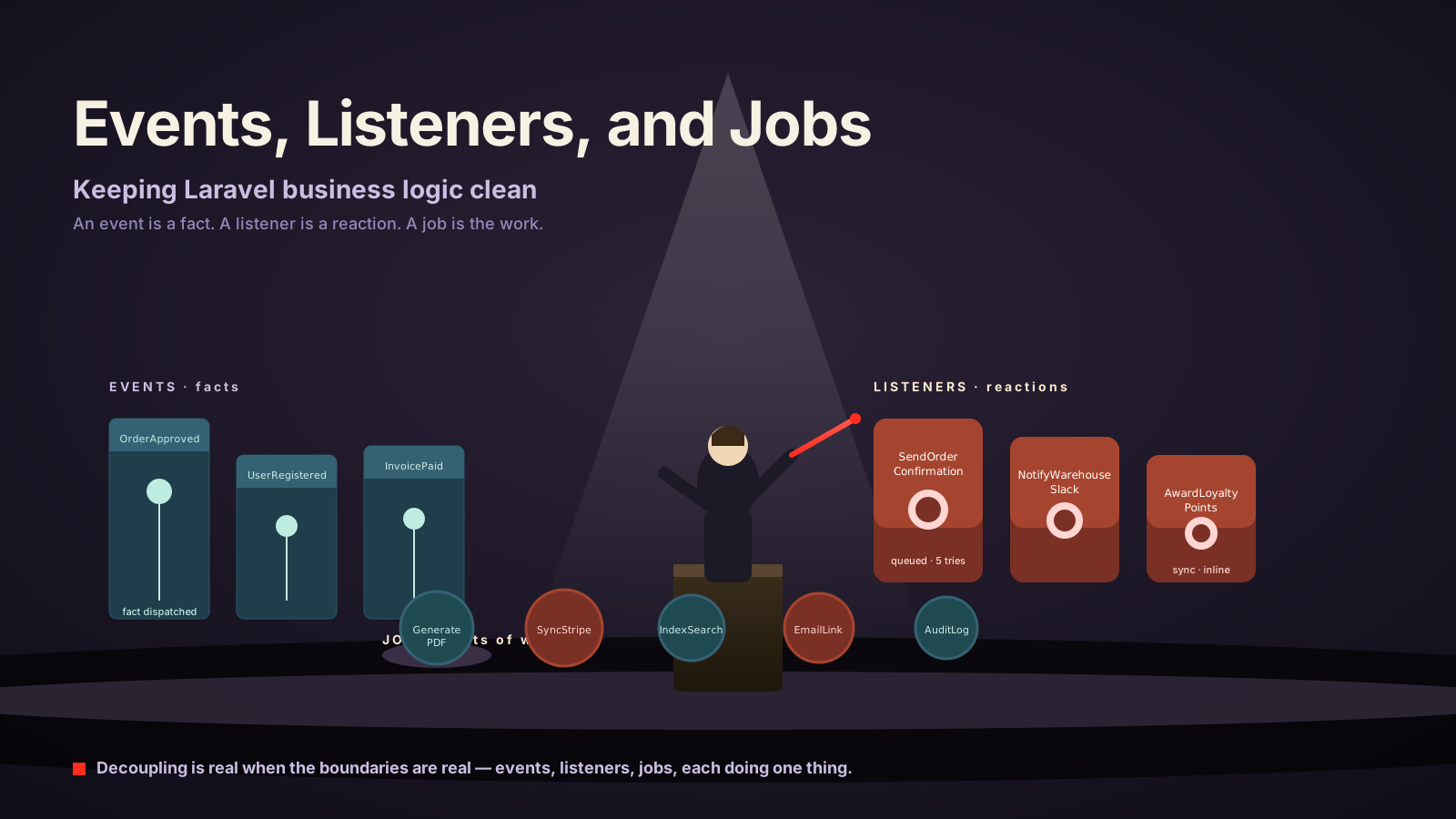
- Event — a fact. Something happened.
OrderApproved,UserRegistered,InvoicePaid. An event has no opinion about what should happen next. - Listener — a reaction. "When
OrderApprovedhappens, send the confirmation email." A listener is bound to one event and decides what to do about it. - Job — a unit of work. "Send this email." "Sync this customer to Stripe." A job has no opinion about why it was dispatched. You can dispatch it from a listener, a controller, an Artisan command, or another job.
The cleanest mental model is that an event broadcasts what happened to everyone who cares, listeners decide how to react, and jobs do the actual work. When code mixes those roles — a listener that contains payment logic, a job that knows about three different events, an event that "should also send an email" — the system gets unreadable fast.
Dispatch An Event When You Want Fan-Out
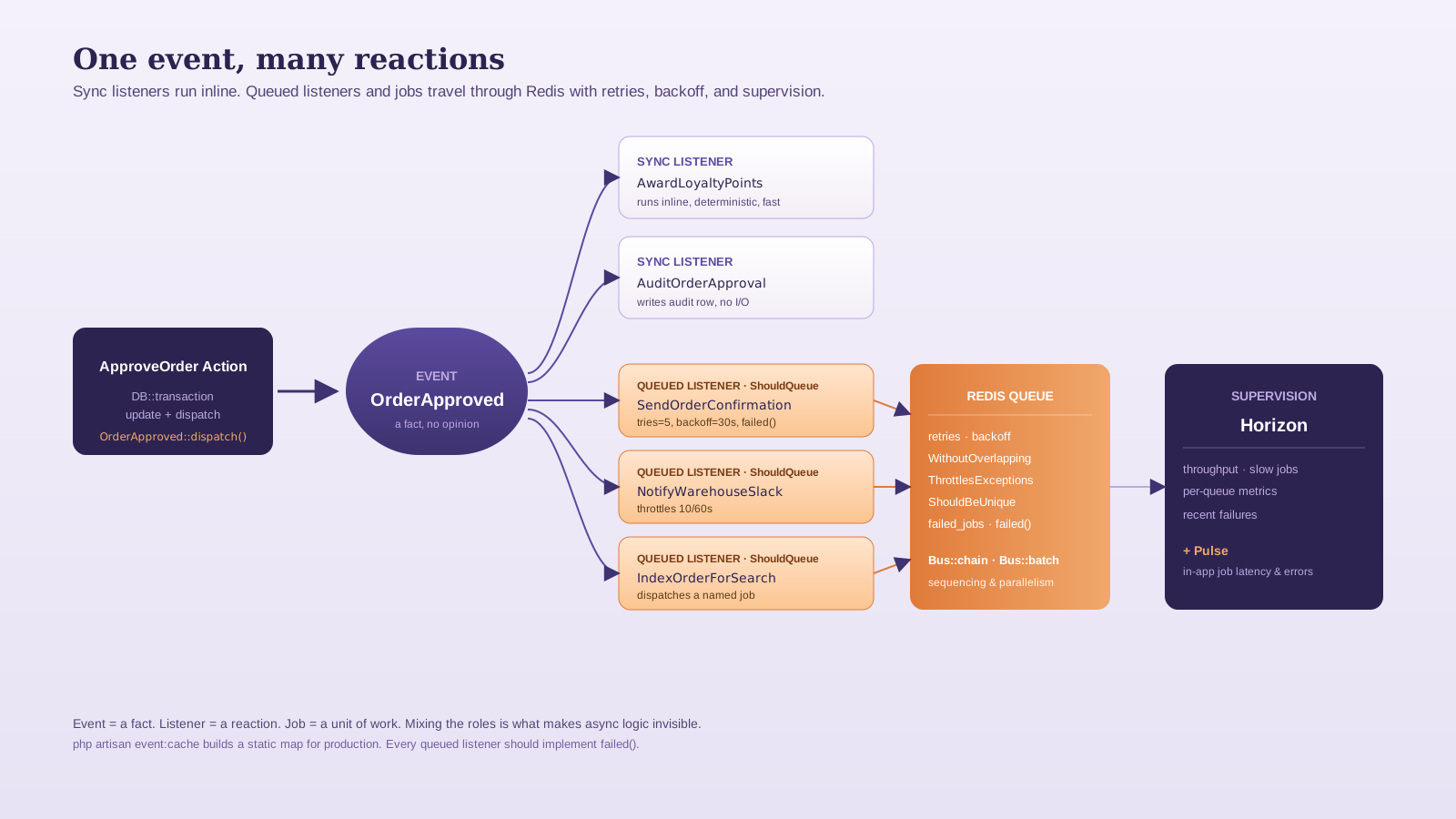
Events earn their keep when more than one thing should happen, and when those things are not the responsibility of the code that triggered them. An order being approved, for example, may need to:
- Send a confirmation email
- Push a notification to the warehouse Slack channel
- Update the customer's loyalty points
- Index the order for search
- Append a row to an audit log
If you put all of that in your ApproveOrder Action, the Action is no longer about approving an order — it is about every consequence of that, and the next consequence forces a code change in the same place.
// app/Actions/Orders/ApproveOrder.php
final class ApproveOrder
{
    public function execute(Order $order, User $approver): Order
    {
        return DB::transaction(function () use ($order, $approver) {
            $order->update([
                'status'      => 'approved',
                'approved_by' => $approver->id,
                'approved_at' => now(),
            ]);

            OrderApproved::dispatch($order->fresh());

            return $order;
        });
    }
}// app/Events/OrderApproved.php
final class OrderApproved
{
use Dispatchable, SerializesModels;
public function __construct(public readonly Order $order) {}
}The Action now does one thing: change the order's state and announce that fact. Listeners take it from there.
Sync Listeners vs Queued Listeners
By default, a listener runs synchronously, in the same PHP process that dispatched the event. That is fine for cheap, deterministic work — recording an audit row, awarding loyalty points from local data. It is wrong for anything that talks to a network, sends an email, or could plausibly take more than a few hundred milliseconds.
To queue a listener, implement ShouldQueue:
namespace App\Listeners\Orders;

use App\Events\OrderApproved;
use Illuminate\Contracts\Queue\ShouldQueue;
use Illuminate\Queue\InteractsWithQueue;

final class SendOrderConfirmation implements ShouldQueue
{
    use InteractsWithQueue;

    public int $tries = 5;
    public int $backoff = 30; // seconds, or array for progressive backoff

    public function handle(OrderApproved $event): void
    {
        Mail::to($event->order->customer)
            ->send(new OrderConfirmationMail($event->order));
    }

    public function failed(OrderApproved $event, \Throwable $e): void
    {
        Log::error('order.confirmation.mail.failed', [
            'order_id' => $event->order->id,
            'error'    => $e->getMessage(),
        ]);
    }
}
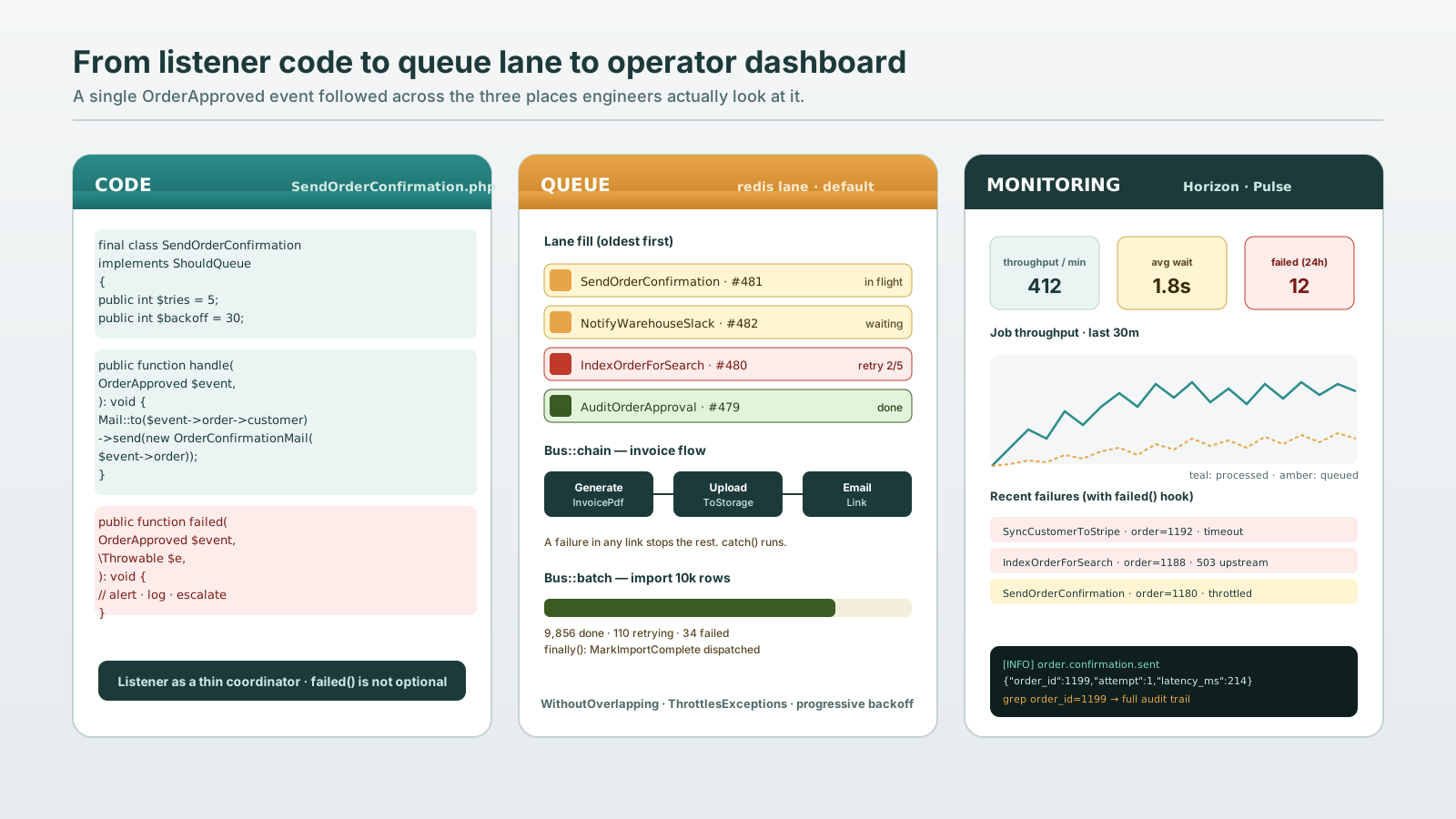
The failed() hook is the part most teams forget. A queued listener that fails five times disappears into failed_jobs with a stack trace nobody reads. A failed() method is your chance to decide what "permanently failed" means for that listener — alert someone, mark the order as needing manual review, escalate to a different queue.
Listener Discovery, Not Manual Mapping
Older Laravel taught you to register every listener in EventServiceProvider::$listen. From Laravel 11, listener auto-discovery is the default — drop a class in app/Listeners, type-hint the event in handle(), and the framework wires it up. The $listen array still works as an explicit override. If you want it back as the source of truth, set protected static bool $shouldDiscoverEvents = false; on the provider.
For production, run php artisan event:cache in your deploy step. It builds a static map of events to listeners so the framework does not scan files at runtime. Pair it with event:clear in development.
Jobs For Standalone Work
A job is the right tool when the work is meaningful on its own — not as a reaction, but as something you would dispatch from multiple places. "Generate this report PDF and email it." "Recompute the customer's loyalty tier." "Sync this product to the search index." Code that calls these usually does not care why they need to run, only that they do.
final class SyncCustomerToStripe implements ShouldQueue
{
    use Dispatchable, InteractsWithQueue, Queueable, SerializesModels;

    public int $tries = 3;
    public array $backoff = [10, 60, 300];

    public function __construct(public readonly Customer $customer) {}

    public function handle(StripeClient $stripe): void
    {
        $stripe->customers->update($this->customer->stripe_id, [
            'email' => $this->customer->email,
            'name'  => $this->customer->name,
        ]);
    }

    public function uniqueId(): string
    {
        return "stripe-sync:{$this->customer->id}";
    }
}
Dispatch from anywhere that needs it:
SyncCustomerToStripe::dispatch($customer);
SyncCustomerToStripe::dispatch($customer)->onQueue('integrations');
SyncCustomerToStripe::dispatch($customer)->delay(now()->addMinutes(5));
Implementing ShouldBeUnique (with uniqueId()) prevents the same job for the same customer from queueing twice within uniqueFor seconds — useful for sync-style work where a duplicate run is wasted at best and harmful at worst.
Listener Or Job? A Useful Test
The temptation is to make every listener queued, or to skip listeners entirely and dispatch jobs from the controller. Two questions sort this out:
- Would this code make sense in any context other than "X just happened"? If yes, it is a job. If no, it is a listener for the event named X.
- Does anything else need to react to X? If yes, the dispatcher of X should fire an event, not a job. The event is the announcement; the listeners are the reactions.
Practical pattern: dispatch one event per business fact. Have listeners decide whether they react synchronously or queue. Inside a queued listener, if the work is also useful elsewhere, have the listener dispatch a named job.
public function handle(OrderApproved $event): void
{
    GenerateOrderInvoicePdf::dispatch($event->order);
    NotifyAccounting::dispatch($event->order);
}
The listener stays a thin coordinator. The jobs stay reusable. The event stays a fact.
Sequencing — Bus::chain And Bus::batch
Some workflows need order. Build a PDF, then upload it to S3, then email a link to the customer. Each step depends on the previous one's output. That is Bus::chain:
Bus::chain([
    new GenerateInvoicePdf($invoice),
    new UploadInvoiceToStorage($invoice),
    new EmailInvoiceLink($invoice),
])->catch(function (\Throwable $e) use ($invoice) {
    Log::error('invoice.chain.failed', ['invoice' => $invoice->id, 'error' => $e->getMessage()]);
})->dispatch();
If any link fails, the rest of the chain stops and catch() runs. That is usually what you want for a multi-step workflow — a half-done chain is worse than a failed one because it lies about state.
Some workflows need parallelism. Process 10,000 imported rows concurrently, then run a "finalize import" step only when all of them finish. That is Bus::batch:
$batch = Bus::batch($jobs)
    ->name('import-customers')
    ->onQueue('imports')
    ->allowFailures()
    ->finally(fn (Batch $batch) => MarkImportComplete::dispatch($importId))
    ->dispatch();
->allowFailures() lets the batch continue even when some jobs fail; without it, one failure cancels the rest. ->finally() runs whether the batch succeeded or not — the right place to update import status.
Middleware, Overlap, And Backoff
Once you have queued listeners and jobs, the operational concerns get real. Two pieces of the framework earn their keep:
public function middleware(): array
{
    return [
        new WithoutOverlapping($this->customer->id),
        (new ThrottlesExceptions(10, 60))->backoff(60),
    ];
}
WithoutOverlapping ensures only one job for a given key ($this->customer->id) runs at a time — useful for sync-style jobs that should not race each other. ThrottlesExceptions slows down a job that is hitting an external rate limit instead of burning through retries. Both are Illuminate\Queue\Middleware classes you return from a middleware() method on the job.
Backoff is the other lever. public array $backoff = [10, 30, 90, 300]; gives you progressive backoff between retries. For external APIs, this is the difference between gracefully riding out a 30-second outage and DOS-ing the upstream the moment it comes back.
Observability — Or You Did Not Ship
A queued system is invisible by default. Three things make it observable:
- Horizon for Redis queues. The dashboard shows job throughput, failures, slow jobs, and per-queue metrics. Install it the moment you have more than one worker.
- Pulse for in-app metrics. Slow jobs and slow queries land here automatically.
failed()hooks on every job and queued listener. The default failed-jobs table is fine as a backstop, but it is not where bugs get fixed — it is where they go to die.
A small habit that pays for itself: every queued listener and job logs a structured line on success and failure with the IDs of the entities involved. When something goes wrong six months later, "grep for order_id=12345" is the difference between a five-minute and a five-hour debugging session.
The shape that holds up over time is boring on purpose. Events are facts. Listeners react to facts. Jobs do work. Each one is small. Each one logs. Each one fails out loud. The decoupling is real because the boundaries are real — not because you split the code into more files.