Every Laravel project hits the same tipping point with file uploads. The first version is $request->file('photo')->store('uploads') and a happy demo. Six months later you've got a public bucket full of user filenames, an avatar endpoint someone used to deliver malware, and an image/jpeg that's actually a PHP shell because it didn't get sniffed.
Uploads aren't conceptually hard. They're a sequence of small steps where skipping any one of them has consequences. The teams that ship safe uploads aren't the ones that picked the perfect package — they're the ones who treat the upload path as a small, deliberate pipeline.
The Five Things An Upload Has To Do
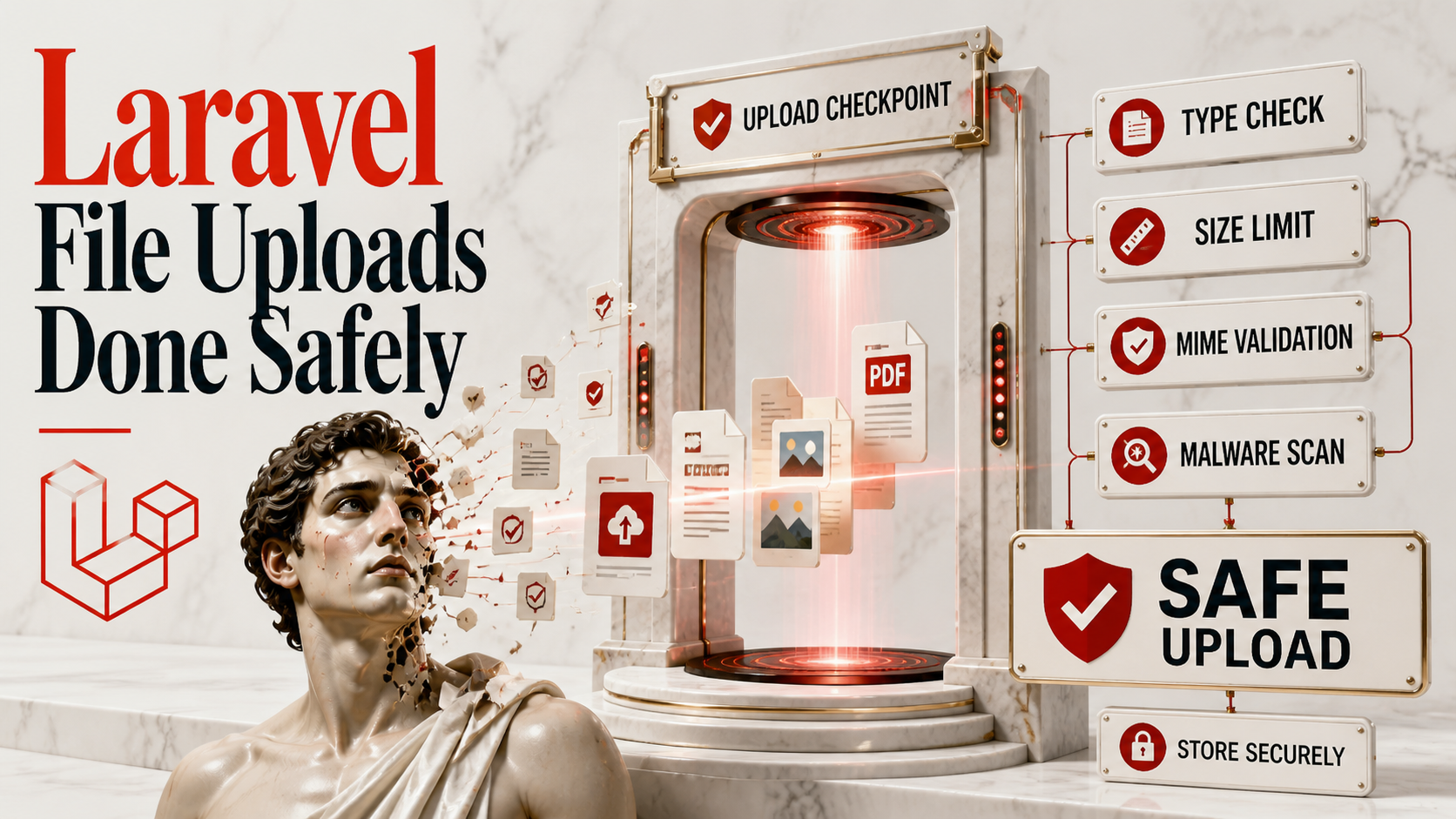
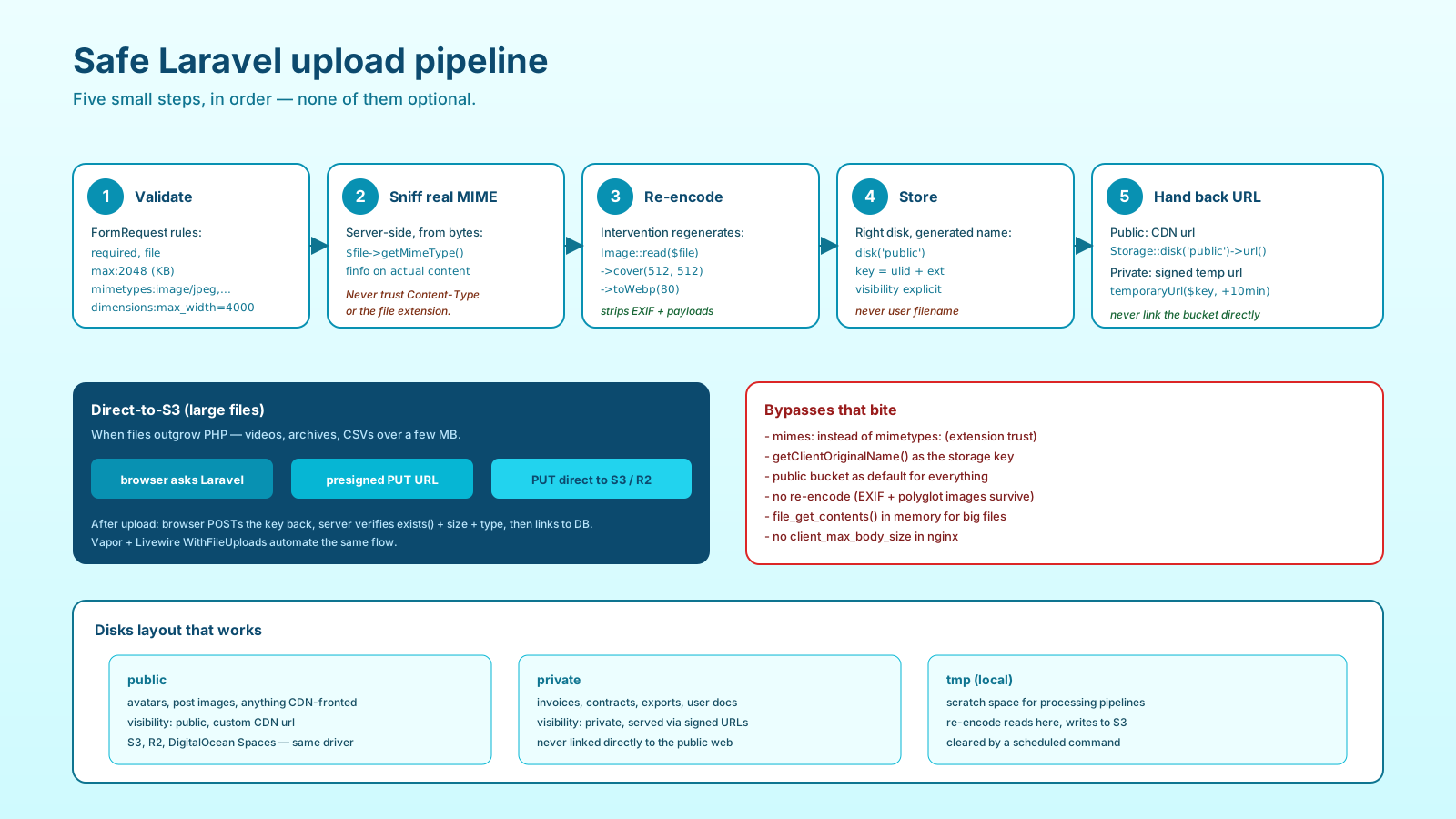
A production-grade upload, regardless of size or use case, does five things in this order:
- Validate the request — size, type, presence — before reading the file.
- Sniff the real MIME type from the file contents, not the extension or the header the client sent.
- Re-encode anything that's actually a media file, to strip metadata and any embedded payload.
- Store with a generated filename, on the right disk, with the right ACL.
- Hand back a URL — signed if the file is private, public if it isn't.
Skip any one and you've got a bug. Skip the third and your uploads carry GPS metadata or worse. Skip the fourth and a user's filename ends up as a path on disk, which is how directory traversal works.
Validation At The Edge
The cheapest layer of defense is validation, and it goes in a FormRequest:
namespace App\Http\Requests;

use Illuminate\Foundation\Http\FormRequest;

class UploadAvatarRequest extends FormRequest
{
    public function rules(): array
    {
        return [
            'photo' => [
                'required',
                'file',
                'max:2048', // KB
                'mimetypes:image/jpeg,image/png,image/webp',
                'dimensions:min_width=100,max_width=4000,max_height=4000',
            ],
        ];
    }

    public function authorize(): bool
    {
        return $this->user()->can('update', $this->route('user'));
    }
}
A few non-obvious things matter here. mimetypes: not mimes: — both rules sniff the actual file contents (not the client's Content-Type header), but mimetypes: lets you specify the exact MIME types you accept (image/jpeg, image/png), while mimes: only takes extensions like jpg,png and asks Laravel to map them to a MIME type for you. For uploads where you care about the precise wire format, mimetypes: is the rule that says what you actually mean. The max:2048 is in kilobytes (Laravel's quirk), so this allows up to 2MB. dimensions: is its own rule and doesn't double-check the MIME — both are needed.
Authorization belongs on the request, not in the controller. Whether someone is allowed to upload an avatar is a permission question, and the upload should never even start if the answer is no.
The Disks You Actually Want
Laravel's filesystem abstracts over local disk, public disk, S3, and anything S3-compatible (Cloudflare R2, MinIO, DigitalOcean Spaces — the S3 driver covers all of them). Your config/filesystems.php for a real app usually has three disks:
'disks' => [
    'public' => [   // CDN-fronted, world-readable
        'driver'     => 's3',
        'key'        => env('AWS_ACCESS_KEY_ID'),
        'secret'     => env('AWS_SECRET_ACCESS_KEY'),
        'region'     => env('AWS_DEFAULT_REGION'),
        'bucket'     => env('AWS_PUBLIC_BUCKET'),
        'visibility' => 'public',
        'url'        => env('AWS_PUBLIC_URL'), // CloudFront or R2 custom domain
    ],
    'private' => [  // private docs, signed URLs
        'driver'     => 's3',
        'bucket'     => env('AWS_PRIVATE_BUCKET'),
        'visibility' => 'private',
        // ... same key/secret/region
    ],
    'tmp' => [      // local, processing scratch
        'driver' => 'local',
        'root'   => storage_path('app/tmp'),
    ],
],
Two buckets, not one. Public assets — avatars, post images, anything you want to CDN — live in public. Anything sensitive — invoices, contracts, exports — lives in private and is served through signed URLs. Mixing them is the bug that gets you on Twitter when someone's medical document is suddenly indexed by Google.
The Storage Step, Done Once And Properly
Here's the minimum a server-side upload action looks like:
namespace App\Actions\Uploads;

use Illuminate\Http\UploadedFile;
use Illuminate\Support\Facades\Storage;
use Illuminate\Support\Str;
use Intervention\Image\Laravel\Facades\Image;

final class StoreAvatar
{
    public function __invoke(UploadedFile $file, int $userId): string
    {
        // 1. Sniff the real MIME from contents.
        $mime = $file->getMimeType();
        if (! in_array($mime, ['image/jpeg', 'image/png', 'image/webp'], true)) {
            abort(422, 'Unsupported image type');
        }

        // 2. Re-encode through Intervention to strip EXIF + any payload.
        $clean = Image::read($file)
            ->cover(512, 512)
            ->toWebp(80)
            ->toString();

        // 3. Generate the filename — never trust the client's.
        $name = sprintf('avatars/%d/%s.webp', $userId, Str::ulid());

        // 4. Put on the public disk with explicit visibility.
        Storage::disk('public')->put($name, $clean, 'public');

        return Storage::disk('public')->url($name);
    }
}
Five concerns, five lines. The MIME check is a belt with the validator's suspenders. The Intervention re-encode means the bytes that hit S3 are bytes Intervention generated, not bytes the user sent — that's the most reliable way to strip EXIF, embedded PHP, and obvious polyglot tricks. The filename is a ULID, not $file->getClientOriginalName(), which is one of the most user-controlled and dangerous values in the request.
For non-image files (PDFs, CSVs, ZIPs), you can't re-encode safely — you store the raw bytes. In that case the discipline is: sniff the MIME, store on the private disk, and never serve the file with the user's filename in a Content-Disposition header without sanitizing it first.
Streaming, Not Loading
A 200MB upload that goes through $request->file('video')->store(...) is fine because Laravel's UploadedFile already keeps it on disk in tmp rather than in memory. A 200MB upload that you file_get_contents() to pass to Intervention is not fine — that's 200MB of process memory per concurrent request.
The rule: process files on disk, not in memory. Intervention reads from a file path or stream. S3 uploads via putFile move bytes without buffering in PHP. When you genuinely need to stream — say, a 2GB export — Storage::writeStream($path, $resource) and Storage::readStream($path) exist and are the right tool.
Direct-To-S3 For Files That Don't Belong On Your App Server
Once your files get past a few megabytes, routing the upload through PHP is wasted bandwidth and wasted memory. The pattern that scales is presigned PUT:
// app/Http/Controllers/Uploads/PresignController.php
use Aws\S3\S3Client;

public function __invoke(PresignRequest $req, S3Client $s3): array
{
    $key = sprintf('uploads/%s/%s', $req->user()->id, Str::ulid());

    $cmd = $s3->getCommand('PutObject', [
        'Bucket'      => config('filesystems.disks.private.bucket'),
        'Key'         => $key,
        'ContentType' => $req->validated('contentType'),
    ]);

    $url = (string) $s3->createPresignedRequest($cmd, '+5 minutes')->getUri();

    return ['url' => $url, 'key' => $key];
}
The browser gets a one-time URL it can PUT directly to S3, skipping your app server entirely. After the upload finishes, the browser POSTs the key back to your server, you verify the object exists (Storage::disk('private')->exists($key)), check the size and content type, and link the file to a database row.
Laravel Vapor automates this end-to-end. Livewire's WithFileUploads does its own version for Livewire forms. For everything else, the snippet above is enough.
The Things That Will Bite You
A short list of bugs I've seen in real projects:
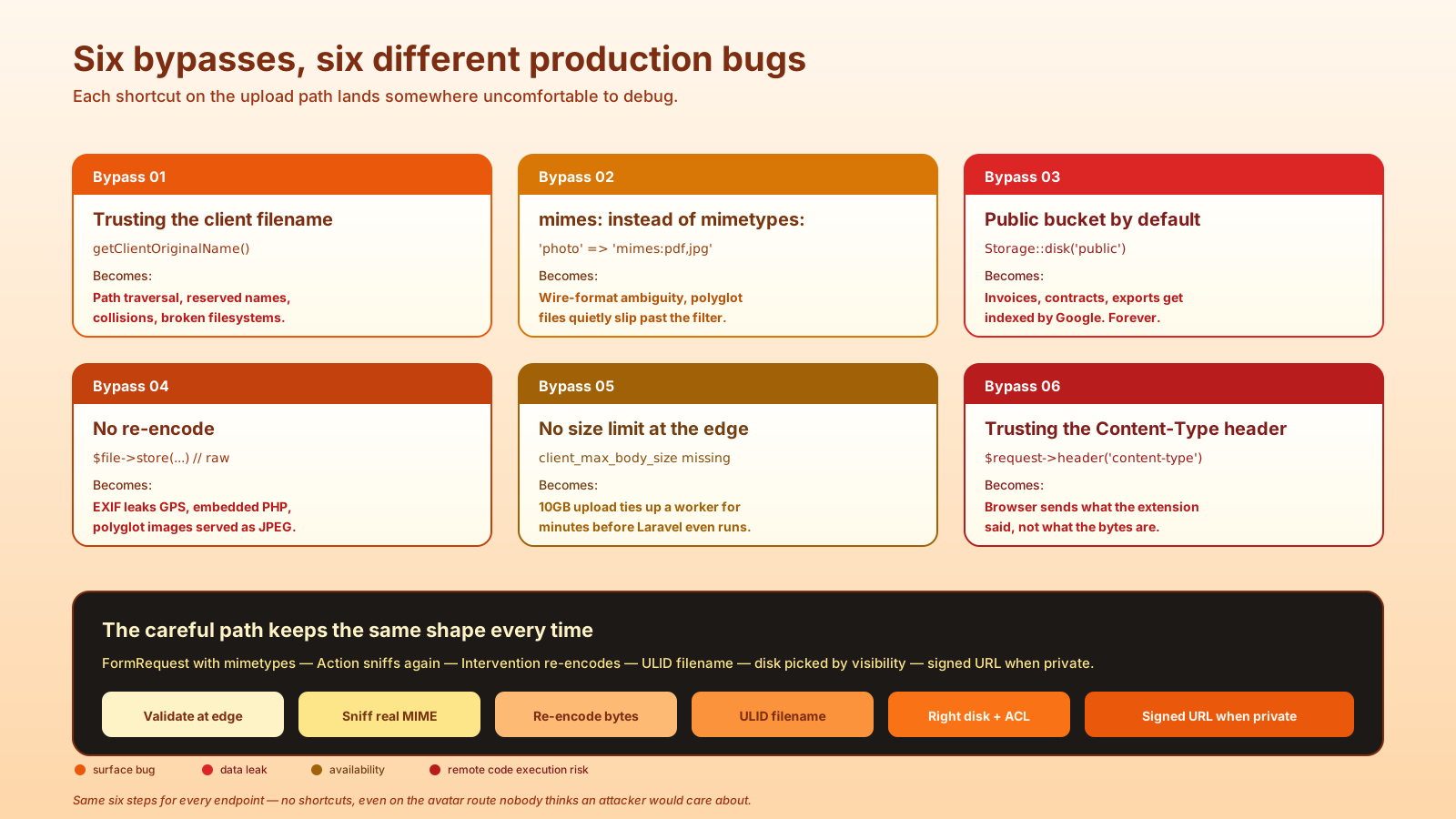
mimes:pdf,jpginstead ofmimetypes:application/pdf,image/jpeg. Both read the file's bytes — butmimes:works in extensions and lets Laravel's MIME map decide what they mean, whilemimetypes:pins the exact wire-format types. For anything security-sensitive usemimetypes:, where the rule literally says what you accept.- Storing user filenames as object keys.
getClientOriginalName()is a string the user fully controls — including../, including reserved names, including Unicode that breaks your filesystem. - Public bucket for private files. Defaults are sticky; once a file lives in a public bucket, every link to it is shareable forever. Pick the disk per file type, not per project.
- No re-encoding. Stripping EXIF is a privacy concern. Catching polyglot images is a security one. Both go away if Intervention generates the bytes you store.
- No size limit at the web server. PHP's
upload_max_filesizeis a backstop. The first line of defense isclient_max_body_sizein nginx (or the equivalent in your reverse proxy) — without it, a 10GB upload will tie up a worker for minutes before Laravel ever sees it. - Trusting the
Content-Typeheader. The browser sends what the file's extension was.getMimeType()runsfinfoon the actual bytes. Same word, very different trust level.
A Working Default For New Endpoints
If I'm adding a new upload route to a Laravel project today, the shape is always the same: a FormRequest that authorizes and validates with mimetypes:, an Action class that sniffs MIME again as a backstop, re-encodes if it's an image, generates a ULID filename, picks the right disk based on visibility, and returns a URL — signed if the disk is private. Direct-to-S3 only when the file size demands it.
That's six steps. None of them are clever. The reason secure Laravel uploads stay secure is that nobody on the team treats any of those steps as optional, even on the avatar endpoint that "no attacker would care about." The careful path is also the simple one — once you've done it twice, you stop wanting to take shortcuts.