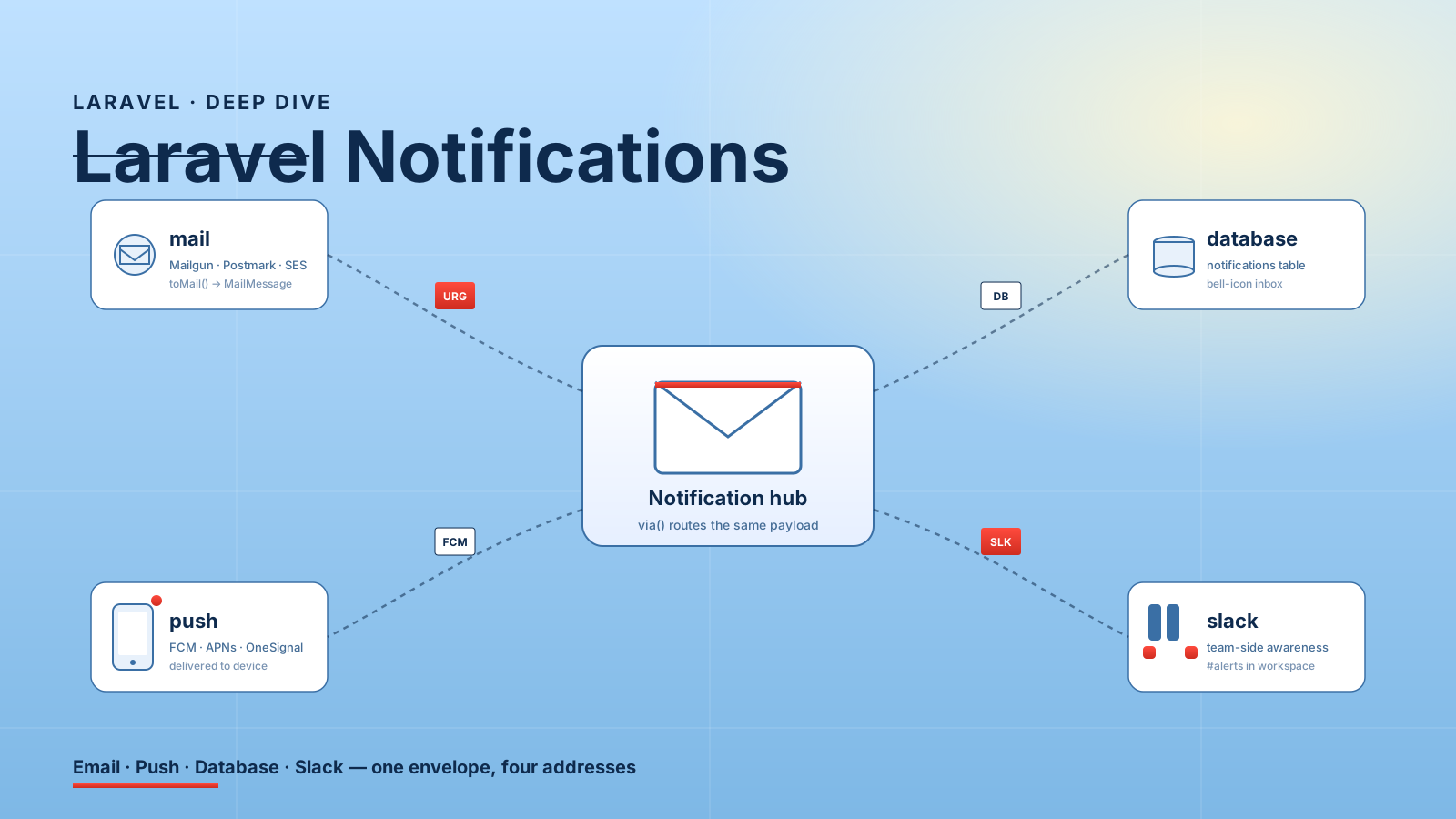
A new feature lands. Marketing wants the user to get an email when their report is ready. Product wants a bell icon on the dashboard with the same news. Mobile wants a push notification. Support wants every one of these to land in a Slack channel so they can see what customers see.
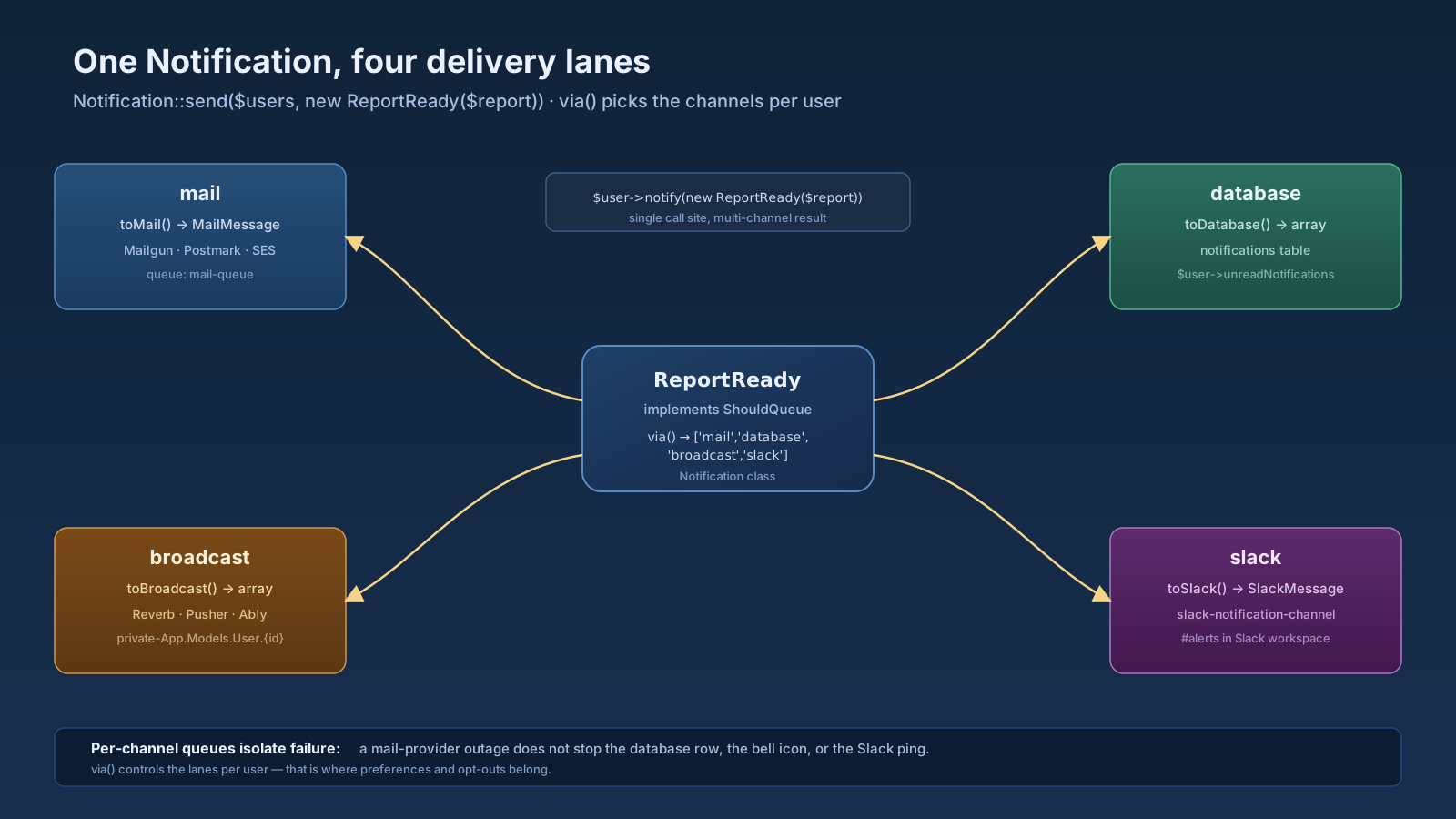
That is the moment the Laravel Notification system becomes useful. One class, one via() method that returns a list of channels, and the same business event lights up four places at once. It is also the moment teams quietly add three notification packages they don't need, queue everything synchronously by accident, and end up debugging "why did the email send but the bell never appeared?" for an afternoon.
Notifications are well-designed and easy to misuse. This article is about both halves.
What A Notification Actually Is
A Notification is a class with a via() method that returns the channels it should be delivered through, plus one method per channel describing what to send.
php artisan make:notification ReportReadynamespace App\Notifications;
use App\Models\Report;
use Illuminate\Bus\Queueable;
use Illuminate\Contracts\Queue\ShouldQueue;
use Illuminate\Notifications\Messages\MailMessage;
use Illuminate\Notifications\Notification;
class ReportReady extends Notification implements ShouldQueue
{
use Queueable;
public function __construct(public Report $report) {}
public function via(object $notifiable): array
{
return ['mail', 'database', 'broadcast'];
}
public function toMail(object $notifiable): MailMessage
{
return (new MailMessage)
->subject('Your report is ready')
->line('We finished generating '.$this->report->name.'.')
->action('Open report', route('reports.show', $this->report));
}
public function toDatabase(object $notifiable): array
{
return [
'report_id' => $this->report->id,
'name' => $this->report->name,
];
}
public function toBroadcast(object $notifiable): array
{
return ['report_id' => $this->report->id];
}
}You send it in one of two shapes. From a single user: $user->notify(new ReportReady($report)). From a collection or to multiple recipients: Notification::send($users, new ReportReady($report)). The framework handles routing each channel, including queueing, because the class implements ShouldQueue.
The Channels That Ship In Core
Out of the box, Laravel ships with mail, database, and broadcast. SMS via Vonage (formerly Nexmo, Laravel's official SMS partner) lives in a first-party package — laravel/vonage-notification-channel — that you install when you need it. Slack has its own first-party package too — laravel/slack-notification-channel — which used to live in core and was extracted into a separate composer package a few releases back. Everything else is a vendor channel.
You can pick from a healthy ecosystem on laravel-notification-channels.com: Twilio for SMS that isn't Vonage, FCM for Android push, APNs for iOS push, Discord, Telegram, OneSignal, WhatsApp Business, and dozens more. They all follow the same shape — install the composer package, the via() array starts accepting a new string, and you implement toFcm(), toTwilio(), etc.
The channel that surprises new teams most is database. It writes a row to the framework-provided notifications table (use php artisan notifications:table then migrate). Each notifiable model gets a notifications() relationship for free. That is the bell-icon dashboard endpoint, served from a real table, with read/unread state.
$user->unreadNotifications;          // collection of unread
$user->notifications;                // all of them
$notification->markAsRead();         // when the user clicks
$user->unreadNotifications->markAsRead(); // mark all
You don't need a third-party package or a custom inbox table to ship this. That alone justifies the system existing.
When To Use A Notification Instead Of A Mailable
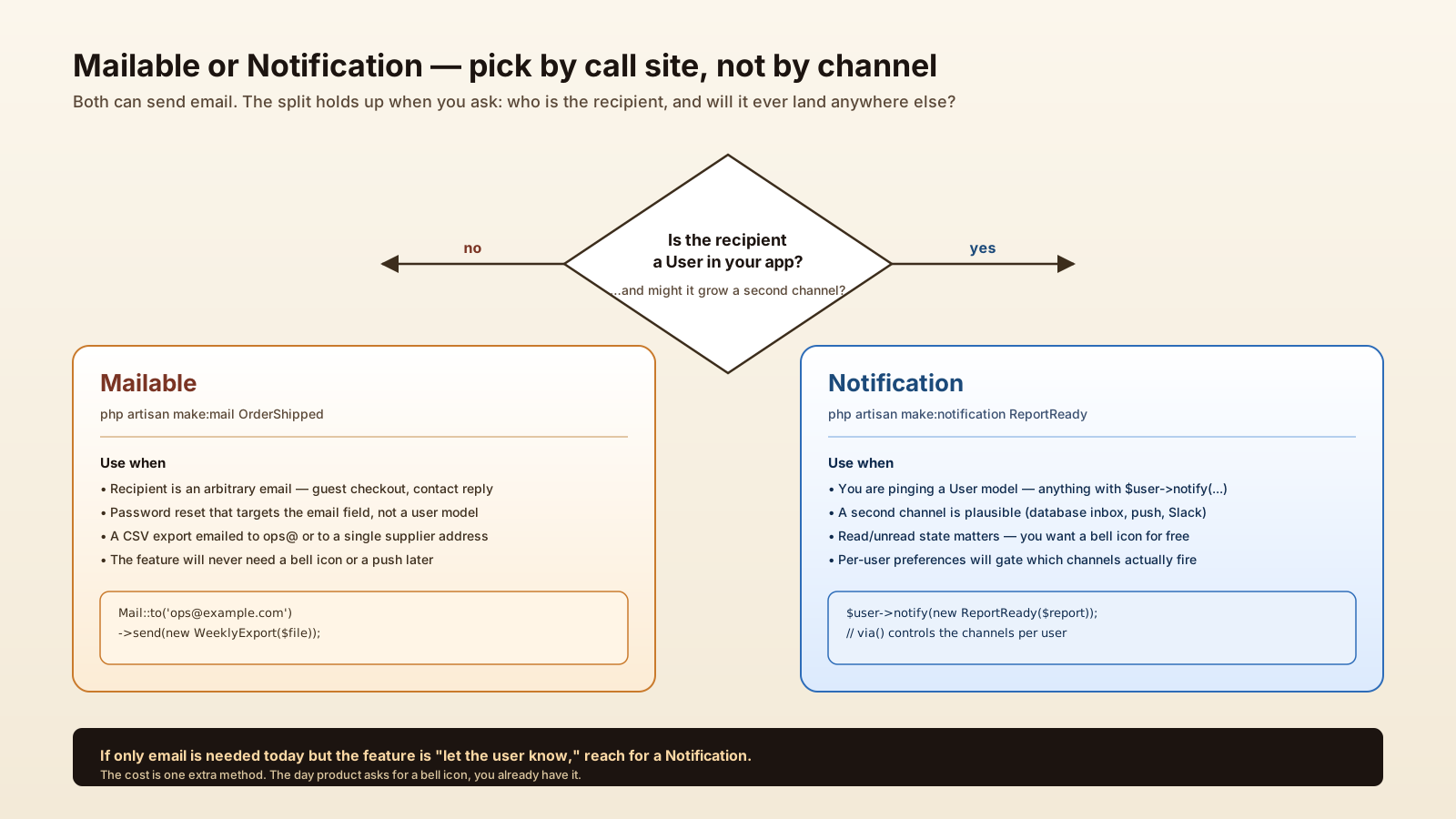
Mailables and Notifications overlap. Both can send email. Both can be queued. Both have nice fluent builders. The split that holds up in real codebases:
- Mailable for one-off transactional email that has nothing to do with users — order confirmations to a guest checkout, contact form replies, a CSV export emailed to a single address, password resets that go to the email field rather than the user model.
- Notification for "ping a user" semantics — anything where you might one day add a second channel, anything that should land in their database inbox, anything that's part of a series ("you have 3 unread notifications").
If you only need email today, but the feature is "let the user know when X happens," use a Notification. The cost is one extra method (via() returning ['mail']), and the moment product asks for the bell icon you already have it.
The Queue Trap
Implementing ShouldQueue on a Notification queues the entire notification — meaning every channel for that notifiable runs on the queue. That's usually what you want. What you don't always want is all channels on the same queue with the same retry policy.
Two failure modes:
- The mail channel goes down. The notification job fails. The whole notification retries — and now your database row is written twice or your broadcast fires again.
- The push channel takes 8 seconds and the rest of the notifications back up behind it.
The fix is per-channel queue routing:
public function viaQueues(): array
{
    return [
        'mail'      => 'mail-queue',
        'database'  => 'database-queue',
        'broadcast' => 'broadcast-queue',
    ];
}
Or skip queueing per channel by implementing shouldSend($notifiable, $channel) and a per-channel retry strategy. The point is that the default — one job for one notification — is fine until you have more than one channel that can fail differently.
User Preferences Without A Mess
The product question that turns up about three weeks after notifications ship: "users want to opt out of marketing pings but keep transactional ones." The right place for that is via(), not the call site.
public function via(object $notifiable): array
{
    $channels = ['database'];

    if ($notifiable->wantsEmail($this->category())) {
        $channels[] = 'mail';
    }

    if ($notifiable->wantsPush($this->category())) {
        $channels[] = 'fcm';
    }

    return $channels;
}

protected function category(): string
{
    return 'reports';
}
The notification asks the user model what categories they've opted into. Preference logic stays in one place; you don't have a forest of if ($user->wantsEmail) ... calls scattered across actions and listeners. New channel? One method. New category? One column.
Testing Notifications
Notification::fake() is the only API you usually need. It swaps the dispatcher for a recorder so nothing is actually sent and you assert what would have been.
use Illuminate\Support\Facades\Notification;

it('notifies the report owner when generation completes', function () {
    Notification::fake();

    $user   = User::factory()->create();
    $report = Report::factory()->for($user)->create();

    GenerateReport::run($report);

    Notification::assertSentTo($user, ReportReady::class, function ($n, $channels) {
        return in_array('mail', $channels) && in_array('database', $channels);
    });
});
The closure form lets you pin not just that a notification was sent, but via which channels and with what payload. That's how you catch "we silently dropped the database channel because a config typo broke via()" before it ships.
When Not To Use A Notification
Three signs you've reached for the wrong tool:
- The "notification" never reaches an end user. If the only recipient is
#alertsin your team Slack and there's no user model behind it, that's a log line or a Mailable to an alias, not a Notification. - You want fan-out to many recipients with different content per recipient. Notifications can do this, but a domain event with separate listeners is clearer when the messages diverge meaningfully.
- The thing you're sending is a marketing campaign. Use a real ESP (Mailchimp, Postmark Streams, Customer.io). Laravel notifications were not designed for unsubscribes, list segmentation, or deliverability tooling.
The notification system is great at "tell this user something happened." It's not a campaign tool, it's not an alerting platform, and it's not the right home for Notification::route('mail', $arbitraryAddress) calls that aren't really notifications at all.
A One-Sentence Mental Model
A Laravel Notification is a single class that owns one user-facing message across every channel that user might receive it through — mail, database inbox, broadcast, Slack, SMS, push — so when product asks for a fifth channel you add a method, not a feature.