There is a moment, on every business application I've shipped, when someone from operations asks "can I just edit that field?" and the honest answer is "give me a week to build a screen for it." Build that screen ten times and you start measuring it in days lost. Build it twenty times and you start looking for a tool that already understands your Eloquent models.
Laravel Nova is the official answer. It is not free — a single-site licence is $99 (one-time, with $79/year renewals for updates) and an unlimited-projects licence is $299 — and it is opinionated in ways that occasionally bite. But for a back-office team that needs to edit twenty models a day across orders, customers, refunds, content, and feature flags, Nova is dramatically cheaper than building the same thing twice.
This is what Nova actually does, where the abstraction holds, where it leaks, and what to reach for when Nova is wrong for the job.
What Nova Actually Is
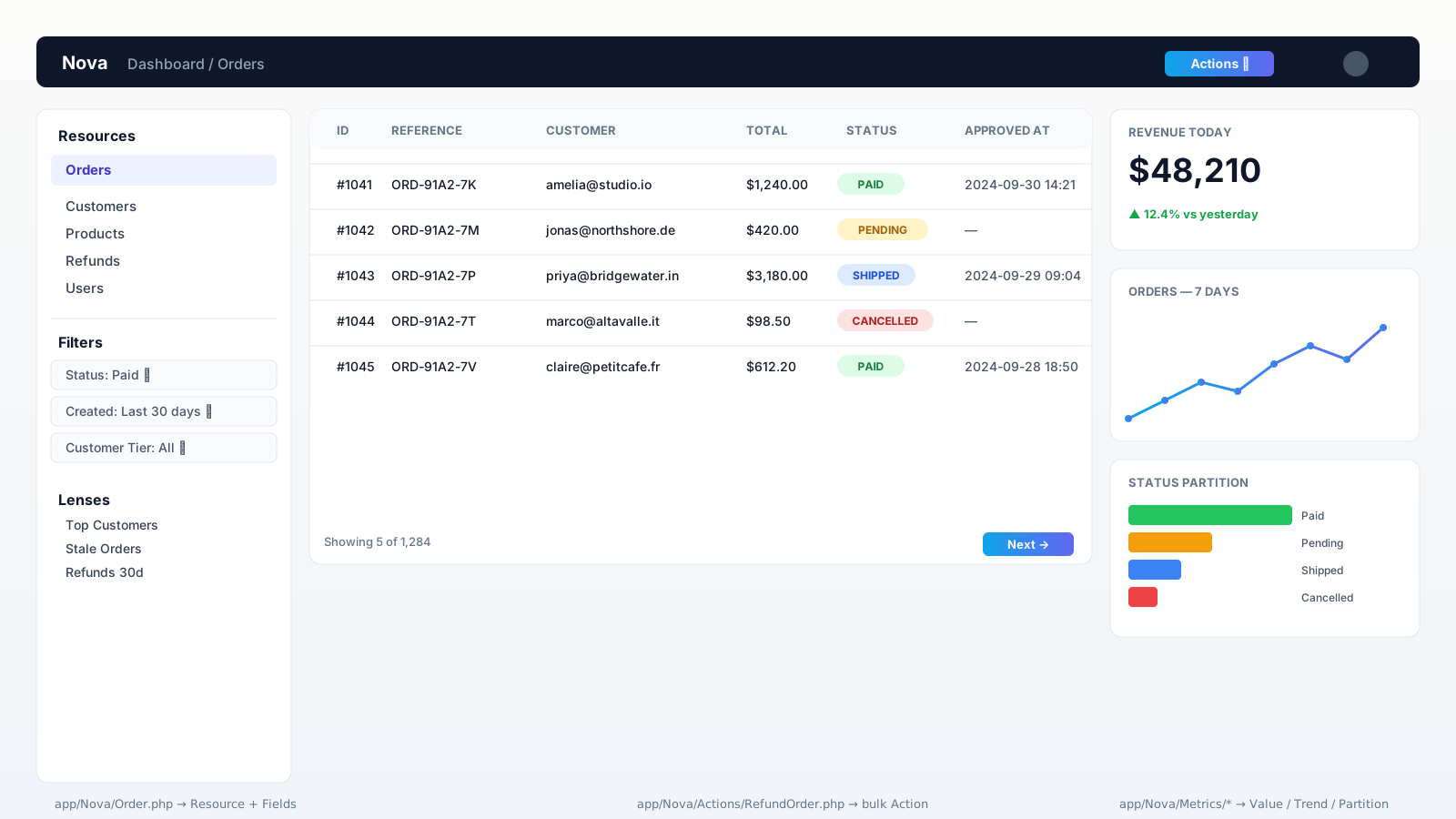
Install Nova as a Composer package — composer require laravel/nova after registering the licence — and you get a Vue 3 SPA mounted at /nova, an app/Nova/ directory, and a service provider. Behind the SPA, Nova's job is to turn Eloquent models into a CRUD interface plus the surrounding furniture: search, filters, bulk actions, custom views, and dashboards.
The vocabulary you live inside is small:
- Resources — one PHP class per model, declaring how it appears in the panel.
- Fields — the controls on the form (
Text,Number,BelongsTo,HasMany,MorphTo,Image,Markdown,KeyValue, etc.). - Actions — buttons that run code on selected rows (refund, archive, export).
- Filters — left-rail dropdowns that scope the index query.
- Lenses — alternate views of the same model, usually a custom query (top customers, abandoned carts).
- Metrics — dashboard cards (Value, Trend, Partition, Progress).
- Cards & Tools — bigger custom widgets and full custom routes.
That's the whole surface. The leverage is real because Nova does not invent new state — it sits on top of your Eloquent models and your Laravel policies.
The Smallest Useful Resource
php artisan nova:resource OrderThat command scaffolds app/Nova/Order.php. The smallest version that earns its keep:
namespace App\Nova;

use Laravel\Nova\Fields\BelongsTo;
use Laravel\Nova\Fields\Currency;
use Laravel\Nova\Fields\DateTime;
use Laravel\Nova\Fields\ID;
use Laravel\Nova\Fields\Select;
use Laravel\Nova\Fields\Text;
use Laravel\Nova\Http\Requests\NovaRequest;

class Order extends Resource
{
    public static $model = \App\Models\Order::class;
    public static $title = 'reference';
    public static $search = ['reference', 'customer.email'];

    public function fields(NovaRequest $request): array
    {
        return [
            ID::make()->sortable(),
            Text::make('Reference')->sortable()->rules('required', 'max:32'),
            BelongsTo::make('Customer')->searchable(),
            Currency::make('Total')->currency('USD')->sortable(),
            Select::make('Status')->options([
                'pending'   => 'Pending',
                'paid'      => 'Paid',
                'shipped'   => 'Shipped',
                'cancelled' => 'Cancelled',
            ])->displayUsingLabels()->filterable(),
            DateTime::make('Approved At')->onlyOnDetail(),
        ];
    }
}
Drop that file in app/Nova/, and Nova builds the index, detail, create, and edit screens for orders. Search works (because of $search). The customer lookup is searchable because we said so. The status filter is added to the left rail by ->filterable(). There is no controller, no Blade template, no route. That is the trade you are buying.
Actions Are Where The Actual Work Lives
The CRUD UI is table stakes. Where Nova starts paying for itself is Actions — the buttons that operate on rows. Every back-office tool has the same shapes: refund this, mark these as shipped, resend this email, export this filtered set.
php artisan nova:action RefundOrdernamespace App\Nova\Actions;
use App\Actions\Orders\RefundOrder as RefundOrderAction;
use Illuminate\Bus\Queueable;
use Illuminate\Support\Collection;
use Laravel\Nova\Actions\Action;
use Laravel\Nova\Actions\ActionResponse;
use Laravel\Nova\Fields\ActionFields;
use Laravel\Nova\Fields\Textarea;
use Laravel\Nova\Http\Requests\NovaRequest;
class RefundOrder extends Action
{
use Queueable;
public $name = 'Refund';
public $confirmText = 'Refund the selected orders to the original payment method?';
public function handle(ActionFields $fields, Collection $models): ActionResponse
{
foreach ($models as $order) {
app(RefundOrderAction::class)->execute(
order: $order,
reason: $fields->reason,
actor: auth()->user(),
);
}
return ActionResponse::message('Refund queued for ' . $models->count() . ' order(s).');
}
public function fields(NovaRequest $request): array
{
return [
Textarea::make('Reason')->rules('required', 'max:500'),
];
}
}Two things to notice. First, the Action collects its own input via fields() — Nova prompts for the reason in a modal before running. Second, the work itself is delegated to a regular Laravel Action class (App\Actions\Orders\RefundOrder) that you can call from anywhere — a queued job, an Artisan command, a webhook. Nova is the trigger, not the home of the business logic. That separation is what keeps Nova from becoming a place where critical code goes to hide.
Register the action on the resource:
public function actions(NovaRequest $request): array
{
    return [
        (new Actions\RefundOrder())->canSee(fn ($req) => $req->user()->can('refund', \App\Models\Order::class))
                                   ->canRun(fn ($req, $order) => $order->status === 'paid'),
    ];
}
canSee controls whether the button appears at all; canRun controls whether it lights up for a given row. Combined with policies, that's enough to keep an over-eager support agent from running the wrong action on the wrong order.
Filters, Lenses, And Metrics Are The Difference Between A Toy And A Tool
Filters are simple — Select-like dropdowns that scope the index query. Use ->filterable() on a field to get one for free, or generate a real filter class with php artisan nova:filter when you need custom logic.
Lenses are the underrated piece. A lens is an alternative table view backed by a custom query. "Top customers by lifetime value", "Stale orders waiting more than 48 hours", "Refunds in the last 30 days" — they don't fit on the default index, but they belong in the same place as the data:
public function query(LensRequest $request, $query)
{
    return $request->withOrdering($request->withFilters(
        $query->select('orders.customer_id', DB::raw('SUM(total) AS lifetime_value'))
              ->groupBy('customer_id')
              ->orderByDesc('lifetime_value')
              ->limit(50)
    ));
}
Metrics drive the dashboard. The four built-in shapes — Value, Trend, Partition, Progress — cover most "how are we doing today" cards without writing JavaScript. You give them an Eloquent query; Nova handles the chart.
Authorization: Use Policies, Not Just Gate::define('viewNova')
app/Providers/NovaServiceProvider.php has a gate() method that controls who can open the panel at all:
protected function gate(): void
{
    Gate::define('viewNova', function ($user) {
        return $user->hasRole('staff');
    });
}
That's the front door. The interior — who can edit which resource, who can run which action — uses Laravel Policies. Nova checks view, viewAny, create, update, delete, restore, and forceDelete exactly like the rest of your app. Per-resource overrides (authorizable(), authorizedToCreate()) exist on the Resource class for the rare case where Nova's view differs from the public app's view.
The pitfall is getting clever. Don't write Nova-specific authorization that diverges from your OrderPolicy; the day you ship a "Refund" button on the customer-facing app, you want one source of truth.
Where Nova Hurts
Nova is opinionated, and the opinions don't always fit:
- The fields are not infinitely flexible. Repeater fields, conditional fields, multi-step forms — possible, but you'll be writing custom Vue components and learning Nova's JS package layout. If your domain has a lot of bespoke forms, the abstraction cost adds up.
- Heavy index queries. Nova does
SELECT *plus joins for relationships you display. On a five-million-roweventstable, the default index will time out. Reach forstatic $perPageOptions,static $tableStyle = 'tight', lenses with explicit columns, andSearchableindexes on the columns you actually search. - Custom routes inside Nova. Tools and Cards exist for genuinely custom pages, but you are writing a Nova package — Vue + composer.json + service provider. For one-off internal tools, sometimes a regular Laravel route under
/adminis cheaper. - Upgrades. Nova's major versions occasionally break custom field packages. If you depend on community fields, pin them and read the upgrade notes.
The Free Alternatives Are Genuinely Good Now
Five years ago Nova was the only serious option. Now Filament is free, MIT-licensed, ships TALL stack (Tailwind + Alpine + Livewire + Laravel) instead of Vue, and has feature parity with Nova on most of the things teams actually use. Backpack is a paid alternative with a different design language. Voyager and Orchid round out the field. The honest comparison:
- Pick Nova if you're already on a Laravel team that ships Vue, you want the support contract, and your back-office is large enough that $99–$299 per project is a rounding error.
- Pick Filament if you want something free, you're comfortable with Livewire, and you don't mind that the ecosystem is community-driven. The developer experience is excellent and improving fast.
- Pick a custom admin if you have fewer than five resources or your back-office is so unusual that any framework will fight you. Three Inertia pages can be cheaper than configuring Nova or Filament for an idiosyncratic flow.
The Rule That Keeps Nova Healthy
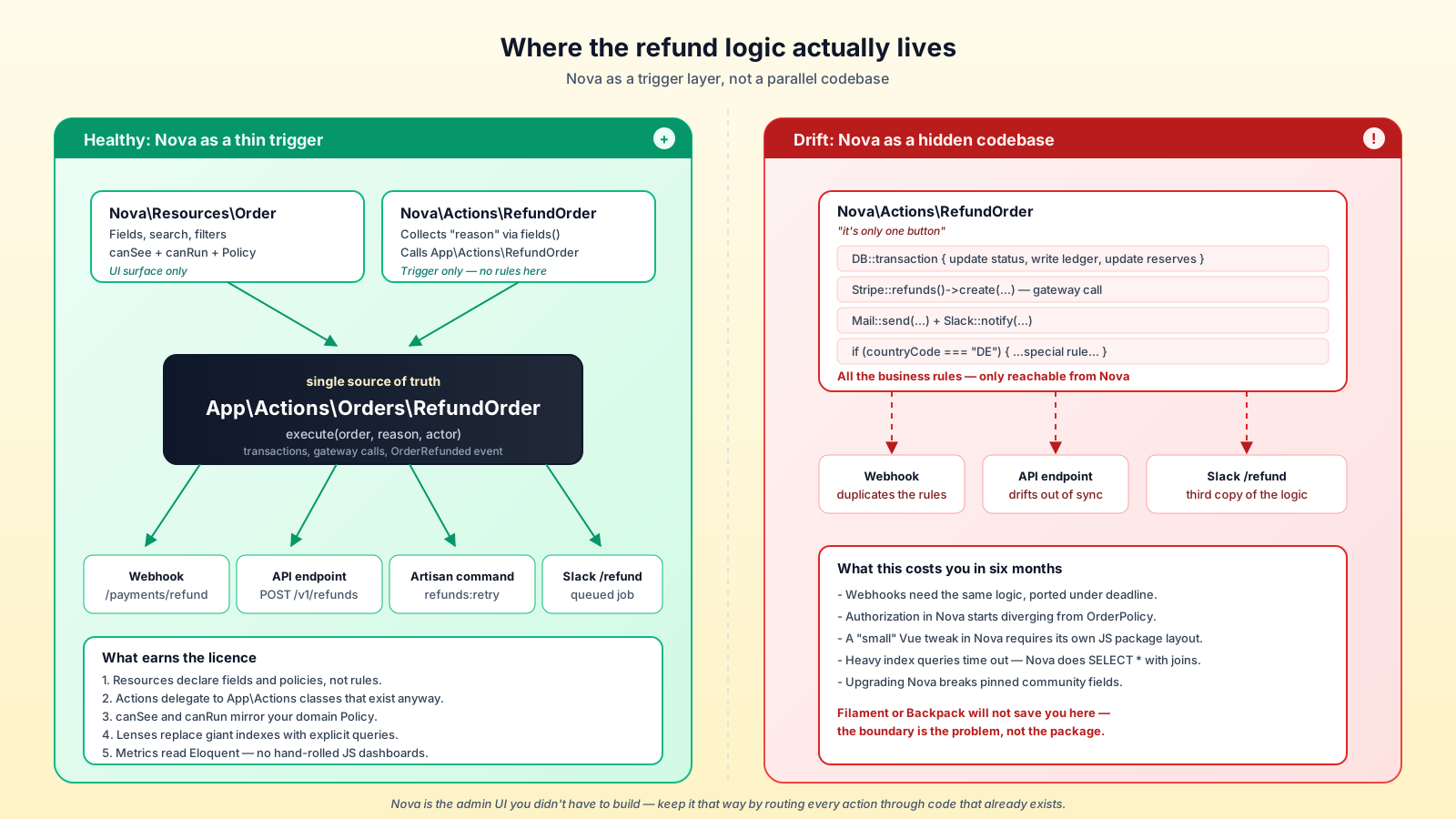
The biggest mistake teams make with Nova is letting it become a second codebase. Business logic creeps into Action classes, validation drifts from the public API, and six months later "the thing that handles refunds" lives only in app/Nova/Actions/RefundOrder.php. When the next channel needs to refund — a webhook from your payment provider, a Slack /refund command — the logic has to be extracted under deadline.
Treat Nova as a trigger layer. It calls the same Action classes, sends the same events, runs the same jobs as the rest of the app. The Resource declares fields and the Action declares the button; everything else lives in the application code Nova happens to call. Done that way, Nova is what it should be — an admin UI you didn't have to build — and not a parallel universe of business rules.
A One-Sentence Mental Model
Laravel Nova turns your Eloquent models into a polished CRUD admin in an afternoon by composing Resources, Fields, Actions, Filters, Lenses, and Metrics on top of your existing policies — the trade is a paid licence, a Vue dependency, and the discipline to keep business logic in your application code rather than in app/Nova/.