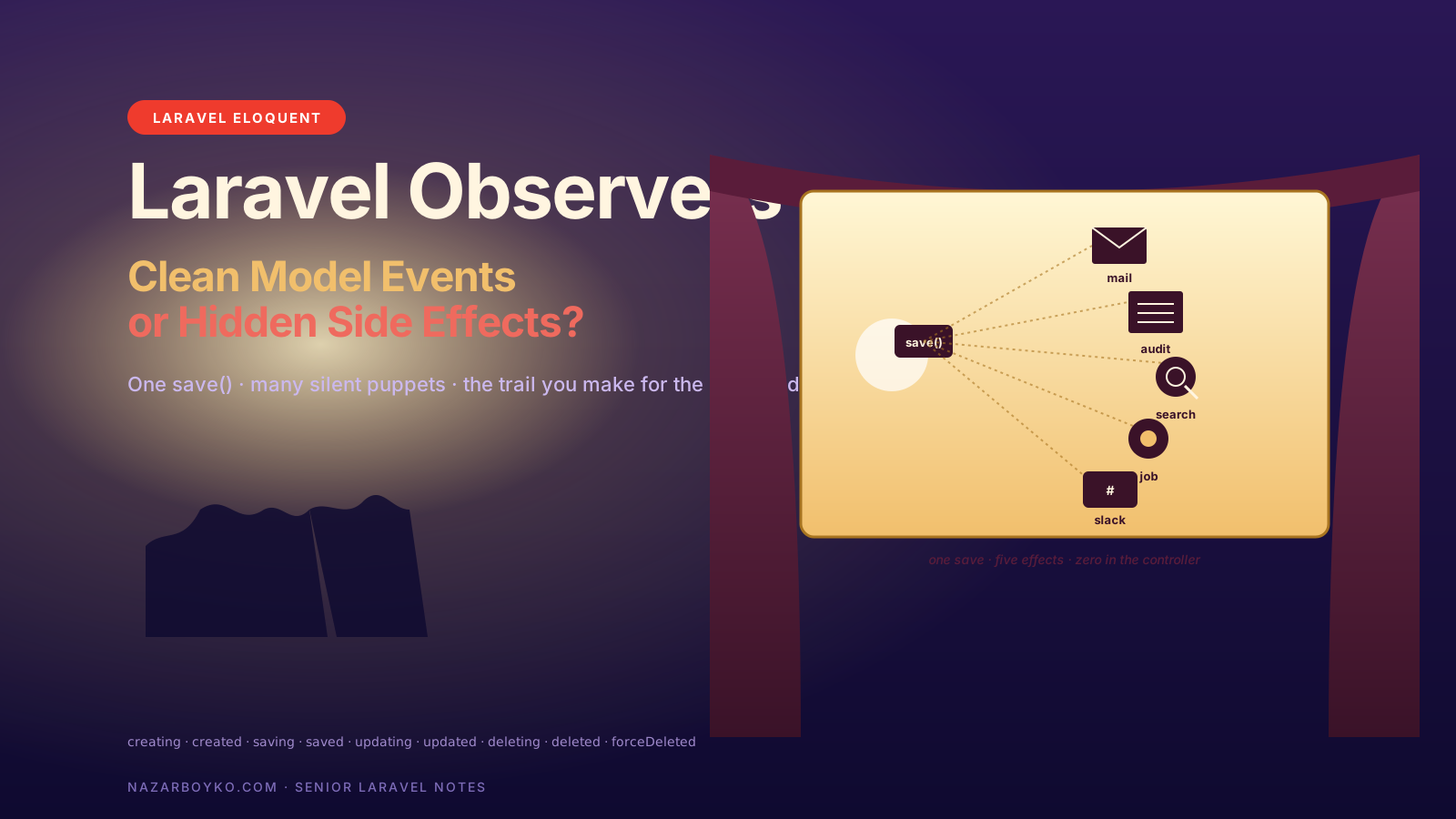
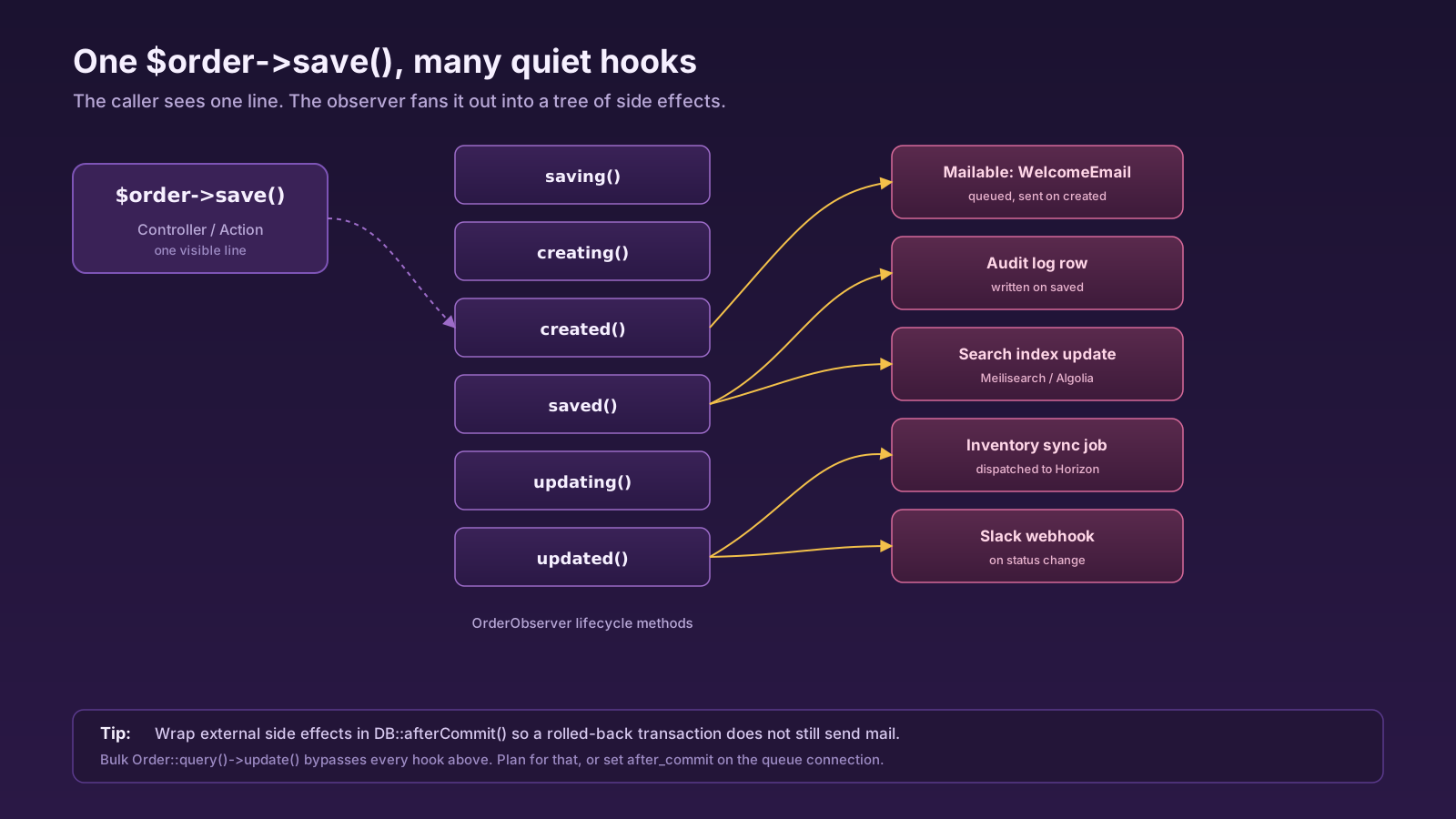
You're trying to figure out why creating a new Order in tinker fires three emails, writes two audit rows, sends a Slack notification, and queues a job to sync inventory. None of that is in the controller. None of that is in the route. Grep for OrderShipped and you find one observer file with eight methods on it. Welcome to Laravel observers.
Observers are one of the cleanest features in the framework when you use them for the right thing, and one of the worst sources of "where is this even happening?" when you don't. This article is about where that line is — and why it's so easy to drift over it.
What An Observer Actually Is
An observer is a class whose method names match Eloquent's lifecycle events. You make one with the artisan generator, point it at a model, and Laravel calls the methods at the appropriate moment.
php artisan make:observer OrderObserver --model=OrderThe full set of methods you can implement: retrieved, creating, created, updating, updated, saving, saved, deleting, deleted, restoring, restored, forceDeleted, replicating. The *ing versions fire before persistence; the *ed versions fire after. saving/saved fire on both inserts and updates.
Wiring is a single line. In Laravel 11+ the idiomatic approach is the attribute on the model:
use App\Observers\OrderObserver;
use Illuminate\Database\Eloquent\Attributes\ObservedBy;

#[ObservedBy(OrderObserver::class)]
class Order extends Model
{
    // ...
}
In older codebases you'll see the equivalent registration in AppServiceProvider::boot():
public function boot(): void
{
    Order::observe(OrderObserver::class);
}
Either form works. The attribute keeps the binding next to the model, which is genuinely nicer when you're trying to find what reacts to a save.
Where Observers Earn Their Keep
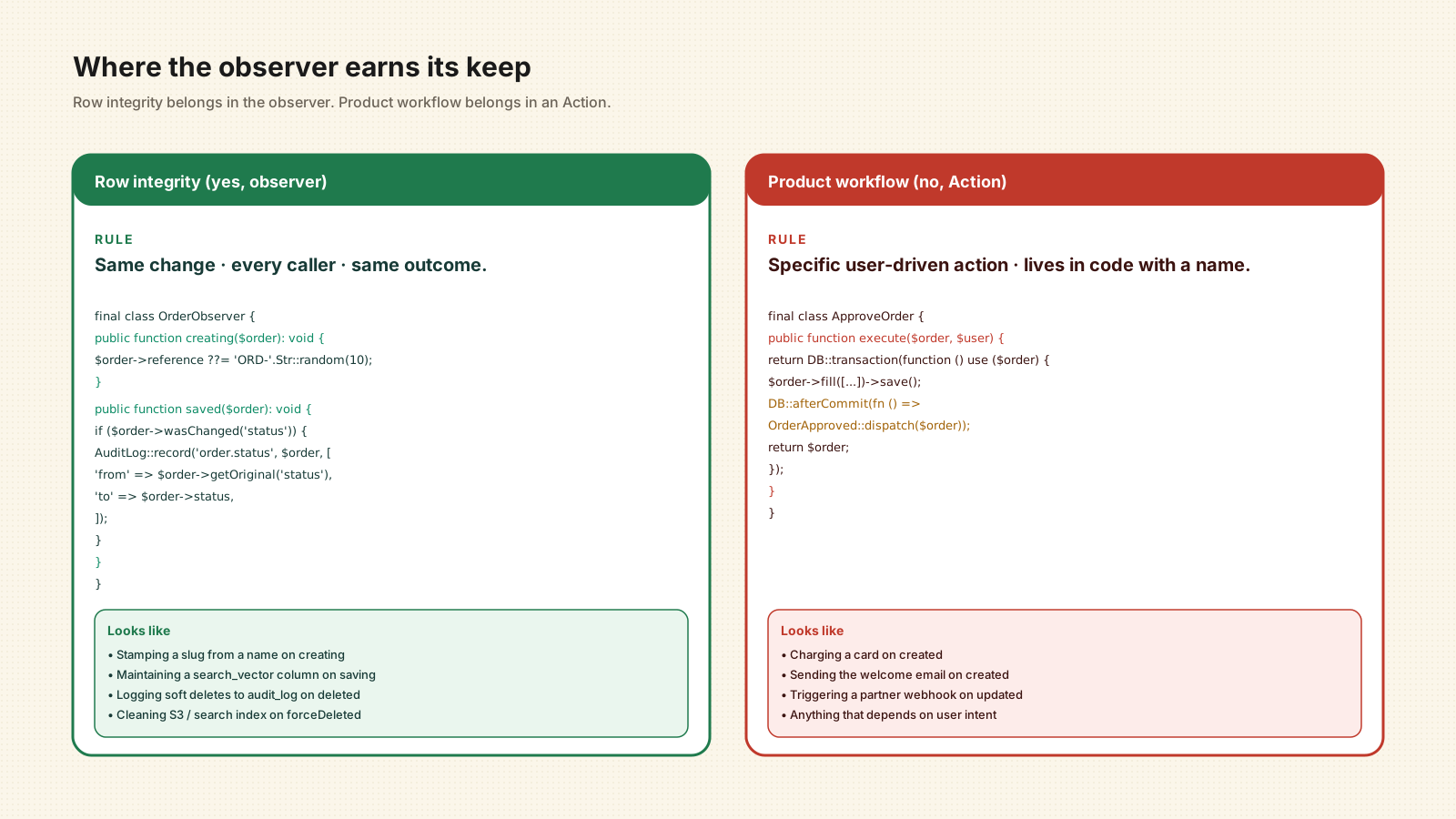
The right place for an observer is the kind of side effect that's truly owned by the model itself — something that should happen every time the row changes, regardless of who changed it.
Things that fit cleanly:
- Stamping a
slugfrom anameoncreating. - Maintaining a
search_vectorcolumn onsaving. - Logging soft deletes to an
audit_logtable ondeleted. - Cascading cleanup on
forceDeletedfor relationships your DB doesn't know about (S3 objects, search indexes, cached aggregates).
final class OrderObserver
{
    public function creating(Order $order): void
    {
        $order->reference ??= 'ORD-'.strtoupper(Str::random(10));
    }

    public function saved(Order $order): void
    {
        if ($order->wasChanged('status')) {
            AuditLog::record('order.status_changed', $order, [
                'from' => $order->getOriginal('status'),
                'to'   => $order->status,
            ]);
        }
    }
}
Both methods are about the row's own integrity. They don't reach into the outside world, they don't depend on user context, and they'd be the same whether the change came from a controller, a job, a tinker session, or a seeder. That's the test.
Where Observers Become A Trap
The trap is using observers for product behavior instead of model integrity. Charging a card on created. Sending the welcome email on created. Triggering a webhook on updated. Anything where "what happens next" depends on the business intent of the action, not on the row's persistence.
Three things go wrong fast:
- Tests slow down and get weird. Every factory call now fires real or mocked side effects. You either accept the tax (slow suite) or pepper your tests with
Order::withoutEvents(fn () => Order::factory()->create())and lose coverage of the events you actually care about. - Disabling becomes folklore. Someone writes a one-off importer. Did they remember to skip events? Did they import 200,000 rows and accidentally send 200,000 welcome emails? Real story, more than once.
- The action loses its name. "Approve order" stops being a thing in your codebase. It's just
$order->update(['status' => 'approved'])and a chain of magic. Six months later, when you need a second way to approve an order (an admin Slack command, an API endpoint), you can't tell what's safe to run and what gets duplicated.
If the side effect belongs to a specific user-driven action, put it in an Action class or a job dispatched from there. The observer should be for the row, not for the workflow.
The Transaction Footgun
The single most common observer bug: an observer fires inside a transaction, queues a job, and the transaction rolls back. The job picks up before the rollback completes — or after, with the row gone — and crashes trying to load a model that no longer exists.
Laravel ships the fix. DB::afterCommit() defers the closure until the surrounding transaction actually commits:
public function saved(Order $order): void
{
    if ($order->wasChanged('status') && $order->status === 'paid') {
        DB::afterCommit(function () use ($order) {
            ProcessPaidOrder::dispatch($order);
        });
    }
}
If your queue connection has after_commit => true set in config/queue.php, dispatched jobs get this behaviour for free. Worth setting once at the queue level instead of remembering to wrap every dispatch.
Disabling Events When You Need To
Some operations have no business firing observers. Bulk imports. Backfills. Test factories that just need a row in the table.
Order::withoutEvents(function () {
    Order::factory()->count(50_000)->create();
});
withoutEvents is scoped — only that closure runs without observers, and the previous handlers are restored after. There's also saveQuietly(), deleteQuietly(), forceDeleteQuietly() on the model itself for one-off cases.
What's not safe is Order::query()->update([...]) and Order::query()->delete(). Those bypass observers entirely because they never load the model. If your audit row depends on the observer, mass updates are silently invisible. That has bitten more than one team into discovering they had two days of missing audit data.
Observers vs Events vs Jobs
People conflate these three because they all fire after something happens. They're not the same.
- Observer methods are tightly coupled to one model. Same process, same request. Synchronous unless you queue from inside.
- Events + listeners are decoupled — multiple listeners, multiple models can dispatch the same event, listeners can be queued. Use them when the business fact matters more than which row caused it.
- Jobs are units of work. Anything slow, anything that can fail and retry, anything you want to see on the Horizon dashboard.
The shape that holds up: the Action that approves an order writes the row, dispatches OrderApproved (a domain event), and that event has whatever listeners the product needs. The observer on Order does only what's true of every order save — stamping fields, writing audit, maintaining derived columns. Different jobs.
Reading An Unfamiliar Codebase With Observers
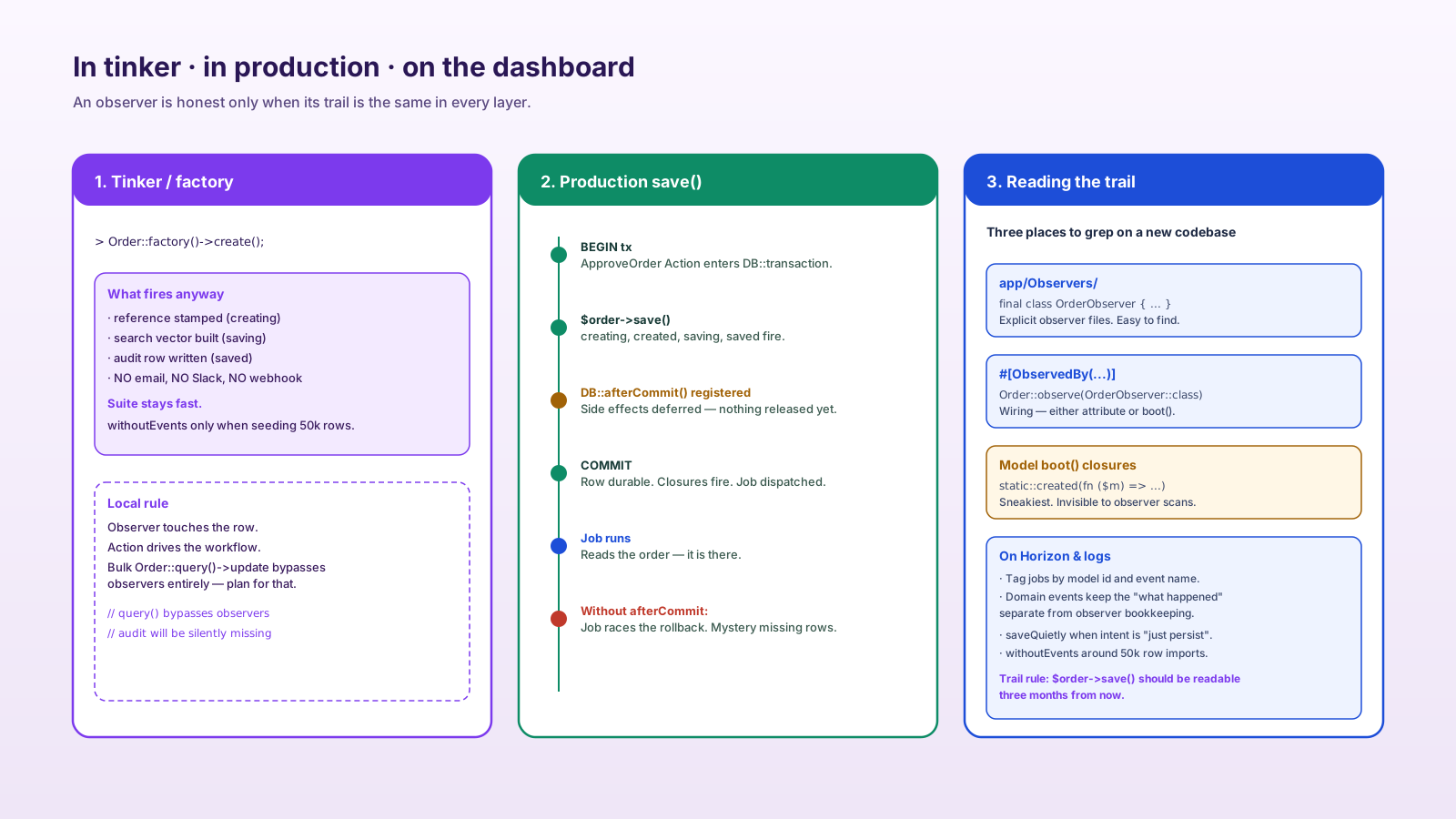
When you join a Laravel codebase and want to know what fires on a save, three places to grep:
app/Observers/— explicit observer classes.Model::observe(and#[ObservedBy(— registration sites.boot()methods on individual models — closure-style hooks likestatic::created(fn ($model) => ...)that aren't in an observer file.
That third one is the sneakiest. A two-line closure inside a model's boot() method is invisible to anyone scanning for observers. If your team relies on observers, it's worth a convention: real hooks go in observer classes, not model boot() closures, so there's exactly one place to look.
A Useful Default
The rule that's served me well: an observer method gets to touch the row it received and write to the database. It does not call mailers, dispatch domain events, or hit external services. If it needs to do any of those, it dispatches a job inside DB::afterCommit and the job does the work — visible on Horizon, retryable, testable, named.
That keeps observers boring, which is what you want from something that runs on every save you'll ever do.
A One-Sentence Mental Model
Observers are great for the row's own bookkeeping and dangerous for the product's workflow — keep them small, defer their side effects to DB::afterCommit, and remember that anyone reading $order->save() has no idea what's about to happen unless you make the trail easy to follow.