So, you've built the feature. The controller works. The form submits. The user gets a nice success message.
Then production happens.
The payment provider gets slow. Email delivery takes three seconds. A CSV import locks up the request. A webhook fails halfway through. Suddenly that clean little feature feels like a shopping cart with one broken wheel.
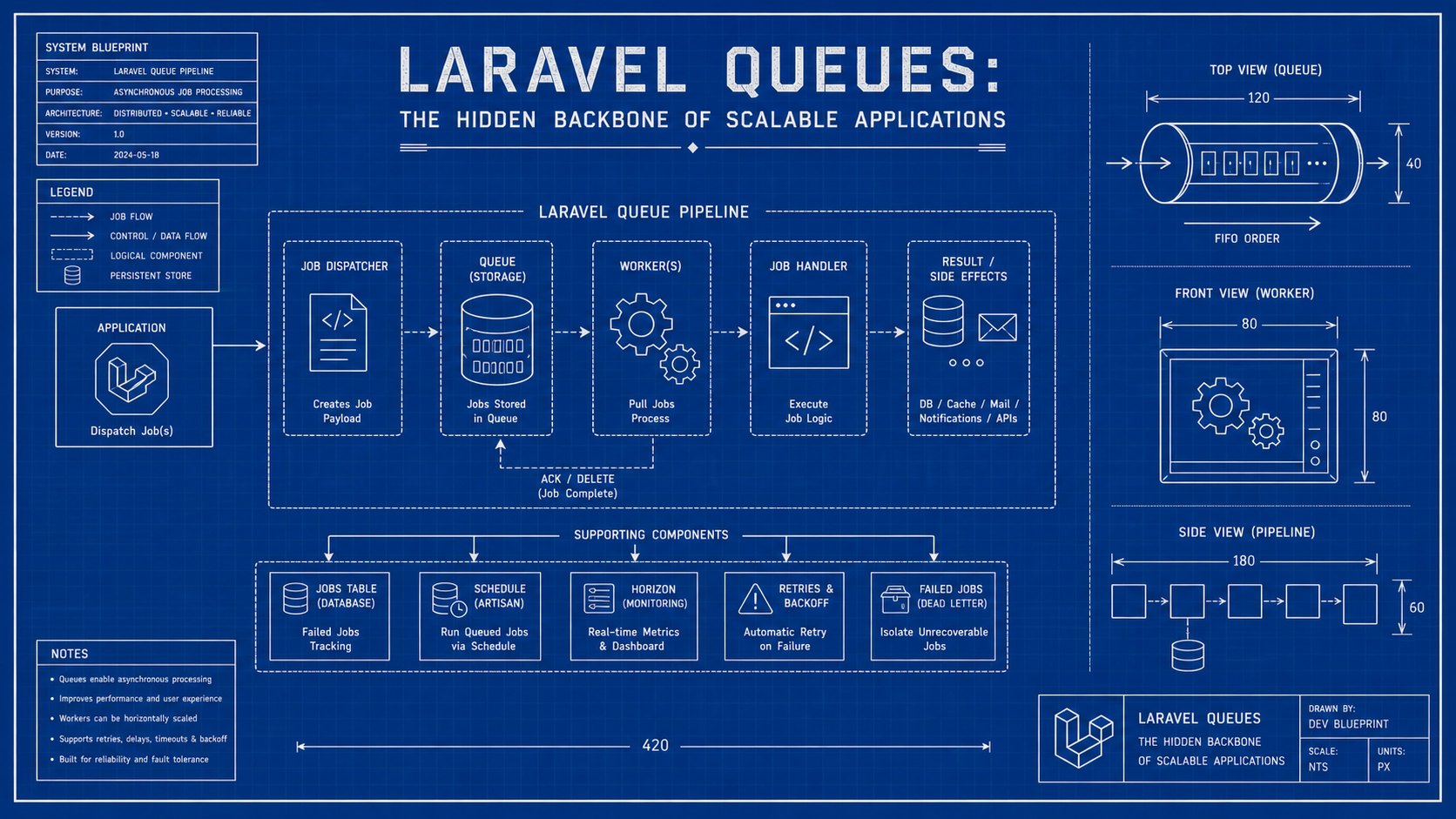
That's where Laravel queues become the hidden backbone of scalable applications. They let your app say, "I got your request," then process slow or unreliable work safely in the background.
A Queue Is A Waiting Line For Work
A queue is not complicated as an idea. You put work into a line, and workers pull jobs from that line.
Think of it like a coffee shop. The cashier doesn't make every latte before taking the next order. They take the order, put it into the system, and the barista handles it. If the cashier did everything, the line would reach the parking lot.
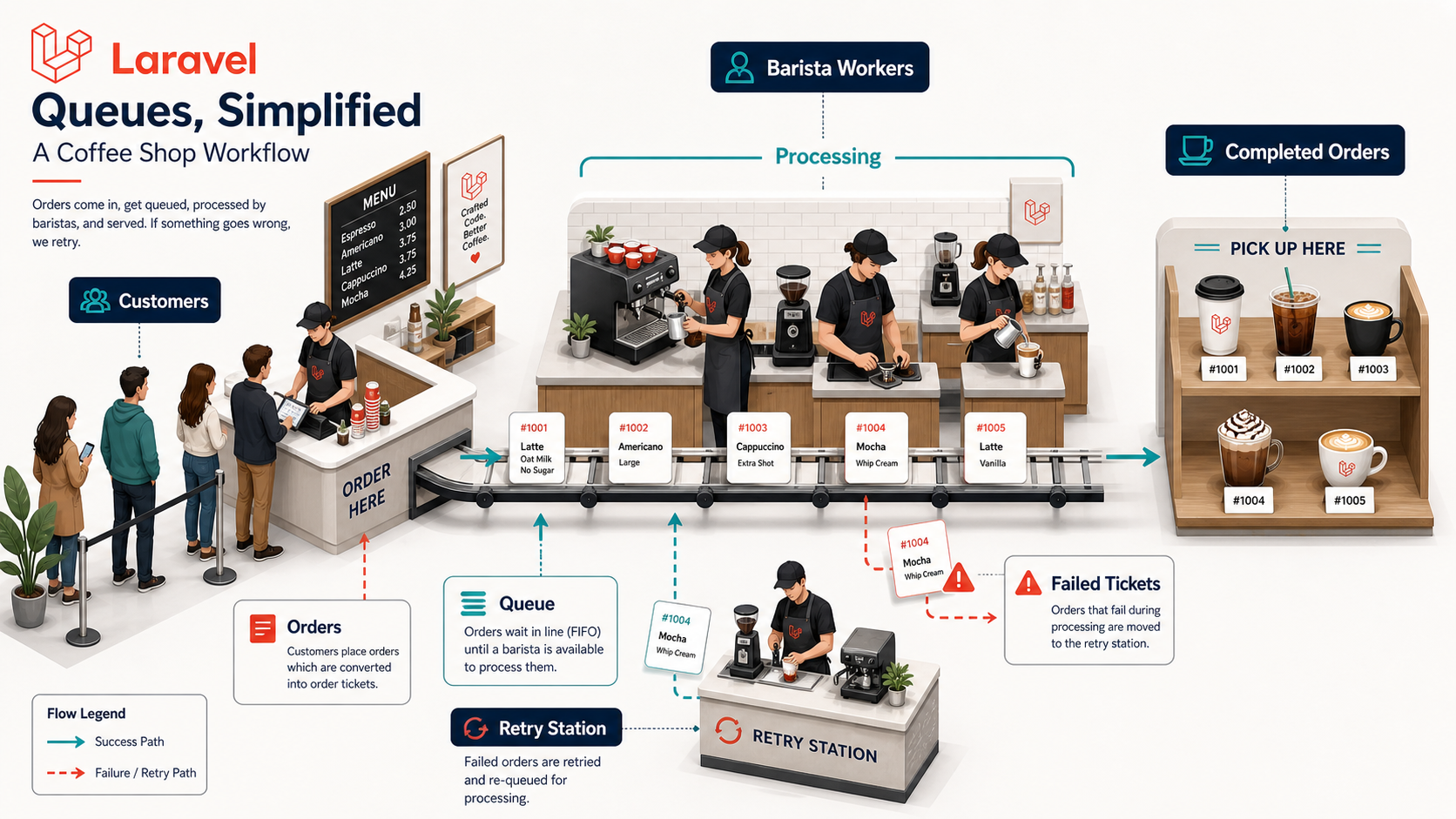
Laravel gives you a clean way to model that same pattern.
What Belongs In A Queue?
- Emails and notifications. Don't make users wait for SMTP, push services, or third-party APIs.
- Payment follow-up work. Receipts, analytics, fraud checks, and sync tasks can happen after the critical transaction.
- Imports and exports. Large CSV or report work should not live inside a web request.
- Webhook processing. Acknowledge the webhook quickly, then process the payload in a job.
- Expensive calculations. If it can run later without hurting the user experience, it's a queue candidate.
The rule is simple: if the user doesn't need the result immediately, strongly consider a job.
Jobs Make Background Work Explicit
In Laravel, a job is a class that represents one unit of work. That class is serializable, dispatchable, and handled by a queue worker.
Here's a small job that sends a welcome email:
final class SendWelcomeEmail implements ShouldQueue
{
    use Dispatchable, Queueable;

    public function __construct(public int $userId) {}

    public function handle(): void
    {
        $user = User::findOrFail($this->userId);
        Mail::to($user)->send(new WelcomeMail($user));
    }
}
Notice that the job stores the userId, not the whole business operation inside a controller. That makes the work explicit and testable.
You can dispatch it like this:
$user = User::create($validated);

SendWelcomeEmail::dispatch($user->id);

return redirect()->route('dashboard');
The controller stays fast, and the email work moves to the background.
Retries Are A Feature, Not A Panic Button
Most queue failures are not dramatic code bugs. They're boring real-world failures.
A provider times out. A database connection drops. An API rate limit kicks in. A worker restarts during deployment. Production loves boring chaos.
Laravel lets jobs retry instead of failing immediately. That retry behavior is one of the biggest reasons queues are valuable.
Use Attempts And Backoff Intentionally
A retry without a strategy is just the same mistake repeated louder.
Here's a job with a retry limit and backoff schedule:
final class SyncCustomerToCrm implements ShouldQueue
{
    public int $tries = 5;

    public function backoff(): array
    {
        return [30, 120, 300, 900];
    }

    public function handle(CrmClient $crm): void
    {
        $crm->syncCustomer($this->customerId);
    }
}
This job doesn't hammer the CRM every second. It slows down between attempts, which gives temporary problems time to recover.
Failed Jobs Are Signals
A failed job is not only an error. It's a signal that the system could not complete a promised unit of work.
That distinction matters. If a request fails, the user probably sees it. If a background job fails silently, nobody may know until a customer asks why their invoice, email, shipment, or subscription never updated.
That's why failed jobs need visibility.
What You Should Track
- Job class. Which kind of work is failing?
- Payload identity. Which user, order, tenant, or record is affected?
- Failure reason. Was it validation, timeout, rate limit, missing data, or a bug?
- Retry count. Did it fail once or repeatedly?
- Recovery path. Can you retry safely, or does a human need to fix data first?
A failed job table without process is like a smoke alarm with no batteries. It looks responsible, but it won't save you.
Horizon Makes Queues Observable
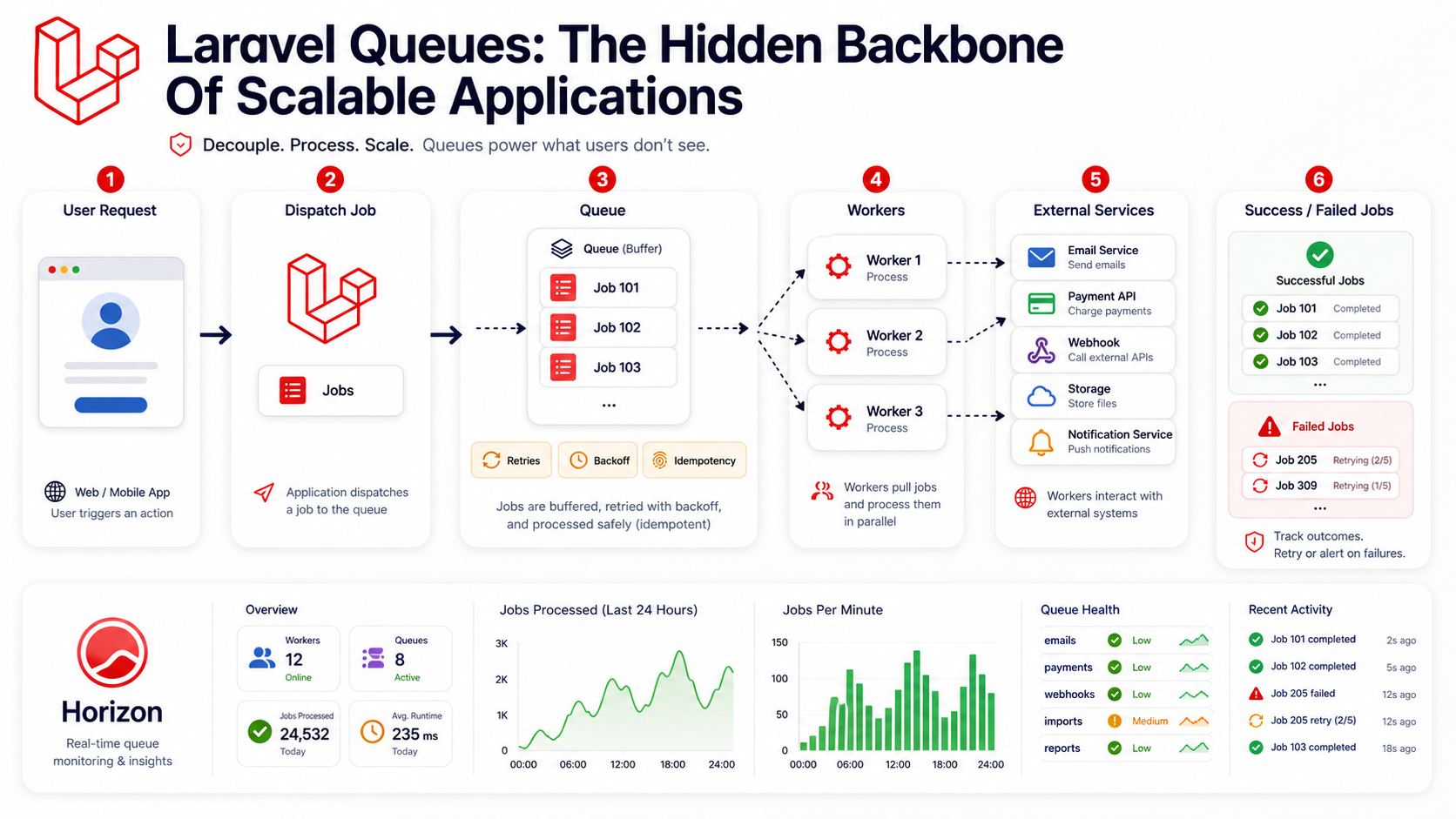
Laravel Horizon gives Redis queues a proper dashboard. You can see job throughput, failed jobs, supervisors, worker balancing, runtimes, and queue health.
For production applications, this is a big deal. Queue workers are long-running processes, and long-running processes need supervision.
A basic Horizon supervisor config might look like this:
'production' => [
    'supervisor-1' => [
        'connection' => 'redis',
        'queue' => ['default', 'emails'],
        'balance' => 'auto',
        'maxProcesses' => 10,
        'tries' => 3,
    ],
],
The important idea is not the exact numbers. It's that queue capacity becomes a production setting, not a random command someone started in a terminal.
Idempotency Is What Makes Retries Safe
Here's the part that separates beginner queue usage from production queue usage: idempotency.
An idempotent job can run more than once without creating duplicate damage. That's critical because jobs can be retried, workers can die, deployments can restart, and network calls can succeed even when your app thinks they failed.
Think of idempotency like checking whether the door is already locked before locking it again. The second attempt shouldn't break the lock.
A Non-Idempotent Job
This job can create duplicate charges if it runs twice:
public function handle(PaymentGateway $gateway): void
{
    $order = Order::findOrFail($this->orderId);

    $gateway->charge($order->customer, $order->total);

    $order->markAsPaid();
}
The problem is that payment happens before the system proves whether this order was already charged.
A Safer Job
A safer version checks state and uses an idempotency key:
public function handle(PaymentGateway $gateway): void
{
    $order = Order::findOrFail($this->orderId);

    if ($order->paid_at !== null) {
        return;
    }

    $gateway->charge(
        customer: $order->customer,
        amount: $order->total,
        idempotencyKey: 'order-' . $order->id,
    );

    $order->markAsPaid();
}
Now the retry behavior is much safer. The job has a memory of what it is trying to accomplish.
Common Queue Problems
- Dispatching jobs before the database transaction commits. The worker may run before the record exists.
- Passing huge models into jobs. Prefer stable identifiers and reload fresh data in
handle(). - Retrying non-idempotent operations. This is how duplicate emails, charges, and side effects happen.
- Using one queue for everything. Separate urgent jobs from slow reports and bulk imports.
- Ignoring worker memory. Long-running workers need restarts, limits, and monitoring.
Queues are powerful, but they are not a trash bag for code you don't want to think about.
Pro Tips
- Name queues by priority or domain.
payments,emails,imports, andwebhooksare easier to reason about than one giantdefaultqueue. - Set timeouts deliberately. A job timeout should be shorter than the worker timeout strategy around it.
- Make retries boring. Use backoff, idempotency keys, and state checks.
- Log business identifiers. Debugging
Order 928431 failedis much better than debuggingJob failed. - Create a manual recovery path. Production needs retry buttons, dashboards, and operational habits.
Final Tips
One of the easiest production mistakes is treating queues as an optimization detail. I've done that before, and yeah, it usually becomes obvious only after the first ugly incident.
The better mental model is this: queues are part of your application's contract. When you dispatch a job, you're promising the user that something important will happen later.
Design your jobs like that promise matters. Because it does. Good luck with your workers 👊