The first time you dispatch a job in Laravel, it feels like magic. The checkout endpoint that used to hang for two seconds while a confirmation email rendered now responds in eighty milliseconds. You ship it on a Friday. On Monday a customer support ticket lands: "I never got my receipt."
You open Horizon. Three thousand jobs in failed_jobs. Half of them are duplicates. The other half timed out talking to an SMTP server that was misconfigured for an hour. Nobody noticed because the user-facing checkout was, technically, still working.
That's the moment most Laravel teams learn what queues actually are. They're not a speed feature. They're a contract — a promise that some piece of work will eventually complete, retry sensibly when it doesn't, and tell you loudly when it gives up. Get the contract right and queues become the most reliable part of your stack. Get it wrong and you've moved the problems somewhere harder to debug.
Speed Is The Side Effect, Reliability Is The Point
The textbook reason for queues is response time. Real reason is fault isolation.
Picture a checkout that has to charge a card, decrement stock, send an email, ping the warehouse, and notify a Slack channel. Done synchronously, the slowest hop sets your latency floor and the flakiest hop sets your error rate. If the warehouse API is having a bad day, your checkout is having a bad day.
Move the email, warehouse call, and Slack notification onto a queue and the controller's only job is "did we take the money and persist the order?" Everything else becomes someone else's problem — specifically, a queue worker that can retry, back off, and fail loudly without the customer ever seeing it. The latency win is real, but the reliability win is bigger.
Writing A Job That Survives Production
Generating a job is one php artisan make:job command. Writing a job that behaves under pressure is a discipline. The pattern that holds up looks like this:
// app/Jobs/ChargeSubscriptionJob.php
namespace App\Jobs;

use App\Models\Subscription;
use App\Services\PaymentGateway;
use Illuminate\Bus\Queueable;
use Illuminate\Contracts\Queue\ShouldBeUnique;
use Illuminate\Contracts\Queue\ShouldQueue;
use Illuminate\Foundation\Bus\Dispatchable;
use Illuminate\Queue\InteractsWithQueue;
use Illuminate\Queue\Middleware\WithoutOverlapping;
use Illuminate\Queue\SerializesModels;

final class ChargeSubscriptionJob implements ShouldQueue, ShouldBeUnique
{
    use Dispatchable, InteractsWithQueue, Queueable, SerializesModels;

    public int $tries = 5;
    public int $timeout = 30;
    public array $backoff = [30, 60, 120, 300, 600];

    public function __construct(public Subscription $subscription) {}

    public function uniqueId(): string
    {
        return "charge:{$this->subscription->id}:{$this->subscription->current_period_start->format('Y-m')}";
    }

    public function middleware(): array
    {
        return [(new WithoutOverlapping($this->subscription->id))->expireAfter(180)];
    }

    public function handle(PaymentGateway $gateway): void
    {
        if ($this->subscription->isPaidForCurrentPeriod()) {
            return;
        }

        $gateway->charge($this->subscription);
    }
}
There are five defenses packed into that file and each earns its keep.
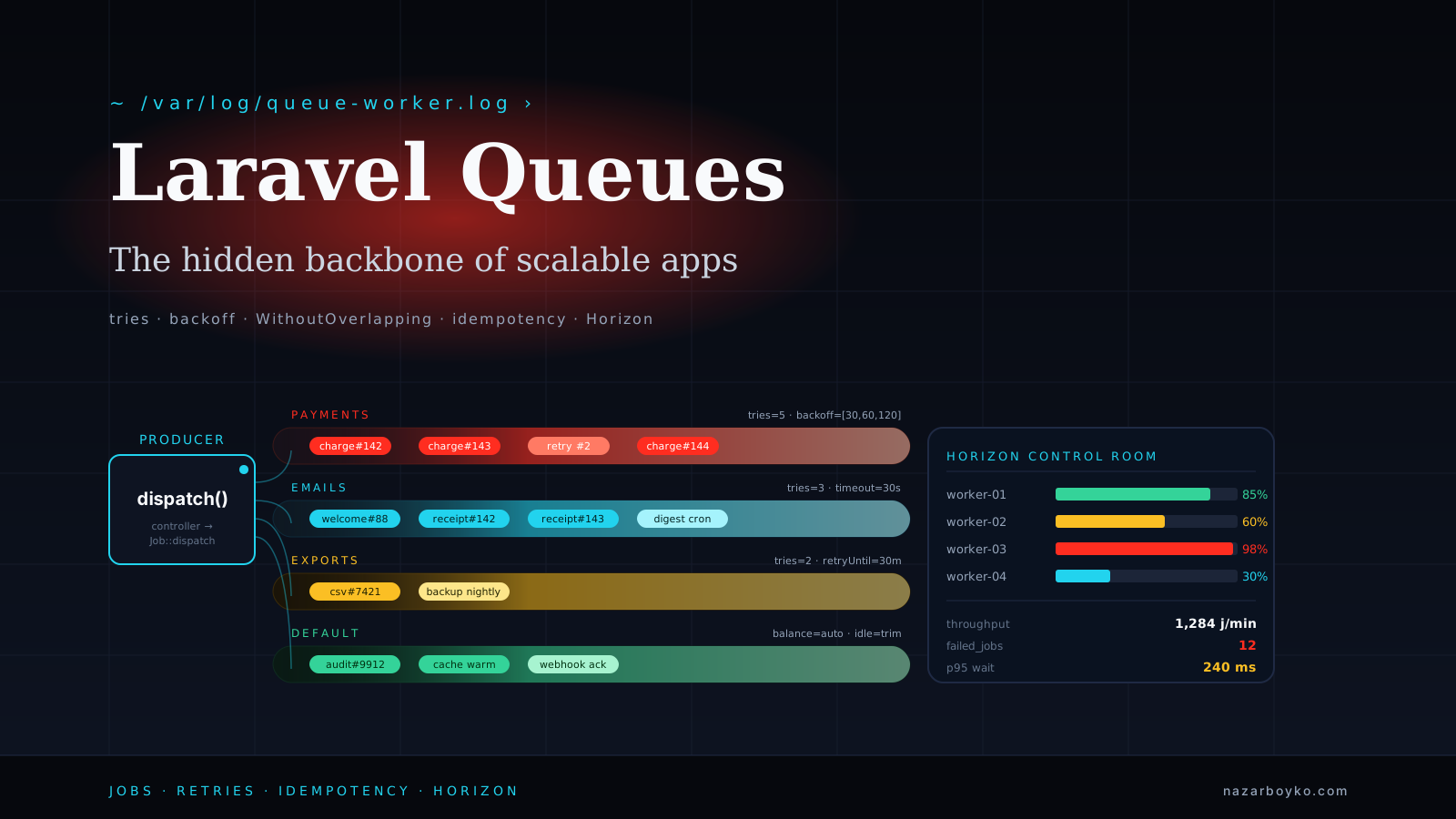
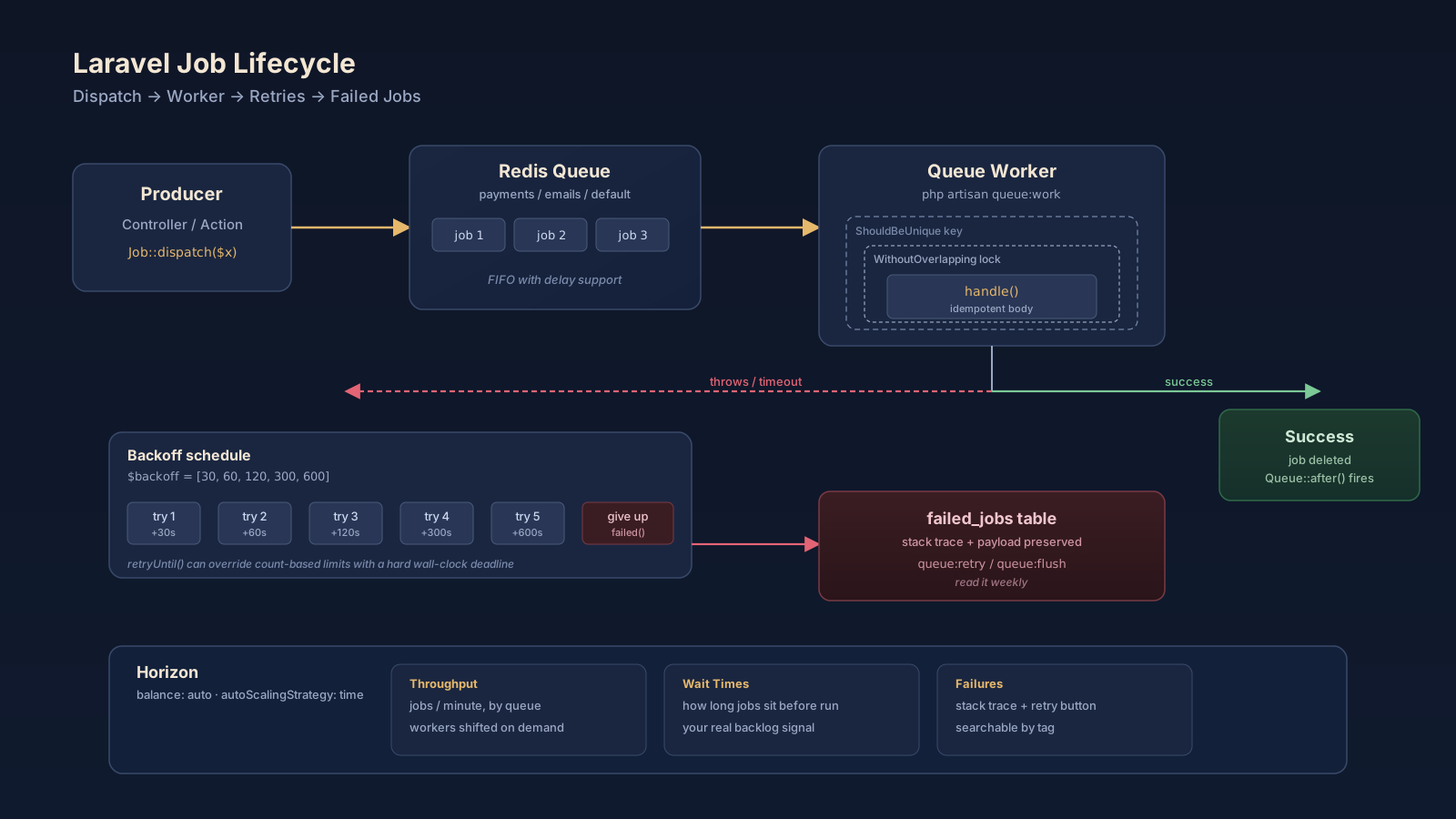
$tries and $backoff together say "if the gateway hiccups, wait progressively longer before pestering it again." $timeout caps how long a worker will wait before killing the job — without it, a hung HTTP call ties up a worker forever. The WithoutOverlapping middleware uses a Redis lock so only one charge for this subscription runs at a time, even if the same job lands twice. ShouldBeUnique plus uniqueId() prevents the same job from being queued twice in the first place. And the early-return inside handle() is the real safety net: even if all the queue-level guards fail, the job itself refuses to charge a subscription that's already paid.
That last line is the one that pays rent. Network partitions, worker crashes, deploy timing — there are a dozen ways for a job to run twice. Idempotency in the handler is the only defense that always works.
The Serialization Trap That Catches Everyone Once
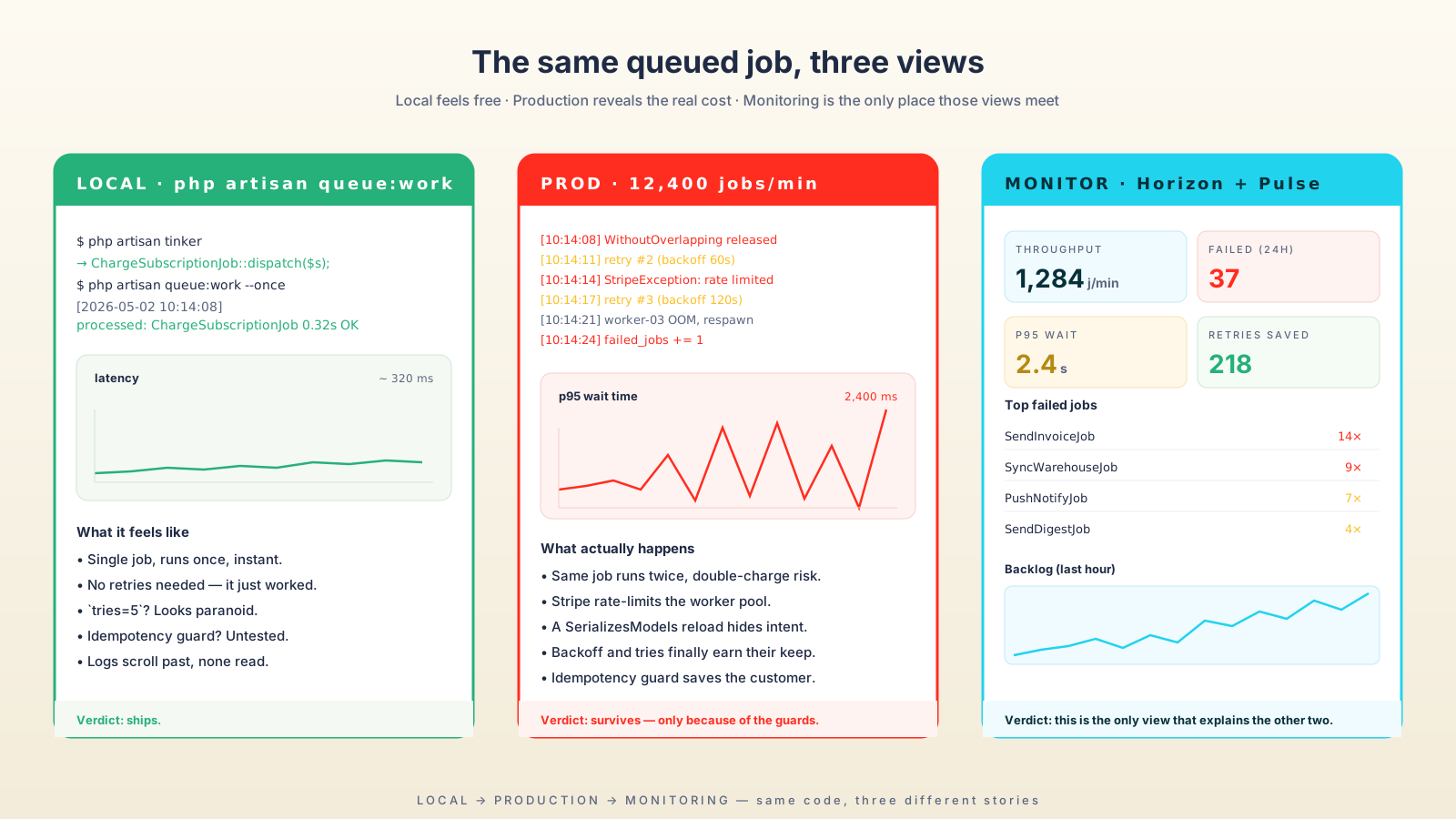
SerializesModels does something clever and slightly dangerous. When you pass a model to a job, Laravel only stores the class name and primary key. When the worker picks the job up — minutes, hours, sometimes days later — it re-fetches a fresh instance from the database.
That's the right default. It's also why this code silently fails:
$user = User::find(1);
$user->trial_extended = true;          // unsaved attribute
$user->setRelation('coupon', $coupon); // in-memory relation
ProcessUserJob::dispatch($user);       // both vanish
The job runs against a freshly-loaded $user with neither the unsaved attribute nor the in-memory relation. If you need that state in the job, persist it first or pass primitives:
ProcessUserJob::dispatch($user->id, ['trial_extended' => true, 'coupon_id' => $coupon->id]);The same caveat applies to $user->fresh() inside the job — every time the worker reloads the model, you've already lost any in-process changes the dispatcher made. Treat queued jobs as a different process, because they are.
Retries, Backoff, And When To Give Up
Laravel's retry story has three knobs and they don't all do the same thing. $tries is "how many times total." $backoff is "how long to wait between attempts" (a single int, an array of seconds, or a backoff() method for dynamic logic). retryUntil() is "give up at this clock time, regardless of how many tries are left."
For a payment job, time-based limits are usually what you want — a card charge that's been retrying for six hours has probably crossed into a different problem space. For a notification job, count-based limits are fine because you'd rather drop the notification than retry it eight hours late.
public function retryUntil(): \DateTime
{
    return now()->addMinutes(30);
}

public function backoff(): array
{
    return [10, 30, 60, 120];
}
What you do not want is tries = 0 (infinite retries) on anything that hits a third party. A paid Stripe webhook stuck in a retry loop will happily generate ten thousand failed attempts overnight, and Stripe will rate-limit you out of business by morning.
The failed() method is your last word with a job. Use it to alert, write to a dead-letter table, or compensate:
public function failed(\Throwable $e): void
{
    Log::error('Subscription charge gave up', [
        'subscription_id' => $this->subscription->id,
        'error' => $e->getMessage(),
    ]);

    $this->subscription->markPaymentFailed($e->getMessage());
}
Horizon Earns Its Keep The Day Things Go Wrong
php artisan queue:work plus a Supervisor config will run queues fine in production. Horizon doesn't replace it — it wraps it with the dashboard and configuration you'll need at 3 AM.
The single feature that pays for installing Horizon is auto-balancing. You define supervisors with min/max worker counts and let Horizon shift workers across queues as load shifts:
// config/horizon.php
'environments' => [
    'production' => [
        'main-supervisor' => [
            'connection' => 'redis',
            'queue' => ['payments', 'default', 'emails', 'exports'],
            'balance' => 'auto',
            'autoScalingStrategy' => 'time',
            'minProcesses' => 2,
            'maxProcesses' => 30,
            'balanceMaxShift' => 2,
            'balanceCooldown' => 3,
            'tries' => 3,
            'timeout' => 60,
        ],
    ],
],
balance => 'auto' plus autoScalingStrategy => 'time' (the modern default) tells Horizon to allocate workers proportional to how long each queue's backlog would take to drain, not just how many jobs are sitting in it. A queue with five slow jobs gets more workers than a queue with fifty fast ones — which is almost always what you actually want.
The tags feature is the second thing worth knowing. Tag a job with the model it operates on:
public function tags(): array
{
    return ['subscription:'.$this->subscription->id, 'team:'.$this->subscription->team_id];
}
Now you can search Horizon's "Pending" or "Recent" view by tag and answer questions like "what's still queued for team 47?" without grepping logs.
Tests That Pay Rent
You don't need to test that Laravel's bus dispatches jobs. You need to test that your code dispatches the right job at the right time and that the job's handler does what it claims. Two tests, two purposes:
// tests/Feature/CheckoutTest.php
use App\Jobs\SendOrderConfirmation;
use Illuminate\Support\Facades\Queue;

it('queues the confirmation email after a successful checkout', function () {
    Queue::fake();

    $this->postJson('/api/checkout', ['cart_id' => $cart->id, 'token' => 'tok_123'])
        ->assertOk();

    Queue::assertPushed(SendOrderConfirmation::class, function ($job) use ($cart) {
        return $job->order->cart_id === $cart->id;
    });
});

// tests/Unit/Jobs/ChargeSubscriptionJobTest.php
it('does not charge a subscription that is already paid', function () {
    $subscription = Subscription::factory()->paidThisPeriod()->create();
    $gateway = Mockery::mock(PaymentGateway::class);
    $gateway->shouldNotReceive('charge');

    (new ChargeSubscriptionJob($subscription))->handle($gateway);
});
The first test asserts the dispatch contract. The second asserts the idempotency guarantee. Together they cover the failure mode that double-charges customers, and they run in milliseconds because neither one touches Redis.
A Few Habits That Save You Later
A short list of things I've learned to do reflexively:
- Separate queues by failure domain.
payments,emails,defaultis a reasonable starting split. A bad email template shouldn't back up your payment workers. - Set a queue connection per environment.
syncin tests,redisin production. Neverdatabasefor anything that matters — it's fine for tiny apps, painful at scale. - Use
Queue::after()for telemetry. A single hook inAppServiceProvidercan ship per-job timing to Datadog or Pulse without touching every job class. - Restart workers on deploy.
php artisan queue:restart(or Horizon'shorizon:terminate) tells workers to finish their current job and exit so Supervisor can spawn fresh ones with the new code. Without it, your workers keep running the old release for hours. - Read
failed_jobsweekly. It's the cheapest production health check you'll ever set up.
![Five-card queue-habits checklist arranged around a central Laravel app icon. Card 01 Separate Queues — `->onQueue('payments')`, payments / emails / default, a bad template never blocks a charge. Card 02 Idempotent Handler — `if ($s->isPaidThisPeriod()) return;`, re-runs are inevitable. Card 03 Bounded Retries — `$backoff = [30,60,120,300]`, never tries=0 on third-party calls, time-bound payments and count-bound mail. Card 04 Observe Before Launch — Horizon plus Pulse plus Sentry, `tags(): ['team:'.$id]`, drop telemetry via Queue::after(). Card 05 Restart On Deploy — `php artisan horizon:terminate`, workers cache code so the old release silently keeps running.](/assets/imgs/articles/laravel-queues-the-hidden-backbone-of-scalable-applications/inline-3.svg)
A One-Sentence Mental Model
Laravel queues aren't a way to make code faster — they're a way to make unreliable work reliable, and that only happens when retries are bounded, handlers are idempotent, model state is treated as a different process, and Horizon is the dashboard you check before the customer support ticket arrives.