You've inherited a Zend Framework 2 application. Maybe it was the company's first PHP service, written when ZF2 was the modern choice. Maybe it's a billing system that's been quietly invoicing customers for eight years. Either way, it boots, it works, and nobody really wants to touch it. Until Composer starts complaining that half its dependencies are abandoned.
Because that's what happened. In 2019, Zend transferred the framework to the Linux Foundation, and the project relaunched at the end of 2019 under a new name: Laminas. Every zendframework/* package on Packagist is now marked abandoned, with a polite note pointing at its laminas/* replacement. Apigility became Laminas API Tools. Zend Expressive became Mezzio. The code is the same. The vendor name is not.
That sounds like a one-line fix until you remember every use Zend\... statement scattered across 600 files, every config key that mentions Zend\Mvc\Service\..., every aliased class your team registered in the service manager, and every Composer dependency that pinned a specific zendframework/zend-* version five years ago. Mechanical work, but mechanical work at scale is where bugs hide.
The good news: this migration has been heavily tooled. There's a compatibility bridge that keeps the old class names alive while you finish the move, and there's an official CLI that does the bulk of the rewrite for you. The catch is that you have to understand what each one is doing before you trust it on a production codebase, or the silent gaps will bite you a week after deploy.
The rename, in one paragraph
Around mid-2019, Zend (then a part of Rogue Wave Software, soon Perforce) decided the framework needed a more vendor-neutral home and contributed it to the Linux Foundation. The Foundation set up the Laminas Project as the umbrella, kept the same component team, and cut a release of every package under the new namespace. The components are functionally identical at the cut-over commit. The rename is literally a vendor namespace change, plus a top-level PHP namespace change from Zend\... to Laminas\..., plus a few sibling-project renames (Expressive → Mezzio, Apigility → Laminas API Tools). No public API was redesigned for the rename.
That's important to internalise. The Laminas rename is not a major version upgrade. It's a relabel. The breaking changes you might have to deal with (the ones where method signatures changed, configuration shape moved, things actually broke) happened earlier, between Zend Framework 2 and Zend Framework 3. If your codebase is still on ZF2 today, you have two migrations to think about: ZF2 → ZF3 (a real semver bump), and ZF3 → Laminas (a rename). Most teams do them as one project, but they're separate problems with separate tools.
Everything below is about the second one. If you've already shipped on ZF3 components, the path is short. If you're still on ZF2 components, you'll do the deprecation work first, then ride the rename through.
What actually changed in the namespaces
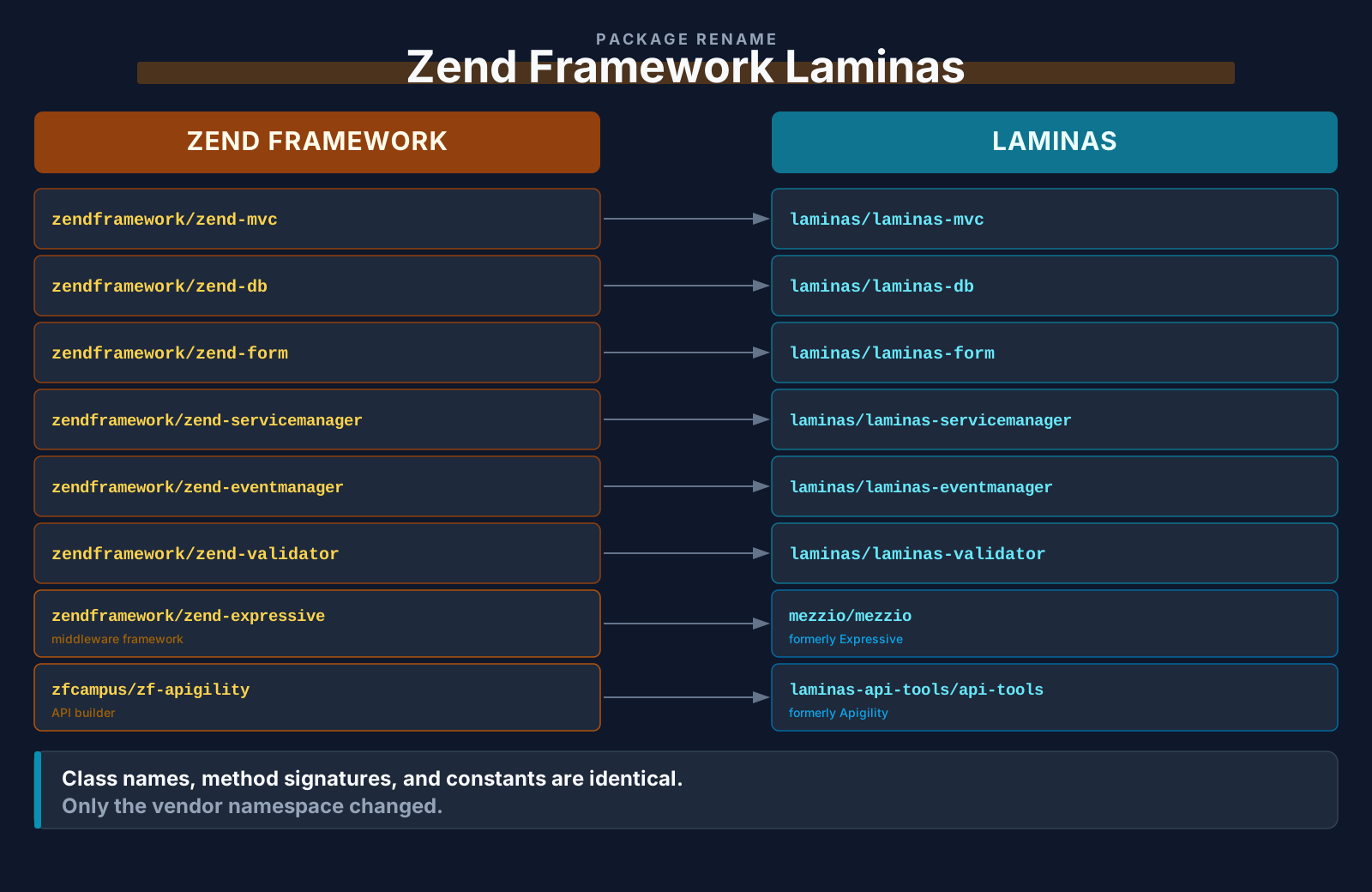
The pattern is mechanical. Every Composer package whose vendor was zendframework became laminas, with the package suffix preserved:
zendframework/zend-mvc          →  laminas/laminas-mvc
zendframework/zend-servicemanager → laminas/laminas-servicemanager
zendframework/zend-eventmanager →  laminas/laminas-eventmanager
zendframework/zend-db           →  laminas/laminas-db
zendframework/zend-form         →  laminas/laminas-form
zendframework/zend-validator    →  laminas/laminas-validator
zendframework/zend-filter       →  laminas/laminas-filter
zendframework/zend-hydrator     →  laminas/laminas-hydrator
zendframework/zend-cache        →  laminas/laminas-cache
zendframework/zend-config       →  laminas/laminas-config
zendframework/zend-i18n         →  laminas/laminas-i18n
zendframework/zend-stdlib       →  laminas/laminas-stdlib
zendframework/zend-view         →  laminas/laminas-view
The PHP namespaces follow the same rule: Zend\Mvc becomes Laminas\Mvc, Zend\Db\Sql\Select becomes Laminas\Db\Sql\Select, and so on. Class names don't change. Method signatures don't change. Constants don't change. If Zend\Validator\Date::FORMAT_DEFAULT was a thing, Laminas\Validator\Date::FORMAT_DEFAULT is the same thing.
The sibling projects rebranded a little harder:
- Zend Expressive (the PSR-15 middleware framework) became Mezzio. Packages moved from
zendframework/zend-expressive-*tomezzio/mezzio-*, and the namespace becameMezzio\.... Same code, different shelf. - Apigility (the API builder) became Laminas API Tools. Packages moved from
zfcampus/zf-apigility-*tolaminas-api-tools/api-tools-*. The browser-based admin app got a new coat of paint but the same underlying ZF/Laminas modules.
If you have these in your stack, you'll see them as separate clusters of renames during the migration; they don't ride along automatically with the core packages.
The compatibility bridge
If you tried to do this rename by hand on a real codebase, you'd quickly hit the dependency graph problem. Your application has direct dependencies on laminas/laminas-mvc, but you also pull in some third-party module (say, a PDF generator) that still depends on zendframework/zend-pdf somewhere inside its tree. You can't make that third-party module update on your timeline. So either you abandon it, vendor-fork it, or find a way to make Zend\Pdf and Laminas\Pdf mean the same thing in the same process.
The Laminas team built that third option. It's a Composer plugin called laminas/laminas-zendframework-bridge, and once installed it does two jobs:
- Aliases the old PHP class names (
Zend\Validator\Date) to the new ones (Laminas\Validator\Date) at autoload time, so legacy code that saysnew Zend\Validator\Date()still gets a real, working object, just an alias to the Laminas class. - Rewrites Composer's installation behavior so that anything in your dependency tree that still points at
zendframework/*gets transparently resolved to the correspondinglaminas/*package without you needing to fork those packages.
You install it like any other dependency:
composer require laminas/laminas-zendframework-bridgeOnce installed, the bridge registers an autoloader that intercepts class loads in the Zend\ namespace, finds the corresponding Laminas\ class, and emits class_alias() calls so the old name and the new name resolve to the same class object. It also handles the inverse: Laminas\... requests when only the legacy Zend\... class is loaded, so config files written against either name continue to work.
That's the part that makes the migration gradual instead of all-or-nothing. You don't have to rename every file in your codebase before you can deploy. You can:
- Install Laminas alongside the legacy Zend packages.
- Add the bridge.
- Boot the application. It should behave exactly as before, because every
Zend\Xis now a thin alias forLaminas\X. - Run the migration tool to rewrite your codebase, file by file, on whatever schedule you can stomach.
- Drop the bridge once your last
Zend\reference is gone.
The migration CLI
The bridge is the safety net. The actual rewriter is a separate package: laminas/laminas-migration. It's a small CLI shipped as a Composer global tool that walks a directory tree and rewrites every reference to legacy Zend, Expressive, or Apigility names into their Laminas, Mezzio, or API Tools equivalents.
You install it once, globally:
composer global require laminas/laminas-migrationThat puts the binary on your PATH as laminas-migration. From there, you point it at a project root and let it run:
cd /path/to/your/project
laminas-migration migrate
What it actually does is mechanical, but the list is long. It rewrites:
- PHP
usestatements in every*.phpfile (use Zend\Mvc\Controller\AbstractActionController→use Laminas\Mvc\Controller\AbstractActionController). - Fully qualified class references inside method bodies (
new \Zend\Db\Sql\Sql($adapter)→new \Laminas\Db\Sql\Sql($adapter)). - Class references inside string keys in config files, which is exactly where most hand-rolled
sedscripts go wrong: the strings need quote-escaping handling and array nesting awareness. - Composer package names inside
composer.json(zendframework/zend-mvc→laminas/laminas-mvc). - Module names inside
config/application.config.php(or whichever file lists your enabled modules):Zend\RouterbecomesLaminas\Router,ZF\Apigility\DocumentationbecomesLaminas\ApiTools\Documentation, and so on. - File comments that reference legacy class names, optionally. There's a flag for whether to touch comments or leave them as historical record.
- Expressive- and Apigility-specific constructs (the
Mezzio\andLaminas\ApiTools\namespaces, themezzio/package names) using the same logic.
The tool is conservative by default. It won't touch your vendor/ directory. It won't touch files named in a .gitignore-style ignore file you configure. It won't reformat your code beyond the substitutions. If the rewrite of a single file would produce a syntax error (because of some weird construct it didn't expect), it reports the file and skips it instead of leaving a half-rewritten mess.
The first time you run it, you'll get an output like this:
Replacing in /path/to/your/project/module/Application/src/Controller/IndexController.php
Replacing in /path/to/your/project/module/Application/config/module.config.php
Replacing in /path/to/your/project/composer.json
...
[OK] Migration complete!
A typical mid-size ZF2/ZF3 application has somewhere between a few hundred and a few thousand replacements. The tool will do them all in seconds.
After the rewrite, run composer update so the new laminas/* packages get pulled in (the migration changed your composer.json but didn't touch composer.lock), then run your test suite.
The order of operations that keeps you sane
Now the practical order. Doing these steps out of sequence is how migrations end up half-baked.
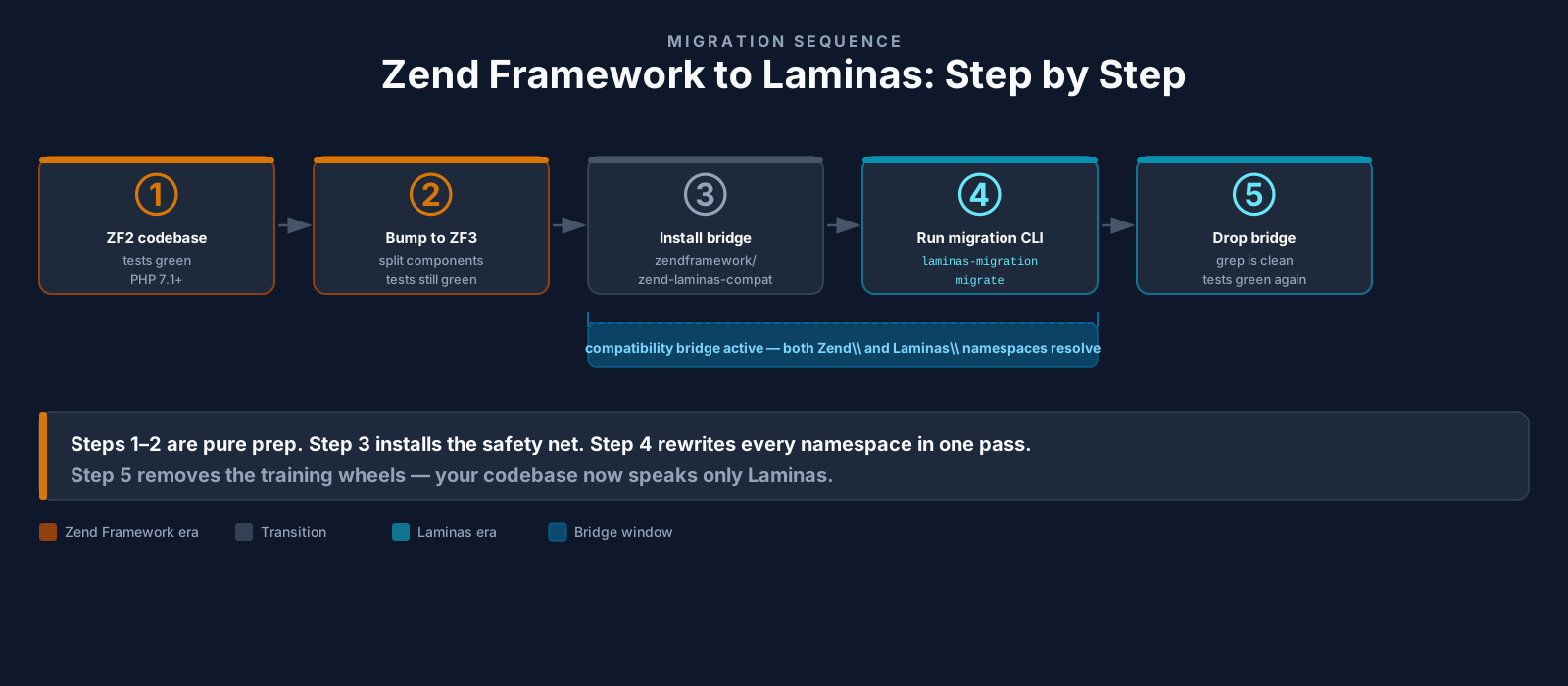
1. Pin the current state. Check that your test suite is green on the current zendframework/* setup. If it's not, fix that first. Migrating a broken codebase magnifies the brokenness; you'll spend the entire migration debugging pre-existing bugs you didn't know about.
2. Bump to ZF3 if you haven't. This is the real migration. Updating from ZF2 components to ZF3 components involves actual API changes: the service manager v3 rewrite, hydrator API changes, validator option-array shape changes, deprecations in the event manager. Do this on the old zendframework/* packages, not on Laminas. There's no need to learn the new namespaces while you're also fighting deprecations. Once the app is green on ZF3, you have a stable jumping-off point.
3. Install the bridge. Add laminas/laminas-zendframework-bridge to composer.json. Don't change anything else yet. Boot the app. Run the test suite. Everything should pass. The bridge is invisible at this stage because nothing has been renamed.
4. Run the migration tool. Commit before, run laminas-migration migrate --path=., commit the result on its own branch. Don't mix this commit with manual edits.
5. Update Composer. composer update to pick up the new laminas/* packages. Inspect composer.lock to confirm the zendframework/* packages are gone (they may not be; see the next point).
6. Find what didn't get renamed. This is the slow part. The migration tool catches the obvious. It misses a few categories:
- String references in config that the tool's heuristics didn't recognise as class names, especially custom factory keys or invokable lists where the namespaces are concatenated dynamically.
- Inline class names embedded in error messages or log lines (these are just strings, so the tool leaves them alone).
- Custom code that builds Zend class names at runtime with concatenation like
'Zend\\Validator\\' . $name. The tool can't safely rewrite these because the operand is dynamic. - YAML or XML config files, if your project uses any. The tool focuses on PHP.
- Annotations referencing Zend classes (
@Zend\Form\Annotation\Type): depending on tool version, these may or may not be rewritten. Check the diff.
A grep -r "Zend\\\\" . over the codebase after migration is the cheapest way to find the leftovers. If the bridge is still installed, the leftover Zend\... references will keep working, so you can fix them on your own schedule.
7. Run your tests, then your manual smoke checks. Tests catch the renames that broke. Smoke checks catch the renames that "work" but resolve to the wrong target, like a class alias that pointed at the wrong Laminas class because of a typo in your custom factory.
8. Drop the bridge when grep is clean. Remove laminas/laminas-zendframework-bridge from composer.json only after grep -r "Zend\\\\" --include="*.php" --include="*.json" . returns nothing meaningful. Removing it earlier means any leftover legacy reference becomes a fatal error at runtime instead of a silent alias.
What the Tool Doesn't Catch, and What to Look For
The categories above are general; here's what they look like in real ZF2/ZF3 codebases.
Service manager invokables. Any module's module.config.php typically has a service_manager key with invokables and factories arrays. The keys and values are class names, and the migration tool catches them. But projects often build the invokables list programmatically, for example by iterating a folder and constructing class names from filenames. That code is just string manipulation as far as the tool is concerned, so the rewriter leaves it alone:
foreach ($validatorClasses as $class) {
    // 'Zend\\Validator\\Date' built at runtime — tool can't rewrite this
    $sm->setInvokableClass('validator_' . $class, 'Zend\\Validator\\' . $class);
}
After the migration, that string is still 'Zend\\Validator\\...'. The bridge will keep it working. But if you remove the bridge, every entry in this loop will fail to resolve. The fix is to rewrite the loop by hand to use Laminas\\Validator\\....
Custom abstract factories. If your codebase has its own implementations of AbstractFactoryInterface (or the ZF3 equivalent), and they pattern-match on namespace prefixes (for example, "any class starting with Application\Service\ should be created by AppServiceFactory"), those pattern-match strings might encode Zend\... as part of the rule. Read every custom factory you have and check.
View helper plugin manager keys. ZF2 view helper plugin managers had key names like 'zendformelement' and 'zendformrow', all-lowercase, no separators. The tool's substitution logic should catch these (the Laminas version uses 'laminasformelement'), but in practice some projects had typos or non-standard casing that the tool's normaliser didn't recognise. If your views start rendering blank or throwing "no helper named X" errors, this is a likely culprit.
External package configuration. A surprising number of third-party modules document their configuration with literal Zend class names in their README. After the migration, those examples copy-pasted into your project will be wrong. Search your codebase for any references to those modules' class names and update them to the Laminas equivalent.
Composer specifics that bite
A few Composer details matter enough to call out separately.
Replace, don't dual-install. When the migration finishes, your composer.json should contain only laminas/* packages, not both laminas/* and zendframework/*. Leaving the old packages declared is harmless from a runtime perspective (the bridge handles aliasing) but it muddies the dependency tree and makes it impossible to tell, later, whether you've actually finished the migration. The migration tool removes the old declarations from composer.json automatically; just confirm in your diff that it did.
Plugin allow-list (Composer 2.2+). Composer 2.2 added an allow-plugins key. The bridge is a Composer plugin, so you'll need:
{
    "config": {
        "allow-plugins": {
            "laminas/laminas-component-installer": true,
            "laminas/laminas-zendframework-bridge": true
        }
    }
}
Without that, modern Composer will refuse to run the plugin and emit a warning every time you composer install. The error message is helpful, but it's the kind of thing CI configurations sometimes ignore until a deploy fails.
Lock file regeneration. After the migration, composer.lock will still reference the old zendframework/* packages until you run composer update. Some teams panic at this point because composer install against the unchanged lock file appears to "work". It works because the lock points at the legacy packages, which are still on Packagist (just abandoned). The lockfile update is what actually completes the rename. Don't skip it because tests pass without it.
Replace metadata. The laminas/* packages declare replace for the corresponding zendframework/* packages in their composer manifests. That's how a transitive dependency on zendframework/zend-mvc from some old library doesn't pull a second copy of the framework into vendor/. Composer sees the replace and treats laminas/laminas-mvc as satisfying both. This is the magic that makes the bridge's gradual-migration story possible at all.
Mezzio and API Tools: The Sibling Rebrands
If your application uses Zend Expressive or Apigility, the migration includes those too, but the rebrand is more visible because the project name changed.
Expressive → Mezzio. Every zendframework/zend-expressive-* package becomes mezzio/mezzio-*. Every Zend\Expressive\... namespace becomes Mezzio\.... The application skeleton is the same. The middleware-pipeline philosophy is the same. The PSR-15 contracts are the same. If you have integration tests asserting on rendered output, they should pass unchanged.
Apigility → Laminas API Tools. Every zfcampus/zf-apigility-* package becomes laminas-api-tools/api-tools-*. Every ZF\Apigility\... namespace becomes Laminas\ApiTools\.... The browser admin UI is largely the same; the URL paths inside the admin module changed prefix from /apigility/... to something explicitly under the API Tools branding, which matters if you'd hardcoded those routes anywhere (rare).
The migration tool handles all of these. The only manual step worth flagging: any documentation, READMEs, or onboarding wiki pages your team maintains that mention "Apigility" or "Expressive" need a sweep too. The tool can't reach those.
When the bridge is not enough
The compatibility bridge is excellent at what it does, aliasing old class names to new ones. But it has a hard limit: it can't fix code that's actually broken between ZF2 and ZF3. If your application is still running against the old service manager API, the old hydrator API, or the old validator option-array shape, the bridge won't save you when you upgrade. It aliases names; it doesn't translate APIs.
This trips up teams that try to skip the ZF3 step. They install the bridge, run the migration tool, and then discover that half their custom factories don't work because the service manager v3 changed how factories are invoked. The error messages can be confusing. They look like rename problems, but they're really API-shape problems that have been there the whole time.
The cheap diagnostic: if a class fails to load and the class doesn't exist on disk under either name, it's a rename problem. If the class loads fine but a method behaves unexpectedly, or a factory throws because it received an array argument it didn't expect, it's an API problem. The bridge solves the first; only doing the ZF2 → ZF3 work solves the second.
End state
When you've gotten through the migration, your project looks like this: every composer.json dependency is laminas/* or mezzio/* or laminas-api-tools/*, every use statement is Laminas\... (or Mezzio\..., or Laminas\ApiTools\...), every config file references the new namespaces, the bridge is gone, and grep -r "Zend\\\\" . returns nothing. The application behaves exactly as it did before the migration started.
That last sentence is the whole point. You haven't gained any features. You haven't fixed any bugs. You've simply moved the codebase off a name that's been abandoned on Packagist and onto a name that's still being maintained by a foundation. From the outside, no one will notice. From the inside, your dependency tree is healthy again, and the next time security advisories drop, they'll actually flow into your project through a vendor that's still publishing them.