So, you've been writing Node.js for years. You know require like you know your own keyboard. Then one day someone hands you a library that ships ESM only, you npm install it, and your codebase explodes into a cascade of ERR_REQUIRE_ESM errors that no Stack Overflow answer seems to fully resolve.
You change one file to .mjs, half your project breaks. You add "type": "module" to package.json, the other half breaks. You spend two hours moving things around and end up with a tsconfig.json setting called nodenext that nobody on your team can explain. By the end of the day you're staring at the screen wondering how a 30-year-old language ended up with two module systems that don't really get along.
You're not wrong to be frustrated. The ESM-versus-CommonJS situation in Node.js is one of the rare places where the ecosystem genuinely failed to soften the transition. There's no single switch you can flip — there's a tangle of file extensions, package settings, loader behaviour, and tooling assumptions, all of which interact in ways that aren't obvious until you trip over them.
Let's break it down for real this time. Not the surface-level "ESM uses import, CommonJS uses require" version — the actual model behind each one, why they're hard to mix, what's changed recently, and what migration looks like when you're the one responsible for not breaking production.
The two module systems are doing different things
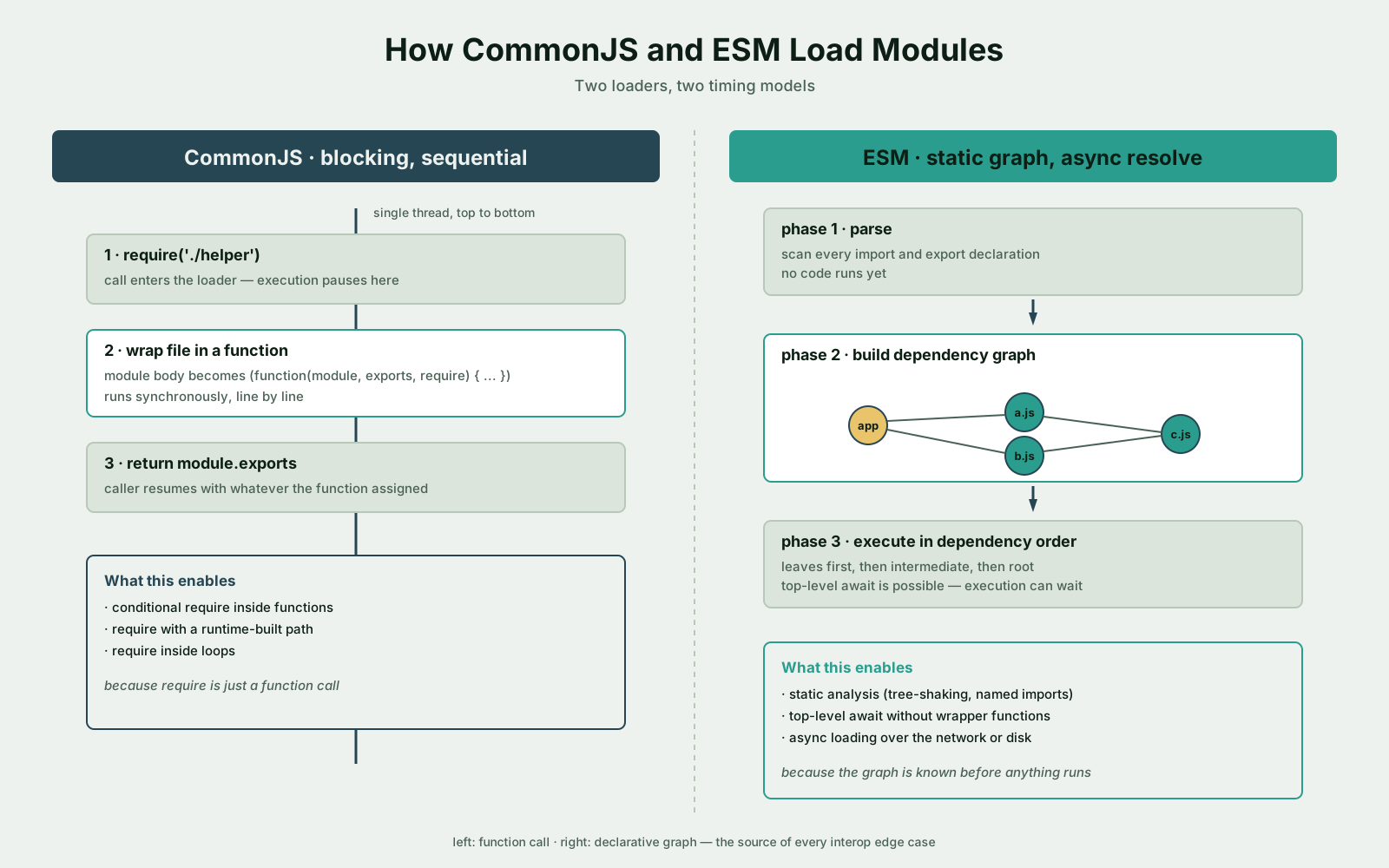
Before any syntax, this is the part most articles skip. ESM and CommonJS are not two flavours of the same idea. They have different loading models, different timing, and different mental models for what a module is.
CommonJS treats a module as a function. When you require('./helper'), Node finds the file, wraps its contents in a function, executes that function, and hands you back whatever you assigned to module.exports. The whole thing is synchronous — require blocks until the module is loaded and run.
const greet = (name) => `Hello, ${name}`;

module.exports = { greet };const { greet } = require('./helper.cjs');
console.log(greet('world'));Because require is a function call, you can do strange things with it. Conditional requires. Requires inside loops. Requires whose path is built from a runtime variable. The module system doesn't care — it's just a function that runs when you call it.
ESM treats a module as a static graph. When Node sees import { greet } from './helper.js', it doesn't run anything yet. It parses the file, looks at every import and export declaration, builds a graph of dependencies, then loads them in the right order asynchronously.
export const greet = (name) => `Hello, ${name}`;import { greet } from './helper.js';
console.log(greet('world'));The asynchronous, static nature of ESM is the source of basically every interop problem that follows. You can't have a "conditional import" the same way you'd have a conditional require — import statements are hoisted and resolved before anything in your file actually runs. If you need conditional loading in ESM, you reach for the import() expression, which is a different beast — it returns a promise.
This isn't a stylistic choice. ESM is async because the spec was designed for environments (browsers, deno, bundlers) where loading might involve a network fetch. CommonJS was designed for a world where every module was sitting on a local disk. Both choices are reasonable in their own context. They just don't compose cleanly when you try to bolt them together inside one runtime.
How Node decides which loader to use
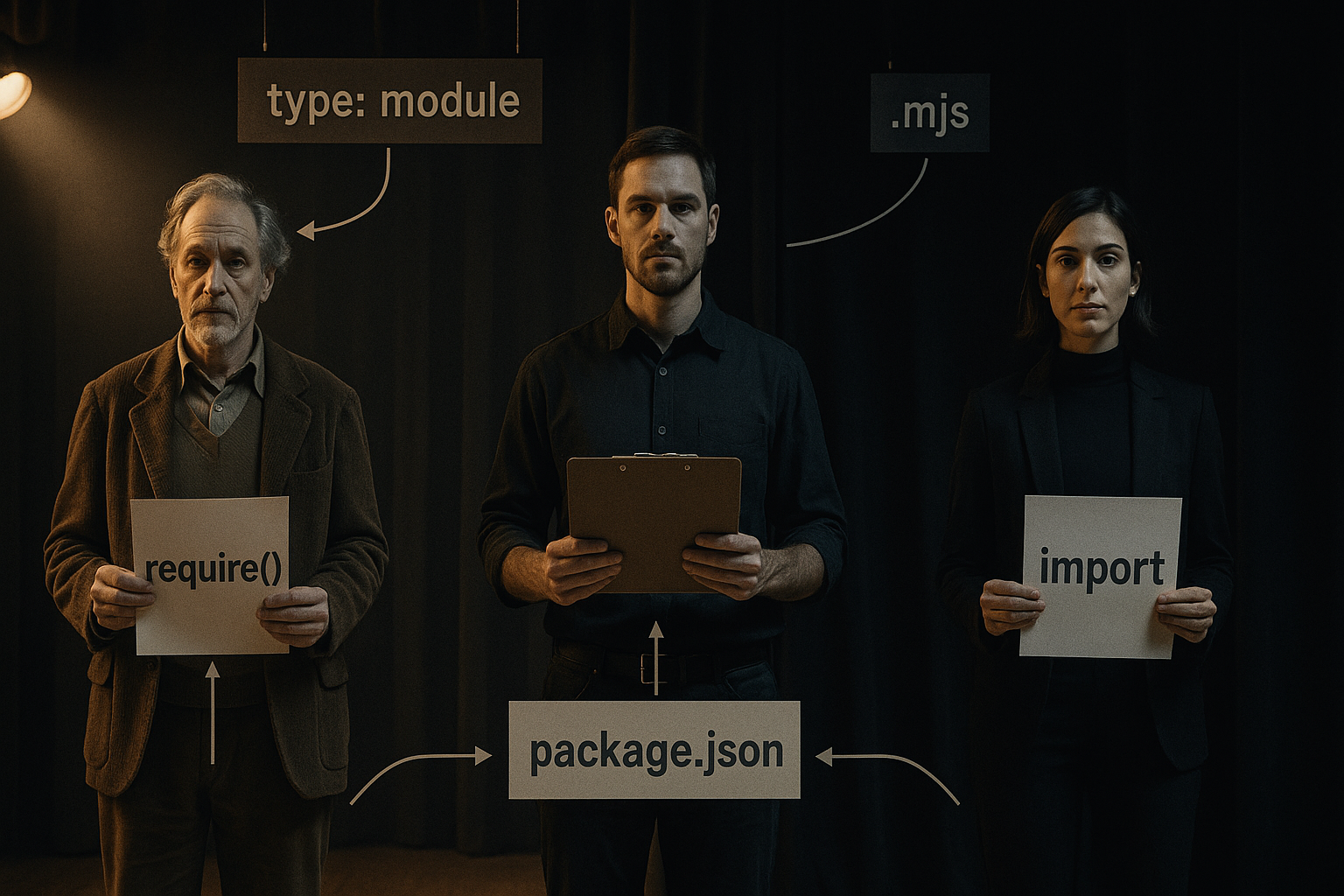
Once you understand there are two loaders, the next question is: which one does Node use for a given file? The answer lives in three places, in this priority order.
1. The file extension. If the file ends in .mjs, it's always loaded as ESM. If it ends in .cjs, it's always loaded as CommonJS. These extensions are unconditional — they ignore everything else.
2. The nearest package.json's "type" field. For .js files, Node walks up from the file looking for the closest package.json. If that file has "type": "module", the .js file is ESM. If it has "type": "commonjs" or omits the field, the .js file is CommonJS.
3. The default. If there's no package.json at all, .js defaults to CommonJS.
That's the entire decision tree. There's no command-line flag for "be ESM today, be CJS tomorrow." The loader is decided per-file based on what's around it.
{
  "name": "my-app",
  "type": "module"
}
With that package.json in place, every .js file in the project loads as ESM. If you have one file that needs to stay CommonJS (a legacy script, a config file required by some tool), you give it the .cjs extension and Node will keep loading it the old way.
The reverse also works. In a CommonJS project, you can have one ESM file by naming it .mjs. This is occasionally useful when you want to use top-level await in a single script without converting your whole codebase.
The everyday differences that bite
If the loaders were just two ways to express the same thing, this wouldn't matter much. But ESM removes a handful of things you've been using for years in CommonJS, and CommonJS doesn't have most of what ESM offers.
__dirname and __filename are gone in ESM. They were CommonJS-specific globals. In ESM you reconstruct them from import.meta.url:
import { fileURLToPath } from 'node:url';
import { dirname } from 'node:path';

const __filename = fileURLToPath(import.meta.url);
const __dirname = dirname(__filename);
You'll write that snippet so many times you'll memorise it. Some projects extract it into a tiny utility module. Some teams just paste it where they need it.
require is gone in ESM (with one important asterisk we'll get to). If you need to load a CommonJS module from ESM, you can usually just import it — Node handles the bridge. If you need the older require semantics for some reason, you can rebuild it with createRequire:
import { createRequire } from 'node:module';

const require = createRequire(import.meta.url);

const legacyConfig = require('./legacy-config.cjs');
File extensions are required in ESM imports. CommonJS lets you write require('./helper') and Node will helpfully tack on .js, .json, or check for helper/index.js. ESM doesn't do that. You write the full filename or it errors:
// CommonJS — works
const helper = require('./helper');

// ESM — only this works
import { helper } from './helper.js';
This trips up everyone migrating from TypeScript-with-CJS to TypeScript-with-ESM, because TypeScript wants you to write ./helper even when the compiled output needs ./helper.js. The moduleResolution: "nodenext" setting in tsconfig.json is what forces TypeScript to demand the extension.
Top-level await works in ESM. This is one of the genuinely nice things you get for free:
import { connect } from './my-db.js';

export const db = await connect(process.env.DATABASE_URL);
That file's export will only resolve after connect resolves, and any module that imports from it will wait. You can't do this in CommonJS because the loader is synchronous — there's nowhere to put the await.
ESM is always in strict mode. No "use strict" needed, and you can't opt out. This usually doesn't matter, but if you have legacy code that depends on sloppy-mode behaviour (implicit globals, weird this rebinding), you'll find out fast.
JSON imports look different. In CommonJS, require('./package.json') returns the parsed JSON. In ESM, you have to ask for it explicitly with an import attribute:
import pkg from './package.json' with { type: 'json' };

console.log(pkg.version);
The with { type: 'json' } part is the spec-mandated way to opt into JSON imports. Older Node versions used assert { type: 'json' } instead — that syntax is being phased out in favour of with.
The interop story (and why it's still tricky)
For the first few years of Node ESM support, the two systems were almost completely walled off. ESM could import CommonJS modules — Node had built a compatibility layer for that. But CommonJS couldn't synchronously load ESM, period. If you had a CJS file and an ESM module you needed to use, your only option was the dynamic import() expression, which returns a promise.
// Old story: only async access to ESM from CJS
async function load() {
  const { default: chalk } = await import('chalk');
  console.log(chalk.green('hello'));
}

load();
This is fine for some cases and incredibly annoying for others — especially configuration files, CLI entry points, and anywhere you want a synchronous top-level expression.
The new story (Node 22+) loosened that restriction. Recent Node versions can require() an ESM module if that module doesn't use top-level await and none of its dependencies do either. The feature started behind a flag and graduated over a few releases; in current Node it's available without the flag for the synchronous subset of ESM:
// New story: works if 'chalk' is sync ESM (no top-level await)
const chalk = require('chalk');

console.log(chalk.default.green('hello'));
A few things to notice. First, you still get the namespace object, not the default export directly — that's why you have to write chalk.default even though the package's "main" export is the default. Second, if the ESM module does use top-level await, this still throws — Node will tell you to use dynamic import() instead. Third, this only helps you read ESM from CJS at runtime. It doesn't fix any of the build-time or tooling issues we'll get to next.
Going the other way is easier. ESM importing CommonJS has worked from day one, with one gotcha: named imports from CJS modules are best-effort.
import lodash from 'lodash'; // CommonJS package — default import worksimport { debounce } from 'lodash'; // named import — depends on Node's detectionNode does its best to figure out the named exports a CJS module produces by statically analysing the file. For most popular libraries this works. For modules that build their exports dynamically (module.exports[key] = ... inside a loop), Node can't see them, and the named import fails. The fix is to use the default import and destructure at runtime:
import lodash from 'lodash';
const { debounce } = lodash;
Ugly, but reliable.
The dual-package hazard
If you publish an npm package and you want to support both CJS and ESM consumers, you publish two versions inside one package. This is a dual package. It's also where one of the nastiest interop bugs lives.
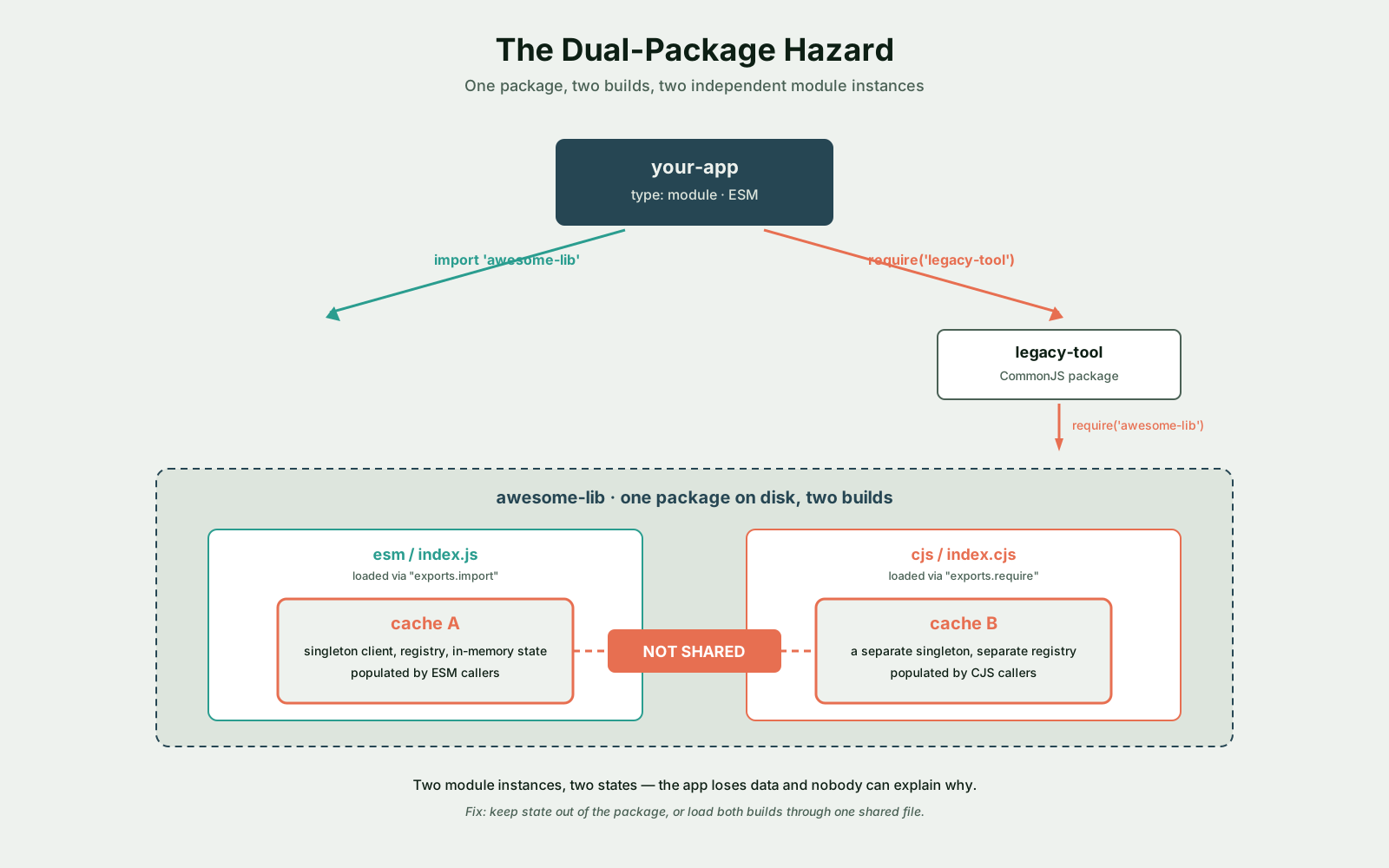
The hazard goes like this. Your package has internal state — a cache, a registry, a singleton client. A consumer's app loads your package once as ESM (from their ESM code) and again as CommonJS (from a transitive dependency that's still CJS). Node treats those as two separate module instances. They each get their own copy of the internal state. From the outside, your package looks like it's losing data or behaving inconsistently, and nobody can figure out why.
your-app (ESM)
  ├─ import 'awesome-lib'  → loads awesome-lib/esm/index.js  → cache A
  └─ require('legacy-tool')
       └─ require('awesome-lib') → loads awesome-lib/cjs/index.cjs → cache B
The two awesome-lib instances don't share state. They don't even know about each other.
The fix is to keep state out of the package, or to load both builds from a single shared CJS file, or — most commonly — to design your package so that internal state isn't a thing. Stateless utility libraries dodge this entirely. Anything that holds connections, registries, or caches has to think hard about it.
The way you ship a dual package is through the "exports" field in package.json:
{
  "name": "awesome-lib",
  "type": "module",
  "main": "./cjs/index.cjs",
  "exports": {
    ".": {
      "import": "./esm/index.js",
      "require": "./cjs/index.cjs"
    },
    "./feature": {
      "import": "./esm/feature.js",
      "require": "./cjs/feature.cjs"
    }
  }
}
The "exports" map is what Node and modern bundlers look at to decide which file to load. "main" is kept around as a fallback for ancient tooling that doesn't understand "exports". Once you ship an "exports" map, the package's old main/module fields become advisory only — and importantly, the map also acts as an encapsulation boundary. Anything not listed in "exports" is no longer importable from outside the package, even if the file still exists on disk.
Where the tooling breaks first
The runtime story is solvable. The bigger pain is usually tooling. Every build tool, test runner, transpiler, and bundler has its own opinion about which module system you're using, and they don't always agree with Node.
TypeScript. This is where most teams hit the wall. TypeScript's module and moduleResolution settings are a layered set of compatibility modes, and the right combination depends on what runtime you're targeting:
"module": "commonjs"— emit CJS, the historical default."module": "esnext"— emit raw ESM, expect a bundler to handle it."module": "nodenext"(paired with"moduleResolution": "nodenext") — emit whichever the nearestpackage.jsonsays, with the same per-file rules Node uses. This is the setting you want for pure-Node ESM projects.
The nodenext mode is strict in a way that surprises people the first time. It demands explicit file extensions on imports (./helper.js, not ./helper), it forces you to use import attributes for JSON, and it'll yell at you if you try to mix ESM and CJS syntax in the same file. The trade-off is that what TypeScript compiles works correctly in real Node — no more "compiles fine, crashes at runtime" surprises.
Jest. Jest's ESM support has been a long, awkward journey. For years you'd write modern ESM code and your tests would fail with SyntaxError: Cannot use import statement outside a module. The supported workarounds typically involve NODE_OPTIONS='--experimental-vm-modules' and a transform config that tells Jest how to handle TypeScript or modern syntax. A lot of teams have just switched to Vitest, which was designed for ESM from the start and doesn't need the same gymnastics.
Bundlers. Webpack, Rollup, esbuild, and Vite all understand both module systems and produce output for whichever target you pick. They handle the interop layer for you at build time. But they also have their own quirks — Webpack's tree-shaking, for instance, only works on static ESM imports, so converting your codebase to ESM is the move that actually unlocks dead-code elimination. If you've ever wondered why your bundle is 800KB even though you only import three functions from a giant library, this is part of why.
ts-node, tsx, swc-node. Running TypeScript directly without compilation has its own ESM story. ts-node historically needed the --esm flag plus a custom loader. tsx was built to make ESM-TypeScript "just work" without configuration. Most teams that want a friction-free dev loop end up reaching for tsx (for execution) and tsup or esbuild (for builds).
The general lesson is: every tool in your toolchain has a "default module assumption" baked in. When you switch a project to ESM, you usually end up reconfiguring three or four tools to match, not just changing your package.json.
A migration plan that doesn't burn
If you have a non-trivial CommonJS codebase and you want to move to ESM, don't try to do it in one PR. The change has too many edges. Here's a plan that's worked for me and for teams I've helped through it.
1. Stop adding new CJS. Before you touch any existing code, change your conventions for new files. Any new module gets written as ESM-ready, even if it has to live in CJS files for now. That means no require calls inside functions, no module.exports = function () { ... } patterns, no __dirname without thinking about it.
2. Audit your dependencies. Run npm ls and look for packages that are ESM-only — they tend to be the newer ones (chalk 5+, node-fetch 3+, nanoid 4+, many in the unjs ecosystem). For each, decide whether you'll switch your call site to dynamic import(), downgrade to the last CJS-compatible version, or use the new require(esm) path in recent Node.
3. Convert your config and entry points first. The files that benefit most from ESM are the ones that already want async behaviour at the top level — your server bootstrap, your CLI entry point, your migration scripts. Rename them to .mjs and rewrite them to use import. This gives you a feel for the syntax without touching the deep parts of your codebase.
4. Move shared utilities next. Convert your utils/, lib/, and helpers. These have the fewest dependencies on Node-isms like __dirname and the highest chance of being imported by everything else.
5. Flip the project's "type". Once enough of your .js files are ESM-ready, add "type": "module" to package.json and rename the few remaining stragglers to .cjs. Now your default is ESM and the old files are explicit exceptions.
6. Re-run your test suite and CI at every step. The most common failure isn't your application code — it's a build script, a CLI wrapper, or a tooling config that quietly assumed it was running in CJS. Find these by running everything, not by reading.
7. Clean up the .cjs holdouts. Some files might stay .cjs forever — a Tailwind config, a third-party tool's expected format, a script that intentionally uses sync require for performance. That's fine. The goal isn't 100% ESM; the goal is to be in control of which loader runs each file.
A pure-CJS-to-pure-ESM conversion of a medium-sized codebase tends to take a few weeks of background work, not a weekend. Most of the time isn't writing — it's catching the long tail of tooling integrations that broke quietly.
The bits that will still annoy you
Even after a clean migration, some things just stay slightly worse:
- Default vs. named exports. ESM's named-import semantics are stricter than what most CJS packages emit, so you'll keep writing
import pkg from 'thing'; const { foo } = pkg;for a while. __dirnamereconstructions in every file that touches the filesystem.- TypeScript's
.jsextension requirement on imports of.tsfiles, which feels backwards every time. - Test runners deciding mid-upgrade that they need yet another flag.
- The fact that the npm ecosystem still has both kinds of packages, and probably will for a long time.
None of these are catastrophic. They're paper cuts. The reason ESM is worth the migration anyway is the rest of the story — top-level await, real static analysis, working tree-shaking, alignment with how the rest of the JavaScript ecosystem works, and a path forward that's actually moving. CommonJS isn't going anywhere fast, but the future of new tooling and new packages is mostly ESM, and being fluent in both is the price of working in Node in 2026.
The good news is that once you've internalised the loader model — static graph vs. function call, async resolve vs. sync execute, file extension and "type" decide the loader — almost every error message starts making sense. The cryptic ones are usually one of three things: a missing file extension, a "type" field in the wrong package.json, or a CJS package that doesn't expose the named export you're asking for. Once you can recognise those three shapes, the rest of the work is just patience.