You've shipped the Node service. It works. Then traffic doubles, p99 latency starts breathing heavily, and the dashboards light up at 3am for the first time. You SSH in, run top, and the CPU isn't even pinned. Memory looks fine. The database is bored. But the response times are doubling, then tripling, and you have no idea where the time is actually going.
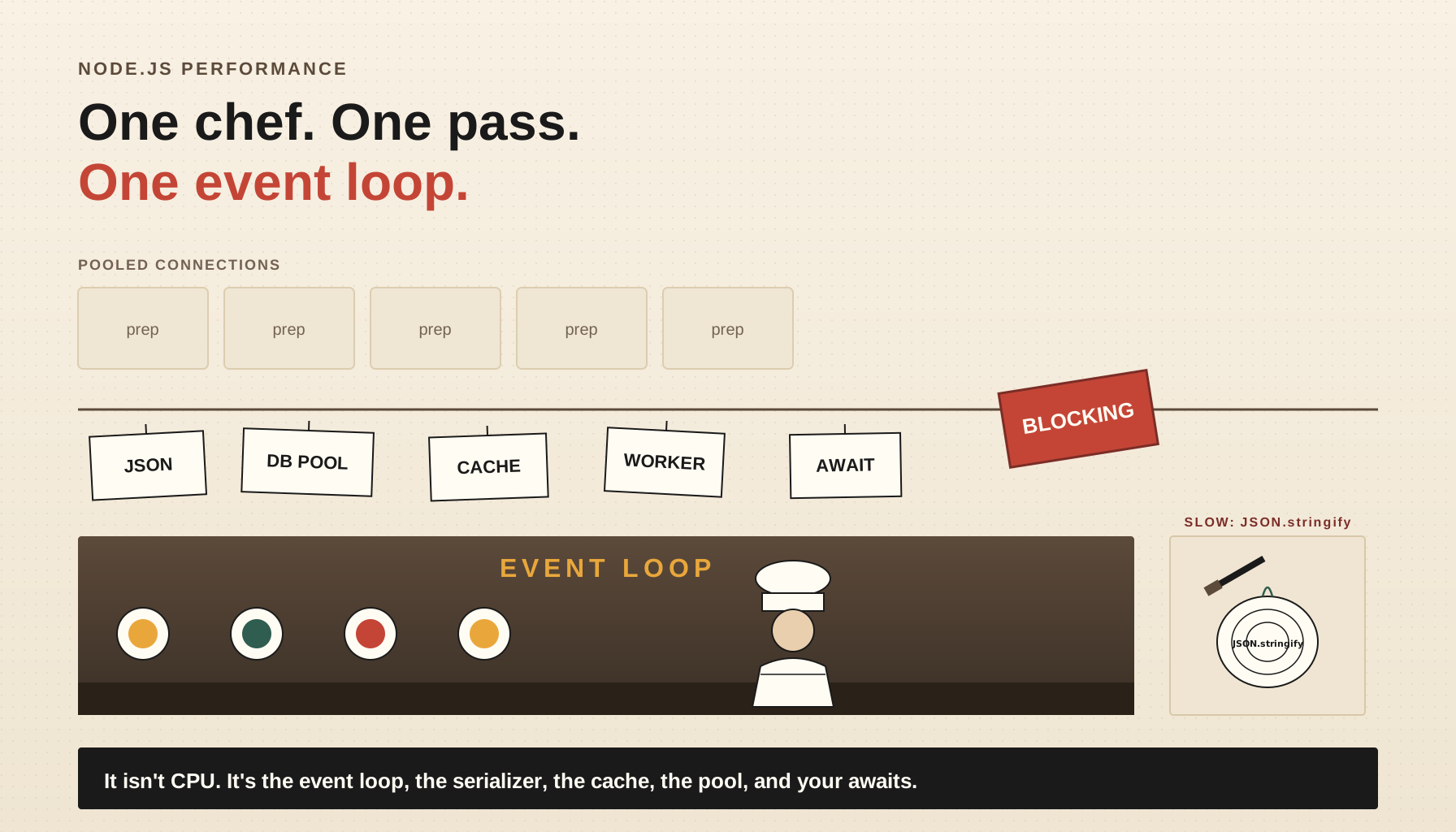
If that sounds familiar, you're in the most common Node.js performance situation: the bottleneck isn't where your instincts tell you to look. Node is single-threaded for your code, asynchronous for I/O, and aggressively optimised by V8 - which means the usual suspects (CPU, memory, GC) are almost never the first thing that breaks. What breaks first is the event loop, the serialization layer, the cache strategy, the connection pools, and the way you wrote await.
This piece walks through those five categories. Each one has the same shape: how to spot it, what's actually going on underneath, and the concrete patterns that fix it. You won't need to rewrite anything in Rust. You won't need a microservices migration. Most of these are 5-line changes that move p99 by an order of magnitude.
Profile First, Optimise Second
Before anything else: do not optimise from intuition. Node's runtime is too non-obvious for that. The slow part is rarely the part you'd guess, and "optimising" a fast section just adds complexity for no measurable win.
Node ships with three profilers that are good enough for almost any production investigation.
node --prof your-app.js produces a V8 tick log that you process with node --prof-process isolate-0x*.log > processed.txt. The output shows where C++ and JavaScript time is spent. It's noisy but free, and it tells you within a minute whether your bottleneck is JSON.stringify, regex, GC, or something in a native binding.
node --cpu-prof your-app.js writes a .cpuprofile file you can open in Chrome DevTools (Performance tab → Load profile). This is the friendliest one - flame graphs, call trees, the lot. Use it for any "this endpoint is slow" investigation.
node --inspect your-app.js opens a port for Chrome DevTools to attach live. You can record CPU profiles, take heap snapshots, and step through async stacks. The one to use when you want to poke at a running app instead of a captured trace.
For event-loop-specific work, Clinic.js is the tool. clinic doctor watches your process while you hit it with load and tells you, in plain English, whether you have an event loop problem, an I/O problem, or a GC problem. clinic flame gives you a CPU flame graph. clinic bubbleprof visualises async operations and is the one tool that makes "where is my await actually waiting" comprehensible.
The rule, regardless of which tool: run your real workload through it. Synthetic benchmarks lie. The hot path in your test rig is not the hot path in production, because production has 30 other things competing for the event loop.
The Event Loop Is The Hot Path
Almost every Node performance problem eventually comes back to the event loop. If you take one thing from this article: the event loop is your single most precious resource, and any synchronous work you do on it is work that nothing else can do at the same time.
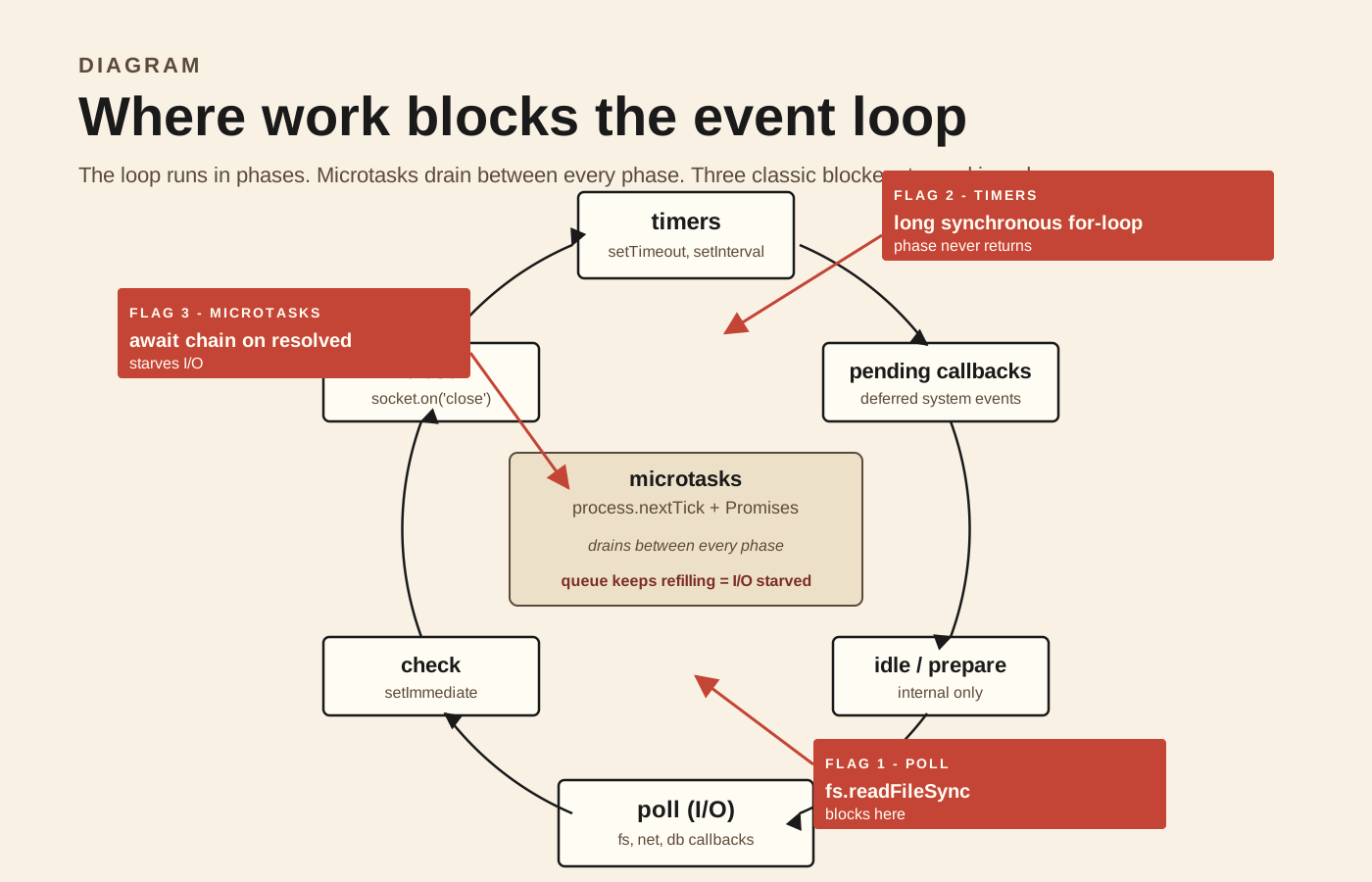
The loop runs in phases - timers, pending callbacks, idle/prepare, poll, check, close - and between every phase it drains the microtask queue. Your JavaScript runs inside callbacks scheduled into those phases. While your code is executing, no other request is being served, no I/O callback fires, no setTimeout ticks. The loop is paused on you.
The metric you want to watch is event loop lag - how long the loop takes longer than it "should" to come back around. A healthy Node service has lag in the low single-digit milliseconds. Lag above 50ms means requests are queueing. Lag above a second means the loop is effectively stuck.
You can measure it cheaply with perf_hooks:
import { monitorEventLoopDelay } from 'node:perf_hooks';

const h = monitorEventLoopDelay({ resolution: 20 });
h.enable();

setInterval(() => {
  // Values are in nanoseconds.
  const p99ms = h.percentile(99) / 1e6;
  const meanMs = h.mean / 1e6;
  console.log({ eventLoopLag: { p99ms, meanMs } });
  h.reset();
}, 5000);
Ship that into your metrics system and you'll catch event loop problems before users do. The most common causes:
Synchronous work that should be async. fs.readFileSync in a request handler. crypto.pbkdf2Sync for password hashing on the hot path. JSON.parse of a 50MB blob. Anything ending in Sync is a hand grenade in a Node server - it's fine in a build script, a CLI tool, or initialisation, but it has no place inside a request handler.
Big loops over big arrays. A for loop over 100k items doing meaningful work per item will hold the loop for tens of milliseconds. If you can do the work incrementally, yield control with setImmediate between chunks:
export async function processInChunks<T>(
  items: T[],
  chunkSize: number,
  fn: (item: T) => void,
): Promise<void> {
  for (let i = 0; i < items.length; i += chunkSize) {
    const end = Math.min(i + chunkSize, items.length);
    for (let j = i; j < end; j++) fn(items[j]);
    // Give the event loop a turn between chunks.
    await new Promise((resolve) => setImmediate(resolve));
  }
}
That setImmediate lets queued I/O callbacks run before the next chunk, so a long batch job doesn't starve incoming requests.
CPU-bound work in the main thread. Anything heavy and synchronous - image resizing, parsing a huge payload, running a regex against a megabyte of text - belongs in a worker thread, not the main loop.
import { parentPort } from 'node:worker_threads';
import { scryptSync } from 'node:crypto';

parentPort?.on('message', ({ password, salt }) => {
  // scryptSync is intentionally CPU-heavy — perfect for a worker.
  const hash = scryptSync(password, salt, 64).toString('hex');
  parentPort?.postMessage({ hash });
});import { Worker } from 'node:worker_threads';
import { resolve } from 'node:path';
const workerPath = resolve(__dirname, '../workers/hash-worker.js');
export function hashOffThread(password: string, salt: string): Promise<string> {
return new Promise((resolve, reject) => {
const w = new Worker(workerPath);
w.once('message', ({ hash }) => {
resolve(hash);
w.terminate();
});
w.once('error', reject);
w.postMessage({ password, salt });
});
}In production you'd reuse workers from a pool instead of spawning one per request, but the idea is the same: the main loop stays free, the work happens elsewhere, and the result comes back via message.
Note on the V8 microtask queue. process.nextTick callbacks and resolved-promise .then callbacks all run before the loop moves to the next phase. A tight chain of awaits on already-resolved values can starve I/O without ever blocking - the loop technically isn't blocked, but it never gets to its I/O phase because the microtask queue keeps refilling. If you await 10,000 immediately-resolved promises in a row, you'll see this. The fix is the same setImmediate trick - it schedules a macro task that lets a full loop iteration happen.
Serialization Is The Quiet Killer
Once event loop blocking is under control, the next most common culprit is serialization. Specifically: JSON.stringify and JSON.parse on payloads bigger than they look.
Both functions are synchronous, both run in the main thread, and JSON.stringify in particular is one of the most expensive things a typical Node service does on a per-request basis. Encoding a 1MB response object can take tens of milliseconds. For an endpoint that returns large lists - search results, dashboards, analytics - serialization can easily account for half the total response time.
Three patterns help.
Avoid serializing what you can stream. If you're returning a long list, prefer a streaming response over building the whole payload in memory and stringifying it. The Readable stream interface plus JSON.stringify per chunk lets the client start receiving and rendering before you've finished generating:
import { Readable } from 'node:stream';
import type { FastifyInstance } from 'fastify';

export function registerExportRoute(app: FastifyInstance) {
  app.get('/export/users', async (_req, reply) => {
    reply.type('application/x-ndjson');
    const cursor = app.db.users.cursor(); // hypothetical streaming cursor

    const stream = new Readable({
      async read() {
        const row = await cursor.next();
        if (!row) return this.push(null);
        // Newline-delimited JSON — each row stringifies on its own.
        this.push(JSON.stringify(row) + '\n');
      },
    });

    return reply.send(stream);
  });
}
NDJSON is a small format win - each row is its own self-contained JSON document, you never need a giant array in memory, and the client can parse incrementally. For "I just need to dump a million rows to a client", it beats a flat JSON array every time.
Use a schema-aware serializer for hot endpoints. JSON.stringify is general-purpose. It inspects every property of every object at runtime, decides what to do with each one, and handles edge cases (toJSON, circular refs, undefined values) for safety. When you already know the exact shape of the output, libraries like fast-json-stringify compile a serializer function from a JSON schema and emit code that's significantly faster than the generic implementation. Fastify uses this approach internally for its response schema, which is one of the reasons Fastify benchmarks well.
import fastJson from 'fast-json-stringify';

export const stringifyUserSummary = fastJson({
  title: 'UserSummary',
  type: 'object',
  properties: {
    id: { type: 'string' },
    name: { type: 'string' },
    email: { type: 'string' },
    createdAt: { type: 'string' },
  },
  required: ['id', 'name', 'email', 'createdAt'],
});
You give up flexibility (any property not in the schema is dropped) in exchange for speed. For a public API endpoint where the shape is fixed and the traffic is high, it's worth it.
Don't parse what you don't need. A common pattern is taking an incoming JSON request body, parsing it, validating a single field, and routing on that. If the body is large, you've paid the cost of parsing the whole thing before you knew you needed any of it. If you control the client, prefer routing on headers or path params. If you don't, consider streaming the body and parsing incrementally with stream-json - slower per-byte, but it can short-circuit before fully consuming a large payload.
Cache The Right Things, At The Right Layer
Caching is the most overused and most under-thought optimisation in Node services. Every team eventually adds Redis. Most of those Redis caches save almost nothing, because they were dropped in the wrong layer or invalidated wrongly.
Think about caching as a hierarchy, from cheapest to most expensive:
1. In-process memoisation. A Map in the module scope. Hit cost is a hash lookup; miss cost is whatever you were doing anyway. Zero network, zero serialization. The downside is it's per-process, so if you run four Node instances they each have their own cache, which means more memory and more cache misses on cold starts. Perfect for things that are expensive to compute but small in cardinality - compiled regexes, parsed schemas, derived configuration.
export function memoize<TArgs extends readonly unknown[], TResult>(
  fn: (...args: TArgs) => TResult,
  key: (...args: TArgs) => string,
): (...args: TArgs) => TResult {
  const cache = new Map<string, TResult>();
  return (...args: TArgs) => {
    const k = key(...args);
    const cached = cache.get(k);
    if (cached !== undefined) return cached;
    const result = fn(...args);
    cache.set(k, result);
    return result;
  };
}
For something with high cardinality but a bounded working set, swap Map for an LRU. The lru-cache library is the canonical choice - it has size and TTL options, and it's used inside npm itself.
2. Local cache with TTL. Same idea but with expiration, for things that go stale - feature flags, currency rates, the result of a slow upstream call. LRU with a short TTL (seconds to minutes) is the right primitive. The key insight: a 5-second TTL on a call that takes 200ms turns 1000 requests/sec into 1 upstream call every 5 seconds. The cache doesn't need to be clever to be enormously valuable.
3. Shared cache (Redis / Memcached). Now you're paying a network round trip per cache hit. That's fine if the original work was expensive enough to dwarf it - a 5ms Redis get to avoid a 500ms database query is great. It's terrible if you're using Redis to avoid a 0.5ms in-memory computation, because you've made the fast path slower.
The other Redis trap: serialization. Every Redis get/set involves stringifying or parsing JSON. If your cached values are large objects, that JSON cost shows up on every hit, and it's not free. Consider caching pre-rendered strings (the HTML chunk, the JSON response body) rather than caching objects you have to re-serialize on each read.
4. CDN / HTTP cache. The cheapest hit of all: the request never reaches your Node process. If you can set Cache-Control: public, max-age=... on a response and let a CDN handle the repeated requests, you've removed those requests from your event loop entirely. This is often the biggest win available, and it's the one most teams skip because it requires thinking about invalidation upfront.
A pragmatic rule for picking a layer: pick the cheapest one that's still correct. Most teams default to Redis because it's familiar. Half the time, a local LRU with a 30-second TTL would have done the same job with no extra moving parts.
Stampedes are a real problem. When a hot cache key expires, every concurrent request misses simultaneously, recomputes the same value, and writes it back. For an expensive computation this can crater the service. Wrap your cache reads in a per-key "in-flight promise" pattern - if a recomputation is already in progress for a key, await that promise instead of starting a second one:
const inFlight = new Map<string, Promise<unknown>>();

export async function singleFlight<T>(
  key: string,
  fn: () => Promise<T>,
): Promise<T> {
  const existing = inFlight.get(key);
  if (existing) return existing as Promise<T>;

  const promise = fn().finally(() => inFlight.delete(key));
  inFlight.set(key, promise);
  return promise;
}
Combine that with the cache itself: check cache, on miss go through singleFlight, on success write to cache. One recomputation regardless of how many concurrent callers waited.
Pool Everything That Has A Handshake
A pool is just "don't recreate this expensive thing every time you need it." For Node, three pools matter the most.
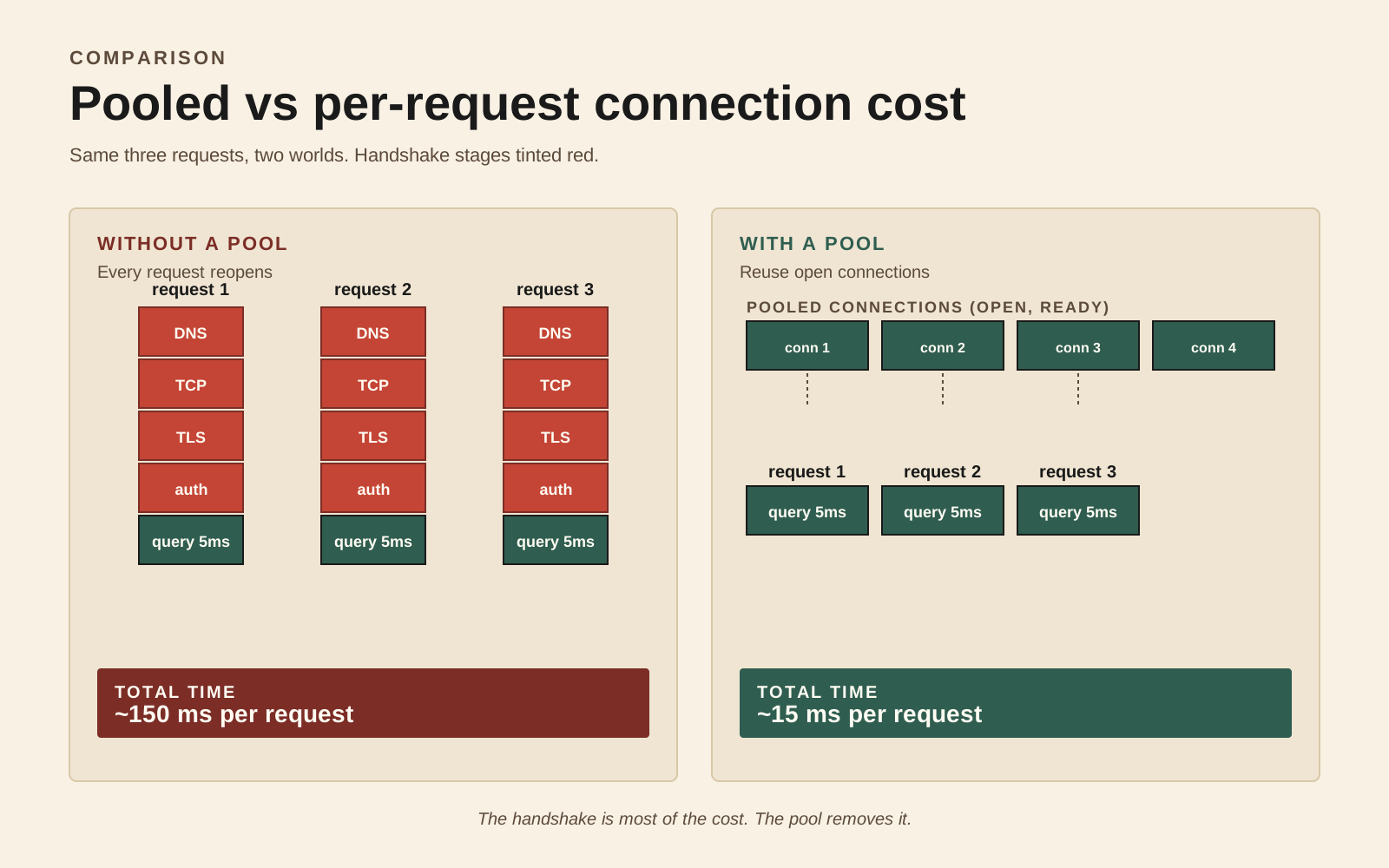
Database connection pools. Every database client library - pg, mysql2, mongodb - has a built-in pool. Use it. Creating a connection from scratch involves TCP handshake, TLS negotiation, authentication, and possibly a session setup query. That's tens of milliseconds before you've sent your actual query. A pool keeps a fixed number of connections open and hands them out.
import { Pool } from 'pg';

export const pool = new Pool({
  connectionString: process.env.DATABASE_URL,
  max: 20,
  idleTimeoutMillis: 30_000,
  connectionTimeoutMillis: 2_000,
});

// Always use the pool. Never `new Client()` per request.
export async function query<T>(text: string, params?: unknown[]): Promise<T[]> {
  const res = await pool.query<T>(text, params);
  return res.rows;
}
The trap is sizing. A common mistake is setting max to a huge number - "more connections = more throughput", right? It's the opposite. Most databases have a low limit on total concurrent connections (Postgres defaults around 100), and going beyond what the database can serve concurrently just means your connections sit waiting on the server side. The right max per Node process is small - often 10 to 20 - and you scale by running more processes, not by giving each process more connections.
HTTP keep-alive. When your Node service calls another HTTP service, each request opens a new TCP connection unless you tell it not to. That's a handshake per outbound call. Enable keep-alive on the agent:
import { Agent, request } from 'undici';

export const httpAgent = new Agent({
  keepAliveTimeout: 30_000,
  keepAliveMaxTimeout: 60_000,
  connections: 50, // per origin
});

export async function getJson<T>(url: string): Promise<T> {
  const res = await request(url, { dispatcher: httpAgent });
  return (await res.body.json()) as T;
}
undici is the modern HTTP client in Node - it's the underlying implementation of the global fetch in Node 18+, and using it directly gives you more knobs (per-origin pool sizes, pipelining, custom interceptors). For high-fan-out services, switching from a default http.request to a tuned undici Agent often cuts p99 in half on its own.
Worker pools. If you're using worker threads for CPU work (from the event loop section), pool them. Spawning a worker per request costs several milliseconds and a chunk of memory. A small pool of long-lived workers, each pulling messages from a queue, is the right shape. piscina is the well-maintained worker pool library; it handles the queueing, the round-robin, and clean shutdown for you.
import Piscina from 'piscina';
import { resolve } from 'node:path';

export const cpuPool = new Piscina({
  filename: resolve(__dirname, './hash-worker.js'),
  minThreads: 2,
  maxThreads: 8,
});

// Anywhere in your service:
export async function hashPassword(pw: string, salt: string): Promise<string> {
  return cpuPool.run({ password: pw, salt });
}
The pool sizing principle is the same as for DB connections: a small number, sized to your hardware. maxThreads higher than your CPU count doesn't help - they just contend for the same cores.
Async Bottlenecks: Concurrency Vs Speed
The last category is the subtlest. Your code uses await everywhere. You think it's concurrent. It isn't. It's serial - async, but serial.
This is the canonical mistake:
export async function buildDashboard(userId: string) {
  const profile = await getProfile(userId);
  const orders = await getOrders(userId);
  const billing = await getBilling(userId);
  const activity = await getActivity(userId);
  return { profile, orders, billing, activity };
}
If each of those calls takes 100ms, the function takes 400ms. The awaits are sequential - each one waits for the previous to finish. None of them depend on each other, but you've serialised them anyway.
The fix is Promise.all:
export async function buildDashboard(userId: string) {
  const [profile, orders, billing, activity] = await Promise.all([
    getProfile(userId),
    getOrders(userId),
    getBilling(userId),
    getActivity(userId),
  ]);
  return { profile, orders, billing, activity };
}
Same code, four calls happen in parallel, total time is ~100ms. This is the single highest-ROI change I've seen in Node code reviews - it's mechanical, it's safe wherever the calls are independent, and it routinely cuts endpoint latency by 3-4x.
The trap with Promise.all is unbounded concurrency. If you have a list of 10,000 user IDs and you Promise.all them, you fire 10,000 simultaneous database queries. Your connection pool runs out, the database starts queueing, and you've made it worse. Bound the concurrency:
export async function parallelWithLimit<T, R>(
  items: T[],
  limit: number,
  fn: (item: T) => Promise<R>,
): Promise<R[]> {
  const results: R[] = new Array(items.length);
  let i = 0;
  async function worker() {
    while (true) {
      const idx = i++;
      if (idx >= items.length) return;
      results[idx] = await fn(items[idx]);
    }
  }
  await Promise.all(Array.from({ length: limit }, worker));
  return results;
}
A limit of 5-20 is usually right, matching whatever the downstream resource can handle. Libraries like p-limit do this with a nicer API if you want a dependency.
Promise.allSettled for partial failure. If one of four parallel calls failing should not fail the whole request, use allSettled and decide per-result. This is especially useful for "decorative" calls - analytics, recommendations, related items - where the page can render without them.
Beware the await-in-a-loop pattern. for (const x of items) { await doSomething(x); } is serial. If doSomething is independent per item, that's the same dashboard mistake at a larger scale. for...of over a long list with an await inside is almost always a candidate for parallelWithLimit.
Don't make CPU work concurrent. Promise.all parallelises I/O waits, not CPU. If you Promise.all ten functions that each do a 100ms synchronous hash, the event loop runs them one after another - you wait 1 second total. The concurrency only helps when the work is genuinely something Node hands off to the OS (network, disk, child process). For CPU work, see the worker thread section above.
Pulling It Together
The pattern across all five categories is the same: Node performance work is about understanding where the time is going, not making CPU instructions faster.
The event loop is your scheduler - anything synchronous blocks everything. Serialization is the biggest hidden synchronous cost in most services. Caches save work, but only at the right layer. Pools save handshake cost, which is most of the cost of cheap operations. And await does not, by itself, mean parallel - it means "pause this function until the promise resolves," nothing more.
If you do nothing else: ship event loop lag to your metrics dashboard today, then sit with a CPU profile of your slowest endpoint for fifteen minutes tomorrow. You'll usually find one of the five things above. Fix it, measure again, move on. That's the whole loop - no rewrites, no rewriting in Rust, just steady work on the layer where the bottleneck actually lives.