Here's a question that trips up engineers who've shipped "login with Google" three times: when the OAuth dance finishes, what is the thing your server actually receives in the browser redirect, the access token or something else?
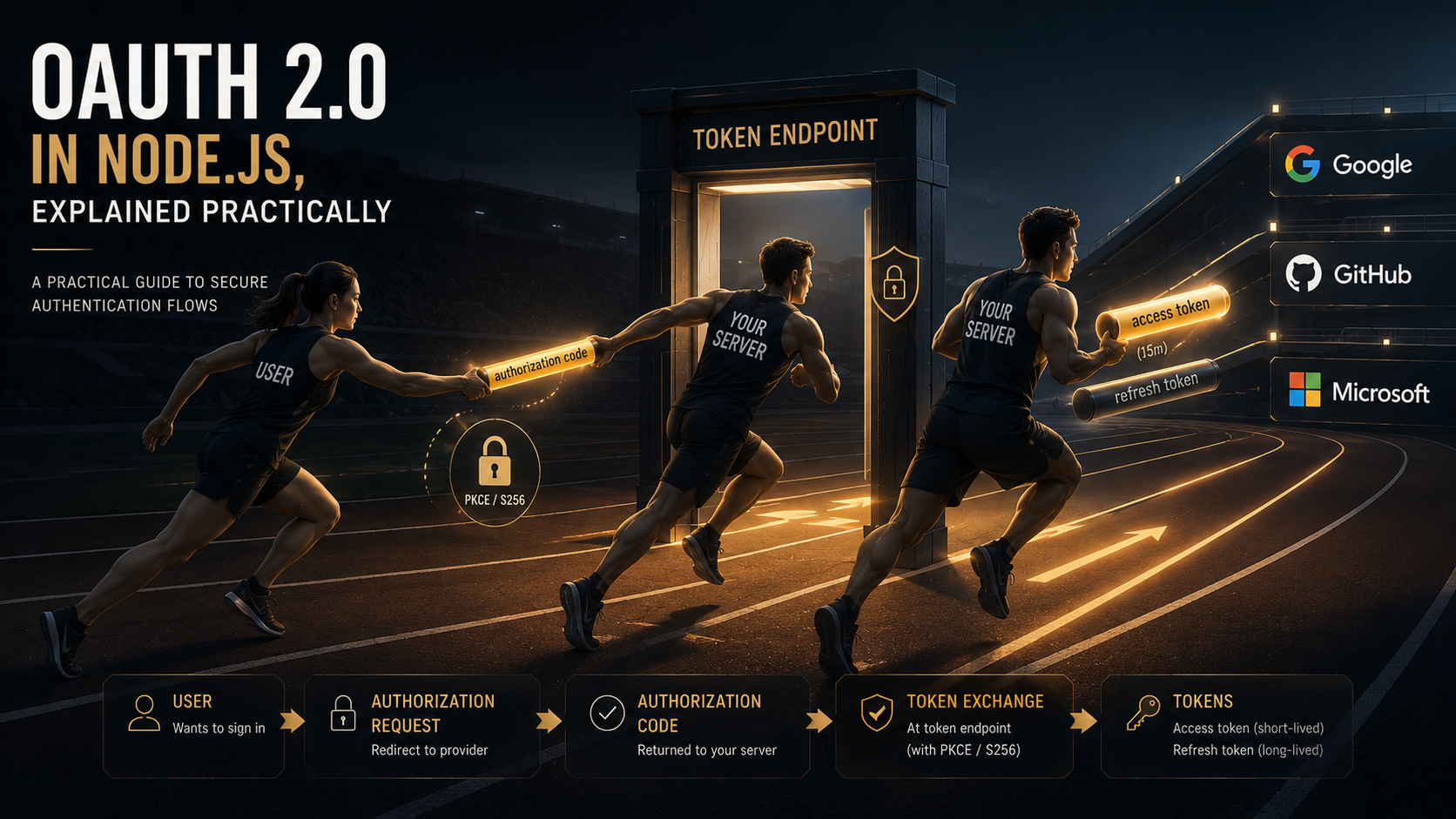
If you said access token, you've described a flow that the IETF officially deprecated in January 2025. The implicit grant, where the provider hands a token straight back through the URL, is gone from OAuth 2.1 and flagged as a liability by RFC 9700, the new security best-current-practice document. What your server should receive is a short, single-use authorization code, which it then trades, over a back-channel POST, away from the browser, for the actual tokens.
That single distinction is the whole game. Almost every OAuth bug and almost every OAuth breach comes down to a token ending up somewhere it shouldn't: a URL, a log line, browser history, a referrer header. OAuth 2.0 is, more than anything, a careful set of rules about which secret travels through which channel. This piece walks through those rules in Node.js: real code, the crypto involved in PKCE, how refresh rotation works, and where the provider integrations bite.
The mental model: four parties and two channels
Strip away the jargon and OAuth has four roles:
- Resource owner: the human. You.
- Client: the app that wants access. Your Node server, or a SPA, or a CLI.
- Authorization server: who the user logs in with and who issues tokens. Google, GitHub, Auth0, your own Keycloak.
- Resource server: the API that holds the data. Often the same vendor as the auth server, sometimes your own API.
And two channels, which is the part people skip:
- Front channel: the browser. Redirects, URL parameters, anything the user (and their browser history, and any proxy in between) can see.
- Back channel: a direct server-to-server HTTPS request. Nobody but the two endpoints sees the body.
The golden rule: secrets travel on the back channel, references travel on the front channel. The authorization code is a reference: short-lived, single-use, useless on its own. It's safe to put in a redirect URL because even if someone steals it, they can't redeem it without the other half of the proof. Tokens are secrets. They never touch the front channel in a correctly-built modern flow.
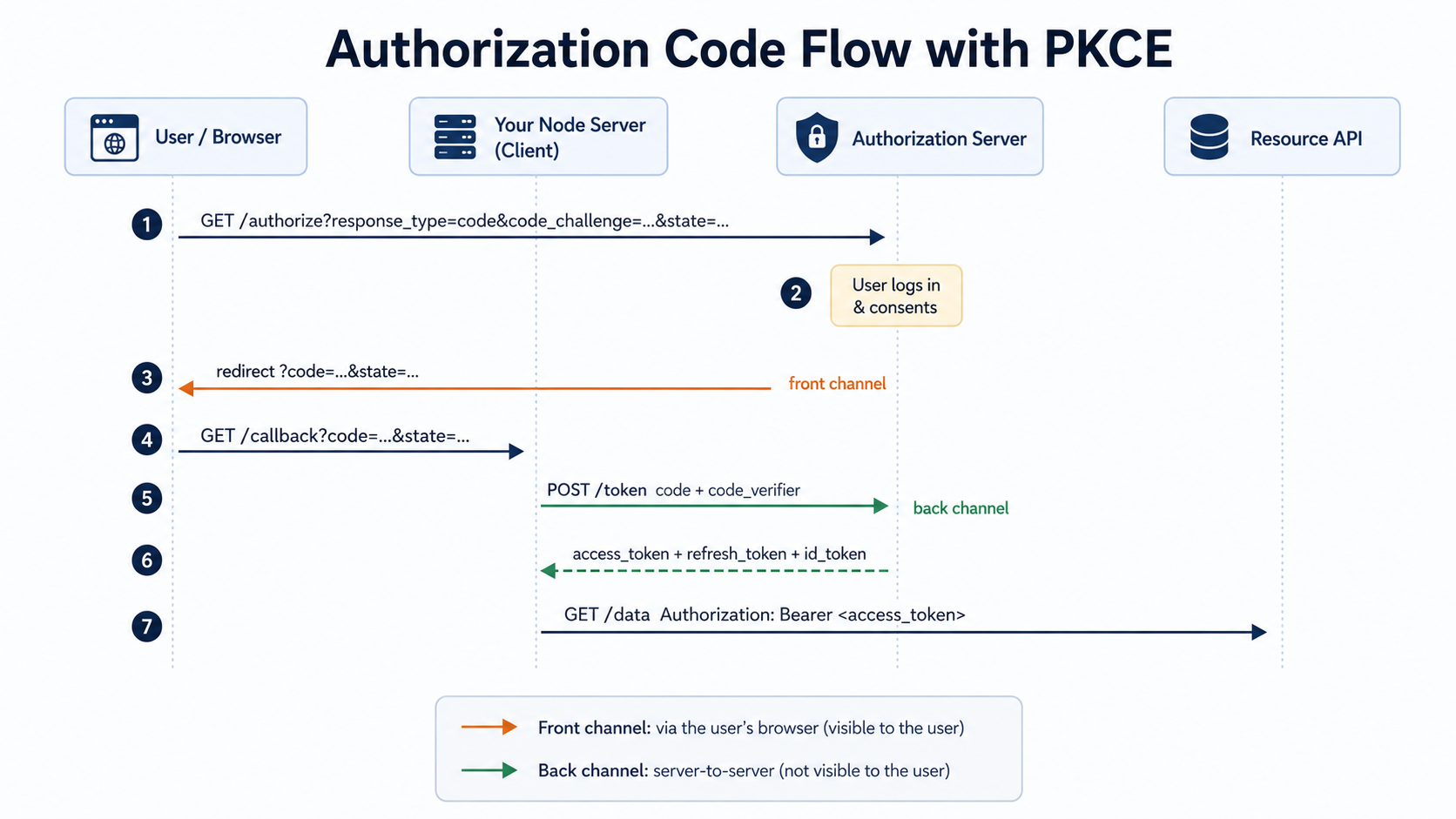
Step one: send the user to /authorize
The flow starts when your server builds an authorization URL and redirects the browser to it. You're not making an HTTP request here; you're handing the user a link and stepping out of the way. The important parameters:
import { randomBytes, createHash } from "node:crypto";

function base64url(buf: Buffer): string {
  return buf
    .toString("base64")
    .replace(/\+/g, "-")
    .replace(/\//g, "_")
    .replace(/=/g, "");
}

// PKCE: a random secret the server keeps, and a hash it sends publicly.
const codeVerifier = base64url(randomBytes(32)); // 43 chars after encoding
const codeChallenge = base64url(createHash("sha256").update(codeVerifier).digest());

// CSRF protection: an unguessable value we'll check on the way back.
const state = base64url(randomBytes(16));

// Stash verifier + state in the user's session (server-side), keyed to this login attempt.
req.session.oauth = { codeVerifier, state };

const url = new URL("https://accounts.google.com/o/oauth2/v2/auth");
url.searchParams.set("response_type", "code");
url.searchParams.set("client_id", process.env.GOOGLE_CLIENT_ID!);
url.searchParams.set("redirect_uri", "https://app.example.com/callback");
url.searchParams.set("scope", "openid email profile");
url.searchParams.set("state", state);
url.searchParams.set("code_challenge", codeChallenge);
url.searchParams.set("code_challenge_method", "S256");

res.redirect(url.toString());
Three things in there carry real weight, and none of them are optional anymore.
response_type=code says "give me a code, not a token." That's the authorization code grant, the only grant RFC 9700 wants you using for browser-based and native apps.
state is your CSRF defense. You generate a random value, save it server-side, and the provider echoes it back in the redirect. On return you compare. If they don't match, someone is trying to feed your callback a code they obtained elsewhere, so you reject it. RFC 9700 upgraded state from "recommended" to a hard requirement for exactly this reason.
code_challenge and code_challenge_method=S256 are PKCE, and they deserve their own section.
PKCE: the part that makes the front channel safe
PKCE (Proof Key for Code Exchange, RFC 7636, pronounced "pixy") was originally designed for mobile apps that can't keep a client secret. It's now mandatory-to-implement for all client types, including server-side web apps. Here's the threat it kills.
The authorization code comes back through the browser. On a mobile device, a malicious app could register the same custom URL scheme and intercept that redirect. On the web, it could leak through a referrer header or a compromised proxy. If the code alone were enough to get tokens, intercepting it would be game over.
PKCE makes the code worthless without a second secret that never left your server. The mechanism is a one-way hash:
- Your client generates a high-entropy random string, the code verifier: between 43 and 128 characters of unreserved characters (
[A-Z]/[a-z]/[0-9]/-._~), per the spec.base64url(randomBytes(32))lands you at 43. - You hash it: code challenge =
BASE64URL(SHA256(ASCII(code_verifier))). That's theS256method. - You send only the challenge to
/authorize. It rides the front channel, which is fine, because a SHA-256 hash can't be reversed into the verifier. - Later, on the back-channel token request, you send the verifier. The auth server hashes it and checks it equals the challenge it stored with the code.
An attacker who intercepts the code never saw the verifier (it stayed in your session) and can't derive it from the challenge (SHA-256 is one-way). The stolen code is inert.
A quick note on entropy: randomBytes from node:crypto is a CSPRNG, which is the whole point. Do not reach for Math.random() for any of these values: verifier, state, or anything else in this flow. Math.random() is predictable and has no business near a security boundary.
Step two: handle the callback and exchange the code
The provider redirects the browser back to your redirect_uri with ?code=...&state=.... Now your server does the back-channel exchange:
app.get("/callback", async (req, res) => {
  const { code, state } = req.query;
  const saved = req.session.oauth;

  // 1. CSRF check — constant-time compare against the value we stored.
  if (!saved || state !== saved.state) {
    return res.status(400).send("Invalid state");
  }

  // 2. Back-channel token exchange. Note: this is server-to-server, not a redirect.
  const body = new URLSearchParams({
    grant_type: "authorization_code",
    code: String(code),
    redirect_uri: "https://app.example.com/callback",
    client_id: process.env.GOOGLE_CLIENT_ID!,
    client_secret: process.env.GOOGLE_CLIENT_SECRET!, // confidential client only
    code_verifier: saved.codeVerifier, // the PKCE proof
  });

  const resp = await fetch("https://oauth2.googleapis.com/token", {
    method: "POST",
    headers: { "Content-Type": "application/x-www-form-urlencoded" },
    body,
  });

  if (!resp.ok) {
    return res.status(502).send("Token exchange failed");
  }

  const tokens = await resp.json();
  // { access_token, expires_in, refresh_token?, id_token?, token_type: "Bearer", scope }

  // 3. Clear the one-time login state so the code can't be replayed.
  delete req.session.oauth;

  // store tokens server-side (see "Where to keep tokens" below)
  await saveTokens(req.session.userId, tokens);
  res.redirect("/dashboard");
});
The redirect_uri in this POST has to exactly match the one you registered and the one you sent to /authorize. RFC 9700 forbids wildcard matching: the server must do a bit-for-bit string comparison. This is the open-redirector defense: if an attacker can't smuggle their own URL into redirect_uri, they can't get the code delivered to a server they control. A trailing slash mismatch will get you a real, confusing error here, and that's the spec working as intended.
client_secret belongs only to confidential clients: your Node server, which can keep a secret. A SPA or a native app is a public client: it can't hide a secret in shipped JavaScript or a binary, so it omits the secret and leans entirely on PKCE. That distinction is why PKCE became universal: it's the only thing protecting a public client's code exchange.
What the tokens actually are
The token response gives you up to three things, and conflating them is a classic source of bugs.
Access token. The bearer credential. You attach it to API calls as Authorization: Bearer <token> and the resource server checks it. It's deliberately short-lived, commonly in the 15-to-60-minute range, so that a leaked one expires fast. Often it's a JWT you can inspect, but you should treat it as opaque unless the provider documents otherwise; some providers issue opaque reference tokens you can't decode.
Refresh token. A longer-lived credential, days to weeks, whose only job is to get new access tokens without dragging the user back through a login screen. It's far more sensitive than an access token because it's a renewable key to the account. It never goes to the resource API; it only ever goes back to the auth server's token endpoint.
ID token. Only if you requested the openid scope, which is OpenID Connect sitting on top of OAuth. It's a JWT about the user (their ID, email, name), meant for your app to learn who logged in. It is not an API credential. Sending an ID token as a bearer token to an API is a common rookie mistake; use the access token for that.
Refresh flows and the rotation trap
When an access token expires, you don't bounce the user to a login page. You POST the refresh token to the token endpoint and get a fresh access token:
async function refreshAccessToken(refreshToken: string) {
  const resp = await fetch("https://oauth2.googleapis.com/token", {
    method: "POST",
    headers: { "Content-Type": "application/x-www-form-urlencoded" },
    body: new URLSearchParams({
      grant_type: "refresh_token",
      refresh_token: refreshToken,
      client_id: process.env.GOOGLE_CLIENT_ID!,
      client_secret: process.env.GOOGLE_CLIENT_SECRET!,
    }),
  });

  const tokens = await resp.json();
  // IMPORTANT: the response MAY include a new refresh_token. If it does,
  // the OLD one is now dead. Persist the new one immediately.
  return tokens;
}
Here's the gotcha that produces "users randomly get logged out" bug reports: refresh token rotation. Many modern auth servers issue a new refresh token on every refresh and invalidate the old one. If your code grabs the new access token but ignores the new refresh_token in the response and keeps using the old one, your very next refresh fails, because you're presenting a token the server already retired.
Rotation exists for a good reason. A refresh token sitting in a database is a fat target; rotating it shrinks the window in which a stolen one is useful. Pair it with reuse detection: if the auth server ever sees a refresh token that was already rotated away, that's a strong signal the token was stolen, since the legitimate client and an attacker are now both holding copies. The defensive move is to revoke the entire token family and force re-authentication. So a token that was valid a moment ago can be deliberately killed mid-session. Your refresh handler has to treat "refresh failed" as "send the user to log in again," not as a retry loop.
Two more refresh realities that surprise people:
- You won't always get a refresh token. Google, for instance, only returns one on the first consent unless you explicitly ask for offline access (
access_type=offlineand oftenprompt=consent). If you assumed every login yields a refresh token, you'll have aundefinedwhere you expected a string. - Concurrent refreshes race. If five API calls all notice the access token expired at once and all fire a refresh, with rotation enabled four of them lose. Serialize refreshes behind a single in-flight promise (or a per-user lock) so only one rotation happens.
// Coalesce concurrent refreshes so rotation doesn't eat itself.
const inFlight = new Map<string, Promise<Tokens>>();

function refreshOnce(userId: string, refreshToken: string) {
  if (inFlight.has(userId)) return inFlight.get(userId)!;

  const p = refreshAccessToken(refreshToken)
    .then(async (tokens) => {
      await saveTokens(userId, tokens); // persist rotated refresh token
      return tokens;
    })
    .finally(() => inFlight.delete(userId));

  inFlight.set(userId, p);
  return p;
}
Where to keep tokens
This is where Node apps leak. The rules:
- Refresh tokens never go to the browser. Keep them server-side: your database, encrypted at rest, or a fast store like Redis for session metadata. A refresh token in
localStorageis an XSS payload's dream. - Session over tokens-in-JS for web apps. The robust pattern for a server-rendered or BFF-style app: the browser holds an
HttpOnly,Secure,SameSitesession cookie; your server maps that session to the real tokens it stores. The browser never sees an access or refresh token at all.HttpOnlymeans JavaScript can't read the cookie, which neuters token theft via XSS. - For SPAs, use a backend-for-frontend. Rather than letting the SPA hold tokens, a thin backend holds them and the SPA talks to that backend with a cookie session. This is the direction RFC 9700 pushes for exactly the leakage reasons above.
Provider integrations: do you hand-roll or use a library?
You've now seen the whole flow in raw fetch, which is the best way to understand it. In production you'll usually lean on a library, because the per-provider quirks are tedious and easy to get subtly wrong.
For Google specifically, the official google-auth-library wraps all of this. Its OAuth2Client builds the auth URL, does the code exchange, and (the genuinely valuable part) verifies ID tokens for you:
import { OAuth2Client } from "google-auth-library";

const client = new OAuth2Client(process.env.GOOGLE_CLIENT_ID);

async function verifyGoogleIdToken(idToken: string) {
  const ticket = await client.verifyIdToken({
    idToken,
    audience: process.env.GOOGLE_CLIENT_ID, // must match YOUR client id
  });
  const payload = ticket.getPayload();
  // payload.sub is the stable Google user id; payload.email, payload.name, ...
  return payload;
}
That audience check is not a formality. It's the difference between "this token was minted for my app" and "this is some valid Google token from another app that I'm naively trusting." Verifying an ID token means checking the signature (against the provider's published keys), the issuer, the expiry, and the audience. Skip the audience and you've built an authentication bypass.
For multi-provider setups (log in with Google or GitHub or Microsoft), the trade-off is real:
- Hand-rolled
fetchwins when you have one provider, want zero dependencies, and want to understand exactly what's happening. The code above is most of it. - A higher-level library (Passport's strategy ecosystem, or framework-native solutions like Auth.js for Next.js) wins when you're juggling several providers, because each one has its own scopes, refresh quirks, and userinfo shapes. Auth.js, for one, has refresh-token rotation handling built in, which, given the rotation trap above, is not nothing.
The honest answer: build it once by hand so you know the flow, then reach for a library so you're not maintaining provider quirks forever. The library isn't doing anything magic; it's doing exactly what's in this article, plus the long tail of per-provider edge cases you'd otherwise discover in production.
The short version
OAuth 2.0 is a discipline about channels. References (the authorization code) ride the front channel where they might leak, so they're made worthless on their own. Secrets (the tokens, the PKCE verifier, the client secret) ride the back channel and never touch the browser. PKCE bridges the gap by proving, over the back channel, that whoever is redeeming the code is the same party that started the flow. Refresh tokens trade a login screen for a back-channel POST, but rotation means the token you hold can expire the instant you use it, so handle failure as "log in again," persist every rotated token, and serialize concurrent refreshes.
Get those few things right and the provider integrations are mostly paperwork. Get the channel discipline wrong and no library will save you.
Sources: RFC 7636 (PKCE), RFC 9700 (OAuth Security BCP), google-auth-library-nodejs, Auth0: Refresh Tokens, WorkOS: OAuth best practices.