"It Works On My Wi-Fi"
You finish a feature, run it on your gigabit connection, watch the API respond in 30 milliseconds, and ship it. A week later a user emails you a screenshot of a white screen taken on a regional train somewhere between two cell towers. They were not impressed.
The network is not a guarantee. It is a flaky external dependency that happens to be wrapped in a polished fetch API. Treating it as reliable is the same category of mistake as assuming a third-party service has 100% uptime — and on mobile devices, the failure rate is much higher than any cloud SLA. Offline-first is the architecture that takes this seriously.
The shift is small but profound. Instead of fetch, render, fall back to error, you do render from local cache, then sync. Once you internalize that flip, every part of the app gets simpler, because the cache stops being an afterthought and becomes the source of truth the UI reads from.
What "Offline-First" Actually Means
Offline-first is not a checkbox you tick after the app is built. It is a data flow:
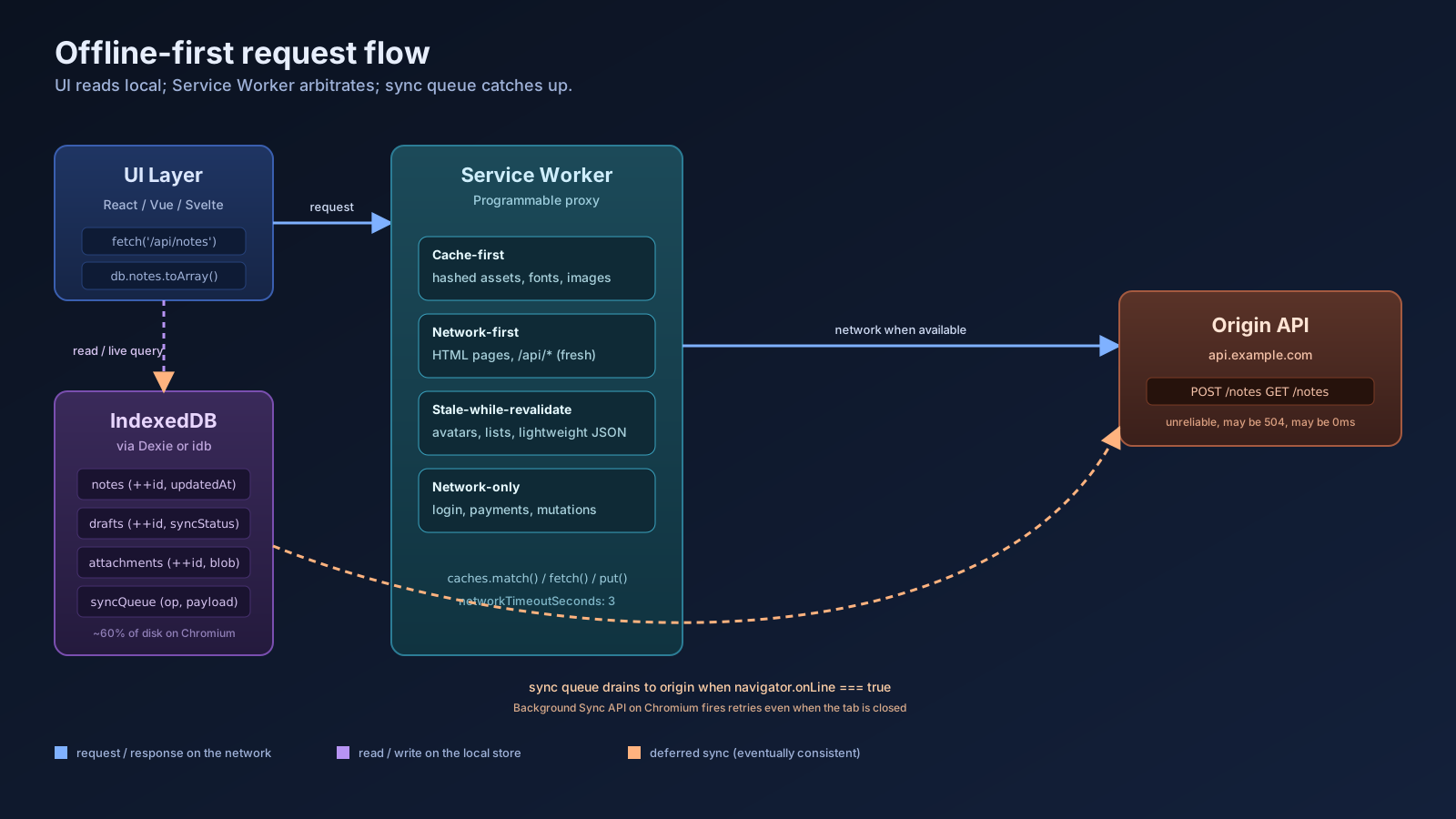
- The UI reads from a local store — IndexedDB, the Cache API, or both — and renders immediately.
- A background process talks to the network, refreshes the local store, and pushes pending writes when connectivity returns.
- The UI subscribes to local-store changes and re-renders when sync brings in new data.
That data flow is reactive, not request-response. It also makes the app feel instant on good networks, because rendering from the local cache is almost always faster than waiting on a round trip to your origin server.
Two primitives carry the weight: a Service Worker for assets and shell HTML, and IndexedDB for structured data. Workbox 7, Next-PWA, and the Vite PWA plugin all sit on top of these — they do not replace them, they just give you sane defaults instead of hand-rolling the strategies.
Service Workers Are A Programmable Proxy
A Service Worker is a JavaScript file that the browser registers once, then runs on its own thread between your tabs and the network. Every fetch from your page can be intercepted, served from a cache, modified, or passed through.
Registration is a single call:
// Run from the page once on first load.
if ('serviceWorker' in navigator) {
  navigator.serviceWorker.register('/sw.js');
}
After that, the worker file owns the network for its scope. The shape of the worker matters more than the registration:
// sw.js
const SHELL = 'shell-v3';

self.addEventListener('install', (event) => {
  event.waitUntil(
    caches.open(SHELL).then((cache) =>
      cache.addAll(['/', '/offline.html', '/styles.css', '/app.js'])
    )
  );
});

self.addEventListener('activate', (event) => {
  event.waitUntil(
    caches.keys().then((keys) =>
      Promise.all(keys.filter((k) => k !== SHELL).map((k) => caches.delete(k)))
    )
  );
});
The two lifecycle events are the unglamorous part most tutorials breeze past: install populates the cache, activate evicts the previous version. If you skip the activate cleanup, your users accumulate dead caches forever and Safari eventually starts complaining about quota.
Pick A Caching Strategy Per Resource Type
The single biggest mistake I see in offline-first projects is using one cache strategy for everything. Different resources have different freshness needs, and getting this wrong is how you ship "stale forever" bugs.
The four named strategies you actually need:
- Cache-first — for hashed static assets (
/_next/static/...). They never change at a given URL; serve from cache, fall back to network. Fastest possible response. - Network-first — for HTML pages and API calls where freshness matters. Try the network; fall back to cache only on failure.
- Stale-while-revalidate — for content that can be one revision old (avatars, list pages, lightweight JSON). Serve cache immediately, kick off a network request in the background, update the cache for next time.
- Network-only — for things you never want to cache (login, payments, anything mutating).
Workbox 7 lets you wire these by route in a few lines instead of hand-writing fetch handlers:
// sw.js with workbox-routing + workbox-strategies
import { registerRoute } from 'workbox-routing';
import {
  CacheFirst,
  NetworkFirst,
  StaleWhileRevalidate,
} from 'workbox-strategies';

registerRoute(({ request }) => request.destination === 'image',
  new CacheFirst({ cacheName: 'images' }));

registerRoute(({ url }) => url.pathname.startsWith('/api/'),
  new NetworkFirst({ cacheName: 'api', networkTimeoutSeconds: 3 }));

registerRoute(({ request }) => request.destination === 'document',
  new StaleWhileRevalidate({ cacheName: 'pages' }));
networkTimeoutSeconds is the small detail that separates "feels offline-first" from "feels broken on bad 3G" — without it, a slow network is worse than no network, because the browser waits for the timeout before falling back.
IndexedDB Holds The Real Data
The Cache API is for opaque Request / Response pairs — it stores HTTP responses, not domain objects. The moment you need to query "all unsynced notes" or "messages older than yesterday," you want a database. That is IndexedDB.
The native API is famously verbose, so use a wrapper. Two solid choices in 2026:
- Dexie.js v4 — a friendly Promise-based ORM with versioned schemas, transactions, and live queries.
idbby Jake Archibald — a thin Promise wrapper if you want to stay close to the metal.
Dexie covers most app needs:
import Dexie, { Table } from 'dexie';

interface Note {
  id?: number;
  title: string;
  body: string;
  updatedAt: number;
  syncStatus: 'clean' | 'dirty' | 'syncing';
}

class AppDB extends Dexie {
  notes!: Table<Note, number>;
  constructor() {
    super('app');
    this.version(1).stores({
      notes: '++id, updatedAt, syncStatus',
    });
  }
}

export const db = new AppDB();
The ++id is an auto-incrementing primary key, and the comma-separated fields after it are indexes. Anything you plan to filter on goes in there — without an index, IndexedDB falls back to a full scan.
A Sync Queue That Survives Reconnects
The trickiest part of offline-first is not the cache. It is reconciling local writes with the server when the network returns. The simplest model that holds up: every mutation writes locally, marks the record dirty, and is replayed by a sync worker.
export async function saveNote(input: Omit<Note, 'id' | 'syncStatus' | 'updatedAt'>) {
  const id = await db.notes.add({
    ...input,
    updatedAt: Date.now(),
    syncStatus: 'dirty',
  });
  scheduleSync();
  return id;
}

async function scheduleSync() {
  if (!navigator.onLine) return;
  const pending = await db.notes.where('syncStatus').equals('dirty').toArray();
  for (const note of pending) {
    await db.notes.update(note.id!, { syncStatus: 'syncing' });
    try {
      await fetch('/api/notes', {
        method: 'POST',
        body: JSON.stringify(note),
        headers: { 'content-type': 'application/json' },
      });
      await db.notes.update(note.id!, { syncStatus: 'clean' });
    } catch {
      await db.notes.update(note.id!, { syncStatus: 'dirty' });
      return;
    }
  }
}

window.addEventListener('online', scheduleSync);
That is the whole pattern. For a more robust version, register the Service Worker's Background Sync API — registration.sync.register('notes') — which gives you a system-managed retry that fires when connectivity returns even if the page is closed. It is Chrome-only as of 2026, so treat it as a progressive enhancement layered on top of the online event, not a replacement.
Conflict Resolution Is A Product Decision
You cannot avoid the conflict question. If a user edits a note offline and the server has been edited from another device in the meantime, who wins?
Three answers, in roughly increasing complexity:
- Last-write-wins. Compare timestamps, keep the newer one. Fine for personal apps, drafts, settings.
- Per-field merge. Merge non-conflicting field changes, surface conflicts only on the same field. Works well for documents with distinct sections.
- CRDTs. Yjs, Automerge — designed for collaborative editing where multiple users edit simultaneously. Not free; introduce them when last-write-wins genuinely loses data your users care about.
The mistake is to default to "we'll figure it out later." Decide upfront and document it, because the resolution rule shapes your schema (you need updatedAt per record at minimum, or per field for option two).
Storage Has Limits And They Bite
Browsers do not give you infinite space. Origins on Chromium and Firefox get roughly 60% of disk by default; Safari is stingier and varies by version. When you exceed quota, the browser may evict your data without warning unless you ask for persistence.
if (navigator.storage?.persist) {
  const granted = await navigator.storage.persist();
  // granted === true means the browser will not evict your data on quota pressure.
}
Combine that with navigator.storage.estimate() to track usage, and you can warn the user (or trim old caches) before the OS does it for you. For media-heavy apps, a quota check at startup is not optional.
A One-Sentence Mental Model
Offline-first is a UI that reads from a local database, a Service Worker that decides per-resource whether the network or the cache answers, and a sync queue that flushes local writes when connectivity returns — once the cache is the source of truth, "offline" stops being an error state and becomes a normal mode of operation.