Most apps eventually grow user roles. Admins, editors, viewers. The product manager files a ticket: "Viewers should not be able to delete articles." A junior dev opens the React component and writes the obvious thing:
function ArticleActions({ user }) {
  return (
    <div>
      <button>Share</button>
      {user.role === 'admin' && <button>Delete</button>}
    </div>
  );
}
The button disappears. QA confirms. The PM closes the ticket. Three months later a disgruntled viewer figures out that the API still answers DELETE /articles/47 for them, opens DevTools, and removes half the content library before lunch. The post-mortem is short: there was no real authorization check anywhere in the stack. The button was the entire security model.
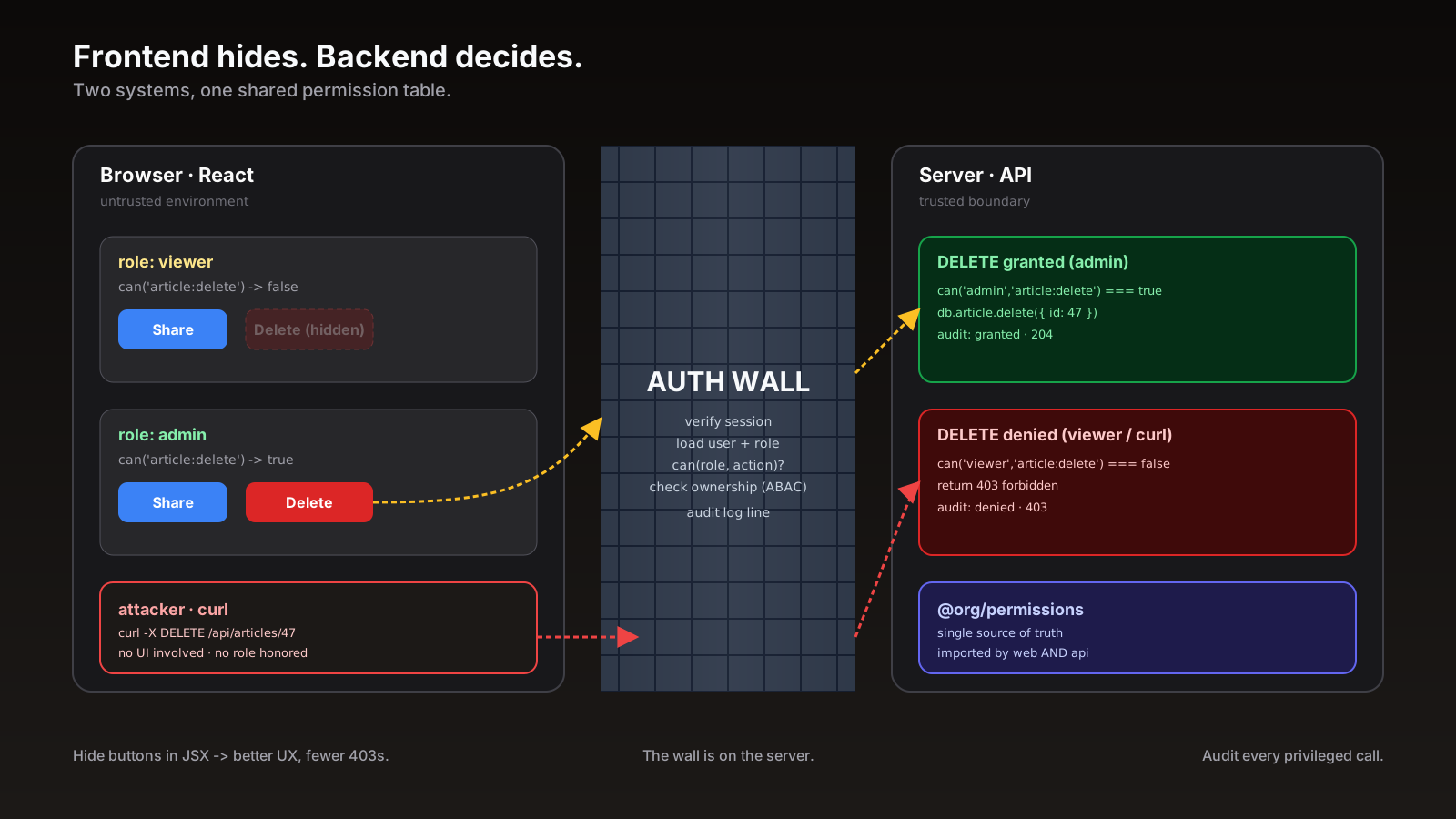
The lesson is the one nobody likes hearing: hiding UI is not authorization, it is courtesy. Authorization is what your server does when a request arrives, with zero trust in anything the client said.
AuthN Vs AuthZ, Which Bug You Actually Have
Two words that get smashed together and shouldn't:
- Authentication (AuthN). Who are you. Sessions, JWTs, OAuth, magic links. The system can prove the request belongs to a known user.
- Authorization (AuthZ). What can you do. Role checks, policies, ownership rules. The system decides if this user is allowed to perform this action on this resource.
The frontend can do AuthN-adjacent things — store the token, attach it to requests, redirect on 401. The frontend cannot do AuthZ for real, because the frontend runs on a machine the attacker controls. They can mutate your Redux store. They can monkey-patch fetch. They can replay requests with curl. Anything you compute in the browser, they can edit. The only authorization that counts is the one your server does on every request.
Then Why Hide The Button At All?
Two reasons, neither of them security.
- It is good UX. Showing a viewer a Delete button that always returns 403 is cruel. They will click it, get an error, file a ticket, and waste both their time and your support team's. Hide what the user cannot do. Show what they can. That is the entire frontend permission story.
- It saves pointless requests. Every disabled control that the user clicks anyway becomes a wasted round trip. At scale that is real cost — both in load on your API and in latency for the user when something else queues behind it.
Once you accept that the frontend is doing UX, not security, the design choices get easier. You can be optimistic. You can cache. You can be wrong occasionally — the server will catch it.
A Single Source Of Truth, Two Consumers
The mistake most teams make is writing two different permission models — one in JavaScript (if user.role === 'admin') and one in the backend (if request.user.role == "admin"). They drift. Within six months, the frontend thinks editors can comment and the backend disagrees, and your bug tracker fills with "the button worked but the action failed" tickets.
The shape that holds up is one definition, two consumers:
// packages/permissions/src/index.ts — shared between frontend and backend
export type Role = 'admin' | 'editor' | 'viewer';

export const POLICY = {
  'article:delete': new Set<Role>(['admin']),
  'article:edit':   new Set<Role>(['admin', 'editor']),
  'article:read':   new Set<Role>(['admin', 'editor', 'viewer']),
  'comment:create': new Set<Role>(['admin', 'editor', 'viewer']),
} as const;

export type Action = keyof typeof POLICY;

export function can(role: Role, action: Action): boolean {
  return POLICY[action].has(role);
}
The React side imports it:
import { can } from '@org/permissions';

{can(user.role, 'article:delete') && <button>Delete</button>}
The Express/Fastify/Next route handler imports it too:
import { can } from '@org/permissions';

export async function DELETE(req: Request, { params }: { params: { id: string } }) {
  const user = await getUser(req);
  if (!can(user.role, 'article:delete')) {
    return new Response('forbidden', { status: 403 });
  }
  await db.article.delete({ where: { id: params.id } });
  return new Response(null, { status: 204 });
}
When the product changes its mind about who can delete what, you change the table once, the rest follows. No drift. No two-place edits. No "the button worked but the action failed."
RBAC Is The Floor, ABAC Is The Ceiling
Roles get you about 80% of the way. Then someone says "an editor can edit any article, but only the author can delete their own draft." That is not a role question. That is an attribute question — the answer depends on properties of the user, the resource, and sometimes the environment. This is ABAC (attribute-based access control), and it is what every real product needs eventually.
// can a user delete this specific article?
function canDeleteArticle(user: User, article: Article) {
  if (user.role === 'admin') return true;
  if (user.role === 'editor' && article.authorId === user.id && article.status === 'draft') {
    return true;
  }
  return false;
}
Once these rules multiply, hand-rolling them gets painful. JS has good libraries for this:
- CASL. The most common pick — define abilities once with subject types and conditions, check them with
ability.can('delete', article). Works with TypeScript, has a Vue and React adapter. - AccessControl. Classic RBAC with attribute-level grants and inheritance.
- Casbin. Policy-as-code DSL, ports across languages so you can share the same
.csvpolicy between Node and Go. - Oso. Policy-engine style with a real query engine, useful when rules get complex enough that hand-written checks turn into a tangle.
The library matters less than the principle: define abilities once, check them on the server unconditionally, mirror them on the client for UX.
Hiding, Disabling, And Explaining
Three patterns show up over and over for permission-aware UI. Use them deliberately:
- Hide. The action does not apply to this user at all. Viewers do not need to see "Delete database." Out of sight, out of mind, no questions.
- Disable with tooltip. The action exists, but this user cannot perform it on this resource. Show the button greyed out with
aria-disabledand a tooltip: "Only the workspace owner can change billing." This teaches the user what the system does without giving them a wall to bang into. - Show, explain, redirect. Sometimes the right move is to show the action, let them click, and route them to an upgrade flow or a request-access form. This is how most SaaS products handle plan-gated features.
The wrong pattern is show, fail. A button that always 403s is a bug, not a permission system.
Loading States Are Permissions Too
A subtle one. Every "permission-aware" UI has a moment between page render and permission load where you do not yet know what the user can do. If you optimistically show every button, viewers see the Delete button flash before it disappears. If you hide everything, admins see a broken-looking page until permissions resolve.
The cleanest answer: render the page server-side with the permissions baked in. In Next.js App Router, the layout or page is a server component, the user object includes the permission set, and the JSX never has to ask "do I know yet?" In SPAs, hold the page in a skeleton until the auth check resolves, or persist the last-known permission set in sessionStorage and reconcile after the new fetch lands. Whichever you pick, do it consistently. A flashing UI is a tell that the security model is glued on.
Audit, Don't Trust
One last piece. Even with shared permissions and a real backend wall, log every privileged action. user_id, action, resource_id, result (granted / denied), timestamp. Two reasons:
- Forensics. When something goes wrong, the audit log is what tells you whether the issue was a bypass, a UI bug, or a misclick by a real admin.
- Compliance. Most B2B contracts (SOC 2, ISO 27001, HIPAA) require it anyway. Building it in from day one is cheaper than retrofitting it during an audit.
Plain JSON, indexed by user and resource, retained for at least a year. Boring infrastructure. Saves real careers.
A One-Sentence Mental Model
Permission-based UI is two systems wearing one face — the frontend hides what the user cannot do because that is kinder, the backend rejects what the user cannot do because that is the only thing standing between your data and a curl command, and the trick is to make both speak from the same definition so they cannot disagree.