Prisma is, for a lot of teams, the easiest way to ship a Node.js service that talks to a database. You declare your schema once in schema.prisma, run prisma generate, and your editor starts autocompleting your way through CRUD with full types. The first month is great. The first quarter is usually still great.
Then a query gets slow. Or you need a window function. Or a colleague asks why the dashboard endpoint fires 200 queries. And suddenly you are reading the Prisma docs in a different mood, looking for the escape hatch.
This is not a "Prisma bad" article. Prisma 6, released in late 2024, is genuinely a polished tool. This is a "know what it generates" article — because the day you need to understand the SQL is the day Prisma becomes a different kind of object in your codebase.
What Prisma Actually Is
Prisma is three pieces:
schema.prisma— a declarative schema language for models, relations, indexes, and the database connection.prisma migrate— a tool that diffs your schema against the database and generates SQL migrations.- The Prisma Client — a generated, type-safe API. Historically backed by a Rust query engine that ran as a binary alongside your Node process; from Prisma 6.7 (preview) and 6.16 (GA, late 2025) the default is the new TypeScript/WASM Query Compiler with native database driver adapters, and the Rust binary is being phased out.
The Rust engine matters in older codebases — it's what gave Prisma the polished error messages and consistent behavior across databases, and also what made it feel heavy on serverless cold starts. New projects in 2026 should opt into the Rust-free setup via driver adapters (@prisma/adapter-pg, etc.); existing projects can stay on the Rust engine for now and migrate when convenient.
// schema.prisma
model User {
  id        String   @id @default(cuid())
  email     String   @unique
  posts     Post[]
  createdAt DateTime @default(now())

  @@index([createdAt])
}

model Post {
  id       String  @id @default(cuid())
  title    String
  authorId String
  author   User    @relation(fields: [authorId], references: [id])
}
prisma migrate dev turns this into a SQL migration file you commit to git. prisma generate produces the typed client. npx prisma studio opens a local data browser. That whole loop is what people fall in love with.
select vs include Is The Most Important Distinction
Reach for the client and you immediately face two ways to pull related data:
// include: pull the whole related row
await prisma.user.findMany({
  include: { posts: true },
});

// select: choose exact fields, including from relations
await prisma.user.findMany({
  select: {
    id: true,
    email: true,
    posts: { select: { id: true, title: true } },
  },
});
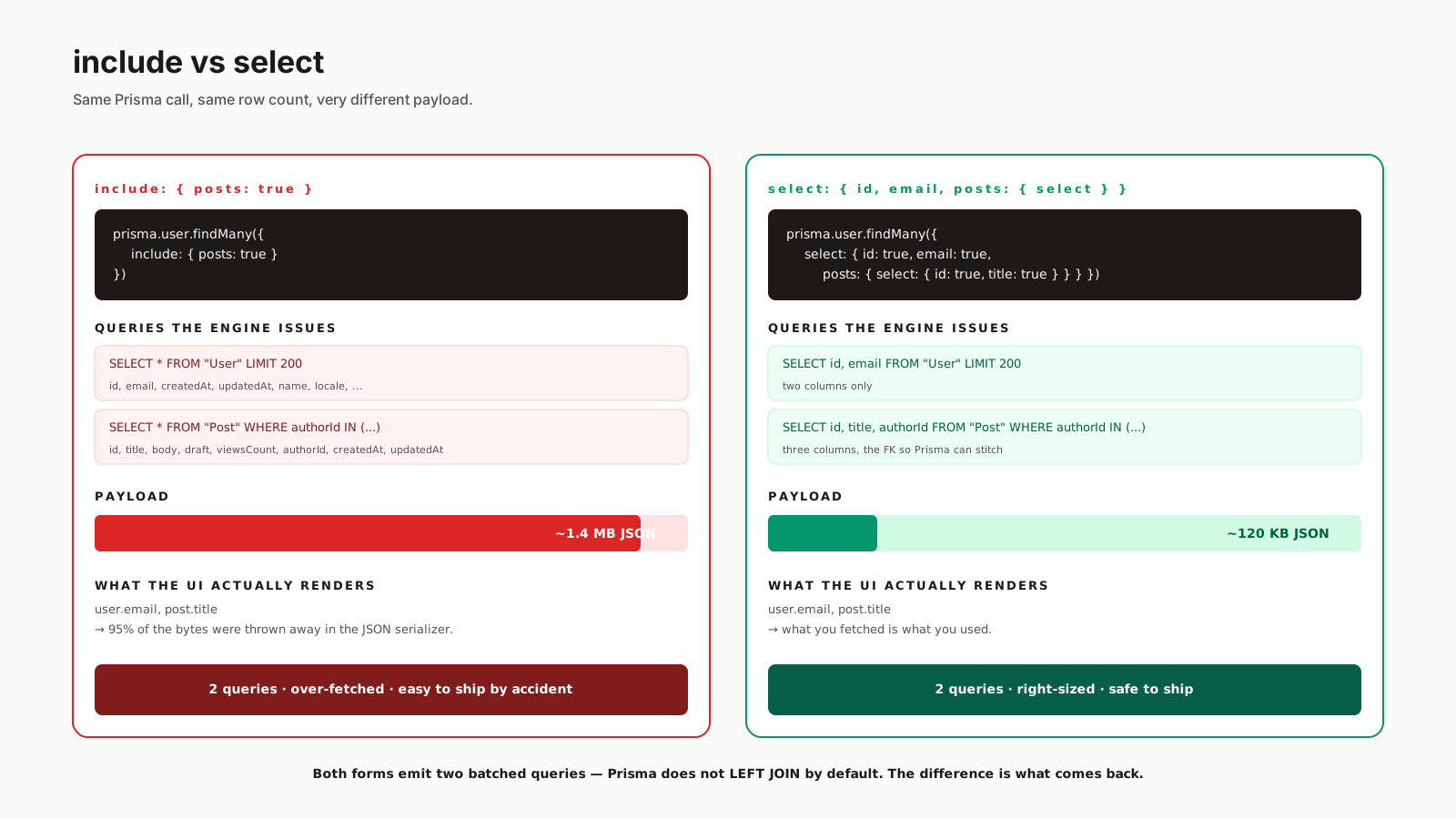
Both produce a single logical fetch, but the SQL underneath depends on the strategy. Modern Prisma (5.10+ with relationJoins enabled, default in 6.x for Postgres/MySQL/CockroachDB) uses relationLoadStrategy: 'join', which emits one SQL statement using LEFT JOIN LATERAL + json_agg/json_build_object on Postgres or correlated subqueries on MySQL — the data is shaped on the database side. The older relationLoadStrategy: 'query' (the historical default, still available) issues separate queries per relation with WHERE id IN (...) and stitches in JS. Both work; the join strategy is usually the right choice now. Either way, the payload size is wildly different between include and select.
include: { posts: true } returns every column on every post row, including columns you never use. On a list endpoint with 200 users and 20 posts each, that is 4000 rows × every column. select shrinks the payload to what you actually render.
The rule I follow: never use include in code that ships to production. Always select. The keystrokes you save are not worth the bandwidth and serialization cost.
The N+1 Trap, Prisma Edition
You did the right thing — used Prisma's nested select — and the request still fires 50 queries. What happened?
Usually this:
const users = await prisma.user.findMany();
for (const user of users) {
  const posts = await prisma.post.findMany({ where: { authorId: user.id } }); // N+1
  // ...
}
Prisma's relations syntax exists specifically so you do not have to write this. But code grows organically, and the loop creeps in when someone adds "just one more piece of data" later. The defense is logging:
const prisma = new PrismaClient({
  log: [{ level: 'query', emit: 'event' }],
});

prisma.$on('query', (e) => {
  console.log({ query: e.query, params: e.params, ms: e.duration });
});
Turn this on in development and your terminal becomes a mirror of every query the engine actually issues. The N+1 finds itself in a few seconds.
Migrations Are A Workflow, Not A Command
prisma migrate dev is great in development. In production, the command you want is prisma migrate deploy, which only applies pending migrations and never tries to generate new ones. The split exists for a reason: you do not want a deploy script noticing schema drift and "fixing" it on its own.
The workflow that holds up under teams:
- Edit
schema.prisma. npx prisma migrate dev --name add_user_locale— generates a new SQL file and applies it locally.- Review the SQL. Edit it if Prisma generated something you did not want.
- Commit both
schema.prismaand the new migration file. - CI/deploy runs
prisma migrate deploy.
That step 3 is the one people skip. Prisma will sometimes generate a destructive migration (drop a column, recreate an enum) when there was a non-destructive path. Read the SQL.
$queryRaw Is The Escape Hatch You Need
The Prisma client cannot express every SQL query. Window functions, recursive CTEs, complex aggregations, full-text search with tsvector — at some point you will hit a wall. The answer is $queryRaw:
const top = await prisma.$queryRaw<{ id: string; title: string; views: number }[]>`
  SELECT p.id, p.title, COUNT(v.id)::int AS views
  FROM "Post" p
  LEFT JOIN "View" v ON v.post_id = p.id
  WHERE p.created_at > now() - interval '7 days'
  GROUP BY p.id
  ORDER BY views DESC
  LIMIT 10
`;
The tagged template form (` instead of a plain string) parameterizes interpolations safely. There is also $queryRawUnsafe for the rare case you need to build the SQL string dynamically — and that one is exactly as dangerous as it sounds.
Drop to raw SQL without guilt. The point of Prisma is the 95% of CRUD it does well, not pretending the 5% does not exist.
Prisma Accelerate, Pulse, And The Edge Story
Prisma has been investing in two adjacent products. Accelerate is a connection pooler and query cache that sits in front of your database — useful in serverless or edge environments where you cannot run a long-lived pool. Pulse is a change-data-capture stream that lets you subscribe to database events from Prisma Client. Both are paid services.
You do not need them to use Prisma. They are a path the team is offering for the deployment shapes (edge functions, serverless, real-time UIs) where the classic pool-and-query model gets awkward.
When Not To Reach For Prisma
If your team writes SQL fluently and wants types without a generated client, Drizzle or Kysely will fit better. If you need the lowest-possible runtime overhead on the edge, Drizzle's footprint is smaller. If your schema is heavily denormalized or relies on Postgres-specific features Prisma does not model well (custom types, complex check constraints), the abstraction will keep getting in your way.
If your team is mid-sized, ships a lot of CRUD, and cares about onboarding speed, Prisma is hard to beat.
A One-Sentence Mental Model
Prisma is a typed CRUD generator with an excellent migration story — treat it as that, log every query in development, prefer select to include, and keep $queryRaw in your toolkit for the day the abstraction can no longer help you.