You've shipped a couple of services on Prisma.
The first one was a joy. The schema sat in a single file, the types flowed everywhere, autocomplete knew about every column, and migrations felt like a tidy little ritual. You wrote less SQL than you ever had, and the bugs you used to chase, the field-renamed-but-not-everywhere bug, the where-clause-typo bug, the forgot-to-update-the-DTO bug, quietly stopped happening.
Then the second service grew up. A few million rows. A few hundred queries per second. A few engineers who hadn't been there for the choice. And you started to feel the seams.
Prisma is a remarkable piece of software. It's also a piece of software, which means it has a particular shape, and that shape pushes back against you in production in ways that don't show up in the README. This is a tour of both sides: the parts that earn their keep, and the parts that, if you don't see them coming, will burn an afternoon or a Saturday.
The schema is the best part
If you take nothing else away, take this: the schema.prisma file is the centerpiece. Every other good thing about Prisma flows from it.
model User {
  id        String   @id @default(cuid())
  email     String   @unique
  createdAt DateTime @default(now())
  posts     Post[]
}

model Post {
  id        String   @id @default(cuid())
  title     String
  body      String
  authorId  String
  author    User     @relation(fields: [authorId], references: [id])
  createdAt DateTime @default(now())

  @@index([authorId, createdAt])
}
That file is your domain in one place. The columns, the indexes, the relations, the defaults, the constraints, all visible without opening a migration folder or a database client. When a new engineer joins, this is the document you point them at first, and they can read the whole shape of your data in three minutes.
Better still, this file generates the client. Run prisma generate and you get a fully-typed PrismaClient with the exact methods, arguments, and return types your schema supports. Rename body to content in the schema and TypeScript will fail to compile every line in the codebase that still uses body. That's not a small thing. It's the difference between "the migration ran cleanly" and "the migration ran cleanly and nothing in the application drifted out of sync."
This is the part of Prisma that gives you the biggest dividend per minute of learning. Even if you eventually decide Prisma isn't right for a given service, the schema-first habit it teaches you is worth keeping.
Migrations: smooth in dev, sharp edges in prod
The first time you run prisma migrate dev, it feels like magic. You edit the schema, you run one command, you get a timestamped SQL file in prisma/migrations/, your database moves forward, your client regenerates. The whole thing is one terminal session.
Production is where the abstraction thins out.
The flow there is prisma migrate deploy, which applies any unapplied migrations from the migrations folder to the target database. It will not generate new migrations, it will not edit existing ones, and it will not prompt you. That's the right design, production should never invent SQL on its own, but it puts the weight on what you committed.
So you need to keep a few things in your head as the project grows.
Migration files are immutable once they're in main. If you push a migration and someone else pulls main, runs migrate dev, and gets a working database, that migration is now part of the history. Editing it later means everyone's local environment drifts from staging, and staging drifts from production. The fix for "the migration I just wrote is wrong" is to write a new migration that corrects it. This trips people up more than you'd expect, because Prisma will happily let you edit an old migration.sql and won't warn you about it.
The shadow database is your friend and your blocker. migrate dev uses a temporary "shadow" database to detect schema drift and verify your migrations are reversible. In local dev it spins one up automatically. In a managed-database environment, you may not have permission to CREATE DATABASE, which means the dev flow doesn't work from your laptop against staging. You'll need a local Postgres, or a dedicated dev DB on the same server, or DATABASE_URL/SHADOW_DATABASE_URL pointed at two databases you can write to.
Destructive changes don't ask twice. Drop a column in the schema, run migrate dev, and Prisma will write a DROP COLUMN statement and apply it. In dev that's fine, your sample data was disposable. In production it's a foot-gun the size of an incident report. The mitigation is to review every generated migration SQL file before it lands on main, and to break risky changes into the boring two-step dance: add the new column nullable, backfill, swap reads, swap writes, drop the old column in a later migration. Prisma won't do that for you, that's not its job, but you have to remember it, because the tool makes the destructive path easy.
Long-running migrations need to come out of the framework. A CREATE INDEX on a 50-million-row table can take hours and will lock writes for most of it. Postgres has CREATE INDEX CONCURRENTLY for exactly this reason, but prisma migrate deploy wraps each migration in a transaction by default, and CREATE INDEX CONCURRENTLY can't run in a transaction. The escape hatch is to write the migration manually, mark it with the appropriate transaction-disabling directive, or run that step out of band entirely and tell Prisma it's been applied. None of these are well-signposted, and you usually only discover them under pressure.
What you ask vs what runs
This is the part that bites the hardest, and it's worth slowing down for.
When you write something like:
const posts = await prisma.post.findMany({
  where: { published: true },
  include: { author: true, tags: true },
  orderBy: { createdAt: 'desc' },
  take: 20,
});
You're describing the shape of the result, not the SQL. Prisma's query engine, a Rust binary that ships with the client, is what turns that description into queries. For a long time the default strategy was not a SQL JOIN. It was a primary query plus a separate query per relation, stitched together in the engine before handing the result back to you. That choice is reasonable for some shapes and miserable for others, but the important thing is that it's not obvious from the code, and it's not what most engineers assume when they read it.
In newer Prisma versions you can opt into a JOIN-based strategy by passing relationLoadStrategy: 'join' to a query, which pushes the relation fetching into the database as a real LEFT JOIN. That's usually faster for small take values and small relation cardinalities. It's not always faster: large fan-outs or wide rows can balloon under JOINs in ways that multi-query strategies avoid. The point isn't that one is right. The point is that both exist, both run by default in different shapes of code, and you have to know which one you're getting if performance matters.
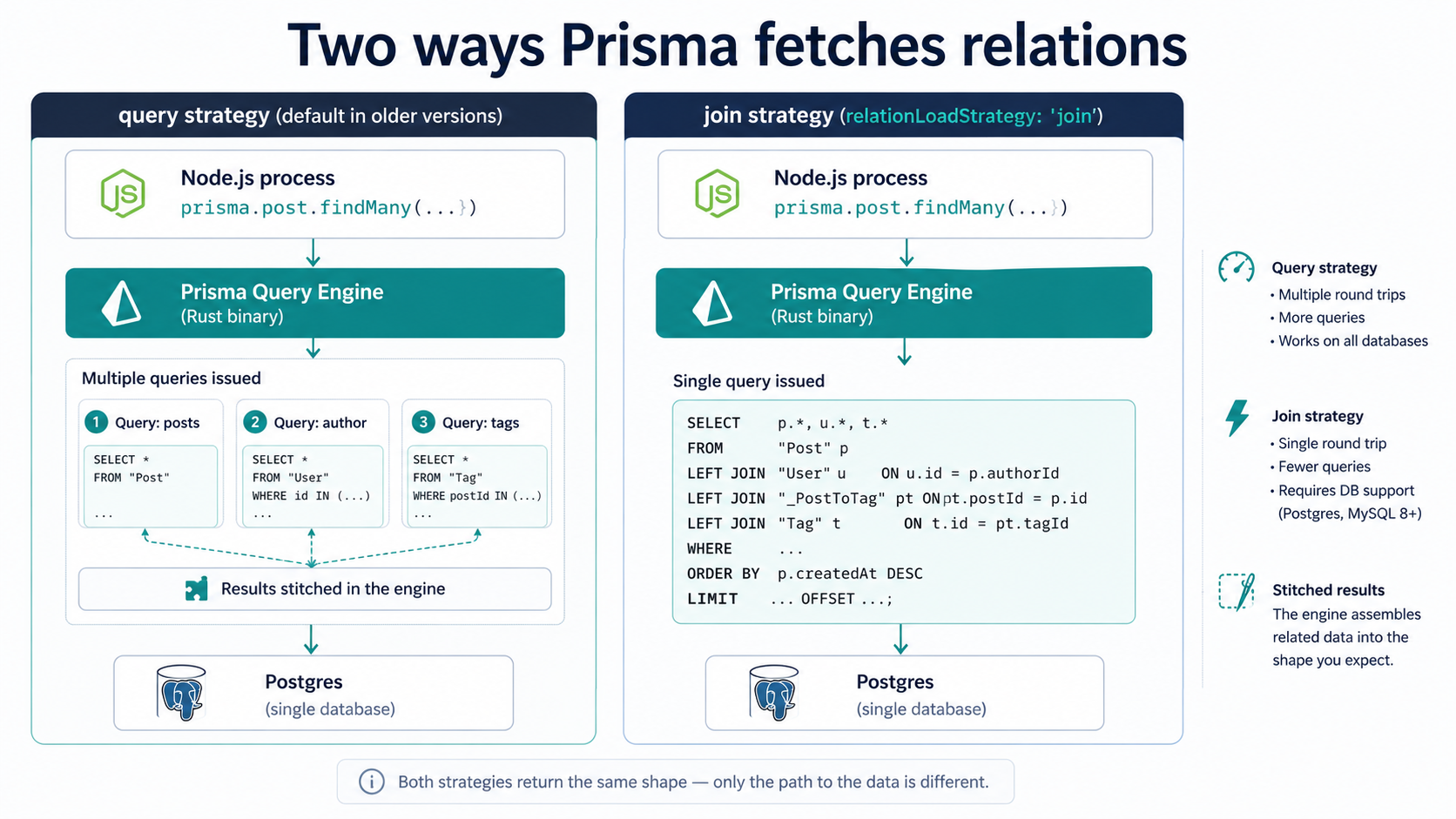
The practical advice that holds up: when a query starts to feel slow, your first move is not to micro-optimise the TypeScript. It's to log the actual SQL. Prisma can do this for you by passing log: ['query'] (or the more configurable event-emitter variant) into the client constructor. Once you see the queries hitting the database, the gap between "what I wrote" and "what's running" closes immediately, and most of the surprises explain themselves.
The flip side is that for the 80% of CRUD code in a typical app, none of this matters and the abstraction earns its keep cleanly. You only have to learn this layer for the queries that show up in your slow-query log. Most queries don't.
The N+1 problem still exists, just with a friendlier face
Classic ORMs taught everyone the N+1 lesson the hard way: a loop over a list of users, a property access on each one that quietly triggers a follow-up query, 200 users in the list, 201 queries on the database. Prisma doesn't do lazy loading, which kills that specific shape of the problem at the source: there's no user.posts that secretly runs SQL the first time you touch it.
But the equivalent foot-gun is still reachable.
const users = await prisma.user.findMany({ where: { digestOptIn: true } });

for (const user of users) {
  const posts = await prisma.post.findMany({
    where: { authorId: user.id, createdAt: { gte: lastWeek } },
  });
  await sendDigest(user, posts);
}
That's an N+1, and the type system won't tell you. Prisma runs every findMany inside the loop as a separate query, the database gets hammered, and your digest job that used to take 30 seconds is now taking ten minutes because the user list grew.
The fix is the same as it's always been: fetch the relations up front, group in memory, then loop. Prisma's include would handle most cases. For cases where you can't include the whole relation (because the filter on the relation is complex), findMany plus a manual Map is the boring, fast answer:
const users = await prisma.user.findMany({ where: { digestOptIn: true } });
const userIds = users.map((u) => u.id);

const posts = await prisma.post.findMany({
  where: { authorId: { in: userIds }, createdAt: { gte: lastWeek } },
});

const byAuthor = new Map<string, typeof posts>();
for (const post of posts) {
  const list = byAuthor.get(post.authorId) ?? [];
  list.push(post);
  byAuthor.set(post.authorId, list);
}

for (const user of users) {
  await sendDigest(user, byAuthor.get(user.id) ?? []);
}
Two queries instead of N+1, regardless of how many users you have. The reason this is worth writing down is that the loop-of-awaits pattern is invisible in a code review. The reviewer sees await prisma.post.findMany, recognises it as a normal Prisma call, and moves on. It takes a second look to spot that it's inside a for loop and not behind a single batch query. Train your eye to flag it.
Connection pooling, and why your serverless deploy keeps melting
Prisma's PrismaClient holds its own connection pool. In a long-running Node process, a Fastify server, a worker, a classic Express app, that's exactly what you want. You instantiate the client once at boot, you reuse it across requests, the pool stays warm, and connections get returned to it cleanly.
In serverless, that model inverts on you.
Each Lambda or Vercel function invocation is, conceptually, its own process. If you naively create a new PrismaClient() per request, every invocation opens its own pool, which means every concurrent request opens a fresh set of connections to your database. Under load, your function fan-out runs straight into Postgres's max_connections limit, and you start seeing FATAL: sorry, too many clients already in the logs. The function works fine at low traffic and falls over the instant it gets popular, exactly the shape of incident you don't want to debug from a phone.
The Node-globals trick takes the edge off:
import { PrismaClient } from '@prisma/client';

const globalForPrisma = globalThis as unknown as { prisma?: PrismaClient };

export const prisma =
  globalForPrisma.prisma ?? new PrismaClient({ log: ['warn', 'error'] });

if (process.env.NODE_ENV !== 'production') {
  globalForPrisma.prisma = prisma;
}
That pattern reuses one client per warm function instance, which helps. But warm instances aren't shared across the fan-out: under a spike, you still get one pool per instance, and the instance count is whatever the platform decides it should be.
The real answer in serverless is an external pooler. Two paths:
- PgBouncer (or a managed equivalent like Supabase's pooler, Neon's pooler, RDS Proxy) sits between your functions and the database, multiplexes many client connections onto few server connections, and stops the fan-out from destroying you. Prisma supports PgBouncer-style transaction-mode pooling by adding
?pgbouncer=true&connection_limit=1to theDATABASE_URL. You give up some features that need session-level state (prepared statements, advisory locks) in exchange for the connection sanity. - Prisma Accelerate is Prisma's own hosted layer. It does the pooling and adds a query-level cache. It's a service you pay for, with the trade-off of an extra network hop and a dependency on Prisma's infrastructure. For a lot of teams the trade is worth it; for others, "another service in the critical path" is a hard no.
Neither is wrong. What's wrong is shipping a serverless deployment of Prisma without picking one and hoping the connection count works itself out. It won't.
Raw SQL is not a defeat
Here's a thing the marketing tends to underplay: there are queries Prisma's API won't express well, and there always will be.
Window functions. Recursive CTEs. Complex aggregations with GROUP BY ROLLUP. JSONB path queries. Geospatial queries with PostGIS. Anything that uses a Postgres feature beyond the common subset of SQL. Prisma's query builder is opinionated, and the opinions are about portability and type-safety, not about being a complete frontend to your database.
That's fine. Prisma gives you two escape hatches:
import { Prisma } from '@prisma/client';

type Row = { authorId: string; postCount: number; rank: number };

const rows = await prisma.$queryRaw<Row[]>(Prisma.sql`
  SELECT
    "authorId",
    COUNT(*)::int AS "postCount",
    RANK() OVER (ORDER BY COUNT(*) DESC)::int AS rank
  FROM "Post"
  WHERE "createdAt" >= ${weekAgo}
  GROUP BY "authorId"
  ORDER BY "postCount" DESC
  LIMIT 50;
`);
$queryRaw returns rows. $executeRaw runs a statement and returns an affected-row count. Both use the tagged-template-literal form so values get parameterised. Concatenating user input into the SQL string with $queryRawUnsafe exists, but it's the path that bypasses the protection, so reach for it last and only when you genuinely need a dynamic identifier.
The cultural mistake teams make is treating raw SQL as an admission of failure. It isn't. The right mental model is: Prisma is the default for the 90% of queries that fit cleanly, and SQL is for the 10% that don't. The 10% deserve to be in the codebase, named after what they do, with a comment explaining why they're raw. They don't deserve to be a contortion of the query builder that takes an hour to read.
Bundle size, cold starts, and the binary you ship
The Prisma client ships with a native query engine. It's a Rust binary, a few megabytes uncompressed, and it has to be present at runtime on the architecture you're deploying to. On a server you provisioned, that's a non-issue. On serverless platforms with tight bundle limits, it can be the difference between "deploys fine" and "exceeds maximum function size".
Two things to know up front:
binaryTargetsin the schema tells Prisma which architectures to ship engines for. The default is your local machine. For Linux serverless you usually need to add a target like"native"plus the platform-specific one (Vercel and AWS Lambda use specific glibc/openssl variants; check the Prisma docs for the exact strings, since they change). Forget this and you'll get aPrismaClientInitializationError: Query engine binary for current platform "X" could not be foundat runtime, not at build time.- Cold-start latency comes from a couple of places: loading the binary, opening a connection, and (in serverless) the first network round-trip to wherever your database lives. The binary load is small. The connection open is bigger. The geographic distance is often the biggest. A function in
us-east-1talking to a database ineu-west-1will feel like Prisma is slow when it's just light hitting fibre. Co-locate them.
There's also a newer driver adapters path where Prisma can use a pure-JS driver instead of the binary engine, which trims the deploy size and helps in edge/Workers environments. It's behind a feature flag in many setups and still doesn't cover every database the regular engine does, so check the support matrix for whatever you're on before you commit to it.
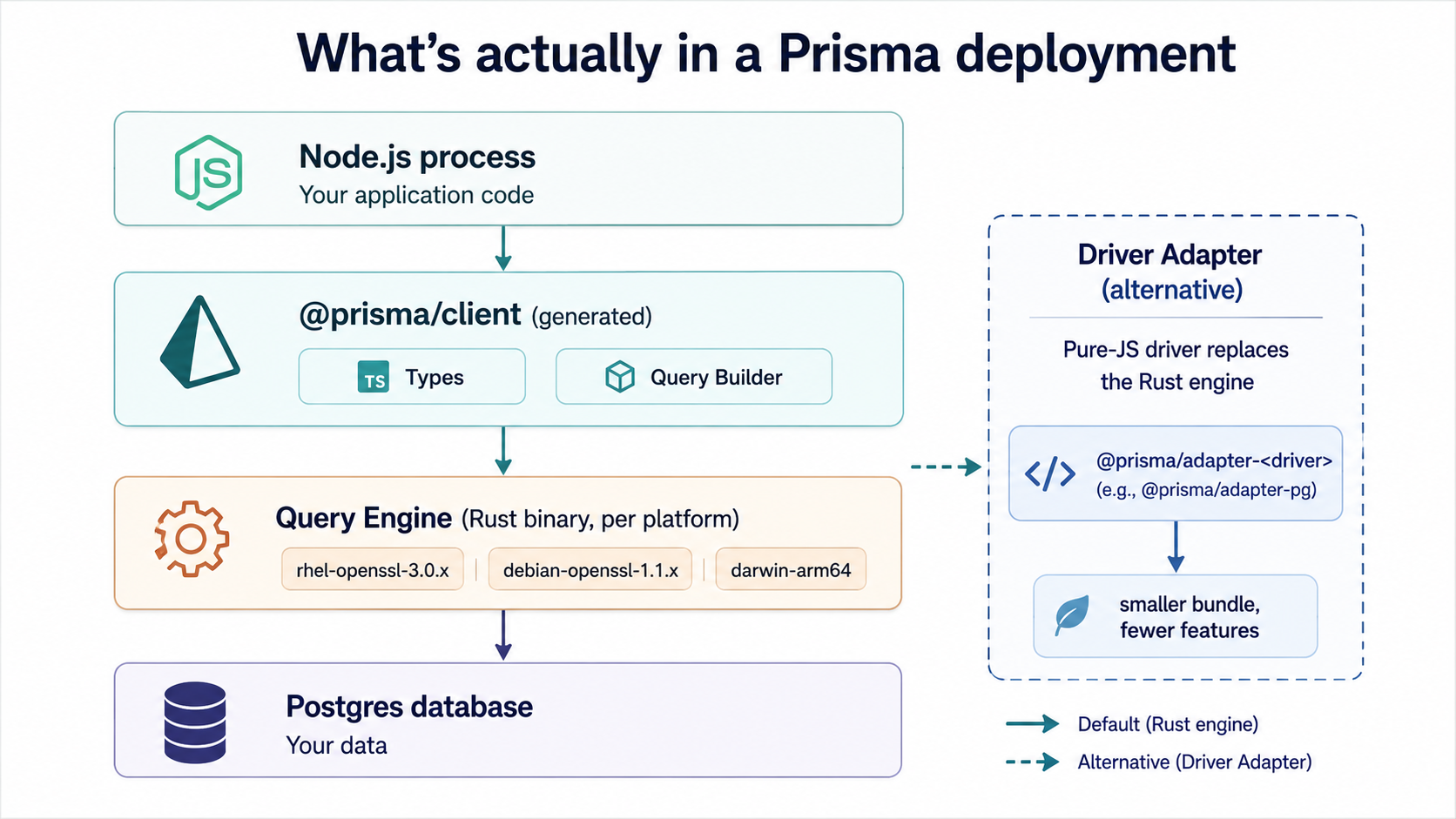
None of this is fatal in production. Plenty of teams run Prisma on Lambda quite happily. But it's the layer where "it worked on my machine" goes to die, so it pays to read the deployment docs before the rollout, not during.
Soft places you'll feel as the project grows
A few smaller things that don't deserve their own section but will show up eventually.
The generated client is generated. It lives at node_modules/.prisma/client by default. CI builds that aggressively cache node_modules but skip the prisma generate step will silently ship stale types. Add prisma generate to your postinstall or your build pipeline and stop thinking about it.
PrismaClientKnownRequestError codes are stable and worth catching by code, not by message. P2002 for unique constraint violations, P2025 for "record not found" on updates and deletes, P2003 for foreign-key violations. Wrap your service layer once with a small adapter that turns those into your own domain errors, and the rest of the codebase stops needing to know about Prisma's error shapes.
Soft deletes aren't built in. There's a middleware/extension pattern for it, and it works, but it's the kind of thing you bolt on per-model with care rather than enabling globally. Global soft-delete logic tends to leak in surprising places, like when an aggregation should include archived rows but doesn't, or when a foreign-key relationship breaks because the parent was "deleted" but children weren't.
Multi-tenancy isn't built in either. You have a choice: every query passes where: { tenantId } manually, or you use a Prisma Client extension to inject it, or you go schema-per-tenant with separate DATABASE_URLs. Each has trade-offs, and "we'll figure it out later" is the option that bites worst. Retrofitting tenant scoping into thousands of queries is its own arc of suffering.
And finally: introspection (prisma db pull) is good but not perfect. It will pull most of your schema reliably, but database features Prisma doesn't model (partial indexes, exclusion constraints, custom types, certain Postgres-specific defaults) won't round-trip cleanly. If you're adopting Prisma on top of a database that's been growing for years, plan for a phase of hand-cleaning the introspected schema rather than trusting it on the first pass.
So, is it worth it?
For most Node.js applications, yes, emphatically.
The schema-first workflow, the generated types, the migrations as code, the readable query API. They raise the floor of the codebase. Junior engineers ship correct database code faster. Senior engineers spend less time fighting boilerplate. Code review gets sharper because the queries are short and intentional. None of that is small.
The places where Prisma hurts are the places where every ORM hurts. Abstractions over databases leak at the edges, and the edges are where production lives. The honest stance is: Prisma is the default for the common case, raw SQL is the right tool for the uncommon case, and the two don't compete. The teams that get the most out of Prisma are the ones that learn to switch tools fluently and don't treat reaching for $queryRaw as a moral failing.
If you're picking Prisma today, the things to set up early, before the codebase grows around them, are the small habits that prevent the worst of the pain. Pick a connection-pooling story before you go serverless. Read every generated migration before you merge it. Log queries in dev so you see what's actually running. Wrap the error codes once. Decide your tenancy model on day one. Co-locate compute and database.
Do those, and the parts that hurt mostly stop hurting. The parts that work keep working. And the next time someone joins the team and points at the schema.prisma file and says "this is a lot", you'll be able to honestly answer: "and that's the easy part."