"But Nobody Disables JavaScript Anymore"
Every time I bring up progressive enhancement, somebody says this. They're right that almost nobody intentionally turns JavaScript off. They're missing that intentional disabling is not the failure mode that matters.
The failure mode that matters is involuntary: the user's mobile signal drops mid-page-load, a corporate proxy rewrites a script tag, an ad blocker decides your CDN looks suspicious, a third-party tag throws an error that breaks the rest of the bundle, a Safari version has a regression you didn't catch in QA. JavaScript fails for users who were never asked. And in an app that depends on JavaScript loading and running cleanly, "fails" means "the page is bricked."
Progressive enhancement is the trick that makes this category of failure invisible to the user. You build in layers. The bottom layer is HTML and a server that can respond to it. Everything above that is a layer of polish that enhances the experience when it loads. When it doesn't, the page still works.
That sounds like 2008. The reason to revisit it now is that the modern frameworks — Next.js with Server Actions, React Router 7 loaders/actions, Remix's heritage, Astro forms — have made progressive enhancement the default path again, after years of treating it as a chore.
The Layer Model
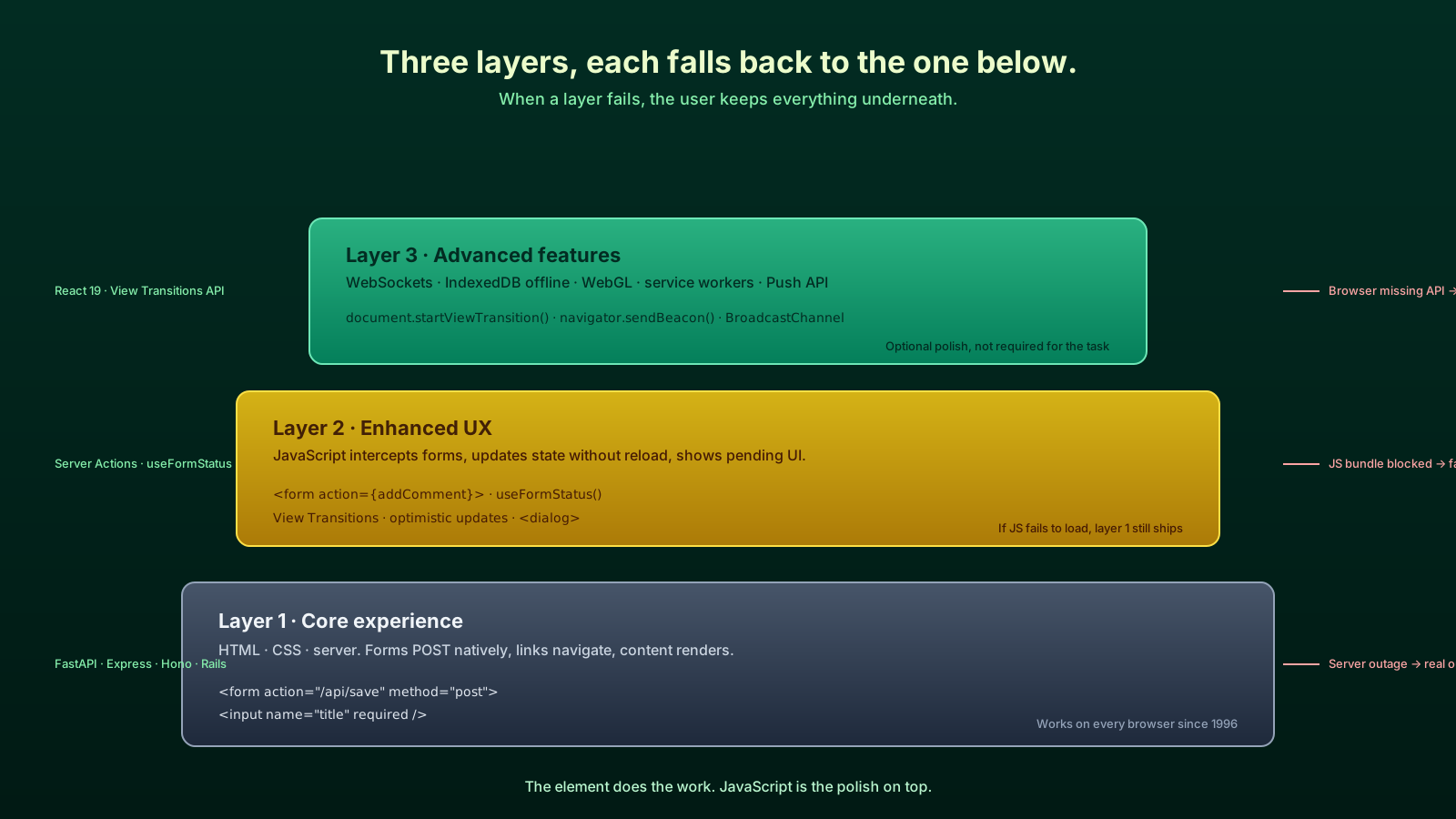
I think about it as three concentric circles, smallest at the center.
- Core experience. HTML, CSS, server. A user can read content, navigate, fill in forms, and submit them. No JavaScript needed.
- Enhanced experience. JavaScript intercepts forms, updates state without a full reload, animates transitions, makes the experience snappy.
- Advanced features. WebSockets for live updates, View Transitions API for animated route changes, IndexedDB for offline state, WebGL for graphics.
If layer 3 fails, the user keeps layer 2. If layer 2 fails, the user keeps layer 1. If layer 1 fails, you have a server outage and that's a different problem.
Most of the apps I see in code review are missing layer 1 entirely. They jump straight to layer 2, and when JavaScript breaks, the whole thing collapses.
The Form Is The Foundation
The single highest-leverage thing you can do to enhance an app progressively is use real HTML forms.
// Bad — does nothing without JavaScript
<button onClick={() => submitData()}>Save</button>// Good — works with or without JavaScript
<form action="/api/save" method="post">
<input name="title" required />
<button type="submit">Save</button>
</form>The browser has known how to submit forms since 1995. It will encode the inputs, set the right Content-Type, follow redirects, and update history. None of this requires a single line of your JavaScript. If your server route at /api/save accepts application/x-www-form-urlencoded (which Next.js Server Actions, Express, FastAPI, and basically every backend framework do), you have a working app already.
Then you enhance. In Next.js this is essentially free:
// app/posts/new/page.tsx
import { db } from '@/lib/db';
import { redirect } from 'next/navigation';

async function createPost(formData: FormData) {
  'use server';
  const title = String(formData.get('title') ?? '').trim();
  if (!title) return;
  const post = await db.post.create({ data: { title } });
  redirect(`/posts/${post.id}`);
}

export default function NewPostPage() {
  return (
    <form action={createPost}>
      <input name="title" required minLength={3} />
      <button type="submit">Create</button>
    </form>
  );
}
If JavaScript is enabled, Next.js intercepts the submission, runs the action over the existing connection, and updates the page without a full reload. If JavaScript fails to load, the browser submits the form natively to the same handler — which is reachable as a regular HTTP endpoint — and the user gets a real page navigation. Either way, the post is created.
Pending States Without Breaking The Baseline
A common worry: "If I rely on the form's native submit, how do I show a loading spinner?" In React 19 (stable since December 2024) the answer is useFormStatus, which only runs in the enhanced layer:
'use client';
import { useFormStatus } from 'react-dom';

export function SubmitButton() {
  const { pending } = useFormStatus();
  return (
    <button type="submit" disabled={pending}>
      {pending ? 'Creating…' : 'Create'}
    </button>
  );
}
When JavaScript runs, useFormStatus lights up and the button shows "Creating…" while the action is in flight. When JavaScript doesn't run, the user just sees "Create" and the page navigates after submit — the natural feedback the browser already provides.
The Platform Has Quietly Caught Up
Some of the recent pieces that make progressive enhancement easier than it was a few years ago:
<dialog>element. Native modal dialogs with focus management and anEsc-closes contract. Supported across all modern browsers since 2022. No morereact-modalfor the simple case.<details>and<summary>. Native disclosure widgets. No state management, no JavaScript, accessible by default.popoverattribute. Stable in modern browsers. Built-in tooltips and popovers without a positioning library.- View Transitions API. Animated route changes with one CSS rule and a
document.startViewTransitioncall. Falls back silently in browsers that don't support it. - CSS
:has(). Parent selectors that used to require JavaScript. - Container queries. Components that respond to their container's size, not the viewport.
Each of these moves work the platform used to outsource to JavaScript back into the browser. Use them as your default and your apps will be more resilient by accident.
A Concrete Example: A Comment Form
Pulling it together. The brief: a user can post a comment under a blog post. It needs to work on a flaky train, on an old corporate browser, and on a fast desktop with a fancy network.
// app/posts/[id]/page.tsx
import { db } from '@/lib/db';
import { revalidatePath } from 'next/cache';
import { SubmitButton } from '@/components/SubmitButton';

async function addComment(formData: FormData) {
  'use server';
  const text = String(formData.get('text') ?? '').trim();
  const postId = String(formData.get('postId') ?? '');
  if (!text || !postId) return;
  await db.comment.create({ data: { text, postId } });
  revalidatePath(`/posts/${postId}`);
}

export default async function PostPage({
  params,
}: {
  params: Promise<{ id: string }>;
}) {
  const { id } = await params;
  const post = await db.post.findUnique({
    where: { id },
    include: { comments: { orderBy: { createdAt: 'desc' } } },
  });
  if (!post) return <p>Not found</p>;

  return (
    <article>
      <h1>{post.title}</h1>
      <ul>{post.comments.map((c) => <li key={c.id}>{c.text}</li>)}</ul>
      <form action={addComment}>
        <input type="hidden" name="postId" value={post.id} />
        <textarea name="text" required minLength={1} maxLength={2000} />
        <SubmitButton />
      </form>
    </article>
  );
}
Trace what happens in three scenarios:
- Modern browser, JS loaded. The user types, hits submit, the action runs, the comment list re-renders without a full reload, the input clears. Smooth and instant.
- JS bundle failed to load. The user types, hits submit, the browser POSTs the form to the action endpoint, the page reloads from the server with the new comment in the list. Slower, but it works.
- JS broken by an ad blocker on the third-party widget two pages up. Same as above. The form is real HTML and survives whatever the rest of the page is doing.
You wrote one set of code. The framework gave you both layers for free.
Where People Get It Wrong
The most common mistake is treating progressive enhancement as "render the same component twice, once with JS and once without." That's miserable to maintain and almost always abandoned.
The correct framing is structural. Use the right element. Buttons that submit forms are <button type="submit">, not <div onClick>. Links that navigate are <a href>, not <div onClick={() => router.push}>. Forms have action and method attributes. The element does the work; JavaScript adds polish.
The other common mistake is testing only on the developer's machine. Every CI pipeline should have a way to test with JavaScript disabled — Playwright supports it with one config line, and it catches an entire class of regressions before they reach users.
The Quiet Reason It Matters
The pitch I make to teams who think this is overkill: progressive enhancement is the cheapest insurance policy you can buy. You're not changing the user experience for the 99% who load JavaScript fine. You're guaranteeing that the 1% on a bad network, a corporate proxy, an old browser, or hit by a bad deploy — still get a working app. The cost is mostly using HTML the way it was meant to be used and letting the framework do the rest.
That's a much better trade than "everything is JavaScript and we hope nothing fails."