Symfony Forms look like HTML forms from the outside.
That is the trap.
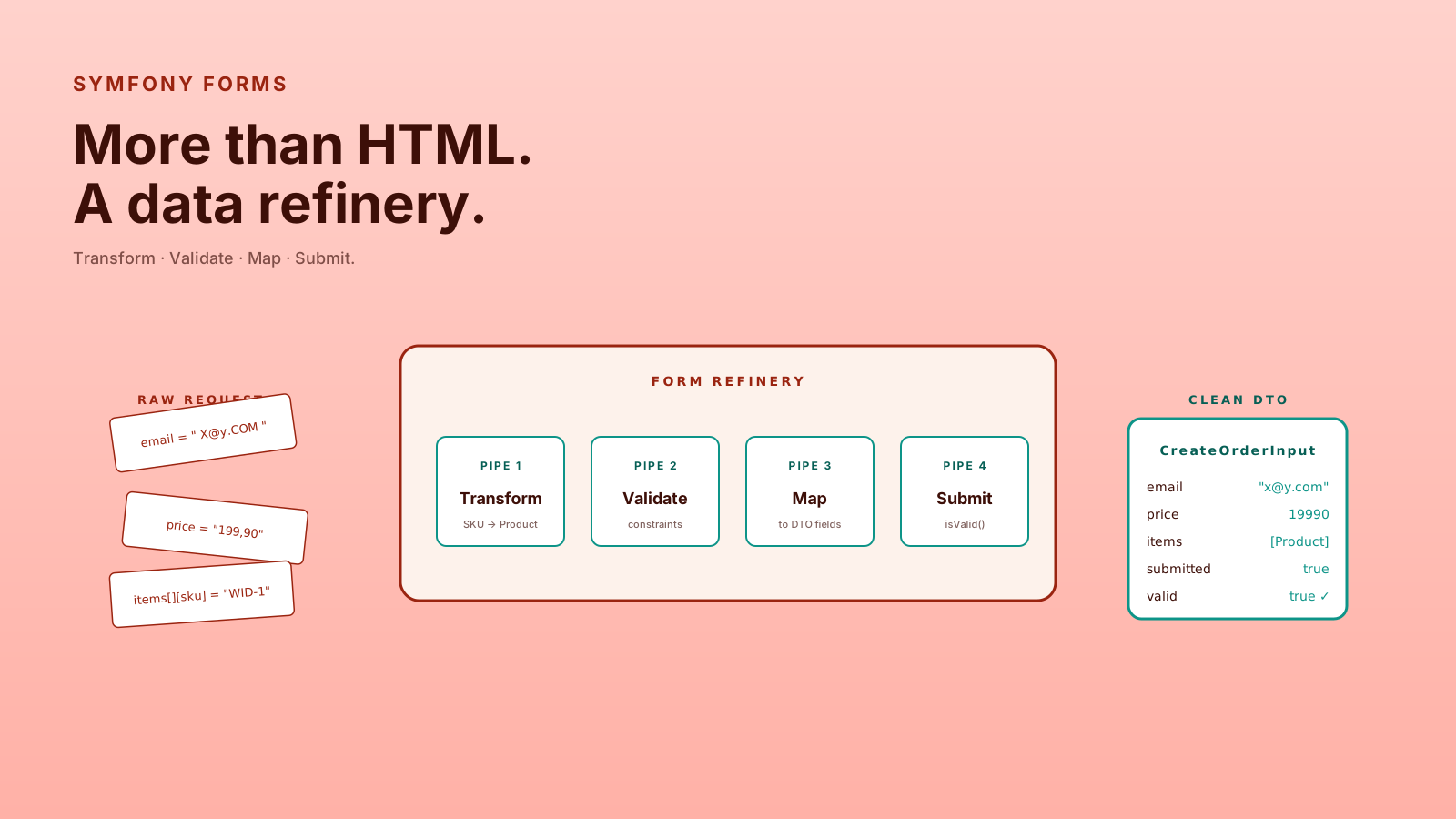
Yes, they can render fields. Yes, they can process POST data. But the real value is that Symfony Form is a data processing component. It maps input, transforms values, validates constraints, handles nested structures, and gives you a reusable boundary between the outside world and your application.
A form is not just a screen. It is a customs checkpoint for data.
Forms Are Input Boundaries
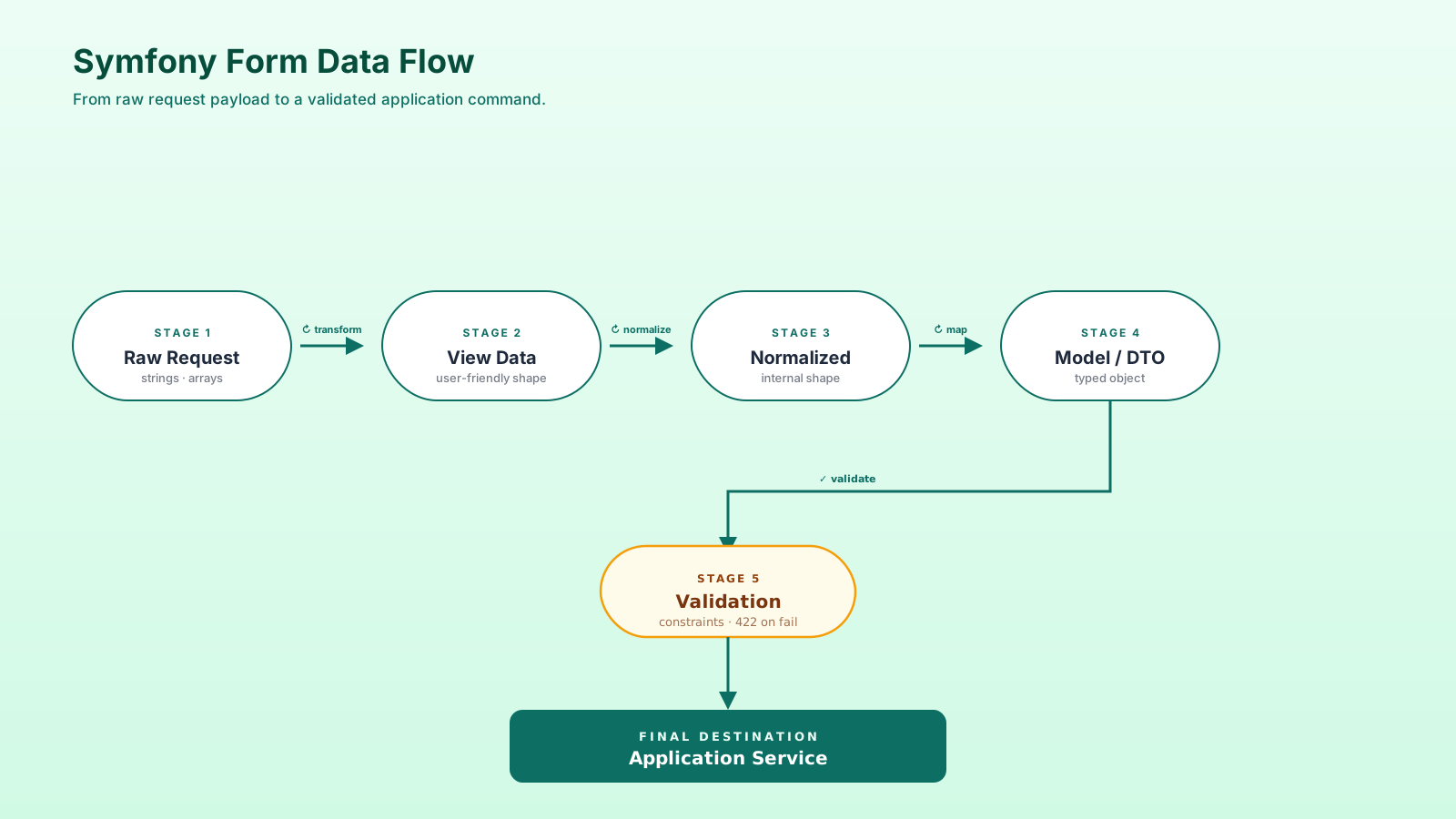
When data enters your app, you need to answer three questions.
- What shape should this input have? The form defines expected fields and structure.
- How should raw input become application data? Transformers and mapping handle conversion.
- Is the final data valid? Validation constraints protect the business rules.
That is much bigger than HTML.
final class RegisterUserType extends AbstractType
{
    public function buildForm(FormBuilderInterface $builder, array $options): void
    {
        $builder
            ->add('email', EmailType::class)
            ->add('plainPassword', PasswordType::class);
    }
}
This looks simple, but it creates a reusable definition of expected input.
DTOs Keep Forms Away From Entities
Binding forms directly to Doctrine entities can be convenient. It can also accidentally let external input mutate persistence objects too early.
For complex workflows, use a DTO.
use Symfony\Component\Validator\Constraints as Assert;

final class RegisterUserInput
{
    #[Assert\Email]
    #[Assert\NotBlank]
    public string $email = '';

    #[Assert\Length(min: 12)]
    public string $plainPassword = '';
}
Now the form writes into an input object, not your database entity.
$input = new RegisterUserInput();
$form = $this->createForm(RegisterUserType::class, $input);
$form->handleRequest($request);

if ($form->isSubmitted() && $form->isValid()) {
    $this->registerUser->handle($input);
}
That separation is boring in the best possible way.
Data Transformers Are The Secret Weapon
A data transformer converts data between formats. Symfony uses transformers internally, but custom transformers are where forms become really useful.
Imagine a form where the user enters a SKU, but your application needs a Product object.
final class SkuToProductTransformer implements DataTransformerInterface
{
    public function transform(mixed $product): string
    {
        return $product?->sku() ?? '';
    }

    public function reverseTransform(mixed $sku): Product
    {
        return $this->products->getBySku((string) $sku);
    }
}
The form can now accept user-friendly input while the application receives meaningful data.
This is like translating airport signs: travelers see "Gate B12," but the system knows the internal routing details.
Validation Belongs Close To Input
Symfony Validator lets you define constraints with attributes, YAML, XML, or PHP configuration.
For DTO-based forms, attributes are often readable.
final class CreateCouponInput
{
    #[Assert\NotBlank]
    #[Assert\Length(max: 40)]
    public string $code = '';

    #[Assert\Range(min: 1, max: 100)]
    public int $discountPercent = 0;
}
This does not replace domain rules. It protects input shape before deeper business logic runs.
A coupon being between 1 and 100 percent is input validation. Whether this merchant is allowed to create a coupon this month may be domain logic.
Form Events Make Forms Dynamic
Real forms are rarely static. Some fields appear only when another value is selected. Some choice lists change based on the user. Some fields should be read-only after submission.
The Form component solves this through form events — PRE_SET_DATA, POST_SET_DATA, PRE_SUBMIT, SUBMIT, POST_SUBMIT. They let you modify the form structure at the right moment in the lifecycle.
A common case: show a "cancellation reason" field only when status is set to "cancelled":
public function buildForm(FormBuilderInterface $builder, array $options): void
{
    $builder->add('status', ChoiceType::class, [
        'choices' => ['Active' => 'active', 'Paused' => 'paused', 'Cancelled' => 'cancelled'],
    ]);

    $addReasonField = function (FormInterface $form, ?string $status): void {
        if ($status === 'cancelled') {
            $form->add('cancelReason', TextareaType::class, [
                'constraints' => [new Assert\NotBlank(), new Assert\Length(max: 500)],
            ]);
        }
    };

    $builder->addEventListener(FormEvents::PRE_SET_DATA, function (FormEvent $event) use ($addReasonField) {
        $data = $event->getData();
        $addReasonField($event->getForm(), $data?->status);
    });

    $builder->addEventListener(FormEvents::PRE_SUBMIT, function (FormEvent $event) use ($addReasonField) {
        $data = $event->getData();
        $addReasonField($event->getForm(), $data['status'] ?? null);
    });
}
PRE_SET_DATA runs when the form first loads data (the GET request). PRE_SUBMIT runs when the user submits (the POST request). Together they keep the form consistent in both directions.
This is also how you build admin tools where field visibility depends on the current user, or e-commerce flows where shipping fields appear only for physical products. The form stays a single class — no controller branching, no scattered conditional rendering.
Reusable Field Types Beat Copy-Paste
Once your app has more than a handful of forms, you'll notice patterns: every "money" field is a number with a currency selector, every "address" field has the same five sub-fields, every "user picker" hits the same autocomplete endpoint.
Custom field types let you encapsulate that pattern once and reuse it everywhere.
final class MoneyAmountType extends AbstractType
{
    public function buildForm(FormBuilderInterface $builder, array $options): void
    {
        $builder
            ->add('amountInCents', IntegerType::class, [
                'attr' => ['min' => 0],
            ])
            ->add('currency', ChoiceType::class, [
                'choices' => ['USD' => 'USD', 'EUR' => 'EUR', 'UAH' => 'UAH'],
            ]);
    }

    public function configureOptions(OptionsResolver $resolver): void
    {
        $resolver->setDefaults([
            'data_class' => Money::class,
            'empty_data' => fn () => new Money(0, 'USD'),
        ]);
    }
}
Now any other form can do ->add('price', MoneyAmountType::class) and get the same UX, the same validation, the same data transformer behavior. When you decide to change the currency list, you change one file.
A small extension of the same idea: form themes. A theme is a Twig template that defines how field types render. Build one global form theme matched to your design system, set it in twig.yaml, and every form in the app gets a consistent look without per-template rendering code. That single line of config saves weeks of ad-hoc CSS work over the lifetime of the project.
Forms Work For APIs Too
The Form component is not limited to Twig-rendered HTML.
You can submit arrays from JSON payloads and still use form validation, transformation, and mapping.
$payload = json_decode($request->getContent(), true, flags: JSON_THROW_ON_ERROR);

$input = new CreateCouponInput();
$form = $this->createForm(CreateCouponType::class, $input);
$form->submit($payload);

if (!$form->isValid()) {
    return $this->json($this->formatErrors($form), 422);
}
This approach is not always necessary, but it is useful when you want consistent input handling across web and API flows.
Complex Business Input Needs Structure
Symfony Forms shine when input is nested, conditional, or transformed.
Examples include admin tools, checkout flows, product configuration screens, permission editors, bulk import review pages, and internal operations dashboards.
A raw controller handling all of that becomes a spaghetti bowl quickly.
$builder
    ->add('name')
    ->add('items', CollectionType::class, [
        'entry_type' => ProductBundleItemType::class,
        'allow_add' => true,
        'allow_delete' => true,
    ]);
Nested form collections are not glamorous, but they solve real back-office problems.
Common Form Problems
- Binding everything to entities — It is convenient until external input starts shaping your persistence model.
- Putting business workflows in form types — A form should process input, not approve refunds or ship orders.
- Ignoring transformers — Without transformers, controllers often fill up with conversion code.
- Treating validation as domain logic — Validation checks input; domain services protect business behavior.
- Making one giant form type — Split complex forms into smaller reusable types.
Forms become painful when they are asked to own too much.
Pro Tips
- Use DTOs for write flows — Especially when input does not map perfectly to one entity.
- Keep form types declarative — Field shape and options belong there; business orchestration does not.
- Normalize API errors — If you use forms for APIs, build a consistent error formatter.
- Use transformers for meaningful conversion — IDs, slugs, SKUs, and external codes often deserve transformers.
- Test complex forms — Form tests catch mapping and validation bugs before they reach users.
Final Tips
I used to think Symfony Forms were "too much" for many cases. Then I worked on admin and business workflows where the input was messy, conditional, and full of edge cases. Suddenly the structure made sense.
Use forms when input deserves a real boundary. Skip them when a tiny request DTO is enough. That judgment is the senior part.
Good luck turning messy input into clean application behavior 👊