You hit a Symfony route, a controller returns something, and the browser gets a response.
Simple, right?
Well, yes and no. The beauty of Symfony is that the request lifecycle is not hidden magic. It is a structured pipeline built around HttpKernel, Request, Response, and the EventDispatcher. Once you understand that flow, half of Symfony starts feeling less mysterious.
HttpKernel is like an airport control tower. The controller is only one airplane. The tower also handles routing, security checks, exceptions, response modifications, and all the listeners waiting for their moment.
HttpKernel Has One Main Job
The HttpKernel component converts a Request into a Response. That sentence sounds small, but it is the center of the framework.
use App\Kernel;
use Symfony\Component\HttpFoundation\Request;

require_once dirname(__DIR__).'/vendor/autoload_runtime.php';

return function (array $context) {
    return new Kernel($context['APP_ENV'], (bool) $context['APP_DEBUG']);
};
Modern Symfony hides most bootstrap details from your daily work, but conceptually the flow is still the same: create a kernel, receive a request, produce a response.
At the core, Symfony applications are not "pages." They are request-response machines.
The Request Is A Real Object, Not A Global
Symfony wraps HTTP input in Request. Query parameters, POST data, files, headers, cookies, session, method, path — they all live behind one object.
That is cleaner than reaching into $_GET, $_POST, and $_SERVER like you are rummaging through a garage in the dark.
use Symfony\Component\HttpFoundation\Request;
use Symfony\Component\HttpFoundation\JsonResponse;

public function list(Request $request): JsonResponse
{
    $page = max(1, $request->query->getInt('page', 1));

    return new JsonResponse([
        'page' => $page,
    ]);
}
The important part is not just convenience. A request object makes HTTP behavior testable, passable, and explicit.
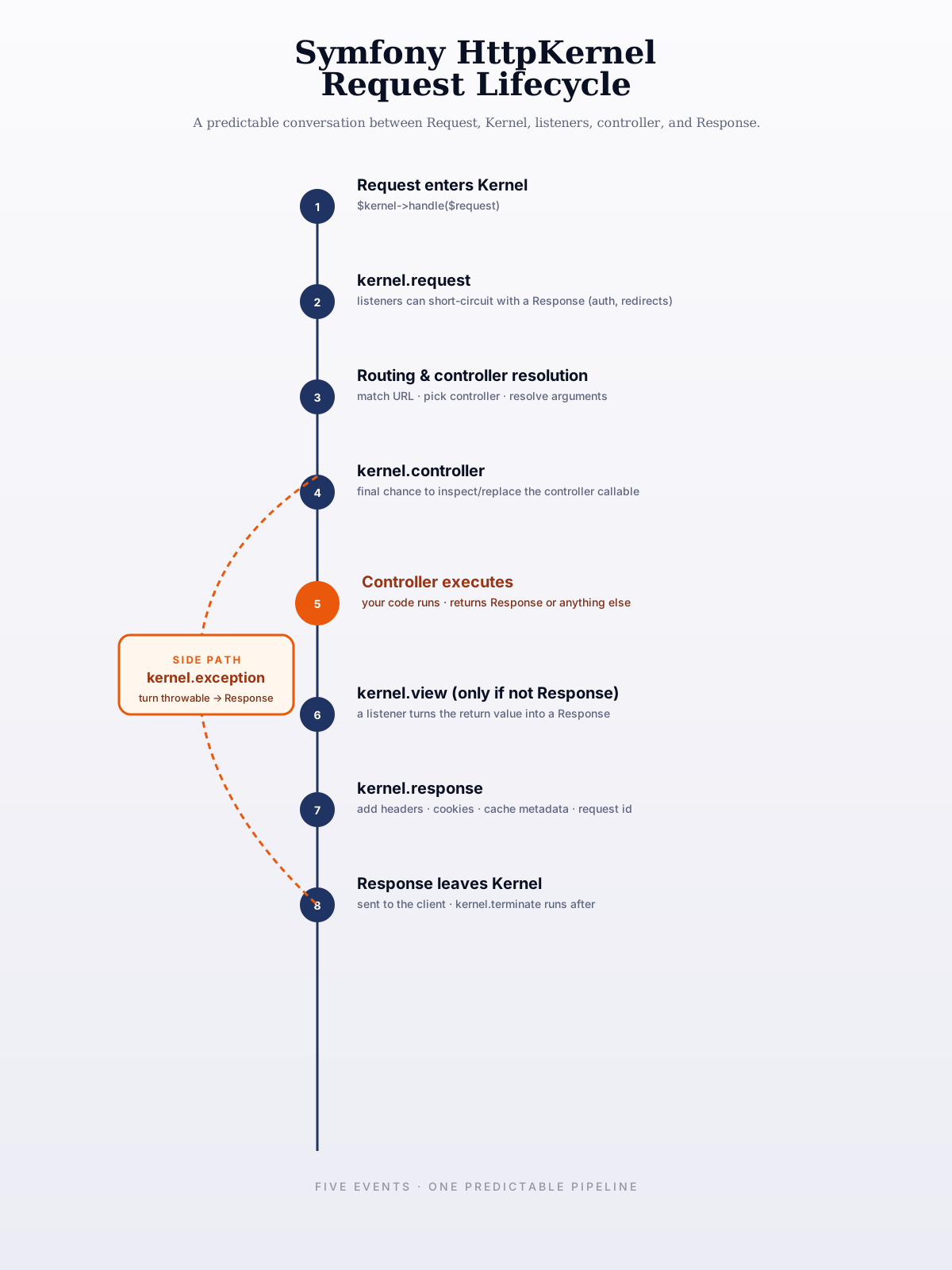
The Event Timeline Is The Real Story
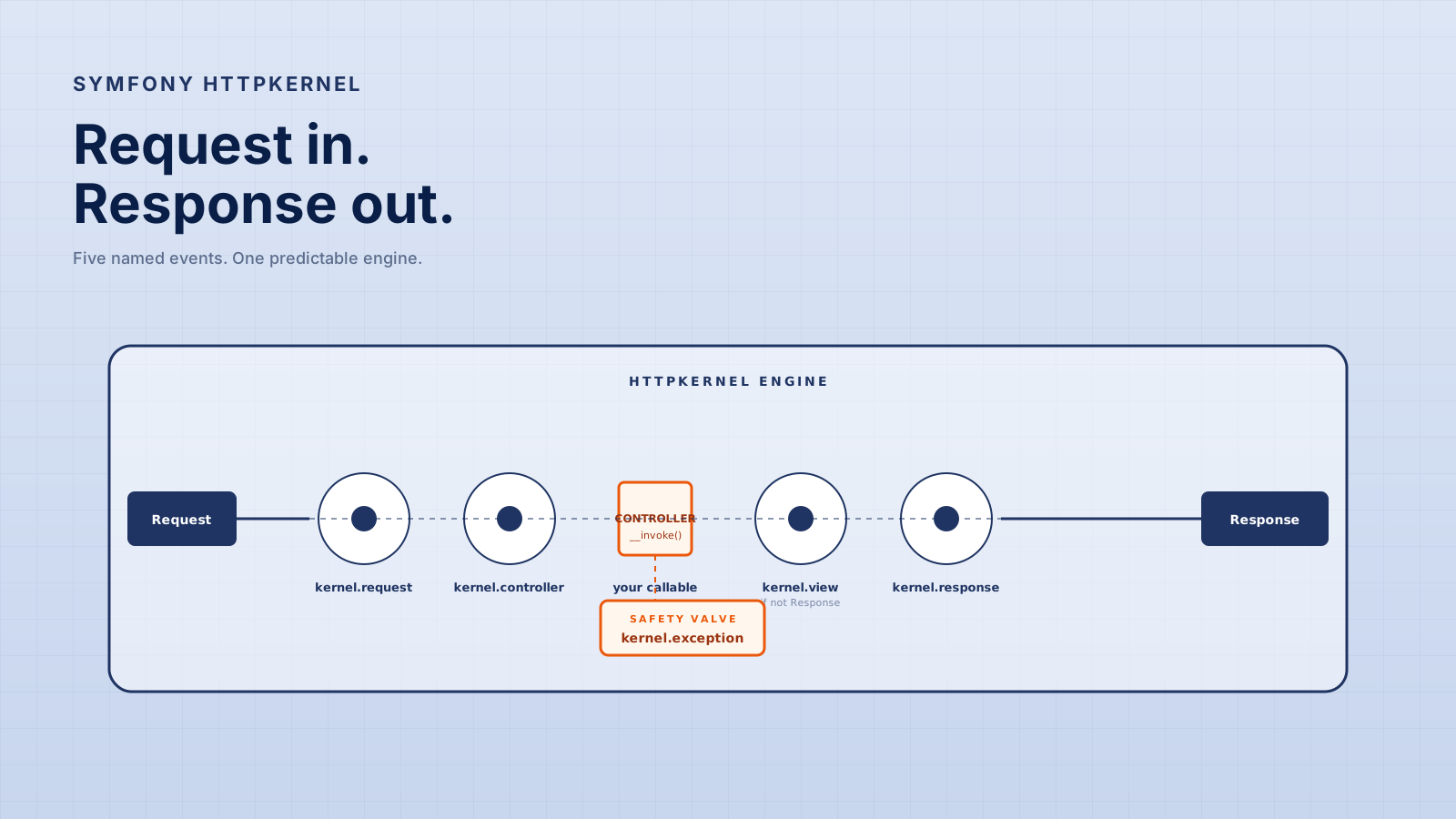
Symfony uses kernel events to let different parts of the system participate in the request lifecycle.
Think of it like a theater production. The controller is the actor on stage, but lighting, sound, stage direction, and safety crews all run cues before and after the actor speaks.
kernel.request
This happens early. Listeners can inspect the request, initialize context, redirect, or even return a response before a controller runs.
Security and routing-related behavior often feels like it happens "before the controller" because, practically, it does.
kernel.controller
At this point Symfony has selected the controller. Listeners can inspect or modify controller-related behavior.
You do not reach for this every day, but it matters when building framework-level features.
kernel.view
If a controller returns something that is not already a Response, a listener can transform it.
This is how higher-level tools can let controllers return DTOs, arrays, or resources while something else converts them into HTTP responses.
kernel.response
This happens after a Response exists but before it goes back to the client. It is perfect for headers, cookies, cache metadata, and final response adjustments.
kernel.exception
When something explodes, Symfony gives listeners a chance to convert the exception into a response.
That is why a production app can return a structured JSON error instead of a raw stack trace.
Controllers Are Not The Whole Framework
A controller is just one callable in the middle of a larger flow.
That is why Symfony encourages thin controllers. If your controller handles validation, permissions, business rules, database writes, email dispatching, and response formatting, it becomes a traffic jam.
public function __invoke(RegisterUserRequest $request): JsonResponse
{
    $user = $this->registerUser->handle(
        email: $request->email,
        plainPassword: $request->password,
    );

    return new JsonResponse([
        'id' => $user->id(),
    ], 201);
}
This controller does not pretend to be the whole application. It receives HTTP input, calls a use case, and returns HTTP output.
Middleware-Like Flow Without Being Middleware
Developers coming from other frameworks often ask, "Where is middleware in Symfony?"
The honest answer: Symfony does not need to copy that exact model because the event system covers many of the same extension points. Listeners and subscribers can run before controller execution, after response creation, or during exception handling.
namespace App\EventSubscriber;

use Symfony\Component\EventDispatcher\EventSubscriberInterface;
use Symfony\Component\HttpKernel\Event\ResponseEvent;
use Symfony\Component\HttpKernel\KernelEvents;

final class RequestIdSubscriber implements EventSubscriberInterface
{
    public static function getSubscribedEvents(): array
    {
        return [KernelEvents::RESPONSE => 'onResponse'];
    }

    public function onResponse(ResponseEvent $event): void
    {
        $event->getResponse()->headers->set('X-Request-Id', uniqid('req_', true));
    }
}
This is not middleware by name, but it solves a familiar problem through Symfony's event model.
Exceptions Are Part Of The Lifecycle
A strong Symfony app does not let exceptions leak randomly.
You can let Symfony's default error handling do its job, or you can add listeners for API-specific error responses. The point is that errors are still part of the request-to-response pipeline.
public function onException(ExceptionEvent $event): void
{
    $exception = $event->getThrowable();

    if (!$exception instanceof DomainException) {
        return;
    }

    $event->setResponse(new JsonResponse([
        'error' => $exception->getMessage(),
    ], 422));
}
Use this carefully. A global exception subscriber can make APIs clean, but it can also hide bugs if you catch too broadly.
Sub-Requests And Listener Priority
Two parts of the kernel become important once you start building real cross-cutting features.
Sub-requests. A controller (or a listener) can call Kernel::handle() again with a new Request and a HttpKernelInterface::SUB_REQUEST flag. The sub-request runs through the same pipeline — events, routing, controller — but its kernel.request and kernel.response listeners can check $event->isMainRequest() before doing global work like setting cookies or writing the request log. Without that guard, every sub-request gets its own duplicated header.
public function onResponse(ResponseEvent $event): void
{
    if (! $event->isMainRequest()) {
        return; // skip cookies, logging, request-id headers for sub-requests
    }

    $event->getResponse()->headers->set('X-Request-Id', $this->id());
}
This is why ESI (Edge Side Includes) and Twig's render(controller(...)) work cleanly: they execute sub-requests, but global listeners politely sit out.
Listener priority. Multiple listeners can subscribe to the same event. The one with the highest priority runs first. A common newcomer bug is registering an authentication listener at default priority and being surprised that another listener already redirected the user. Set priorities deliberately when ordering matters:
public static function getSubscribedEvents(): array
{
    return [
        KernelEvents::REQUEST => [['authenticate', 256]], // earlier than most
        KernelEvents::RESPONSE => [['addRequestId', -100]], // after others
    ];
}
A useful mental check: if your subscriber needs another subscriber to have already run, write that down in a comment and use priority to enforce it.
The Profiler Is The Best Way To Learn The Lifecycle
Reading about the lifecycle is one thing. Watching it actually run is faster.
In dev mode, Symfony's web profiler records every step of the kernel pipeline for each request: which listeners fired, in what order, how long each took, which routes matched, which controller was selected, which events your code dispatched, which queries hit the database. The little colored bar at the bottom of the page is a portal into all of it.
A few profiler panels worth knowing:
- Request / Response. Headers, cookies, session, the matched route, the resolved controller. The first place to look when "why didn't my listener run" is the question.
- Events. Every dispatched event with its listeners and priorities. Reveals subscriber ordering bugs immediately.
- Performance. A timeline of what happened between request and response. Slow listener? Slow controller? Slow Doctrine query? The bar makes it obvious.
- Doctrine. Every SQL query, with stack traces. The fastest N+1 detector you'll find.
The profiler runs in dev only — never enable it in production, the data is too sensitive. But for learning Symfony, it's worth more than any blog post (this one included).
Common HttpKernel Problems
- Putting framework logic into controllers — Controllers should not become fake kernels.
- Using listeners for business rules — Events are great for cross-cutting behavior, but not every domain decision belongs there.
- Catching every exception globally — Converting all errors into friendly JSON can hide programming mistakes.
- Forgetting response headers —
kernel.responseis often the right place for request IDs, cache headers, and security headers. - Not understanding event priority — Listener order matters when multiple subscribers touch the same request or response.
Symfony gives you sharp tools. The trick is not using every hook just because it exists.
Pro Tips
- Trace the lifecycle once manually — Follow one request through routing, controller, response, and exception paths.
- Keep subscribers focused — A subscriber should do one cross-cutting job, not become a hidden service layer.
- Prefer explicit application services — Use events for infrastructure flow, not core business orchestration.
- Use the profiler heavily — Symfony's profiler makes the request lifecycle visible instead of theoretical.
- Return real responses intentionally — Know when your controller returns
Response, JSON, DTOs, or something a listener transforms.
Final Tips
The first time I really understood HttpKernel, Symfony stopped feeling "heavy" and started feeling organized. The framework was not doing random magic; it was running a predictable ceremony around HTTP.
That is the mental model worth keeping: a Symfony request is a structured conversation between the request, the kernel, listeners, the controller, and the response.
Once you see the flow, debugging gets calmer. Go trace a request like a pro 👊