So you've shipped a Node service that reads a file, transforms each row, and writes the result somewhere — a database, an S3 bucket, another API. It works perfectly on your laptop. It works perfectly with the 200-row sample. Then production gets a 4 GB file at 2 a.m., the pod's RSS climbs in a perfect diagonal line, the OOM killer steps in, and the process restarts to do it again.
You stare at the code and there's no obvious bug. Every function returns. Every callback fires. The dashboards say the request is "fine." But the memory chart looks like a hill, and the hill keeps getting taller.
That hill is almost always backpressure — or, more precisely, the absence of it.
This article is about what backpressure actually is — not the API trick, but the concept — why it shows up in Node so often, and how the stream design turns it into something you can write code against. We'll start with the mental model and work outward to the code.
What Backpressure Actually Is
Backpressure is what a slow consumer does to make a fast producer wait.
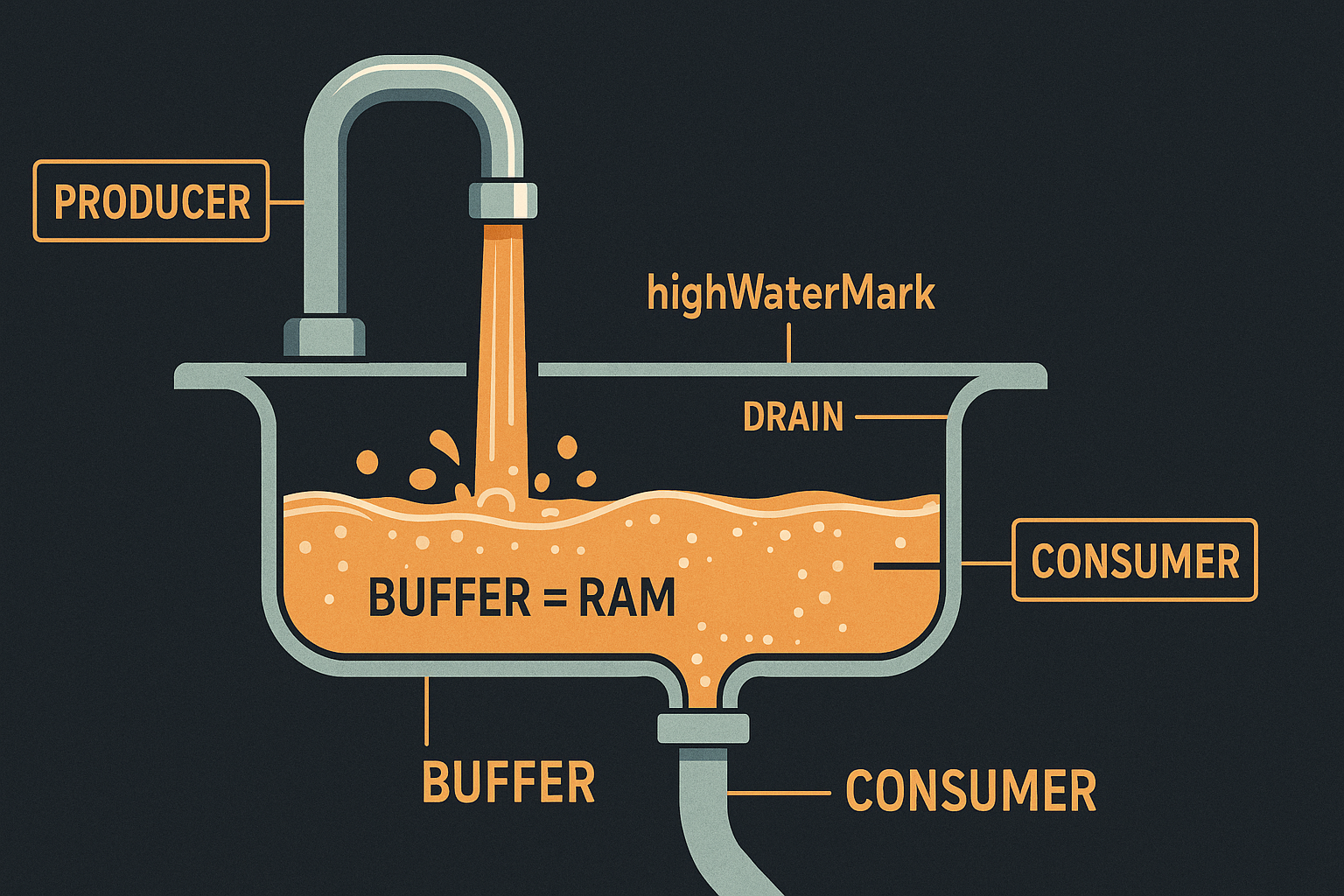
That's the whole concept. Whenever you have a pipeline — anything where data flows from one stage to another — there are two speeds: the speed at which the producer can hand work over, and the speed at which the consumer can take work in. If the producer is faster, the difference has to go somewhere. It goes into a buffer.
A buffer is just memory. So if you don't slow the producer down, the gap turns into RAM growth. The producer doesn't know it's a problem. The consumer can't make it a problem. The buffer happily expands. And you find out the next morning when the dashboard goes red.
Backpressure is the signal that goes the other direction. It's the consumer saying "hold on, I'm full." It's the producer hearing that and pausing. It's the entire pipeline matching its slowest stage so memory stays flat instead of climbing.
You can build that signal yourself with semaphores and queues. You can borrow it from libraries. Or — and this is what Node leans on heavily — you can use streams, where backpressure is baked into the API and the runtime takes care of the bookkeeping.
The reason Node services hit this so much is that Node makes producers easy. Reading a file, fetching a URL, subscribing to a Kafka topic, listening on a socket — these are all one-liners that hand you a hose of data. Consumers, on the other hand, often involve network calls or disk writes, which are an order of magnitude slower. Producer fast, consumer slow, buffer in the middle, RAM climbs.
The Memory Spike, Explained
Let's make the mental model concrete. Imagine the simplest possible pipeline:
import { createReadStream } from 'node:fs';

const src = createReadStream('events.ndjson');

src.on('data', (chunk) => {
  saveToDb(chunk); // returns a promise, not awaited
});
What does this look like in memory?
The file reader pulls bytes from disk as fast as the kernel will hand them over. Each chunk fires a 'data' event. The handler kicks off a saveToDb call and returns immediately. The reader pulls the next chunk. And the next. And the next.
There's no awaiting. There's no blocking. saveToDb is an unresolved promise floating in the event loop, holding a reference to its chunk. The next call holds the next chunk. After a few hundred milliseconds the file reader has produced thousands of chunks faster than the database can absorb a dozen, and every one of those chunks is a live object the garbage collector can't touch.
Each chunk is a live reference. Each promise is a live reference. The Promise machinery itself eats memory. The query queue inside the DB driver eats memory. The closures around chunk eat memory. And none of it can be collected because every reference is held by something that's still "in progress."
That's the shape of every "Node memory leak that isn't really a leak" — the data isn't leaking, it's just queued up faster than it can be processed.
The fix isn't tuning the garbage collector. It isn't raising the heap limit. The fix is making the producer wait for the consumer.
How Streams Encode Backpressure
Node's stream API turns the "wait for the consumer" idea into a concrete signal: the return value of .write().
When you call writable.write(chunk), you get back either true or false. true means "I took the chunk, the internal buffer is still under the threshold, keep going." false means "I took the chunk, but the internal buffer is now over the threshold — you should wait before sending more." When the buffer drains back down, the stream fires a 'drain' event.
The threshold is the highWaterMark. It defaults to 16 KB for byte streams and 16 objects for object-mode streams. It's not a hard limit — the stream will accept more chunks if you ignore the signal — it's a signal.
That's the contract. A well-behaved producer respects it:
function writeWithBackpressure(writable, chunk) {
  return new Promise((resolve) => {
    if (writable.write(chunk)) {
      resolve();
    } else {
      writable.once('drain', resolve);
    }
  });
}
An ignorant producer doesn't:
// looks fine, leaks memory
src.on('data', (chunk) => {
  dest.write(chunk); // return value ignored
});
That second snippet is the classic bug. The first time most developers see it, they're surprised it compiles, let alone runs. There's no warning. The types don't complain. The chunks keep flowing. The buffer grows.
The first snippet is the cure. But it's tedious to write by hand, easy to get wrong on errors, and almost always done better by a higher-level helper.
pipeline() Is Almost Always The Right Default
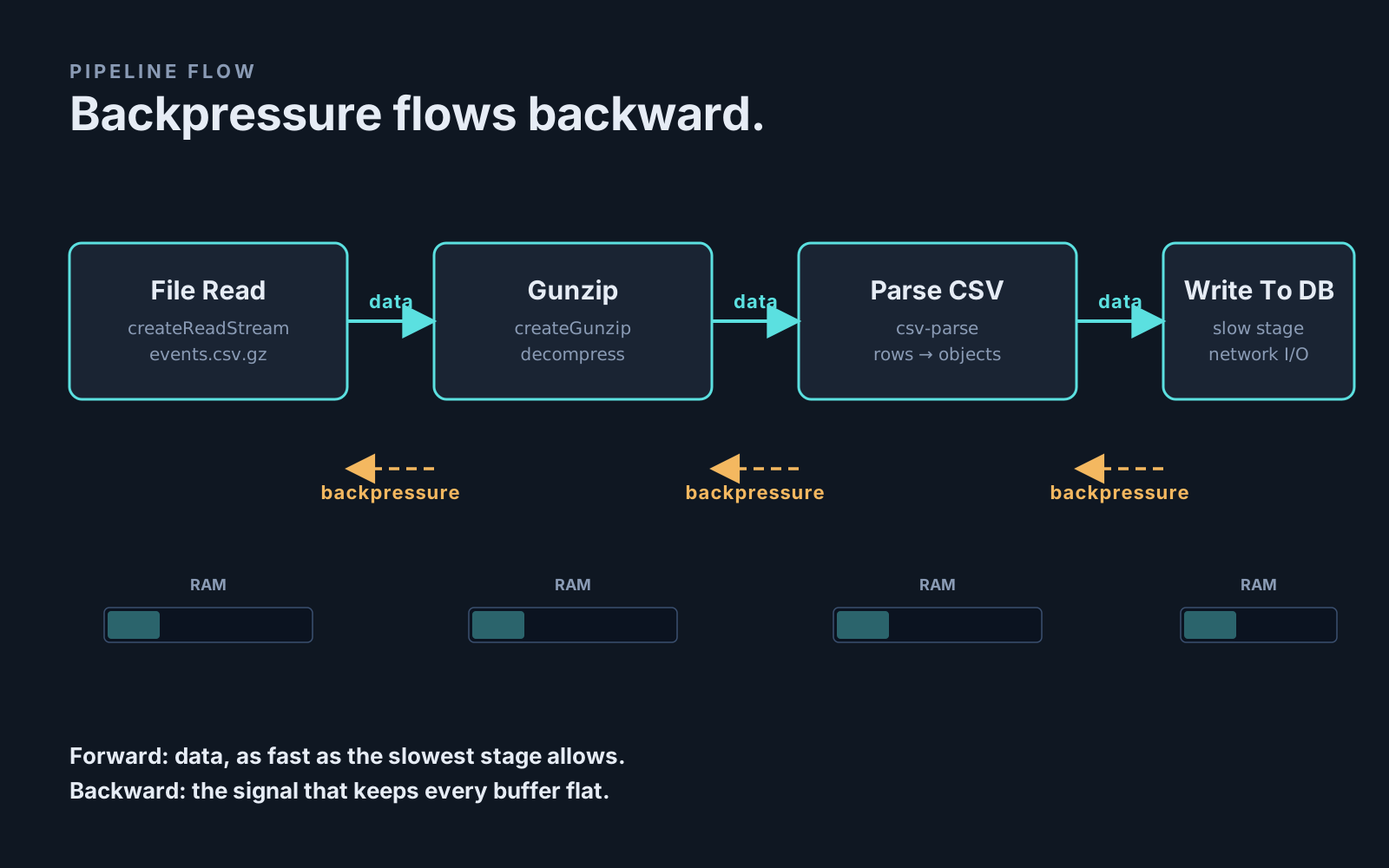
The standard library ships pipeline() in node:stream/promises. It takes any number of streams, hooks them together with proper backpressure between each pair, propagates errors, cleans up on failure, and returns a promise that resolves when the last byte lands.
import { pipeline } from 'node:stream/promises';
import { createReadStream } from 'node:fs';
import { createGunzip } from 'node:zlib';
import { parse } from 'csv-parse';
import { writeToDb } from './db-writer.js';

await pipeline(
  createReadStream('events.csv.gz'),
  createGunzip(),
  parse({ columns: true }),
  writeToDb(),
);
If the database is the slow stage, it slows down parse. parse slows down the gunzip. The gunzip slows down the file read. The file read stops asking the kernel for more bytes. Memory stays flat. The pipeline runs as fast as its slowest stage, which is exactly the speed you wanted.
You can write the same logic by hand with .pipe(). It will look almost identical. It will behave almost identically. And then one day a transform throws an error — and .pipe() quietly leaves the upstream readers running, holding file descriptors, holding database connections, holding memory. Whoever is unlucky enough to be on call that night discovers it.
pipeline() always cleans up. There's no practical reason to write new code with .pipe() in 2026.
The for await...of Trap
The cleanest-looking way to consume a readable stream in modern Node is the async iterator:
for await (const chunk of readable) {
  await processChunk(chunk);
}
This handles backpressure correctly — but only because of one specific detail. The stream pauses while the loop body is running, because the iterator pulls the next chunk only when the previous iteration resolves. If processChunk does its work synchronously and returns immediately, that's still fine. But the moment you switch to a fire-and-forget pattern, the safety is gone:
// the safety net is gone the moment you stop awaiting
for await (const chunk of readable) {
  processChunk(chunk); // not awaited
}
Without the await, the loop body resolves instantly, the iterator pulls the next chunk immediately, and you're back to "fast producer, no signal, growing buffer." It's the same bug as the first snippet, just dressed up in a nicer syntax.
The rule is simple: if a stream consumer is doing any async work, await it. The iterator is what holds the backpressure together.
When You're Not Using Streams At All
Streams cover the file-and-network case beautifully. They don't cover everything. You'll hit the same backpressure pattern in plenty of code that has no .write() and no pipeline() anywhere.
The most common version is the loop over a list:
const userIds = await db.query('SELECT id FROM users');
await Promise.all(userIds.map((id) => sendWelcomeEmail(id)));
If userIds is 50, this is fine. If it's 500,000, you've just launched half a million in-flight HTTP requests, your provider rate-limits you, your event loop is choking on completed promises, and your memory chart looks like the hill from earlier.
There's no .write() signal here, but the problem is structurally identical: a fast producer (the array of IDs) is feeding a slow consumer (an HTTP API) with no throttle in the middle. The fix is to add one.
The smallest version is a manual concurrency limiter — a counter that says "no more than N in flight at once." p-limit is a tiny library that does exactly this:
import pLimit from 'p-limit';

const limit = pLimit(10);
await Promise.all(
  userIds.map((id) => limit(() => sendWelcomeEmail(id))),
);
Now there are never more than 10 requests in flight. The producer waits for the consumer. Memory stays flat. The job takes longer than the all-at-once version, but it actually finishes.
The same pattern shows up in a Kafka or SQS consumer that pulls messages faster than it processes them, a DB cursor that fetches rows in 1000-row pages but processes them one at a time, a worker thread pool that accepts jobs without checking whether any worker is free. The shape is always the same: producer, consumer, no signal in between.
A Quick Test For Your Own Code
If you want to check whether your service has a backpressure problem hiding in it, look for these three shapes:
A stream that produces data with an event handler whose callback isn't awaited and whose return value isn't checked. That's the classic.
A loop that builds a large array of promises with Promise.all, where each promise hits an external system. The bigger the array gets in production, the worse it gets — and it usually grows quietly with your user base.
A worker that pulls from a queue (Kafka, SQS, Redis Streams, RabbitMQ) and immediately acks the message before processing finishes. The queue has no idea you're falling behind, so it keeps shipping you messages, so your in-memory buffer of "things I've pulled but haven't finished" grows until the process dies.
For each of these, the question to ask is: how does the producer know to wait? If the answer is "it doesn't" or "I'm not sure," that's where the next memory spike is coming from.
The One Thing To Remember
Backpressure isn't a Node-specific concept and it isn't really a stream-specific concept either. It's the basic shape of any system where one side produces work and another side consumes it at a different rate. Memory grows in the middle, and you either build a way to slow the producer down or you eventually run out of RAM.
Node makes this acute because Node makes producers easy. A file, an HTTP body, a Kafka topic, a database cursor, an iterator over a million IDs — all one-liners. Consumers — DB writes, network calls, disk flushes — are almost always slower. The gap is real, and unless something is shaped to close it, memory pays the bill.
Streams give you that shape for free. pipeline() is the right default. Async iterators work if you actually await the body. For non-stream code, a concurrency limit is the same idea spelled by hand. The vocabulary is different in each case, but the question you're asking is always the same: who is telling the producer to wait?
Once you've started asking that question, you'll spot the pattern in code that used to look fine. And then the 4 GB file at 2 a.m. stops being a story your service tells, and starts being one that goes off without anyone hearing about it.